brake HYUNDAI SONATA 2021 Manual Online
[x] Cancel search | Manufacturer: HYUNDAI, Model Year: 2021, Model line: SONATA, Model: HYUNDAI SONATA 2021Pages: 546, PDF Size: 51.21 MB
Page 392 of 546
6-108
Limitations of the System
Smart Cruise Control system may have
limits to its ability to detect distance to
the vehicle ahead due to road and traffic
conditions.
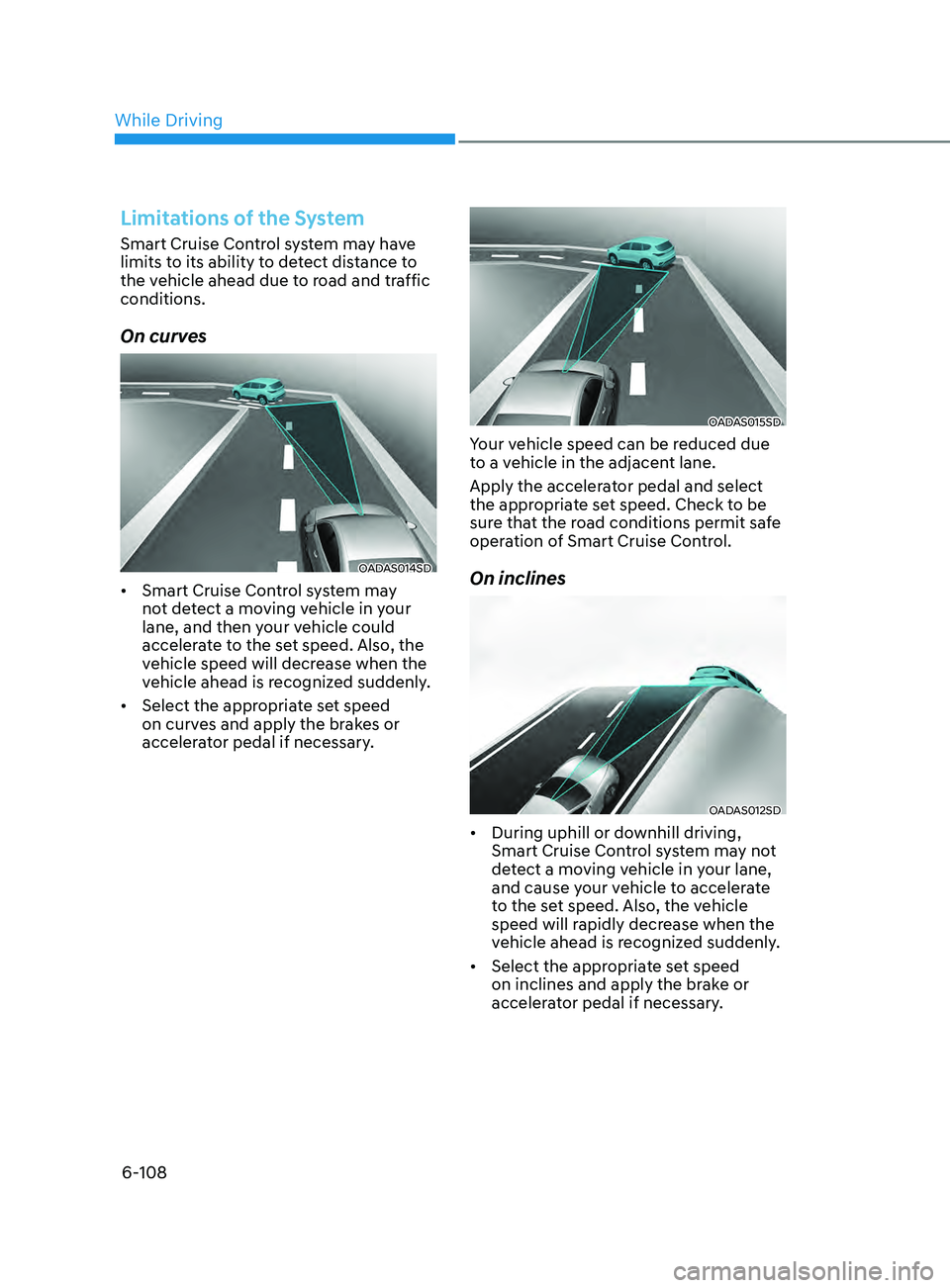
On curves
OADAS014SD
• Smart Cruise Control system may
not detect a moving vehicle in your
lane, and then your vehicle could
accelerate to the set speed. Also, the
vehicle speed will decrease when the
vehicle ahead is recognized suddenly.
• Select the appropriate set speed
on curves and apply the brakes or
accelerator pedal if necessary.
OADAS015SD
Your vehicle speed can be reduced due
to a vehicle in the adjacent lane.
Apply the accelerator pedal and select
the appropriate set speed. Check to be
sure that the road conditions permit safe
operation of Smart Cruise Control.
On inclines
OADAS012SD
• During uphill or downhill driving,
Smart Cruise Control system may not
detect a moving vehicle in your lane,
and cause your vehicle to accelerate
to the set speed. Also, the vehicle
speed will rapidly decrease when the
vehicle ahead is recognized suddenly.
• Select the appropriate set speed
on inclines and apply the brake or
accelerator pedal if necessary.
While Driving
Page 393 of 546
06
6-109
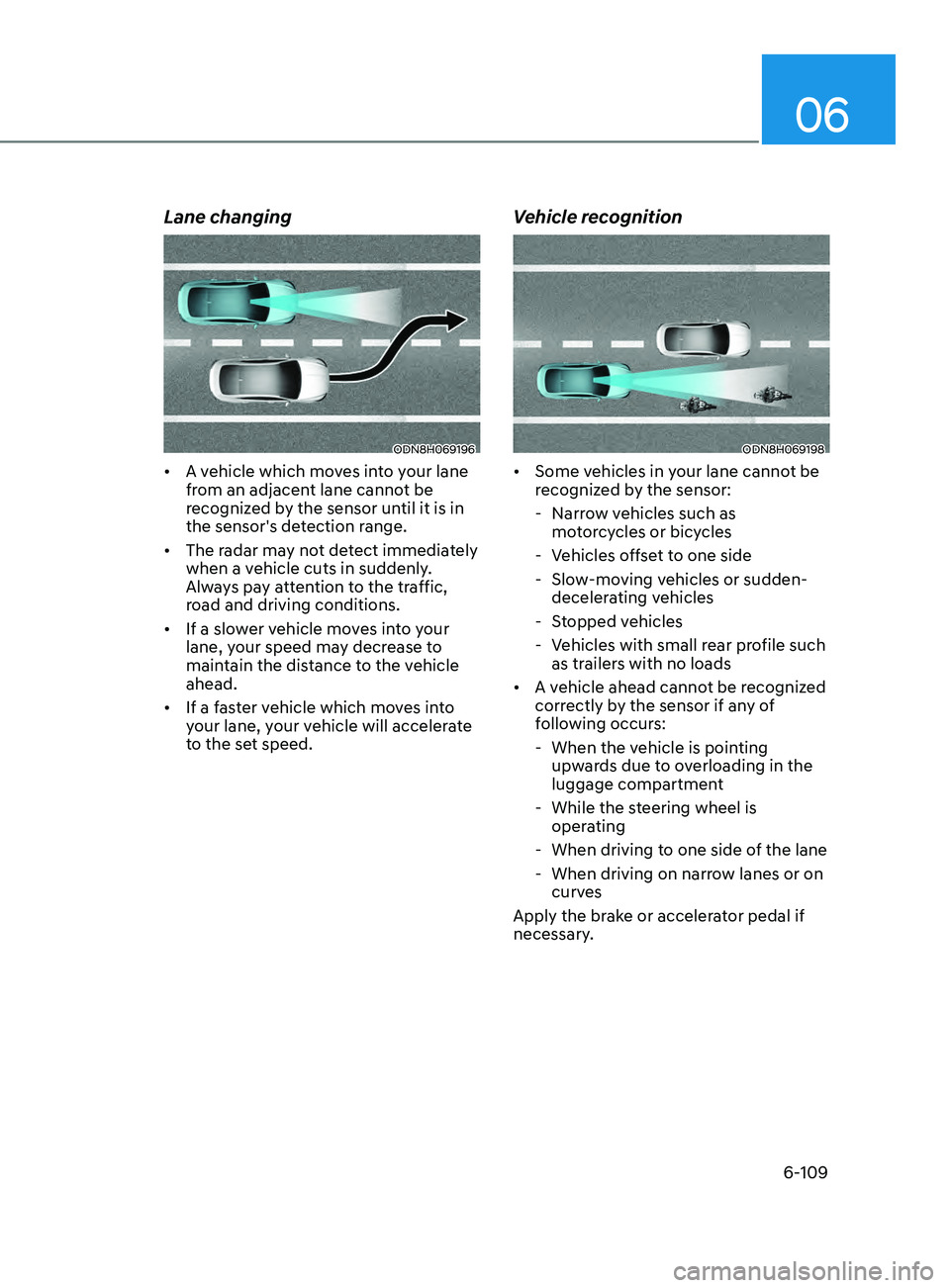
Lane changing
ODN8H069196
• A vehicle which moves into your lane
from an adjacent lane cannot be
recognized by the sensor until it is in
the sensor's detection range.
• The radar may not detect immediately
when a vehicle cuts in suddenly.
Always pay attention to the traffic,
road and driving conditions.
• If a slower vehicle moves into your
lane, your speed may decrease to
maintain the distance to the vehicle
ahead.
• If a faster vehicle which moves into
your lane, your vehicle will accelerate
to the set speed.
Vehicle recognition
ODN8H069198
• Some vehicles in your lane cannot be
recognized by the sensor:
- Narr
ow vehicles such as
motorcycles or bicycles
- V
ehicles offset to one side
- Slo
w-moving vehicles or sudden-
decelerating vehicles
- S
topped vehicles
- V
ehicles with small rear profile such
as trailers with no loads
• A vehicle ahead cannot be recognized
correctly by the sensor if any of
following occurs:
- When the v
ehicle is pointing
upwards due to overloading in the
luggage compartment
- While the s
teering wheel is
operating
- When driving t
o one side of the lane
- When driving on narr
ow lanes or on
curves
Apply the brake or accelerator pedal if
necessary.
Page 394 of 546
6-110
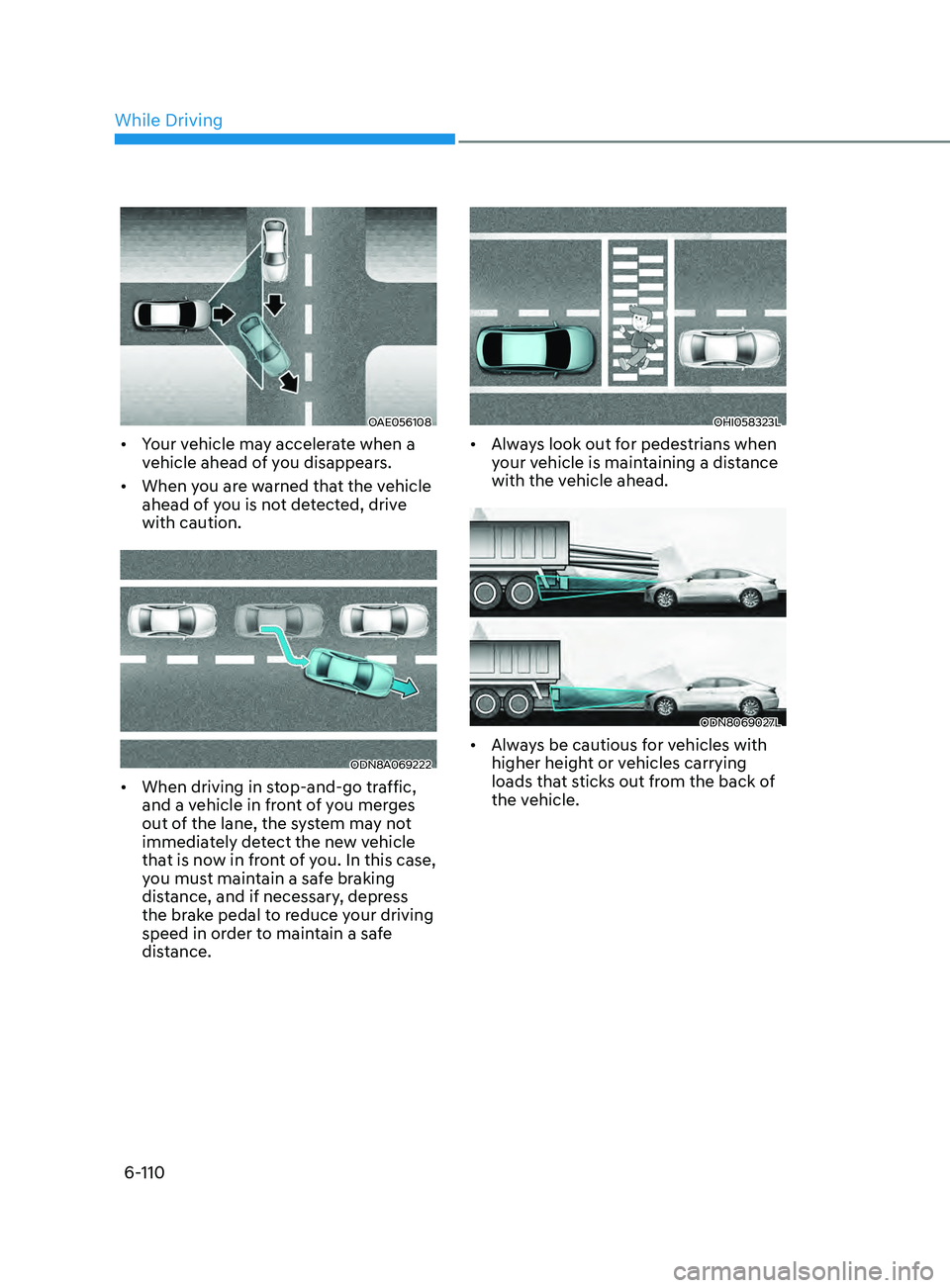
OAE056108
• Your vehicle may accelerate when a
vehicle ahead of you disappears.
• When you are warned that the vehicle
ahead of you is not detected, drive
with caution.
ODN8A069222
• When driving in stop-and-go traffic,
and a vehicle in front of you merges
out of the lane, the system may not
immediately detect the new vehicle
that is now in front of you. In this case,
you must maintain a safe braking
distance, and if necessary, depress
the brake pedal to reduce your driving
speed in order to maintain a safe
distance.
OHI058323L
• Always look out for pedestrians when
your vehicle is maintaining a distance
with the vehicle ahead.
ODN8069027L
• Always be cautious for vehicles with
higher height or vehicles carrying
loads that sticks out from the back of
the vehicle.
While Driving
Page 395 of 546
06
6-111
WARNING
When using Smart Cruise Control take
the following precautions:
• If an emergency stop is necessary,
you must apply the brakes. The
vehicle cannot be stopped at every
emergency situation by using Smart
Cruise Control system.
• Keep a safe distance according to
road conditions and vehicle speed. If
the vehicle to vehicle distance is too
close during a high-speed driving, a
serious collision may result.
• Always maintain sufficient braking
distance and decelerate your vehicle
by applying the brakes if necessary.
• Smart Cruise Control system cannot
recognize a stopped vehicle,
pedestrians or an oncoming vehicle.
Always look ahead cautiously to
prevent unexpected and sudden
situations from occurring.
• Vehicles moving in front of you with
a frequent lane change may cause
a delay in the system's reaction or
may cause the system to react to a
vehicle actually in an adjacent lane.
Always drive cautiously to prevent
unexpected and sudden situations
from occurring.
• Always be aware of the selected
speed and vehicle to vehicle
distance. The driver should not solely
rely on the system but always pay
attention to driving conditions and
control your vehicle speed.
• Smart Cruise Control system may not
recognize complex driving situations
so always pay attention to driving
conditions and control your vehicle
speed.
• Smart Cruise Control system may
recognize a pedestrian, bicycle,
motorcycle, etc. as a vehicle. Always,
look ahead cautiously to prevent
unexpected and sudden situations
from occurring.
• Turn off Smart Cruise Control system
when the vehicle is being towed.
NOTICE
Smart Cruise Control system may not
operate temporarily due to:
• Electrical interference
• Modifying the suspension
• Differences of tire abrasion or tire
pressure
• Installing different type of tires
The brake control using Smart Cruise
Control system may make a sound.
Information
This device complies with Part 15 of the
FCC rules.
Operation is subject to the following two
conditions:
1.
This device may not cause harmful
interfer
ence.
2.
This device must accept any
interfer
ence received, including
interference that may cause undesired
operation.
Page 404 of 546
6-120
LFA system will not be in the ENABLED
state and/or the steering wheel will not be
assisted when:
• The turn signal is turned on before
changing a lane. If you change
lanes without the turn signal on, the
steering wheel might be controlled.
• The vehicle is not driven in the middle
of the lane when the system is turned
on or right after changing a lane.
• ESC (Electronic Stability Control) or
VSM (Vehicle Stability Management)
is activated.
• The vehicle is driven on a sharp curve.
• If vehicle speed is over 95 mph (153
km/h)
• The vehicle makes sharp lane
changes.
• The vehicle brakes suddenly.
• Only one lane marker is detected.
• The lane is very wide or narrow.
• There are more than two lane markers
on the road (e.g. construction area).
• Radius of a curve is too small.
• The vehicle is driven on a steep
incline.
• The steering wheel is turned suddenly.
• The system may not operate for 15
seconds after the engine is started or
the camera is initialized.Limitations of the System
LFA system may operate prematurely
even if the vehicle does not depart from
the intended lane, OR, LFA system may
not assist your steering or warn you if the
vehicle leaves the intended lane under
the following circumstances:
When the lane and road conditions are
poor
• It is difficult to distinguish the lane
marking from the road surface or the
lane marking is faded or not clearly
marked.
• It is difficult to distinguish the color of
the lane marker from the road.
• There are markings on the road
surface that look like a lane marker
that is inadvertently being detected
by the camera.
• The lane marker is indistinct or
damaged.
• The lane marker is merged or divided
(e.g. tollgate).
• The lane number increases or
decreases or the lane marker are
crossing complicatedly.
• There are more than two lane markers
on the road in front of you.
• The lane marker is very thick or thin.
• The lane is very wide or narrow.
• The lane marker ahead is not visible
due to rain, snow, water on the road,
damaged or stained road surface, or
other factors.
While Driving
Page 409 of 546
06
6-125
Warning Message
Hands-off warning
ODN8A069219
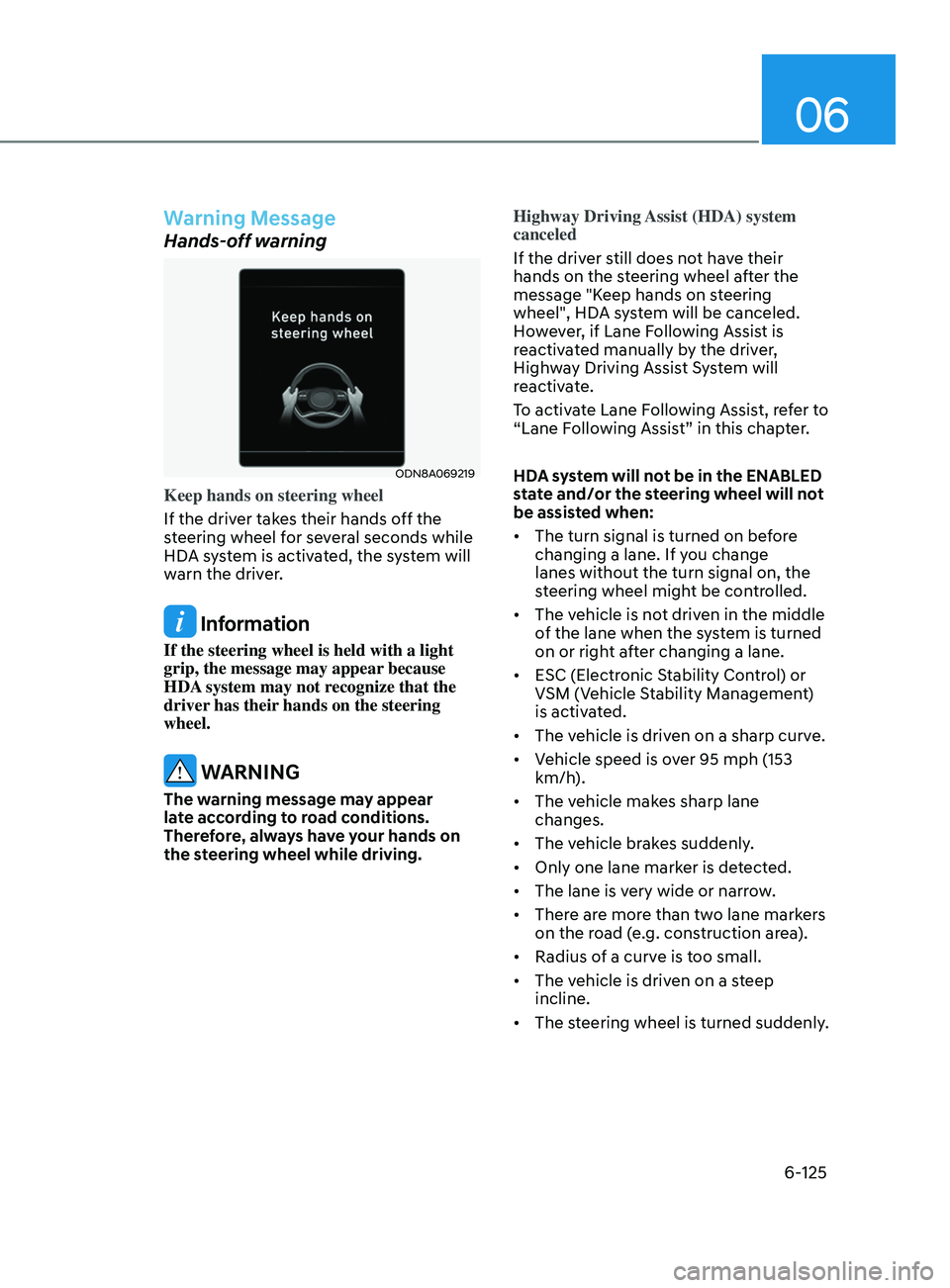
Keep hands on steering wheel
If the driver takes their hands off the
steering wheel for several seconds while
HDA system is activated, the system will
warn the driver.
Information
If the steering wheel is held with a light
grip, the message may appear because
HDA system may not recognize that the
driver has their hands on the steering
wheel.
WARNING
The warning message may appear
late according to road conditions.
Therefore, always have your hands on
the steering wheel while driving.Highway Driving Assist (HDA) system
canceled
If the driver still does not have their
hands on the steering wheel after the
message "Keep hands on steering
wheel", HDA system will be canceled.
However, if Lane Following Assist is
reactivated manually by the driver,
Highway Driving Assist System will
reactivate.
To activate Lane Following Assist, refer to
“Lane Following Assist” in this chapter.
HDA system will not be in the ENABLED
state and/or the steering wheel will not
be assisted when:
•
The turn signal is turned on before
changing a lane. If you change
lanes without the turn signal on, the
steering wheel might be controlled.
• The vehicle is not driven in the middle
of the lane when the system is turned
on or right after changing a lane.
• ESC (Electronic Stability Control) or
VSM (Vehicle Stability Management)
is activated.
• The vehicle is driven on a sharp curve.
• Vehicle speed is over 95 mph (153
km/h).
• The vehicle makes sharp lane
changes.
• The vehicle brakes suddenly.
• Only one lane marker is detected.
• The lane is very wide or narrow.
• There are more than two lane markers
on the road (e.g. construction area).
• Radius of a curve is too small.
• The vehicle is driven on a steep
incline.
• The steering wheel is turned suddenly.
Page 416 of 546
6-132
Rear Cross-Traffic Collision-Avoidance Assist (RCCA) system
•„Left
ODN8H069203L
•„Right
ODN8H069204L
•„Left
ODN8069038
•„Right
ODN8069038
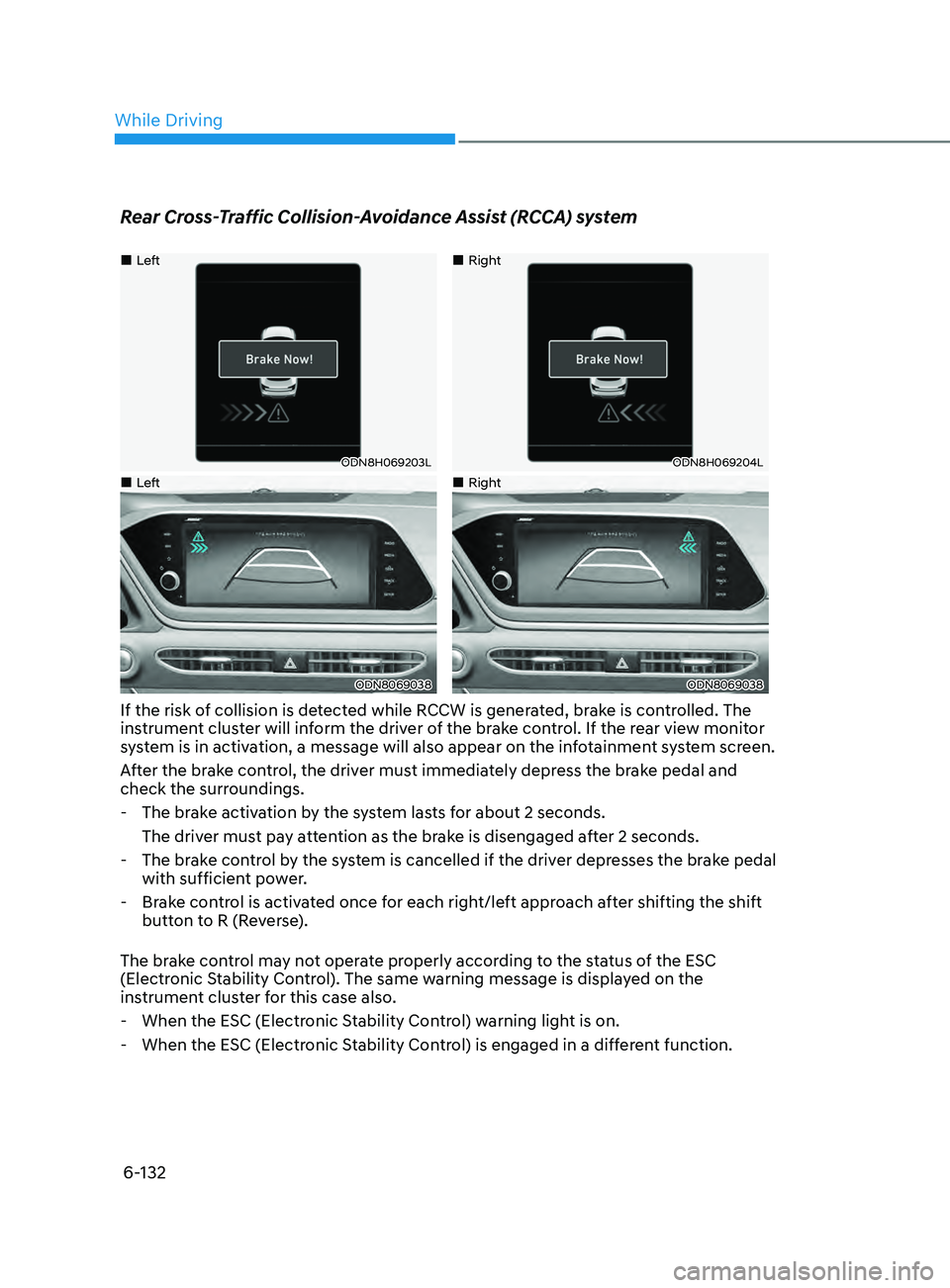
If the risk of collision is detected while RCCW is generated, brake is controlled. The
instrument cluster will inform the driver of the brake control. If the rear view monitor
system is in activation, a message will also appear on the infotainment system screen.
After the brake control, the driver must immediately depress the brake pedal and
check the surroundings.
- The br
ake activation by the system lasts for about 2 seconds.
The driver must pay attention as the brake is disengaged after 2 seconds.
- The br
ake control by the system is cancelled if the driver depresses the brake pedal
with sufficient power.
- Br
ake control is activated once for each right/left approach after shifting the shift
button to R (Reverse).
The brake control may not operate properly according to the status of the ESC
(Electronic Stability Control). The same warning message is displayed on the
instrument cluster for this case also.
- When the ESC (Electr
onic Stability Control) warning light is on.
- When the ESC (Electr
onic Stability Control) is engaged in a different function.
While Driving
Page 417 of 546
06
6-133
CAUTION
• When the operation condition of
Rear Cross-Traffic Collision Warning
system is satisfied, the warning
will occur every time a vehicle
approaches the side or rear of your
stopped (0 mph (0 km/h) vehicle
speed) vehicle.
• The system’s warning or brake may
not operate properly if the left or
right of your vehicle’s rear bumper is
blocked by a vehicle or obstacle.
• The driver should always use
extreme caution while operating
the vehicle, whether or not the
warning light on the side view mirror
illuminates or there is a warning
alarm.
• Playing the vehicle audio system at
high volume may offset the system’s
warning sounds.
• The warning of Rear Cross-Traffic
Collision Warning System may not
sound while other system’s warning
sounds.
• If any other warning sound such as
seat belt warning chime is already
generated, Rear Cross-Traffic
Collision Warning system warning
may not sound.
WARNING
• Drive safely even though the vehicle
is equipped with Rear Cross-Traffic
Collision Warning system and Rear
Cross-Traffic Collision-Avoidance
Assist system. Do not solely rely
on the system but check your
surrounding when backing the
vehicle up.
• The driver is responsible for accurate
brake control.
• Always pay extreme caution while
driving. Rear Cross-Traffic Collision
Warning system and Rear Cross-
Traffic Collision-Avoidance Assist
system may not operate properly or
unnecessarily operate in accordance
with your driving situations.
• Rear Cross-Traffic Collision-
Avoidance Assist system is not a
substitute for safe driving practices,
but a convenience function only. It
is the responsibility of the driver to
always drive cautiously to prevent
unexpected and sudden situations
from occurring. Pay attention to the
road conditions at all times.
Page 420 of 546
6-136
• The vehicle height gets lower or
higher due to heavy loading in a trunk,
abnormal tire pressure, etc.
• When the temperature of the rear
bumper is high.
• When the sensors are blocked by
other vehicles, walls or parking-lot
pillars.
• The vehicle drives on a curved road.
• The road pavement (or the peripheral
ground) abnormally contains metallic
components (i.e. possibly due to
subway construction).
• There is a fixed object near the
vehicle, such as a guardrail.
• While going down or up a steep
road where the height of the lane is
different.
• Driving on a narrow road where trees
or grass or overgrown.
• Driving in rural areas where the sensor
does not detect another vehicle for an
extended period of time.
• Driving on a wet road.
• Driving on a road where the guardrail
or wall is in double structure.
• A big vehicle is near such as a bus or
truck.
• When the other vehicle approaches
very close.
• When the other vehicle passes at a
very fast speed.
• While changing lanes. •
If the vehicle has started at the same
time as the vehicle next to you and
has accelerated.
• When the vehicle in the next lane
moves two lanes away from you or
when the vehicle two lanes away
moves to the next lane from you.
• A motorcycle or bicycle is near.
• A flat trailer is near.
• If there are small objects in the
detecting area such as a shopping
cart or a baby stroller.
• If there is a low height vehicle such as
a sports car.
• The brake pedal is depressed.
• ESC (Electronic Stability Control) is
activated.
• ESC (Electronic Stability Control)
malfunctions.
• The tire pressure is low or a tire is
damaged.
• The brake is reworked.
• The vehicle sharply stops.
• Temperature is extremely low around
the vehicle.
• The vehicle severely vibrates while
driving over a bumpy road, uneven/
bumpy road, or concrete patch.
• The vehicle drives on a slippery
surface due to snow, water puddle,
or ice.
• If the vehicle moves backward after
the vehicle is parked with a diagonal
line
While Driving
Page 421 of 546
![HYUNDAI SONATA 2021 Manual Online 06
6-137
OHI058316L
[A] : Structure
• Driving where there is a vehicle or
structure near
The system may not operate properly
when driving where there is a vehicle
or structure near.
In certain in](/img/35/41164/w960_41164-420.png "HYUNDAI SONATA 2021 Manual Online 06
6-137
OHI058316L
[A] : Structure
• Driving where there is a vehicle or
structure near
The system may not operate properly
when driving where there is a vehicle
or structure near.
In certain in")
06
6-137
OHI058316L
[A] : Structure
• Driving where there is a vehicle or
structure near
The system may not operate properly
when driving where there is a vehicle
or structure near.
In certain instances, the system may
not detect the vehicle approaching
from behind and the warning or brake
may not operate properly.
Always pay attention to your
surrounding while driving.
OHI058317L
• When the vehicle is in a complex
parking environment
The system may not operate properly
when the vehicle is in a complex
parking environment.
In certain instances, the system may
not be able to exactly determine the
risk of collision for the vehicles which
are parking or pulling out near your
vehicle (e.g. a vehicle escaping beside
your vehicle, a vehicle parking or
pulling out in the rear area, a vehicle
approaching your vehicle making a
turn, etc.).
In this case, the warning or brake may
not operate properly.