jack HYUNDAI SONATA 2021 Owners Manual
[x] Cancel search | Manufacturer: HYUNDAI, Model Year: 2021, Model line: SONATA, Model: HYUNDAI SONATA 2021Pages: 546, PDF Size: 51.21 MB
Page 136 of 546
Convenient Features
5-6
If the remote key is in close proximity to
your mobile phone, the signal could be
blocked by your mobile phone’s normal
operational signals. This is specifically
relevant when the phone is active such
as making and receiving calls, text
messaging, and/or sending/receiving
emails.
When possible, avoid placing the remote
key and your mobile phone in the same
location such as a pants or jacket pocket
in order to avoid interference between
the two devices.
Information
This device complies with Part 15 of the
FCC rules.
Operation is subject to the following three
conditions:
1.
This device may not cause harmful
interfer
ence.
2.
This device must accept any
interfer
ence received, including
interference that may cause undesired
operation.
3.
Changes or
modifications not expressly
approved by the party responsible
for compliance could void the user’s
authority to operate the device.
NOTICE
Keep the remote key away from
electromagnetic materials that block
electromagnetic waves to the key
surface.
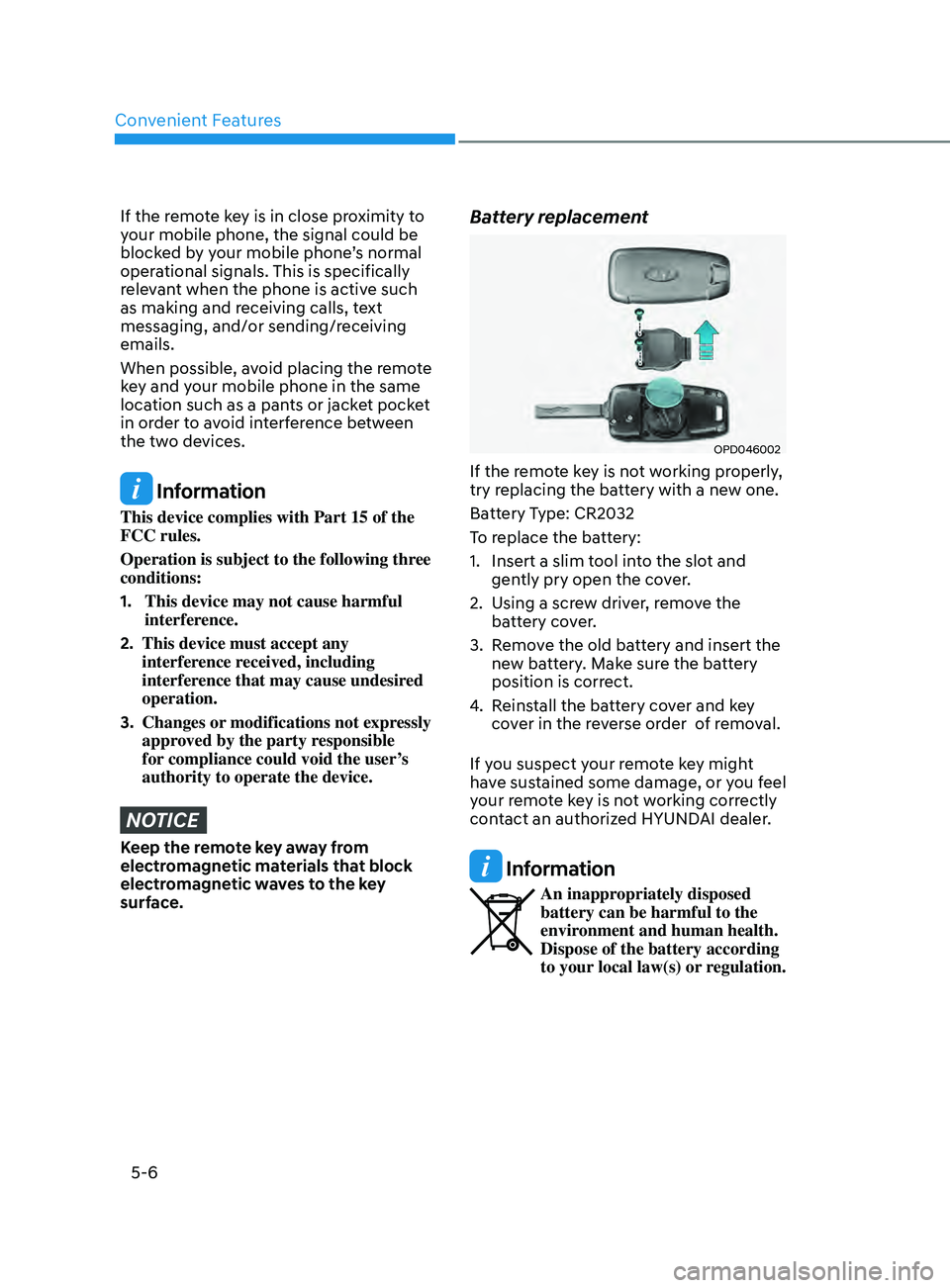
Battery replacement
OPD046002
If the remote key is not working properly,
try replacing the battery with a new one.
Battery Type: CR2032
To replace the battery:
1.
Insert a slim t
ool into the slot and
gently pry open the cover.
2.
U
sing a screw driver, remove the
battery cover.
3.
R
emove the old battery and insert the
new battery. Make sure the battery
position is correct.
4.
R
einstall the battery cover and key
cover in the reverse order of removal.
If you suspect your remote key might
have sustained some damage, or you feel
your remote key is not working correctly
contact an authorized HYUNDAI dealer.
Information
An inappropriately disposed
battery can be harmful to the
environment and human health.
Dispose of the battery according
to your local law(s) or regulation.
Page 142 of 546
Convenient Features
5-12
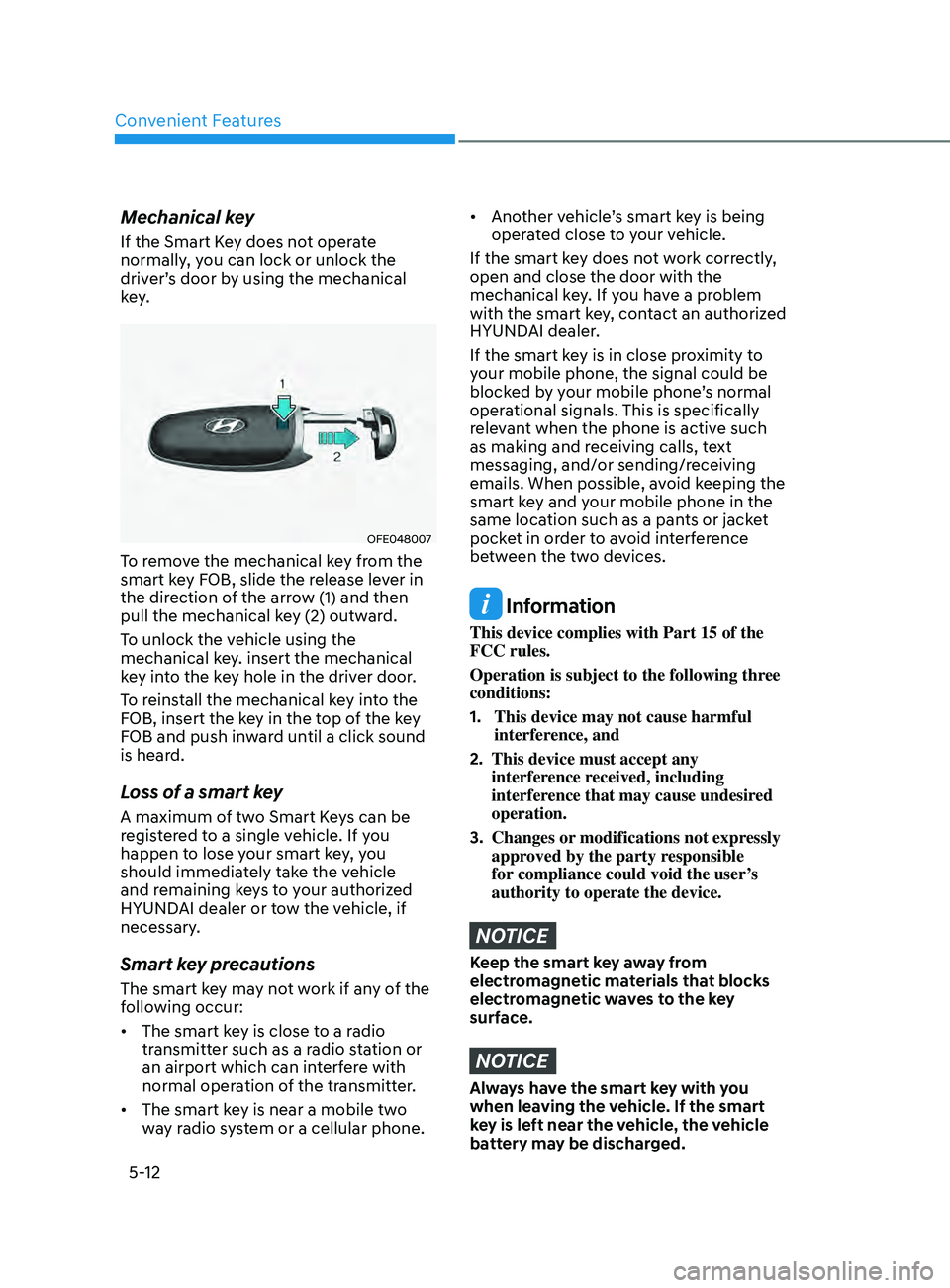
Mechanical key
If the Smart Key does not operate
normally, you can lock or unlock the
driver’s door by using the mechanical
key.
OFE048007
To remove the mechanical key from the
smart key FOB, slide the release lever in
the direction of the arrow (1) and then
pull the mechanical key (2) outward.
To unlock the vehicle using the
mechanical key. insert the mechanical
key into the key hole in the driver door.
To reinstall the mechanical key into the
FOB, insert the key in the top of the key
FOB and push inward until a click sound
is heard.
Loss of a smart key
A maximum of two Smart Keys can be
registered to a single vehicle. If you
happen to lose your smart key, you
should immediately take the vehicle
and remaining keys to your authorized
HYUNDAI dealer or tow the vehicle, if
necessary.
Smart key precautions
The smart key may not work if any of the
following occur:
• The smart key is close to a radio
transmitter such as a radio station or
an airport which can interfere with
normal operation of the transmitter.
• The smart key is near a mobile two
way radio system or a cellular phone.
• Another vehicle’s smart key is being
operated close to your vehicle.
If the smart key does not work correctly,
open and close the door with the
mechanical key. If you have a problem
with the smart key, contact an authorized
HYUNDAI dealer.
If the smart key is in close proximity to
your mobile phone, the signal could be
blocked by your mobile phone’s normal
operational signals. This is specifically
relevant when the phone is active such
as making and receiving calls, text
messaging, and/or sending/receiving
emails. When possible, avoid keeping the
smart key and your mobile phone in the
same location such as a pants or jacket
pocket in order to avoid interference
between the two devices.
Information
This device complies with Part 15 of the
FCC rules.
Operation is subject to the following three
conditions:
1.
This device may not cause harmful
interfer
ence, and
2.
This device must accept any
interfer
ence received, including
interference that may cause undesired
operation.
3.
Changes or
modifications not expressly
approved by the party responsible
for compliance could void the user’s
authority to operate the device.
NOTICE
Keep the smart key away from
electromagnetic materials that blocks
electromagnetic waves to the key
surface.
NOTICE
Always have the smart key with you
when leaving the vehicle. If the smart
key is left near the vehicle, the vehicle
battery may be discharged.
Page 436 of 546

Emergency Situations
Hazard Warning Flasher ........................................................................\
.........7 -2
In Case of an Emergency While Driving ........................................................7-2
If the Engine Stalls While Driving ........................................................................\
..... 7 -2
If the Engine Stalls at a Crossroad or Crossing .......................................................7-2
If you Have a Flat Tire While Driving
........................................................................\
7
-3
If the Engine Will not Start ........................................................................\
.....7 -3If the Engine Doesn’t Turn Over or Turns Over Slowly ............................................7 -3
If the Engine Turns Over Normally but Doesn’t Start ..............................................7-3
Jump Starting ........................................................................\
........................ 7- 4
If the Engine Overheats
........................................................................\
......... 7-
6
Tire Pressure Monitoring System (TPMS)
......................................................7-7
Check Tire Pressure ........................................................................\
........................... 7 -7
Tire Pressure Monitoring System ........................................................................\
.... 7-
8
Low Tire Pressure Telltale
........................................................................\
................ 7-9
Low Tire Pressure LCD Display with Position Indicator
.........................................7-9
TPMS Malfunction Indicator
........................................................................\
........... 7-10
Changing a Tire with TPMS
........................................................................\
............ 7-10
If you Have a Flat Tire (With Spare Tire) ......................................................7 -12Jack and Tools ........................................................................\
.................................7 -12
Changing Tires ........................................................................\
................................. 7-13
Towing ........................................................................\
................................... 7 -18Towing Service ........................................................................\
................................7 -18
Emergency Towing ........................................................................\
.......................... 7-19
7. Emergency Situations
7
Page 447 of 546
Emergency Situations7-12
if you Have a flaT Tire (Wi TH s Pare T ire)
WARNING
Changing a tire can be dangerous.
Follow the instructions in this section
when changing a tire to reduce the risk
of serious injury or death.
CAUTION
Be careful as you use the jack handle to
stay clear of the flat end. The flat end
has sharp edges that could cause cuts.
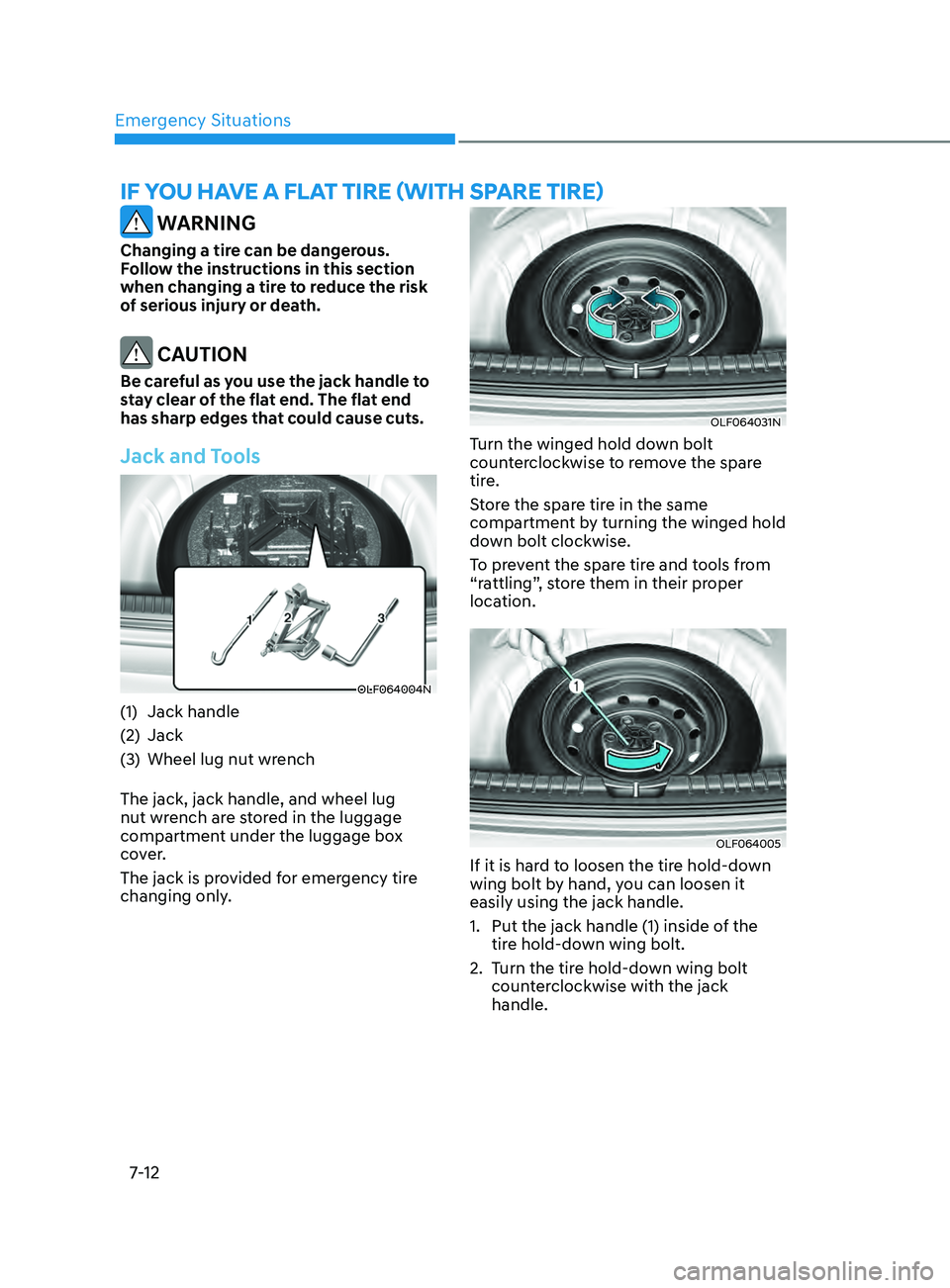
Jack and Tools
OLF064004N
(1) Jack handle
(2)
J
ack
(3)
Wheel lug nut wr
ench
The jack, jack handle, and wheel lug
nut wrench are stored in the luggage
compartment under the luggage box
cover.
The jack is provided for emergency tire
changing only.
OLF064031N
Turn the winged hold down bolt
counterclockwise to remove the spare
tire.
Store the spare tire in the same
compartment by turning the winged hold
down bolt clockwise.
To prevent the spare tire and tools from
“rattling”, store them in their proper
location.
OLF064005
If it is hard to loosen the tire hold-down
wing bolt by hand, you can loosen it
easily using the jack handle.
1.
Put the jack handle (1) inside o
f the
tire hold-down wing bolt.
2.
T
urn the tire hold-down wing bolt
counterclockwise with the jack
handle.
Page 448 of 546
07
7-13
Changing Tires
WARNING
A vehicle can slip or roll off of a jack
causing serious injury or death to you or
those nearby. Take the following safety
precautions:
• Never place any portion of your body
under a vehicle that is supported by
a jack.
• NEVER attempt to change a tire in
the lane of traffic. ALWAYS move the
vehicle completely off the road on
level, firm ground away from traffic
before trying to change a tire. If you
cannot find a level, firm place off
the road, call a towing service for
assistance.
• Be sure to use the jack provided with
the vehicle.
• ALWAYS place the jack on the
designated jacking positions on the
vehicle and NEVER on the bumpers
or any other part of the vehicle for
jacking support.
• Do not start or run the engine while
the vehicle is on the jack.
• Do not allow anyone to remain in the
vehicle while it is on the jack.
• Keep children away from the road
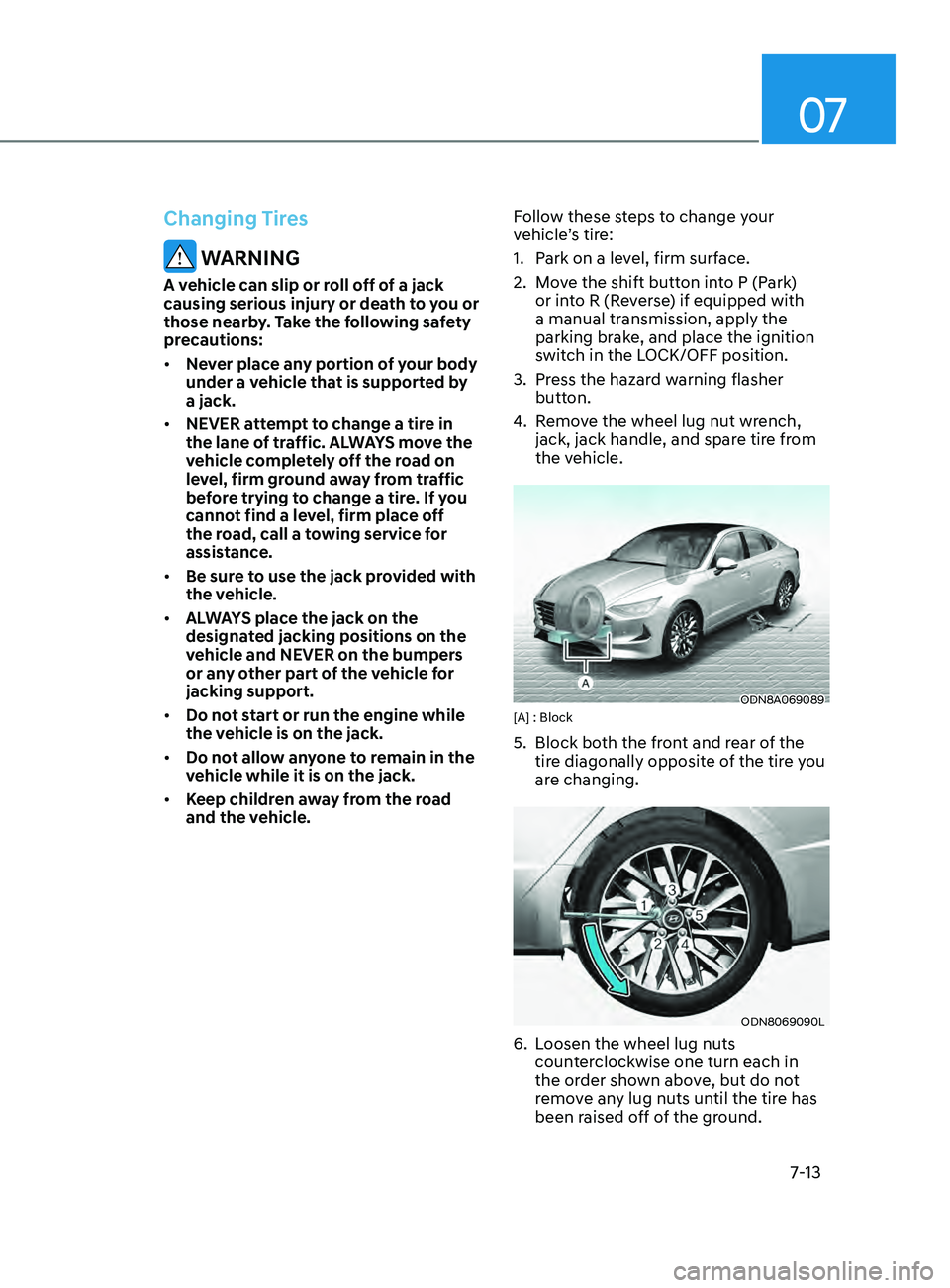
and the vehicle. Follow these steps to change your
vehicle’s tire:
1.
P
ark on a level, firm surface.
2. M ove the shift button into P (Park)
or into R (Reverse) if equipped with
a manual transmission, apply the
parking brake, and place the ignition
switch in the LOCK/OFF position.
3.
Pr
ess the hazard warning flasher
button.
4.
R
emove the wheel lug nut wrench,
jack, jack handle, and spare tire from
the vehicle.
ODN8A069089[A] : Block
5. Block bo th the front and rear of the
tire diagonally opposite of the tire you
are changing.
ODN8069090L
6. Loosen the wheel lug nuts counterclockwise one turn each in
the order shown above, but do not
remove any lug nuts until the tire has
been raised off of the ground.
Page 449 of 546
Emergency Situations
7-14
ODN8A069091
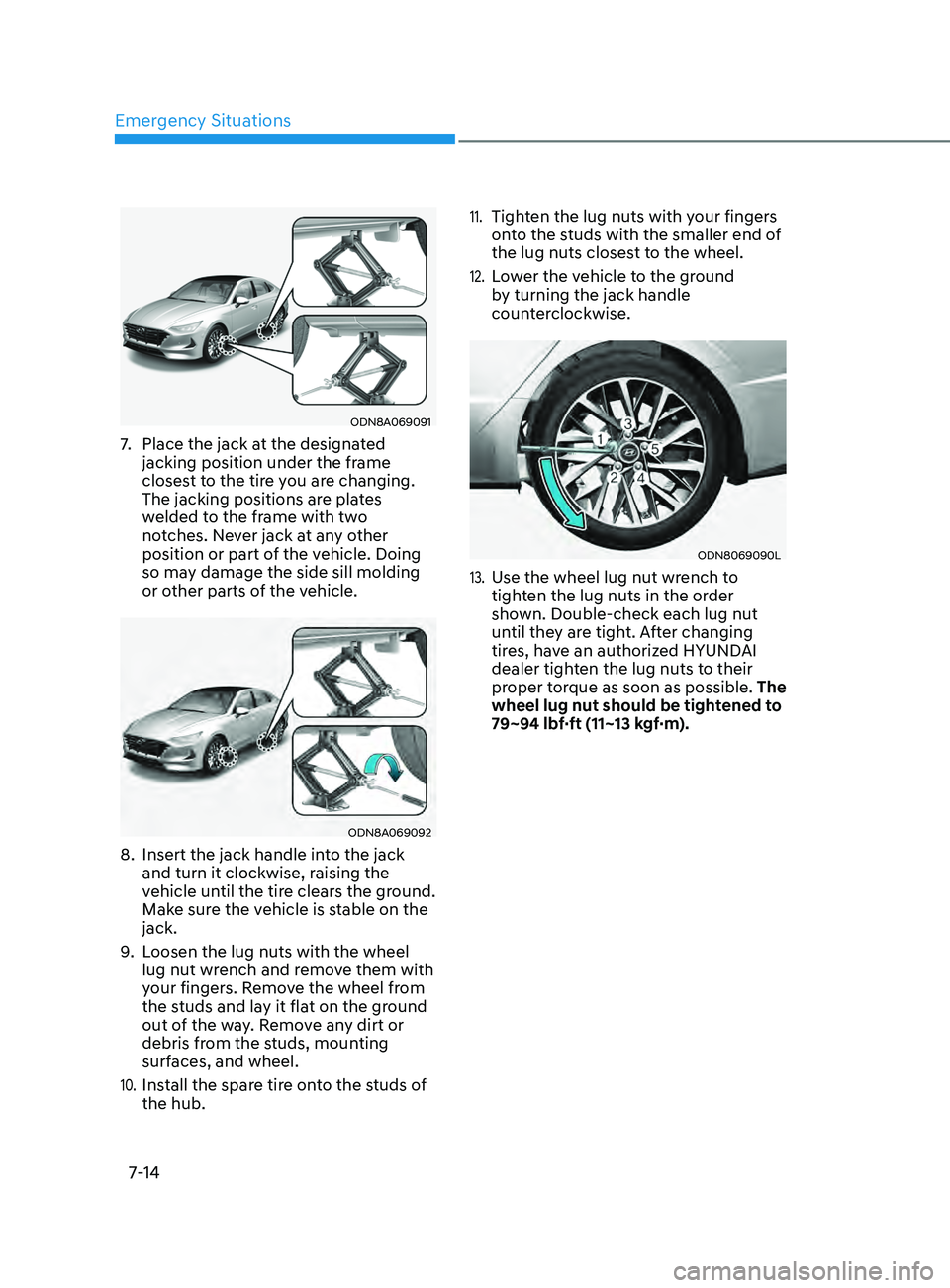
7. Place the jack at the designated
jacking position under the frame
closest to the tire you are changing.
The jacking positions are plates
welded to the frame with two
notches. Never jack at any other
position or part of the vehicle. Doing
so may damage the side sill molding
or other parts of the vehicle.
ODN8A069092
8. Insert the jack handle in to the jack
and turn it clockwise, raising the
vehicle until the tire clears the ground.
Make sure the vehicle is stable on the
jack.
9.
L
oosen the lug nuts with the wheel
lug nut wrench and remove them with
your fingers. Remove the wheel from
the studs and lay it flat on the ground
out of the way. Remove any dirt or
debris from the studs, mounting
surfaces, and wheel.
10. Install the spare tire onto the studs of
the hub.
11. Tighten the lug nuts with your fingers
onto the studs with the smaller end of
the lug nuts closest to the wheel.
12. Lower the vehicle to the ground
by turning the jack handle
counterclockwise.
ODN8069090L
13. Use the wheel lug nut wrench to
tighten the lug nuts in the order
shown. Double-check each lug nut
until they are tight. After changing
tires, have an authorized HYUNDAI
dealer tighten the lug nuts to their
proper torque as soon as possible. The
wheel lug nut should be tightened to
79~94 lbf·ft (11~13 kgf·m).
Page 450 of 546
07
7-15
If you have a tire gauge, check the tire
pressure (see “Tires and Wheels” in
chapter 2 for tire pressure instructions.).
If the pressure is lower or higher than
recommended, drive slowly to the
nearest service station and adjust it to
the recommended pressure. Always
reinstall the valve cap after checking
or adjusting tire pressure. If the cap
is not replaced, air may leak from the
tire. If you lose a valve cap, buy another
and install it as soon as possible. After
changing tires, secure the flat tire and
return the jack and tools to their proper
storage locations. If it is hard to secure
the flat tire, put the flat tire in the
luggage compartment.
NOTICE
• Check the tire pressure as soon
as possible after installing a spare
tire. Adjust it to the recommended
pressure.
• Check and tighten the wheel lug
nuts after driving over 30 miles (50
km), after the spare tire is installed.
Recheck the tire wheel lug nuts after
driving over 620 miles (1,000 km)
after the replaced tire is reinstalled.
CAUTION
Your vehicle has metric threads on the
studs and lug nuts. Make certain during
tire changing that the same nuts that
were removed are reinstalled. If you
have to replace your lug nuts make
sure they have metric threads to avoid
damaging the studs and ensure the
wheel is properly secured to the hub.
Consult an authorized HYUNDAI dealer
for assistance.
If any of the equipment such as the jack,
lug nuts, studs, or other equipment is
damaged or in poor condition, do not
attempt to change the tire and call for
assistance.
Use of compact spare tires (if equipped)
Compact spare tires are designed for
emergency use only. Drive carefully on
the compact spare tire and always follow
the safety precautions.
WARNING
To prevent compact spare tire failure
and loss of control possibly resulting in
an accident:
• Use the compact spare tire only in an
emergency.
• NEVER operate your vehicle over 50
mph (80 km/h).
• Do not exceed the vehicle’s
maximum load rating or the load
carrying capacity shown on the
sidewall of the compact spare tire.
• Do not use the compact spare tire
continuously. Repair or replace the
original tire as soon as possible to
avoid failure of the compact spare
tire.
Page 452 of 546
07
7-17
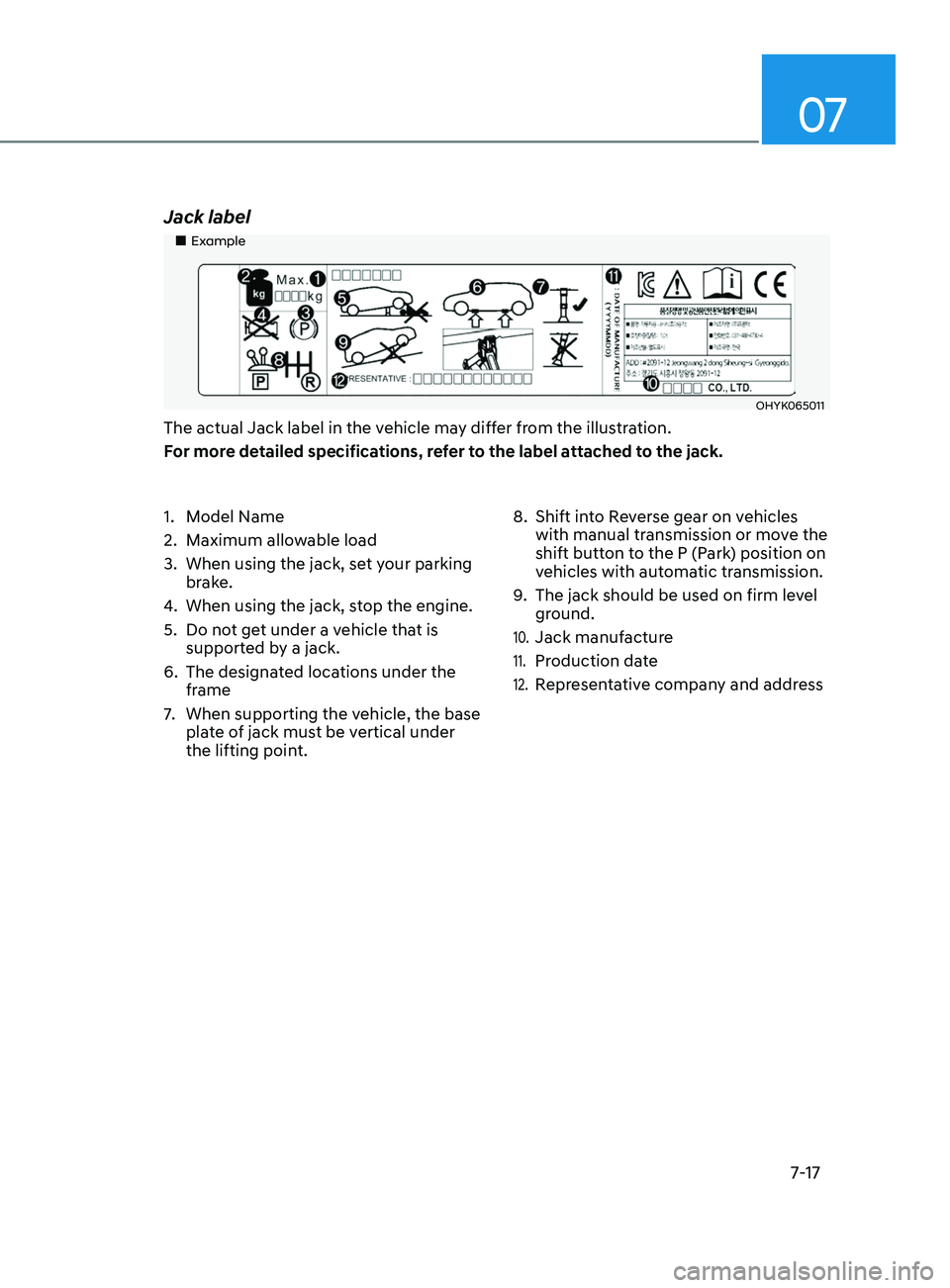
Jack label
„„Example
OHYK065011
The actual Jack label in the vehicle may differ from the illustration.
For more detailed specifications, refer to the label attached to the jack.
1.
M
odel Name
2.
Maximum allo
wable load
3.
When using the jack, se
t your parking
brake.
4.
When using the jack, s
top the engine.
5.
Do no
t get under a vehicle that is
supported by a jack.
6.
The designa
ted locations under the
frame
7.
When supporting the v
ehicle, the base
plate of jack must be vertical under
the lifting point. 8.
Shift in
to Reverse gear on vehicles
with manual transmission or move the
shift button to the P (Park) position on
vehicles with automatic transmission.
9.
The jack should be used on firm le
vel
ground.
10. Jack manufacture
11. Production date
12. Representative company and address
Page 537 of 546

I
I-9
Instrument cluster ........................................................................\
.......................... 4-2
Instrument cluster illumination
........................................................................\
. 4-3
Gauges and meters
........................................................................\
.................... 4-3
Transmission shift indicator
........................................................................\
...... 4-6
Warning and indicator lights
........................................................................\
..... 4-7
LCD display messages
........................................................................\
............ 4-15
LCD display (Type A, B)
........................................................................\
........ 4-19
LCD display (Type C)
........................................................................\
............. 4-34
Instrument panel fuse replacement
...................................................................... 8-49
Instrument panel overview
........................................................................\
............ 2-5
Interior care
........................................................................\
.................................. 8-67
Interior features
........................................................................\
.......................... 5-145
Cup holder
........................................................................\
............................. 5-145
Sunvisor........................................................................\
................................. 5-146
Power outlet
........................................................................\
.......................... 5-146
USB charger
........................................................................\
.......................... 5-147
Wireless cellular phone charging system
......................................................5-148
Clock
........................................................................\
..................................... 5-150
Clothes hanger
........................................................................\
....................... 5-150
Floor mat anchor(s)
........................................................................\
............... 5-151
Interior lights
........................................................................\
............................... 5-80
Front lamps........................................................................\
.............................. 5-81
Rear lamps
........................................................................\
............................... 5-81
Luggage compartment lamp
........................................................................\
.... 5-82
Vanity mirror lamp
........................................................................\
.................. 5-82
Interior overview
........................................................................\
........................... 2-4
ISG (Idle Stop and Go) system
........................................................................\
.... 6-33
J
Jack and tools
........................................................................\
............................... 7-12
Jump starting
........................................................................\
.................................. 7-4
K
Key ignition switch
........................................................................\
........................ 6-6