mirror HYUNDAI SONATA 2022 Owner's Manual
[x] Cancel search | Manufacturer: HYUNDAI, Model Year: 2022, Model line: SONATA, Model: HYUNDAI SONATA 2022Pages: 546, PDF Size: 51.21 MB
Page 268 of 546
Convenient Features
5-138
WinDshielD De F rosting A n D De Fogging
WARNING
Windshield heating
Do not use the
or position
during cooling operation in extremely
humid weather. The difference between
the temperature of the outside air and
that of the windshield could cause the
outer surface of the windshield to fog
up, causing loss of visibility could cause
an accident resulting in serious injury
or death. In this case, set the mode
selection knob or button to the
position and fan speed control knob or
button to a lower speed.
• For maximum defrost performance,
set the temperature control knob
to the highest temperature setting
(rotated all the way to the right) and
the fan speed control to the highest
setting.
• If warm air to the floor is desired while
defrosting or defogging, set the mode
to the floor-defrost position.
• Before driving, clear all snow and ice
from the windshield, rear window,
side view mirrors, and all side
windows.
• Clear all snow and ice from the
hood and air inlet in the cowl grill
to improve heater and defroster
efficiency and to reduce the
probability of fogging up the inside of
the windshield.
NOTICE
If you start the vehicle when the
weather is cold, more adequate way to
heat the cabin is described below.
1.
T
urn off or lower the blower, right
after engine starting, because
engine temperature is still low and
the air flow is cold.
2.
A
fter few minutes of engine warm
up, turn the blower to low to medium
speed and set the temperature
control to Hot.
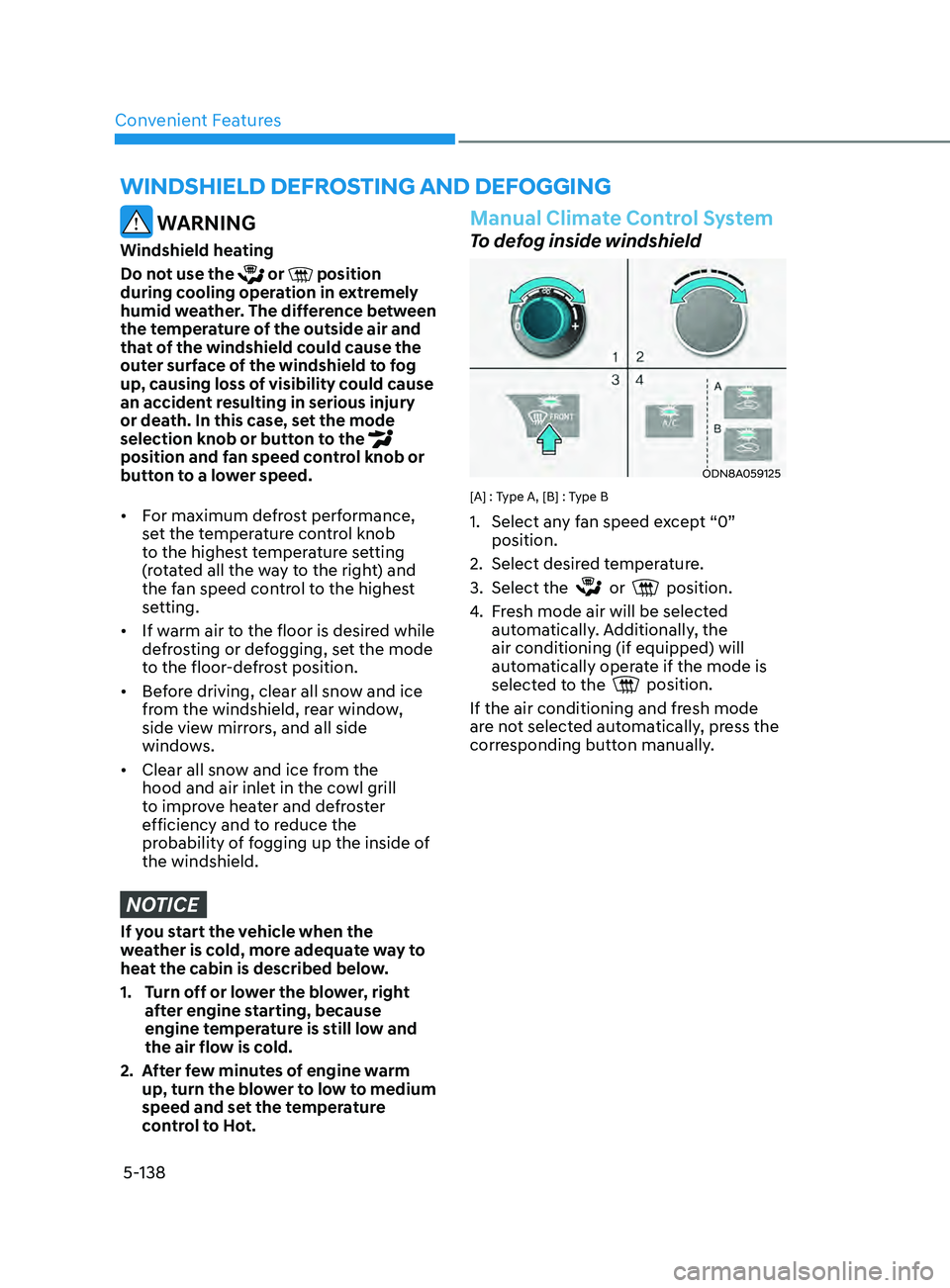
Manual Climate Control System
To defog inside windshield
ODN8A059125
[A] : Type A, [B] : Type B
1. Select an y fan speed except “0”
position.
2.
Select desir
ed temperature.
3.
Select the or position.
4.
F
resh mode air will be selected
automatically. Additionally, the
air conditioning (if equipped) will
automatically operate if the mode is
selected to the
position.
If the air conditioning and fresh mode
are not selected automatically, press the
corresponding button manually.
Page 272 of 546
Convenient Features
5-142
DefrosterNOTICE
To prevent damage to the conductors
bonded to the inside surface of the rear
window, never use sharp instruments or
window cleaners containing abrasives
to clean the window.
Information
If you want to defrost and defog the
front windshield, refer to “Windshield
Defrosting and Defogging” in this chapter.
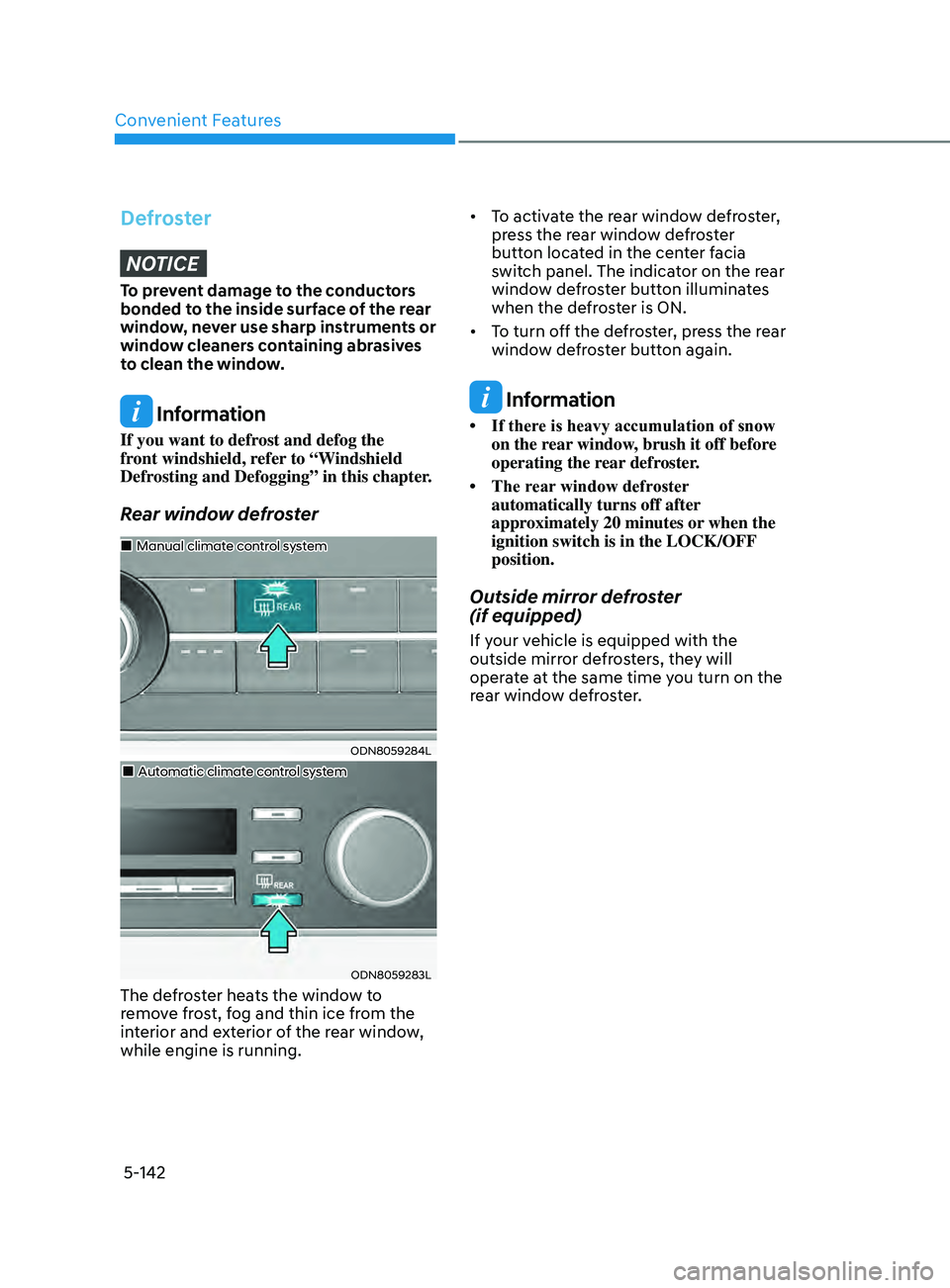
Rear window defroster
ODN8059284L
„„Manual climate control system
„„Automatic climate control system
ODN8059283L
The defroster heats the window to
remove frost, fog and thin ice from the
interior and exterior of the rear window,
while engine is running. • To
activate the rear window defroster,
pr
ess the rear window defroster
button located in the center facia
switch panel. The indicator on the rear
window defroster button illuminates
when the defroster is ON.
• To turn off the defroster, press the rear
windo
w defroster button again.
Information
• If there is heavy accumulation of snow on the r
ear window, brush it off before
operating the rear defroster.
• The
rear
window defroster
automatically turns off after
approximately 20 minutes or when the
ignition switch is in the LOCK/OFF
position.
Outside mirror defroster
(if equipped)
If your vehicle is equipped with the
outside mirror defrosters, they will
operate at the same time you turn on the
rear window defroster.
Page 276 of 546
Convenient Features5-146
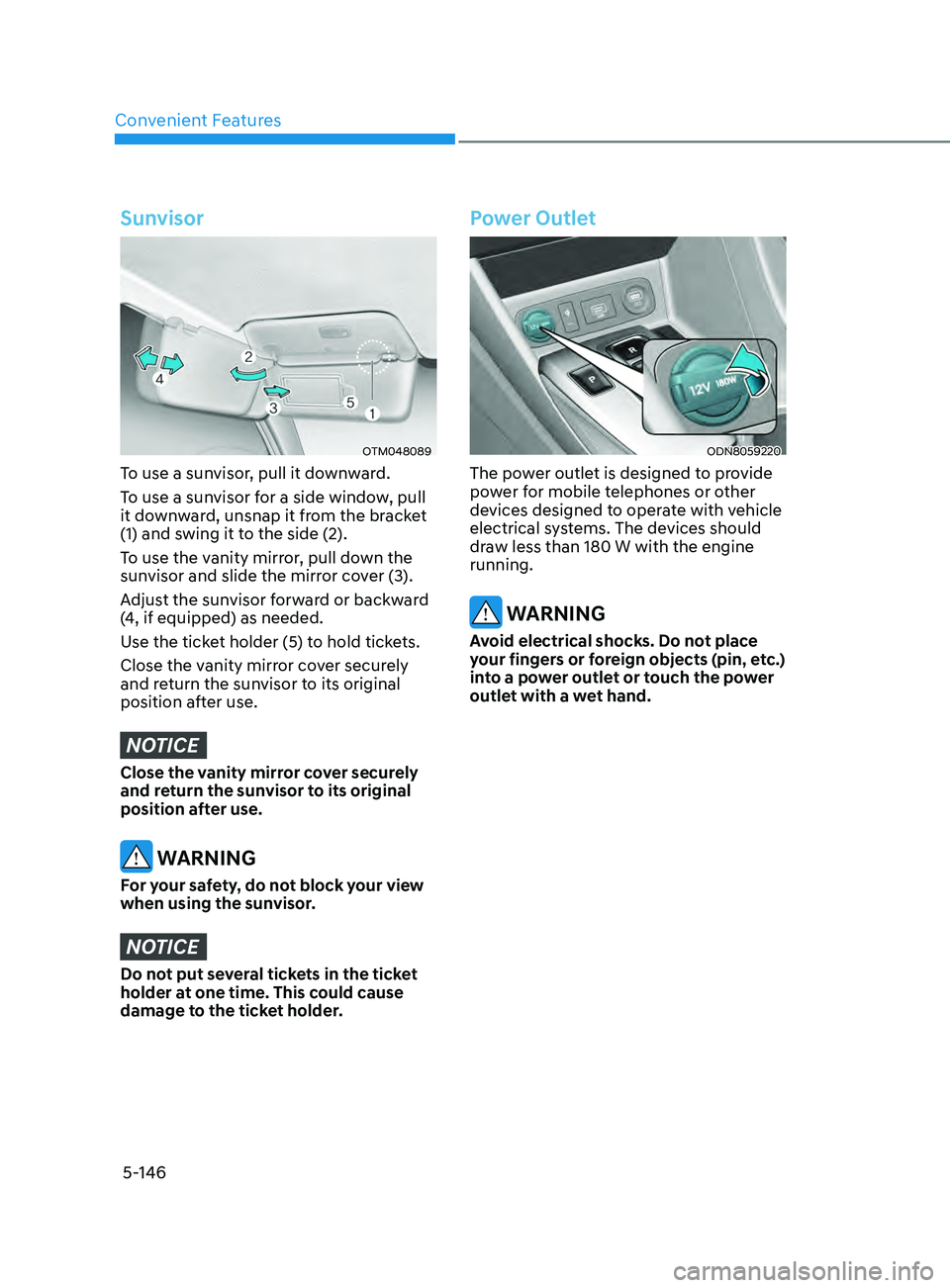
Sunvisor
OTM048089
To use a sunvisor, pull it downward.
To use a sunvisor for a side window, pull
it downward, unsnap it from the bracket
(1) and swing it to the side (2).
To use the vanity mirror, pull down the
sunvisor and slide the mirror cover (3).
Adjust the sunvisor forward or backward
(4, if equipped) as needed.
Use the ticket holder (5) to hold tickets.
Close the vanity mirror cover securely
and return the sunvisor to its original
position after use.
NOTICE
Close the vanity mirror cover securely
and return the sunvisor to its original
position after use.
WARNING
For your safety, do not block your view
when using the sunvisor.
NOTICE
Do not put several tickets in the ticket
holder at one time. This could cause
damage to the ticket holder.
Power Outlet
ODN8059220
The power outlet is designed to provide
power for mobile telephones or other
devices designed to operate with vehicle
electrical systems. The devices should
draw less than 180 W with the engine
running.
WARNING
Avoid electrical shocks. Do not place
your fingers or foreign objects (pin, etc.)
into a power outlet or touch the power
outlet with a wet hand.
Page 289 of 546
06
6-5
Before Entering the Vehicle
• Be sure all windows, outside mirror(s),
and outside lights are clean and
unobstructed.
• Remove frost, snow, or ice.
• Visually check the tires for uneven
wear and damage.
• Check under the vehicle for any sign
of leaks.
• Be sure there are no obstacles behind
you if you intend to back up.
Before Starting
• Make sure the hood, the trunk, and
the doors are securely closed and
locked.
• Adjust the position of the seat and
steering wheel.
• Adjust the inside and side view
mirrors.
• Verify all the lights work.
• Fasten your seatbelt. Check that
all passengers have fastened their
seatbelts.
• Check the gauges and indicators
in the instrument panel and the
messages on the instrument display
when the ignition switch is in the ON
position.
• Check that any items you are carrying
are stored properly or fastened down
securely.
WARNING
To reduce the risk of SERIOUS INJURY or
DEATH, take the following precautions:
• ALWAYS wear your seat belt. All
passengers must be properly belted
whenever the vehicle is moving.
For more information, refer to "Seat
Belts" in chapter 3.
• Always drive defensively. Assume
other drivers or pedestrians may be
careless and make mistakes.
• Stay focused on the task of driving.
Driver distraction can cause
accidents.
• Leave plenty of space between you
and the vehicle in front of you.
WARNING
NEVER drink alcohol or take drugs and
drive.
Drinking alcohol or taking drugs and
driving is dangerous and may result in
an accident and SERIOUS INJURY or
DEATH.
Drunk driving is the number one
contributor to the highway death
toll each year. Even a small amount
of alcohol will affect your reflexes,
perceptions and judgment. Just
one drink can reduce your ability to
respond to changing conditions and
emergencies and your reaction time
gets worse with each additional drink.
Driving while under the influence
of drugs is as dangerous or more
dangerous than driving under the
influence of alcohol.
You are much more likely to have a
serious accident if you drink or take
drugs and drive. If you are drinking or
taking drugs, don't drive. Do not ride
with a driver who has been drinking
or taking drugs. Choose a designated
driver or call a taxi.
Before Driving
Page 330 of 546
6-46
NOTICE
NEVER install any accessories or
stickers on the front windshield, or tint
the front windshield.
NEVER place any reflective objects
(i.e. white paper, mirror) over the
dashboard. Any light reflection may
prevent the system from functioning
properly.
Pay extreme caution to keep the camera
dry.
NEVER disassemble the camera
assembly, or apply any impact on the
camera assembly.
Information
Have the vehicle inspected by an
authorized HYUNDAI dealer when:
• The windshield glass is replaced.
• The radar sensor or cover gets
damaged or replaced.
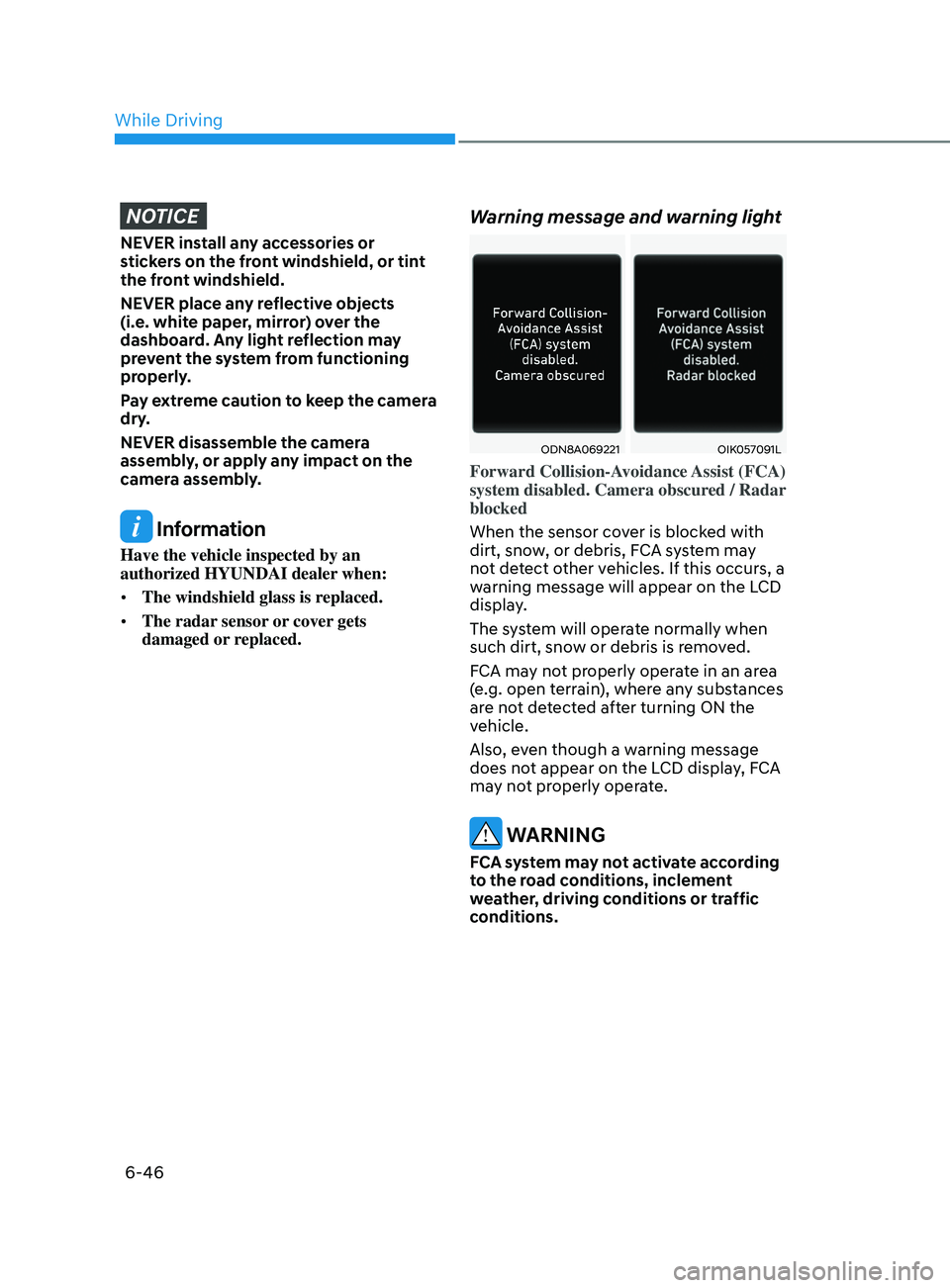
Warning message and warning light
ODN8A069221OIK057091L
Forward Collision-Avoidance Assist (FCA)
system disabled. Camera obscured / Radar
blocked
When the sensor cover is blocked with
dirt, snow, or debris, FCA system may
not detect other vehicles. If this occurs, a
warning message will appear on the LCD
display.
The system will operate normally when
such dirt, snow or debris is removed.
FCA may not properly operate in an area
(e.g. open terrain), where any substances
are not detected after turning ON the
vehicle.
Also, even though a warning message
does not appear on the LCD display, FCA
may not properly operate.
WARNING
FCA system may not activate according
to the road conditions, inclement
weather, driving conditions or traffic
conditions.
While Driving
Page 344 of 546
6-60
• When you replace the windshield
glass, LKA system camera or related
parts of the steering wheel, have the
vehicle inspected by an authorized
HYUNDAI dealer and have the system
checked for calibration.
• The system detects lane markers
and controls the steering wheel
by a camera, therefore, if the lane
markers are hard to detect, the
system may not work properly.
Please refer to “Limitations of the
S y s t e m ”.
• Do not remove or damage the related
parts of LKA system.
• You may not hear a warning sound
of LKA system if the audio volume is
high.
• Do not place objects on the
dashboard that reflects light such as
mirrors, white paper, etc. This may
prevent LKA system from functioning
properly. •
Always have your hands on the
steering wheel while LKA system is
activated. If you continue to drive
with your hands off the steering
wheel after the “Keep hands on
steering wheel” warning message
appears, the system will stop
controlling the steering wheel.
• The steering wheel is not
continuously controlled so if the
vehicle speed is at a higher rate
when leaving a lane the vehicle may
not be controlled by the system. The
driver must always follow the speed
limit when using the system.
• If you attach objects to the steering
wheel, the system may not assist
steering or the hands off alarm may
not work properly.
While Driving
Page 350 of 546
6-66
When external condition is intervened
• The brightness outside changes
suddenly such as when entering or
exiting a tunnel, or when passing
under a bridge.
• The brightness outside is too low such
as when the headlamps are not on at
night or the vehicle is going through
a tunnel.
• There is a boundary structure in the
roadway such as a concrete barrier,
guardrail and reflector post that is
inadvertently being detected by the
camera.
• When light coming from a street light
or an oncoming vehicle is reflected on
a wet road surface such as a puddle in
the road.
• The field of view in front is obstructed
by sun glare.
• There is not enough distance between
you and the vehicle in front to be
able to detect the lane marker or the
vehicle ahead is driving on the lane
marke.
• Driving on a steep grade, over a hill, or
when driving on a curved road.
• The adverse road conditions cause
excessive vehicle vibrations while
driving.
• The surrounding of the inside rear
view mirror temperature is high due to
direct sunlight, etc.
• Road surface is not even. When front visibility is poor
•
The windshield or the camera lens is
blocked with dirt or debris.
• The windshield glass is fogged up; a
clear view of the road is obstructed.
• Placing objects on the dashboard, etc.
• The sensor cannot detect the lane
marker because of fog, heavy rain or
snow.
While Driving
Page 354 of 546
6-70
Warning and System Control
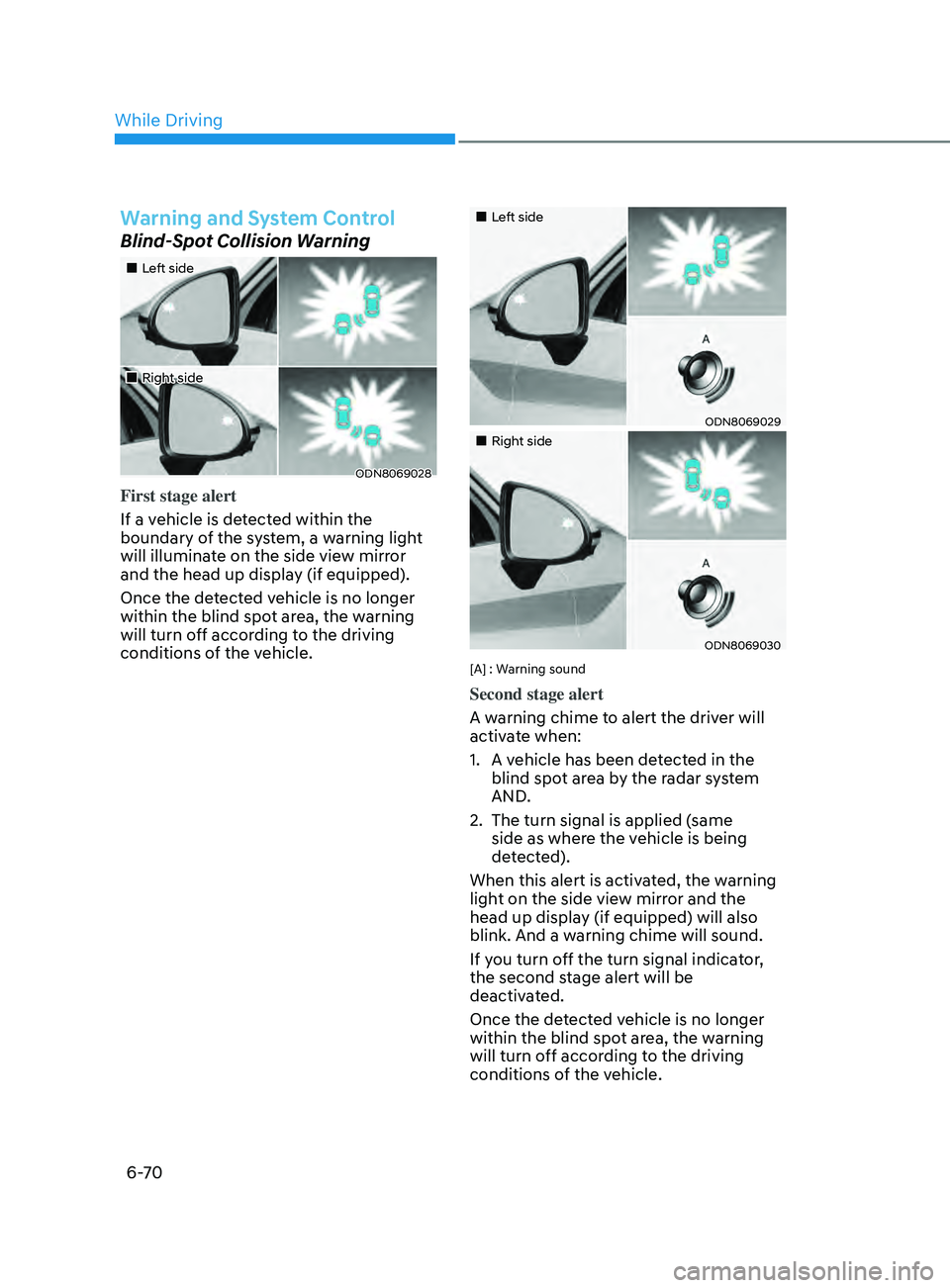
Blind-Spot Collision Warning
•„Left side
•„Right side
ODN8069028
First stage alert
If a vehicle is detected within the
boundary of the system, a warning light
will illuminate on the side view mirror
and the head up display (if equipped).
Once the detected vehicle is no longer
within the blind spot area, the warning
will turn off according to the driving
conditions of the vehicle.
•„Left side
ODN8069029
•„Right side
ODN8069030
[A] : Warning sound
Second stage alert
A warning chime to alert the driver will
activate when:
1.
A v
ehicle has been detected in the
blind spot area by the radar system
AND.
2.
The turn signal is applied (
same
side as where the vehicle is being
detected).
When this alert is activated, the warning
light on the side view mirror and the
head up display (if equipped) will also
blink. And a warning chime will sound.
If you turn off the turn signal indicator,
the second stage alert will be
deactivated.
Once the detected vehicle is no longer
within the blind spot area, the warning
will turn off according to the driving
conditions of the vehicle.
While Driving
Page 355 of 546
06
6-71
WARNING
• The warning light on the side view
mirror will illuminate whenever a
vehicle is detected at the rear side by
the system.
To avoid accidents, do not focus only
on the warning light and neglect to
see the surrounding of the vehicle.
• Drive safely even though the
vehicle is equipped with Blind-Spot
Collision-Avoidance Assist system.
Do not solely rely on the system
but check your surrounding before
changing lanes or backing the
vehicle up.
• The system may not alert the driver
in some conditions so always check
your surroundings while driving.
CAUTION
• The driver should always use
extreme caution while operating
the vehicle, whether or not the
warning light on the side view mirror
illuminates or there is a warning
alarm.
• Playing the vehicle audio system at
high volume may offset the Blind-
Spot Collision Warning system
warning sounds.
• The warning of Blind-Spot Collision-
Avoidance Assist system may not
sound while other system’s warning
sounds.
Blind-Spot Collision-Avoidance
Assist
Blind-Spot Collision-Avoidance Assist
system may apply braking power, when
an approaching vehicle is detected
within a certain distance next to or
behind your vehicle.
It gently applies braking power on the
tire, which is located in the opposite
side of the possibly-colliding point. The
instrument cluster will inform the driver
of the system activation.
Blind-Spot Collision-Avoidance Assist
system is automatically deactivated
when:
- The v
ehicle drives a certain distance
away
- The v
ehicle direction is changed
against the possible-colliding point
- The s
teering wheel is abruptly moved
- The br
ake pedal is depressed
- A
fter a certain period of time
The driver should drive the vehicle in the
middle of the vehicle lanes to keep the
system in the ready status.
When the vehicle drives too close to one
side of the vehicle lanes, the system may
not properly operate.
In addition, the system may not properly
control your vehicle in accordance with
driving situations. Thus, always pay close
attention to road situations.
Page 357 of 546
06
6-73
Rear corner radar
The rear corner radars are the sensors
inside the rear bumper for detecting the
side and rear areas. Always keep the rear
bumper clean for proper operation of the
system.
CAUTION
• The system may not work properly
when the bumper has been
damaged, or if the rear bumper has
been replaced or repaired.
• The sensing range differs somewhat
according to the width of the road.
When the road is narrow, the system
may detect other vehicles in the next
lane. On the other hand, when the
road is wide, the system may not
detect vehicles on both lanes and
may not warn.
• The system may turn off due to
strong electromagnetic waves.
• Always keep the sensors clean.
• NEVER arbitrarily disassemble the
sensor component nor apply any
impact on the sensor component.
• Be careful not to apply unnecessary
force on the radar sensor or sensor
cover. If the sensor is forcibly moved
out of proper alignment, the system
may not operate correctly. In this
case, a warning message may not
be displayed. Have the vehicle
inspected by an authorized HYUNDAI
dealer. •
Do not apply foreign objects such as
a bumper sticker or a bumper guard
near the radar sensor or apply paint
to the sensor area. Doing so may
adversely affect the performance of
the sensor.
• NEVER install any accessories or
stickers on the front windshield, nor
tint the front windshield.
• Pay extreme caution to keep the
front view camera out of water.
• NEVER locate any reflective objects
(i.e. white paper, mirror) over the
crash pad. Any light reflection may
cause a malfunction of the system.