clock HYUNDAI SONATA 2023 User Guide
[x] Cancel search | Manufacturer: HYUNDAI, Model Year: 2023, Model line: SONATA, Model: HYUNDAI SONATA 2023Pages: 555, PDF Size: 42.72 MB
Page 463 of 555
07
7-15
ODN8A069091
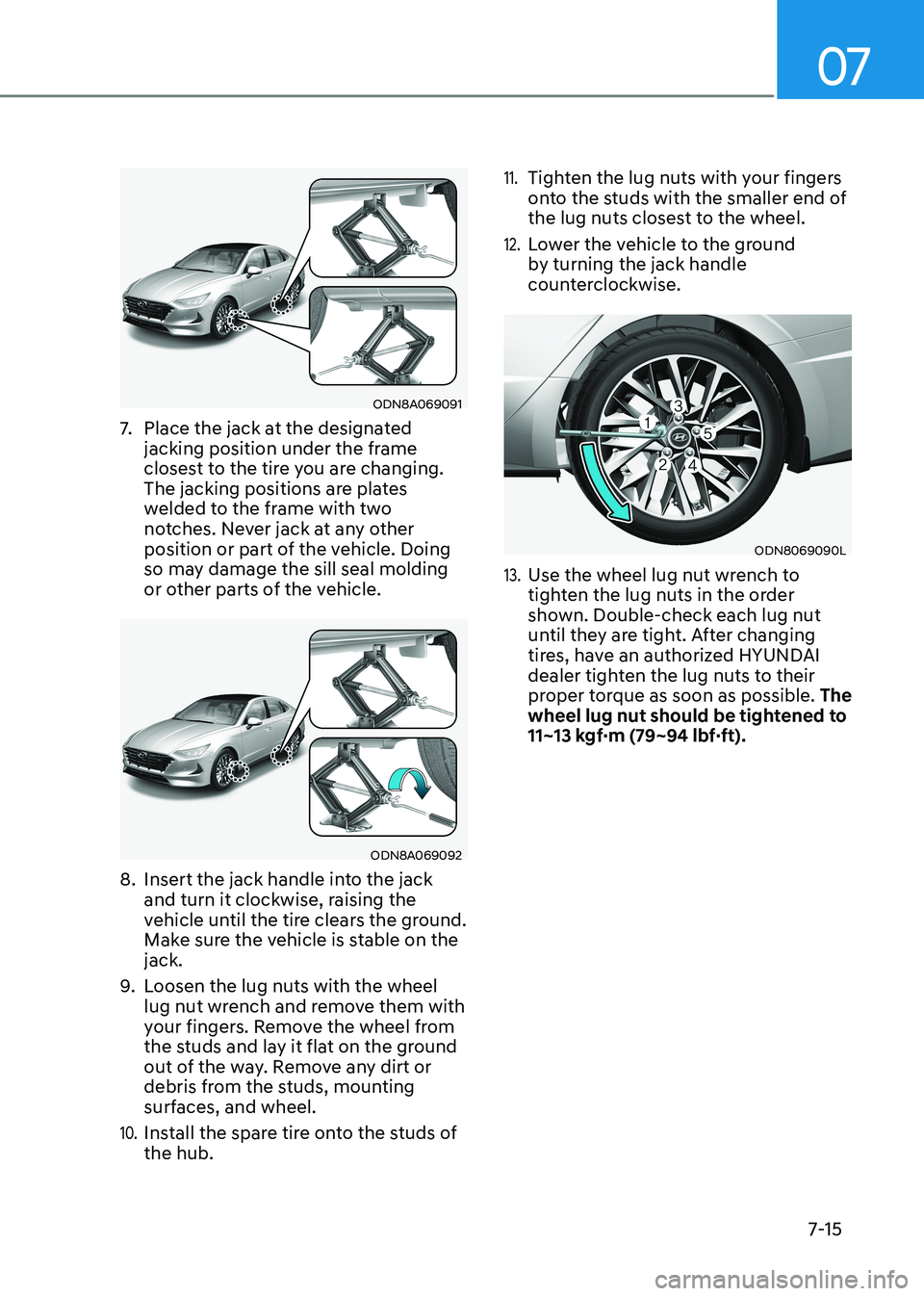
7. Place the jack at the designated
jacking position under the frame
closest to the tire you are changing.
The jacking positions are plates
welded to the frame with two
notches. Never jack at any other
position or part of the vehicle. Doing
so may damage the sill seal molding
or other parts of the vehicle.
ODN8A069092
8. Insert the jack handle into the jack
and turn it clockwise, raising the
vehicle until the tire clears the ground.
Make sure the vehicle is stable on the jack.
9. Loosen the lug nuts with the wheel
lug nut wrench and remove them with
your fingers. Remove the wheel from
the studs and lay it flat on the ground
out of the way. Remove any dirt or
debris from the studs, mounting
surfaces, and wheel.
10. Install the spare tire onto the studs of the hub.
11. Tighten the lug nuts with your fingers
onto the studs with the smaller end of
the lug nuts closest to the wheel.
12. Lower the vehicle to the ground
by turning the jack handle
counterclockwise.
ODN8069090L
13. Use the wheel lug nut wrench to
tighten the lug nuts in the order
shown. Double-check each lug nut
until they are tight. After changing
tires, have an authorized HYUNDAI
dealer tighten the lug nuts to their
proper torque as soon as possible. The
wheel lug nut should be tightened to
11~13 kgf·m (79~94 lbf·ft).
Page 497 of 555
08
8-27
For mixing percentage, refer to the
following table:
Ambient
Temperature Mixture Percentage
(volume)
Antifreeze Water
-15°C (5°F) 35 65
-25°C (-13°F) 40 60
-35°C (-31°F) 50 50
-45°C (-49°F) 60 40
Information
If in doubt about the mix ratio, a 50%
water and 50% antifreeze mix is the
easiest to mix together as it will be the same quantity of each. It is suitable to
use for most temperature ranges of -35°C
(-31°F) and higher.
WARNING
Make sure the coolant cap is properly
closed after refilling coolant. Otherwise
the engine could be overheated while driving.
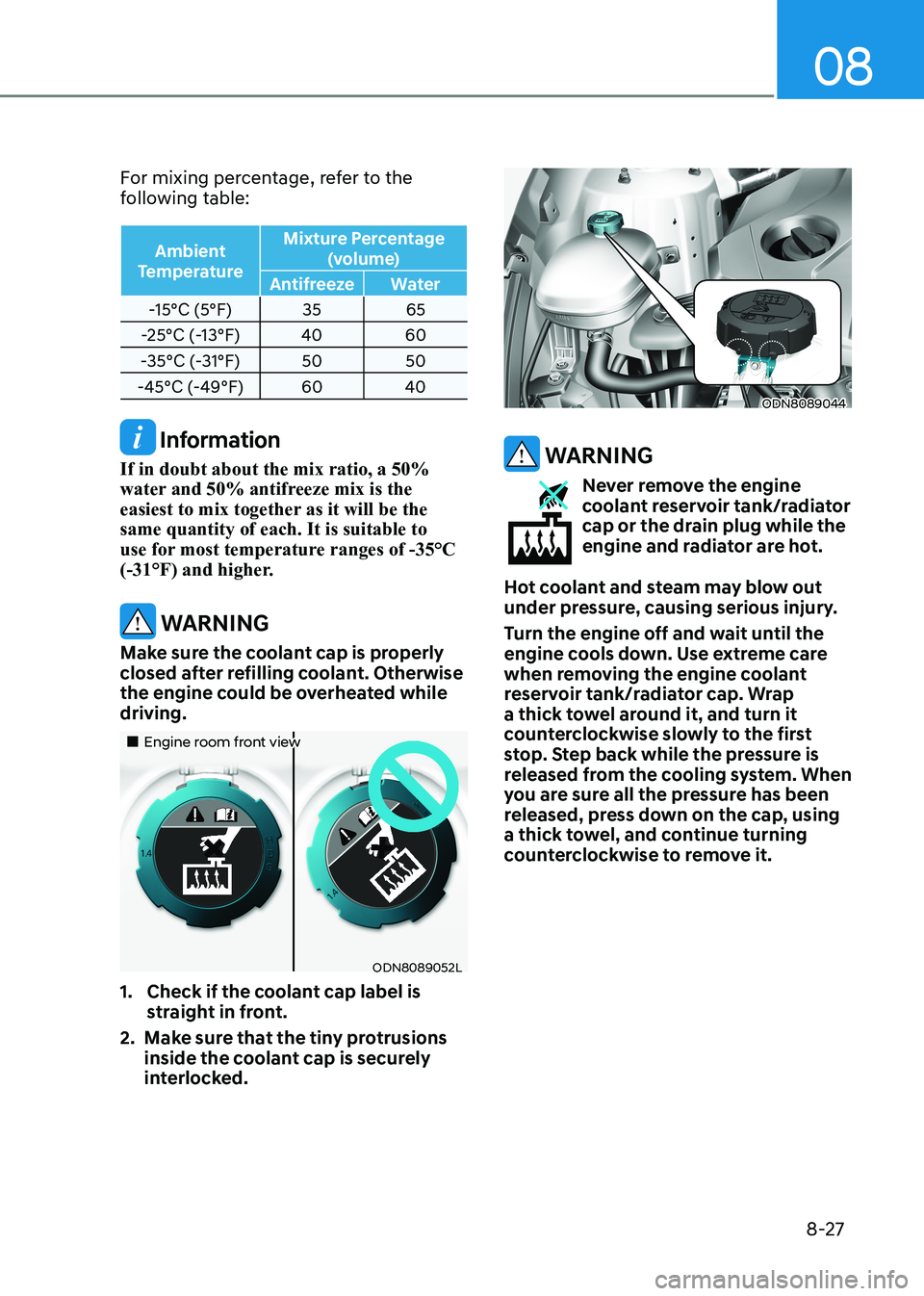
„„Engine room front view
ODN8089052L
1. Check if the coolant cap label is straight in front.
2. Make sure that the tiny protrusions inside the coolant cap is securely
interlocked.
ODN8089044
WARNING
Never remove the engine
coolant reservoir tank/radiator
cap or the drain plug while the
engine and radiator are hot.
Hot coolant and steam may blow out
under pressure, causing serious injury.
Turn the engine off and wait until the
engine cools down. Use extreme care
when removing the engine coolant
reservoir tank/radiator cap. Wrap
a thick towel around it, and turn it
counterclockwise slowly to the first
stop. Step back while the pressure is
released from the cooling system. When
you are sure all the pressure has been
released, press down on the cap, using
a thick towel, and continue turning
counterclockwise to remove it.
Page 507 of 555
08
8-37
Battery Recharging
WARNING
Always follow these instructions when
recharging your vehicle’s battery to
avoid the risk of SERIOUS INJURY or
DEATH from explosions or acid burns: • Before performing maintenance or
recharging the battery, turn off all
accessories and place the ignition
switch to the LOCK/OFF position.
• Keep all flames, sparks, or smoking
materials away from the battery.
• Always work outdoors or in an area
with plenty of ventilation.
• Wear eye protection when checking
the battery during charging.
• The battery must be removed from
the vehicle and placed in a well
ventilated area.
• Watch the battery during charging,
and stop or reduce the charging
rate if the battery cells begin boiling
violently.
• Vehicle is equipped with the
Absorbent Glass Mat (AGM) battery.
Do not charge the AGM battery with
a general charger. It may damage
or explode the AGM battery. Only
charge the AGM battery with a
charger that has AGM battery
setting.
• The negative battery cable must
be removed first to disconnect
the battery and installed last
to reconnect with the battery.
Disconnect the battery charger in the
following order:
1. Turn off the battery charger main
switch.
2. Unhook the negative clamp from the negative battery terminal.
3. Unhook the positive clamp from the positive battery terminal.
• Always use a genuine HYUNDAI
approved battery when you replace
the battery. By jump starting
After a jump start, idle the engine
with the headlights ON for 20-30
minutes before shutting the engine
off. The vehicle may not restart if you
shut it off before the battery had a
chance to adequately recharge. See
“Jump Starting” in chapter 7 for more
information on jump starting procedures.
Information
An inappropriately disposed battery can be harmful to
the environment and human health. Dispose of the battery
according to your local law(s) or
regulations.
Reset Features
The following items may need to be reset
after the battery has been discharged or
the battery has been disconnected. See
chapter 3 or 4 for: •
Power Windows
• Trip Computer
• Climate Control System
• Clock
• Audio System
• Sunroof
Page 530 of 555
Maintenance
8-60
ODN8A089063
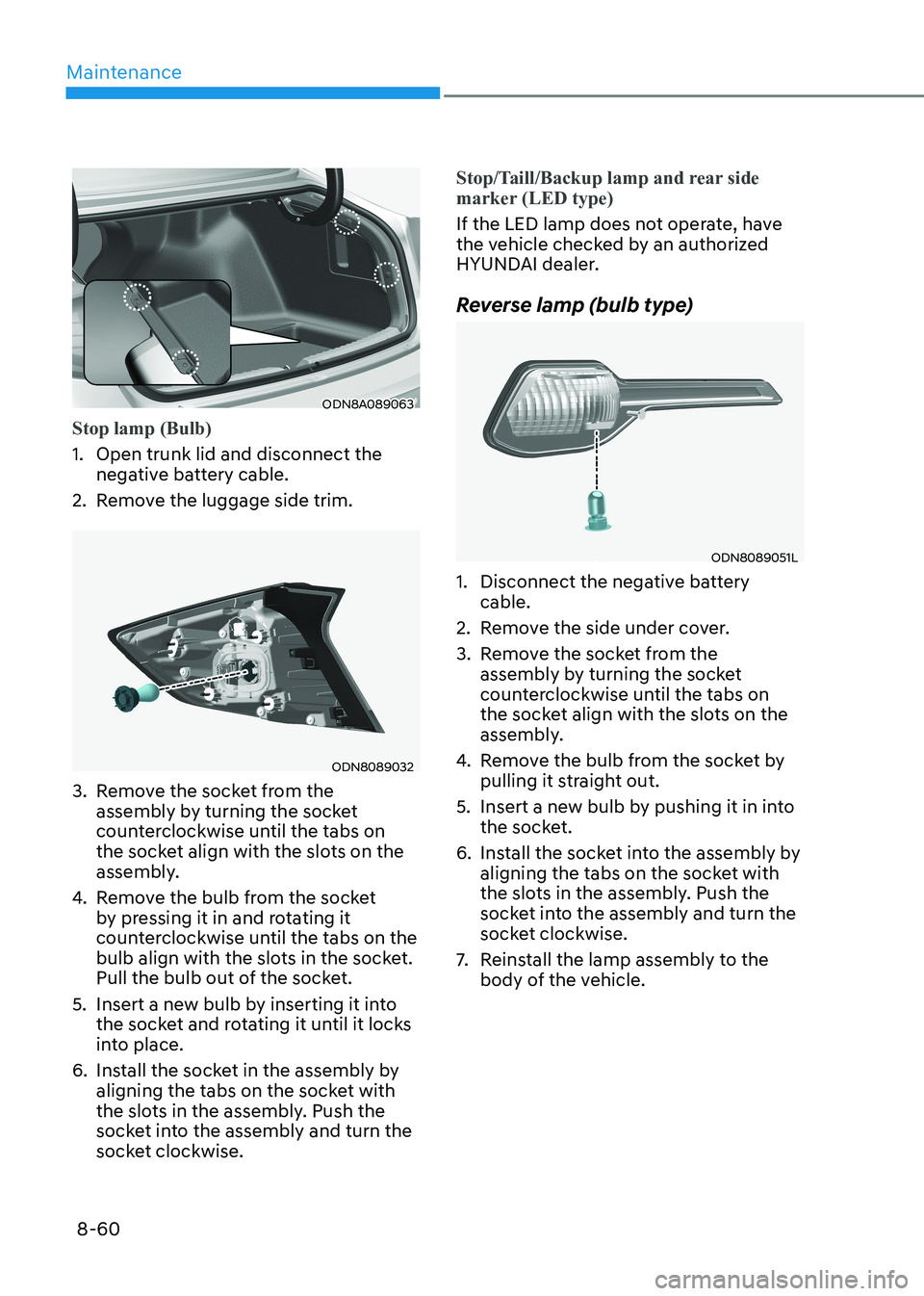
Stop lamp (Bulb)
1. Open trunk lid and disconnect the negative battery cable.
2. Remove the luggage side trim.
ODN8089032
3. Remove the socket from the assembly by turning the socket
counterclockwise until the tabs on
the socket align with the slots on the
assembly.
4. Remove the bulb from the socket
by pressing it in and rotating it
counterclockwise until the tabs on the
bulb align with the slots in the socket.
Pull the bulb out of the socket.
5. Insert a new bulb by inserting it into the socket and rotating it until it locks
into place.
6. Install the socket in the assembly by aligning the tabs on the socket with
the slots in the assembly. Push the
socket into the assembly and turn the
socket clockwise.
Stop/Taill/Backup lamp and rear side
marker (LED type)
If the LED lamp does not operate, have
the vehicle checked by an authorized
HYUNDAI dealer.
Reverse lamp (bulb type)
ODN8089051L
1. Disconnect the negative battery cable.
2. Remove the side under cover.
3. Remove the socket from the assembly by turning the socket
counterclockwise until the tabs on
the socket align with the slots on the
assembly.
4. Remove the bulb from the socket by
pulling it straight out.
5. Insert a new bulb by pushing it in into the socket.
6. Install the socket into the assembly by aligning the tabs on the socket with
the slots in the assembly. Push the
socket into the assembly and turn the
socket clockwise.
7. Reinstall the lamp assembly to the
body of the vehicle.
Page 549 of 555
I
I -7
Infotainment System .......................................................................................... 5-139
Antenna .......................................................................................................... 5-139
Audio (Display Audio) / Video / Navigation System (AVN) ........................5-141
Bluetooth ®
Wireless Technology Hands-Free ................................................5-141
Steering Wheel Audio Control ....................................................................... 5-140
USB and iPod® Port ...................................................................................... 5-139
Instrument Cluster ................................................................................................. 4-2
Gauges and Meters ............................................................................................. 4-4
Instrument Cluster Control ................................................................................. 4-4
LCD Display Messages .................................................................................... 4-19
Transmission Shift Indicator .............................................................................. 4-9
Warning and Indicator Lights ........................................................................... 4-11
Instrument Panel Overview ................................................................................... 2-7
Interior Features ................................................................................................. 5-132
Clock .............................................................................................................. 5-137
Clothes Hanger ............................................................................................... 5-137
Cup Holder ..................................................................................................... 5-132
Floor Mat Anchor(s) ....................................................................................... 5-138
Power Outlet ................................................................................................... 5-133
Sunvisor .......................................................................................................... 5-133
USB Charger .................................................................................................. 5-134
Wireless Cellular Phone Charging System ....................................................5-135
Interior Overview................................................................................................... 2-6 Introduction ........................................................................................................... 1-2
J Jump Starting ......................................................................................................... 7-4
L
Lane Following Assist (LFA) ............................................................................ 6-126
LFA Operation ................................................................................................ 6-127
Limitations of the System .............................................................................. 6-130
Warning Message ........................................................................................... 6-128
Lane Keeping Assist (LKA) ................................................................................ 6-70
Limitations of the System ................................................................................ 6-75
LKA Operation ................................................................................................. 6-71
LKA System Function Change ......................................................................... 6-72
Warning Light and Message ............................................................................. 6-74