warning lights HYUNDAI SONATA 2023 Owner's Guide
[x] Cancel search | Manufacturer: HYUNDAI, Model Year: 2023, Model line: SONATA, Model: HYUNDAI SONATA 2023Pages: 555, PDF Size: 42.72 MB
Page 328 of 555
06
6-41
ESC OFF usage
When Driving
The ESC OFF mode should only be used
briefly to help free the vehicle if stuck in
snow by temporarily stopping operation
of the ESC to maintain wheel torque.
To turn ESC off while driving, press the
ESC OFF button while driving on a flat
road surface.
NOTICE
To prevent damage to the transmission: • Do not allow wheel(s) of one axle to
spin excessively while the ESC, ABS,
and parking brake warning lights
are displayed. The repairs would not
be covered by the vehicle warranty.
Reduce engine power and do not
spin the wheel(s) excessively while
these lights are displayed.
• When operating the vehicle on
a dynamometer, make sure the
ESC is turned off (ESC OFF light
illuminated).
Information
Turning the ESC off does not affect ABS
or standard brake system operation.
Vehicle Stability Management
(VSM)
The Vehicle Stability Management (VSM)
is a function of the Electronic Stability
Control (ESC) system. It helps ensure the
vehicle stays stable when accelerating
or braking suddenly on wet, slippery and
rough roads where traction over the four
tires can suddenly become uneven.
WARNING
Take the following precautions when
using the Vehicle Stability Management
(VSM): • ALWAYS check the speed and the
distance to the vehicle ahead. The
VSM is not a substitute for safe
driving practices.
• Never drive too fast for the road
conditions. The VSM system will not
prevent accidents. Excessive speed
in bad weather, slippery and uneven
roads can result in severe accidents.
VSM operation
VSM ON condition
The VSM operates when:
The Electronic Stability Control (ESC) is on.
When operating
When you apply your brakes under
conditions which may activate the ESC,
you may hear sounds from the brakes,
or feel a corresponding sensation in the
brake pedal. This is normal and it means
your VSM is active.
NOTICE
The VSM does not operate when: • Driving on a banked road such as
gradient or incline.
• Driving rearward.
• ESC OFF indicator light is on.
• EPS (Electric Power Steering)
warning light (
) is on or blinks.
Page 450 of 555
Emergency Situations
7-2
If the Engine Stalls While Driving
• Reduce your speed gradually, keeping
a straight line. Move cautiously off the
road to a safe place.
• Turn on your hazard warning flasher.
• Try to start the engine again. If your
vehicle will not start, contact an
authorized HYUNDAI dealer or seek
other qualified assistance.
If the Engine Stalls at a Crossroad
or Crossing
If the engine stalls at a crossroads or
crossing, if safe to do so, move the shift
button to the N (Neutral) position and
then push the vehicle to a safe location.
In Case of an emergenCy WhIle DrIvIng
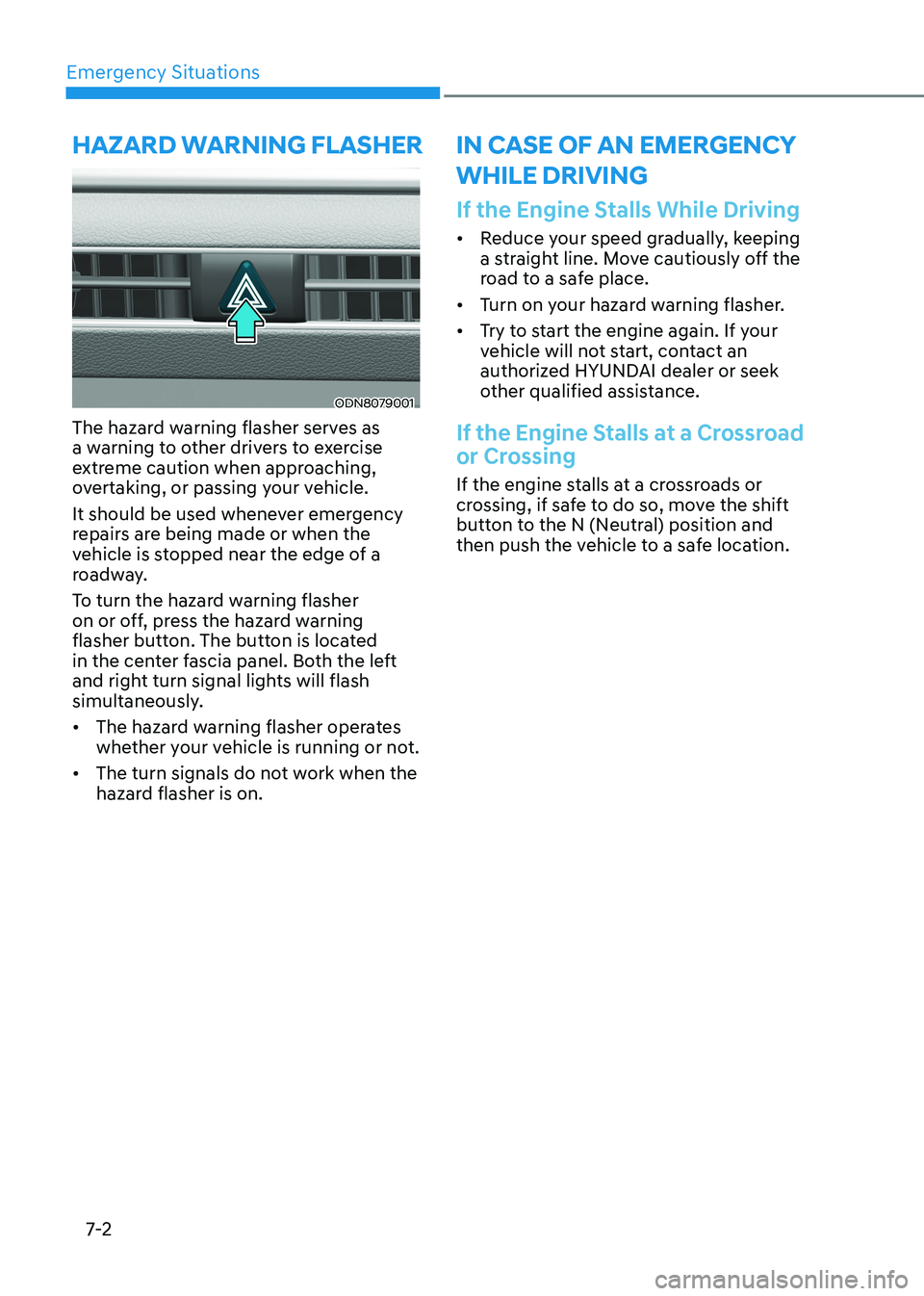
ODN8079001
The hazard warning flasher serves as
a warning to other drivers to exercise
extreme caution when approaching,
overtaking, or passing your vehicle.
It should be used whenever emergency
repairs are being made or when the
vehicle is stopped near the edge of a
roadway.
To turn the hazard warning flasher
on or off, press the hazard warning
flasher button. The button is located
in the center fascia panel. Both the left
and right turn signal lights will flash
simultaneously. • The hazard warning flasher operates
whether your vehicle is running or not.
• The turn signals do not work when the
hazard flasher is on.
hazarD WarnIng flasher
Page 469 of 555
07
7-21
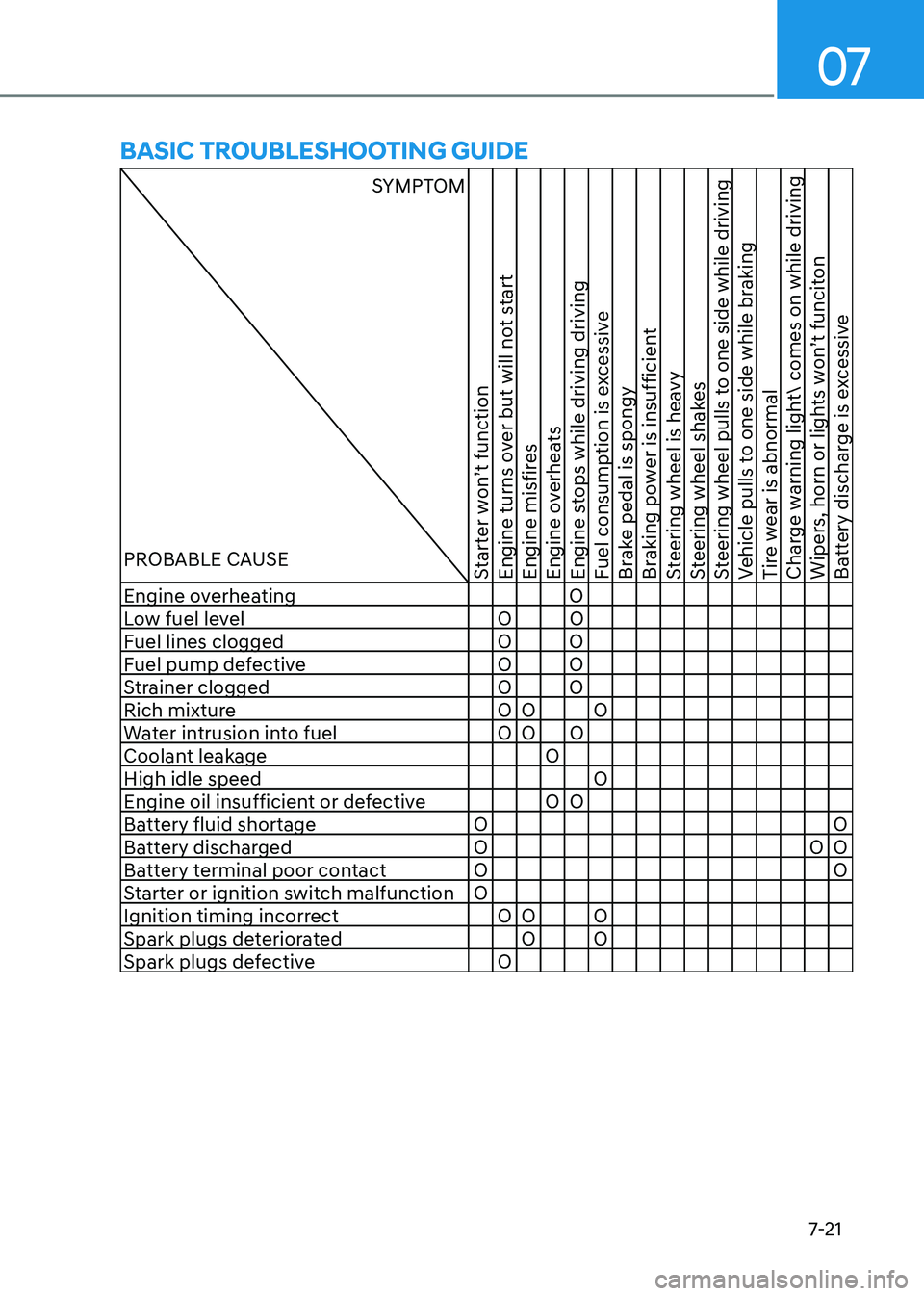
BasIC trouBleshootIng guIDe
SYMPTOM
PROBABLE CAUSE
Starter won’t function
Engine turns over but will not start
Engine misfires
Engine overheats
Engine stops while driving driving
Fuel consumption is excessive
Brake pedal is spongy
Braking power is insufficient
Steering wheel is heavy
Steering wheel shakes
Steering wheel pulls to one side while driving
Vehicle pulls to one side while braking
Tire wear is abnormal
Charge warning light comes on while driving
Wipers, horn or lights won’t funciton
Battery discharge is excessive
Engine overheating O
Low fuel level O O
Fuel lines clogged O O
Fuel pump defective O O
Strainer clogged O O
Rich mixture O O O Water intrusion into fuel O O O
Coolant leakage OHigh idle speed O
Engine oil insufficient or defective O O
Battery fluid shortage O O
Battery discharged O O O
Battery terminal poor contact O O
Starter or ignition switch malfunction O
Ignition timing incorrect O O O Spark plugs deteriorated O O Spark plugs defective O
Page 470 of 555
Emergency Situations
7-22
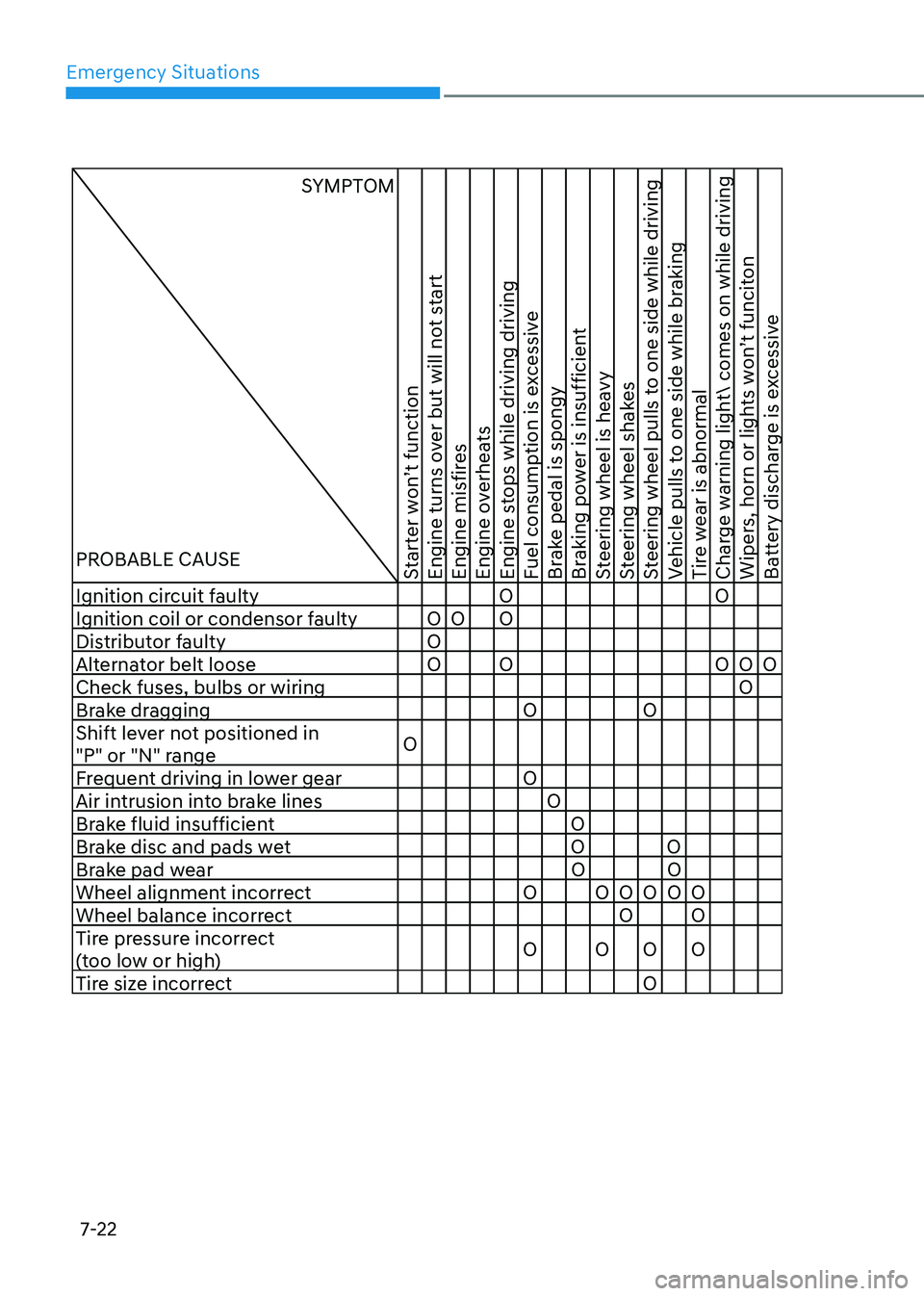
SYMPTOM
PROBABLE CAUSE
Starter won’t function
Engine turns over but will not start
Engine misfires
Engine overheats
Engine stops while driving driving
Fuel consumption is excessive
Brake pedal is spongy
Braking power is insufficient
Steering wheel is heavy
Steering wheel shakes
Steering wheel pulls to one side while driving
Vehicle pulls to one side while braking
Tire wear is abnormal
Charge warning light comes on while driving
Wipers, horn or lights won’t funciton
Battery discharge is excessive
Ignition circuit faulty O O Ignition coil or condensor faulty O O O
Distributor faulty O
Alternator belt loose O O O O O Check fuses, bulbs or wiring O
Brake dragging O O
Shift lever not positioned in
"P" or "N" range O
Frequent driving in lower gear O
Air intrusion into brake lines O
Brake fluid insufficient O
Brake disc and pads wet O O
Brake pad wear O O
Wheel alignment incorrect O O O O O O Wheel balance incorrect O O
Tire pressure incorrect
(too low or high) O O O O
Tire size incorrect O
Page 477 of 555
08
8 -7
While operating your vehicle: •
Note any changes in the sound of the
exhaust or any smell of exhaust fumes
in the vehicle.
• Check for vibrations in the steering
wheel. Notice if there is any increased
steering effort or looseness in the
steering wheel, or change in its
straight-ahead position.
• Notice if your vehicle constantly turns
slightly or “pulls” to one side when
traveling on smooth, level road.
• When stopping, listen and check for
unusual sounds, pulling to one side,
increased brake pedal travel or “hard-
to-push” brake pedal.
• If any slipping or changes in the
operation of your transmission occurs,
check the transmission fluid level.
• Check the automatic transmission P
(Park) function.
• Check the parking brake.
• Check for fluid leaks under your
vehicle (water dripping from the air
conditioning system during or after use is normal).
At least monthly: • Check coolant level in the engine
coolant reservoir.
• Check the operation of all exterior
lights, including the brake lights, turn
signals and hazard warning flashers.
• Check the inflation pressures of all
tires including the spare for tires that
are worn, show uneven wear, or are damaged.
• Check for loose wheel lug nuts. At least twice a year:
(i.e., every Spring and Autumn) •
Check radiator, heater and air
conditioning hoses for leaks or damage.
• Check windshield washer spray and
wiper operation. Clean wiper blades
with a clean cloth dampened with
washer a fluid.
• Check headlamp alignment.
• Check muffler, exhaust pipes, shields and clamps.
• Check the seat belts for wear and function.
At least once a year: • Clean body and door drain holes.
• Lubricate door hinges and hood hinges.
• Lubricate door and hood locks and
latches.
• Lubricate door rubber weather strips.
• Lubricate door checker.
• Check the air conditioning system.
• Inspect and lubricate automatic
transmission linkage and controls.
• Clean the battery and terminals.
• Check the brake fluid level.
Page 507 of 555
08
8-37
Battery Recharging
WARNING
Always follow these instructions when
recharging your vehicle’s battery to
avoid the risk of SERIOUS INJURY or
DEATH from explosions or acid burns: • Before performing maintenance or
recharging the battery, turn off all
accessories and place the ignition
switch to the LOCK/OFF position.
• Keep all flames, sparks, or smoking
materials away from the battery.
• Always work outdoors or in an area
with plenty of ventilation.
• Wear eye protection when checking
the battery during charging.
• The battery must be removed from
the vehicle and placed in a well
ventilated area.
• Watch the battery during charging,
and stop or reduce the charging
rate if the battery cells begin boiling
violently.
• Vehicle is equipped with the
Absorbent Glass Mat (AGM) battery.
Do not charge the AGM battery with
a general charger. It may damage
or explode the AGM battery. Only
charge the AGM battery with a
charger that has AGM battery
setting.
• The negative battery cable must
be removed first to disconnect
the battery and installed last
to reconnect with the battery.
Disconnect the battery charger in the
following order:
1. Turn off the battery charger main
switch.
2. Unhook the negative clamp from the negative battery terminal.
3. Unhook the positive clamp from the positive battery terminal.
• Always use a genuine HYUNDAI
approved battery when you replace
the battery. By jump starting
After a jump start, idle the engine
with the headlights ON for 20-30
minutes before shutting the engine
off. The vehicle may not restart if you
shut it off before the battery had a
chance to adequately recharge. See
“Jump Starting” in chapter 7 for more
information on jump starting procedures.
Information
An inappropriately disposed battery can be harmful to
the environment and human health. Dispose of the battery
according to your local law(s) or
regulations.
Reset Features
The following items may need to be reset
after the battery has been discharged or
the battery has been disconnected. See
chapter 3 or 4 for: •
Power Windows
• Trip Computer
• Climate Control System
• Clock
• Audio System
• Sunroof
Page 520 of 555
Maintenance
8-50
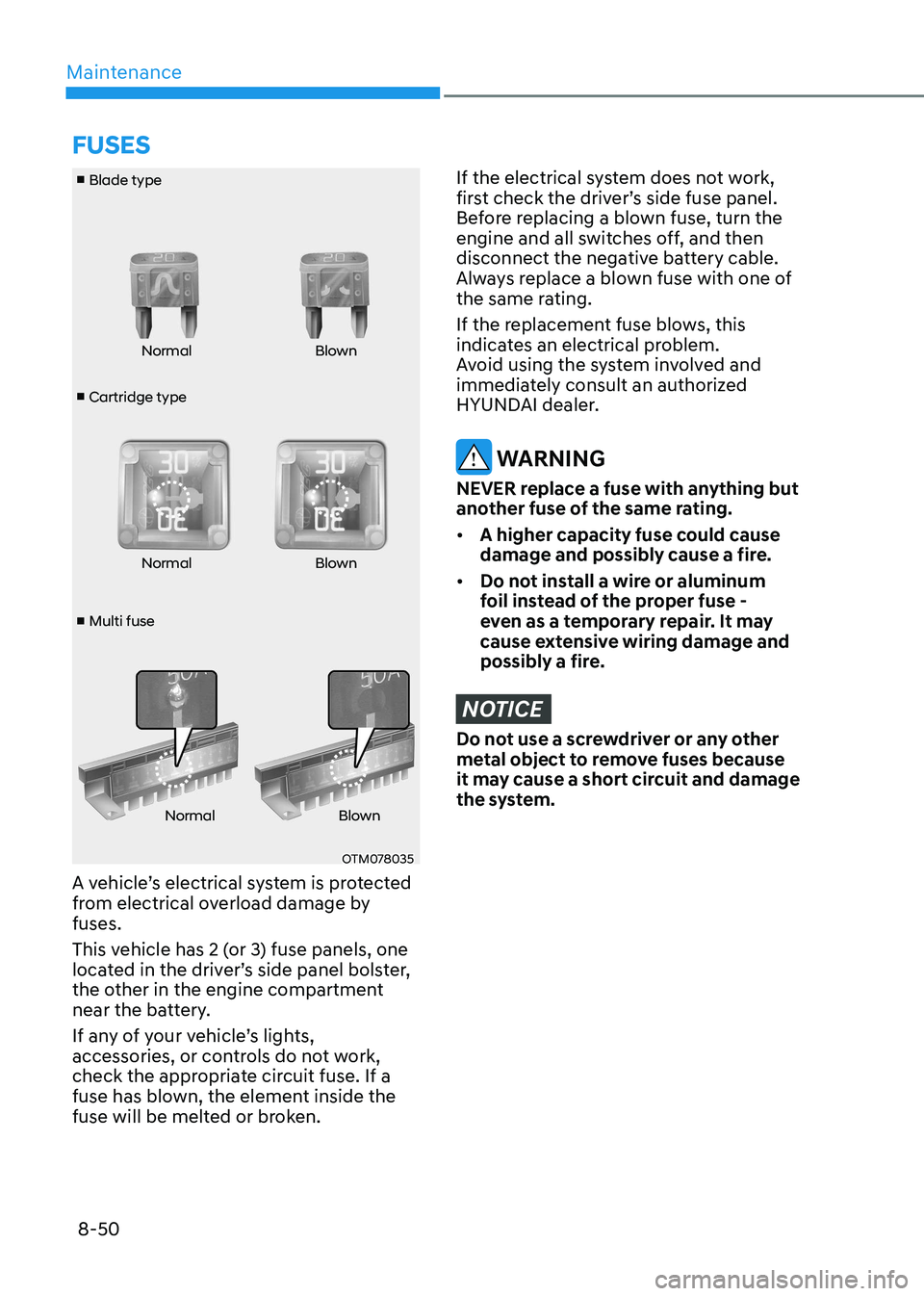
■ Cartridge type
■ Blade type
■ Multi fuse Normal Blown
Normal Blown
Normal Blown
OTM078035
A vehicle’s electrical system is protected
from electrical overload damage by fuses.
This vehicle has 2 (or 3) fuse panels, one
located in the driver’s side panel bolster,
the other in the engine compartment
near the battery.
If any of your vehicle’s lights,
accessories, or controls do not work,
check the appropriate circuit fuse. If a
fuse has blown, the element inside the
fuse will be melted or broken.
If the electrical system does not work,
first check the driver’s side fuse panel.
Before replacing a blown fuse, turn the
engine and all switches off, and then
disconnect the negative battery cable.
Always replace a blown fuse with one of
the same rating.
If the replacement fuse blows, this
indicates an electrical problem.
Avoid using the system involved and
immediately consult an authorized
HYUNDAI dealer.
WARNING
NEVER replace a fuse with anything but
another fuse of the same rating. • A higher capacity fuse could cause
damage and possibly cause a fire.
• Do not install a wire or aluminum
foil instead of the proper fuse -
even as a temporary repair. It may
cause extensive wiring damage and
possibly a fire.
NOTICE
Do not use a screwdriver or any other
metal object to remove fuses because
it may cause a short circuit and damage
the system.
fUSES
Page 532 of 555
Maintenance
8-62
Interior Light Bulb Replacement
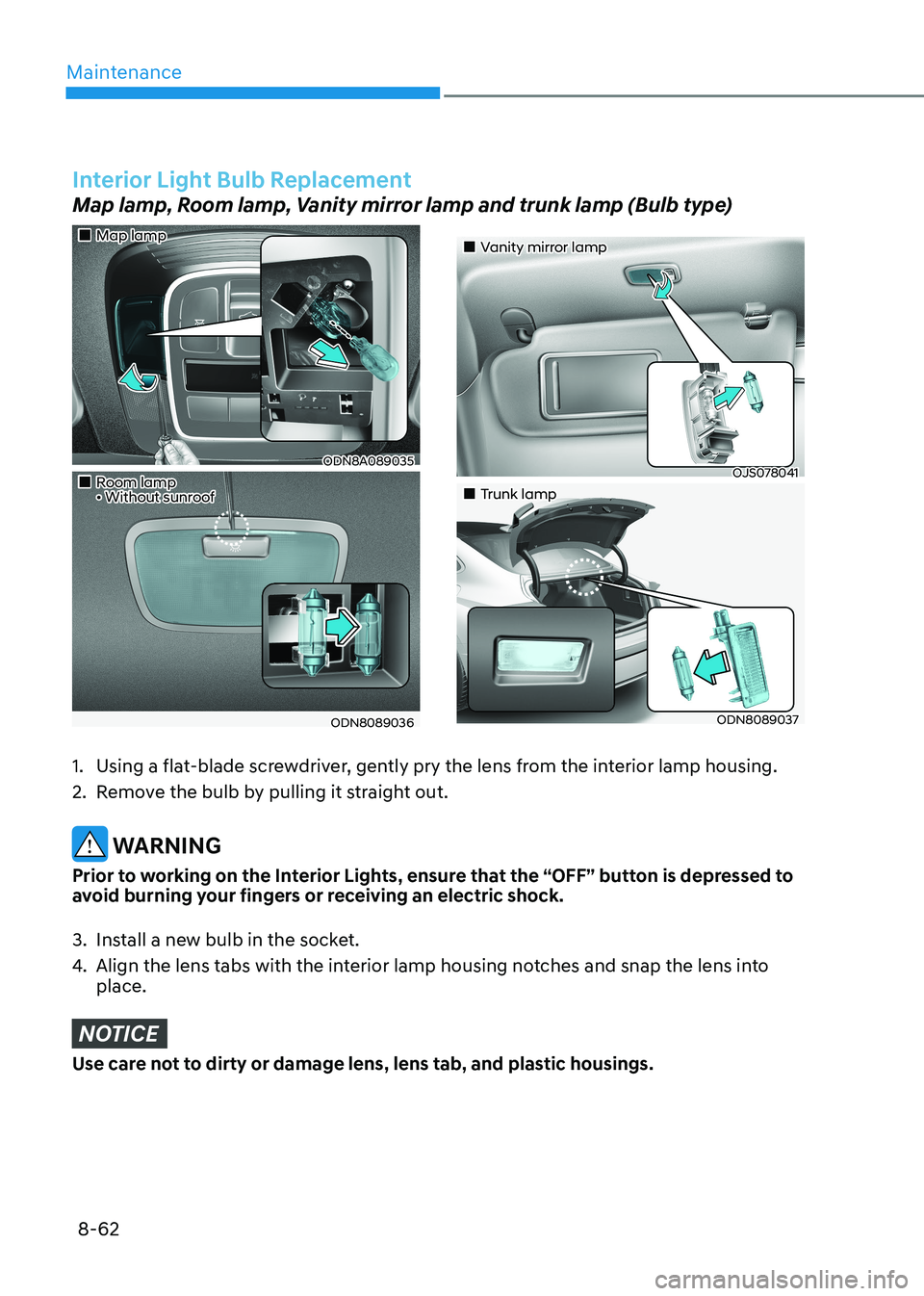
Map lamp, Room lamp, Vanity mirror lamp and trunk lamp (Bulb type)
„„Map lamp
ODN8A089035
„„Room lamp • Without sunroof
ODN8089036
„„Vanity mirror lamp
OJS078041
„„Trunk lamp
ODN8089037
1. Using a flat-blade screwdriver, gently pry the lens from the interior lamp housing.
2. Remove the bulb by pulling it straight out.
WARNING
Prior to working on the Interior Lights, ensure that the “OFF” button is depressed to
avoid burning your fingers or receiving an electric shock.
3. Install a new bulb in the socket.
4. Align the lens tabs with the interior lamp housing notches and snap the lens into place.
NOTICE
Use care not to dirty or damage lens, lens tab, and plastic housings.
Page 549 of 555
I
I -7
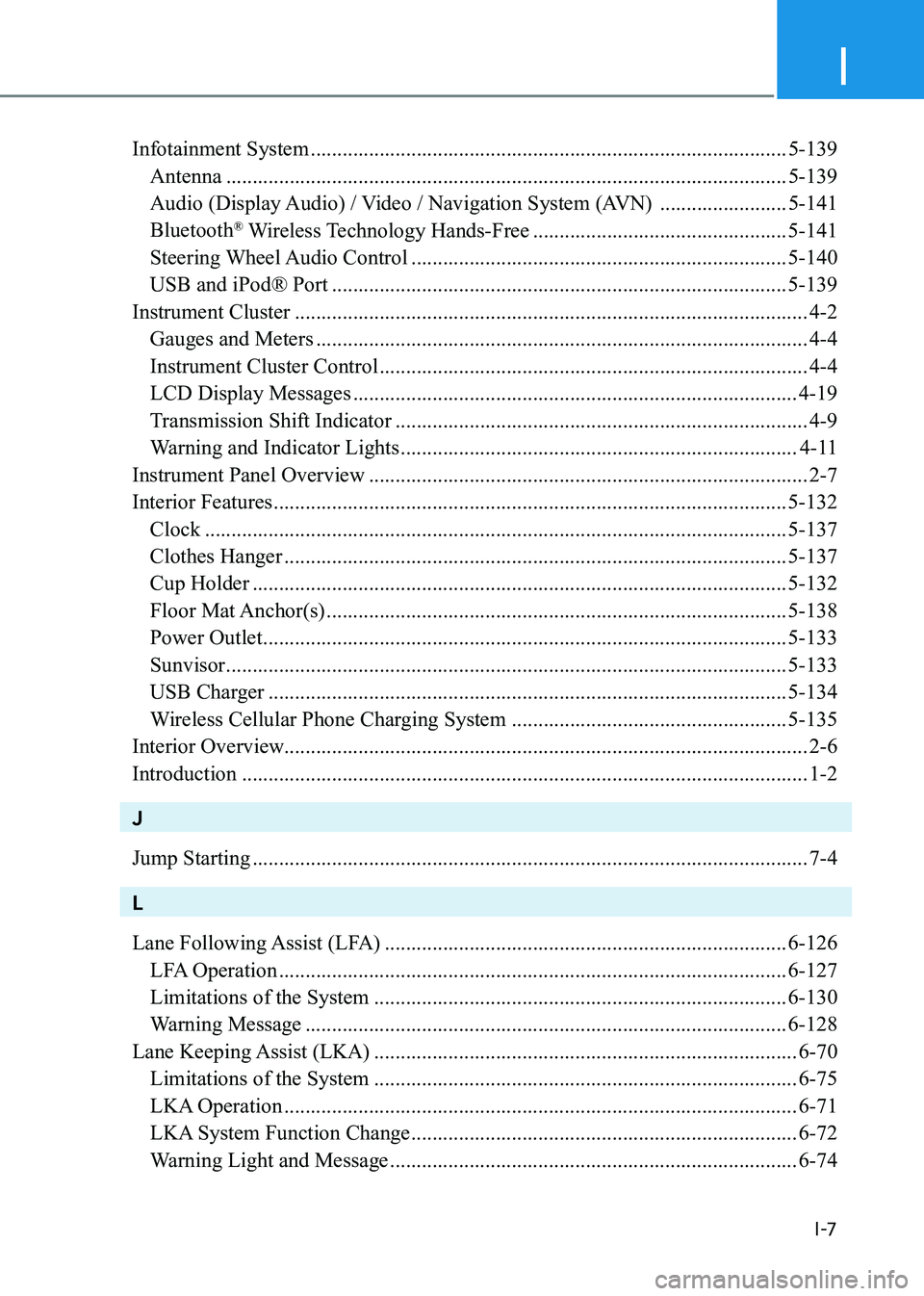
Infotainment System .......................................................................................... 5-139
Antenna .......................................................................................................... 5-139
Audio (Display Audio) / Video / Navigation System (AVN) ........................5-141
Bluetooth ®
Wireless Technology Hands-Free ................................................5-141
Steering Wheel Audio Control ....................................................................... 5-140
USB and iPod® Port ...................................................................................... 5-139
Instrument Cluster ................................................................................................. 4-2
Gauges and Meters ............................................................................................. 4-4
Instrument Cluster Control ................................................................................. 4-4
LCD Display Messages .................................................................................... 4-19
Transmission Shift Indicator .............................................................................. 4-9
Warning and Indicator Lights ........................................................................... 4-11
Instrument Panel Overview ................................................................................... 2-7
Interior Features ................................................................................................. 5-132
Clock .............................................................................................................. 5-137
Clothes Hanger ............................................................................................... 5-137
Cup Holder ..................................................................................................... 5-132
Floor Mat Anchor(s) ....................................................................................... 5-138
Power Outlet ................................................................................................... 5-133
Sunvisor .......................................................................................................... 5-133
USB Charger .................................................................................................. 5-134
Wireless Cellular Phone Charging System ....................................................5-135
Interior Overview................................................................................................... 2-6 Introduction ........................................................................................................... 1-2
J Jump Starting ......................................................................................................... 7-4
L
Lane Following Assist (LFA) ............................................................................ 6-126
LFA Operation ................................................................................................ 6-127
Limitations of the System .............................................................................. 6-130
Warning Message ........................................................................................... 6-128
Lane Keeping Assist (LKA) ................................................................................ 6-70
Limitations of the System ................................................................................ 6-75
LKA Operation ................................................................................................. 6-71
LKA System Function Change ......................................................................... 6-72
Warning Light and Message ............................................................................. 6-74