display HYUNDAI SONATA 2023 Service Manual
[x] Cancel search | Manufacturer: HYUNDAI, Model Year: 2023, Model line: SONATA, Model: HYUNDAI SONATA 2023Pages: 555, PDF Size: 42.72 MB
Page 141 of 555
04
4-55
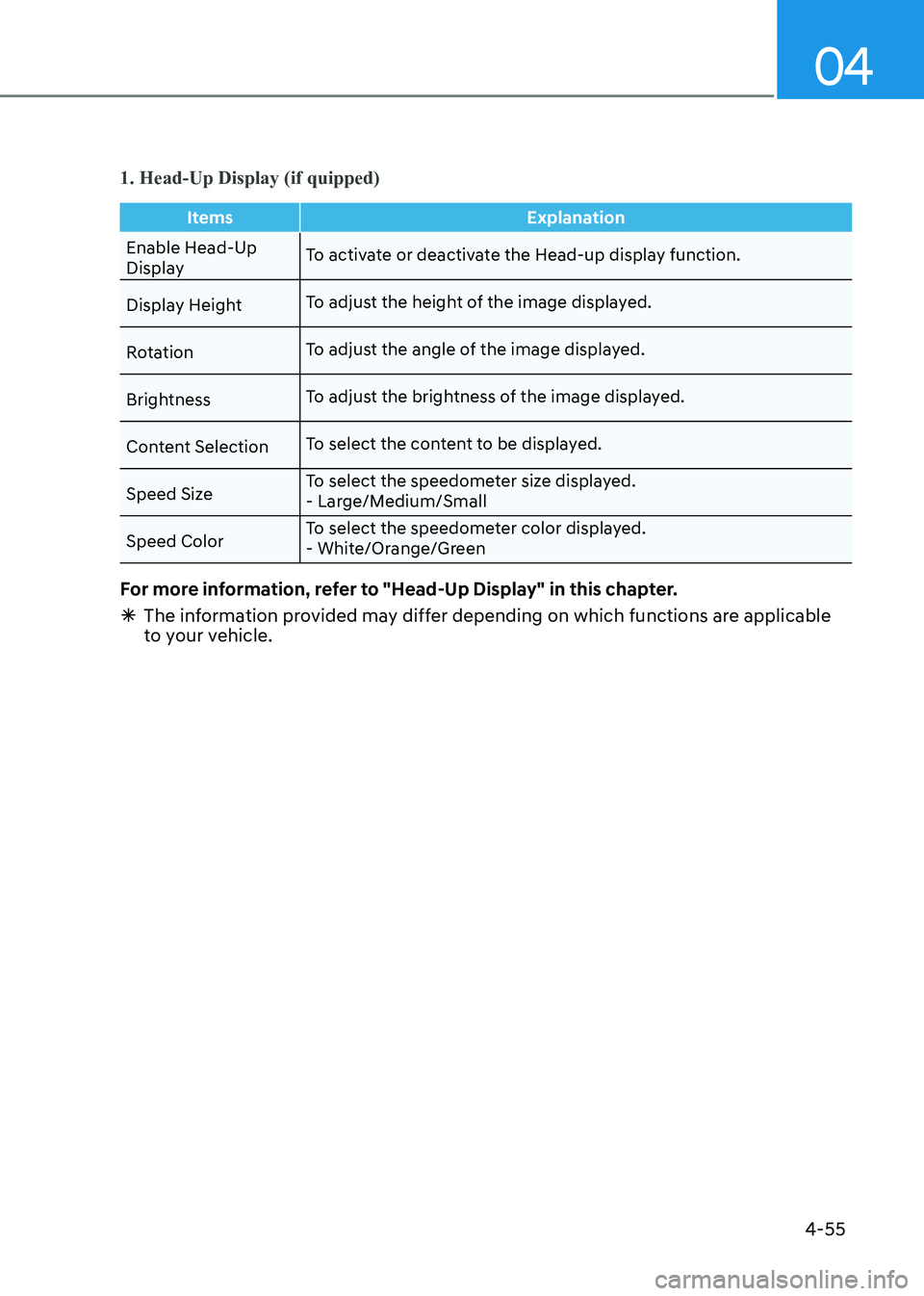
1. Head-Up Display (if quipped)
ItemsExplanation
Enable Head-Up
DisplayTo activate or deactivate the Head-up display function.
Display Height To adjust the height of the image displayed.
Rotation To adjust the angle of the image displayed.
Brightness To adjust the brightness of the image displayed.
Content Selection To select the content to be displayed.
Speed Size To select the speedometer size displayed.
- Large/Medium/Small
Speed Color To select the speedometer color displayed.
- White/Orange/Green
For more information, refer to "Head-Up Display" in this chapter.
à The information provided may differ depending on which functions are applicable
to your vehicle.
Page 144 of 555
Instrument Cluster
4-58
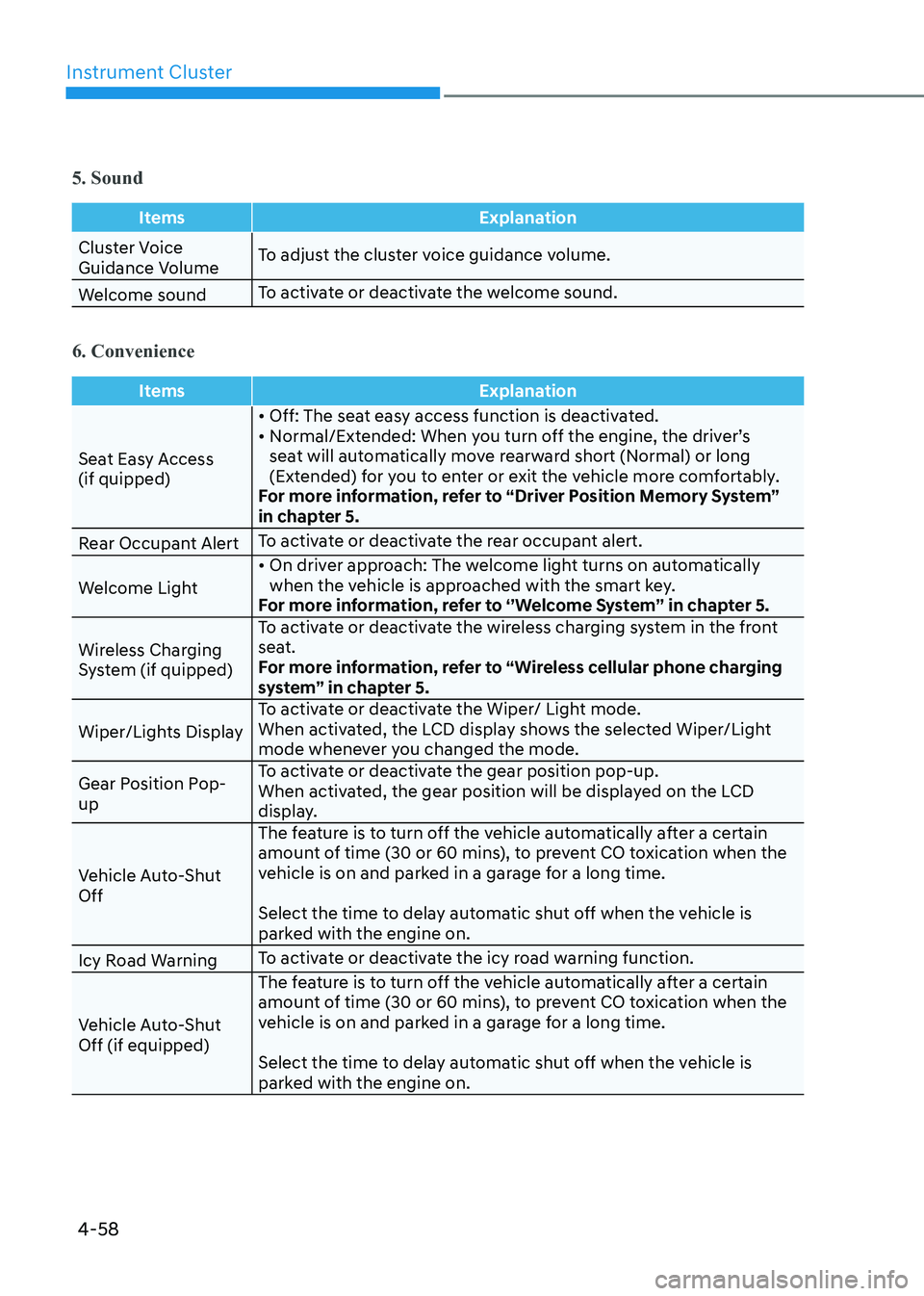
5. Sound
ItemsExplanation
Cluster Voice
Guidance VolumeTo adjust the cluster voice guidance volume.
Welcome sound To activate or deactivate the welcome sound.
6. Convenience
Items
Explanation
Seat Easy Access (if quipped)• Off: The seat easy access function is deactivated.
• Normal/Extended: When you turn off the engine, the driver’s
seat will automatically move rearward short (Normal) or long
(Extended) for you to enter or exit the vehicle more comfortably.
For more information, refer to “Driver Position Memory System”
in chapter 5.
Rear Occupant Alert To activate or deactivate the rear occupant alert.
Welcome Light • On driver approach: The welcome light turns on automatically
when the vehicle is approached with the smart key.
For more information, refer to ‘’Welcome System’’ in chapter 5.
Wireless Charging
System (if quipped) To activate or deactivate the wireless charging system in the front
seat.
For more information, refer to “Wireless cellular phone charging
system” in chapter 5.
Wiper/Lights Display To activate or deactivate the Wiper/ Light mode.
When activated, the LCD display shows the selected Wiper/Light
mode whenever you changed the mode.
Gear Position Pop-up To activate or deactivate the gear position pop-up.
When activated, the gear position will be displayed on the LCD
display.
Vehicle Auto-Shut Off The feature is to turn off the vehicle automatically after a certain
amount of time (30 or 60 mins), to prevent CO toxication when the
vehicle is on and parked in a garage for a long time.
Select the time to delay automatic shut off when the vehicle is
parked with the engine on.
Icy Road Warning To activate or deactivate the icy road warning function.
Vehicle Auto-Shut Off (if equipped) The feature is to turn off the vehicle automatically after a certain
amount of time (30 or 60 mins), to prevent CO toxication when the
vehicle is on and parked in a garage for a long time.
Select the time to delay automatic shut off when the vehicle is
parked with the engine on.
Page 145 of 555
04
4-59
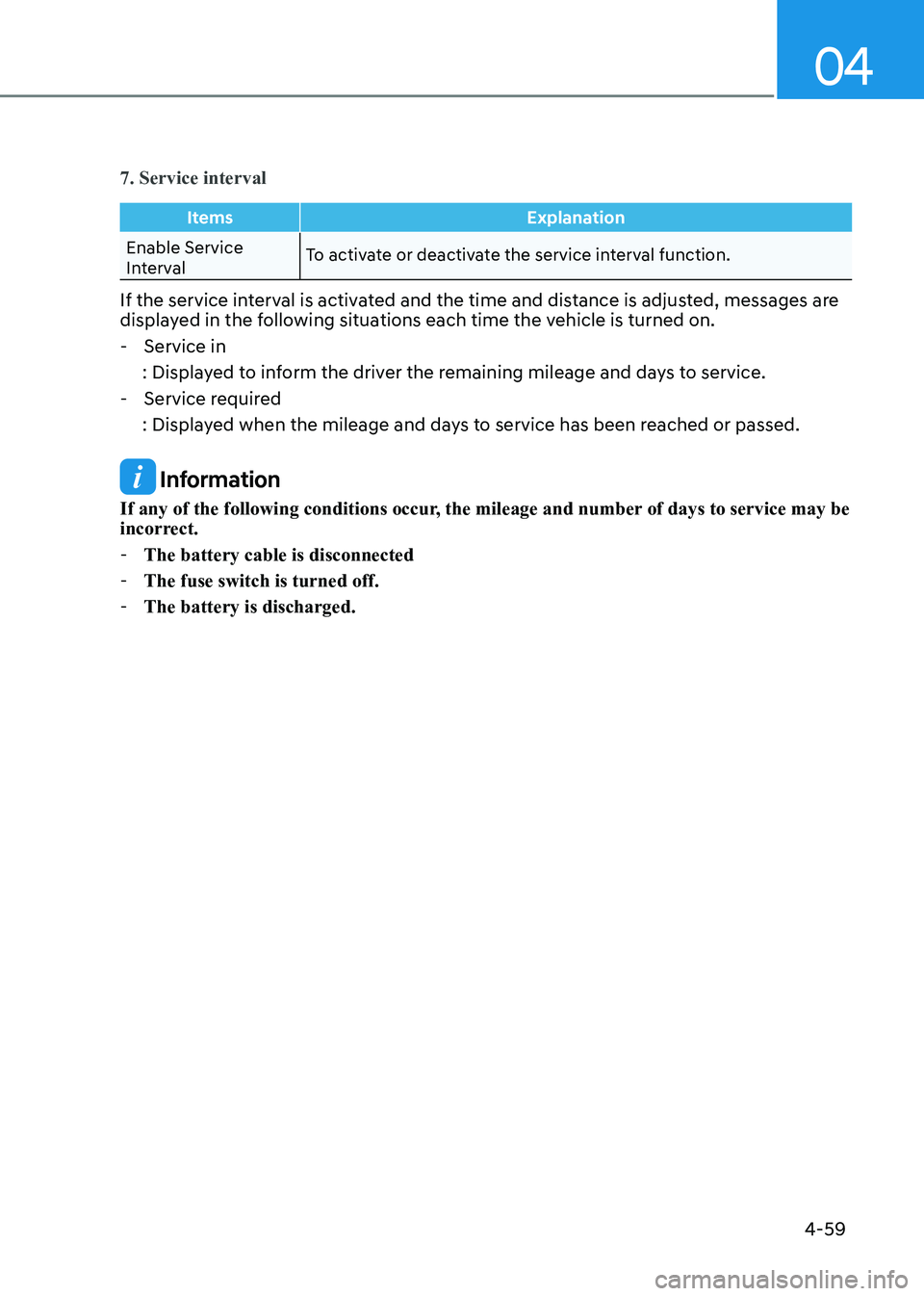
7. Service interval
ItemsExplanation
Enable Service
IntervalTo activate or deactivate the service interval function.
If the service interval is activated and the time and distance is adjusted, messages are
displayed in the following situations each time the vehicle is turned on. - Service in
: Displayed to inform the driver the remaining mileage and days to service.
- Service required
: Displayed when the mileage and days to service has been reached or passed.
Information
If any of the following conditions occur, the mileage and number of days to service may be
incorrect. - The battery cable is disconnected
- The fuse switch is turned off.
- The battery is discharged.
Page 148 of 555
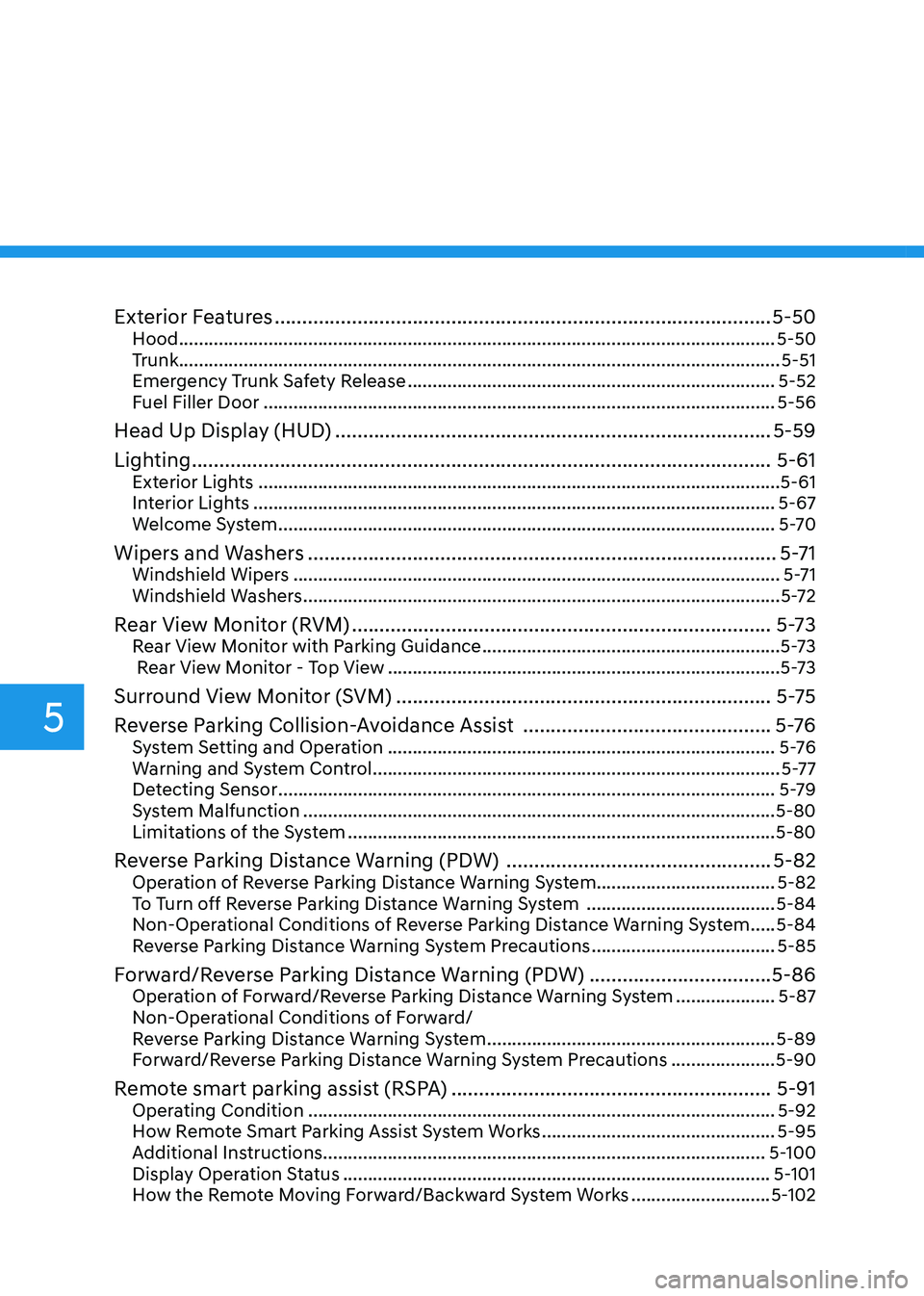
Exterior Features .......................................................................................... 5-50
Hood ........................................................................................................................ 5-50
Trunk ......................................................................................................................... 5-51
Emergency Trunk Safety Release .......................................................................... 5-52
Fuel Filler Door ....................................................................................................... 5-56
Head Up Display (HUD) ............................................................................... 5-59
Lighting ......................................................................................................... 5-61
Exterior Lights ......................................................................................................... 5-61
Interior Lights ......................................................................................................... 5-67
Welcome System .................................................................................................... 5-70
Wipers and Washers ..................................................................................... 5-71
Windshield Wipers .................................................................................................. 5-71
Windshield Washers ................................................................................................ 5-72
Rear View Monitor (RVM) ............................................................................ 5-73
Rear View Monitor with Parking Guidance ............................................................5-73
Rear View Monitor - Top View ............................................................................... 5-73
Surround View Monitor (SVM) .................................................................... 5-75
Reverse Parking Collision-Avoidance Assist .............................................5 -76
System Setting and Operation .............................................................................. 5 -76
Warning and System Control .................................................................................. 5-77
Detecting Sensor .................................................................................................... 5-79
System Malfunction ............................................................................................... 5-80
Limitations of the System ...................................................................................... 5-80
Reverse Parking Distance Warning (PDW) ................................................5-82
Operation of Reverse Parking Distance Warning System ....................................5-82
To Turn off Reverse Parking Distance Warning System ......................................5-84
Non-Operational Conditions of Reverse Parking Distance Warning System .....5-84
Reverse Parking Distance Warning System Precautions .....................................5-85
Forward/Reverse Parking Distance Warning (PDW) .................................5-86
Operation of Forward/Reverse Parking Distance Warning System ....................5-87
Non-Operational Conditions of Forward/
Reverse Parking Distance Warning System ..........................................................5-89
Forward/Reverse Parking Distance Warning System Precautions .....................5-90
Remote smart parking assist (RSPA) ..........................................................5-91
Operating Condition .............................................................................................. 5-92
How Remote Smart Parking Assist System Works ...............................................5-95
Additional Instructions ......................................................................................... 5-100
Display Operation Status ...................................................................................... 5-101
How the Remote Moving Forward/Backward System Works ............................5-102
5
Page 149 of 555
5
Manual Climate Control System .......................................................................... 5-105
Heating and Air Conditioning .............................................................................. 5-106
System Operation ................................................................................................... 5-111
System Maintenance ............................................................................................. 5-112
Automatic Climate Control System ........................................................... 5-114
Automatic Heating and Air Conditioning .............................................................5-115
Manual Temperature Control Mode ..................................................................... 5-116
System Operation .................................................................................................. 5-122
System Maintenance ............................................................................................ 5-123
Windshield Defrosting and Defogging ......................................................5-125
Manual Climate Control System........................................................................... 5-125
Automatic Climate Control System...................................................................... 5-126
Defogging Logic .................................................................................................... 5-127
Auto Defogging System (Only for Automatic Climate Control System) ............5-128
Defroster ................................................................................................................ 5-129
Climate Control Additional Features ........................................................5-130
Sunroof Inside Air Recirculation .......................................................................... 5-130
Automatic Ventilation .......................................................................................... 5-130
Storage Compartment ................................................................................ 5-131
Center Console Storage ......................................................................................... 5-131
Glove Box ................................................................................................................ 5-131
Interior Features .......................................................................................... 5-132
Cup Holder ............................................................................................................. 5-132
Sunvisor ................................................................................................................. 5-133
Power Outlet .......................................................................................................... 5-133
USB Charger .......................................................................................................... 5-134
Wireless Cellular Phone Charging System ..........................................................5-135
Clock ...................................................................................................................... 5-137
Clothes Hanger ...................................................................................................... 5-137
Floor Mat Anchor(s) ............................................................................................... 5-138
Infotainment System .................................................................................. 5-139
USB and iPod® Port ............................................................................................... 5-139
Antenna .................................................................................................................. 5-139
Steering Wheel Audio Control ............................................................................. 5-140
Bluetooth ® Wireless Technology Hands-Free .....................................................5-141
Audio (Display Audio) / Video / Navigation System (AVN) ................................5-141
5. Convenience Features
Page 150 of 555
Convenience Features
5-4
Remote Key (if equipped)
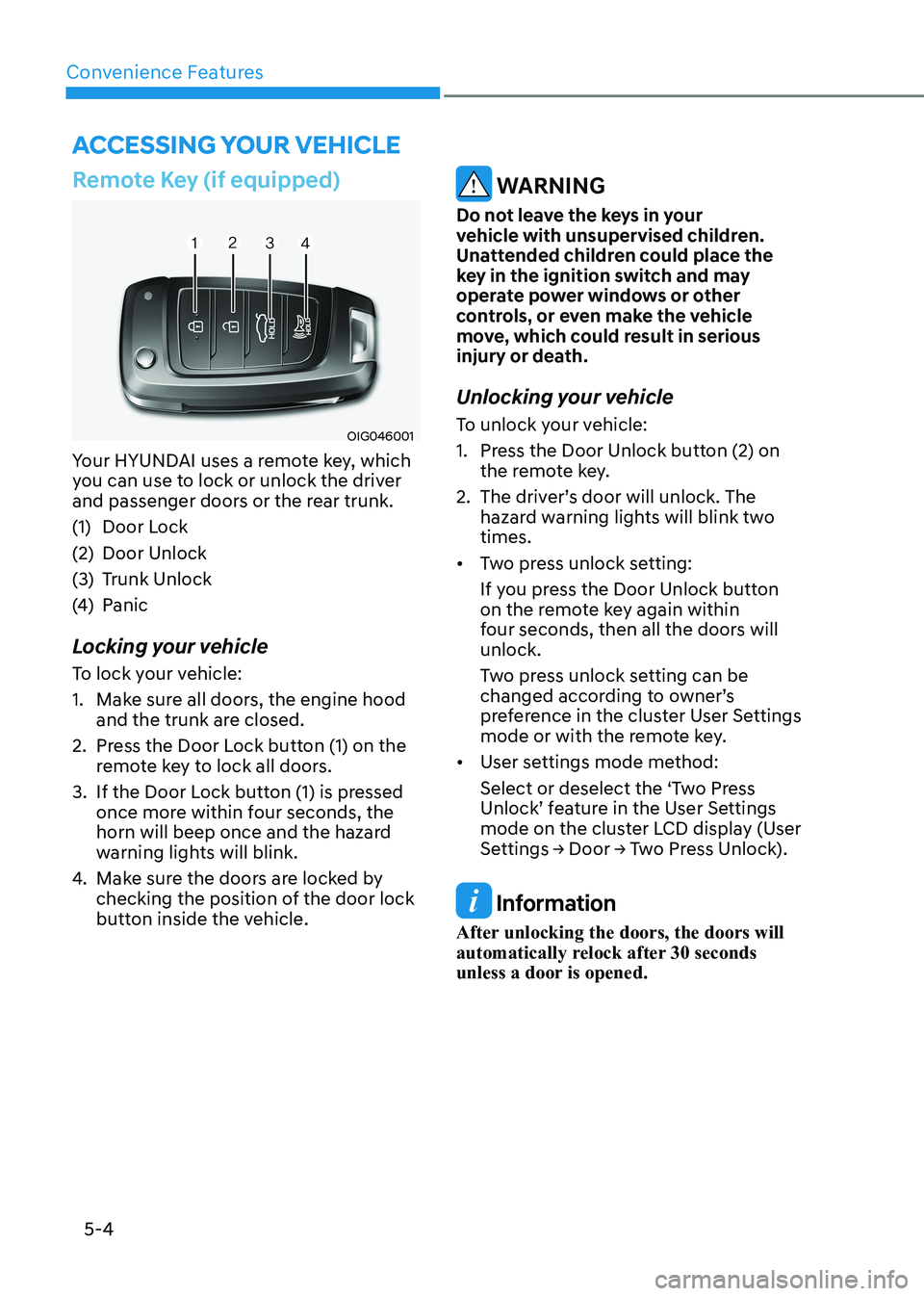
OIG046001
Your HYUNDAI uses a remote key, which
you can use to lock or unlock the driver
and passenger doors or the rear trunk.
(1) Door Lock
(2) Door Unlock
(3) Trunk Unlock
(4) Panic
Locking your vehicle
To lock your vehicle:
1. Make sure all doors, the engine hood and the trunk are closed.
2. Press the Door Lock button (1) on the remote key to lock all doors.
3. If the Door Lock button (1) is pressed once more within four seconds, the
horn will beep once and the hazard
warning lights will blink.
4. Make sure the doors are locked by
checking the position of the door lock
button inside the vehicle.
WARNING
Do not leave the keys in your
vehicle with unsupervised children.
Unattended children could place the
key in the ignition switch and may
operate power windows or other
controls, or even make the vehicle
move, which could result in serious
injury or death.
Unlocking your vehicle
To unlock your vehicle:
1. Press the Door Unlock button (2) on the remote key.
2. The driver’s door will unlock. The hazard warning lights will blink two times.
• Two press unlock setting:
If you press the Door Unlock button
on the remote key again within
four seconds, then all the doors will unlock.
Two press unlock setting can be
changed according to owner’s
preference in the cluster User Settings
mode or with the remote key.
• User settings mode method:
Select or deselect the ‘Two Press
Unlock’ feature in the User Settings
mode on the cluster LCD display (User
Settings → Door → Two Press Unlock).
Information
After unlocking the doors, the doors will
automatically relock after 30 seconds
unless a door is opened.
Accessing Your Vehicle
Page 156 of 555
Convenience Features
5-10
Two Press Unlock Feature
The priority for unlocking the driver door
only, or unlocking all the doors with
one press may be adjusted in the User
Settings mode in the cluster LCD display.
The Two Press Unlock feature, when
enabled, will require the user to press
the door unlock button once for driver
door only and twice for unlocking all the
doors.
Select or Deselect the Two Press Unlock
feature in the User Settings mode in the
cluster LCD display. The option can be
found under the following menu:
User Settings → Door → Two Press Unlock
The Two Press Unlock feature can also be
enabled or disabled by pressing the door
lock and unlock buttons simultaneously
on the Key FOB:
Press and hold both the Door Lock
button and the Door Unlock button
simultaneously until the hazard warning
lights blink.
This will enable or disable the Two Press
Unlock feature. Repeat this procedure to enable/disable the mode again.
Information
If you press the front passenger outside
door handle with the smart key in your possession, all the doors will unlock. Smart Key Reminder
If the smart key is in the vehicle and
any door is opened, the doors will not
lock even though the lock button of the
central door lock switch is pressed.
Trunk opening
To open:
1. Make sure you have the smart key
in your possession and either press
inside the trunk emblem or press the
Trunk Unlock button (3) on the smart
key for more than one second.
2. Once the trunk is opened, the hazard warning lights will blink two times.
• The trunk handle button will only
operate when the smart key is within
0.7~1 m (28~40 inches) from the outside door handle.
• Once the trunk is opened and then
closed, the trunk will automatically
re-lock and the hazard warning will blink once.
• If you leave the smart key and close
the trunk, the chime will sound for 5
seconds. In the case, the trunk cannot
be locked so open it with the trunk
handle button.
Panic button
Press and hold the Panic button (4) for
more than one second. The horn sounds
and hazard warning lights blink for about
30 seconds. To cancel the panic mode,
press any button on the Smart Key.
Page 166 of 555
Convenience Features
5-20
Automatic Door Lock and Unlock
Features
Your vehicle is equipped with features
that will automatically lock or unlock
your vehicle based on settings you select
in the LCD cluster display.
Auto LOCK - Enable on Speed
When this feature is set in the LCD
cluster display, all the doors will be
locked automatically when the vehicle
exceeds 15 km/h (9 mph).
Auto LOCK - Enable on Shift
When this feature is set in the LCD
cluster display, all the doors will be
locked automatically when the vehicle is
shifted out of P (Park) while the engine is running.
Auto UNLOCK - Enable on Shift
When this feature is set in the LCD
cluster display, all the doors will be
unlocked automatically when the vehicle
is shifted back into P (Park).
For more information on these features,
refer to the LCD Display section later in
this chapter.
Additional Unlock Safety Feature -
Air Bag Deployment
As an additional safety feature, all doors
will be automatically unlocked when an
impact causes the air bags to deploy.
Child-Protector Rear Door Locks
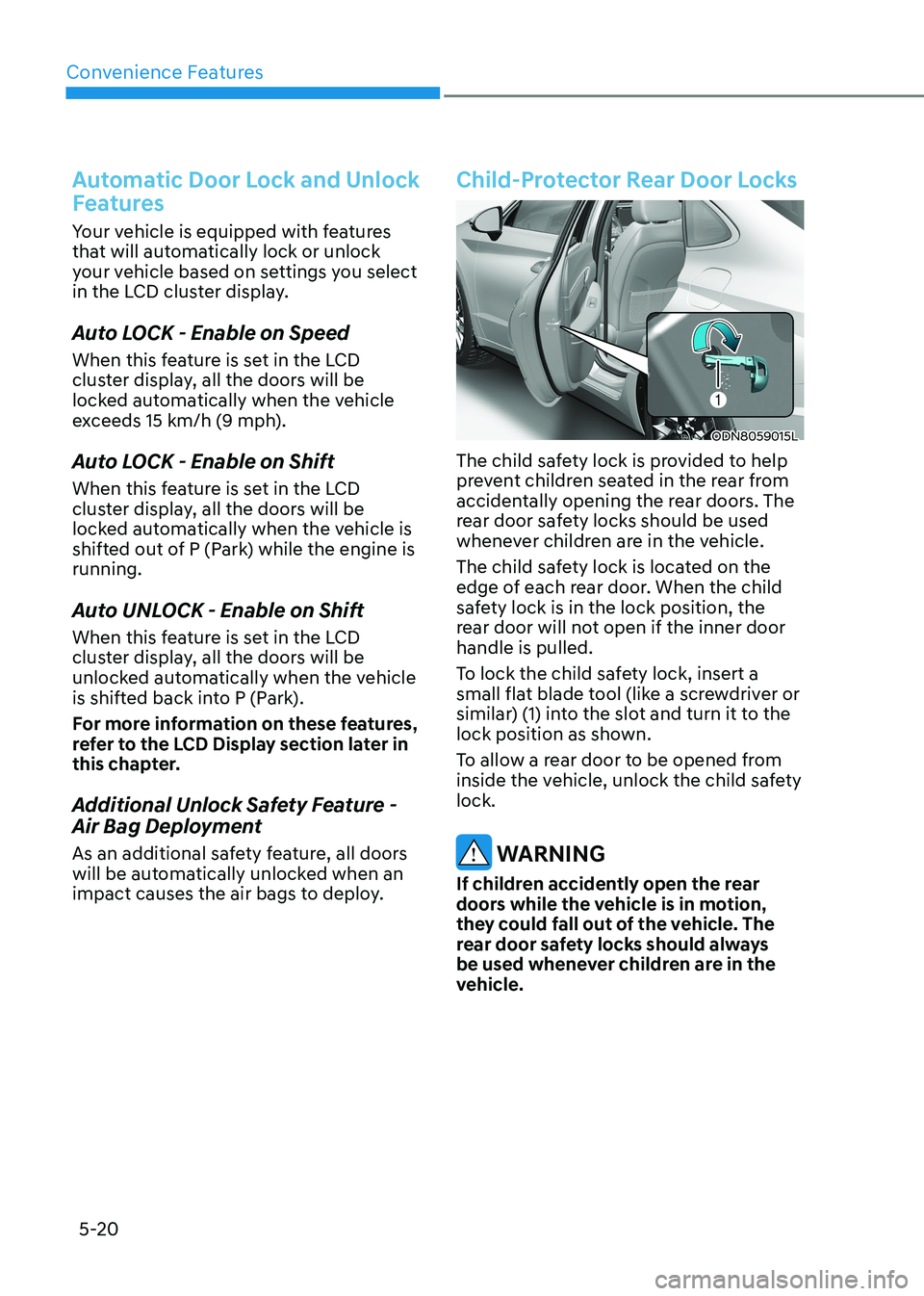
ODN8059015L
The child safety lock is provided to help
prevent children seated in the rear from
accidentally opening the rear doors. The
rear door safety locks should be used
whenever children are in the vehicle.
The child safety lock is located on the
edge of each rear door. When the child
safety lock is in the lock position, the
rear door will not open if the inner door handle is pulled.
To lock the child safety lock, insert a
small flat blade tool (like a screwdriver or
similar) (1) into the slot and turn it to the
lock position as shown.
To allow a rear door to be opened from
inside the vehicle, unlock the child safety lock.
WARNING
If children accidently open the rear
doors while the vehicle is in motion,
they could fall out of the vehicle. The
rear door safety locks should always
be used whenever children are in the
vehicle.
Page 168 of 555
Convenience Features
5-22
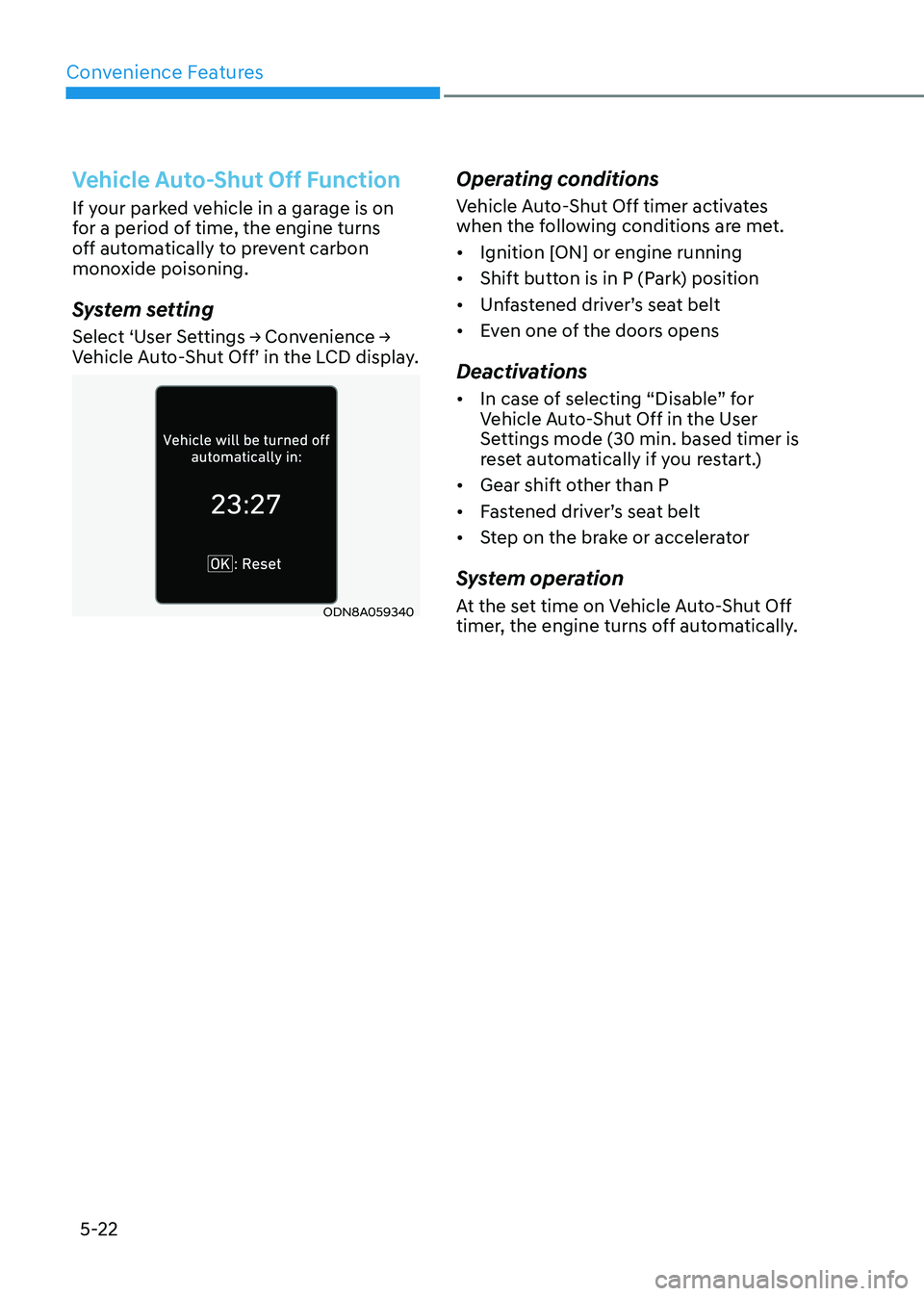
Vehicle Auto-Shut Off Function
If your parked vehicle in a garage is on
for a period of time, the engine turns
off automatically to prevent carbon
monoxide poisoning.
System setting
Select ‘User Settings → Convenience →
Vehicle Auto-Shut Off’ in the LCD display.
ODN8A059340Operating conditions
Vehicle Auto-Shut Off timer activates
when the following conditions are met. •
Ignition [ON] or engine running
• Shift button is in P (Park) position
• Unfastened driver’s seat belt
• Even one of the doors opens
Deactivations • In case of selecting “Disable” for
Vehicle Auto-Shut Off in the User
Settings mode (30 min. based timer is
reset automatically if you restart.)
• Gear shift other than P
• Fastened driver’s seat belt
• Step on the brake or accelerator
System operation
At the set time on Vehicle Auto-Shut Off
timer, the engine turns off automatically.
Page 170 of 555
Convenience Features
5-24
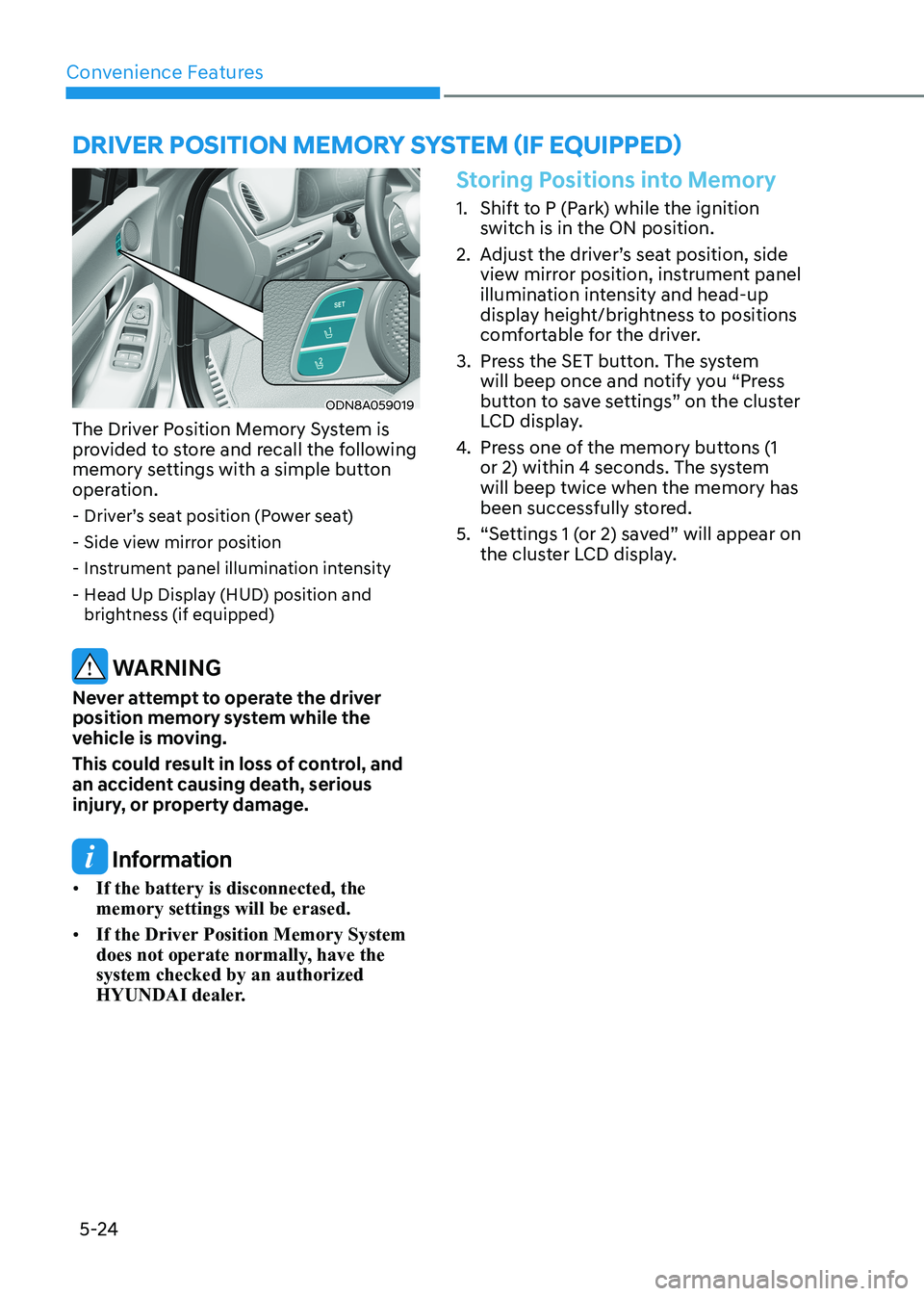
Driver poSiTion memory SySTem (if eQUippeD)
ODN8A059019
The Driver Position Memory System is
provided to store and recall the following
memory settings with a simple button
operation. - Driver’s seat position (Power seat)
- Side view mirror position
- Instrument panel illumination intensity
- Head Up Display (HUD) position and brightness (if equipped)
WARNING
Never attempt to operate the driver
position memory system while the
vehicle is moving.
This could result in loss of control, and
an accident causing death, serious
injury, or property damage.
Information
• If the battery is disconnected, the memory settings will be erased.
• If the Driver Position Memory System
does not operate normally, have the system checked by an authorized
HYUNDAI dealer.
Storing Positions into Memory
1. Shift to P (Park) while the ignition
switch is in the ON position.
2. Adjust the driver’s seat position, side view mirror position, instrument panel
illumination intensity and head-up
display height/brightness to positions
comfortable for the driver.
3. Press the SET button. The system will beep once and notify you “Press
button to save settings” on the cluster
LCD display.
4. Press one of the memory buttons (1
or 2) within 4 seconds. The system will beep twice when the memory has
been successfully stored.
5. “Settings 1 (or 2) saved” will appear on the cluster LCD display.