ignition HYUNDAI SONATA 2023 Manual Online
[x] Cancel search | Manufacturer: HYUNDAI, Model Year: 2023, Model line: SONATA, Model: HYUNDAI SONATA 2023Pages: 555, PDF Size: 42.72 MB
Page 337 of 555
While Driving
6-50
Forward Collision-Avoidance Assist
system is designed to detect the
vehicle, a pedestrian or cyclist ahead (if
equipped) in the roadway through front
radar signals and front view camera
recognition to warn the driver that a
collision is imminent, and if necessary,
apply emergency braking.
WARNING
Take the following precautions when
using Forward Collision-Avoidance
Assist system: • This system is only a supplemental
system and it is not intended to,
nor does it replace the need for
extreme care and attention of
the driver. The sensing range and
objects detectable by the sensors
are limited. Pay attention to the road
conditions at all times.
• Drive at posted speed limits and
accordance to road conditions.
• Always drive cautiously to prevent
unexpected and sudden situations
from occurring. FCA does not always
stop the vehicle completely.
System Setting and Activation
System setting
OTMA058186
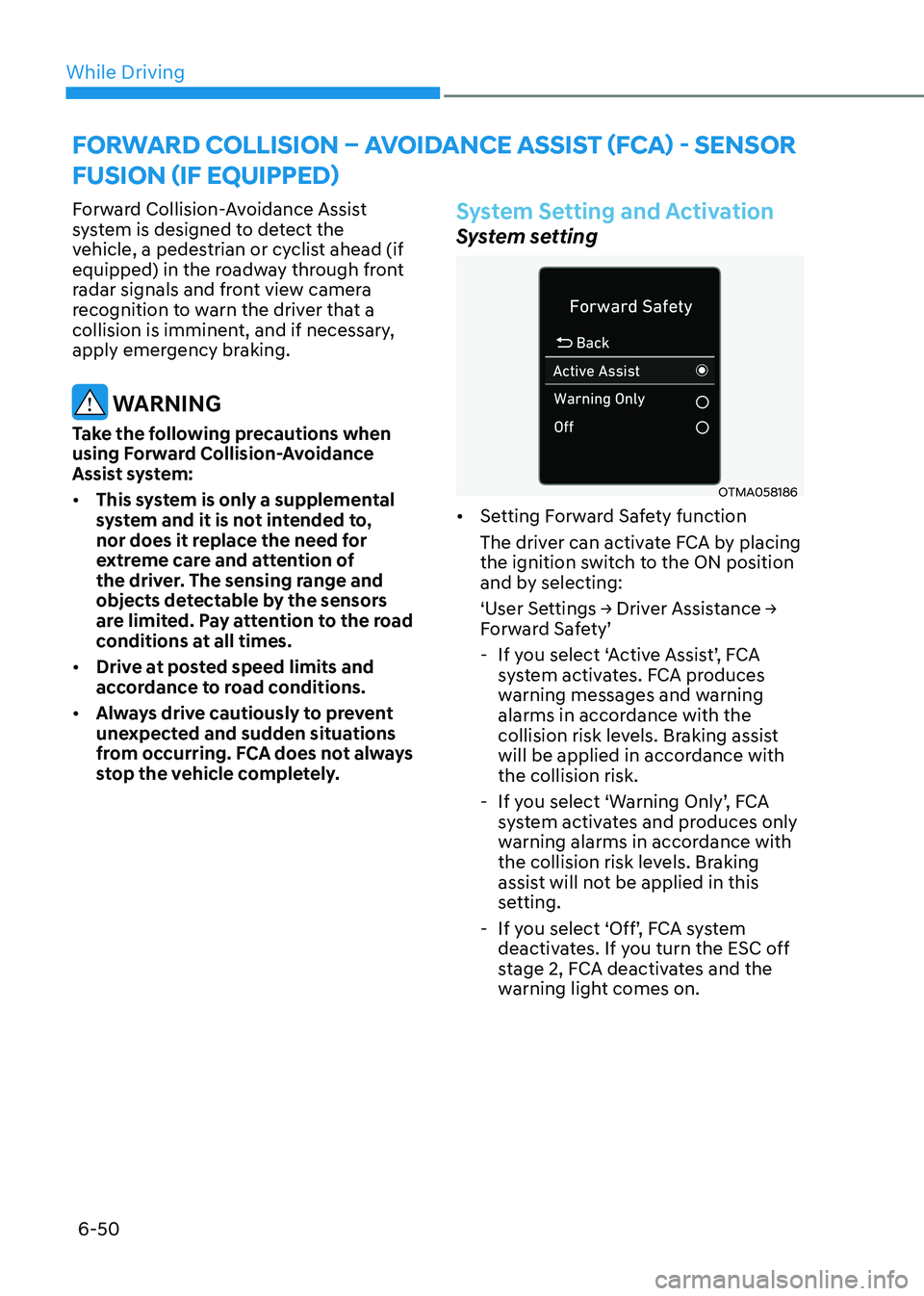
• Setting Forward Safety function
The driver can activate FCA by placing
the ignition switch to the ON position
and by selecting:
‘User Settings → Driver Assistance →
Forward Safety’
- If you select ‘Active Assist’, FCA system activates. FCA produces
warning messages and warning
alarms in accordance with the
collision risk levels. Braking assist
will be applied in accordance with the collision risk.
- If you select ‘Warning Only’, FCA system activates and produces only
warning alarms in accordance with
the collision risk levels. Braking
assist will not be applied in this
setting.
- If you select ‘Off’, FCA system deactivates. If you turn the ESC off
stage 2, FCA deactivates and the
warning light comes on.
forwarD collision – avoiDance assist (fca) - sensor
fusion (if equippeD)
Page 339 of 555
While Driving
6-52
Prerequisite for activation
FCA gets ready to be activated, when
‘Active Assist’ or ‘Warning Only’ under
Forward Safety is selected in the cluster
LCD display, and when the following
prerequisites are satisfied.
- ESC (Electronic Stability Control) is on.
- Vehicle speed is over 10 km/h (6 mph).
(FCA is only activated within a certain
speed range.)
- The system detects a pedestrian, cyclist or a vehicle in front, which may
collide with your vehicle. However,
FCA may not be activated or may only
sound a warning alarm depending on
the driving or vehicle conditions.
FCA may not operate properly according
to the frontal situation, condition of the
vehicle, the direction of pedestrian or
cyclist or speed. If you select "Warning
Only", only warnings occur.
WARNING
To avoid driver distractions, do not
attempt to set or cancel FCA while
driving the vehicle. Always completely
stop the vehicle at a safe place before
setting or canceling the system.
FCA automatically activates upon
placing the ignition switch to the ON
position. The driver can deactivate FCA
by canceling the system setting on the
cluster LCD display or infotainment
system display (if equipped).
FCA automatically deactivates upon
canceling ESC (Electronic Stability
Control). When ESC is canceled, FCA
cannot be activated in the LCD display
or infotainment system display (if
equipped). In this situation, the FCA
warning light will illuminate which is normal.
FCA Warning Message and Brake
Control
FCA produces warning messages,
warning alarms, and emergency braking
based on the level of risk of a frontal
collision, such as when a vehicle ahead
suddenly brakes, or the system detects
that a collision with a pedestrian or
cyclist is imminent.
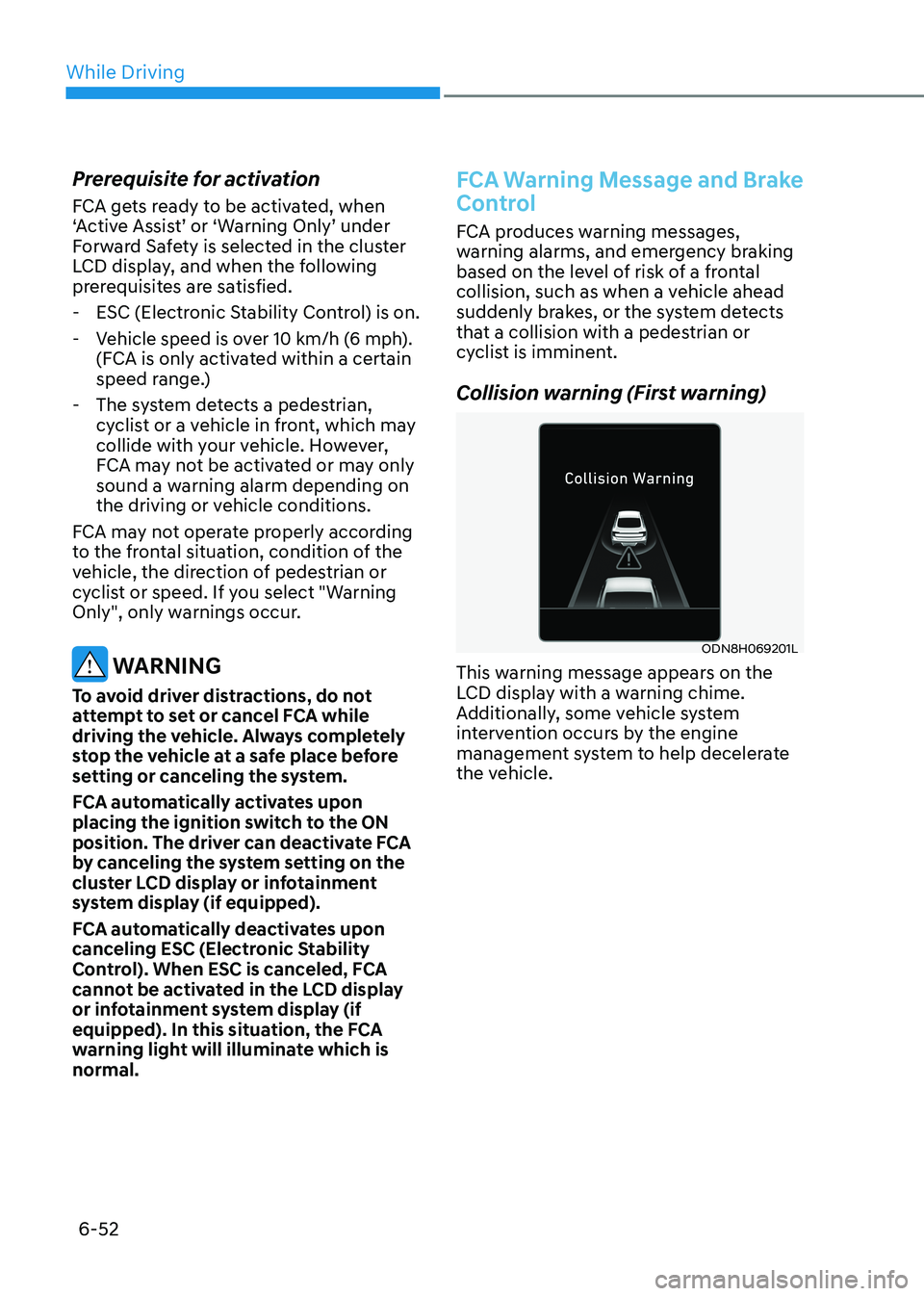
Collision warning (First warning)
ODN8H069201L
This warning message appears on the
LCD display with a warning chime.
Additionally, some vehicle system
intervention occurs by the engine
management system to help decelerate
the vehicle.
Page 358 of 555
06
6-71
•
Do not place objects on the
dashboard that reflects light such as
mirrors, white paper, etc. This may
prevent LKA system from functioning
properly.
• Always have your hands on the
steering wheel while LKA system is
activated. If you continue to drive
with your hands off the steering
wheel after the “Keep hands on
steering wheel” warning message
appears, the system will stop
controlling the steering wheel.
• The steering wheel is not
continuously controlled so if the
vehicle speed is at a higher rate
when leaving a lane the vehicle may
not be controlled by the system. The
driver must always follow the speed
limit when using the system.
• If you attach objects to the steering
wheel, the system may not assist
steering or the hands off alarm may
not work properly.
LKA Operation
ODN8069059
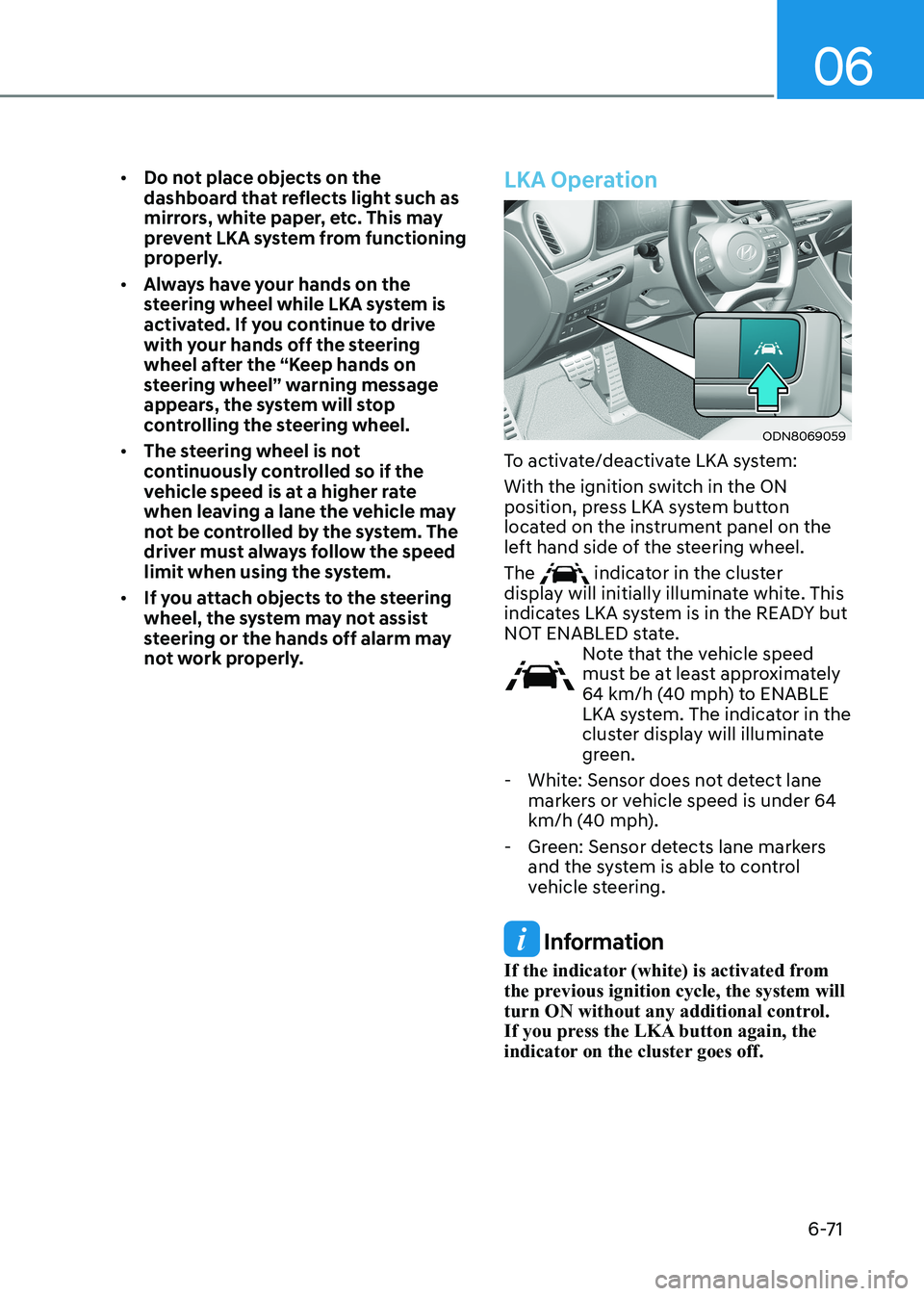
To activate/deactivate LKA system:
With the ignition switch in the ON
position, press LKA system button
located on the instrument panel on the
left hand side of the steering wheel. The
indicator in the cluster
display will initially illuminate white. This
indicates LKA system is in the READY but
NOT ENABLED state.
Note that the vehicle speed
must be at least approximately
64 km/h (40 mph) to ENABLE
LKA system. The indicator in the
cluster display will illuminate
green.
- White: Sensor does not detect lane markers or vehicle speed is under 64
km/h (40 mph).
- Green: Sensor detects lane markers and the system is able to control
vehicle steering.
Information
If the indicator (white) is activated from
the previous ignition cycle, the system will
turn ON without any additional control.
If you press the LKA button again, the
indicator on the cluster goes off.
Page 361 of 555
While Driving
6 -74
OOSH069085L
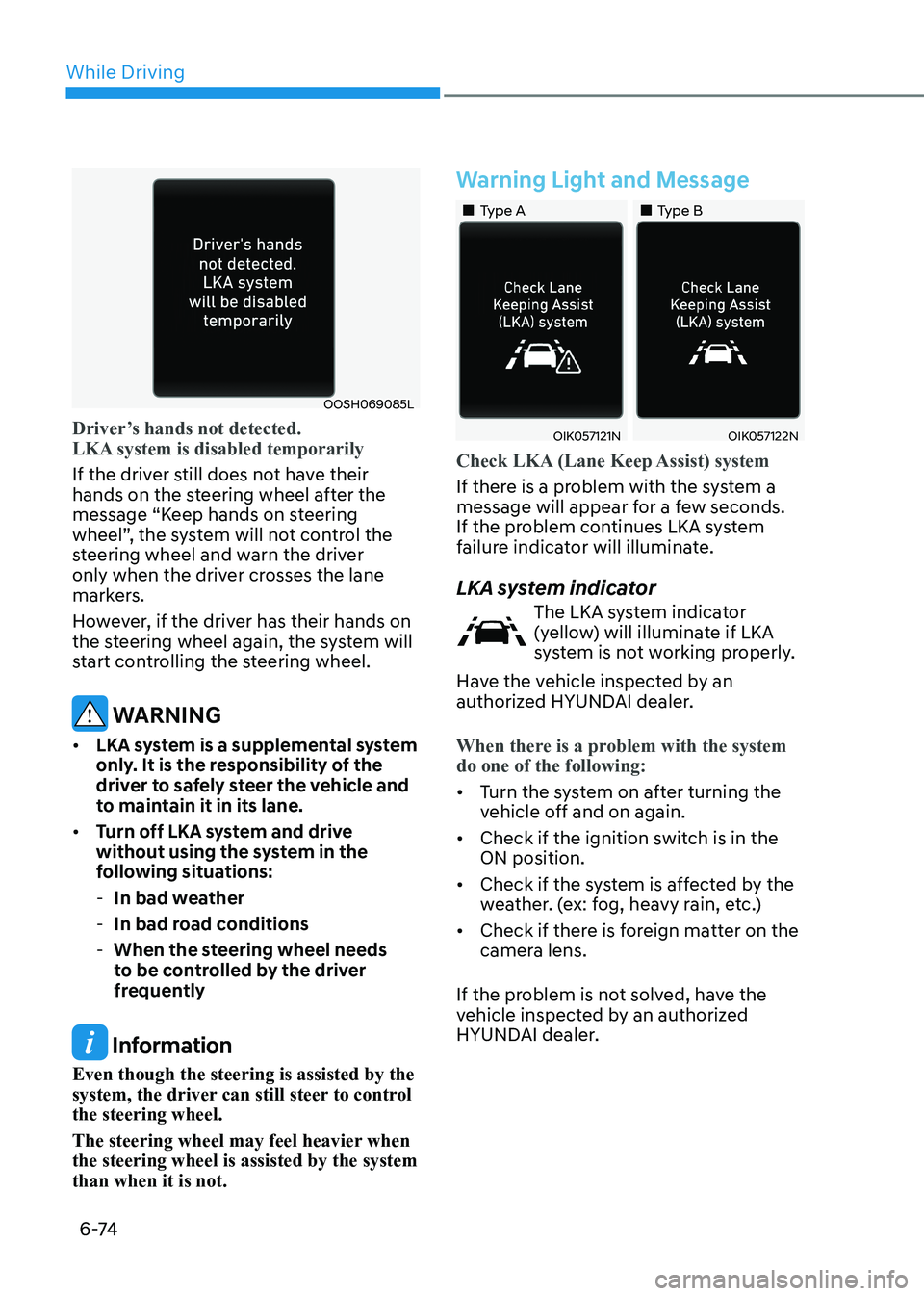
Driver’s hands not detected.
LKA system is disabled temporarily
If the driver still does not have their
hands on the steering wheel after the
message “Keep hands on steering
wheel”, the system will not control the
steering wheel and warn the driver
only when the driver crosses the lane
markers.
However, if the driver has their hands on
the steering wheel again, the system will
start controlling the steering wheel.
WARNING
• LKA system is a supplemental system
only. It is the responsibility of the
driver to safely steer the vehicle and
to maintain it in its lane.
• Turn off LKA system and drive
without using the system in the
following situations:
- In bad weather
- In bad road conditions
- When the steering wheel needs
to be controlled by the driver
frequently
Information
Even though the steering is assisted by the
system, the driver can still steer to control the steering wheel.
The steering wheel may feel heavier when the steering wheel is assisted by the system than when it is not.
Warning Light and Message
„„Type A „„Type B
OIK057121NOIK057122N
Check LKA (Lane Keep Assist) system
If there is a problem with the system a
message will appear for a few seconds.
If the problem continues LKA system
failure indicator will illuminate.
LKA system indicator
The LKA system indicator
(yellow) will illuminate if LKA
system is not working properly.
Have the vehicle inspected by an
authorized HYUNDAI dealer.
When there is a problem with the system do one of the following:
• Turn the system on after turning the
vehicle off and on again.
• Check if the ignition switch is in the ON position.
• Check if the system is affected by the
weather. (ex: fog, heavy rain, etc.)
• Check if there is foreign matter on the
camera lens.
If the problem is not solved, have the
vehicle inspected by an authorized
HYUNDAI dealer.
Page 365 of 555
While Driving
6-78
Blind-Spot Collision-Avoidance Assist
system may activate the Electronic
Stability Control (ESC) in accordance with a colliding possibility with an
approaching vehicle while changing
lanes. It is to lower the colliding risk or
help mitigate the colliding damage.
WARNING
• Always be aware of road conditions
while driving and be alert for
unexpected situations even though
the Blind-Spot Collision Warning
system and Blind-Spot Collision-
Avoidance Assist system are
operating.
• Blind-Spot Collision Warning system
and Blind-Spot Collision-Avoidance
Assist system are supplemental
systems to assist you. Always pay
attention, while driving, for your
safety. Do not entirely rely on the
systems or an accident may occur.
• Blind-Spot Collision Warning system
and Blind-Spot Collision-Avoidance
Assist system are not substitutes
for proper and safe driving. Always
drive safely and use caution when changing lanes or backing up the
vehicle.
Blind-Spot Collision Warning system
and Blind-Spot Collision-Avoidance
Assist system may not detect every
object alongside the vehicle.
System Setting and Activation
System setting • The driver can activate the system
by placing the ignition switch to the
ON position and by selecting ‘User
Settings → Driver Assistance → Blind-
Spot Safety’
- BCA and BCW turn on and get ready to be activated when ‘Active
assist’ is selected. Then, if a vehicle
approaches the driver’s blind spot
area a warning sounds or braking
power is applied.
- BCW turns on and gets ready to be activated when ‘Warning only’
is selected. Then, if a vehicle
approaches the driver’s blind spot
area a warning sounds. Braking
assist will not be applied in this
setting.
- If you select “Off”, BCW system deactivates.
• If the engine is turned off then on
again, the system maintains the
previous state.
• The driver can select the initial
warning activation time in the
User Settings in the LCD display
or infotainment system display by
selecting ‘User Settings → Driver
Assistance → Warning Timing’.
Page 383 of 555
While Driving
6-96
Driver Attention Warning system displays
the condition of the driver’s fatigue level
and inattentive driving practices.
System Setting and Operation
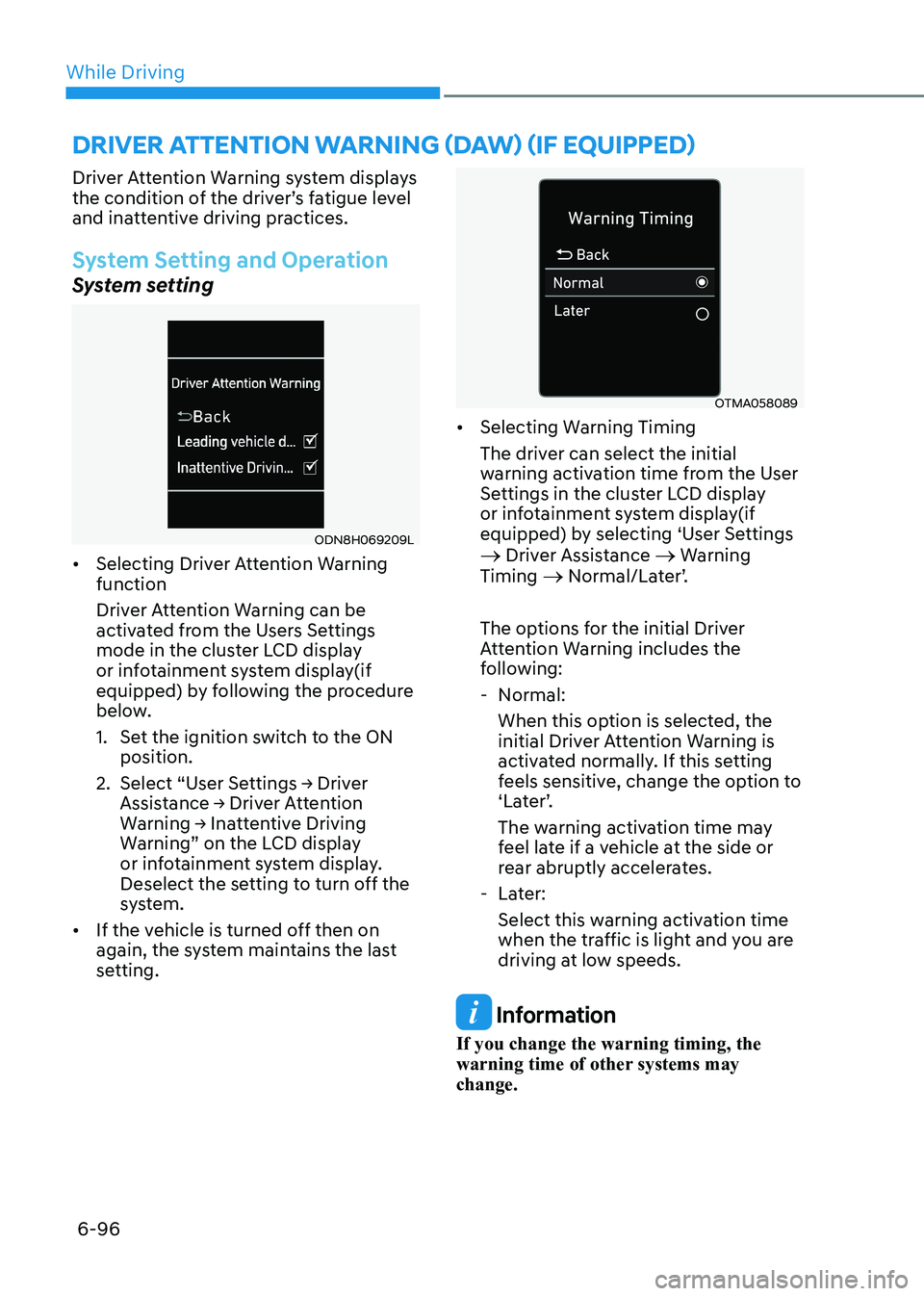
System setting
ODN8H069209L
• Selecting Driver Attention Warning function
Driver Attention Warning can be
activated from the Users Settings
mode in the cluster LCD display
or infotainment system display(if
equipped) by following the procedure
below.
1. Set the ignition switch to the ON
position.
2. Select “User Settings → Driver
Assistance → Driver Attention
Warning → Inattentive Driving
Warning” on the LCD display
or infotainment system display.
Deselect the setting to turn off the
system.
• If the vehicle is turned off then on
again, the system maintains the last
setting.
OTMA058089
• Selecting Warning Timing
The driver can select the initial
warning activation time from the User
Settings in the cluster LCD display
or infotainment system display(if
equipped) by selecting ‘User Settings
→ Driver Assistance → Warning
Timing → Normal/Later’.
The options for the initial Driver
Attention Warning includes the
following: - Normal: When this option is selected, the
initial Driver Attention Warning is
activated normally. If this setting
feels sensitive, change the option to
‘Later’.
The warning activation time may
feel late if a vehicle at the side or
rear abruptly accelerates.
- Later: Select this warning activation time
when the traffic is light and you are
driving at low speeds.
Information
If you change the warning timing, the
warning time of other systems may change.
Driver attention warning (Daw) (if equippeD)
Page 426 of 555
06
6-139
WARNING
• Always be aware of road conditions
while driving and be alert for
unexpected situations even though
Rear Cross-Traffic Collision Warning
system and Rear Cross-Traffic
Collision-Avoidance Assist system
are operating.
• Rear Cross-Traffic Collision Warning
system and Rear Cross-Traffic
Collision-Avoidance Assist system
are supplemental systems to assist
you. Do not entirely rely on the
systems. Always pay attention, while
driving, for your safety.
• Rear Cross-Traffic Collision Warning
system and Rear Cross-Traffic
Collision-Avoidance Assist system
are not substitutes for proper and
safe driving. Always drive safely and use caution when backing up the
vehicle.System Setting and Activation
System setting • The driver can activate the systems
by placing the ignition switch to the
ON position and by selecting “User
Settings → Driver Assistance → Parking
Safety → Rear Cross-Traffic Safety”.
RCCW and RCCA turn on and get
ready to be activated when ‘Rear
Cross-Traffic safety’ is selected.
• When the engine is turned off then on
again, the systems are always ready to
be activated.
• When the system is initially turned
on and when the engine is turned off
then on again, the warning light will
illuminate for 3 seconds on the side
view mirror.
The driver can select the initial warning
activation time in the User Settings in
the LCD display or infotainment system
display by selecting ‘User Settings →
Driver Assistance → Warning Timing’.
Page 441 of 555
While Driving
6-154
Winter Precautions
Use high quality ethylene glycol
coolant
Your vehicle is delivered with high
quality ethylene glycol coolant in the
cooling system. It is the only type of
coolant that should be used because it
helps prevent corrosion in the cooling
system, lubricates the water pump and
prevents freezing. Be sure to replace or
replenish your coolant in accordance
with the maintenance schedule in
chapter 8. Before winter, have your
coolant tested to assure that its freezing
point is sufficient for the temperatures
anticipated during the winter.
Change to "winter weight" oil if necessary
In some climates it is recommended that
a lower viscosity "winter weight" oil be
used during cold weather. See chapter 8
for recommendations. If you aren't sure
what weight oil you should use, consult
an authorized HYUNDAI dealer.
Check battery and cables
Winter puts additional burdens on the
battery system. Visually inspect the
battery and cables as described in
chapter 8. The level of charge in your
battery can be checked by an authorized
HYUNDAI dealer or a service station.Check spark plugs and ignition
system
Inspect your spark plugs as described in
chapter 8 and replace them if necessary. Also check all ignition wiring and
components to be sure they are not
cracked, worn or damaged in any way.
Use approved window washer anti-
freeze in system
To keep the water in the window washer
system from freezing, add an approved
window washer anti-freeze solution in
accordance with instructions on the
container. Window washer anti-freeze is
available from an authorized HYUNDAI
dealer and most auto parts outlets. Do
not use engine coolant or other types
of antifreeze as these may damage the
paint finish.
Do not let your parking brake freeze
Under some conditions your parking
brake can freeze in the engaged position.
This is most likely to happen when
there is an accumulation of snow or
ice around or near the rear brakes or
if the brakes are wet. If there is a risk
the parking brake may freeze, apply
it only temporarily while you put the
gear selector lever in P and block the
rear wheels so the car cannot roll. Then
release the parking brake.
Page 451 of 555
07
7-3
If you Have a Flat Tire While Driving
If a tire goes flat while you are driving: • Take your foot off the accelerator
pedal and let the vehicle slow down
while driving straight ahead. Do not
apply the brakes immediately or
attempt to pull off the road as this
may cause loss of vehicle control
resulting in an accident. When the
vehicle has slowed to such a speed
that it is safe to do so, brake carefully
and pull off the road. Drive off the
road as far as possible and park on
firm, level ground. If you are on a
divided highway, do not park in the
median area between the two traffic lanes.
• When the vehicle is stopped, press the
hazard warning flasher button, move
the shift button into P (Park), and
apply the parking brake, and place
the ignition switch in the LOCK/OFF position.
• Have all passengers get out of the
vehicle. Be sure they all get out on the
side of the vehicle that is away from
traffic.
• When changing a flat tire, follow the
instructions provided later in this
chapter.
If the engIne WIll not
s ta rt
If the Engine Doesn’t Turn Over
or Turns Over Slowly
• Be sure the shift button is in N
(Neutral) or P (Park). The engine starts
only when the shift button is in N
(Neutral) or P (Park).
• Check the battery connections to be
sure they are clean and tight.
• Turn on the interior light. If the light
dims or goes out when you operate
the starter, the battery is drained.
Do not push or pull the vehicle to start it.
This could cause damage to your vehicle.
See instructions for “Jump Starting”
provided in this chapter.
CAUTION
Push or pull starting the vehicle may
cause the catalytic converter to
overload which can lead to damage to
the emission control system.
If the Engine Turns Over
Normally but Doesn’t Start
Check the fuel level and add fuel if
necessary.
If the engine still does not start, have
your vehicle checked by an authorized
HYUNDAI dealer.
Page 452 of 555
Emergency Situations
7-4
Jump starting can be dangerous if done
incorrectly. Follow the jump starting
procedure in this section to avoid serious
injury or damage to your vehicle. If in
doubt about how to properly jump start
your vehicle, we strongly recommend
that you have a service technician or
towing service do it for you.
WARNING
To prevent SERIOUS INJURY or DEATH
to you or bystanders, always follow
these precautions when working near
or handling the battery:
Always read and follow
instructions carefully when
handling a battery.
Wear eye protection designed
to protect the eyes from acid splashes.
Keep all flames, sparks, or
smoking materials away from
the battery.
Hydrogen is always present
in battery cells, is highly
combustible, and may explode
if ignited.
Keep batteries out of reach of
children.
Batteries contain sulfuric acid
which is highly corrosive. Do
not allow acid to contact your
eyes, skin or clothing.
If acid gets into your eyes, flush your
eyes with clean water for at least 15
minutes and get immediate medical
attention. If acid gets on your skin,
thoroughly wash the area. If you feel
pain or a burning sensation, get medical
attention immediately. • When lifting a plastic-cased battery,
excessive pressure on the case may
cause battery acid to leak. Lift with a
battery carrier or with your hands on
opposite corners.
• Do not attempt to jump start your
vehicle if your battery is frozen.
• NEVER attempt to recharge the
battery when the vehicle’s battery
cables are connected to the battery.
• The electrical ignition system works
with high voltage. NEVER touch
these components with the engine
running or when the ignition switch is in the ON position.
Information
An inappropriately disposed battery can be harmful to
the environment and human health. Dispose of the battery
according to your local law(s) or
regulations.
NOTICE
To prevent damage to your vehicle: • Only use a 12-volt power supply
(battery or jumper system) to jump
start your vehicle.
• Do not attempt to jump start your
vehicle by push-starting.
Jump startIng