trip computer HYUNDAI SONATA 2023 Owners Manual
[x] Cancel search | Manufacturer: HYUNDAI, Model Year: 2023, Model line: SONATA, Model: HYUNDAI SONATA 2023Pages: 555, PDF Size: 42.72 MB
Page 87 of 555
4
Instrument Cluster ......................................................................................... 4-2
Instrument Cluster Control ...................................................................................... 4-4
Gauges and Meters .................................................................................................. 4-4
Transmission Shift Indicator .................................................................................... 4-9
Warning and Indicator Lights ................................................................................. 4-11
LCD Display Messages ............................................................................................ 4-19
LCD Display (Type A, B) ............................................................................... 4-22
LCD Display Control ............................................................................................... 4-22
LCD Display Modes ................................................................................................ 4-23
Trip Computer......................................................................................................... 4-34
LCD display (Type C) .................................................................................... 4-37
LCD Display Control ............................................................................................... 4-37
View Modes ............................................................................................................ 4-38
Utility View Mode ................................................................................................... 4-39
Option Menu ............................................................................................................ 4-41
User Settings Mode ................................................................................................ 4-42
LCD display (Type D) .................................................................................... 4-49
LCD Display Control ............................................................................................... 4-49
View Modes ........................................................................................................... 4-50
Utility View Mode ................................................................................................... 4-51
Option Menu .......................................................................................................... 4-53
User Settings Mode .............................................................................................. 4-54
4. Instrument Cluster
Page 88 of 555
4-2
Instrument Cluster
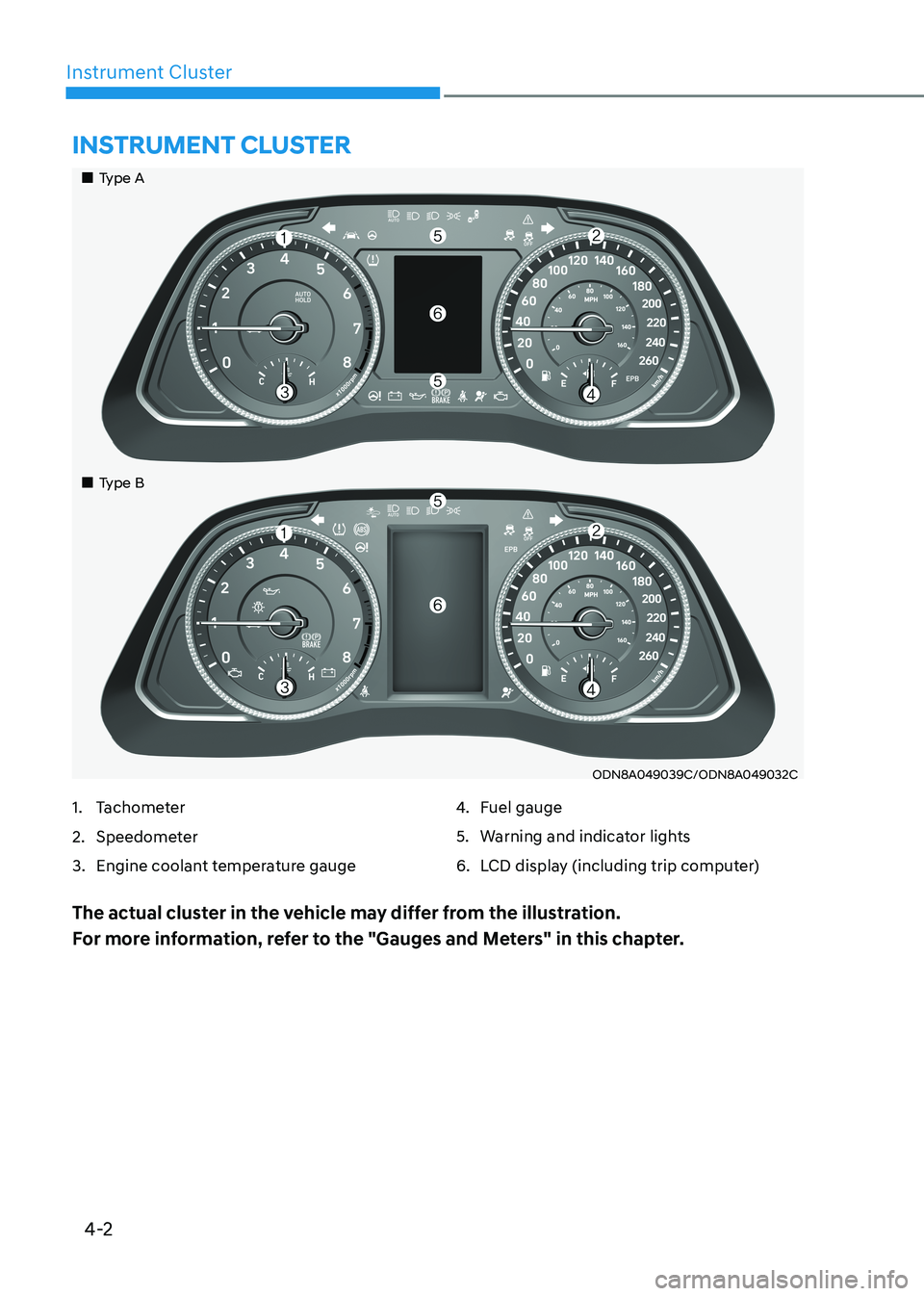
ODN8A049039C/ODN8A049032C
Instrument Cluster
1. Tachometer
2. Speedometer
3. Engine coolant temperature gauge4.
Fuel gauge
5. Warning and indicator lights
6. LCD display (including trip computer)
The actual cluster in the vehicle may differ from the illustration.
For more information, refer to the "Gauges and Meters" in this chapter.
„„Type A
„
„Type B
Page 89 of 555
4-3
04
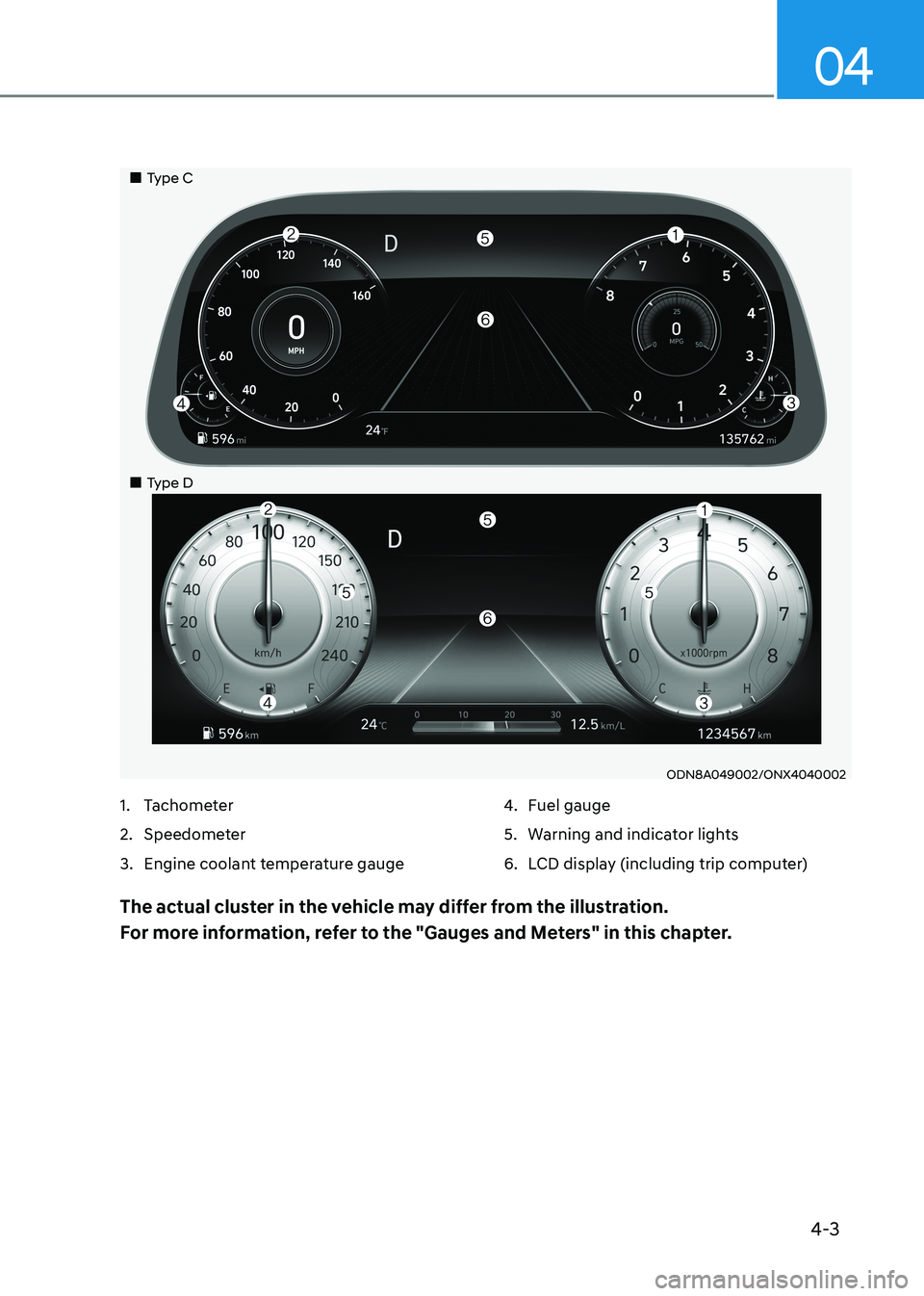
ODN8A049002/ONX4040002
1. Tachometer
2. Speedometer
3. Engine coolant temperature gauge 4.
Fuel gauge
5. Warning and indicator lights
6. LCD display (including trip computer)
The actual cluster in the vehicle may differ from the illustration.
For more information, refer to the "Gauges and Meters" in this chapter.
„„Type C
„
„Type D
Page 94 of 555
Instrument Cluster
4-8
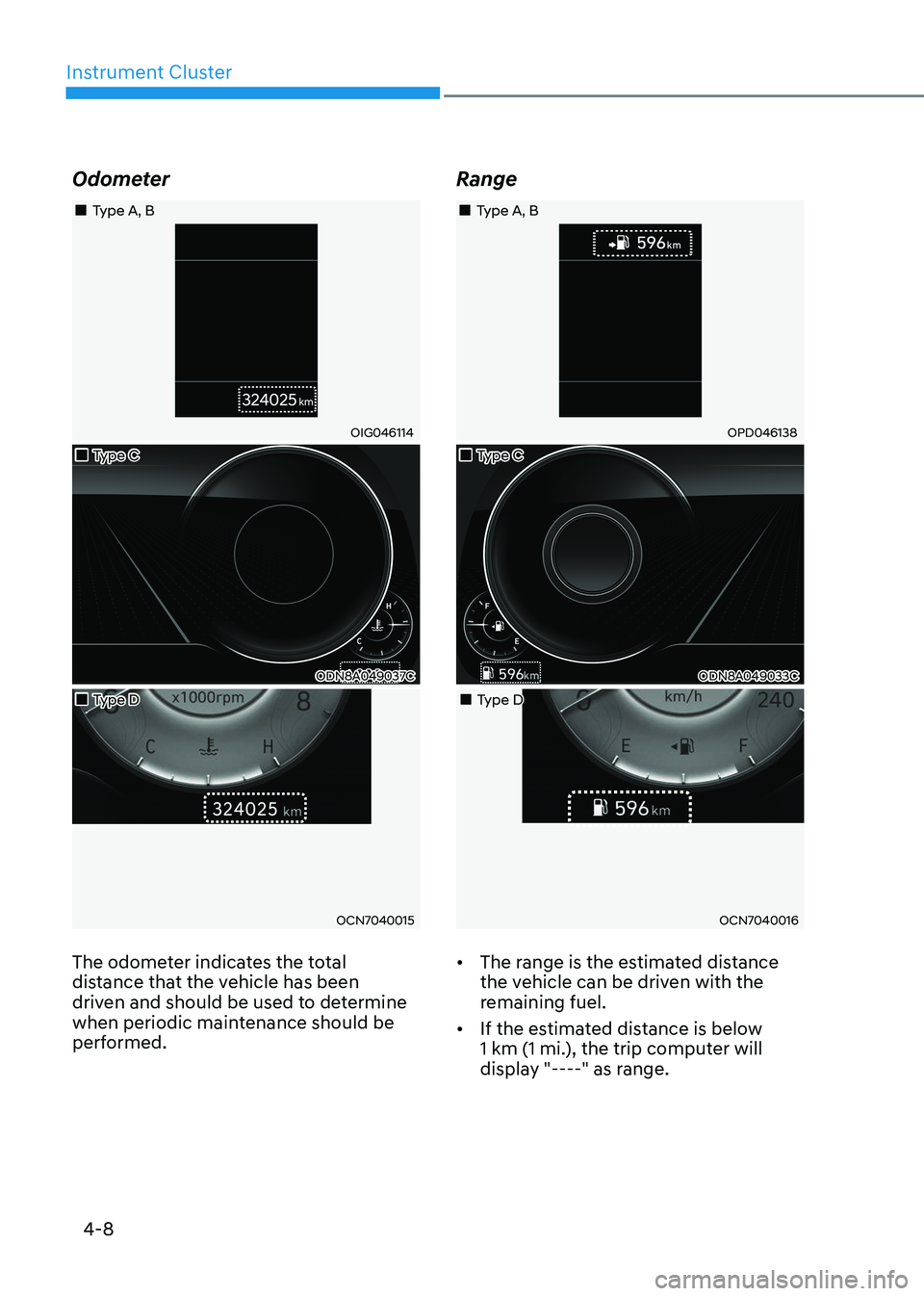
Odometer
„„Type A, B
OIG046114
„„Type C
ODN8A049037C
„„Type D
OCN7040015
The odometer indicates the total
distance that the vehicle has been
driven and should be used to determine
when periodic maintenance should be
performed. Range
„„Type A, B
OPD046138
„„Type C
ODN8A049033C
„„Type D
OCN7040016
• The range is the estimated distance
the vehicle can be driven with the
remaining fuel.
• If the estimated distance is below
1 km (1 mi.), the trip computer will
display "----" as range.
Page 95 of 555
04
4-9
Information
• If the vehicle is not on level ground or
the battery power has been interrupted, the range function may not operate
correctly.
• The range may differ from the actual driving distance as it is only an estimate
of the available driving range for the vehicle and driving conditions.
• The trip computer may not register additional fuel if less than 6 liters (1.6
gallon) of fuel are added to the vehicle.
• The range may vary significantly based on driving conditions, driving habits, and condition of the vehicle.
Transmission Shift Indicator (if equipped)
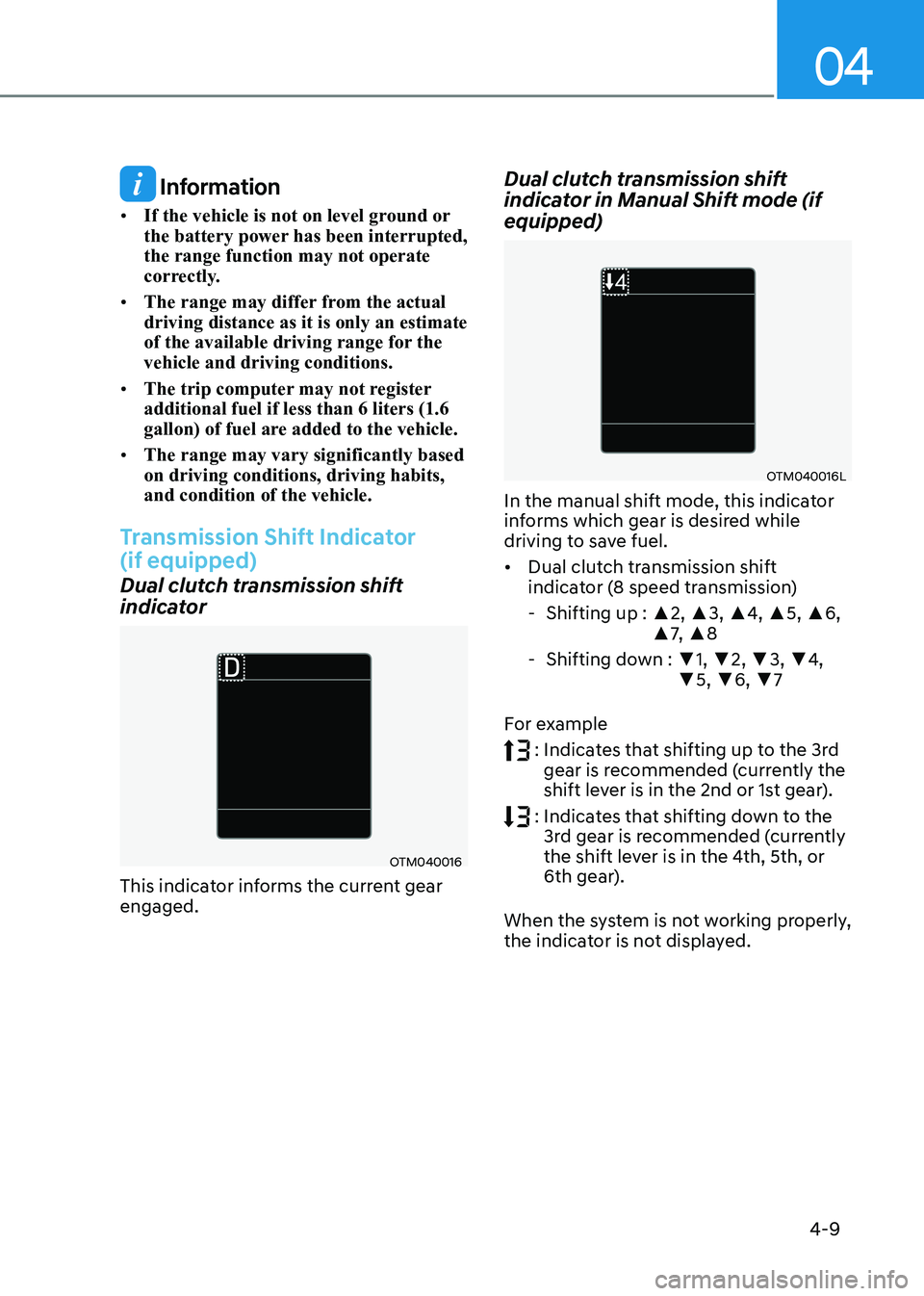
Dual clutch transmission shift
indicator
OTM040016
This indicator informs the current gear engaged. Dual clutch transmission shift
indicator in Manual Shift mode (if equipped)
OTM040016L
In the manual shift mode, this indicator
informs which gear is desired while
driving to save fuel. • Dual clutch transmission shift
indicator (8 speed transmission)
- Shifting up : ▲2, ▲3, ▲4, ▲5, ▲6,
▲ 7, ▲ 8
- Shifting down : ▼1, ▼ 2, ▼3, ▼4,
▼ 5, ▼6, ▼7
For example
: Indicates that shifting up to the 3rd
gear is recommended (currently the
shift lever is in the 2nd or 1st gear).
: Indicates that shifting down to the
3rd gear is recommended (currently
the shift lever is in the 4th, 5th, or
6th gear).
When the system is not working properly,
the indicator is not displayed.
Page 109 of 555
04
4-23
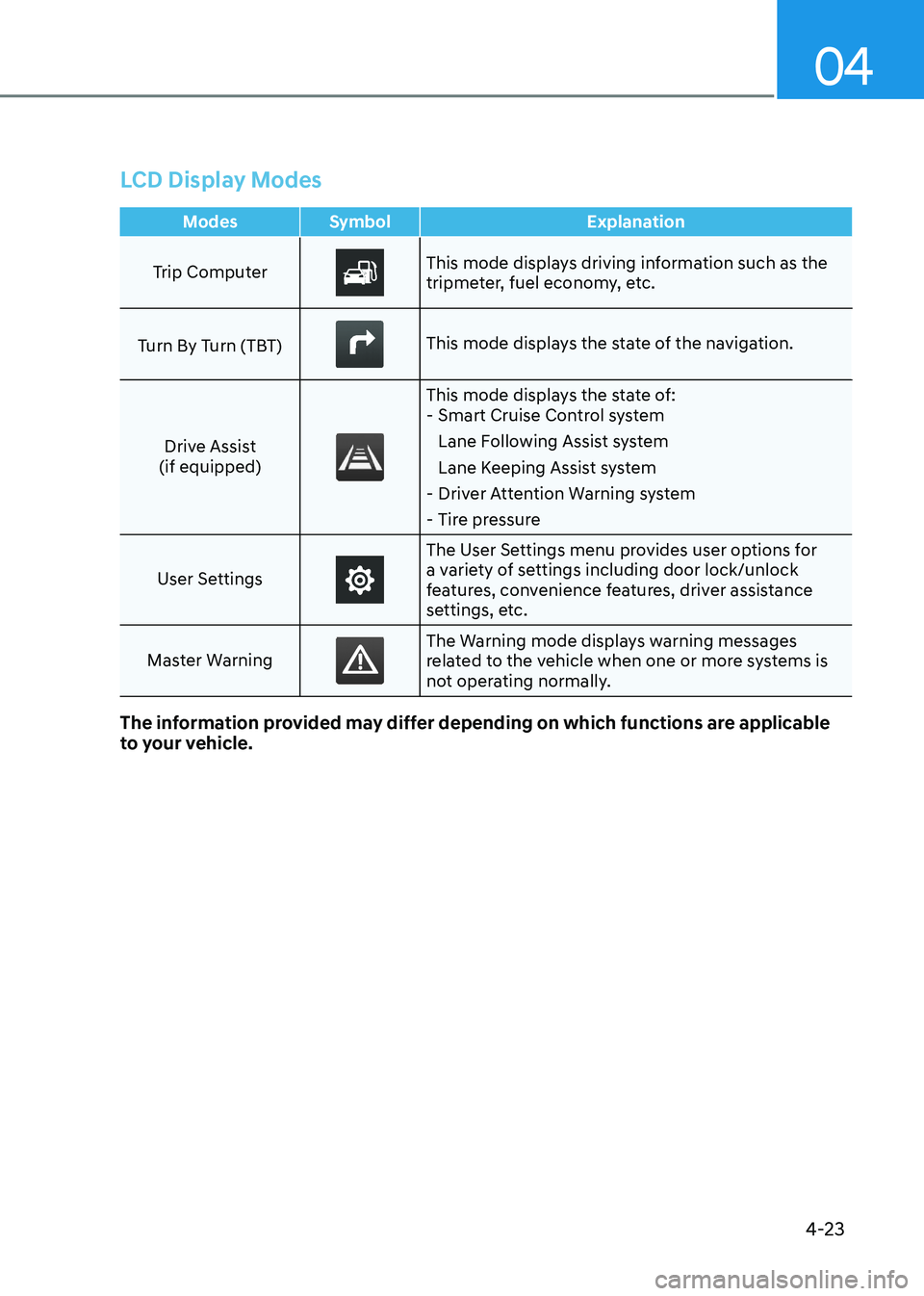
LCD Display Modes
Modes Symbol Explanation
Trip ComputerThis mode displays driving information such as the
tripmeter, fuel economy, etc.
Turn By Turn (TBT)
This mode displays the state of the navigation.
Drive Assist
(if equipped)
This mode displays the state of: - Smart Cruise Control system
Lane Following Assist system
Lane Keeping Assist system
- Driver Attention Warning system
- Tire pressure
User Settings
The User Settings menu provides user options for
a variety of settings including door lock/unlock
features, convenience features, driver assistance
settings, etc.
Master Warning
The Warning mode displays warning messages
related to the vehicle when one or more systems is
not operating normally.
The information provided may differ depending on which functions are applicable
to your vehicle.
Page 110 of 555
Instrument Cluster
4-24
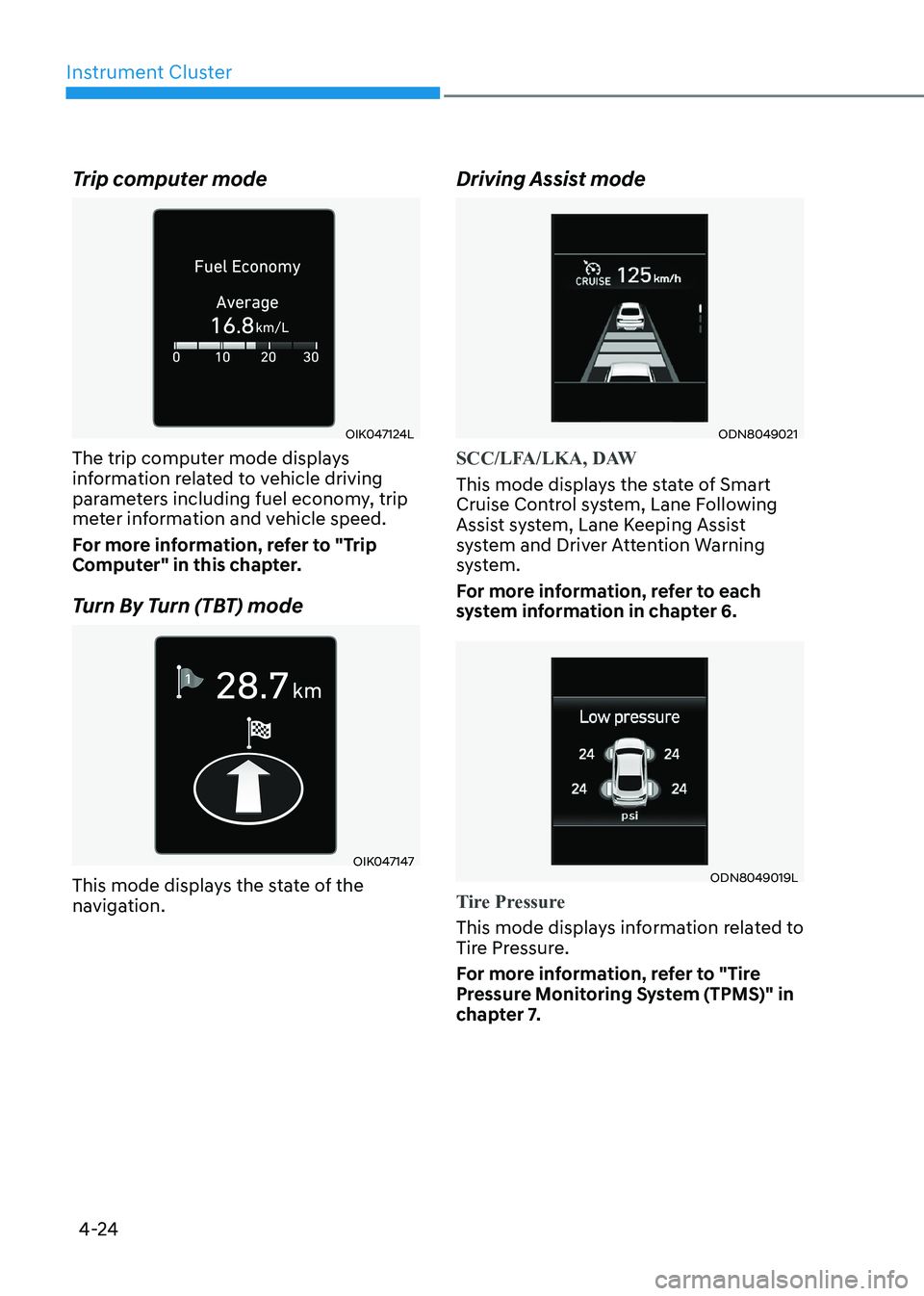
Trip computer mode
OIK047124L
The trip computer mode displays
information related to vehicle driving
parameters including fuel economy, trip
meter information and vehicle speed.
For more information, refer to "Trip
Computer" in this chapter.
Turn By Turn (TBT) mode
OIK047147
This mode displays the state of the
navigation. Driving Assist mode
ODN8049021
SCC/LFA/LKA, DAW
This mode displays the state of Smart
Cruise Control system, Lane Following
Assist system, Lane Keeping Assist
system and Driver Attention Warning
system.
For more information, refer to each
system information in chapter 6.
ODN8049019L
Tire Pressure
This mode displays information related to
Tire Pressure.
For more information, refer to "Tire
Pressure Monitoring System (TPMS)" in
chapter 7.
Page 119 of 555
04
4-33
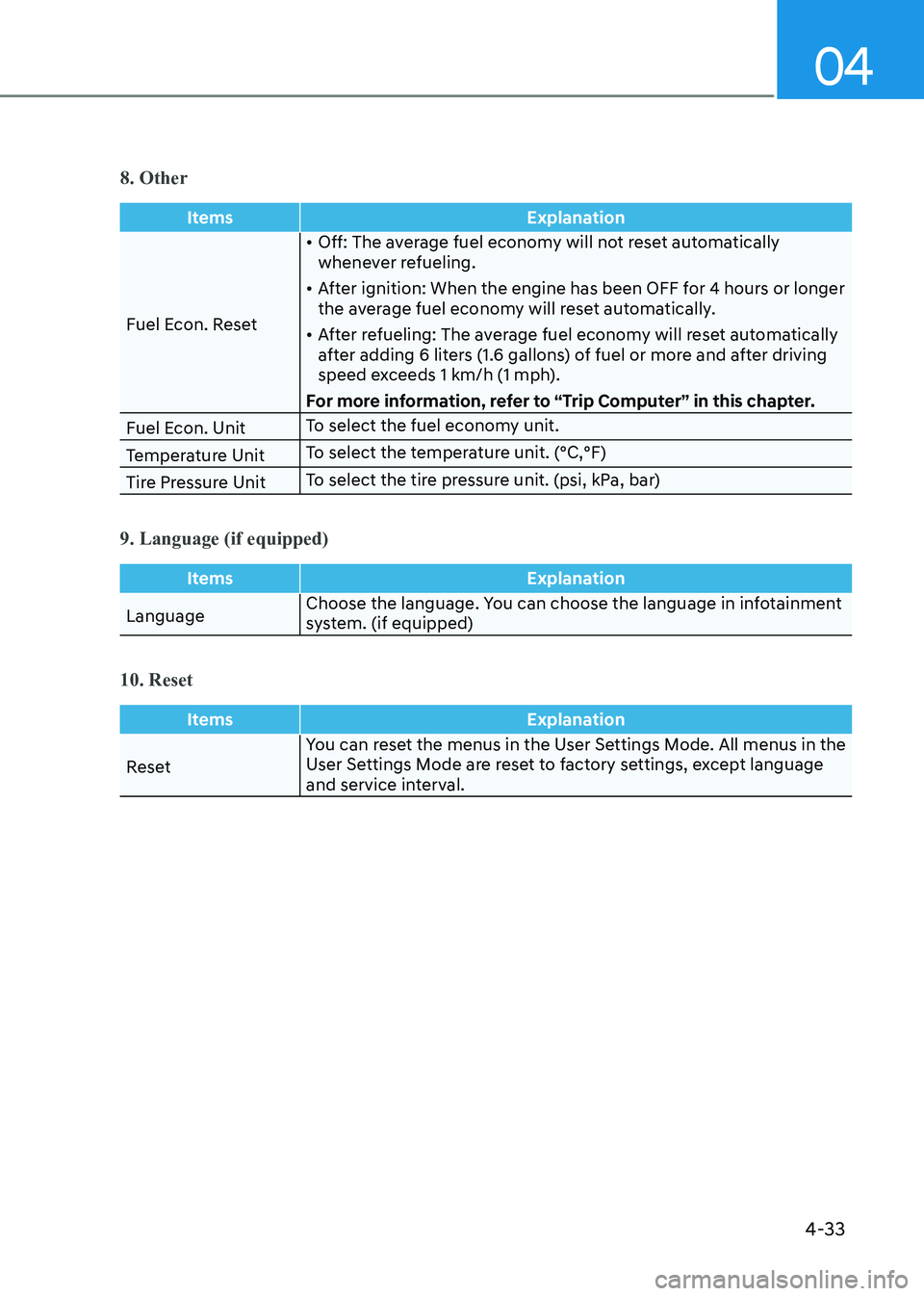
8. Other
ItemsExplanation
Fuel Econ. Reset•
Off: The average fuel economy will not reset automatically
whenever refueling.
• After ignition: When the engine has been OFF for 4 hours or longer
the average fuel economy will reset automatically.
• After refueling: The average fuel economy will reset automatically
after adding 6 liters (1.6 gallons) of fuel or more and after driving
speed exceeds 1 km/h (1 mph).
For more information, refer to “Trip Computer” in this chapter.
Fuel Econ. Unit To select the fuel economy unit.
Temperature Unit To select the temperature unit. (°C,°F)
Tire Pressure Unit To select the tire pressure unit. (psi, kPa, bar)
9. Language (if equipped)
Items
Explanation
LanguageChoose the language. You can choose the language in infotainment
system. (if equipped)
10. Reset
Items
Explanation
ResetYou can reset the menus in the User Settings Mode. All menus in the
User Settings Mode are reset to factory settings, except language
and service interval.
Page 120 of 555
Instrument Cluster
4-34
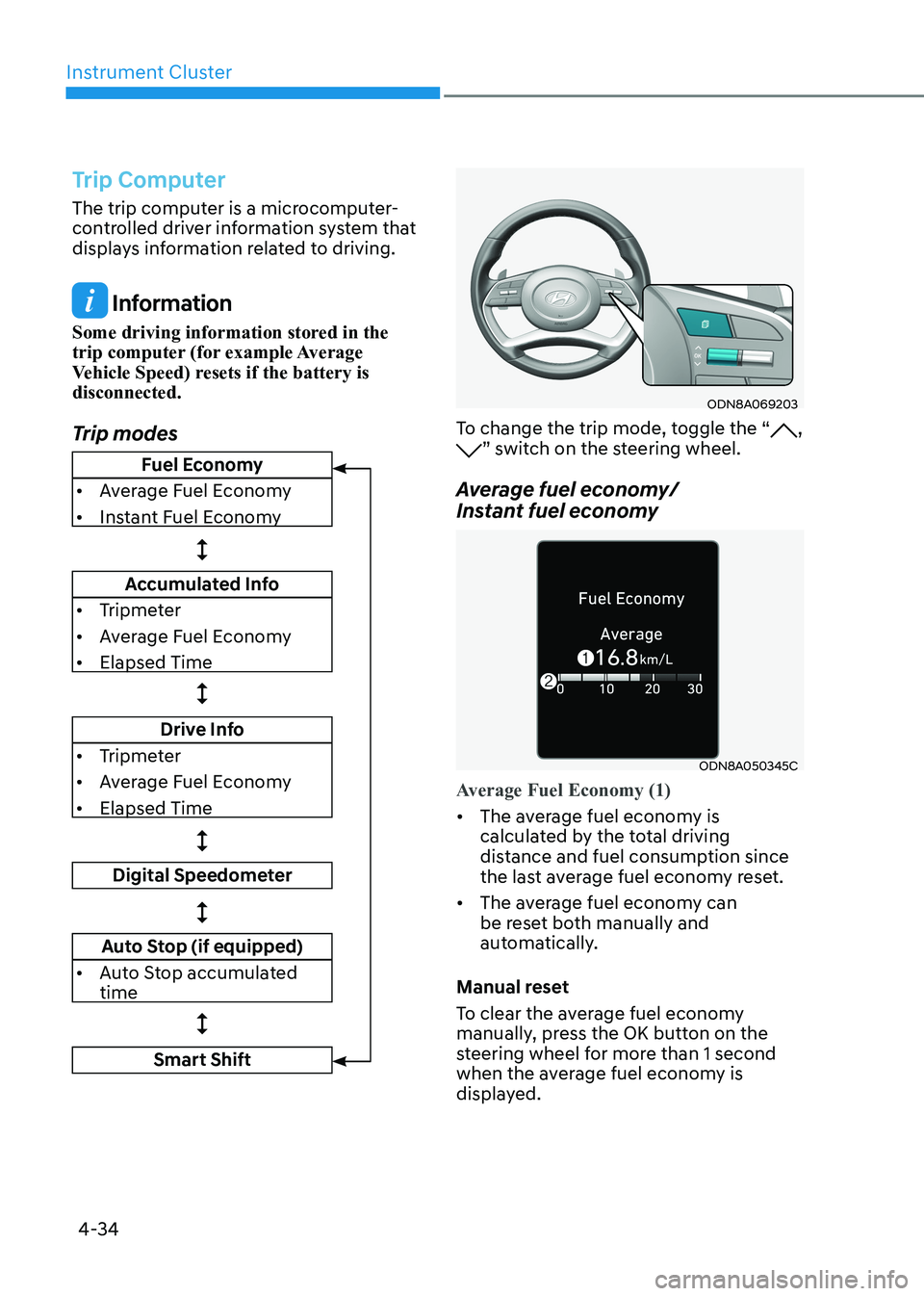
Trip Computer
The trip computer is a microcomputer-
controlled driver information system that
displays information related to driving.
Information
Some driving information stored in the
trip computer (for example Average
Vehicle Speed) resets if the battery is disconnected.
Trip modes
ODN8A069203
To change the trip mode, toggle the “, ” switch on the steering wheel.
Average fuel economy/
Instant fuel economy
ODN8A050345C
Average Fuel Economy (1)
• The average fuel economy is
calculated by the total driving
distance and fuel consumption since
the last average fuel econ omy reset.
• The average fuel economy can
be reset both manually and
automatically.
Manual reset
To clear the average fuel economy
manually, press the OK button on the
steering wheel for more than 1 second
when the average fuel economy is
displayed.
Fuel Economy
• Average Fuel Economy
• Instant Fuel Economy
Accumulated Info
• Tripmeter
• Average Fuel Economy
• Elapsed Time
Drive Info
• Tripmeter
• Average Fuel Economy
• Elapsed Time
Digital Speedometer
Auto Stop (if equipped)
• Auto Stop accumulated time
Smart Shift
Page 134 of 555
Instrument Cluster
4-48
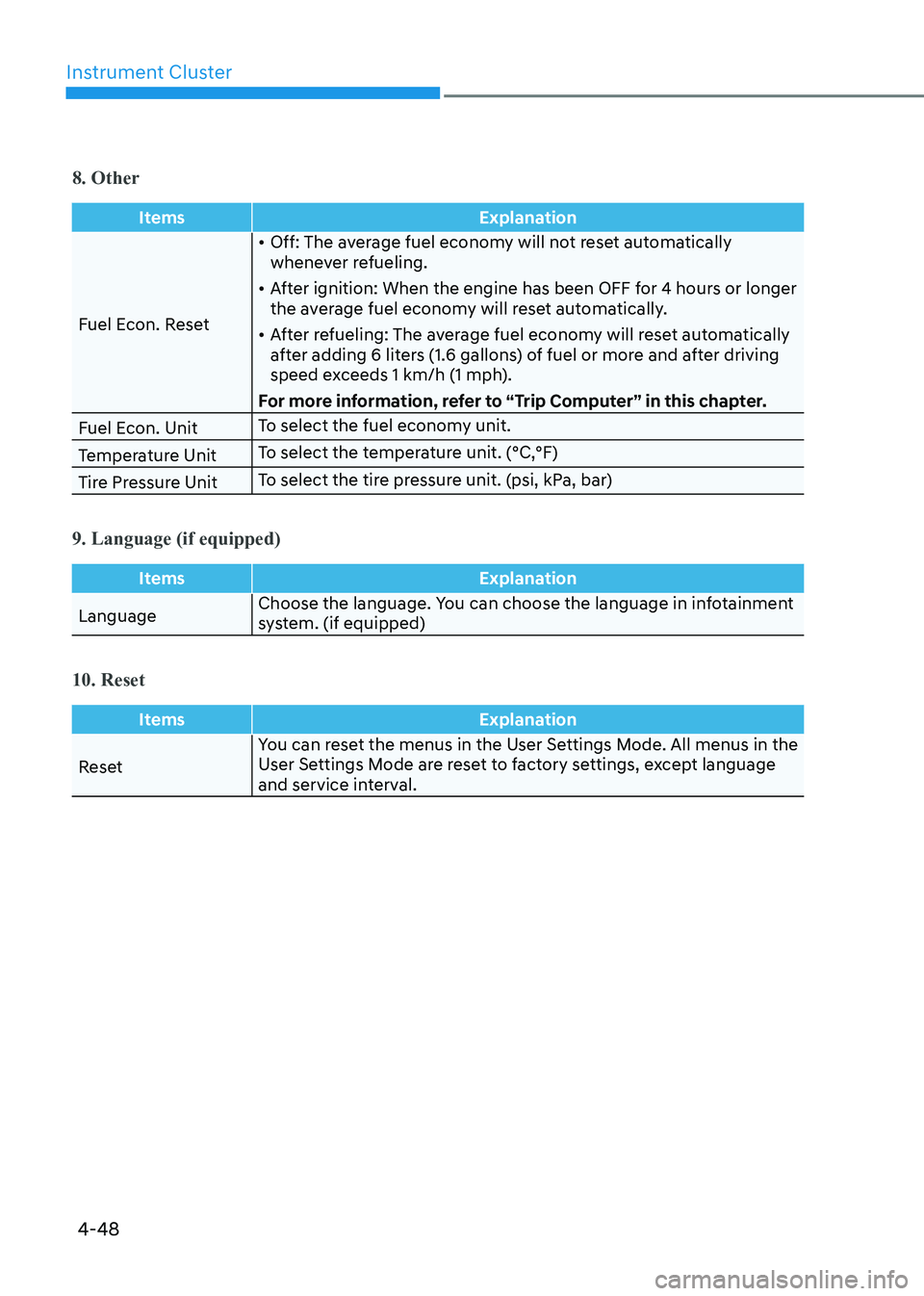
8. Other
ItemsExplanation
Fuel Econ. Reset•
Off: The average fuel economy will not reset automatically
whenever refueling.
• After ignition: When the engine has been OFF for 4 hours or longer
the average fuel economy will reset automatically.
• After refueling: The average fuel economy will reset automatically
after adding 6 liters (1.6 gallons) of fuel or more and after driving
speed exceeds 1 km/h (1 mph).
For more information, refer to “Trip Computer” in this chapter.
Fuel Econ. Unit To select the fuel economy unit.
Temperature Unit To select the temperature unit. (°C,°F)
Tire Pressure Unit To select the tire pressure unit. (psi, kPa, bar)
9. Language (if equipped)
Items
Explanation
LanguageChoose the language. You can choose the language in infotainment
system. (if equipped)
10. Reset
Items
Explanation
ResetYou can reset the menus in the User Settings Mode. All menus in the
User Settings Mode are reset to factory settings, except language
and service interval.