trunk HYUNDAI SONATA 2023 Owners Manual
[x] Cancel search | Manufacturer: HYUNDAI, Model Year: 2023, Model line: SONATA, Model: HYUNDAI SONATA 2023Pages: 555, PDF Size: 42.72 MB
Page 15 of 555
2-4
Vehicle Information and Reporting Safety Defects
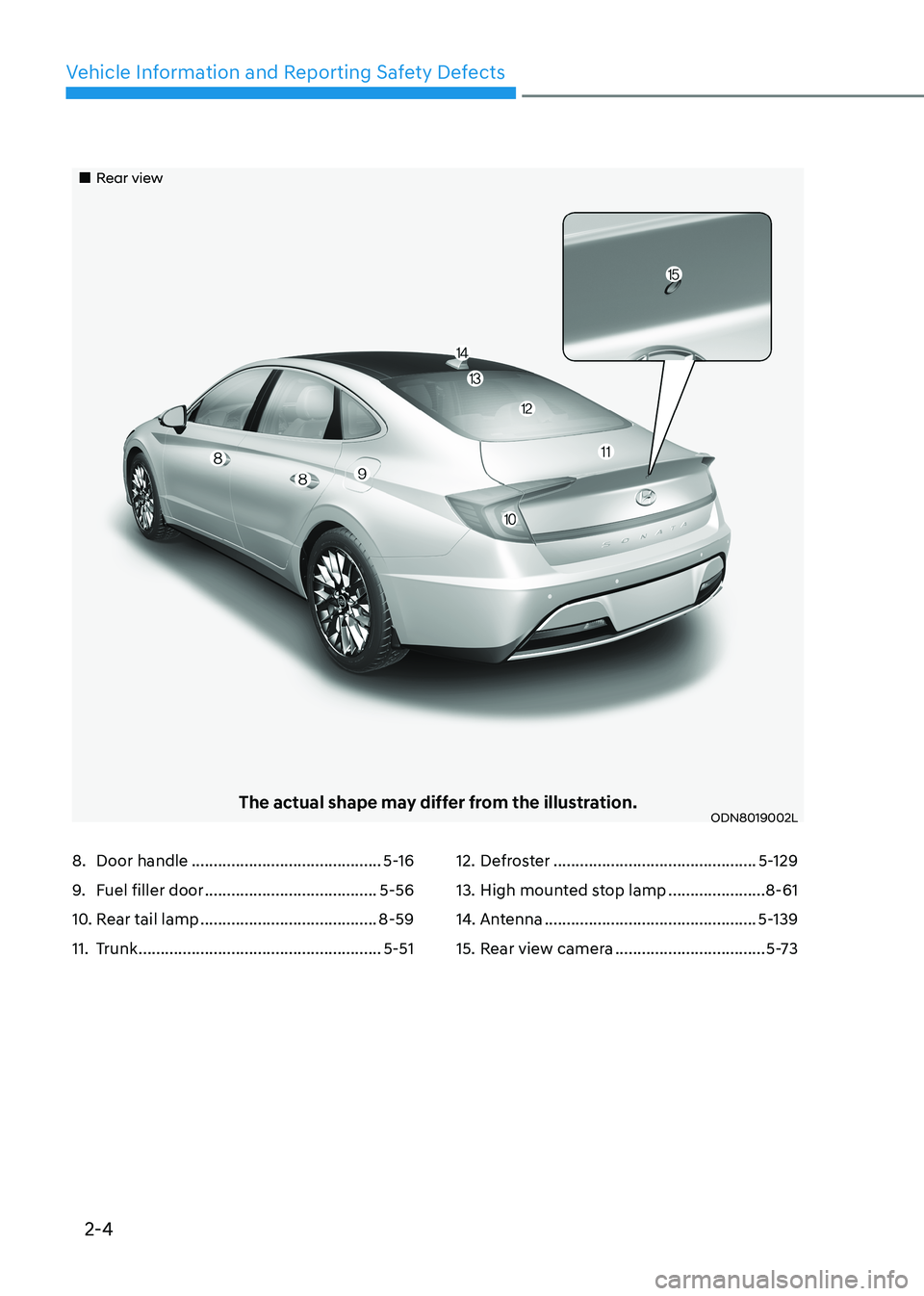
„„Rear view
The actual shape may differ from the illustration.ODN8019002L
8. Door handle ........................................... 5-16
9. Fuel filler door ....................................... 5-56
10. Rear tail lamp ........................................ 8-59
11. Trunk ....................................................... 5-5112. Defroster
.............................................. 5-129
13. High mounted stop lamp ......................8-61
14. Antenna ................................................ 5-139
15. Rear view camera ..................................5-73
Page 16 of 555
2-5
02
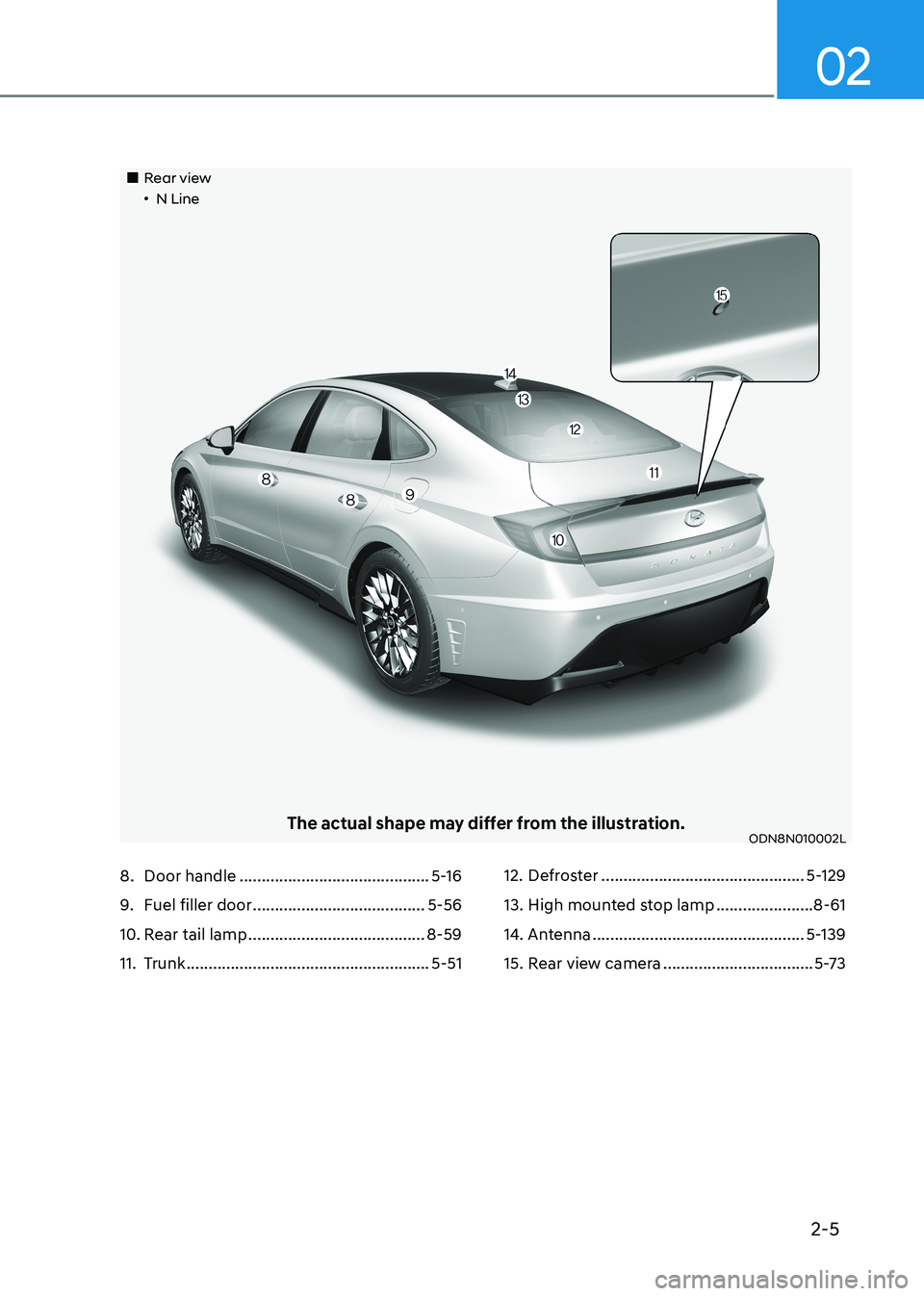
„„Rear view„•N Line
The actual shape may differ from the illustration.ODN8N010002L
8. Door handle ........................................... 5-16
9. Fuel filler door ....................................... 5-56
10. Rear tail lamp ........................................ 8-59
11. Trunk ....................................................... 5-5112. Defroster
.............................................. 5-129
13. High mounted stop lamp ......................8-61
14. Antenna ................................................ 5-139
15. Rear view camera ..................................5-73
Page 17 of 555
2-6
Vehicle Information and Reporting Safety Defects
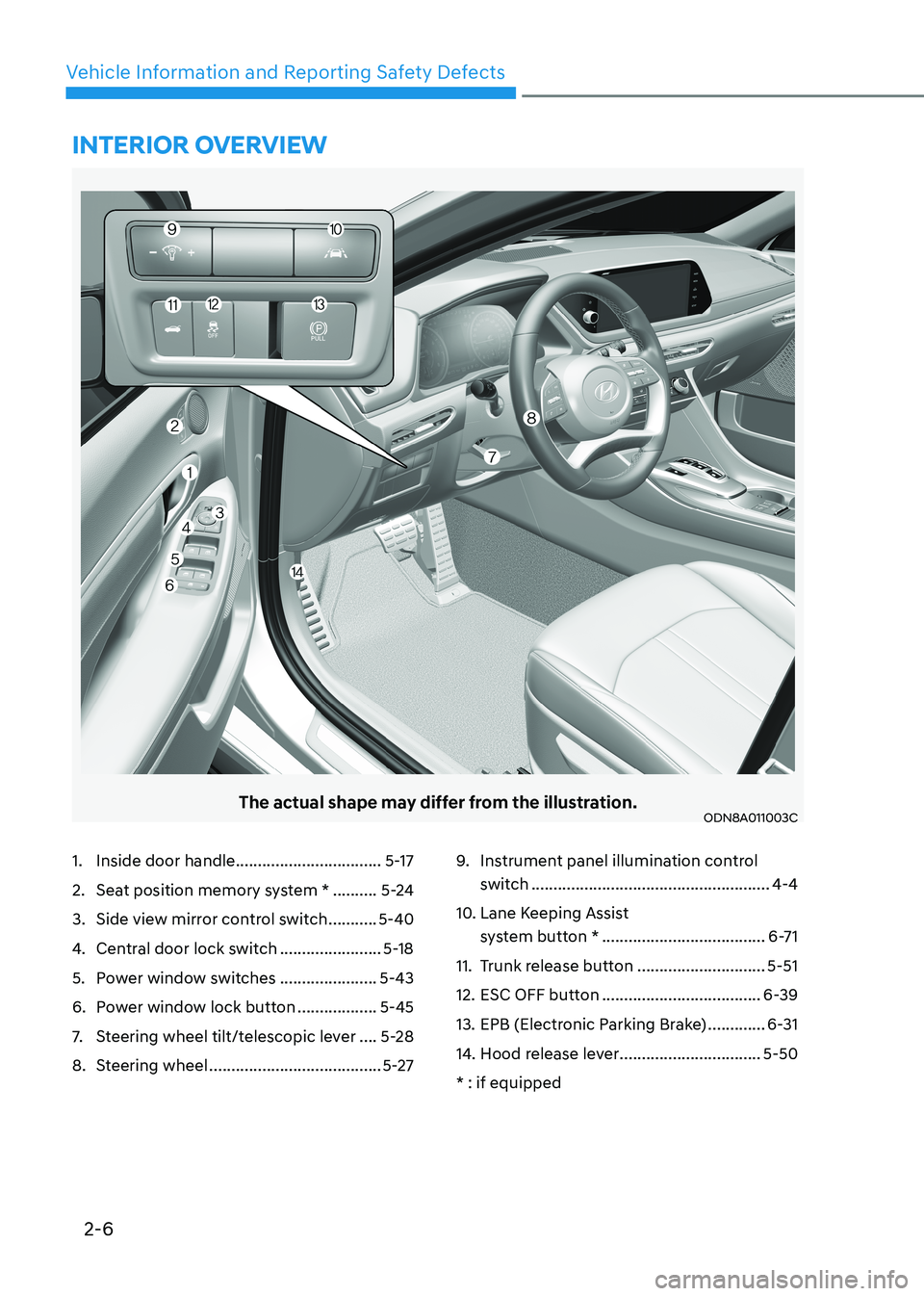
The actual shape may differ from the illustration.ODN8A011003C
1. Inside door handle .................................5-17
2. Seat position memory system * ..........5-24
3. Side view mirror control switch ...........5-40
4. Central door lock switch .......................5-18
5. Power window switches ......................5-43
6. Power window lock button ..................5-45
7. Steering wheel tilt/telescopic lever ....5-28
8. Steering wheel ....................................... 5-279.
Instrument panel illumination control
switch ...................................................... 4-4
10. Lane Keeping Assist system button * ..................................... 6-71
11. Trunk release button .............................5-51
12. ESC OFF button .................................... 6-39
13. EPB (Electronic Parking Brake) .............6-31
14. Hood release lever ................................5-50
* : if equipped
intErior ovErviEw
Page 39 of 555
Seats & Safety System
3-10
Rear Seats
Folding the rear seat
The rear seatbacks can be folded to
facilitate carrying long items or to
increase the luggage capacity of the
vehicle.
WARNING
• Never allow passengers to sit on top
of the folded down seatback while
the vehicle is moving. This is not a
proper seating position and no seat
belts are available for use. This could
result in serious injury or death in
case of an accident or sudden stop.
• Objects carried on the folded down
seatback should not extend higher
than the top of the front seatbacks.
This could allow cargo to slide
forward and cause injury or damage
during sudden stops.
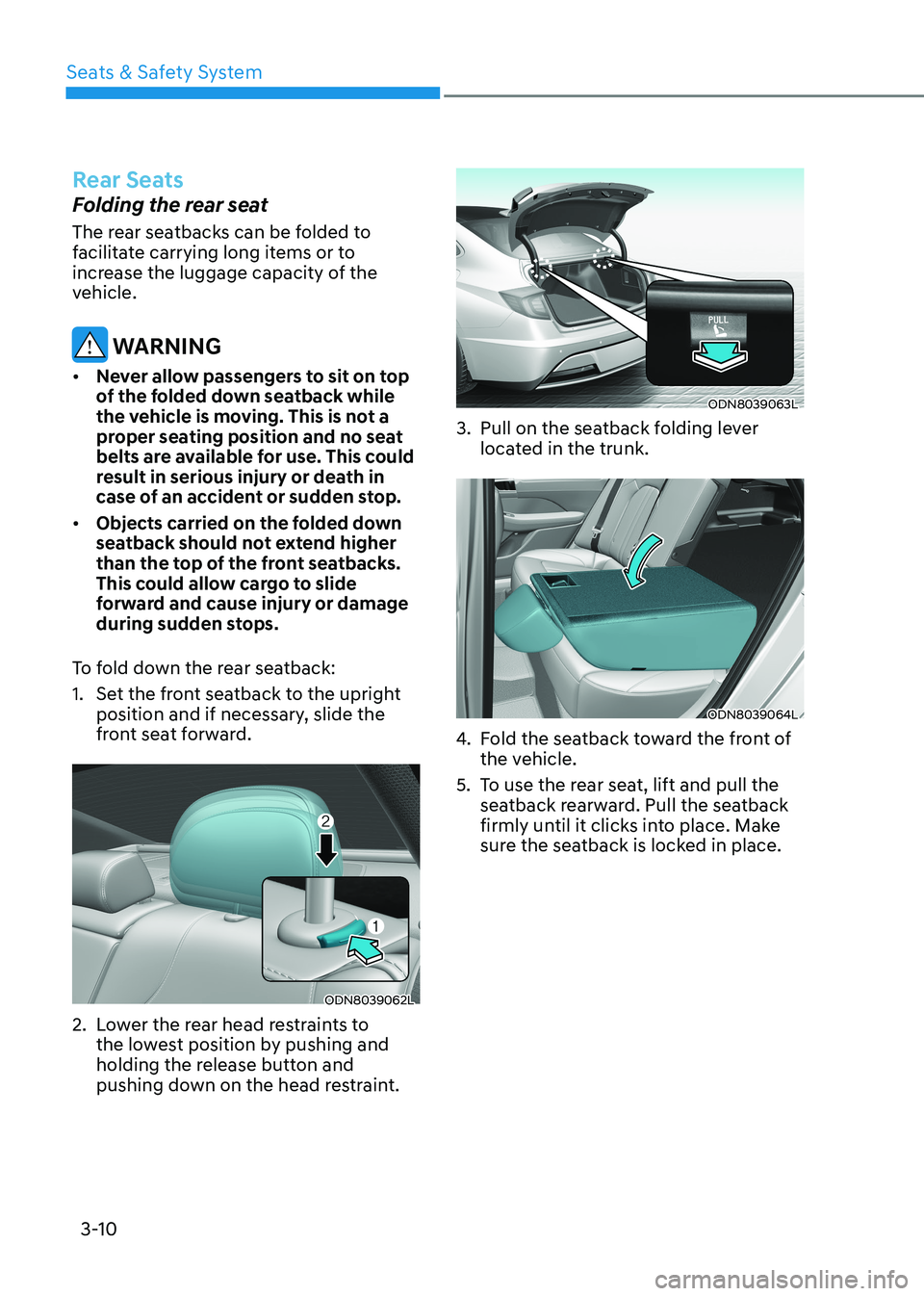
To fold down the rear seatback:
1. Set the front seatback to the upright position and if necessary, slide the
front seat forward.
ODN8039062L
2. Lower the rear head restraints to the lowest position by pushing and
holding the release button and
pushing down on the head restraint.
ODN8039063L
3. Pull on the seatback folding lever located in the trunk.
ODN8039064L
4. Fold the seatback toward the front of
the vehicle.
5. To use the rear seat, lift and pull the seatback rearward. Pull the seatback
firmly until it clicks into place. Make
sure the seatback is locked in place.
Page 106 of 555
Instrument Cluster
4-20
Press START button with key
(for smart key system)
This warning message is displayed if you
press the Engine Start/Stop button while
the warning message "Key not detected"
is displayed.
At this time, the immobilizer indicator
light blinks.
Check BRAKE SWITCH fuse
(for smart key system)
This warning message is displayed if the
brake switch fuse is disconnected.
You need to replace the fuse with a new
one before starting the engine.
If that is not possible, you can start the
engine by pressing the Engine Start/
Stop button for 10 seconds in the ACC position.
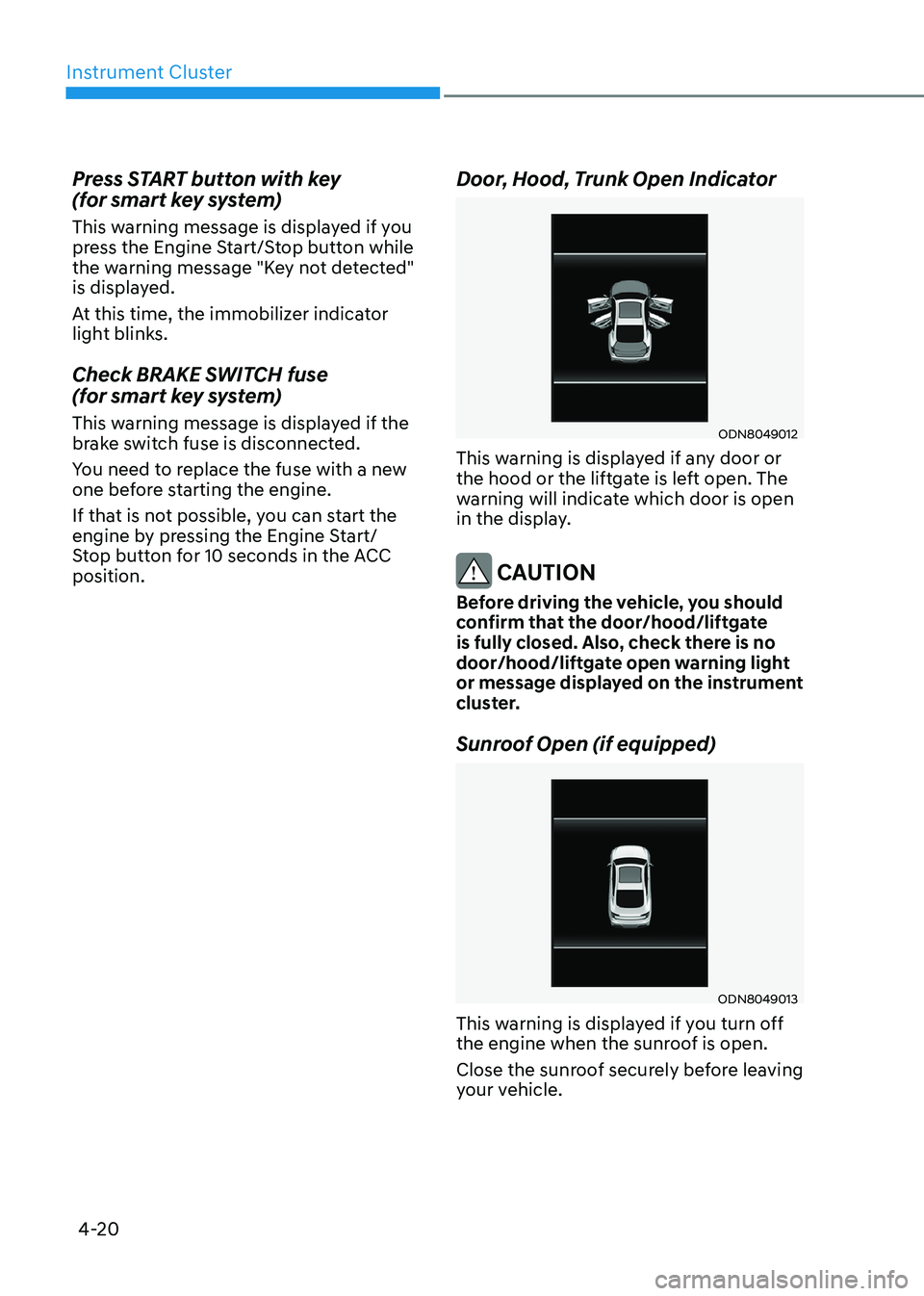
Door, Hood, Trunk Open Indicator
ODN8049012
This warning is displayed if any door or
the hood or the liftgate is left open. The
warning will indicate which door is open
in the display.
CAUTION
Before driving the vehicle, you should
confirm that the door/hood/liftgate
is fully closed. Also, check there is no
door/hood/liftgate open warning light
or message displayed on the instrument
cluster.
Sunroof Open (if equipped)
ODN8049013
This warning is displayed if you turn off
the engine when the sunroof is open.
Close the sunroof securely before leaving
your vehicle.
Page 116 of 555
Instrument Cluster
4-30
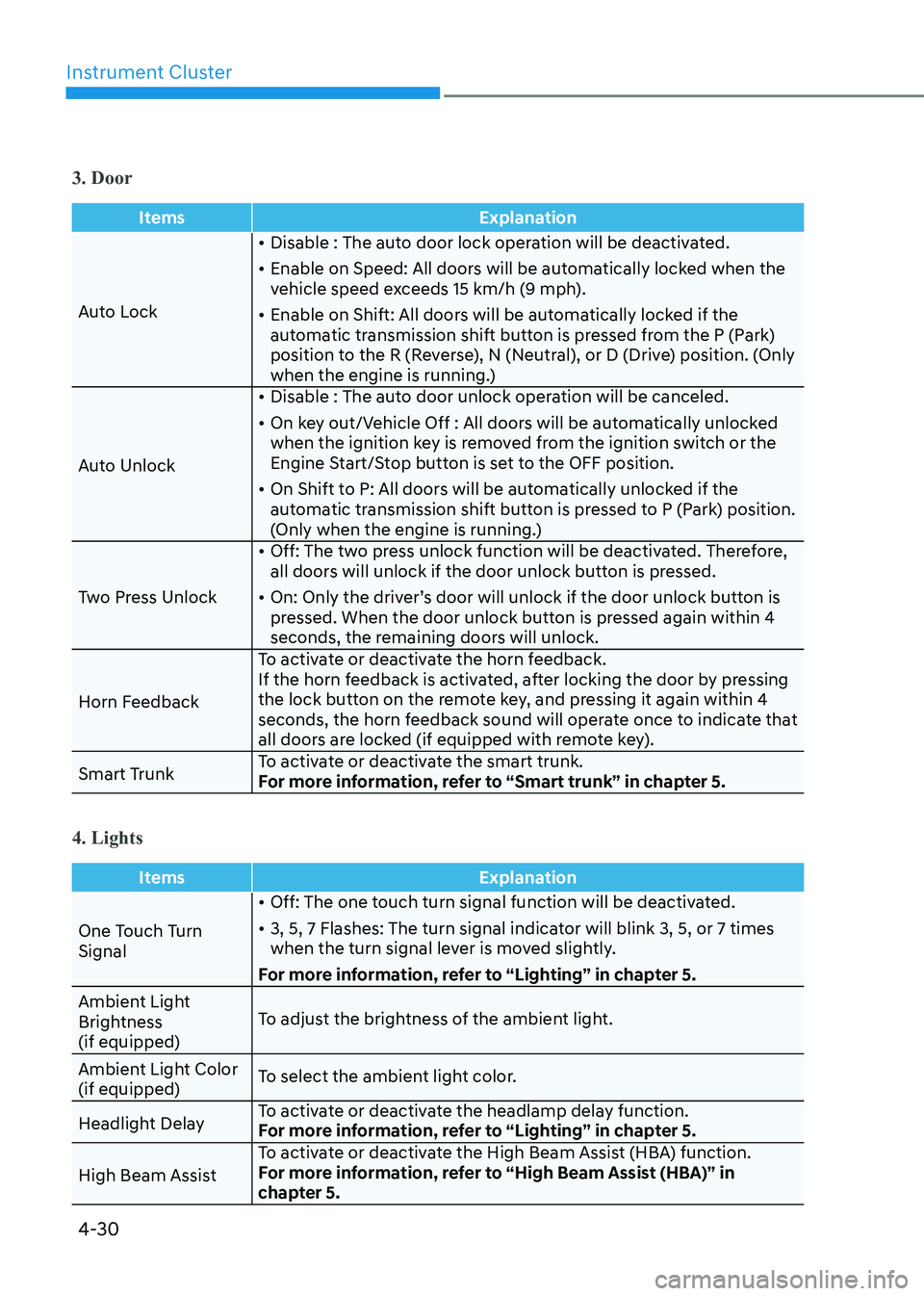
3. Door
ItemsExplanation
Auto Lock•
Disable : The auto door lock operation will be deactivated.
• Enable on Speed: All doors will be automatically locked when the
vehicle speed exceeds 15 km/h (9 mph).
• Enable on Shift: All doors will be automatically locked if the
automatic transmission shift button is pressed from the P (Park)
position to the R (Reverse), N (Neutral), or D (Drive) position. (Only
when the engine is running.)
Auto Unlock •
Disable : The auto door unlock operation will be canceled.
• On key out/Vehicle Off : All doors will be automatically unlocked
when the ignition key is removed from the ignition switch or the
Engine Start/Stop button is set to the OFF position.
• On Shift to P: All doors will be automatically unlocked if the
automatic transmission shift button is pressed to P (Park) position.
(Only when the engine is running.)
Two Press Unlock •
Off: The two press unlock function will be deactivated. Therefore,
all doors will unlock if the door unlock button is pressed.
• On: Only the driver’s door will unlock if the door unlock button is
pressed. When the door unlock button is pressed again within 4
seconds, the remaining doors will unlock.
Horn Feedback To activate or deactivate the horn feedback.
If the horn feedback is activated, after locking the door by pressing
the lock button on the remote key, and pressing it again within 4
seconds, the horn feedback sound will operate once to indicate that
all doors are locked (if equipped with remote key).
Smart Trunk To activate or deactivate the smart trunk.
For more information, refer to “Smart trunk” in chapter 5.
4. Lights
Items
Explanation
One Touch Turn Signal•
Off: The one touch turn signal function will be deactivated.
• 3, 5, 7 Flashes: The turn signal indicator will blink 3, 5, or 7 times
when the turn signal lever is moved slightly.
For more information, refer to “Lighting” in chapter 5.
Ambient Light
Brightness (if equipped) To adjust the brightness of the ambient light.
Ambient Light Color (if equipped) To select the ambient light color.
Headlight Delay To activate or deactivate the headlamp delay function.
For more information, refer to “Lighting” in chapter 5.
High Beam Assist To activate or deactivate the High Beam Assist (HBA) function.
For more information, refer to “High Beam Assist (HBA)” in
chapter 5.
Page 131 of 555
04
4-45
3. Door
ItemsExplanation
Auto Lock• Disable : The auto door lock operation will be deactivated.
• Enable on Speed: All doors will be automatically locked when the
vehicle speed exceeds 15 km/h (9 mph).
• Enable on Shift: All doors will be automatically locked if the
automatic transmission shift button is pressed from the P (Park)
position to the R (Reverse), N (Neutral), or D (Drive) position. (Only
when the engine is running.)
Auto Unlock • Disable : The auto door unlock operation will be canceled.
• On key out/Vehicle Off : All doors will be automatically unlocked
when the ignition key is removed from the ignition switch or the
Engine Start/Stop button is set to the OFF position.
• On Shift to P: All doors will be automatically unlocked if the automatic transmission shift button is pressed to P (Park) position.
(Only when the engine is running.)
Two Press Unlock • Off: The two press unlock function will be deactivated. Therefore,
all doors will unlock if the door unlock button is pressed.
• On: Only the driver’s door will unlock if the door unlock button is pressed. When the door unlock button is pressed again within 4
seconds, the remaining doors will unlock.
Horn Feedback To activate or deactivate the horn feedback.
If the horn feedback is activated, after locking the door by pressing
the lock button on the remote key, and pressing it again within 4
seconds, the horn feedback sound will operate once to indicate that
all doors are locked (if equipped with remote key).
Smart Trunk To activate or deactivate the smart trunk.
For more information, refer to “Smart trunk” in chapter 5.
4. Lights
Items
Explanation
One Touch Turn Signal• Off: The one touch turn signal function will be deactivated.
• 3, 5, 7 Flashes: The turn signal indicator will blink 3, 5, or 7 times
when the turn signal lever is moved slightly.
For more information, refer to “Lighting” in chapter 5.
Ambient Light
Brightness (if quipped) To adjust the brightness of the ambient light.
Ambient Light Color (if quipped) To select the ambient light color.
Headlight Delay To activate or deactivate the headlamp delay function.
For more information, refer to “Lighting” in chapter 5.
High Beam Assist To activate or deactivate the High Beam Assist (HBA) function.
For more information, refer to “High Beam Assist (HBA)” in chapter 5.
Page 143 of 555
04
4-57
3. Door
ItemsExplanation
Auto Lock• Disable : The auto door lock operation will be deactivated.
• Enable on Speed: All doors will be automatically locked when the
vehicle speed exceeds 15 km/h (9 mph).
• Enable on Shift: All doors will be automatically locked if the
automatic transmission shift button is pressed from the P (Park)
position to the R (Reverse), N (Neutral), or D (Drive) position. (Only
when the engine is running.)
Auto Unlock • Disable : The auto door unlock operation will be canceled.
• On key out/Vehicle Off : All doors will be automatically unlocked
when the ignition key is removed from the ignition switch or the
Engine Start/Stop button is set to the OFF position.
• On Shift to P: All doors will be automatically unlocked if the automatic transmission shift button is pressed to P (Park) position.
(Only when the engine is running.)
Two Press Unlock • Off: The two press unlock function will be deactivated. Therefore,
all doors will unlock if the door unlock button is pressed.
• On: Only the driver’s door will unlock if the door unlock button is pressed. When the door unlock button is pressed again within 4
seconds, the remaining doors will unlock.
Horn Feedback To activate or deactivate the horn feedback.
If the horn feedback is activated, after locking the door by pressing
the lock button on the remote key, and pressing it again within 4
seconds, the horn feedback sound will operate once to indicate that
all doors are locked (if equipped with remote key).
Smart Trunk To activate or deactivate the smart trunk.
For more information, refer to “Smart trunk” in chapter 5.
4. Lights
Items
Explanation
One Touch Turn Signal• Off: The one touch turn signal function will be deactivated.
• 3, 5, 7 Flashes: The turn signal indicator will blink 3, 5, or 7 times
when the turn signal lever is moved slightly.
For more information, refer to “Lighting” in chapter 5.
Ambient Light
Brightness (if quipped) To adjust the brightness of the ambient light.
Ambient Light Color (if quipped) To select the ambient light color.
Headlight Delay To activate or deactivate the headlamp delay function.
For more information, refer to “Lighting” in chapter 5.
High Beam Assist To activate or deactivate the High Beam Assist (HBA) function.
For more information, refer to “High Beam Assist (HBA)” in chapter 5.
Page 148 of 555
Exterior Features .......................................................................................... 5-50
Hood ........................................................................................................................ 5-50
Trunk ......................................................................................................................... 5-51
Emergency Trunk Safety Release .......................................................................... 5-52
Fuel Filler Door ....................................................................................................... 5-56
Head Up Display (HUD) ............................................................................... 5-59
Lighting ......................................................................................................... 5-61
Exterior Lights ......................................................................................................... 5-61
Interior Lights ......................................................................................................... 5-67
Welcome System .................................................................................................... 5-70
Wipers and Washers ..................................................................................... 5-71
Windshield Wipers .................................................................................................. 5-71
Windshield Washers ................................................................................................ 5-72
Rear View Monitor (RVM) ............................................................................ 5-73
Rear View Monitor with Parking Guidance ............................................................5-73
Rear View Monitor - Top View ............................................................................... 5-73
Surround View Monitor (SVM) .................................................................... 5-75
Reverse Parking Collision-Avoidance Assist .............................................5 -76
System Setting and Operation .............................................................................. 5 -76
Warning and System Control .................................................................................. 5-77
Detecting Sensor .................................................................................................... 5-79
System Malfunction ............................................................................................... 5-80
Limitations of the System ...................................................................................... 5-80
Reverse Parking Distance Warning (PDW) ................................................5-82
Operation of Reverse Parking Distance Warning System ....................................5-82
To Turn off Reverse Parking Distance Warning System ......................................5-84
Non-Operational Conditions of Reverse Parking Distance Warning System .....5-84
Reverse Parking Distance Warning System Precautions .....................................5-85
Forward/Reverse Parking Distance Warning (PDW) .................................5-86
Operation of Forward/Reverse Parking Distance Warning System ....................5-87
Non-Operational Conditions of Forward/
Reverse Parking Distance Warning System ..........................................................5-89
Forward/Reverse Parking Distance Warning System Precautions .....................5-90
Remote smart parking assist (RSPA) ..........................................................5-91
Operating Condition .............................................................................................. 5-92
How Remote Smart Parking Assist System Works ...............................................5-95
Additional Instructions ......................................................................................... 5-100
Display Operation Status ...................................................................................... 5-101
How the Remote Moving Forward/Backward System Works ............................5-102
5
Page 150 of 555
Convenience Features
5-4
Remote Key (if equipped)
OIG046001
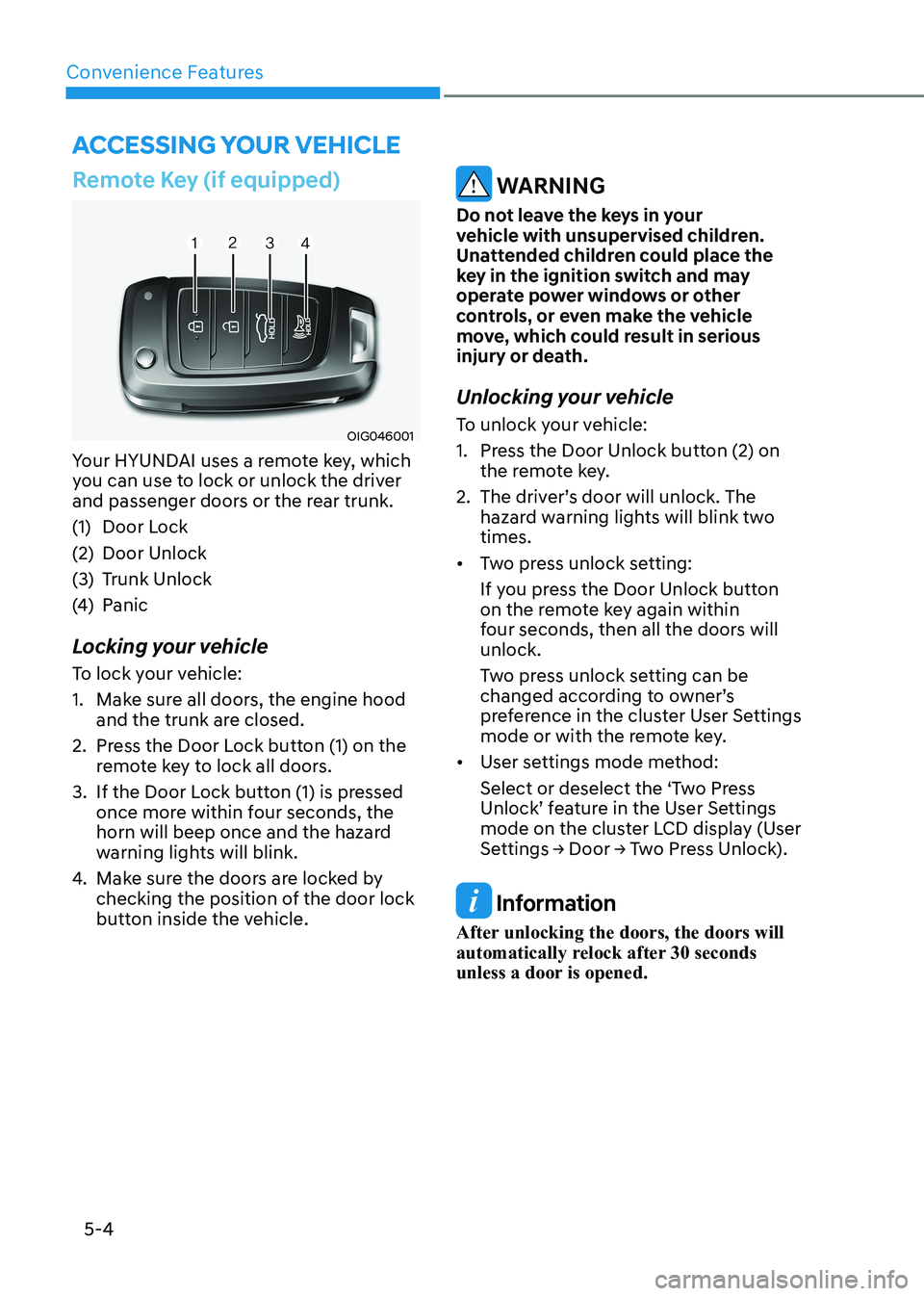
Your HYUNDAI uses a remote key, which
you can use to lock or unlock the driver
and passenger doors or the rear trunk.
(1) Door Lock
(2) Door Unlock
(3) Trunk Unlock
(4) Panic
Locking your vehicle
To lock your vehicle:
1. Make sure all doors, the engine hood and the trunk are closed.
2. Press the Door Lock button (1) on the remote key to lock all doors.
3. If the Door Lock button (1) is pressed once more within four seconds, the
horn will beep once and the hazard
warning lights will blink.
4. Make sure the doors are locked by
checking the position of the door lock
button inside the vehicle.
WARNING
Do not leave the keys in your
vehicle with unsupervised children.
Unattended children could place the
key in the ignition switch and may
operate power windows or other
controls, or even make the vehicle
move, which could result in serious
injury or death.
Unlocking your vehicle
To unlock your vehicle:
1. Press the Door Unlock button (2) on the remote key.
2. The driver’s door will unlock. The hazard warning lights will blink two times.
• Two press unlock setting:
If you press the Door Unlock button
on the remote key again within
four seconds, then all the doors will unlock.
Two press unlock setting can be
changed according to owner’s
preference in the cluster User Settings
mode or with the remote key.
• User settings mode method:
Select or deselect the ‘Two Press
Unlock’ feature in the User Settings
mode on the cluster LCD display (User
Settings → Door → Two Press Unlock).
Information
After unlocking the doors, the doors will
automatically relock after 30 seconds
unless a door is opened.
Accessing Your Vehicle