reset Hyundai Sonata
[x] Cancel search | Manufacturer: HYUNDAI, Model Year: , Model line: , Model:Pages: 283, PDF Size: 13.5 MB
Page 133 of 283
1
FEATURES OF YOUR HYUNDAI
119
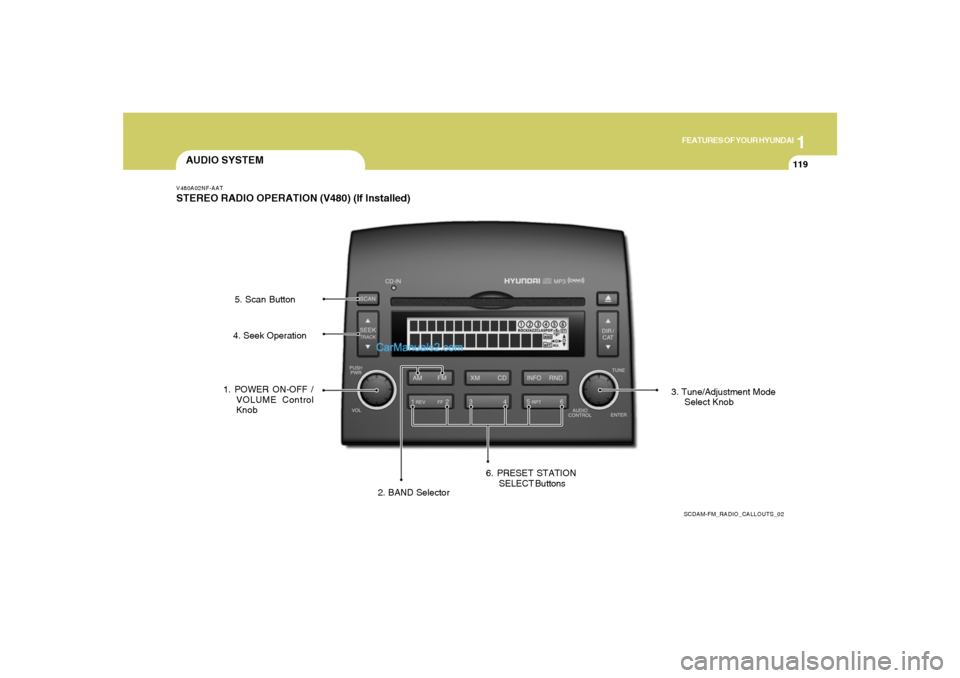
AUDIO SYSTEMV480A02NF-AATSTEREO RADIO OPERATION (V480) (If Installed)
SCDAM-FM_RADIO_CALLOUTS_02
1. POWER ON-OFF /
VOLUME Control
Knob
2. BAND Selector3. Tune/Adjustment Mode
Select Knob 4. Seek Operation5. Scan Button
6. PRESET STATION
SELECT Buttons
Page 134 of 283
1FEATURES OF YOUR HYUNDAI
120
V480B03NF-AAT1. POWER ON-OFF / VOLUME Control
KnobPress the PUSH PWR Control Knob to turn the
audio system on or off.
Rotate the knob clockwise to increase the
volume and turn the knob counterclockwise to
decrease the volume.
If the volume is set above a certain level and the
ignition is turned off for greater than 15s, the
volume will come back on at a "nominal" listening
level when the ignition switch is turned back on.2. BAND SelectorThe AM/FM select control works in radio and
CD mode.o AM/FM select in radio modeThis control allows you to select AM or FM
frequency bands. Press the AM button to select
AM or the FM button to switch between FM1and
FM2 memory preset stations.o AM/FM select in CD modePress these buttons to stop CD play and begin
radio play.
3. Tune(manual) / Adjustment Mode Se-
lect Knobo Rotate counterclockwise to the next fre-
quency down the band (whether or not a
listenable station is located there).
o Rotate clockwise to move to the next fre-
quency up the band (whether or not a listen-
able station is located there).Adjustment Mode SelectPressing the AUDIO SEL knob will initiate Audio
Mode. Each subsequent press will select the
next adjustment in the following order:
1) EQ select
The EQ select control allows you to select
one of the five EQ modes: OFF, CLASSICAL,
POP, ROCK, and JAZZ by rotating the AUDIO
SEL knob. Radio and CD have independent
EQ settings.
2 ) Bass adjust
The bass adjust control allows you to in-
crease or decrease the audio system's
bass output. Rotate the AUDIO SEL knob to
change the bass setting.
3) Midrange adjust
The midrange adjust control allows you to
increase or decrease the audio system's
midrange output. Rotate the AUDIO SEL
knob to change the midrange setting.4) Treble adjust
The treble adjust control allows you to in-
crease or decrease the audio system's
treble output. Rotate the AUDIO SEL knob to
change the treble setting.
5) Speaker balance adjust
Speaker sound distribution can be adjusted
between the right and left speakers by rotat-
ing the AUDIO SEL knob.
6) Speaker fade adjust
Speaker sound can be adjusted between the
front and rear speakers by rotating the
AUDIO SEL knob.
4. SEEK Operation
(Automatic Channel Selection)o Press (down arrow) to find the next
listenable station down the frequency band.
SEEK DOWN will display.
o Press (up arrow) to find the next listenable
station up the frequency band. SEEK UP will
display.5. SCAN ButtonPress the SCAN button to hear a brief sampling
of all listenable stations on the frequency band.
Press the SCAN button again to stop the scan
mode.
Page 135 of 283
1
FEATURES OF YOUR HYUNDAI
121
6. PRESET STATION SELECT ButtonsThe radio is equipped with six preset station
memory controls. These buttons can be used
to select up to 6 preset AM stations and 12
preset FM stations (six in AM, six in FM1, six in
FM2). There are a total possible of 18 preset
stations.Setting memory preset stationso Select the AM or FM band with the BAND
selector. Press AM control to select AM or
the FM control to toggle between FM1and
FM2.
o Press the SEEK control to access the next
listenable station up or down the frequency
band. Rotate the TUNE control to go up or
down the listening band in individual incre-
ments.
o Select a station.
o Press and hold a memory preset control.
You will hear a beep and the station is held
in memory on the control you selected.
CAUTION:
o Do not place beverages close to the
audio system. The playback mecha-
nism may be damaged if you spill them.
o Do not impact or strike the audio sys-
tem, or the playback mechanism could
be damaged.
!
Page 140 of 283
1FEATURES OF YOUR HYUNDAI
126
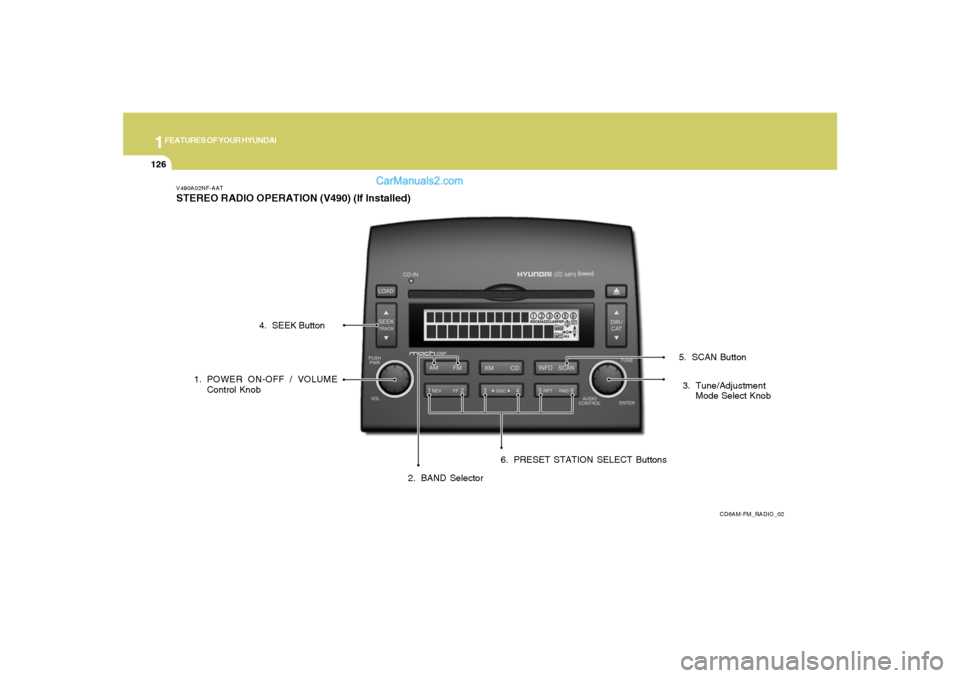
V490A02NF-AATSTEREO RADIO OPERATION (V490) (If Installed)
CD6AM-FM_RADIO_02
1. POWER ON-OFF / VOLUME
Control Knob
2. BAND Selector3. Tune/Adjustment
Mode Select Knob 4. SEEK Button
5. SCAN Button
6. PRESET STATION SELECT Buttons
Page 141 of 283
1
FEATURES OF YOUR HYUNDAI
127
V490B03NF-AAT1. POWER ON-OFF / VOLUME Control
KnobPress the PUSH PWR Control Knob to turn the
audio system on or off.
Rotate the knob clockwise to increase the
volume and turn the knob counterclockwise to
decrease the volume.
If the volume is set above a certain level and the
ignition is turned off for greater than 15 s, the
volume will come back on at a "nominal" listening
level when the ignition switch is turned back on.2. BAND SelectorThe AM/FM select control works in radio and
CD modes.o AM/FM select in radio modeThis control allows you to select AM or FM
frequency bands. Press the AM button to select
AM or the FM button to switch between FM1and
FM2 memory preset stations.o AM/FM select in CD modePress these buttons to stop CD play and begin
radio play.
3. Tune(manual) / Adjustment Mode Se-
lect Knobo Rotate counterclockwise to the next fre-
quency down the band (whether or not a
listenable station is located there).
o Rotate clockwise to move to the next fre-
quency up the band (whether or not a listen-
able station is located there).Adjustment Mode SelectPressing the AUDIO SEL knob will initiate Audio
Mode. Each subsequent press will select the
next adjustment in the following order:
1) EQ select
The EQ select control allows you to select
one of the five EQ modes: OFF, CLASSICAL,
POP, ROCK, and JAZZ by rotating the AUDIO
SEL knob. Radio and CD have independent
EQ settings.
2) Bass adjust
The bass adjust control allows you to in-
crease or decrease the audio system's
bass output. Rotate the AUDIO SEL knob to
change the bass setting.
3) Midrange adjust
The midrange adjust control allows you to
increase or decrease the audio system's
midrange output. Rotate the AUDIO SEL
knob to change the midrange setting.4) Treble adjust
The treble adjust control allows you to in-
crease or decrease the audio system's
treble output. Rotate the AUDIO SEL knob to
change the treble setting.
5) Speaker balance adjust
Speaker sound distribution can be adjusted
between the right and left speakers by rotat-
ing the AUDIO SEL knob.
6) Speaker fade adjust
Speaker sound can be adjusted between
the front and rear speakers by rotating the
AUDIO SEL knob.
4. SEEK Operation
(Automatic Channel Selection)o Press (down arrow) to find the next
listenable station down the frequency band.
SEEK DOWN will display.
o Press (up arrow) to find the next listenable
station up the frequency band. SEEK UP will
display.5. SCAN ButtonPress the SCAN button to hear a brief sampling
of all listenable stations on the frequency band.
Press the SCAN button again to stop the scan
mode.
Page 142 of 283
1FEATURES OF YOUR HYUNDAI
128
6. PRESET STATION SELECT ButtonsThe radio is equipped with six preset station
memory controls. These buttons can be used
to select up to 6 preset AM stations and 12
preset FM stations (six in AM, six in FM1, six in
FM2). There are a total possible of 18 preset
stations.Setting memory preset stationso Select the AM or FM band with the BAND
selector. Press AM control to select AM or
the FM control to toggle between FM1and
FM2.
o Press the SEEK control to access the next
listenable station up or down the frequency
band. Rotate the TUNE control to go up or
down the listening band in individual incre-
ments.
o Select a station.
o Press and hold a memory preset control. You
will hear a beep and the station is held in
memory on the control you selected.
CAUTION:
o Do not place beverages close to the
audio system. The playback mecha-
nism may be damaged if you spill them.
o Do not impact or strike the audio sys-
tem, or the playback mechanism could
be damaged.
!
Page 148 of 283
1FEATURES OF YOUR HYUNDAI
134
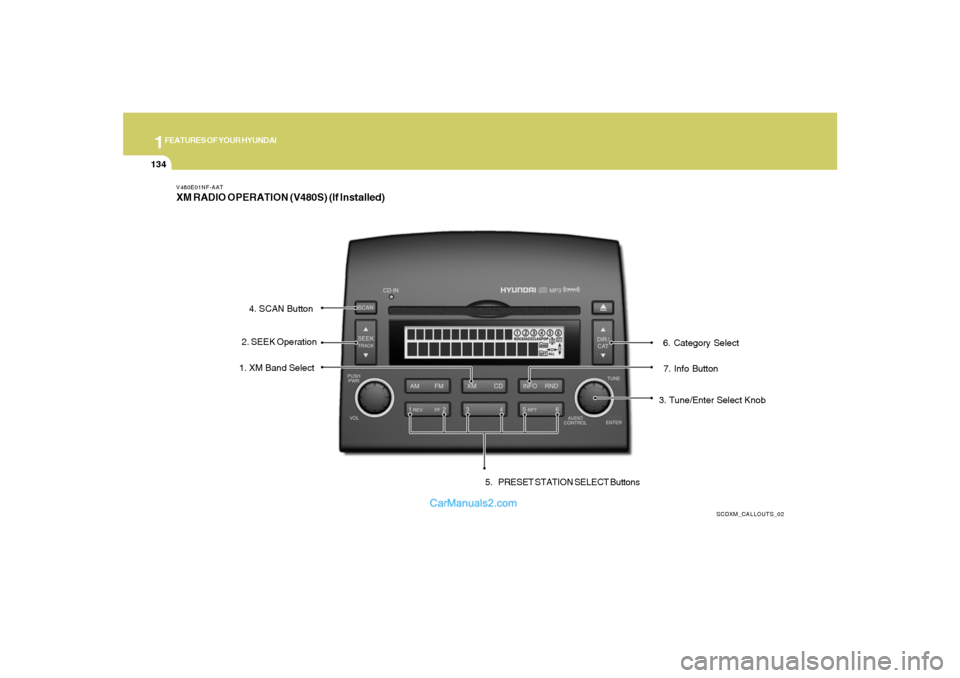
V480E01NF-AATXM RADIO OPERATION (V480S) (If Installed)
SCDXM_CALLOUTS_02
7. Info Button 1. XM Band Select
3. Tune/Enter Select Knob 2. SEEK Operation4. SCAN Button
5. PRESET STATION SELECT Buttons6. Category Select
Page 149 of 283
1
FEATURES OF YOUR HYUNDAI
135
V480F01NF-AAT1. XM Band SelectThis control allows you to select XM bands.
Press the button to enter XM from any other
mode. Press the button to select between XM1,
XM2 and XM3.2. Seek Operationo Press ( down arrow) to find the next
valid station down the XM band. The display
will cycle once through the Channel, Title,
Name and Category for the selected channel
o Press ( up arrow) to find the next
valid station up the XM band. The display will
cycle once through the Channel, Title, Name
and Category for the selected channel.
o Press and hold either the down arrow or up
arrow to tune down or up at a fast rate. The
display will show the Channel Name and Num-
ber while tuning at the fast rate.3. Tune/Enter-Select KnobRotate clockwise or counterclockwise to pre-
view the channel names and numbers above or
below the currently tuned station. Press the
knob to select the currently previewed channel.
4. Scan Button1) Channel Scan
Press the SCAN button to hear a brief sampling
of all valid stations on the XM band. Press the
SCAN button again to stop the scan mode.
2) Preset Scan
Press and hold the SCAN button to hear a brief
sampling of the stations stored in the current XM
band presets. Press the SCAN button again to
stop the scan mode.5. Preset Station Select ButtonsThe radio is equipped with six preset station
memory controls. These buttons can be used to
select up to 18 preset XM stations (six in XM1,
six in XM2, six in XM3).Setting memory preset stationso Select the XM band with the XM selector.
Press the XM selector to toggle between
XM1, XM2, or XM3.
o Select a station using the seek or tune
operations.
o Press and hold a memory preset control. You
will hear a beep and the station is held in
memory on the control you selected.
6. Category SelectPress the Category Select Buttons to select
stations based on Categories.
Press the CAT (up arow) or CAT (down
arrow) to scroll through the list of categories.
Use the Select Knob, Seek Up/Down arrows, or
SCAN button while the category name is dis-
played to select, seek, or scan within that
category.7. Info ButtonThe Info Button is used to temporarily display
information associated with the current station.
Press the Info to select between the Title, Name
and Category information for the current sta-
tion.8. Radio IDSeek or Tune to XM channel 0 to display the
Radio ID.