ECO mode Hyundai Sonata
[x] Cancel search | Manufacturer: HYUNDAI, Model Year: , Model line: , Model:Pages: 271, PDF Size: 12.44 MB
Page 120 of 271
1
FEATURES OF YOUR HYUNDAI
107
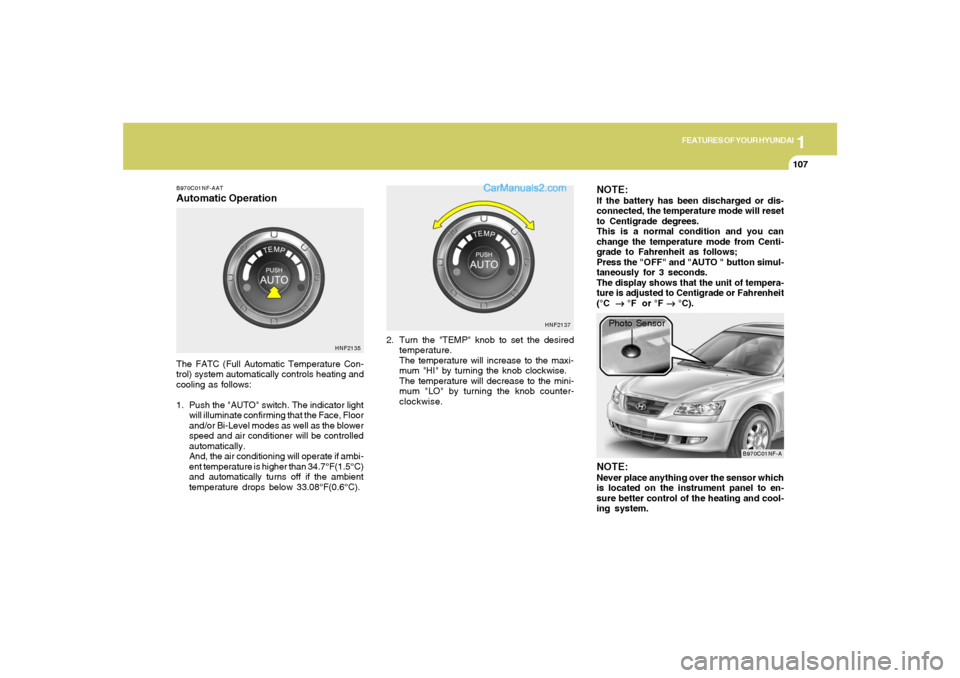
B970C01NF-AATAutomatic OperationThe FATC (Full Automatic Temperature Con-
trol) system automatically controls heating and
cooling as follows:
1. Push the "AUTO" switch. The indicator light
will illuminate confirming that the Face, Floor
and/or Bi-Level modes as well as the blower
speed and air conditioner will be controlled
automatically.
And, the air conditioning will operate if ambi-
ent temperature is higher than 34.7°F(1.5°C)
and automatically turns off if the ambient
temperature drops below 33.08°F(0.6°C).2. Turn the "TEMP" knob to set the desired
temperature.
The temperature will increase to the maxi-
mum "HI" by turning the knob clockwise.
The temperature will decrease to the mini-
mum "LO" by turning the knob counter-
clockwise.
NOTE:If the battery has been discharged or dis-
connected, the temperature mode will reset
to Centigrade degrees.
This is a normal condition and you can
change the temperature mode from Centi-
grade to Fahrenheit as follows;
Press the "OFF" and "AUTO " button simul-
taneously for 3 seconds.
The display shows that the unit of tempera-
ture is adjusted to Centigrade or Fahrenheit
(°C
→ →→ →
→ °F or °F
→ →→ →
→ °C).
HNF2135HNF2137
B970C01NF-A
Photo Sensor
NOTE:Never place anything over the sensor which
is located on the instrument panel to en-
sure better control of the heating and cool-
ing system.
Page 122 of 271
1
FEATURES OF YOUR HYUNDAI
109
With the "Fresh" mode selected, air enters the
vehicle from the outside and is heated or cooled
according to the function selected.
With the "Recirculation" mode selected, air from
within the passenger compartment will be drawn
through the heating system and heated or
cooled according to the function selected.NOTE:o It should be noted that prolonged opera-
tion of the heating system in "recircula-
tion" mode will give rise to fogging of the
windshield and side windows and the air
within the passenger compartment will
become stale. In addition, prolonged
use of the air conditioning with the "Re-
circulation" mode selected may result in
the air within the passenger compart-
ment becoming excessively dry.
o When the ignition switch is turned "ON"
the air intake control will change to " "
mode (regardless of switch position).
This is normal operation. The air intake
control operates in "AUTO" mode when
turning the ignition to the ON position if
the "AUTO" mode was used before shut-
ting off the engine.Recirculation mode :
Air from witin the passenger compartment will
be drawn through the heating system and heated
or cooled according to the function selected.
Exhaust gas cutoff mode :
Air enters the vehicle from the outside.
But if exhaust gas enters the vehicle from the
outside, the exhaust gas cutoff mode ( ) is
automatically converted to the ( ) mode, to
prevent exhaust gas from entering the vehicle.
NOTE:o It should be noted that prolonged opera-
tion of the heating system in recircula-
tion mode ( ) will give rise to misting
of the windshield and side windows and
the air within the passenger compart-
ment will become stale. In addition, pro-
longed use of the air conditioning with
the recirculation mode ( ) sele-cted
may result in the air within the passenger
compartment becoming excessively dry.
o When the ignition switch is turned "ON",
the air intake control will change to
"Fresh" mode (regardless of switch po-
sition). This is normal operation. The air
intake control operates in "AUTO" mode
when turning the ignition to the ON
position if the "AUTO" mode was used
before shutting off the engine.
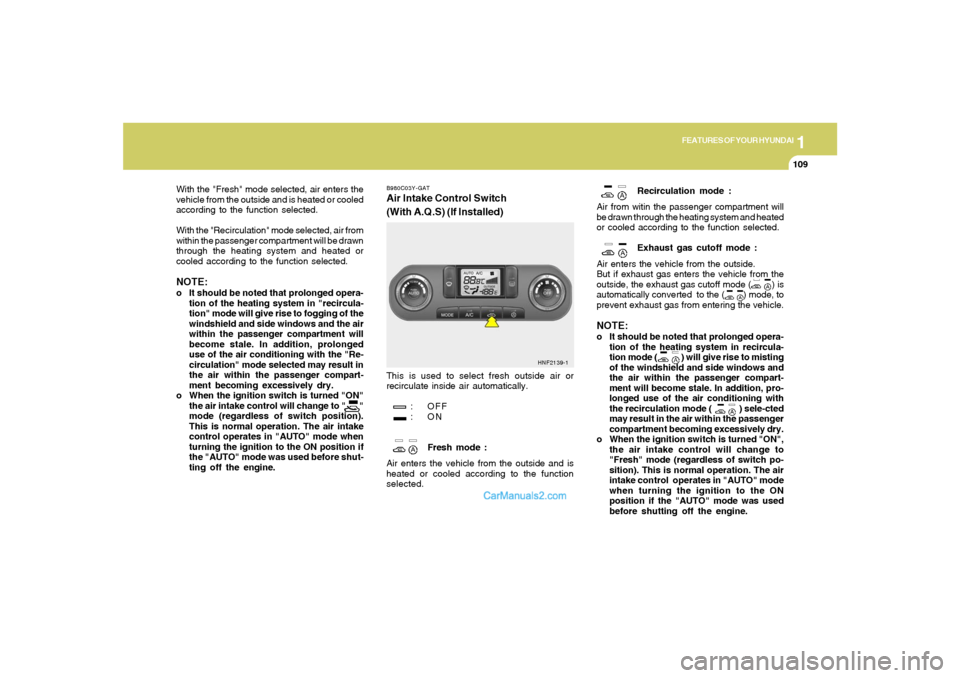
B980C03Y-GATAir Intake Control Switch
(With A.Q.S) (If Installed)This is used to select fresh outside air or
recirculate inside air automatically.
: OFF
:ON
Fresh mode :
Air enters the vehicle from the outside and is
heated or cooled according to the function
selected.
HNF2139-1
Page 132 of 271

1
FEATURES OF YOUR HYUNDAI
119
V480C01NF-AAT1. AUDIO/MP3 CD Select ButtonCD mode may be entered by pressing the CD
button and then loading a CD into the audio
system. The first track of the disc will begin
playing. After that, the CD play will begin where
it stopped last.
NO CD will display if the CD control is activated
when there is not a CD present in the audio
system.NOTE:o Do not apply paper, tape, etc., onto the
label side or the recording side of any
discs, as it may cause a malfunction.
o The unit cannot play a CD-R(Recordable
CD) and CD-RW(Rewritable CD) that is
not finalized. Please refer to the manual
of the CD-R/CD-RW recorder or CD-R/
CD-RW software for more information
on the finalization process.
o Depending on the recording status,
some CD-Rs/CD-RWs may not be play-
able on this unit.
2. TRACK UP/DOWNo Press (down arrow) to revert to the
previous track of the current disc. If the
beginning of the disc is reached, the CD
player seeks to the beginning of the last track
on the current disc and begins playing.
o Press (up arrow) to advance to the next
track of the current disc. After the last track
has been completed, the first track of the
current disc will automatically replay.3. SCAN ButtonPress the SCAN button to hear a short sampling
of all selections on the CD. (The CD scans in a
forward direction, wrapping back to the first
track at the end of the CD.) To stop on a
particular selection, press the button again.4. FF/REVo Press and hold the FF button until the desired
selection is reached. Release the button to
disengage fast forward mode. When in fast
forward mode, your audio system will auto-
matically lower the volume level of the play-
ing media.o Press and hold the REV button until the
desired selection is reached. If the beginning
of the disc is reached, the CD will begin play
at the first track. Release the button to
disengage reverse mode. When in reverse
mode, your audio system will automatically
lower the volume level of the playing media.
5. REPEAT(RPT)When engaged, the repeat feature has three
different modes: RPT Track, RPT DIR, RPT
OFF.
RPT Track will continuously play the current
track selected. RPT DIR will continuously play
the current MP3 directory.
o Press the RPT control until the desired
repeat mode is displayed. The audio system
will then engage the desired repeat mode.RANDOM(RND)When engaged, the random feature has three
different modes: Random Disc, Random Direc-
tory (MP3 only), and Random Off.
RANDOM DISC randomly plays tracks from
the disc presently in the audio system. RAN-
DOM DIRECTORY plays all the tracks on the
current MP3 directory in random order.
Page 139 of 271
1FEATURES OF YOUR HYUNDAI
126
V490D01NF-AAT1. AUDIO/MP3 CD Select ButtonCD mode may be entered by pressing the CD
button and then loading a CD into the audio
system. The first track of the disc will begin
playing. After that, the CD play will begin where
it stopped last.
If an alternative CD is desired, press the corre-
sponding preset control (1- 6) of a loaded CD,
or press the DISC control to access the other
loaded CDs.
NO CD will display if the CD control is activated
when there is not a CD present in the audio
system. If the CD control is pressed followed by
a preset number, and that particular slot is
empty, NO CD will display and the system will
begin to play the next available disc.NOTE:o Do not apply paper, tape, etc., onto the
label side or the recording side of any
discs, as it may cause a malfunction.
o The unit cannot play a CD-R(Recordable
CD) and CD-RW(Rewritable CD) that is
not finalized. Please refer to the manual
of the CD-R/CD-RW recorder or CD-R/
CD-RW software for more information
on the finalization process.
o Depending on the recording status,
some CD-Rs/CD-RWs may not be play-
able on this unit.
2. LOAD ButtonThe load feature allows you to load single CDs
into the player internal to the audio.
o Press the LOAD button. Wait until the CD
displays the insert CD message.
o Load the CD into the player.AutoloadThis feature allows you to azzutoload up to six
discs into the multi-disc CD player internal to the
audio.
o Press and hold the LOAD button until
AUTOLOAD# is displayed.
o Load the desired discs, one at a time. The CD
is loaded into position and the audio system
will display CD#. Each time the audio is ready
for another CD, AUTOLOADING DISC
SLOT# message will be displayed. The player
will move to the next slot after each disc has
been loaded. The process is repeated until
all six slots are full.
The audio system plays the last CD loaded and
the display is updated. If some slots are already
full and autoload is activated, the system will fill
all empty slots.
NOTE:o This CD player is suitable only for 4.7
inch discs, do not use irregular shaped
CDs.
o The disc player holds up to six discs. Do
not try to load more than six.
o This six-disc CD player is equipped with
a CD door.
Compact discs should only be inserted
into the player after the door has opened.
Do not attempt to force the door open.
Compact discs should only be loaded by
pressing the LOAD control.3. DISC Select Buttono Press (left arrow) to select the previous
disc. (Play will begin on the first track of the
disc unless shuffle mode is engaged.) Hold
the button to continue reversing through the
discs.
o Press (right arrow) to select the next disc.
Hold the button to fast-forward through the
remaining discs.
Page 153 of 271
2
DRIVING YOUR HYUNDAI
9
C090E01NF-GATo D (Drive):Use for normal driving. The transaxle will auto-
matically shift through a four/five gear sequence.C090D02A-AATo N (Neutral):In the "N" position, the transaxle is in neutral,
which means that no gears are engaged. The
engine can be started with the shift lever in "N"
position, although this is not recommended
except if the engine stalls while the car is
moving.C090C01A-AATo R (Reverse):Use for backing up the vehicle. Bring the car to
a complete stop before shifting the selector
lever to "R" position.
CAUTION:
o In sports mode, the driver must execute
upward shifts in accordance with pre-
vailing road conditions, taking care to
keep the engine speed below the red
zone.
o For engine protection, upward shifts are
made automatically when the engine
rpm reaches the red zone.
o By rapidly moving the selector lever
backwards (-) twice it is possible to skip
one gear, i.e., 3rd to 1st, 4th to 2nd or 5th
to 3rd. Since sudden engine braking
and/or rapid acceleration can cause a
loss of traction, however, downshifts
must be made carefully in accordance
with the vehicle's speed.
!
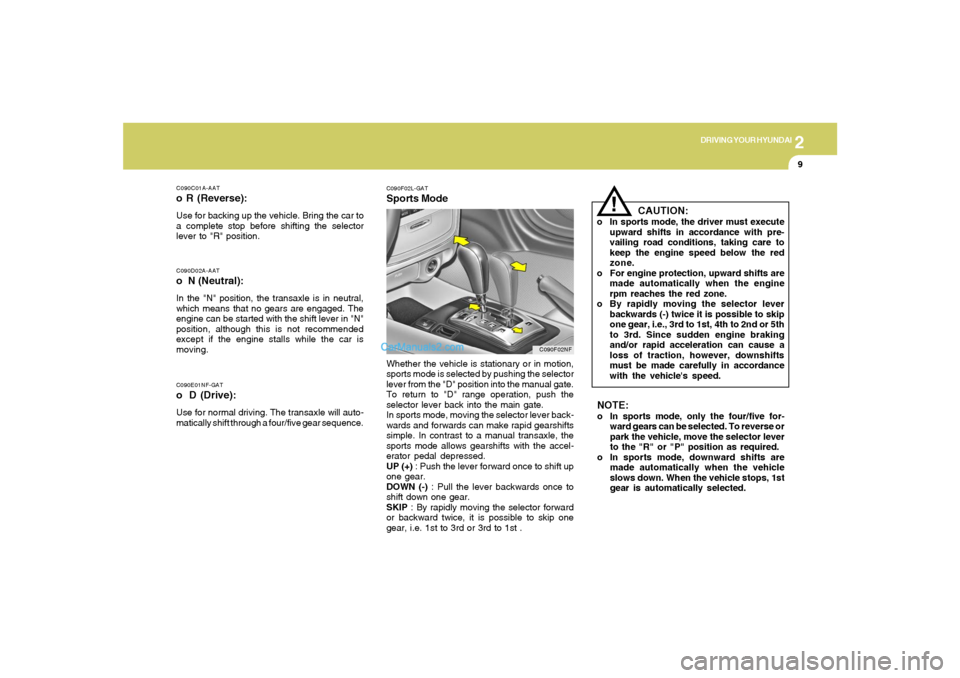
C090F02L-GATSports ModeWhether the vehicle is stationary or in motion,
sports mode is selected by pushing the selector
lever from the "D" position into the manual gate.
To return to "D" range operation, push the
selector lever back into the main gate.
In sports mode, moving the selector lever back-
wards and forwards can make rapid gearshifts
simple. In contrast to a manual transaxle, the
sports mode allows gearshifts with the accel-
erator pedal depressed.
UP (+) : Push the lever forward once to shift up
one gear.
DOWN (-) : Pull the lever backwards once to
shift down one gear.
SKIP : By rapidly moving the selector forward
or backward twice, it is possible to skip one
gear, i.e. 1st to 3rd or 3rd to 1st .
C090F02NF
NOTE:o In sports mode, only the four/five for-
ward gears can be selected. To reverse or
park the vehicle, move the selector lever
to the "R" or "P" position as required.
o In sports mode, downward shifts are
made automatically when the vehicle
slows down. When the vehicle stops, 1st
gear is automatically selected.
Page 154 of 271
2
DRIVING YOUR HYUNDAI
10
!
C090I03L-GAT
CAUTION:
o Shift into "R" and "P" position only when
the vehicle has completely stopped.
o Do not accelerate the engine in reverse
or any of the forward positions with the
brakes applied.
o Always apply the footbrake when shift-
ing from "P" or "N", to "R" or "D"position.
o Do not use the "P" (Park) position in
place of the parking brake. Always set
the parking brake, shift the transaxle
into "P" (Park) position and turn off the
ignition when you leave the vehicle, even
momentarily. Never leave the vehicle
unattended while the engine is running.
o When accelerating from a stop on a
steep hill, the vehicle may have a ten-
dency to roll backwards. Shifting the
shift lever into 2nd gear while in Sport
mode will help prevent the vehicle from
rolling backwards.
o Check the automatic transaxle fluid level
regularly, and add fluid as necessary.
o See the maintenance schedule for the
proper fluid recommendation.
C090H01L-GATNOTE:o For smooth and safe operation, depress
the brake pedal when shifting from "Neu-
tral" position or "Park" position to a
forward or reverse gear.
o The ignition key must be in the "ON"
position and the brake pedal fully de-
pressed in order to move the shift lever
from the "P" (Park) position to any of the
other positions.
o It is always possible to shift from "R",
"N", or "D" position to "P" position. The
vehicle must be fully stopped to avoid
transaxle damage. o To maintain the required levels of ve-
hicle performance and safety, the sys-
tem may not execute certain gearshifts
when the selector lever is operated.
o Before driving away from a stop on a
slippery road, push the selector lever
forward into the +(UP) position. This
causes the transaxle to shift into 2nd
gear which is better for smooth driving
away on a slippery road. Push the selec-
tor lever to the -(DOWN) side to shift
back to 1st gear.
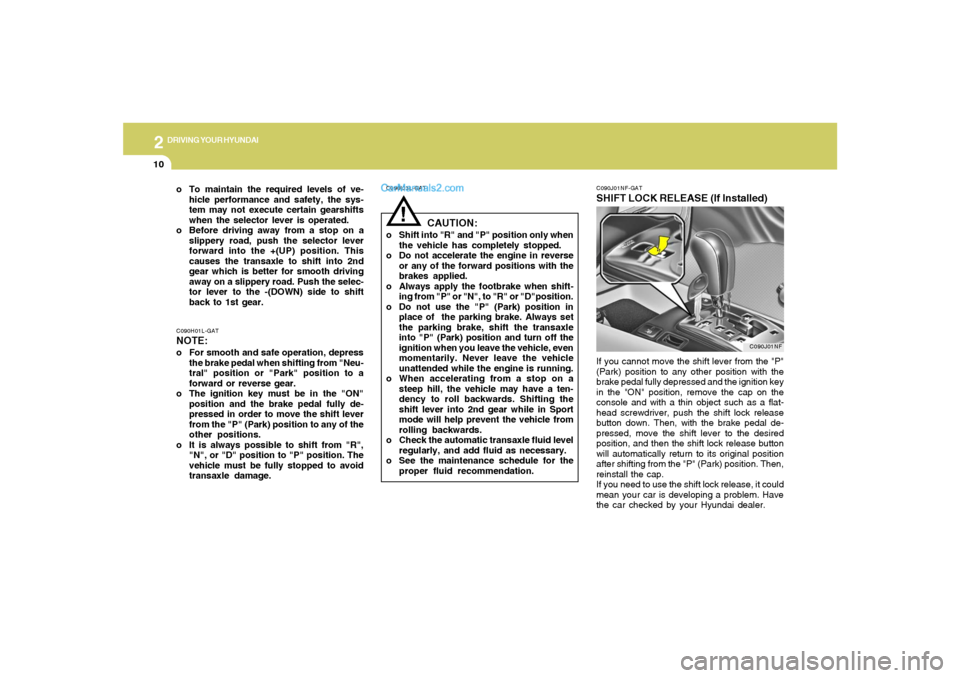
C090J01NF-GATSHIFT LOCK RELEASE (If Installed)If you cannot move the shift lever from the "P"
(Park) position to any other position with the
brake pedal fully depressed and the ignition key
in the "ON" position, remove the cap on the
console and with a thin object such as a flat-
head screwdriver, push the shift lock release
button down. Then, with the brake pedal de-
pressed, move the shift lever to the desired
position, and then the shift lock release button
will automatically return to its original position
after shifting from the "P" (Park) position. Then,
reinstall the cap.
If you need to use the shift lock release, it could
mean your car is developing a problem. Have
the car checked by your Hyundai dealer.
C090J01NF
Page 159 of 271
2
DRIVING YOUR HYUNDAI
15
o Be sure that the wheels are aligned cor-
rectly. Improper alignment can result from
hitting curbs or driving too fast over irregular
surfaces. Poor alignment causes faster tire
wear and may also result in other problems
as well as greater fuel consumption.
o Keep your car in good condition. For better
fuel economy and reduced maintenance
costs, maintain your car in accordance with
the maintenance schedule in Section 5. If
you drive your car in severe conditions,
more frequent maintenance is required (see
Section 5 for details).
o Keep your car clean. For maximum service,
your Hyundai should be kept clean and free
of corrosive materials. It is especially impor-
tant that mud, dirt, ice, etc. not be allowed to
accumulate on the underside of the car. This
extra weight can result in increased fuel
consumption and also contribute to corro-
sion.
o Travel lightly. Don't carry unnecessary
weight in your car. Weight reduces fuel
economy.
o Don't let the engine idle longer than neces-
sary. If you are waiting (and not in traffic),
turn off your engine and restart only when
you're ready to go.
DRIVING FOR ECONOMYC140A01A-AATYou can save fuel and get more miles from your
car if you follow these suggestions:
o Drive smoothly. Accelerate at a moderate
rate. Don't make "jack-rabbit" starts or full-
throttle shifts and maintain a steady cruising
speed. Don't race between stoplights. Try to
adjust your speed to that of the other traffic
so you don't have to change speeds unnec-
essarily. Avoid heavy traffic whenever pos-
sible. Always maintain a safe distance from
other vehicles so you can avoid unneces-
sary braking. This also reduces brake wear.
o Drive at a moderate speed. The faster you
drive, the more fuel your car uses. Driving at
a moderate speed, especially on the high-
way, is one of the most effective ways to
reduce fuel consumption.
o Don't "ride" the brake or clutch pedal. This
can increase fuel consumption and also
increase wear on these components. In
addition, driving with your foot resting on the
brake pedal may cause the brakes to over-
heat, which reduces their effectiveness and
may lead to more serious consequences.
o Take care of your tires. Keep them inflated
to the recommended pressure. Incorrect
inflation, either too much or too little, results
in unnecessary tire wear. Check the tire
pressures at least once a month. o Under some conditions your parking brake
can freeze in the engaged position. This is
most likely to happen when there is an
accumulation of snow or ice around or near
the rear brakes or if the brakes are wet. If
there is a risk that the parking brake may
freeze, apply it only temporarily while you put
the gear selector lever in "P" (automatic) or
in first or reverse gear (manual transaxle)
and block the rear wheels so the car cannot
roll. Then release the parking brake.
o Do not hold the vehicle on the upgrade with
the accelerator pedal. This can cause the
transaxle to overheat. Always use the brake
pedal or parking brake.
Page 165 of 271
2
DRIVING YOUR HYUNDAI
21
C190F01Y-GATTrailer or Vehicle Towing Tips1. Before towing, check hitch and safety chain
connections as well as proper operation of
the trailer running lights, brake lights, and
turn signals.
2. Always drive your vehicle at a moderate
speed. (Less than 60 mph)
3. Trailer towing requires more fuel than normal
conditions.
4. To maintain engine braking efficiency and
electrical charging performance, do not tow
a trailer with the transaxle in fifth gear (manual
transaxle).
5. Always secure items in the trailer to prevent
load shift while driving.
6. Check the condition and air pressure of all
tires on the trailer and your car. Low tire
pressure can seriously affect the handling.
Also check the spare tire.
7. The vehicle/trailer combination is more af-
fected by crosswind and buffeting.
When being passed by a large vehicle, keep
a constant speed and steer straight ahead.
If there is too much wind buffeting, slow down
to get out of the other vehicle's air turbulence.
!
lbs(kg)
!
Tongue
200 (90)
- With3.3L
Brake 2.4L
Without BrakeMaximum Towable Weight
Trailer
2000 (900)
1500 (675)
1000 (450)
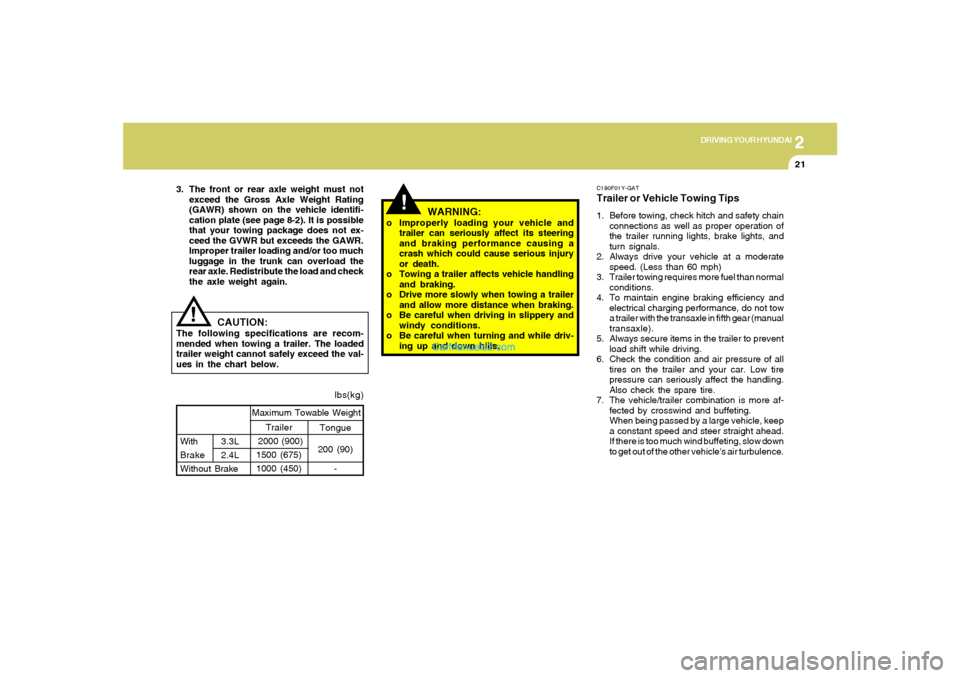
CAUTION:
The following specifications are recom-
mended when towing a trailer. The loaded
trailer weight cannot safely exceed the val-
ues in the chart below.
WARNING:
o Improperly loading your vehicle and
trailer can seriously affect its steering
and braking performance causing a
crash which could cause serious injury
or death.
o Towing a trailer affects vehicle handling
and braking.
o Drive more slowly when towing a trailer
and allow more distance when braking.
o Be careful when driving in slippery and
windy conditions.
o Be careful when turning and while driv-
ing up and down hills. 3. The front or rear axle weight must not
exceed the Gross Axle Weight Rating
(GAWR) shown on the vehicle identifi-
cation plate (see page 8-2). It is possible
that your towing package does not ex-
ceed the GVWR but exceeds the GAWR.
Improper trailer loading and/or too much
luggage in the trunk can overload the
rear axle. Redistribute the load and check
the axle weight again.
Page 251 of 271
8
CONSUMER INFORMATION, REPORTING SAFETY DEFECTS & BINDING ARBITRATION OF WARRANTY CLAIMS
7
Intended Outboard Sidewall: The side
of an asymmetrical tire, that must al-
ways face outward when mounted on a
vehicle.
Kilopascal (kPa): The metric unit for
air pressure.
Load Index: An assigned number rang-
ing from 1 to 279 that corresponds to
the load carrying capacity of a tire.
Maximum Inflation Pressure: The
maximum air pressure to which a cold
tire may be inflated. The maximum air
pressure is molded onto the sidewall.
Maximum Load Rating: The load rat-
ing for a tire at the maximum permis-
sible inflation pressure for that tire.
Maximum Loaded Vehicle Weight:
The sum of curb weight; accessory
weight; vehicle capacity weight; and
production options weight.
Normal Occupant Weight: The num-
ber of occupants a vehicle is designed
to seat multiplied by 150 pounds (68
kg).Occupant Distribution: Designated
seating positions.
Outward Facing Sidewall: The side of
an asymmetrical tire that has a particu-
lar side that faces outward when
mounted on a vehicle. The side of the
tire that contains a whitewall, bears
white lettering or bears manufacturer,
brand and or model name molding that
is higher or deeper than the same mold-
ings on the other sidewall of the tire.
Passenger (P-Metric) Tire: A tire used
on passenger cars and some light duty
trucks and multipurpose vehicles.
Recommended Inflation Pressure:
Vehicle manufacturer's recommended
tire inflation pressure as shown on the
tire placard.
Radial Ply tire: A pneumatic tire in
which the ply cords that extend to the
beads are laid at 90 degrees to the
centerline of the tread.
Rim: A metal support for a tire upon
which the tire beads are seated.Sidewall: The portion of a tire between
the tread and the bead.
Speed Rating: An alphanumeric code
assigned to a tire indicating the maxi-
mum speed at which a tire can operate.
Traction: The friction between the tire
and the road surface. The amount of
grip provided.
Tread: The portion of a tire that comes
into contact with the road.
Treadwear Indicators: Narrow bands,
sometimes called "wear bars," that show
across the tread of a tire when only 2/32
inch of tread remains.
UTQGS: Uniform Tire Quality Grading
Standards, a tire information system
that provides consumers with ratings
for a tire's traction, temperature and
treadwear. Ratings are determined by
tire manufacturers using government
testing procedures. The ratings are
molded into the sidewall of the tire.
Page 252 of 271
8
CONSUMER INFORMATION, REPORTING SAFETY DEFECTS & BINDING ARBITRATION OF WARRANTY CLAIMS8
Vehicle Capacity Weight: The number
of designated seating positions multi-
plied by 150 lbs. (68 kg) plus the rated
cargo and luggage load.
Vehicle Maximum Load on the Tire:
Load on an individual tire due to curb
and accessory weight plus maximum
occupant and cargo weight.
Vehicle Normal Load on the Tire:
That load on an individual tire that is
determined by distributing to each axle
its share of the curb weight, accessory
weight, and normal occupant weight
and dividing by 2.
Vehicle Placard: A label permanently
attached to a vehicle showing the origi-
nal equipment tire size and recom-
mended inflation pressure.all four wheels; otherwise, poor han-
dling may result.
Snow tires should carry 4 psi (28 kPa)
more air pressure than the pressure
recommended for the standard tires on
the tire label on the driver's side of the
center pillar , or up to the maximum
pressure shown on the tire sidewall,
whichever is less.
Do not drive faster than 75 mph (120
km/h) when your car is equipped with
snow tires.I040B01JM-AATALL SEASON TIRES
Hyundai specifies all season tires on
some models to provide good perfor-
mance for use all year round, including
snowy and icy road conditions. All sea-
I040C01JM-AATSUMMER TIRES
Hyundai specifies summer tires on some
models to provide superior performance
on dry roads. Summer tire performance
is substantially reduced in snow and
ice. Summer tires do not have the tire
traction rating M+S (Mud and Snow) on
the tire side wall. If you plan to operate
your vehicle in snowy or icy conditions,
Hyundai recommends the use of snow
tires or all season tires on all four wheels.
I050A03Y-AATTIRE CHAINS
Tire chains, if necessary, should be
installed on the front wheels. Be sure
that the chains are the proper size and
that they are installed in accordance
with the manufacturer's instructions.
To minimize tire and chain wear, do not
continue to use tire chains when they
are no longer needed. son tires are identified by ALL SEASON
and/or M+S (Mud and Snow) on the tire
sidewall. Snow tires have better snow
traction than all season tires an may be
more appropriate in some areas.
I040A01O-AATSNOW TIRES
If you equip your car with snow tires,
they should be the same size and have
the same load capacity as the original
tires. Snow tires should be installed on