reset Hyundai Sonata
[x] Cancel search | Manufacturer: HYUNDAI, Model Year: , Model line: , Model:Pages: 271, PDF Size: 12.44 MB
Page 129 of 271
1FEATURES OF YOUR HYUNDAI
116
V480B01NF-AAT1. POWER ON-OFF / VOLUME Control
KnobPress the PUSH PWR Control Knob to turn the
audio system on or off.
Rotate the knob clockwise to increase the
volume and turn the knob counterclockwise to
decrease the volume.
If the volume is set above a certain level and the
ignition is turned off, the volume will come back
on at a "nominal" listening level when the ignition
switch is turned back on.2. BAND SelectorThe AM/FM select control works in radio and
CD mode.o AM/FM select in radio modeThis control allows you to select AM or FM
frequency bands. Press the button to switch
between FM1, FM2 and AM memory preset
stations.o AM/FM select in CD modePress this button to stop CD play and begin radio
play.
3. Tune(manual) / Adjustment Mode Se-
lect Knobo Rotate counterclockwise to the next fre-
quency down the band (whether or not a
listenable station is located there).
o Rotate clockwise to move to the next fre-
quency up the band (whether or not a listen-
able station is located there).Adjustment Mode SelectPressing the AUDIO SEL knob will initiate Audio
Mode. Each subsequent press will select the
next adjustment in the following order:
1) Bass adjust
The bass adjust control allows you to in-
crease or decrease the audio system's
bass output. Rotate the AUDIO SEL knob to
change the bass setting.
2) Midrange adjust
The midrange adjust control allows you to
increase or decrease the audio system's
midrange output. Rotate the AUDIO SEL
knob to change the midrange setting.
3) Treble adjust
The treble adjust control allows you to in-
crease or decrease the audio system's
treble output. Rotate the AUDIO SEL knob to
change the treble setting.4) Speaker balance adjust
Speaker sound distribution can be adjusted
between the right and left speakers by rotat-
ing the AUDIO SEL knob.
5) Speaker fade adjust
Speaker sound can be adjusted between the
front and rear speakers by rotating the
AUDIO SEL knob.
4. SEEK Operation
(Automatic Channel Selection)o Press (down arrow) to find the next
listenable station down the frequency band.
SEEK DOWN will display.
o Press (up arrow) to find the next listenable
station up the frequency band. SEEK UP will
display.5. SCAN ButtonPress the SCAN button to hear a brief sampling
of all listenable stations on the frequency band.
Press the SCAN button again to stop the scan
mode.
Page 130 of 271
1
FEATURES OF YOUR HYUNDAI
117
6. PRESET STATION SELECT ButtonsThe radio is equipped with six preset station
memory controls. These buttons can be used
to select up to 6 preset AM stations and 12
preset FM stations (six in AM, six in FM1, six in
FM2). There are a total possible of 18 preset
stations.Setting memory preset stationso Select the frequency band with the BAND
selector. Press the AM/FM control to toggle
between AM, FM1, or FM2.
o Press the SEEK control to access the next
listenable station up or down the frequency
band. Rotate the TUNE control to go up or
down the listening band in individual incre-
ments.
o Select a station.
o Press and hold a memory preset control.
You will hear a beep and the station is held
in memory on the control you selected.7. EQ Button- Equalization FeatureThe radio has five EQ modes: OFF, CLASSI-
CAL, POP, ROCK, and JAZZ.
Each press of the EQ button will advance to the
next EQ setting. Radio and CD have indepen-
dent EQ settings.
CAUTION:
o Do not place beverages close to the
audio system. The playback mechanism
may be damaged if you spill them.
o Do not impact or strike the audio system,
or the playback mechanism could be
damaged.
!
Page 135 of 271
1FEATURES OF YOUR HYUNDAI
122
V490A01NF-AATSTEREO RADIO OPERATION (V490) (If Installed)
V490A01NF
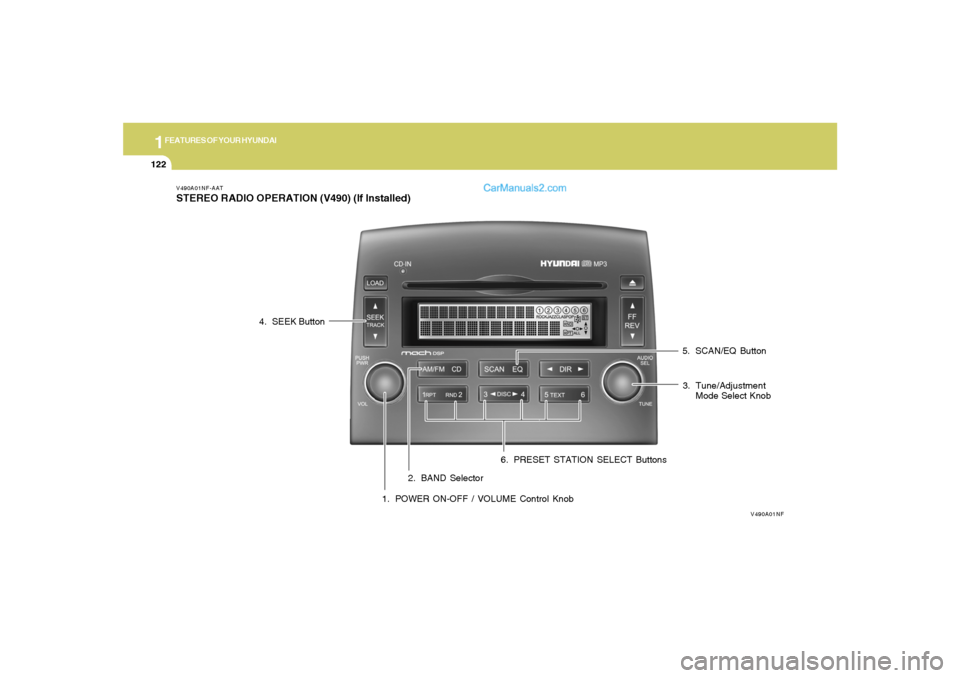
1. POWER ON-OFF / VOLUME Control Knob2. BAND Selector3. Tune/Adjustment
Mode Select Knob 4. SEEK Button
5. SCAN/EQ Button
6. PRESET STATION SELECT Buttons
Page 136 of 271
1
FEATURES OF YOUR HYUNDAI
123
V490B01NF-AAT1. POWER ON-OFF / VOLUME Control
KnobPress the PUSH PWR Control Knob to turn the
audio system on or off.
Rotate the knob clockwise to increase the
volume and turn the knob counterclockwise to
decrease the volume.
If the volume is set above a certain level and the
ignition is turned off, the volume will come back
on at a "nominal" listening level when the ignition
switch is turned back on.2. BAND SelectorThe AM/FM select control works in radio and
CD modes.o AM/FM select in radio modeThis control allows you to select AM or FM
frequency bands. Press the button to switch
between FM1, FM2 and AM memory preset
stations.o AM/FM select in CD modePress this button to stop CD play and begin radio
play.
3. Tune(manual) / Adjustment Mode Se-
lect Knobo Rotate counterclockwise to the next fre-
quency down the band (whether or not a
listenable station is located there).
o Rotate clockwise to move to the next fre-
quency up the band (whether or not a listen-
able station is located there).Adjustment Mode SelectPressing the AUDIO SEL knob will initiate Audio
Mode. Each subsequent press will select the
next adjustment in the following order:
1) Bass adjust
The bass adjust control allows you to in-
crease or decrease the audio system's
bass output. Rotate the AUDIO SEL knob to
change the bass setting.
2) Midrange adjust
The midrange adjust control allows you to
increase or decrease the audio system's
midrange output. Rotate the AUDIO SEL
knob to change the midrange setting.
3) Treble adjust
The treble adjust control allows you to in-
crease or decrease the audio system's
treble output. Rotate the AUDIO SEL knob to
change the treble setting.4) Speaker balance adjust
Speaker sound distribution can be adjusted
between the right and left speakers by rotat-
ing the AUDIO SEL knob.
5) Speaker fade adjust
Speaker sound can be adjusted between
the front and rear speakers by rotating the
AUDIO SEL knob.
4. SEEK Operation
(Automatic Channel Selection)o Press (down arrow) to find the next
listenable station down the frequency band.
SEEK DOWN will display.
o Press (up arrow) to find the next listenable
station up the frequency band. SEEK UP will
display.5. SCAN EQ ButtonPress the SCAN button to hear a brief sampling
of all listenable stations on the frequency band.
Press the SCAN button again to stop the scan
mode.
Page 137 of 271
1FEATURES OF YOUR HYUNDAI
124
EQ Button- Equalization FeatureThe radio has five EQ modes: OFF, CLASSI-
CAL, POP, ROCK, and JAZZ.
Each press of the EQ button will advance to the
next EQ setting. Radio and CD have indepen-
dent EQ settings.6. PRESET STATION SELECT ButtonsThe radio is equipped with six preset station
memory controls. These buttons can be used
to select up to 6 preset AM stations and 12
preset FM stations (six in AM, six in FM1, six in
FM2). There are a total possible of 18 preset
stations.Setting memory preset stationso Select the frequency band with the BAND
selector. Press the AM/ FM control to toggle
between AM, FM1, or FM2.
o Press the SEEK control to access the next
listenable station up or down the frequency
band. Rotate the TUNE control to go up or
down the listening band in individual incre-
ments.
o Select a station.
o Press and hold a memory preset control.
You will hear a beep and the station is held
in memory on the control you selected.
CAUTION:
o Do not place beverages close to the
audio system. The playback mechanism
may be damaged if you spill them.
o Do not impact or strike the audio system,
or the playback mechanism could be
damaged.
!
Page 139 of 271
1FEATURES OF YOUR HYUNDAI
126
V490D01NF-AAT1. AUDIO/MP3 CD Select ButtonCD mode may be entered by pressing the CD
button and then loading a CD into the audio
system. The first track of the disc will begin
playing. After that, the CD play will begin where
it stopped last.
If an alternative CD is desired, press the corre-
sponding preset control (1- 6) of a loaded CD,
or press the DISC control to access the other
loaded CDs.
NO CD will display if the CD control is activated
when there is not a CD present in the audio
system. If the CD control is pressed followed by
a preset number, and that particular slot is
empty, NO CD will display and the system will
begin to play the next available disc.NOTE:o Do not apply paper, tape, etc., onto the
label side or the recording side of any
discs, as it may cause a malfunction.
o The unit cannot play a CD-R(Recordable
CD) and CD-RW(Rewritable CD) that is
not finalized. Please refer to the manual
of the CD-R/CD-RW recorder or CD-R/
CD-RW software for more information
on the finalization process.
o Depending on the recording status,
some CD-Rs/CD-RWs may not be play-
able on this unit.
2. LOAD ButtonThe load feature allows you to load single CDs
into the player internal to the audio.
o Press the LOAD button. Wait until the CD
displays the insert CD message.
o Load the CD into the player.AutoloadThis feature allows you to azzutoload up to six
discs into the multi-disc CD player internal to the
audio.
o Press and hold the LOAD button until
AUTOLOAD# is displayed.
o Load the desired discs, one at a time. The CD
is loaded into position and the audio system
will display CD#. Each time the audio is ready
for another CD, AUTOLOADING DISC
SLOT# message will be displayed. The player
will move to the next slot after each disc has
been loaded. The process is repeated until
all six slots are full.
The audio system plays the last CD loaded and
the display is updated. If some slots are already
full and autoload is activated, the system will fill
all empty slots.
NOTE:o This CD player is suitable only for 4.7
inch discs, do not use irregular shaped
CDs.
o The disc player holds up to six discs. Do
not try to load more than six.
o This six-disc CD player is equipped with
a CD door.
Compact discs should only be inserted
into the player after the door has opened.
Do not attempt to force the door open.
Compact discs should only be loaded by
pressing the LOAD control.3. DISC Select Buttono Press (left arrow) to select the previous
disc. (Play will begin on the first track of the
disc unless shuffle mode is engaged.) Hold
the button to continue reversing through the
discs.
o Press (right arrow) to select the next disc.
Hold the button to fast-forward through the
remaining discs.