set Hyundai Sonata
[x] Cancel search | Manufacturer: HYUNDAI, Model Year: , Model line: , Model:Pages: 208, PDF Size: 16.93 MB
Page 46 of 208
1- 34 FEATURES OF YOUR HYUNDAI
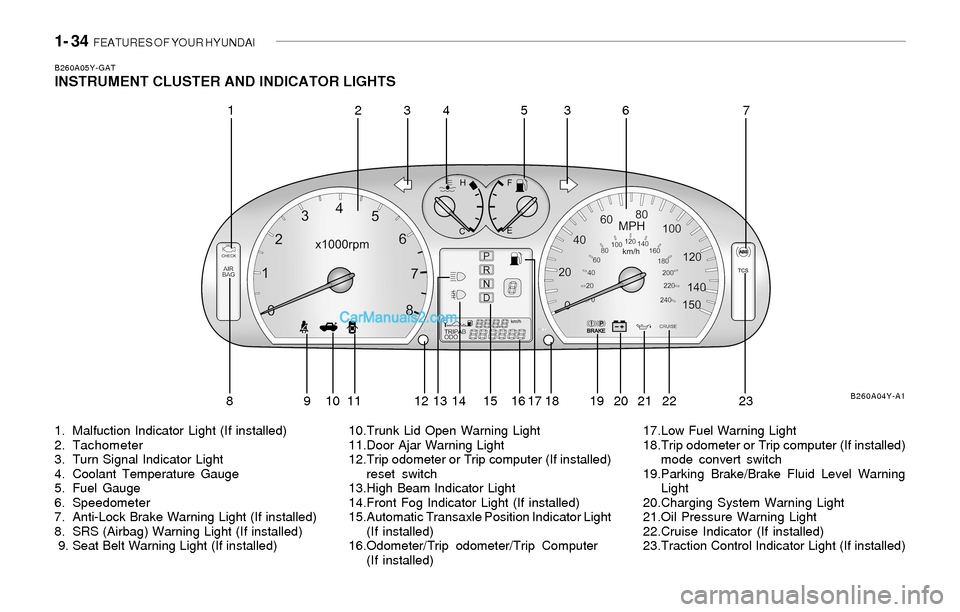
B260A05Y-GATINSTRUMENT CLUSTER AND INDICATOR LIGHTS
1. Malfuction Indicator Light (If installed)
2. Tachometer
3. Turn Signal Indicator Light
4. Coolant Temperature Gauge
5. Fuel Gauge
6. Speedometer
7. Anti-Lock Brake Warning Light (If installed)
8. SRS (Airbag) Warning Light (If installed)
9. Seat Belt Warning Light (If installed)10.Trunk Lid Open Warning Light
11.Door Ajar Warning Light
12.Trip odometer or Trip computer (If installed)
reset switch
13.High Beam Indicator Light
14.Front Fog Indicator Light (If installed)
15.Automatic Transaxle Position Indicator Light
(If installed)
16.Odometer/Trip odometer/Trip Computer
(If installed)17.Low Fuel Warning Light
18.Trip odometer or Trip computer (If installed)
mode convert switch
19.Parking Brake/Brake Fluid Level Warning
Light
20.Charging System Warning Light
21.Oil Pressure Warning Light
22.Cruise Indicator (If installed)
23.Traction Control Indicator Light (If installed)
B260A04Y-A1
12345637
8 9 10 11 12 13 14 15 16 17 18 19 20 21 22 23
Page 49 of 208
FEATURES OF YOUR HYUNDAI 1- 37
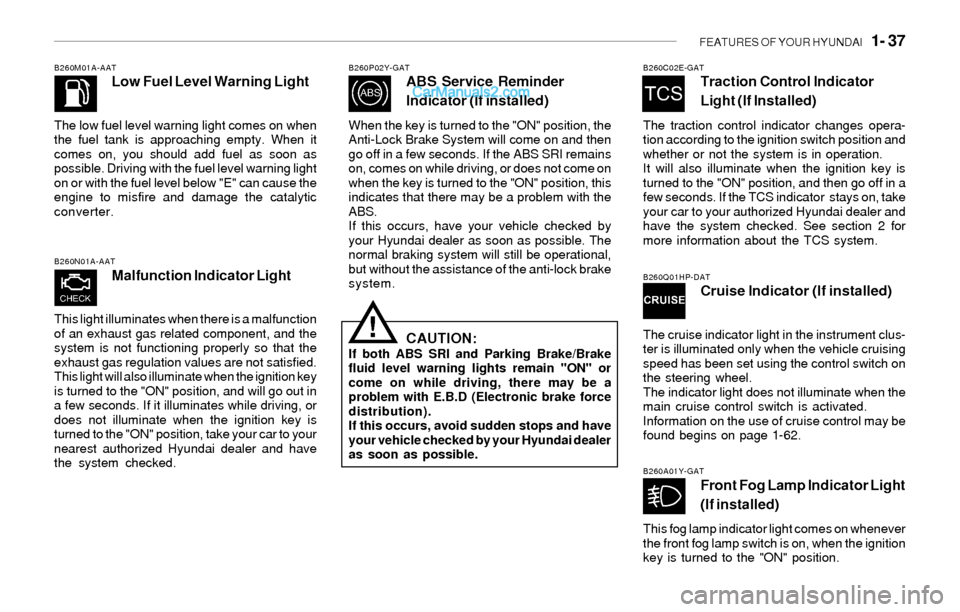
B260M01A-AATLow Fuel Level Warning Light
The low fuel level warning light comes on when
the fuel tank is approaching empty. When it
comes on, you should add fuel as soon as
possible. Driving with the fuel level warning light
on or with the fuel level below "E" can cause the
engine to misfire and damage the catalytic
converter.
B260N01A-AAT
Malfunction Indicator Light
This light illuminates when there is a malfunction
of an exhaust gas related component, and the
system is not functioning properly so that the
exhaust gas regulation values are not satisfied.
This light will also illuminate when the ignition key
is turned to the "ON" position, and will go out in
a few seconds. If it illuminates while driving, or
does not illuminate when the ignition key is
turned to the "ON" position, take your car to your
nearest authorized Hyundai dealer and have
the system checked.
B260P02Y-GATABS Service Reminder
Indicator (If installed)
When the key is turned to the "ON" position, the
Anti-Lock Brake System will come on and then
go off in a few seconds. If the ABS SRI remains
on, comes on while driving, or does not come on
when the key is turned to the "ON" position, this
indicates that there may be a problem with the
ABS.
If this occurs, have your vehicle checked by
your Hyundai dealer as soon as possible. The
normal braking system will still be operational,
but without the assistance of the anti-lock brake
system.
CAUTION:If both ABS SRI and Parking Brake/Brake
fluid level warning lights remain "ON" or
come on while driving, there may be a
problem with E.B.D (Electronic brake force
distribution).
If this occurs, avoid sudden stops and have
your vehicle checked by your Hyundai dealer
as soon as possible.
!
B260C02E-GATTraction Control Indicator
Light (If Installed)
The traction control indicator changes opera-
tion according to the ignition switch position and
whether or not the system is in operation.
It will also illuminate when the ignition key is
turned to the "ON" position, and then go off in a
few seconds. If the TCS indicator stays on, take
your car to your authorized Hyundai dealer and
have the system checked. See section 2 for
more information about the TCS system.
B260Q01HP-DATCruise Indicator (If installed)
The cruise indicator light in the instrument clus-
ter is illuminated only when the vehicle cruising
speed has been set using the control switch on
the steering wheel.
The indicator light does not illuminate when the
main cruise control switch is activated.
Information on the use of cruise control may be
found begins on page 1-62.
B260A01Y-GATFront Fog Lamp Indicator Light
(If installed)
This fog lamp indicator light comes on whenever
the front fog lamp switch is on, when the ignition
key is turned to the "ON" position.
Page 51 of 208
FEATURES OF YOUR HYUNDAI 1- 39
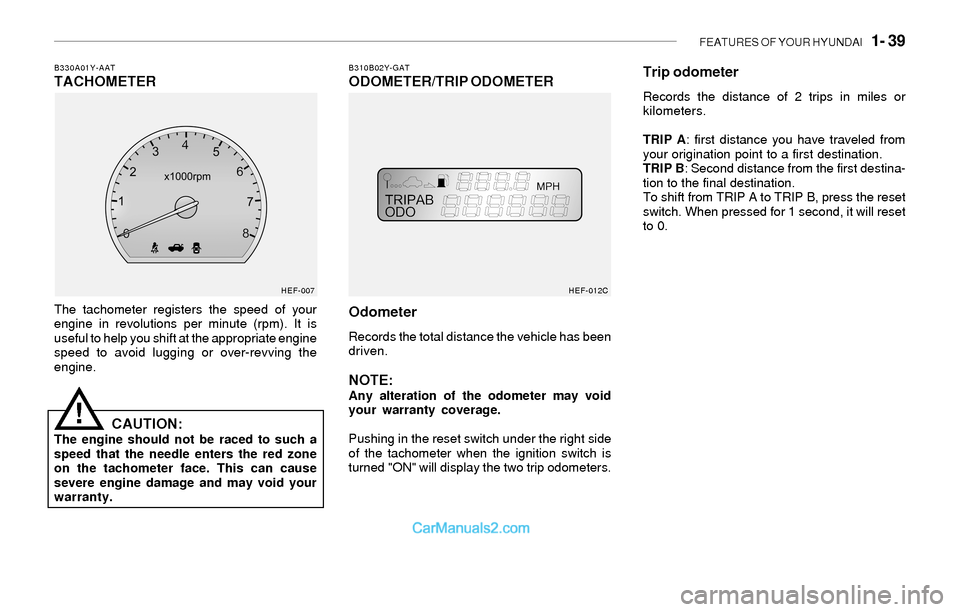
B310B02Y-GATODOMETER/TRIP ODOMETERB330A01Y-AATTACHOMETER
The tachometer registers the speed of your
engine in revolutions per minute (rpm). It is
useful to help you shift at the appropriate engine
speed to avoid lugging or over-revving the
engine.
CAUTION:The engine should not be raced to such a
speed that the needle enters the red zone
on the tachometer face. This can cause
severe engine damage and may void your
warranty.
!
HEF-007
Odometer
Records the total distance the vehicle has been
driven.
NOTE:Any alteration of the odometer may void
your warranty coverage.
Pushing in the reset switch under the right side
of the tachometer when the ignition switch is
turned "ON" will display the two trip odometers.
HEF-012C
Trip odometer
Records the distance of 2 trips in miles or
kilometers.
TRIP A: first distance you have traveled from
your origination point to a first destination.
TRIP B: Second distance from the first destina-
tion to the final destination.
To shift from TRIP A to TRIP B, press the reset
switch. When pressed for 1 second, it will reset
to 0.
Page 52 of 208
1- 40 FEATURES OF YOUR HYUNDAI
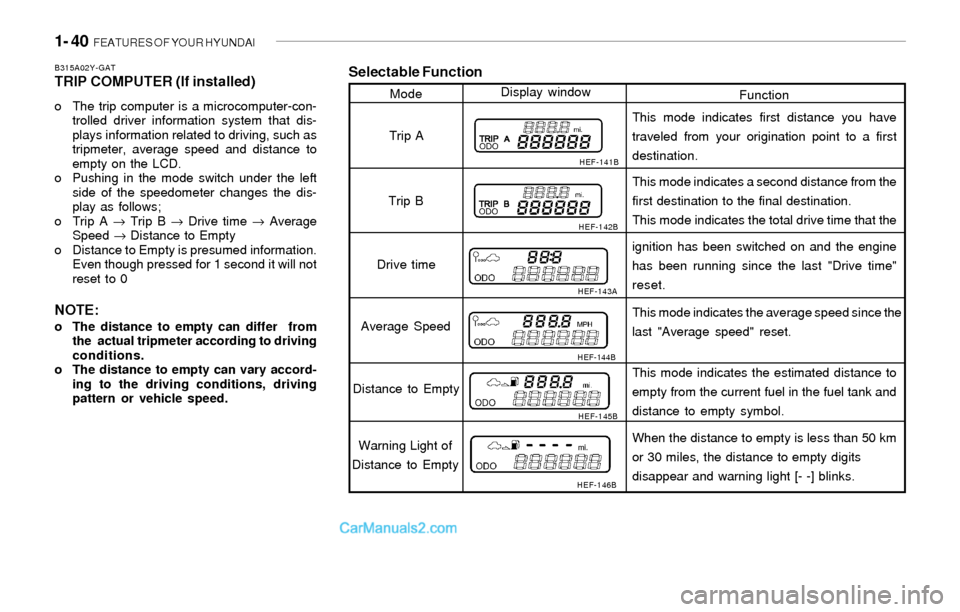
Selectable Function
Function ModeDisplay window
HEF-141B
HEF-142B
HEF-143A
HEF-144B
HEF-145B
HEF-146B
Trip A
Trip B
Drive time
Average Speed
Distance to Empty
Warning Light of
Distance to EmptyThis mode indicates first distance you have
traveled from your origination point to a first
destination.
This mode indicates a second distance from the
first destination to the final destination.
This mode indicates the total drive time that the
ignition has been switched on and the engine
has been running since the last "Drive time"
reset.
This mode indicates the average speed since the
last "Average speed" reset.
This mode indicates the estimated distance to
empty from the current fuel in the fuel tank and
distance to empty symbol.
When the distance to empty is less than 50 km
or 30 miles, the distance to empty digits
disappear and warning light [- -] blinks.
B315A02Y-GATTRIP COMPUTER (If installed)
o The trip computer is a microcomputer-con-
trolled driver information system that dis-
plays information related to driving, such as
tripmeter, average speed and distance to
empty on the LCD.
o Pushing in the mode switch under the left
side of the speedometer changes the dis-
play as follows;
o Trip A → Trip B → Drive time → Average
Speed → Distance to Empty
o Distance to Empty is presumed information.
Even though pressed for 1 second it will not
reset to 0
NOTE:o The distance to empty can differ from
the actual tripmeter according to driving
conditions.
o The distance to empty can vary accord-
ing to the driving conditions, driving
pattern or vehicle speed.
Page 57 of 208
FEATURES OF YOUR HYUNDAI 1- 45
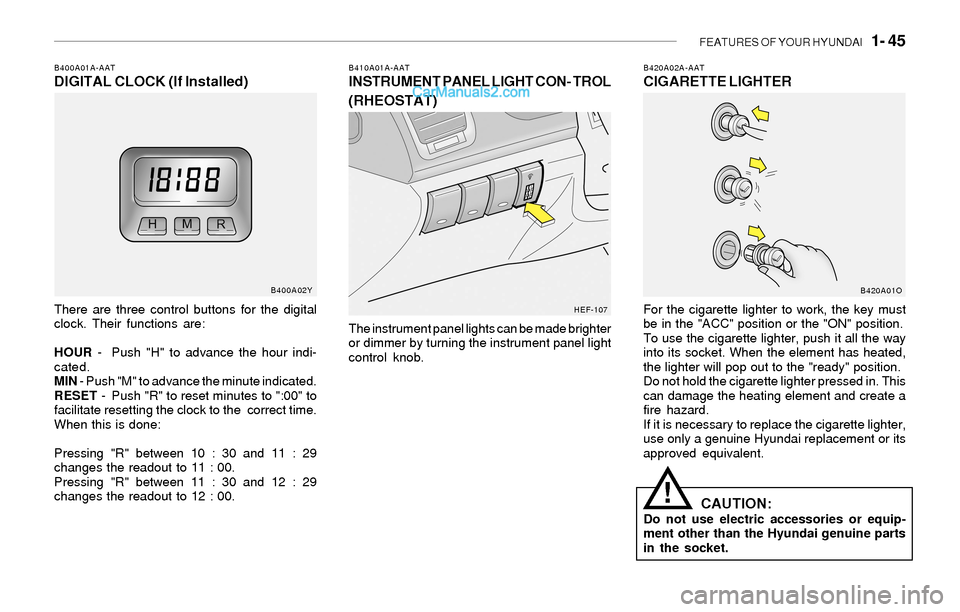
B420A02A-AATCIGARETTE LIGHTER
For the cigarette lighter to work, the key must
be in the "ACC" position or the "ON" position.
To use the cigarette lighter, push it all the way
into its socket. When the element has heated,
the lighter will pop out to the "ready" position.
Do not hold the cigarette lighter pressed in. This
can damage the heating element and create a
fire hazard.
If it is necessary to replace the cigarette lighter,
use only a genuine Hyundai replacement or its
approved equivalent.
CAUTION:Do not use electric accessories or equip-
ment other than the Hyundai genuine parts
in the socket.
!
B410A01A-AATINSTRUMENT PANEL LIGHT CON- TROL
(RHEOSTAT)
The instrument panel lights can be made brighter
or dimmer by turning the instrument panel light
control knob.
B400A01A-AATDIGITAL CLOCK (If Installed)
There are three control buttons for the digital
clock. Their functions are:
HOUR - Push "H" to advance the hour indi-
cated.
MIN - Push "M" to advance the minute indicated.
RESET - Push "R" to reset minutes to ":00" to
facilitate resetting the clock to the correct time.
When this is done:
Pressing "R" between 10 : 30 and 11 : 29
changes the readout to 11 : 00.
Pressing "R" between 11 : 30 and 12 : 29
changes the readout to 12 : 00.
B400A02Y
HEF-107B420A01O
Page 66 of 208
1- 54 FEATURES OF YOUR HYUNDAI
Flashing
Programming
Your vehicle may require that the ignition switch
to be turned to the "ACC" position to program
and/or operate HomeLink system. It is also
recommended that a new battery be placed in
the handheld transmitter of the device being
programmed to HomeLink for quicker program-
ming and accurate transmission of the radio-
frequency.
Follow these steps to program your HomeLink
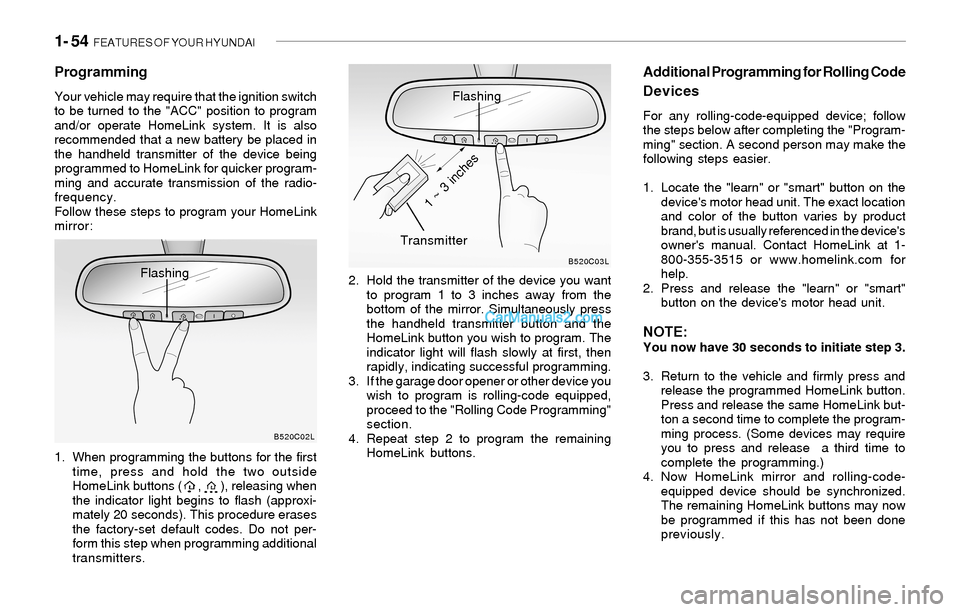
mirror:
1. When programming the buttons for the first
time, press and hold the two outside
HomeLink buttons ( , ), releasing when
the indicator light begins to flash (approxi-
mately 20 seconds). This procedure erases
the factory-set default codes. Do not per-
form this step when programming additional
transmitters.2. Hold the transmitter of the device you want
to program 1 to 3 inches away from the
bottom of the mirror. Simultaneously press
the handheld transmitter button and the
HomeLink button you wish to program. The
indicator light will flash slowly at first, then
rapidly, indicating successful programming.
3. If the garage door opener or other device you
wish to program is rolling-code equipped,
proceed to the "Rolling Code Programming"
section.
4. Repeat step 2 to program the remaining
HomeLink buttons.
Additional Programming for Rolling Code
Devices
For any rolling-code-equipped device; follow
the steps below after completing the "Program-
ming" section. A second person may make the
following steps easier.
1. Locate the "learn" or "smart" button on the
device's motor head unit. The exact location
and color of the button varies by product
brand, but is usually referenced in the device's
owner's manual. Contact HomeLink at 1-
800-355-3515 or www.homelink.com for
help.
2. Press and release the "learn" or "smart"
button on the device's motor head unit.
NOTE:You now have 30 seconds to initiate step 3.
3. Return to the vehicle and firmly press and
release the programmed HomeLink button.
Press and release the same HomeLink but-
ton a second time to complete the program-
ming process. (Some devices may require
you to press and release a third time to
complete the programming.)
4. Now HomeLink mirror and rolling-code-
equipped device should be synchronized.
The remaining HomeLink buttons may now
be programmed if this has not been done
previously.
B520C02LB520C03L
Flashing
Transmitter
1 ~ 3 inches
Page 74 of 208
1- 62 FEATURES OF YOUR HYUNDAI
!
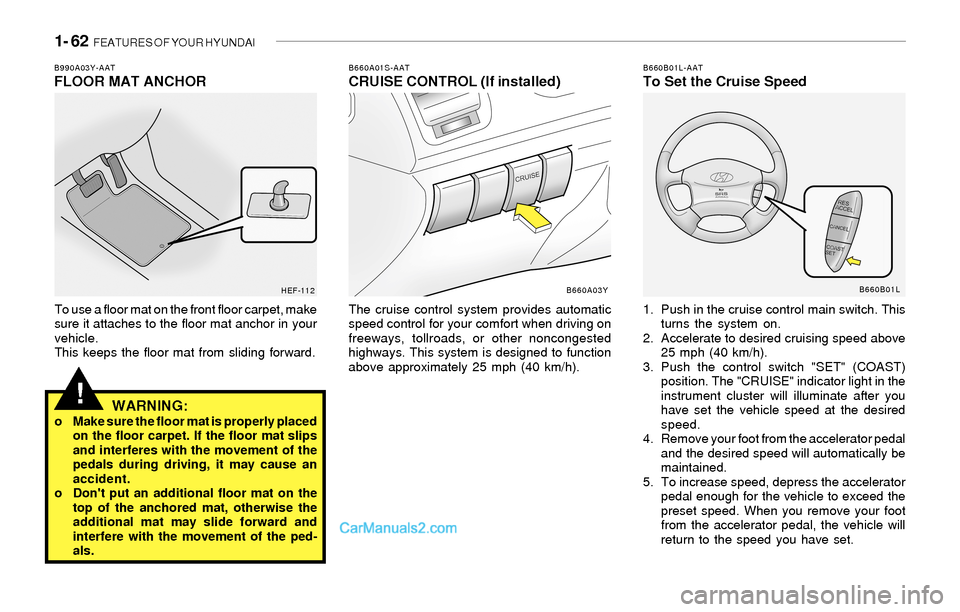
B660A01S-AATCRUISE CONTROL (If installed)
The cruise control system provides automatic
speed control for your comfort when driving on
freeways, tollroads, or other noncongested
highways. This system is designed to function
above approximately 25 mph (40 km/h).
B660B01L-AATTo Set the Cruise Speed
1. Push in the cruise control main switch. This
turns the system on.
2. Accelerate to desired cruising speed above
25 mph (40 km/h).
3. Push the control switch "SET" (COAST)
position. The "CRUISE" indicator light in the
instrument cluster will illuminate after you
have set the vehicle speed at the desired
speed.
4. Remove your foot from the accelerator pedal
and the desired speed will automatically be
maintained.
5. To increase speed, depress the accelerator
pedal enough for the vehicle to exceed the
preset speed. When you remove your foot
from the accelerator pedal, the vehicle will
return to the speed you have set.
B660A03Y
B990A03Y-AATFLOOR MAT ANCHOR
To use a floor mat on the front floor carpet, make
sure it attaches to the floor mat anchor in your
vehicle.
This keeps the floor mat from sliding forward.
WARNING:o Make sure the floor mat is properly placed
on the floor carpet. If the floor mat slips
and interferes with the movement of the
pedals during driving, it may cause an
accident.
o Don't put an additional floor mat on the
top of the anchored mat, otherwise the
additional mat may slide forward and
interfere with the movement of the ped-
als.
HEF-112B660B01L
Page 75 of 208
FEATURES OF YOUR HYUNDAI 1- 63
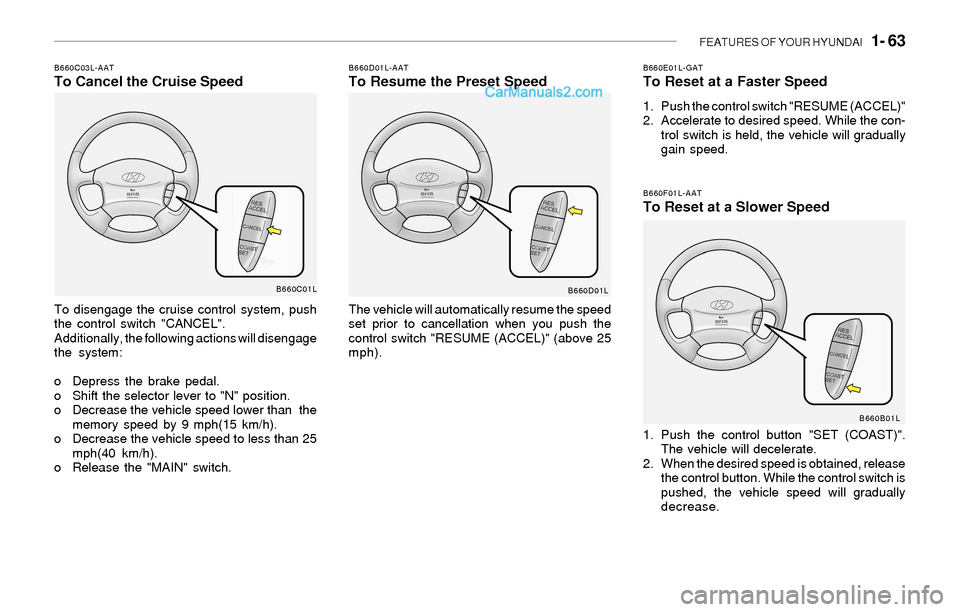
B660F01L-AATTo Reset at a Slower Speed
1. Push the control button "SET (COAST)".
The vehicle will decelerate.
2. When the desired speed is obtained, release
the control button. While the control switch is
pushed, the vehicle speed will gradually
decrease.
B660D01L-AATTo Resume the Preset Speed
The vehicle will automatically resume the speed
set prior to cancellation when you push the
control switch "RESUME (ACCEL)" (above 25
mph).
B660E01L-GATTo Reset at a Faster Speed
1. Push the control switch "RESUME (ACCEL)"
2. Accelerate to desired speed. While the con-
trol switch is held, the vehicle will gradually
gain speed.
B660C03L-AATTo Cancel the Cruise Speed
To disengage the cruise control system, push
the control switch "CANCEL".
Additionally, the following actions will disengage
the system:
o Depress the brake pedal.
o Shift the selector lever to "N" position.
o Decrease the vehicle speed lower than the
memory speed by 9 mph(15 km/h).
o Decrease the vehicle speed to less than 25
mph(40 km/h).
o Release the "MAIN" switch.
B660C01L
B660D01L
B660B01L
Page 76 of 208
1- 64 FEATURES OF YOUR HYUNDAI
!WARNING:o Keep the main switch off when not using
the cruise control.
Use the cruise control system only when
traveling on open highways in good
weather.
o Do not use the cruise control when it
may not be safe to keep the car at a
constant speed, for instance, driving in
heavy or varying traffic, or on slippery
(rainy, icy or snow-covered) or winding
roads or over 6% up-hill or down-hill
roads.
o Pay particular attention to the driving
conditions whenever using the cruise
control system.
o During normal cruise control operation,
when the "SET" button is activated or
reactivated after applying the brakes,
the cruise control will energize after
approximately 3 seconds. This delay is
normal.
Page 77 of 208
FEATURES OF YOUR HYUNDAI 1- 65
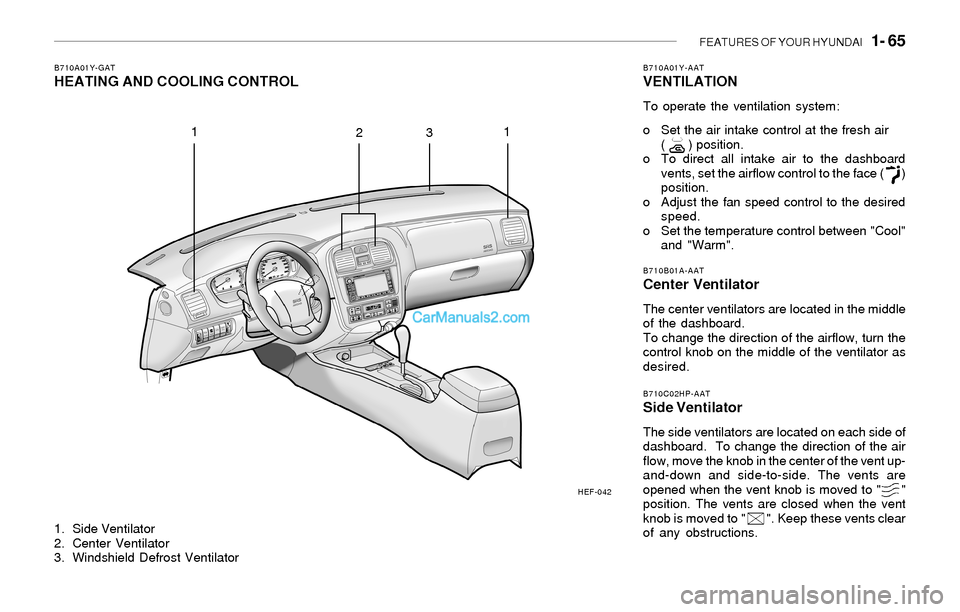
1. Side Ventilator
2. Center Ventilator
3. Windshield Defrost Ventilator
B710A01Y-GATHEATING AND COOLING CONTROLB710A01Y-AATVENTILATION
To operate the ventilation system:
o Set the air intake control at the fresh air
( ) position.
o To direct all intake air to the dashboard
vents, set the airflow control to the face ( )
position.
o Adjust the fan speed control to the desired
speed.
o Set the temperature control between "Cool"
and "Warm".
B710B01A-AATCenter Ventilator
The center ventilators are located in the middle
of the dashboard.
To change the direction of the airflow, turn the
control knob on the middle of the ventilator as
desired.
B710C02HP-AATSide Ventilator
The side ventilators are located on each side of
dashboard. To change the direction of the air
flow, move the knob in the center of the vent up-
and-down and side-to-side. The vents are
opened when the vent knob is moved to " "
position. The vents are closed when the vent
knob is moved to " ". Keep these vents clear
of any obstructions.
HEF-042
1
231