change time Hyundai Sonata Hybrid 2011 User Guide
[x] Cancel search | Manufacturer: HYUNDAI, Model Year: 2011, Model line: Sonata Hybrid, Model: Hyundai Sonata Hybrid 2011Pages: 404, PDF Size: 11.04 MB
Page 215 of 404
4121
Features of your vehicle
8. SCAN Play Button
Plays first 10 seconds of each song in
the DISC. To cancel the mode, press the
button once again.
9. INFO Button
Displays the information of the current
CD TRACK(FILE) as below when the
button is pressed each time.
CDDA : DISC TITLE
➟DISC ARTIST➟TRACK TITLE➟TRACK ARTIST➟TOTAL
TRACK...
MP3/WMA : FILE NAME
➟TITLE➟ARTIST➟ALBUM➟FOLDER➟TOTAL
FILE... (not displayed if the information
is not available on the DISC.)
10. Folder Moving Button
Press the [FOLDER ] button to move
to child folder of the current folder and
displays the first song in the folder.
Press TUNE/ENTER Knob(for CD Changer
: PA760YF, Press [ENTER] button) to move
to the folder played. It will play the first song
in the folder.
Press the [FOLDER ] button to move
to parent folder of the current folder and
displays the first song in the folder.
Press TUNE/ENTER knob(for CD Changer
: PA760YF, Press [ENTER] button) to move
the folder displayed.
11. Search/ENTER Button
Turn this button clockwise to display the
songs next to the currently played song.
Turn the button counterclockwise to dis-
play the songs before the current played
song. Press the button to skip and play
the selected song.
Page 226 of 404
Features of your vehicle
132 4
BLUETOOTH®PHONE OPERATION
(if equipped)
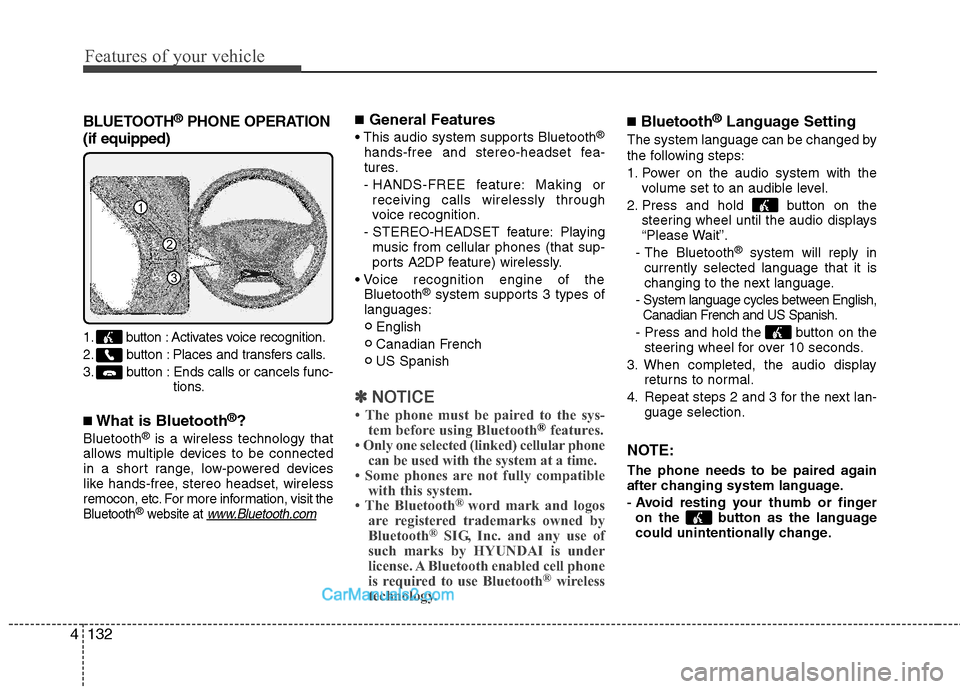
1. button : Activates voice recognition.
2. button : Places and transfers calls.
3.button: Ends calls or cancels func-
tions.
■What is Bluetooth®?
Bluetooth®is a wireless technology that
allows multiple devices to be connected
in a short range, low-powered devices
like hands-free, stereo headset, wireless
remocon, etc. For more information, visit
the
Bluetooth®website at www.Bluetooth.com
■General Features
®
hands-free and stereo-headset fea-
tures.
- HANDS-FREE feature: Making or
receiving calls wirelessly through
voice recognition.
- STEREO-HEADSET feature: Playing
music from cellular phones (that sup-
ports A2DP feature) wirelessly.
Bluetooth
®system supports 3 types of
languages:
English
Canadian French
US Spanish
✽ ✽
NOTICE
• The phone must be paired to the sys-
tem before using Bluetooth®features.
• Only one selected (linked) cellular phone
can be used with the system at a time.
• Some phones are not fully compatible
with this system.
• The Bluetooth
® word mark and logos
are registered trademarks owned by
Bluetooth
®SIG, Inc. and any use of
such marks by HYUNDAI is under
license. A Bluetooth enabled cell phone
is required to use Bluetooth
®wireless
technology.
■Bluetooth®Language Setting
The system language can be changed by
the following steps:
1. Power on the audio system with the
volume set to an audible level.
2. Press and hold button on the
steering wheel until the audio displays
“Please Wait”.
- The Bluetooth
®system will reply in
currently selected language that it is
changing to the next language.
- System language cycles between English,
Canadian French and US Spanish.
- Press and hold the button on the
steering wheel for over 10 seconds.
3. When completed, the audio display
returns to normal.
4. Repeat steps 2 and 3 for the next lan-
guage selection.
NOTE:
The phone needs to be paired again
after changing system language.
- Avoid resting your thumb or finger
on the button as the language
could unintentionally change.
1
3
2
Page 227 of 404
4133
Features of your vehicle
■Receiving a Phone Call
When receiving a phone call, a ringtone
is audible from speakers and the audio
system changes into telephone mode.
When receiving a phone call, “Incoming
call” message and incoming phone num-
ber (if available) are displayed on the
audio.
- Press button on the steering wheel.
- Press button on the steering wheel.
- Use VOLUME buttons on the steering
wheel.
Call):
- Press and hold button on the
steering wheel until the audio system
transfers a call to the phone.
■Talking on the Phone
When talking on the phone, “Active Call”
message and the other party’s phone
number (if available) are displayed on the
audio.
- Press button on the steering wheel.
✽ ✽
NOTICE
In the following situations, you or the
other party may have difficulty hearing
each other:
1. Speaking at the same time, your voice
may not reach each other parties. (This
is not a malfunction.) Speak alternate-
ly with the other party on the phone.
2. Keep the Bluetooth
®volume to a low
level. High-level volume may result in
distortion and echo.
3. When driving on a rough road.
4. When driving at high speeds.
5. When the window is open.
6. When the air conditioning vents are
facing the microphone.
7. When the sound of the air condition-
ing fan is loud.
■Bluetooth®Audio Music Streaming
The audio system supports Bluetooth®
A2DP (Audio Advanced Distribution
Profile) and AVRCP (Audio Video
Remote Control Profile) technologies.
Both profiles provide steaming of music
via compatible “PAIRED” Bluetooth
®
Cellular phone.
To stream music from the Bluetooth® cel-
lular phone, play your music files on your
cellular phone according to your cellular
phone user’s manual and press the
button on the audio system until
“MP3 play” is displayed on the LCD.
The audio system head unit displays
‘MP3 MODE’.
CD/AUX
Page 229 of 404
4135
Features of your vehicle
NOTE:
• If the phone is paired with two or
more vehicles of the same model,
some phones may not handle
Bluetooth
®devices of that name
correctly. In this case, you may need
to change the name displayed on
your phone.
For example, if the vehicles' name is
HMC CAR, you may need to change
the name displayed on you phone
from HMC_CAR to JOHNS_CAR or
HMC CAR_1 to avoid ambiguity.
Refer to your phone User’s Guide, or
contact your cellular carrier or phone
manufacturer for instructions.
When the Bluetooth
®system is enabled,
the phone previously used is automati-
cally selected and re-connected. If you
want to select different phone previously
paired, the phone can be selected
through “Select Phone” menu.
Only a selected phone can be used with
the hands-free system at a time.
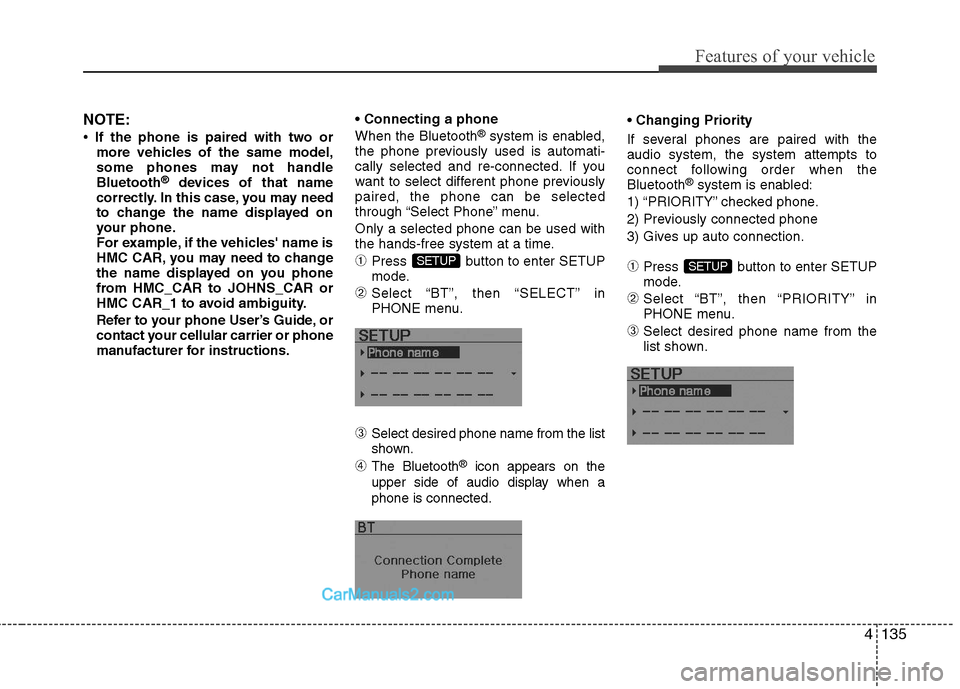
➀Press button to enter SETUP
mode.
➁Select “BT”, then “SELECT” in
PHONE menu.
➂Select desired phone name from the list
shown.
➃The Bluetooth®icon appears on the
upper side of audio display when a
phone is connected.
If several phones are paired with the
audio system, the system attempts to
connect following order when the
Bluetooth
®system is enabled:
1) “PRIORITY” checked phone.
2) Previously connected phone
3) Gives up auto connection.
➀Press button to enter SETUP
mode.
➁Select “BT”, then “PRIORITY” in
PHONE menu.
➂Select desired phone name from the
list shown.
SETUPSETUP
Page 231 of 404
4137
Features of your vehicle
✽ ✽
Tip
■Voice Operation
To get the best performance out of the
Voice Recognition System, observe the
followings:
- Keep the interior of the vehicle as
quiet as possible. Close the window
to eliminate surrounding noise
(traffic noise, vibration sounds,
etc), which may disturb recogniz-
ing the voice command correctly.
- Speak a command after a beep
sound within 5 seconds. Otherwise
the command will not be received
properly.
- Speak in a natural voice without
pausing between words.
- While receiving voice commands,
press the button on the steer-
ing wheel remote controller to ter-
minate guidance. Voice command
will convert back to waiting mode
to allow the user to say a new voice
command.
■Voice Recognition Activation
in the Bluetooth®System can be acti-
vated in the following conditions:
- Button Activation
The voice recognition system will be
active when the button is pressed
and after the sound of a Beep.
- Active Listening
The voice recognition system will be
active for a period of time when the
Voice Recognition system has asked
for a customer response.
from zero to nine while number greater
than ten will not be recognized.
tion mode in following cases : When
pressing the button and saying
“cancel” following the beep. When not
making a call and pressing the
button. When voice recognition has
failed 3 consecutive times.
will announce what commands are
available.
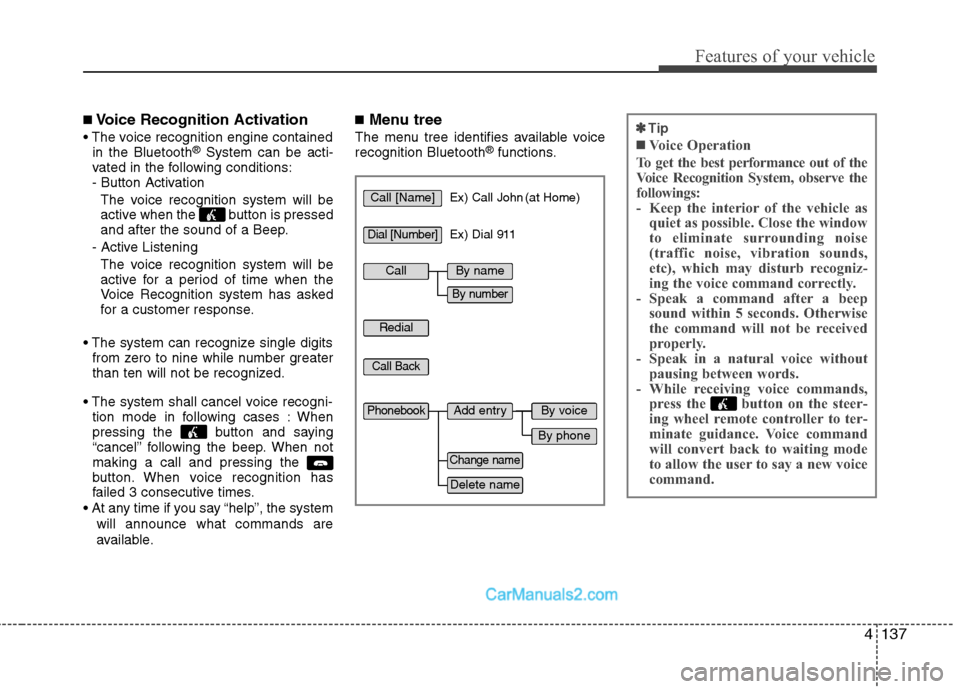
■Menu tree
The menu tree identifies available voice
recognition Bluetooth®functions.
Call [Name]Ex) Call John (at Home)
Ex) Dial 911
Dial [Number]
Redial
Call Back
Add entryPhonebook
Change name
Delete name
By phone
By voice
CallBy name
By number
Page 237 of 404
Driving your vehicle
2 5
WARNING- ENGINE EXHAUST CAN BE DANGEROUS!
Engine exhaust fumes can be extremely dangerous. If, at any time, you smell exhaust fumes inside the vehicle, open the win-
dows immediately.
• Do not inhale exhaust fumes.
Exhaust fumes contain carbon monoxide, a colorless, odorless gas that can cause unconsciousness and death by asphyxia-
tion.
The exhaust system should be checked whenever the vehicle is raised to change the oil or for any other purpose. If you hear
a change in the sound of the exhaust or if you drive over something that strikes the underneath side of the car, have the
exhaust system checked as soon as possible by an authorized HYUNDAI dealer.
Letting the engine idle in your garage, even with the garage door open, is a hazardous practice. Never run the engine in your
garage any longer than it takes to start the vehicle and back the car out.
If it is necessary to idle the engine for a prolonged period with people inside the car, be sure to do so only in an open area
with the air intake set at "Fresh" and fan operating at one of the higher speeds so fresh air is drawn into the interior.
If you must drive with the trunk lid open because you are carrying objects that make this necessary:
1. Close all windows.
2. Open side vents.
3. Set the air intake control at "Fresh", the air flow control at "Floor" or "Face" and the fan at one of the higher speeds.
To assure proper operation of the ventilation system, be sure the ventilation air intakes located just in front of the windshield are
kept clear of snow, ice, leaves or other obstructions.
Page 241 of 404
Driving your vehicle
6 5
✽
✽
NOTICE
• If you press the HEV system start/stop
button without depressing the brake
pedal, the HEV system does not start
and the HEV system start/stop button
changes as follows :
OFF→ →
ACC → →
ON → →
OFF
• If you leave the engine start/stop but-
ton in the ACC or the ON position for
a long time, the battery will be dis-
charged.
Starting the hybrid system
1. Carry the smart key or leave it inside
the vehicle.
2. Make sure the parking brake is firmly
applied.
3. Place the shift lever in the P(Park)
position. In N(Neutral) position, you
can not start the vehicle.
4. Depress the brake pedal.
5. Press the HEV system start/stop but-
ton.
WARNING
Except in an emergency, never
press the engine start/stop but-
ton while the vehicle is in motion.
The may result in higher braking
effort and steering, which could
cause an accident.
Before leaving the driver’s seat,
always make sure the shift lever
is engaged in P (Park), set the
parking brake fully and shut the
engine off. Unexpected and sud-
den vehicle movement may occur
if these precautions are not
taken.
Never reach for the engine
start/stop button, or any other
controls through the steering
wheel while the vehicle is in
motion. The presence of your
hand or arm in this area could
cause a loss of vehicle control,
an accident and serious bodily
injury or death.
Do not place any movable objects
around the driver’s seat as they
may move while driving, interfere
with the driver and lead to an
accident.WARNING
Always wear appropriate shoes
when operating your vehicle.
Unsuitable shoes (high heels, ski
boots, etc.) may interfere with your
ability to use the brake and acceler-
ator pedal.
Before starting the vehicle in slope
area, even if you depress the brake
pedal, the vehicle may be moved
downward when the parking brake
released.
For your safety, after starting the
vehicle firmly, release the parking
brake.
Page 261 of 404
Driving your vehicle
26 5
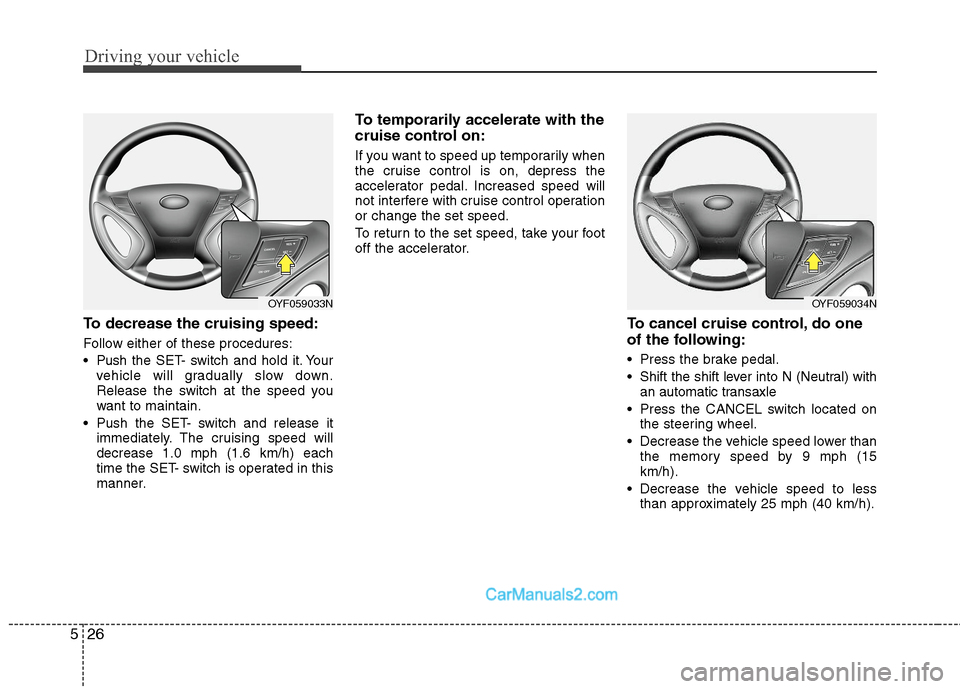
To decrease the cruising speed:
Follow either of these procedures:
Pushthe SET- switch and hold it. Your
vehicle will gradually slow down.
Release the switch at the speed you
want to maintain.
Push the SET- switch and release it
immediately. The cruising speed will
decrease 1.0 mph (1.6 km/h) each
time the SET- switch is operated in this
manner.
To temporarily accelerate with the
cruise control on:
If you want to speed up temporarily when
the cruise control is on, depress the
accelerator pedal. Increased speed will
not interfere with cruise control operation
or change the set speed.
To return to the set speed, take your foot
off the accelerator.
To cancel cruise control, do one
of the following:
Press the brake pedal.
Shift the shift lever into N (Neutral) with
an automatic transaxle
Press the CANCEL switch located on
the steering wheel.
Decrease the vehicle speed lower than
the memory speed by 9 mph (15
km/h).
Decrease the vehicle speed to less
than approximately 25 mph (40 km/h).
OYF059034NOYF059033N
Page 271 of 404
Driving your vehicle
36 5
Use high quality ethylene glycol
coolant
Your vehicle is delivered with high quality
ethylene glycol coolant in the cooling
system. It is the only type of coolant that
should be used because it helps prevent
corrosion in the cooling system, lubri-
cates the water pump and prevents
freezing. Be sure to replace or replenish
your coolant in accordance with the
maintenance schedule in section 7.
Before winter, have your coolant tested to
assure that its freezing point is sufficient
for the temperatures anticipated during
the winter.
Check battery and cables
Winter puts additional burdens on the
battery system. Visually inspect the bat-
tery and cables as described in section
7. The level of charge in your battery can
be checked by an authorized HYUNDAI
dealer or a service station.
Change to "winter weight" oil if
necessary
In some climates it is recommended that
a lower viscosity "winter weight" oil be
used during cold weather. See section 8
for recommendations. If you aren't sure
what weight oil you should use, consult
an authorized HYUNDAI dealer.
Check spark plugs and ignition
system
Inspect your spark plugs as described in
section 7 and replace them if necessary.
Also check all ignition wiring and compo-
nents to be sure they are not cracked,
worn or damaged in any way.
WARNING- Tire chains
The use of chains may adversely
affect vehicle handling.
Do not exceed 20 mph (30 km/h)
or the chain manufacturer’s rec-
ommended speed limit, whichev-
er is lower.
Drive carefully and avoid bumps,
holes, sharp turns, and other
road hazards, which may cause
the vehicle to bounce.
Avoid sharp turns or locked-
wheel braking.
CAUTION
Chains that are the wrong size or
improperly installed can damage
your vehicle's brake lines, sus-
pension, body and wheels.
Stop driving and retighten the
chains any time you hear them
hitting the vehicle.
Page 329 of 404
723
Maintenance
Changing the engine oil and filter
Have engine oil and filter changed by an
authorized HYUNDAI dealer according to
the Maintenance Schedule at the begin-
ning of this section.
CALIFORNIA PROPOSI-
TION 65 WARNING
Engine oil contains chemicals
known to the State of California to
cause cancer, birth defects, and
reproductive harm.
Used engine oil may cause irrita-
tion or cancer of the skin if left in
contact with the skin for prolonged
periods of time. Used engine oil
contains chemicals that have
caused cancer in laboratory ani-
mals. Always protect your skin by
washing your hands thoroughly
with soap and warm water as soon
as possible after handling used oil.