start stop button Hyundai Sonata Hybrid 2012 Service Manual
[x] Cancel search | Manufacturer: HYUNDAI, Model Year: 2012, Model line: Sonata Hybrid, Model: Hyundai Sonata Hybrid 2012Pages: 403, PDF Size: 7.86 MB
Page 143 of 403
Features of your vehicle
62
4
Warning on the LCD screen
(if equipped)
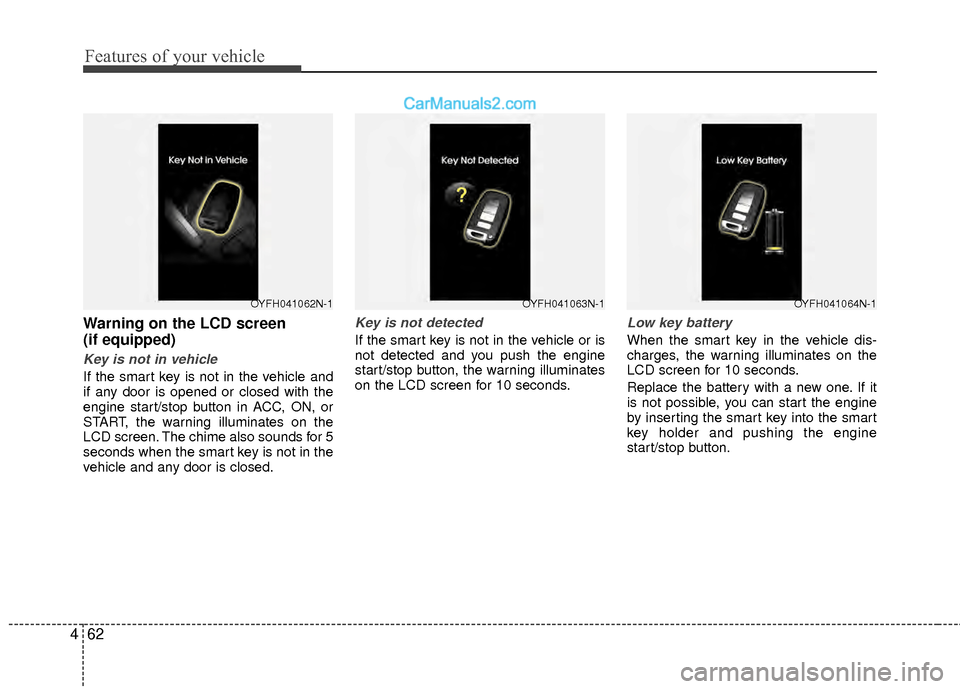
Key is not in vehicle
If the smart key is not in the vehicle and
if any door is opened or closed with the
engine start/stop button in ACC, ON, or
START, the warning illuminates on the
LCD screen. The chime also sounds for 5
seconds when the smart key is not in the
vehicle and any door is closed.
Key is not detected
If the smart key is not in the vehicle or is
not detected and you push the engine
start/stop button, the warning illuminates
on the LCD screen for 10 seconds.
Low key battery
When the smart key in the vehicle dis-
charges, the warning illuminates on the
LCD screen for 10 seconds.
Replace the battery with a new one. If it
is not possible, you can start the engine
by inserting the smart key into the smart
key holder and pushing the engine
start/stop button.
OYFH041063N-1OYFH041064N-1OYFH041062N-1
Page 144 of 403
463
Features of your vehicle
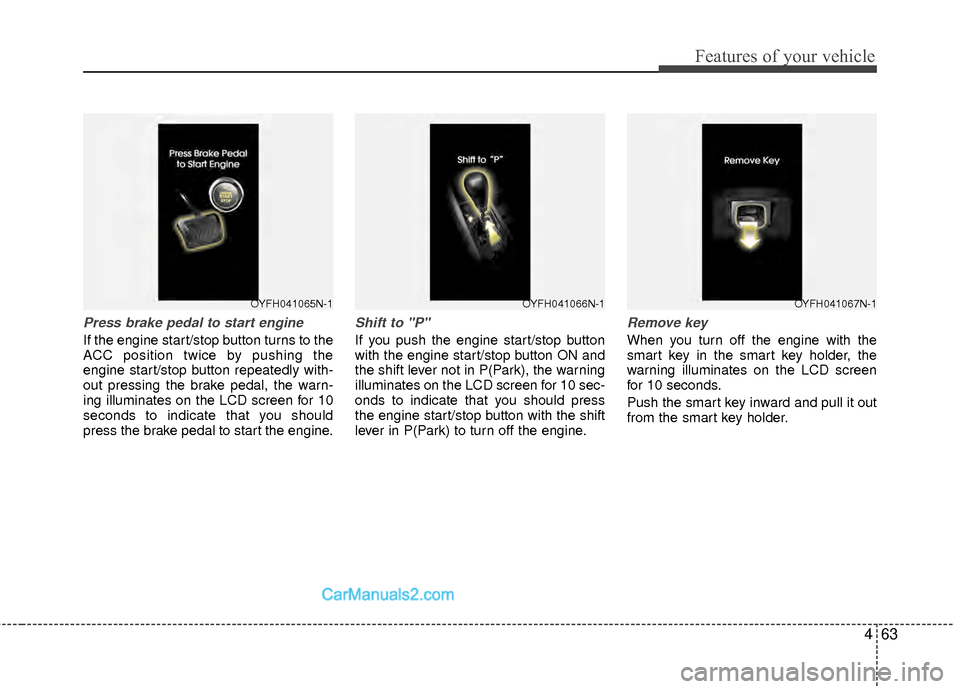
Press brake pedal to start engine
If the engine start/stop button turns to the
ACC position twice by pushing the
engine start/stop button repeatedly with-
out pressing the brake pedal, the warn-
ing illuminates on the LCD screen for 10
seconds to indicate that you should
press the brake pedal to start the engine.
Shift to "P"
If you push the engine start/stop button
with the engine start/stop button ON and
the shift lever not in P(Park), the warning
illuminates on the LCD screen for 10 sec-
onds to indicate that you should press
the engine start/stop button with the shift
lever in P(Park) to turn off the engine.
Remove key
When you turn off the engine with the
smart key in the smart key holder, the
warning illuminates on the LCD screen
for 10 seconds.
Push the smart key inward and pull it out
from the smart key holder.
OYFH041065N-1OYFH041066N-1OYFH041067N-1
Page 145 of 403
Features of your vehicle
64
4
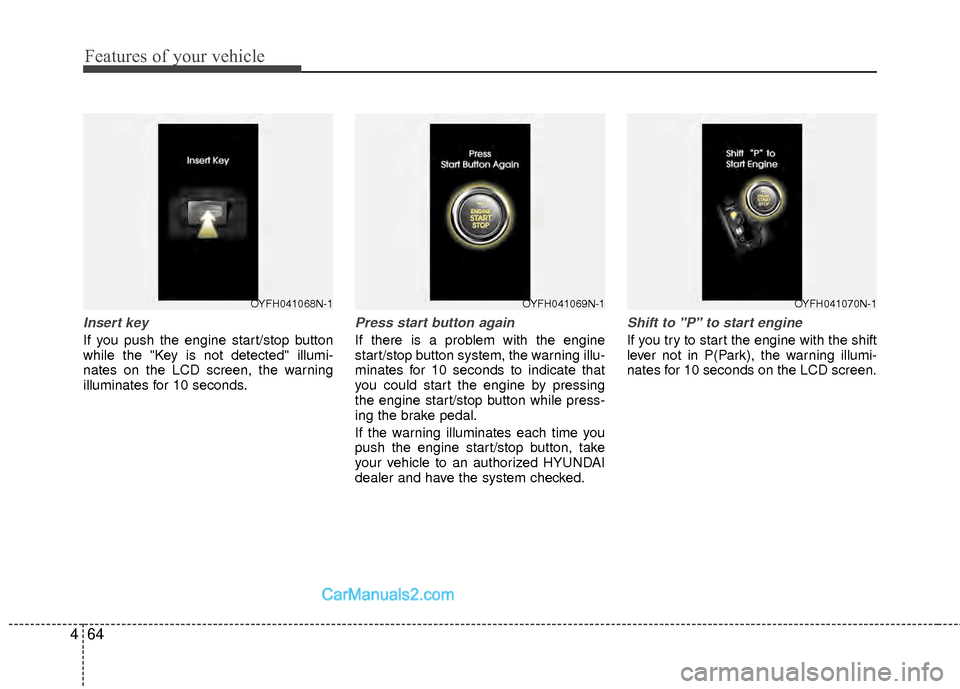
Insert key
If you push the engine start/stop button
while the "Key is not detected" illumi-
nates on the LCD screen, the warning
illuminates for 10 seconds.
Press start button again
If there is a problem with the engine
start/stop button system, the warning illu-
minates for 10 seconds to indicate that
you could start the engine by pressing
the engine start/stop button while press-
ing the brake pedal.
If the warning illuminates each time you
push the engine start/stop button, take
your vehicle to an authorized HYUNDAI
dealer and have the system checked.
Shift to "P" to start engine
If you try to start the engine with the shift
lever not in P(Park), the warning illumi-
nates for 10 seconds on the LCD screen.
OYFH041069N-1OYFH041070N-1OYFH041068N-1
Page 149 of 403
Features of your vehicle
68
4
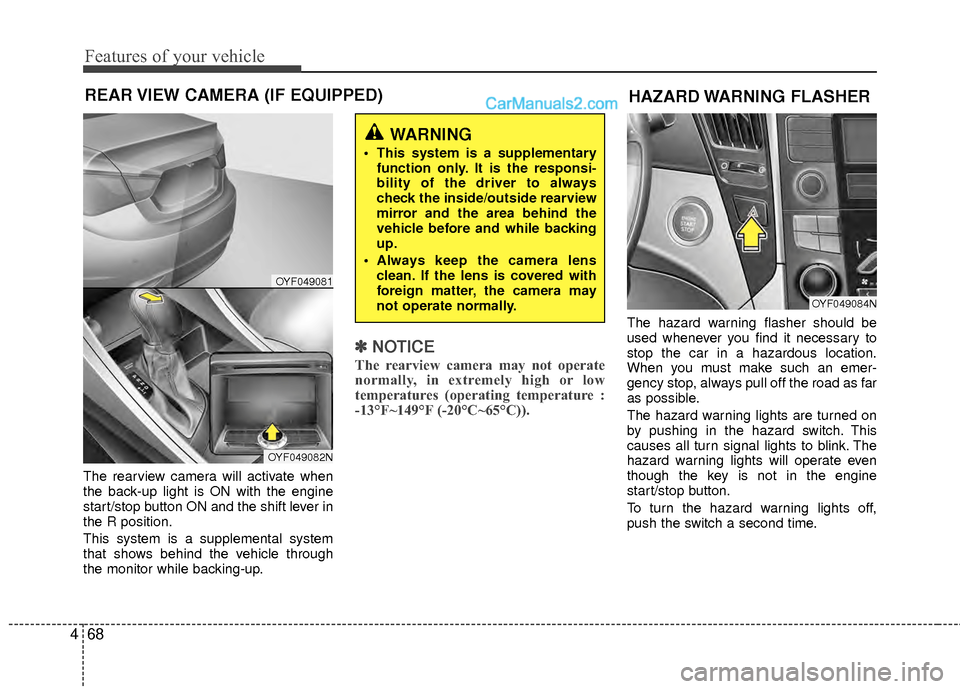
The rearview camera will activate when
the back-up light is ON with the engine
start/stop button ON and the shift lever in
the R position.
This system is a supplemental system
that shows behind the vehicle through
the monitor while backing-up.
✽ ✽
NOTICE
The rearview camera may not operate
normally, in extremely high or low
temperatures (operating temperature :
-13°F~149°F (-20°C~65°C)).
The hazard warning flasher should be
used whenever you find it necessary to
stop the car in a hazardous location.
When you must make such an emer-
gency stop, always pull off the road as far
as possible.
The hazard warning lights are turned on
by pushing in the hazard switch. This
causes all turn signal lights to blink. The
hazard warning lights will operate even
though the key is not in the engine
start/stop button.
To turn the hazard warning lights off,
push the switch a second time.
REAR VIEW CAMERA (IF EQUIPPED)
WARNING
This system is a supplementary
function only. It is the responsi-
bility of the driver to always
check the inside/outside rearview
mirror and the area behind the
vehicle before and while backing
up.
Always keep the camera lens clean. If the lens is covered with
foreign matter, the camera may
not operate normally.
OYF049081
OYF049082N
HAZARD WARNING FLASHER
OYF049084N
Page 150 of 403
469
Features of your vehicle
Battery saver function
The purpose of this feature is to pre-vent the battery from being dis-
charged. The system automatically
turns off the parking lights when the
driver turns off the hybrid system and
opens the driver-side door.
With this feature, the parking lights will be turned off automatically if the driver
parks on the side of road at night.
If necessary, to keep the lights on
when the smart key is turned, perform
the following:
1) Open the driver-side door.
2) Turn the parking lights OFF and ON again using the light switch on the
steering column.
Headlamp delay (if equipped)
If you turn the engine start/stop button to
the ACC or OFF position with the head-
lights ON, the headlights (and/or tail
lights) remain on for about 20 minutes.
However, if the driver’s door is opened
and closed, the headlights are turned off
after 30 seconds.
The headlights can be turned off by
pressing the lock button on the smart key
twice or turning the light switch to the
OFF or Auto position.
However, if you turn the light switch to the
Auto position when it is dark outside, the
headlights will not be turned off.
Headlamp welcome function
When the headlight switch is in the ON or
AUTO position and all doors (and trunk)
are closed and locked, if you press the
door unlock button on the smart key, the
headlights will come on for about 15 sec-
onds. At this time, if you press the door
lock button on the smart key, the head-
lights will turn off immediately.
Daytime running light
(if equipped)
Daytime Running Lights (DRL) can make
it easier for others to see the front of your
vehicle during the day. DRL can be help-
ful in many different driving conditions,
and it is especially helpful after dawn and
before sunset.
The DRL system will turn OFF when:
1. The headlight is ON.
2. Engine stops.
3. If the multifuntion switch is on “DRL
OFF” position.
4. Parking brake ON.
LIGHTING
CAUTION
If the driver gets out of the vehicle through doors other than the (dri-ver's door), the battery saver func- tion does not operate and the headlamp delay does not turn off auto-matically. Therefore, the battery may become discharged. In this case,make sure to turn off the lampsbefore getting out of the vehicle.
Page 151 of 403
Features of your vehicle
70
4
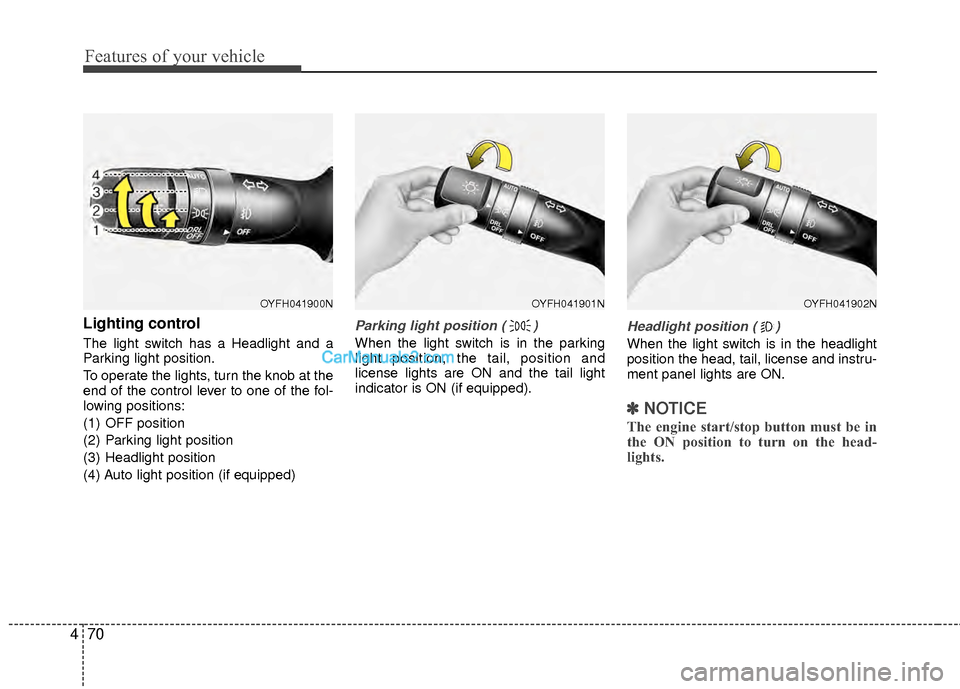
Lighting control
The light switch has a Headlight and a
Parking light position.
To operate the lights, turn the knob at the
end of the control lever to one of the fol-
lowing positions:
(1) OFF position
(2) Parking light position
(3) Headlight position
(4) Auto light position (if equipped)
Parking light position ( )
When the light switch is in the parking
light position, the tail, position and
license lights are ON and the tail light
indicator is ON (if equipped).
Headlight position ( )
When the light switch is in the headlight
position the head, tail, license and instru-
ment panel lights are ON.
✽ ✽
NOTICE
The engine start/stop button must be in
the ON position to turn on the head-
lights.
OYFH041900NOYFH041901NOYFH041902N
Page 153 of 403
Features of your vehicle
72
4
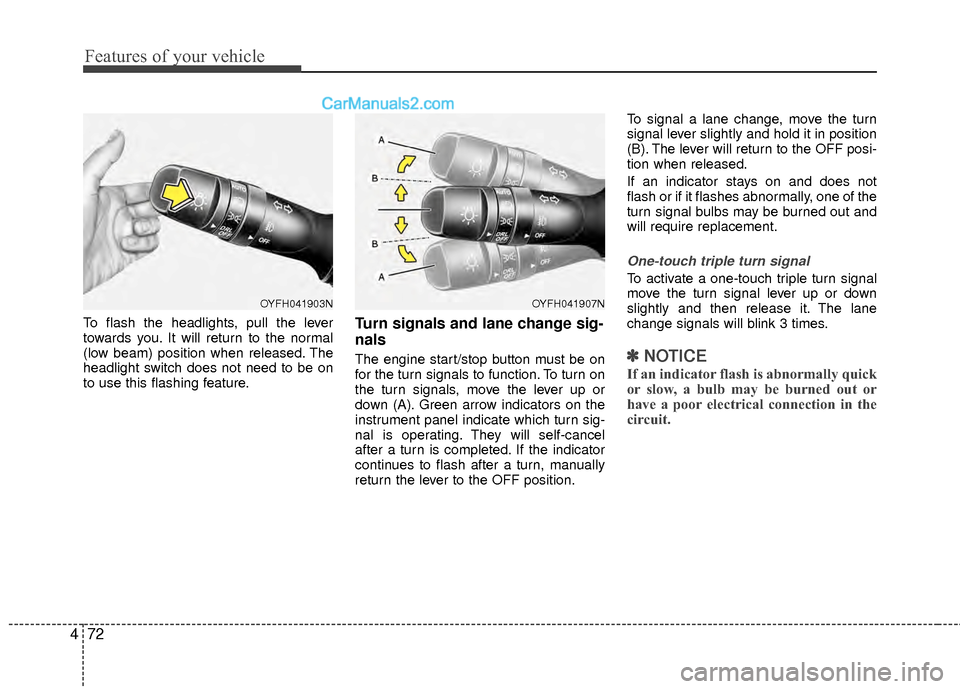
To flash the headlights, pull the lever
towards you. It will return to the normal
(low beam) position when released. The
headlight switch does not need to be on
to use this flashing feature.Turn signals and lane change sig-
nals
The engine start/stop button must be on
for the turn signals to function. To turn on
the turn signals, move the lever up or
down (A). Green arrow indicators on the
instrument panel indicate which turn sig-
nal is operating. They will self-cancel
after a turn is completed. If the indicator
continues to flash after a turn, manually
return the lever to the OFF position. To signal a lane change, move the turn
signal lever slightly and hold it in position
(B). The lever will return to the OFF posi-
tion when released.
If an indicator stays on and does not
flash or if it flashes abnormally, one of the
turn signal bulbs may be burned out and
will require replacement.
One-touch triple turn signal
To activate a one-touch triple turn signal
move the turn signal lever up or down
slightly and then release it. The lane
change signals will blink 3 times.
✽ ✽
NOTICE
If an indicator flash is abnormally quick
or slow, a bulb may be burned out or
have a poor electrical connection in the
circuit.
OYFH041903NOYFH041907N
Page 155 of 403
Features of your vehicle
74
4
WIPERS AND WASHERS
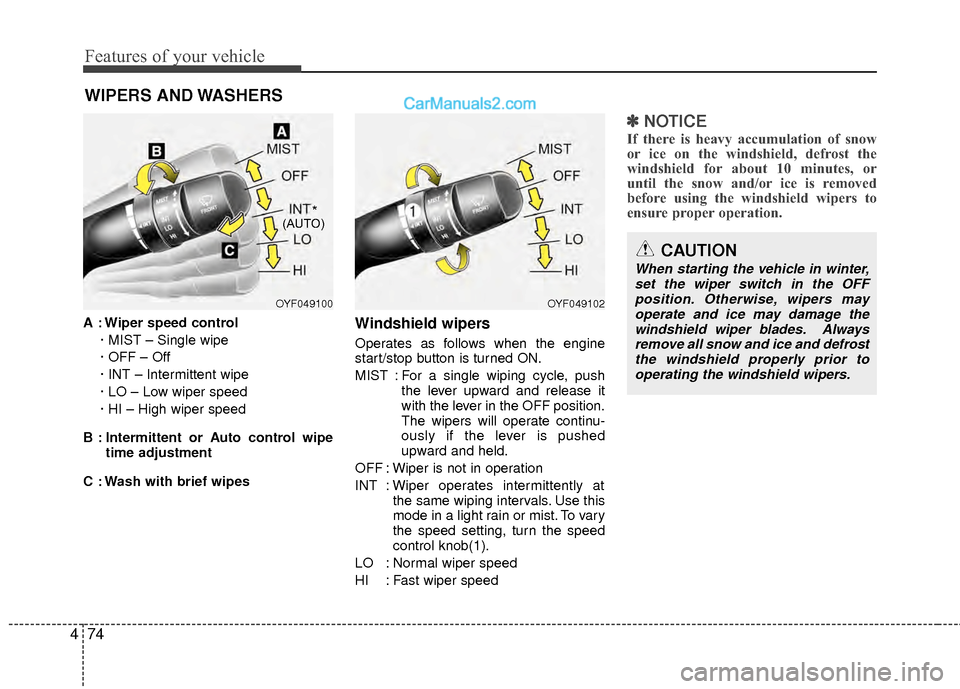
A : Wiper speed control
· MIST – Single wipe
· OFF – Off
· INT – Intermittent wipe
· LO – Low wiper speed
· HI – High wiper speed
B : Intermittent or Auto control wipe time adjustment
C : Wash with brief wipesWindshield wipers
Operates as follows when the engine
start/stop button is turned ON.
MIST : For a single wiping cycle, push the lever upward and release it
with the lever in the OFF position.
The wipers will operate continu-
ously if the lever is pushed
upward and held.
OFF : Wiper is not in operation
INT : Wiper operates intermittently at the same wiping intervals. Use this
mode in a light rain or mist. To vary
the speed setting, turn the speed
control knob(1).
LO : Normal wiper speed
HI : Fast wiper speed
✽ ✽ NOTICE
If there is heavy accumulation of snow
or ice on the windshield, defrost the
windshield for about 10 minutes, or
until the snow and/or ice is removed
before using the windshield wipers to
ensure proper operation.
OYF049100OYF049102
CAUTION
When starting the vehicle in winter,
set the wiper switch in the OFFposition. Otherwise, wipers may operate and ice may damage thewindshield wiper blades. Alwaysremove all snow and ice and defrost the windshield properly prior tooperating the windshield wipers.
*(AUTO)
Page 157 of 403
Features of your vehicle
76
4
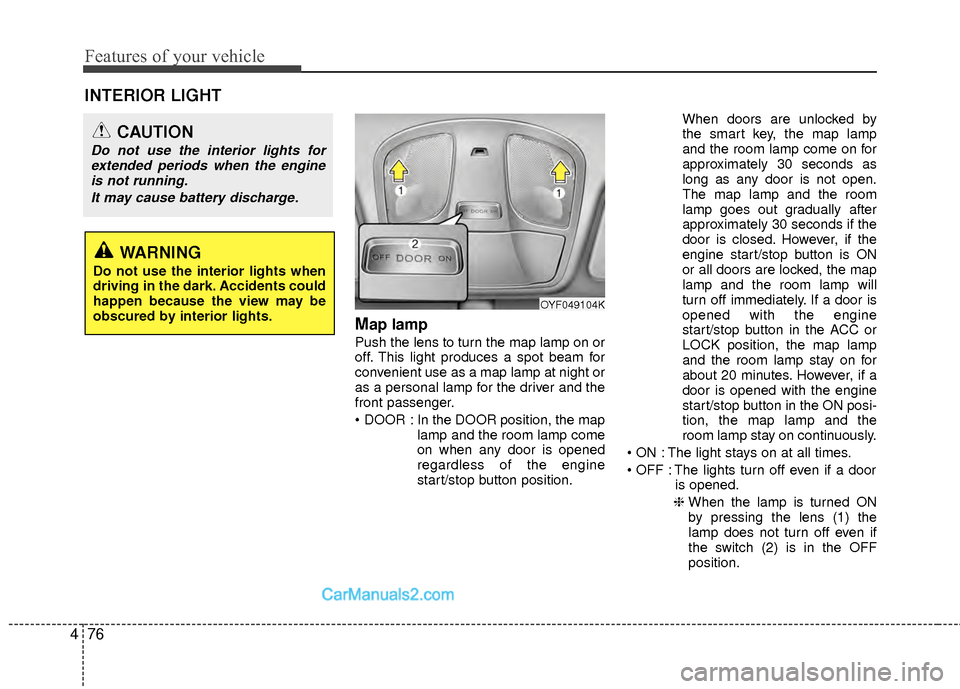
Map lamp
Push the lens to turn the map lamp on or
off. This light produces a spot beam for
convenient use as a map lamp at night or
as a personal lamp for the driver and the
front passenger.
In the DOOR position, the map
lamp and the room lamp come
on when any door is opened
regardless of the engine
start/stop button position. When doors are unlocked by
the smart key, the map lamp
and the room lamp come on for
approximately 30 seconds as
long as any door is not open.
The map lamp and the room
lamp goes out gradually after
approximately 30 seconds if the
door is closed. However, if the
engine start/stop button is ON
or all doors are locked, the map
lamp and the room lamp will
turn off immediately. If a door is
opened with the engine
start/stop button in the ACC or
LOCK position, the map lamp
and the room lamp stay on for
about 20 minutes. However, if a
door is opened with the engine
start/stop button in the ON posi-
tion, the map lamp and the
room lamp stay on continuously.
The light stays on at all times.
The lights turn off even if a door is opened.
❈ When the lamp is turned ON
by pressing the lens (1) the
lamp does not turn off even if
the switch (2) is in the OFF
position.
OYF049104K
INTERIOR LIGHT
CAUTION
Do not use the interior lights for
extended periods when the engineis not running.
It may cause battery discharge.
WARNING
Do not use the interior lights when
driving in the dark. Accidents could
happen because the view may be
obscured by interior lights.
Page 160 of 403
479
Features of your vehicle
✽
✽NOTICE
If you want to defrost and defog the
front windshield, refer to “Windshield
defrosting and defogging” in this sec-
tion.
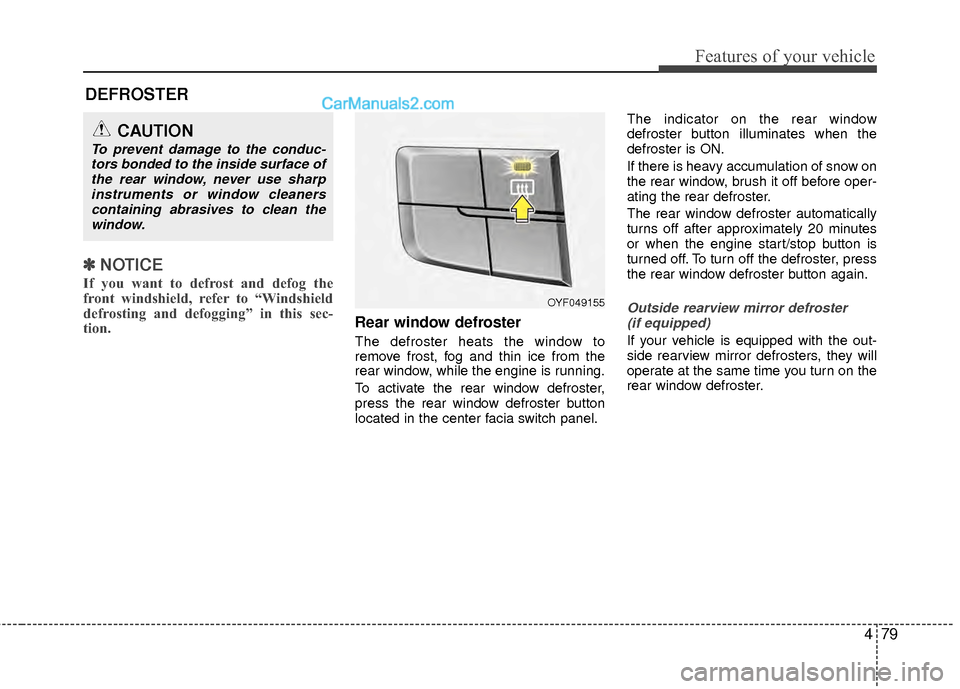
Rear window defroster
The defroster heats the window to
remove frost, fog and thin ice from the
rear window, while the engine is running.
To activate the rear window defroster,
press the rear window defroster button
located in the center facia switch panel. The indicator on the rear window
defroster button illuminates when the
defroster is ON.
If there is heavy accumulation of snow on
the rear window, brush it off before oper-
ating the rear defroster.
The rear window defroster automatically
turns off after approximately 20 minutes
or when the engine start/stop button is
turned off. To turn off the defroster, press
the rear window defroster button again.
Outside rearview mirror defroster
(if equipped)
If your vehicle is equipped with the out-
side rearview mirror defrosters, they will
operate at the same time you turn on the
rear window defroster.
CAUTION
To prevent damage to the conduc-tors bonded to the inside surface ofthe rear window, never use sharpinstruments or window cleanerscontaining abrasives to clean thewindow.
DEFROSTER
OYF049155