audio Hyundai Sonata Hybrid 2015 Repair Manual
[x] Cancel search | Manufacturer: HYUNDAI, Model Year: 2015, Model line: Sonata Hybrid, Model: Hyundai Sonata Hybrid 2015Pages: 543, PDF Size: 25.53 MB
Page 327 of 543
Features of your vehicle
246
4
Bluetooth®Wireless
Technology A UDIO MODE
Using Bluetooth®Wireless
Technology Audio Mode
Playing/Pausing Bluetooth®Wireless
TechnologyAudio
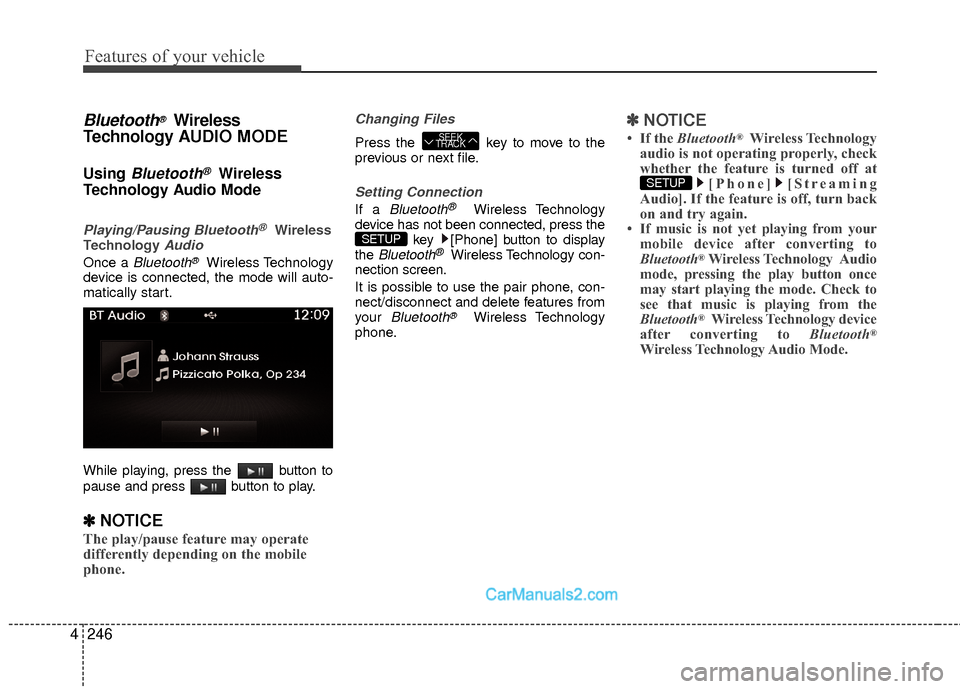
Once a Bluetooth®Wireless Technology
device is connected, the mode will auto-
matically start.
While playing, press the button to
pause and press button to play.
✽ ✽ NOTICE
The play/pause feature may operate
differently depending on the mobile
phone.
Changing Files
Press the key to move to the
previous or next file.
Setting Connection
If a Bluetooth®Wireless Technology
device has not been connected, press the key [Phone] button to display
the
Bluetooth®Wireless Technology con-
nection screen.
It is possible to use the pair phone, con-
nect/disconnect and delete features from
your
Bluetooth®Wireless Technology
phone.
✽ ✽ NOTICE
• If the Bluetooth®Wireless Technology
audio is not operating properly, check
whether the feature is turned off at [Phone] [Streaming
Audio]. If the feature is off, turn back
on and try again.
• If music is not yet playing from your mobile device after converting to
Bluetooth
®Wireless Technology Audio
mode, pressing the play button once
may start playing the mode. Check to
see that music is playing from the
Bluetooth
®Wireless Technology device
after converting to Bluetooth®
Wireless Technology Audio Mode.
SETUP
SETUP
SEEK
TRACK
Page 328 of 543
4247
Features of your vehicle
Pairing a Bluetooth®Wireless
Technology Device
What is Bluetooth® Wireless
Technology Pairing?
Pairing refers to the process of synchro-
nizing your Bluetooth®Wireless
Technology phone or device with the car
audio system for connection. Pairing is
necessary to connect and use the
Bluetooth®Wireless Technology feature.
Pairing Key / Key on
the Steering Remote Controller
When No Devices have been Paired
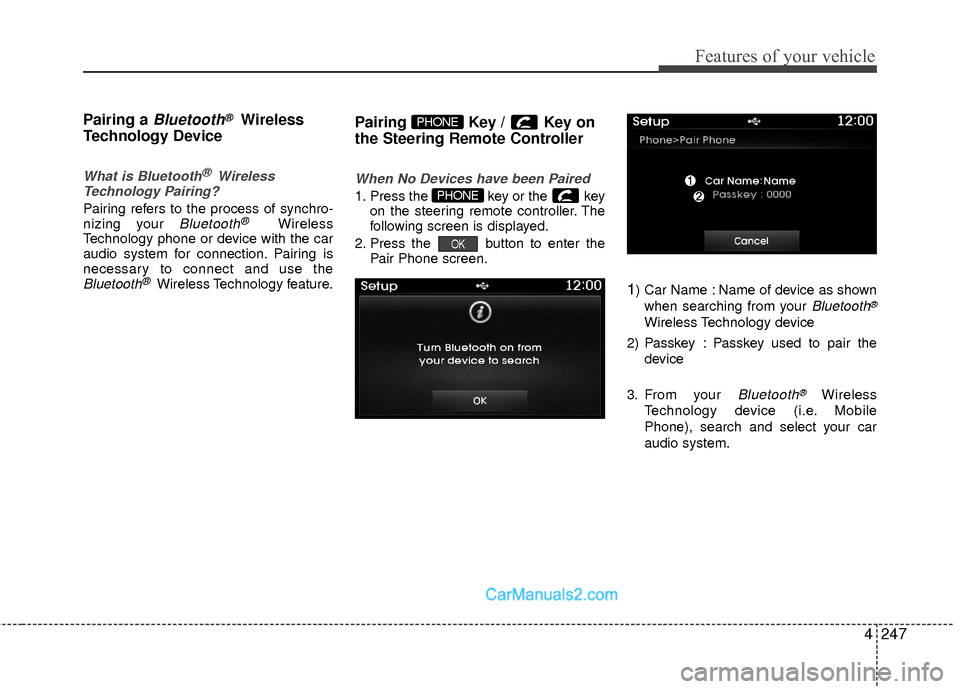
1. Press the key or the key on the steering remote controller. The
following screen is displayed.
2. Press the button to enter the Pair Phone screen.
1) Car Name : Name of device as shown
when searching from your
Bluetooth®
Wireless Technology device
2) Passkey : Passkey used to pair the device
3. From your
Bluetooth®Wireless
Technology device (i.e. Mobile
Phone), search and select your car
audio system.
OK
PHONE
PHONE
Page 329 of 543
![Hyundai Sonata Hybrid 2015 Repair Manual Features of your vehicle
248
4
[Non SSP supported device]
(SSP: Secure Simple Pairing)
4. After a few moments, a screen is dis-
played where the passkey is entered.
Hear, enter the passkey “0000”](/img/35/19645/w960_19645-328.png "Hyundai Sonata Hybrid 2015 Repair Manual Features of your vehicle
248
4
[Non SSP supported device]
(SSP: Secure Simple Pairing)
4. After a few moments, a screen is dis-
played where the passkey is entered.
Hear, enter the passkey “0000”")
Features of your vehicle
248
4
[Non SSP supported device]
(SSP: Secure Simple Pairing)
4. After a few moments, a screen is dis-
played where the passkey is entered.
Hear, enter the passkey “0000” to pair
your
Bluetooth®Wireless Technology
device with the car audio system.
[SSP supported device]
4. After a few moments, a screen is dis- played 6 digits passkey.
Hear, check the passkey on your
Bluetooth®Wireless Technology
device and confirm.
5. Once pairing is complete, the following screen is displayed.
✽ ✽NOTICE
If Bluetooth®Wireless Technology
devices are paired but none are current-
ly connected, pressing the key
or the key on the
steering wheel displays the following
screen. Press the [Pair] button to pair a
new device or press the [Connect] to
connect a previously paired device.
Pairing through [PHONE] Setup
Press the key Select
[Phone] Select [Pair Phone] Select TUNE knob
1. The following steps are the same as those described in the section "When
No Devices have been Paired" on the
previous page.SETUP
PHONE
Page 330 of 543
4249
Features of your vehicle
✽
✽NOTICE
•Bluetooth®Wireless Technology fea-
tures supported within the vehicle are
as follows. Some features may not be
supported depending on your
Bluetooth
®Wireless Technology
device.
- Outgoing/Incoming Handsfree calls
- Operations during a call (Switch to Private, Switch to call waiting, MIC
on/off)
- Downloading Call History
- Downloading Mobile Contacts
- Bluetooth
®Wireless Technology
device auto connection
- Bluetooth Audio Streaming
• Up to five Bluetooth
®Wireless
Technology devices can be paired to
the Car Handsfree system.
• Only one Bluetooth
®Wireless
Technology device can be connected at
a time.
• Other devices cannot be paired while a Bluetooth
®Wireless Technology
device is connected.
• Only Bluetooth
®Wireless Technology
Handsfree and Bluetooth audio relat-
ed features are supported. • Bluetooth related operations are pos-
sible only within devices that support
Handsfree or audio features, such as a
Bluetooth
®Wireless Technology
mobile phone or a Bluetooth audio
device.
• If a connected Bluetooth
®Wireless
Technology device becomes discon-
nected due to being out of communi-
cation range, turning the device OFF,
or a Bluetooth
®Wireless Technology
communication error, corresponding
Bluetooth
®Wireless Technology
devices are automatically searched
and reconnected.
• If the system becomes unstable due to communication errors between the
car Handsfree and the Bluetooth
®
Wireless Technology device, reset the
device by turning off and back on
again. Upon resetting Bluetooth
®
Wireless Technology device, the sys-
tem will be restored. • After pairing is complete, a contacts
download request is sent once to the
mobile phone. Some mobile phones
may require confirmation upon
receiving a download request, ensure
your mobile phone accepts the con-
nection. Refer to your phones user’s
manual for additional information
regarding phone pairing and connec-
tions.
Page 331 of 543
![Hyundai Sonata Hybrid 2015 Repair Manual Features of your vehicle
250
4
Connecting a Device
Press the key Select
[Phone] Select [Paired Phone List]
1) Connected Phone : Device that is cur- rently connected
2) Paired Phone : Device that is](/img/35/19645/w960_19645-330.png "Hyundai Sonata Hybrid 2015 Repair Manual Features of your vehicle
250
4
Connecting a Device
Press the key Select
[Phone] Select [Paired Phone List]
1) Connected Phone : Device that is cur- rently connected
2) Paired Phone : Device that is")
Features of your vehicle
250
4
Connecting a Device
Press the key Select
[Phone] Select [Paired Phone List]
1) Connected Phone : Device that is cur- rently connected
2) Paired Phone : Device that is paired but not connected From the paired phone list, select the
device you want to connect and press the
button.
Changing Priority
What is Priority?
It is possible to pair up to five Bluetooth®
Wireless Technology devices with the car
audio system. The "Change Priority" fea-
ture is used to set the connection priority
of paired phones.
Press the key Select [Phone]Select [Paired Phone List]
SETUP
ConnectSETUP
Page 335 of 543
![Hyundai Sonata Hybrid 2015 Repair Manual Features of your vehicle
254
4
Calling by Dialing a Number
Press the key Select [Dial
Number]
1) Dial Pad : Used to enter phone number
2) Call : If a number has been entered,
calls the number If no n](/img/35/19645/w960_19645-334.png "Hyundai Sonata Hybrid 2015 Repair Manual Features of your vehicle
254
4
Calling by Dialing a Number
Press the key Select [Dial
Number]
1) Dial Pad : Used to enter phone number
2) Call : If a number has been entered,
calls the number If no n")
Features of your vehicle
254
4
Calling by Dialing a Number
Press the key Select [Dial
Number]
1) Dial Pad : Used to enter phone number
2) Call : If a number has been entered,
calls the number If no number has
been entered, switches to call history
screen
3) End : Deletes the entered phone num- ber
4) Delete : Deletes entered numbers one digit at a time
Answering Calls
Answering a Call
Answering a call with a Bluetooth®
Wireless Technology device connected
will display the following screen.
1) Caller : Displays the other party’s namewhen the incoming caller is saved with-
in your contacts
2)Incoming Number : Displays the incoming number
3) Accept : Accept the incoming call
4) Reject : Reject the incoming call
✽ ✽ NOTICE
• When an incoming call pop-up is dis-
played, most Audio and SETUP mode
features are disabled. Only the call
volume will operate.
• The telephone number may not be properly displayed in some mobile
phones.
• When a call is answered with the mobile phone, the call mode will auto-
matically revert to Private mode.
PHONE
Page 337 of 543
![Hyundai Sonata Hybrid 2015 Repair Manual Features of your vehicle
256
4
Contacts
Press the key Select
[Contacts]
The list of saved phone book entries is
displayed. Press the button to
download the call history.
1) Contacts List :
- Display](/img/35/19645/w960_19645-336.png "Hyundai Sonata Hybrid 2015 Repair Manual Features of your vehicle
256
4
Contacts
Press the key Select
[Contacts]
The list of saved phone book entries is
displayed. Press the button to
download the call history.
1) Contacts List :
- Display")
Features of your vehicle
256
4
Contacts
Press the key Select
[Contacts]
The list of saved phone book entries is
displayed. Press the button to
download the call history.
1) Contacts List :
- Displays downloaded contacts entries
- Connects call upon selection
2) Sort by : Find a contact in an alphabet- ical order.
3) Download : Download contacts entries
✽ ✽ NOTICE
• Up to 1,000 contacts saved in your
Bluetooth®Wireless Technology
phone can be downloaded into the car
contacts. Contacts that have been
downloaded to the car cannot be edit-
ed or deleted on the phone.
• Mobile phone contacts are managed separately for each paired Bluetooth
®
Wireless Technology device (max 5
devices x 1,000 contacts each).
Previously downloaded data is main-
tained even if the Bluetooth
®Wireless
Technology device has been discon-
nected.
(However, the contacts and call histo-
ry saved to the phone will be deleted if
a paired phone is deleted.)
• It is possible to download contacts during Bluetooth streaming audio.
• When downloading contacts, the icon will be displayed within the status bar. (Continued)(Continued)
• It is not possible to begin downloading
a contact list when the contact down-
load feature has been turned off with-
in the Bluetooth
®Wireless Technology
device. In addition, some devices may
require device authorization upon
attempting to download contacts. If
downloading does not normally occur,
check the Bluetooth
®Wireless
Technology device settings or the
screen state.
• The contacts download feature may not be supported in some mobile
phones. For more information of sup-
ported Bluetooth
®devices and func-
tion support, refer to your phone’s
user manual.
Download
PHONE
Page 338 of 543
![Hyundai Sonata Hybrid 2015 Repair Manual 4257
Features of your vehicle
Bluetooth®Wireless Technology
Setting
Pairing a New Device
Press the key Select
[Phone] Select [Pair Phone]
Bluetooth®Wireless Technology devices
can be paired with th](/img/35/19645/w960_19645-337.png "Hyundai Sonata Hybrid 2015 Repair Manual 4257
Features of your vehicle
Bluetooth®Wireless Technology
Setting
Pairing a New Device
Press the key Select
[Phone] Select [Pair Phone]
Bluetooth®Wireless Technology devices
can be paired with th")
4257
Features of your vehicle
Bluetooth®Wireless Technology
Setting
Pairing a New Device
Press the key Select
[Phone] Select [Pair Phone]
Bluetooth®Wireless Technology devices
can be paired with the audio system.
For more information, refer to the “Pairing
through Phone Setup” section within
Bluetooth®Wireless Technology.
Viewing Paired Phone List
Press the key Select
[Phone] Select [Paired Phone List]
This feature is used to view mobile
phones that have been paired with the
audio system. Upon selecting a paired
phone, the setup menu is displayed.
For more information, refer to the “Setting
Bluetooth®Wireless Technology
Connection” section within Bluetooth®
Wireless Technology. 1) : Moves to the previous screen
2) Connect/Disconnect Phone : Connect/
disconnects currently selected phone
3) Delete : Deletes the currently selected phone
4) Change Priority : Sets currently selected phone to highest connection priority
SETUP
SETUP
Page 340 of 543
![Hyundai Sonata Hybrid 2015 Repair Manual 4259
Features of your vehicle
Turning Bluetooth System Off
Press the key Select
[Phone] Select [Bluetooth System Off]
Once
Bluetooth®Wireless Technology is
turned off, Bluetooth®Wireless
Technology](/img/35/19645/w960_19645-339.png "Hyundai Sonata Hybrid 2015 Repair Manual 4259
Features of your vehicle
Turning Bluetooth System Off
Press the key Select
[Phone] Select [Bluetooth System Off]
Once
Bluetooth®Wireless Technology is
turned off, Bluetooth®Wireless
Technology")
4259
Features of your vehicle
Turning Bluetooth System Off
Press the key Select
[Phone] Select [Bluetooth System Off]
Once
Bluetooth®Wireless Technology is
turned off, Bluetooth®Wireless
Technology related features will not be
supported within the audio system.
✽ ✽ NOTICE
To turn Bluetooth®Wireless Technology
back on, go to [Phone] and
press “YesSETUP
SETUP
Page 344 of 543
4263
Features of your vehicle
CommandFunction
FM Preset 1~6 Plays the most recently played broadcast
saved in FM Preset 1~6.
AM Preset 1~6 Plays the broadcast saved in AM Preset 1~6.
FM 87.5~107.9 Plays the FM broadcast of the corresponding
frequency.
AM 530~1710 Plays the AM broadcast of the corresponding
frequency.
XM (Satellite)
When currently listening to the XM, main-
tains the current state.
When listening to a different mode, displaysthe most recently played XM screen.
XM (Satellite) 1~3Displays the selected XM screen.
XM Channel Plays the selected XM channel.
Media Moves to the most recently played mediascreen.
CD Plays the music saved in the CD.
USBPlays USB music.
iPod®Plays iPod music.
Command Function
My Music Plays the music saved in My Music.
AUX (Auxiliary) Plays the connected external device.
Bluetooth
®Audio Plays the music saved in connected Bluetooth®
device.
Please repeat Repeats the most recent comment.
Mute Mutes the sound
Cancel (Exit) Ends voice command.
0~255