audio Hyundai Sonata Hybrid 2015 Owner's Manual
[x] Cancel search | Manufacturer: HYUNDAI, Model Year: 2015, Model line: Sonata Hybrid, Model: Hyundai Sonata Hybrid 2015Pages: 543, PDF Size: 25.53 MB
Page 17 of 543
23
Your vehicle at a glance
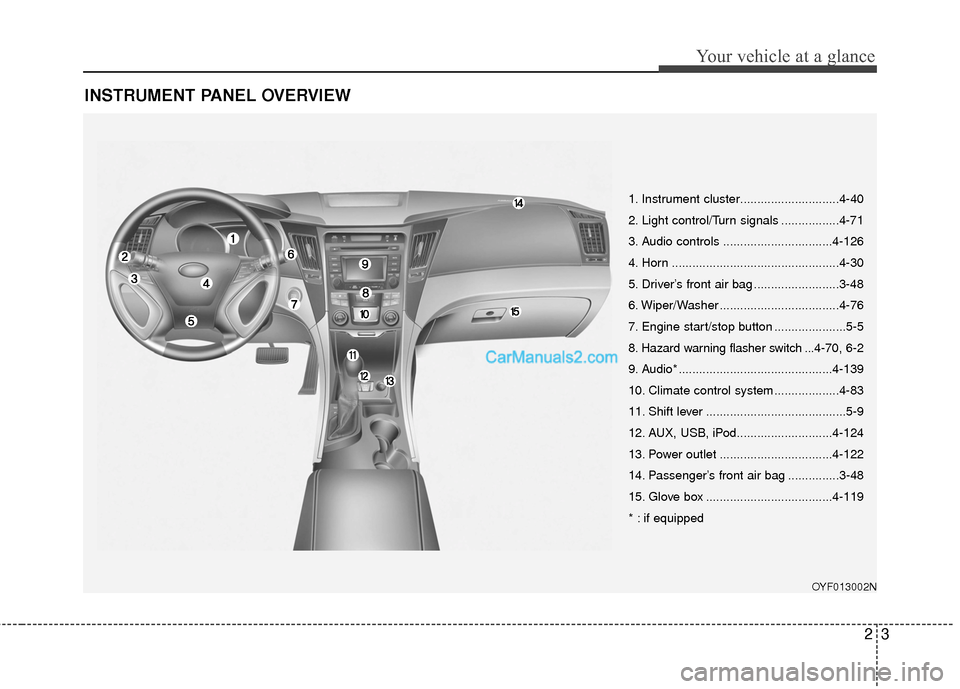
INSTRUMENT PANEL OVERVIEW
OYF013002N
1. Instrument cluster.............................4-40
2. Light control/Turn signals .................4-71
3. Audio controls ................................4-126
4. Horn .................................................4-30
5. Driver’s front air bag .........................3-48
6. Wiper/Washer ...................................4-76
7. Engine start/stop button .....................5-5
8. Hazard warning flasher switch ...4-70, 6-2
9. Audio* .............................................4-139
10. Climate control system ...................4-83
11. Shift lever .........................................5-9
12. AUX, USB, iPod............................4-124
13. Power outlet .................................4-122
14. Passenger’s front air bag ...............3-48
15. Glove box .....................................4-119
* : if equipped
Page 83 of 543
Windshield defrosting and defogging / 4-116Storage compartments / 4-119Interior features / 4-121Audio system / 4-125
Features of your vehicle4
Page 203 of 543
Adjust the sunvisor extension forward or
backward (4).
To use the vanity mirror, pull down the
visor and slide the mirror cover (3).
Push the switch to turn the light on or off.
(if equipped)
: The light turns on.
O: The light turns off.
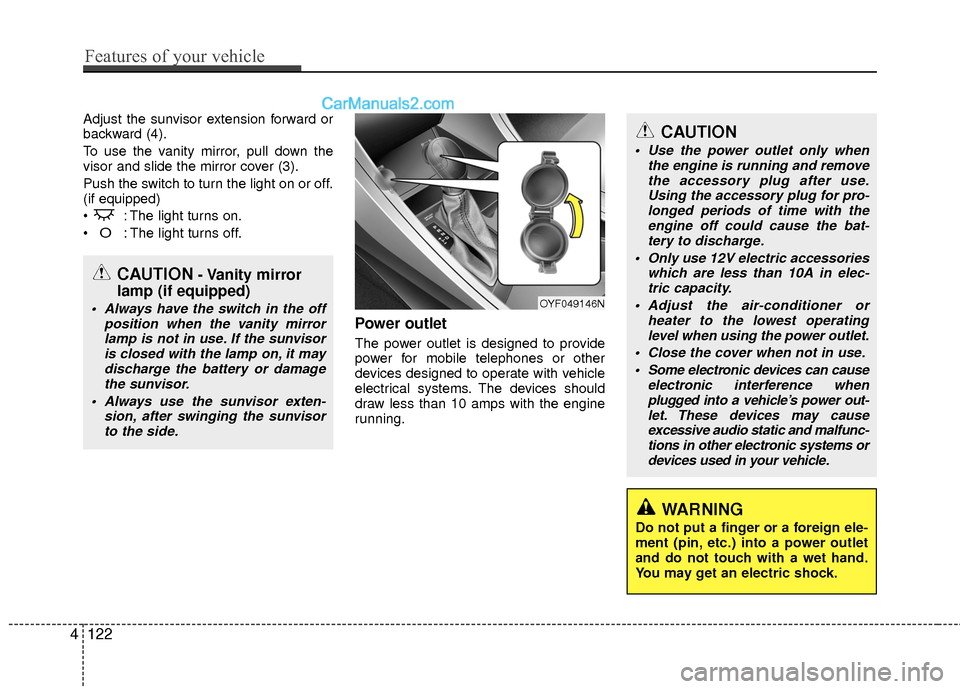
Power outlet
The power outlet is designed to provide
power for mobile telephones or other
devices designed to operate with vehicle
electrical systems. The devices should
draw less than 10 amps with the engine
running.
CAUTION
Use the power outlet only whenthe engine is running and removethe accessory plug after use. Using the accessory plug for pro-longed periods of time with theengine off could cause the bat- tery to discharge.
Only use 12V electric accessories which are less than 10A in elec-tric capacity.
Adjust the air-conditioner or heater to the lowest operatinglevel when using the power outlet.
Close the cover when not in use. Some electronic devices can cause electronic interference whenplugged into a vehicle’s power out- let. These devices may causeexcessive audio static and malfunc- tions in other electronic systems ordevices used in your vehicle.
WARNING
Do not put a finger or a foreign ele-
ment (pin, etc.) into a power outlet
and do not touch with a wet hand.
You may get an electric shock.
OYF049146N
CAUTION- Vanity mirror
lamp (if equipped)
Always have the switch in the off
position when the vanity mirrorlamp is not in use. If the sunvisor is closed with the lamp on, it maydischarge the battery or damagethe sunvisor.
Always use the sunvisor exten- sion, after swinging the sunvisorto the side.
4122
Features of your vehicle
Page 205 of 543
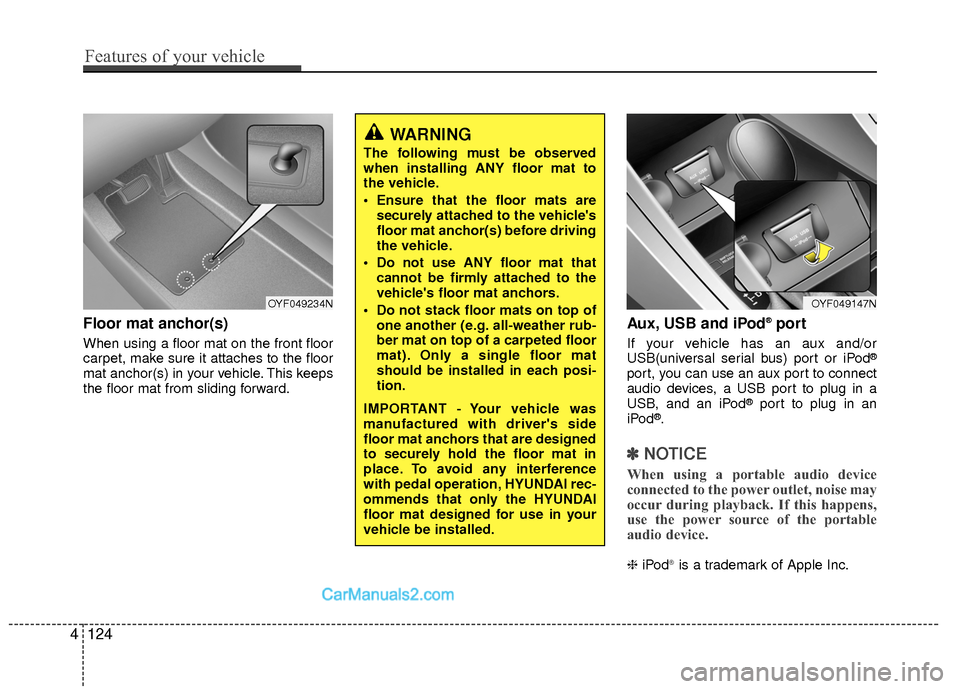
Floor mat anchor(s)
When using a floor mat on the front floor
carpet, make sure it attaches to the floor
mat anchor(s) in your vehicle. This keeps
the floor mat from sliding forward.
Aux, USB and iPod®port
If your vehicle has an aux and/or
USB(universal serial bus) port or iPod®
port, you can use an aux port to connect
audio devices, a USB port to plug in a
USB, and an iPod
®port to plug in an
iPod®.
✽ ✽ NOTICE
When using a portable audio device
connected to the power outlet, noise may
occur during playback. If this happens,
use the power source of the portable
audio device.
❈ iPod®is a trademark of Apple Inc.
WARNING
The following must be observed
when installing ANY floor mat to
the vehicle.
Ensure that the floor mats are
securely attached to the vehicle's
floor mat anchor(s) before driving
the vehicle.
Do not use ANY floor mat that cannot be firmly attached to the
vehicle's floor mat anchors.
Do not stack floor mats on top of one another (e.g. all-weather rub-
ber mat on top of a carpeted floor
mat). Only a single floor mat
should be installed in each posi-
tion.
IMPORTANT - Your vehicle was
manufactured with driver's side
floor mat anchors that are designed
to securely hold the floor mat in
place. To avoid any interference
with pedal operation, HYUNDAI rec-
ommends that only the HYUNDAI
floor mat designed for use in your
vehicle be installed.
OYF049147NOYF049234N
4124
Features of your vehicle
Page 206 of 543
4125
Features of your vehicle
Navigation system (if equipped)
The navigation system ascertains the
present position of your vehicle by using
information from satellites and guides
you to the place you assign as the desti-
nation.
Detailed information for the navigation
system is described in a separate sup-
plied manual.
Bluetooth hands-free
You can use the mobile phone wirelessly
by using the Bluetooth system.
Detailed information for the Bluetooth
hands-free is described in the “Audio
system” section in this chapter or in the
manual supplied separately.
✽ ✽NOTICE
• If you install an after market HID
head lamp, your vehicle's audio and
electronic device may malfunction.
• Prevent chemicals such as perfume, cosmetil oil, sun cream, hand cleaner,
and air freshener from contacting the
interior parts because they may cause
damage or discoloration.
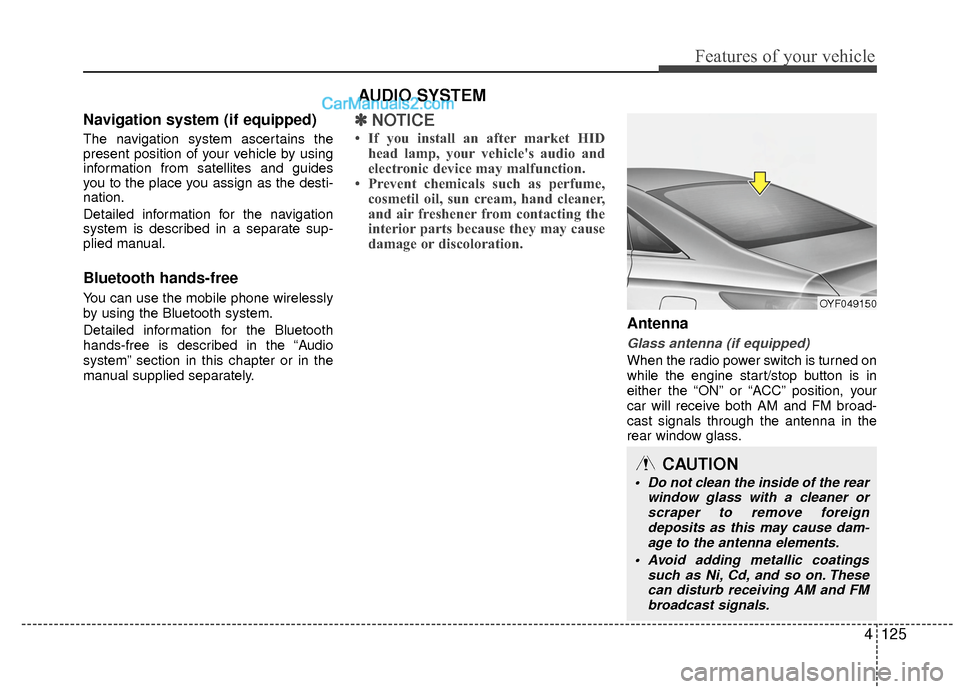
Antenna
Glass antenna (if equipped)
When the radio power switch is turned on
while the engine start/stop button is in
either the “ON” or “ACC” position, your
car will receive both AM and FM broad-
cast signals through the antenna in the
rear window glass.
AUDIO SYSTEM
OYF049150
CAUTION
• Do not clean the inside of the rear
window glass with a cleaner orscraper to remove foreign deposits as this may cause dam-age to the antenna elements.
Avoid adding metallic coatings such as Ni, Cd, and so on. Thesecan disturb receiving AM and FM broadcast signals.
Page 207 of 543
Features of your vehicle
126
4
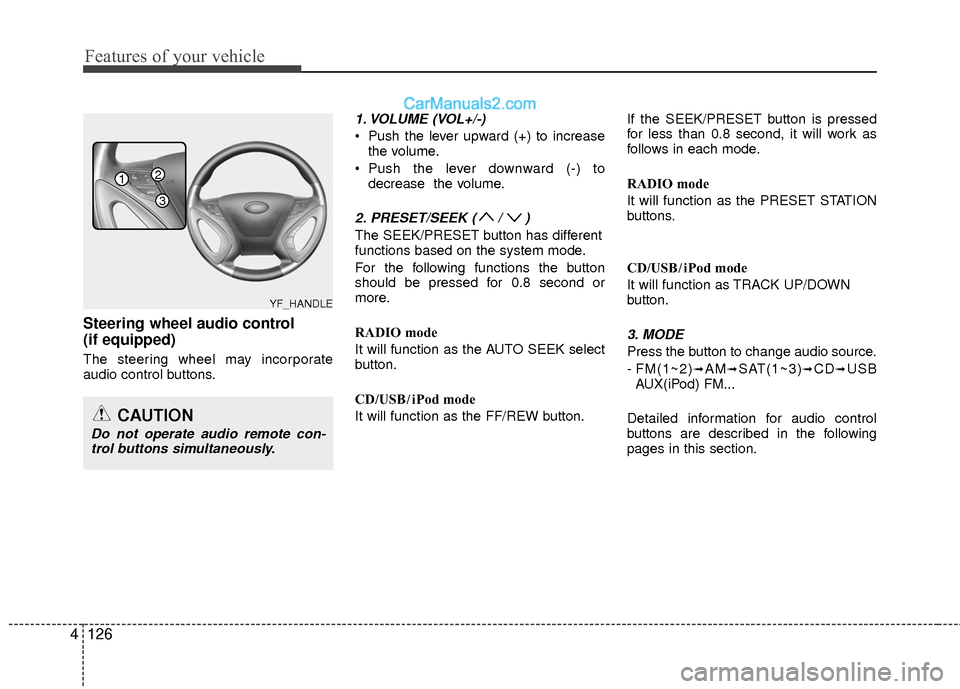
Steering wheel audio control
(if equipped)
The steering wheel may incorporate
audio control buttons.
1. VOLUME (VOL+/-)
Push the lever upward (+) to increase
the volume.
Push the lever downward (-) to decrease the volume.
2. PRESET/SEEK ( / )
The SEEK/PRESET button has different
functions based on the system mode.
For the following functions the button
should be pressed for 0.8 second or
more.
RADIO mode
It will function as the AUTO SEEK select
button.
CD/USB/ iPod mode
It will function as the FF/REW button. If the SEEK/PRESET button is pressed
for less than 0.8 second, it will work as
follows in each mode.
RADIO mode
It will function as the PRESET STATION
buttons.
CD/USB/ iPod mode
It will function as TRACK UP/DOWN
button.
3. MODE
Press the button to change audio source.
- FM(1~2)
➟AM➟SAT(1~3)➟CD➟USB
AUX(iPod) FM...
Detailed information for audio control
buttons are described in the following
pages in this section.
CAUTION
Do not operate audio remote con- trol buttons simultaneously.
1
3
2
YF_HANDLE
Page 208 of 543
4127
Features of your vehicle
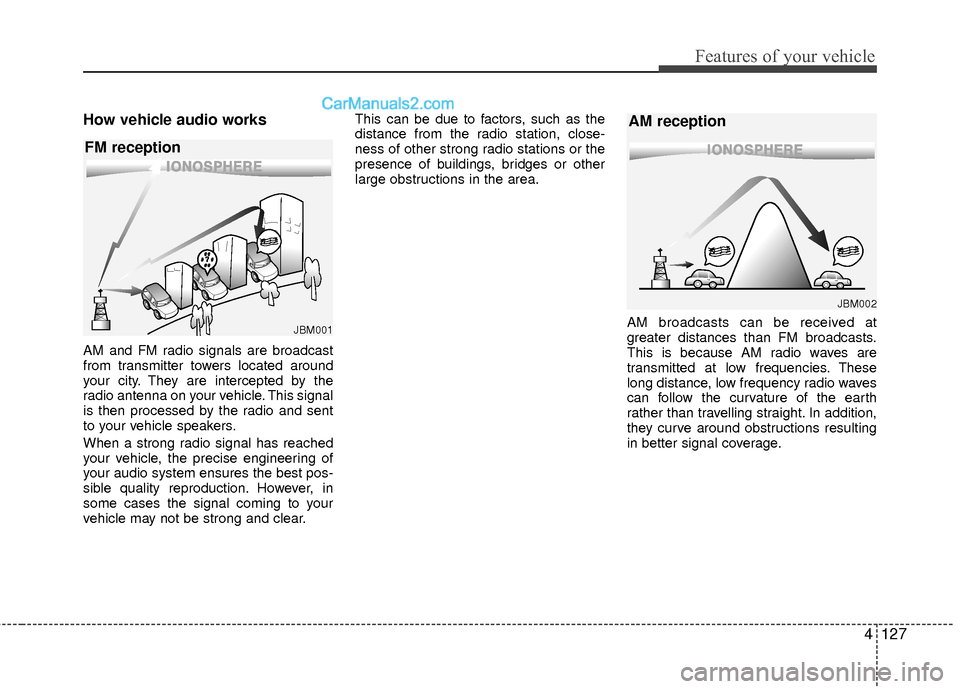
How vehicle audio works
AM and FM radio signals are broadcast
from transmitter towers located around
your city. They are intercepted by the
radio antenna on your vehicle. This signal
is then processed by the radio and sent
to your vehicle speakers.
When a strong radio signal has reached
your vehicle, the precise engineering of
your audio system ensures the best pos-
sible quality reproduction. However, in
some cases the signal coming to your
vehicle may not be strong and clear.This can be due to factors, such as the
distance from the radio station, close-
ness of other strong radio stations or the
presence of buildings, bridges or other
large obstructions in the area.
AM broadcasts can be received at
greater distances than FM broadcasts.
This is because AM radio waves are
transmitted at low frequencies. These
long distance, low frequency radio waves
can follow the curvature of the earth
rather than travelling straight. In addition,
they curve around obstructions resulting
in better signal coverage.
JBM001
FM reception
JBM002
AM reception
Page 210 of 543
4129
Features of your vehicle
Using a cellular phone or a two-wayradio
When a cellular phone is used inside the
vehicle, noise may be produced from the
audio system. This does not mean that
something is wrong with the audio equip-
ment. In such a case, try to operate
mobile devices as far from the audio
equipment as possible.
Caring for disc
If the temperature inside the car is too high, open the car windows to ventilate
before using the system.
It is illegal to copy and use MP3/WMA files without permission. Use CDs that
are created only by lawful means.
Do not apply volatile agents, such as benzene and thinner, normal cleaners
and magnetic sprays made for ana-
logue disc onto CDs.
To prevent the disc surface from get- ting damaged, hold CDs by the edges
or the center hole only.
Clean the disc surface with a piece of soft cloth before playback (wipe it from
the center to the outside edge).
Do not damage the disc surface or attach pieces of sticky tape or paper.
Make certain only CDs are inserted into the CD player (Do not insert more
than one CD at a time).
Keep CDs in their cases after use to protect them from scratches or dirt.
Depending on the type of CD-R/CD- RW CDs, certain CDs may not operate
normally according to the manufactur-
ing companies. In such circumstances,
continued use may cause malfunctions
to your audio system.
✽ ✽ NOTICE -Playing an
Incompatible Copy
Protected Audio CD
Some copy protected CDs, which do not
comply with international audio CD
standards (Red Book), may not play on
your car audio. Please note that inabili-
ties to properly play a copy protected
CD may indicate that the CD is defec-
tive, not the CD player.
CAUTION
When using a communication sys-
tem such as a cellular phone or a radio set inside the vehicle, a sepa-rate external antenna must be fitted.When a cellular phone or a radio setis used with an internal antennaalone, it may interfere with the vehi-cle's electrical system and adverselyaffect safe operation of the vehicle.
WARNING
Do not use a cellular phone while
driving. Stop at a safe location to
use a cellular phone.
Page 211 of 543
Features of your vehicle
130
4
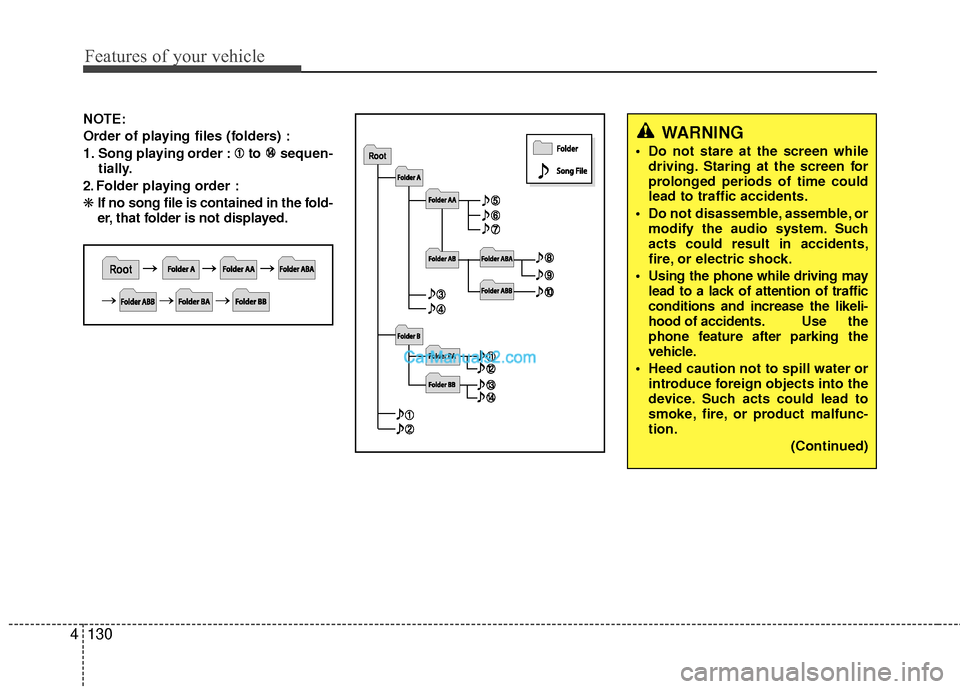
NOTE:
Order of playing files (folders) :
1. Song playing order : to sequen-
tially.
2. Folder playing order :
❋ If no song file is contained in the fold-
er, that folder is not displayed.WARNING
Do not stare at the screen while
driving. Staring at the screen for
prolonged periods of time could
lead to traffic accidents.
Do not disassemble, assemble, or modify the audio system. Such
acts could result in accidents,
fire, or electric shock.
Using the phone while driving may lead to a lack of attention of traffic
conditions and increase the likeli-
hood of accidents. Use the
phone feature after parking the
vehicle.
Heed caution not to spill water or introduce foreign objects into the
device. Such acts could lead to
smoke, fire, or product malfunc-
tion.
(Continued)
Page 212 of 543
4131
Features of your vehicle
(Continued) Turn on the car ignition before using this device. Do not operatethe audio system for long periodsof time with the ignition turned off as such operations may lead tobattery discharge.
Do not subject the device to severe shock or impact. Directpressure onto the front side ofthe monitor may cause damage tothe LCD or touch screen.
When cleaning the device, make sure to turn off the device anduse a dry and smooth cloth.Never use tough materials, chem- ical cloths, or solvents (alcohol,benzene, thinners, etc.) as such materials may damage the devicepanel or cause color/quality dete-rioration.
(Continued)CAUTION
Operating the device while drivingcould lead to accidents due to alack of attention to external sur-roundings. First park the vehiclebefore operating the device.
Adjust the volume to levels that allow the driver to hear soundsfrom outside of the vehicle. Drivingin a state where external soundscannot be heard may lead to acci-dents.
Pay attention to the volume setting when turning the device on. A sud-den output of extreme volumeupon turning the device on couldlead to hearing impairment.(Adjust the volume to a suitablelevels before turning off the device.)
(Continued)
(Continued)
Please refrain from use if the screen is blank or no sound can
be heard as these signs may indi-
cate product malfunction.
Continued use in such conditions
could lead to accidents(fires,
electric shock) or product mal-
functions.
Do not touch the antenna during thunder or lightening as such
acts may lead to lightning
induced electric shock.
Do not stop or park in parking- restricted areas to operate the
product. Such acts could lead to
traffic accidents.
Use the system with the vehicle ignition turned on. Prolonged use
with the ignition turned off could
result in battery discharge.