USB port Hyundai Sonata Hybrid 2016 User Guide
[x] Cancel search | Manufacturer: HYUNDAI, Model Year: 2016, Model line: Sonata Hybrid, Model: Hyundai Sonata Hybrid 2016Pages: 708, PDF Size: 25.92 MB
Page 319 of 708
4-71
Multimedia System
4
U
US
SB
B
M
M O
OD
DE
E
Using USB Mode
Playing/Pausing USB Files
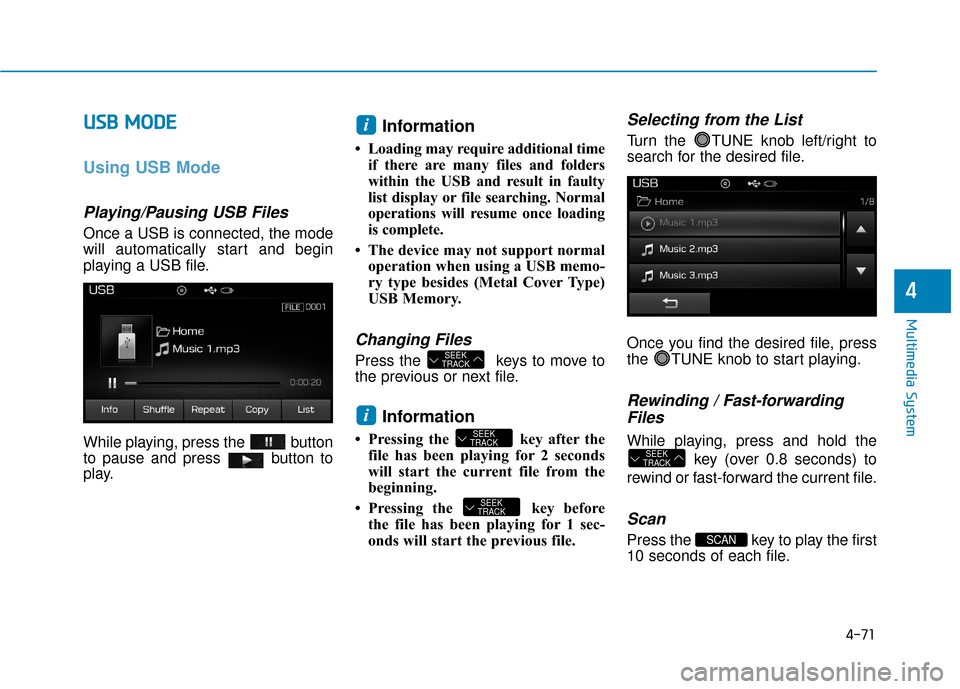
Once a USB is connected, the mode
will automatically start and begin
playing a USB file.
While playing, press the button
to pause and press button to
play.
Information
• Loading may require additional time
if there are many files and folders
within the USB and result in faulty
list display or file searching. Normal
operations will resume once loading
is complete.
• The device may not support normal operation when using a USB memo-
ry type besides (Metal Cover Type)
USB Memory.
Changing Files
Press the keys to move to
the previous or next file.
Information
• Pressing the key after thefile has been playing for 2 seconds
will start the current file from the
beginning.
• Pressing the key before the file has been playing for 1 sec-
onds will start the previous file.
Selecting from the List
Turn the TUNE knob left/right to
search for the desired file.
Once you find the desired file, press
the TUNE knob to start playing.
Rewinding / Fast-forwardingFiles
While playing, press and hold the
key (over 0.8 seconds) to
rewind or fast-forward the current file.
Scan
Press the key to play the first
10 seconds of each file.SCAN
SEEK
TRACK
SEEK
TRACK
SEEK
TRACK
i
SEEK
TRACK
i
Page 368 of 708
4-120
Multimedia System
NameDescription
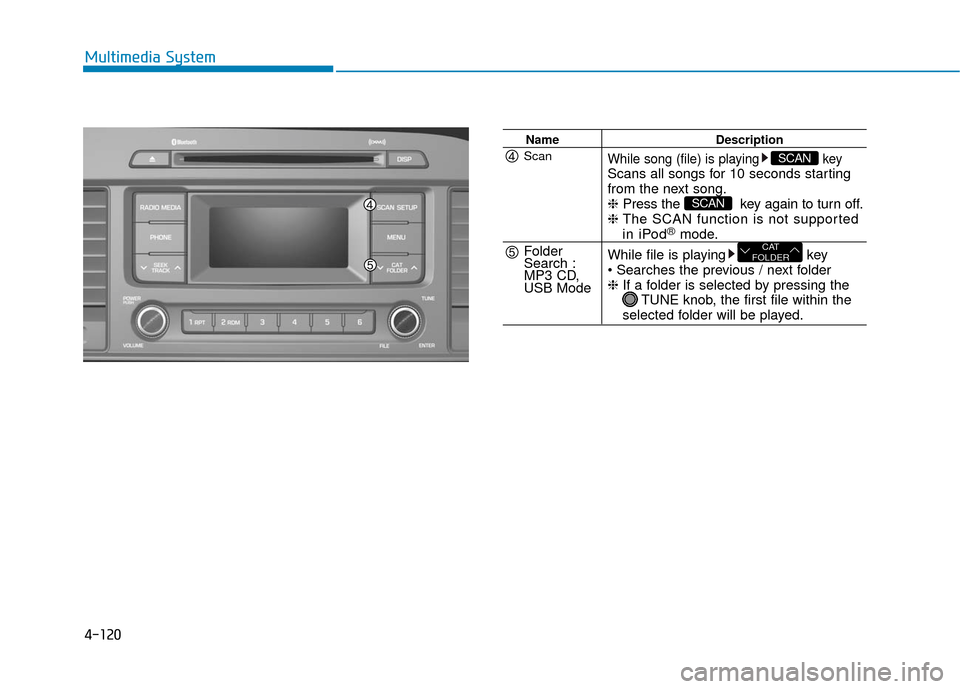
While song (file) is playing keyScans all songs for 10 seconds starting
from the next song.
❈Press the key again to turn off.
❈ The SCAN function is not supported
in iPod®mode.
While file is playing key
❈ If a folder is selected by pressing the
TUNE knob, the first file within the
selected folder will be played.
CAT
FOLDER
SCAN
SCANScan
Folder
Search :
MP3 CD,
USB Mode
Page 373 of 708
4-125
Multimedia System
4
Bluetooth®Wireless
Technology AUDIO
What is
Bluetooth®Wireless
Technology?
Bluetooth®Wireless Technology allows
devices to be connected in a short dis-
tance, including hands-free devices,
stereo headsets, wireless remote con-
trollers, etc. For more information, visit
the
Bluetooth®Wireless Technology
website
at www.Bluetooth.com
Before using Bluetooth®Wireless
Technology audio features
Bluetooth®Wireless Technology
audio may not be supported
depending on the compatibility of
your
Bluetooth®Wireless
Technology mobile phone.
In order to use
Bluetooth®Wireless
Technology audio, you must first
pair and connect the
Bluetooth®
Wireless Technology mobile phone.
Bluetooth®Wireless Technology
audio can be used only when the
[Audio Streaming] of Phone is
turned .
❈ Setting
Bluetooth®Wireless
Technology Audio Streaming :
Press the key Select
[Phone] through the tune knob or key Select [Audio
Streaming] through the TUNE
knob Set /
Starting Bluetooth®Wireless
Technology Audio
Press the key to change
the mode in order of CD ➟ USB ➟
AUX ➟ My Music ➟ BT Audio.
If BT Audio is selected,
Bluetooth®
Wireless Technology audio will
start playing.
❈ Audio may not automatically start
playing in some mobile phones.
Using the Bluetooth®Wireless
Technology audio features
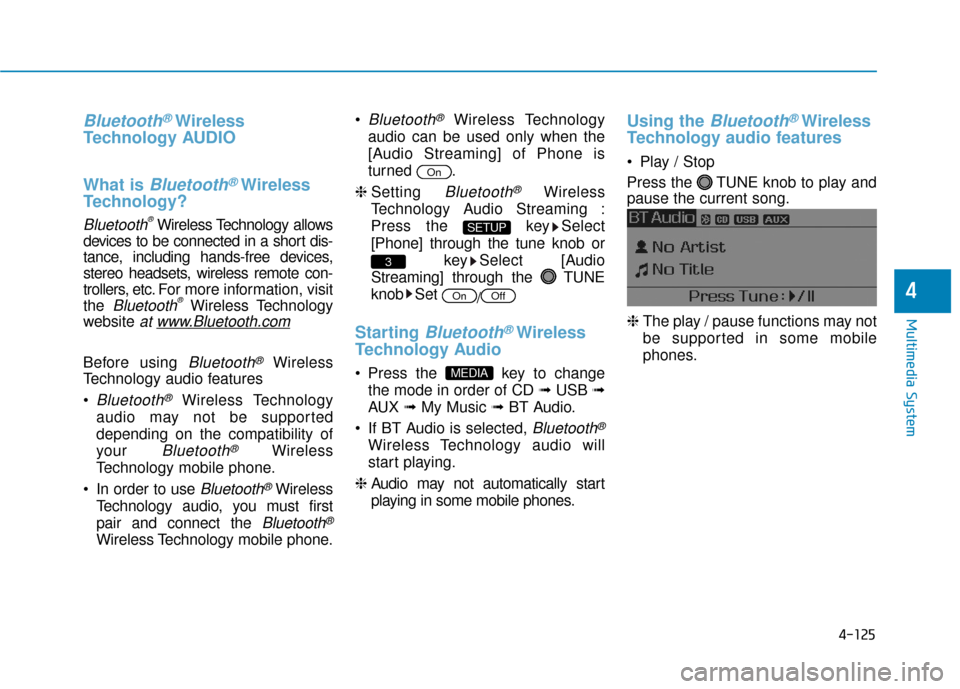
Play / Stop
Press the TUNE knob to play and
pause the current song.
❈ The play / pause functions may not
be supported in some mobile
phones.
MEDIA
OffOn
3
SETUP
On
Page 395 of 708
4-147
Multimedia System
4
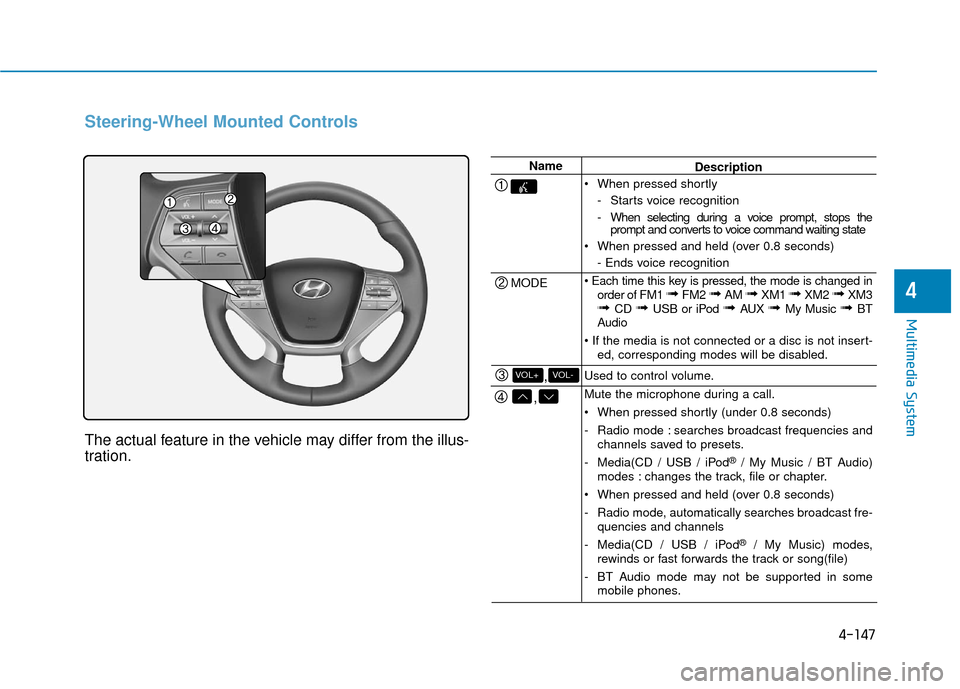
Steering-Wheel Mounted Controls
The actual feature in the vehicle may differ from the illus-
tration.
Name
MODE
,
,VOL-VOL+
Description
When pressed shortly - Starts voice recognition
- When selecting during a voice prompt, stops theprompt and converts to voice command waiting state
When pressed and held (over 0.8 seconds) - Ends voice recognition
order of FM1
➟ FM2 ➟ AM ➟ XM1 ➟ XM2 ➟ XM3➟ CD ➟ USB or iPod ➟ AUX ➟ My Music ➟ BT
Audio
ed, corresponding modes will be disabled.
Used to control volume.
Mute the microphone during a call.
When pressed shortly (under 0.8 seconds)
- Radio mode : searches broadcast frequencies and channels saved to presets.
- Media(CD / USB / iPod
®/ My Music / BT Audio)
modes : changes the track, file or chapter.
When pressed and held (over 0.8 seconds)
- Radio mode, automatically searches broadcast fre- quencies and channels
- Media(CD / USB / iPod
®/ My Music) modes,
rewinds or fast forwards the track or song(file)
- BT Audio mode may not be supported in some mobile phones.
Page 407 of 708
4-159
Multimedia System
4
U
US
SB
B
M
M O
OD
DE
E
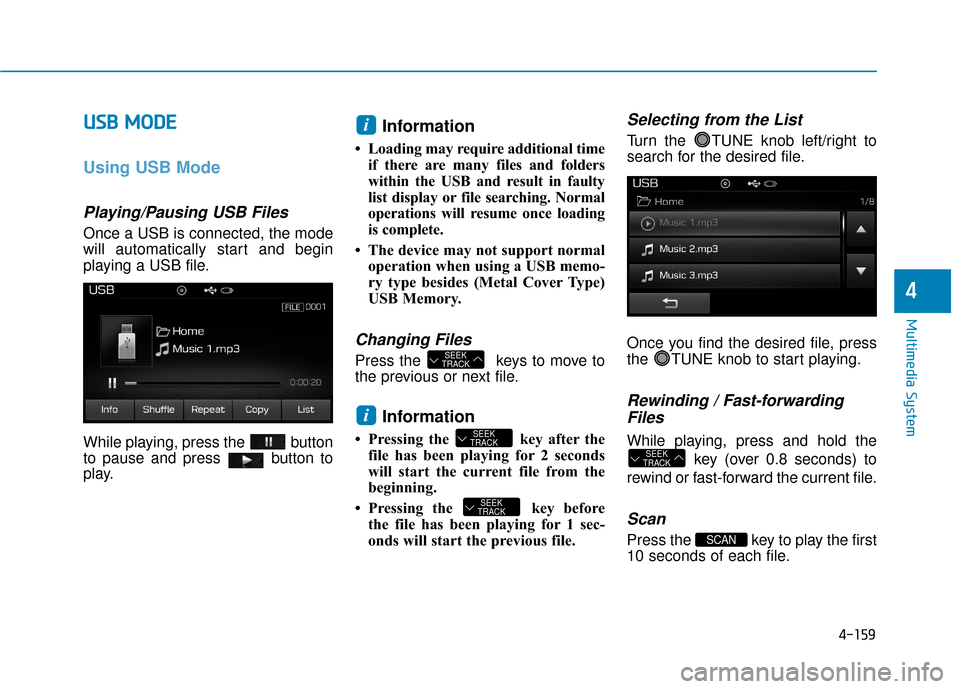
Using USB Mode
Playing/Pausing USB Files
Once a USB is connected, the mode
will automatically start and begin
playing a USB file.
While playing, press the button
to pause and press button to
play.
Information
• Loading may require additional time
if there are many files and folders
within the USB and result in faulty
list display or file searching. Normal
operations will resume once loading
is complete.
• The device may not support normal operation when using a USB memo-
ry type besides (Metal Cover Type)
USB Memory.
Changing Files
Press the keys to move to
the previous or next file.
Information
• Pressing the key after thefile has been playing for 2 seconds
will start the current file from the
beginning.
• Pressing the key before the file has been playing for 1 sec-
onds will start the previous file.
Selecting from the List
Turn the TUNE knob left/right to
search for the desired file.
Once you find the desired file, press
the TUNE knob to start playing.
Rewinding / Fast-forwardingFiles
While playing, press and hold the
key (over 0.8 seconds) to
rewind or fast-forward the current file.
Scan
Press the key to play the first
10 seconds of each file.SCAN
SEEK
TRACK
SEEK
TRACK
SEEK
TRACK
i
SEEK
TRACK
i
Page 674 of 708

I-2
A/V mode ........................................................................\
3-90
Air bag warning labels....................................................2-70
Air bags ........................................................................\
...2-47Additional safety precautions .....................................2-69
Air bag collision sensors ............................................2-63
Air bag inflation conditions .......................................2-65
Air bag non-inflation conditions ................................2-66
Air bag warning labels ...............................................2-70
Curtain air bags ..........................................................2-51
Do not install a child restraint on the front passenger seat..........................................................2-58
Driver’s front air bag..................................................2-49
How does the air bag system operate? .......................2-52
Occupant Classification System (OCS) .....................2-58
Passenger’s front air bag ............................................2-49
Side air bags ...............................................................2-50
SRS Care ....................................................................2-68\
SRS warning light .....................................................2-53
What to expect after an air bag inflates .....................2-57
Where are the air bags? ..............................................2-49
Why didn’t my air bag go off in a collision ..............2-63
Air cleaner.......................................................................7\
-35
Air ventilation seats ........................................................2-22 Airconditioning system
Automatic climate control system............................3-128
Manual climate control system ................................3-129
Refrigerant and Compressor ........................................8-5
Alarm system ..................................................................3-13
Antenna ........................................................................\
.....4-2
Anti-lock brake system (ABS) .......................................5-32
Appearance care..............................................................7-86 Exterior care ...............................................................7-86
Interior care ................................................................7-91
Armrest ........................................................................\
...2-14
Audio/Video/Navigation system (AVN) ...........................4-4
Auto door lock/unlock features ......................................3-12
Auto hold ........................................................................\
5-28
Auto light position ........................................................3-107
Automatic climate control system ................................3-127 Air conditioning .......................................................3-136
Automatic heating and air conditioning ...................3-128
Climate control air filter ...........................................3-139
Manual heating and air conditioning .......................3-129
Automatic transaxle ........................................................5-12 Sports mode ................................................................5-15
AUX, USB and iPod
®port ...............................................4-2
Index
A
Page 680 of 708

I-8
Maintenance services ........................................................7-4
Mirrors ........................................................................\
....3-19Day/night rearview mirror..........................................3-19
Electric chromic mirror (ECM)..................................3-20
Folding the outside rearview mirror...........................3-36
Inside rearview mirror ................................................3-19
Outside rearview mirror .............................................3-34
Reverse parking aid function .....................................3-37
Moonroof, see panoramic sunroof ..................................3-42
Multi box.......................................................................3\
-146
Multi fuse ........................................................................\
7-63
Multimedia system Antenna ........................................................................\
4-2
Audio/Video/Navigation system(AVN) .......................4-4
AUX, USB and iPod
®port ...........................................4-2
Bluetooth®Wireless Technology Hands-Free ..............4-4
Steering wheel audio control........................................4-3
Odometer........................................................................\
.3-63
Oil (Engine) ....................................................................7-27\
Outside rearview mirror..................................................3-34
Outside temperature gauge .............................................3-62
Owner maintenance ..........................................................7-5 Panoramic sunroof ..........................................................3-42
Parking brake ..................................................................7-34
Parking lamp position ...................................................3-108
Passenger’s front air bag.................................................2-49
Power brakes ...................................................................5-19
Power outlet ..................................................................3-148
Power window lock button .............................................3-41
Rear combination light bulb replacement.......................7-79
Rear lamp ......................................................................3-\
118
Rear parking assist system (RPAS) ..............................3-123
Rear seats ........................................................................\
2-12
Rear view camera .........................................................3-122
Recommended cold tire inflation pressures ...................7-45
Recommended lubricants and capacities ..........................8-6
Recommended SAE viscosity number .........................8-7
Replacement light bulb ...................................................7-73 Back-up lamp .............................................................7-83
High mounted stop lamp ............................................7-84
Interior light bulb replacement ...................................7-84
License plate light bulb replacement .........................7-84
Reporting safety defects .................................................8-10
Reverse parking aid function .........................................3-37
Index
O
P
R