AUX Hyundai Sonata Hybrid 2017 Owner's Manual
[x] Cancel search | Manufacturer: HYUNDAI, Model Year: 2017, Model line: Sonata Hybrid, Model: Hyundai Sonata Hybrid 2017Pages: 562, PDF Size: 16.44 MB
Page 13 of 562
 .....................3-116
Air bag warning labels.....................")
I-2
A/V mode ........................................................................\
3-77
AFLS (Adaptive Front Lighting System) .....................3-116
Air bag warning labels....................................................2-68
Air bags ........................................................................\
...2-45Additional safety precautions .....................................2-67
Air bag collision sensors ............................................2-61
Air bag inflation conditions .......................................2-63
Air bag non-inflation conditions ................................2-64
Air bag warning labels ...............................................2-68
Curtain air bags ..........................................................2-49
Do not install a child restraint on the front passenger seat ...........................................................2-60
Driver’s front air bag..................................................2-47
Driver’s knee air bag ..................................................2-47
How does the air bag system operate? .......................2-50
Occupant classification system (OCS) .......................2-56
Passenger’s front air bag ............................................2-47
Side air bags ...............................................................2-48
SRS Care ....................................................................2-66\
SRS warning light ......................................................2-51
What to expect after an air bag inflates .....................2-55
Why didn’t my air bag go off in a collision ..............2-61
Air cleaner.......................................................................7\
-32
Air conditioner compressor label ...................................8-10
Air conditioning system (Refrigerant/Compressor) .........8-5
Air ventilation seats ........................................................2-21 Airconditioning system
Automatic climate control system............................3-139
Manual climate control system ................................3-129
Alarm system ..................................................................3-19
Antenna ........................................................................\
.....4-2
Anti-lock brake system (ABS) .......................................5-40
Appearance care..............................................................7-82 Exterior care ...............................................................7-82
Interior care ................................................................7-87
Armrest ........................................................................\
...2-14
Auto door lock/unlock features ......................................3-17
Auto hold ........................................................................\
5-37
Auto light position ........................................................3-109
Automatic climate control system ................................3-139 Air conditioning .......................................................3-146
Automatic heating and air conditioning ...................3-140
Climate control air filter...................................3-137, 149
Manual heating and air conditioning .......................3-141
Automatic transmission ..................................................5-14 Manual shift mode......................................................5-17
Automatic transmission shift indicator ...........................3-73
Automatic emergency braking (AEB) ............................5-81 System setting and activation .....................................5-81
AEB warning message and system control................5-83
Sensor to detect the distance from the vehicle in front (front radar) ................................................5-86
System malfunction ....................................................5-87
Limitation of the system ............................................5-89
AUX, USB and iPod
®port ...............................................4-2
Index
A
Page 20 of 562
I-9
Multimedia system............................................................4-23.8 Inch Mono TFT ....................................................4-17
Antenna ........................................................................\
4-2
AUX, USB and iPod
®port ..........................................4-2
Blue Link®..................................................................4-54
Steering wheel audio control........................................4-3
Voice recognition........................................................4-46
Occupant classification system (OCS) ...........................2-56
Odometer........................................................................\
.3-72
Oil (Engine) ....................................................................7-24\
Outside temperature gauge .............................................3-73
Owner maintenance ..........................................................7-7
Paddle shifter ..................................................................5-24
Panoramic sunroof ..........................................................3-52
Parking brake ..................................................................7-31
Parking brake (Manual) ..................................................5-29
Parking lamp position ...................................................3-110
Passenger’s front air bag.................................................2-47
Power brakes ...................................................................5-28
Power outlet ..................................................................3-158
Power window lock button .............................................3-47 Rear combination light bulb replacement.......................7-76
Rear parking assist system(RPAS) ...............................3-125
Rear seats ........................................................................\
2-12
Rear view camera .........................................................3-124
Recommended cold tire inflation pressure .....................7-42
Recommended lubricants and capacities ..........................8-6
Recommended lubricants and capacities
Recommended SAE viscosity number .........................8-8
Refrigerant label .............................................................8-10
Remote key .......................................................................3\
-4
Replacement light bulb ...................................................7-69
Reporting safety defects .................................................8-12
Reverse parking aid function ..........................................3-43
Rocking the vehicle ........................................................5-93
Room lamp ....................................................................3-119
Rotation (Tire) ................................................................7-44
Safety messages ................................................................F-6
SCC/LDWS mode...........................................................3-77
Scheduled maintenance service ........................................7-9
I
Index
O
P
R
S
Page 28 of 562
I
IN
N S
ST
T R
R U
U M
M E
EN
N T
T
P
P A
A N
N E
EL
L
O
O V
VE
ER
R V
V I
IE
E W
W
1-5
Your vehicle at a glance
1
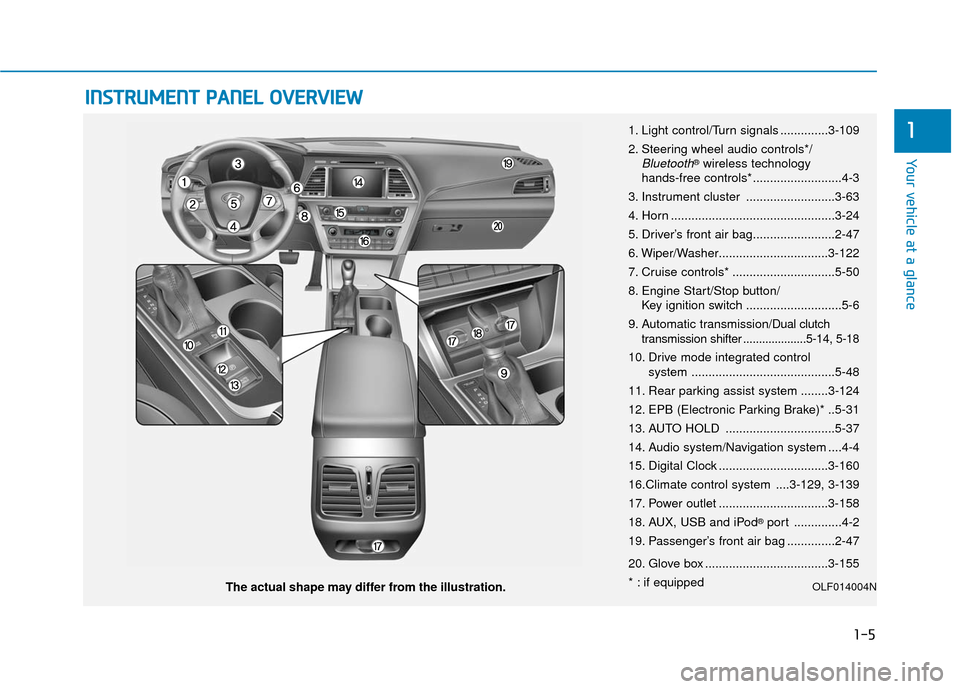
The actual shape may differ from the illustration. 1. Light control/Turn signals ..............3-109
2. Steering wheel audio controls*/
Bluetooth®wireless technology
hands-free controls* ..........................4-3
3. Instrument cluster ..........................3-63
4. Horn ................................................3-24
5. Driver’s front air bag........................2-47
6. Wiper/Washer................................3-122
7. Cruise controls* ..............................5-50
8. Engine Start/Stop button/ Key ignition switch ............................5-6
9. Automatic transmission/
Dual clutch
transmission shifter ....................5-14, 5-18
10. Drive mode integrated control system ..........................................5-48
11. Rear parking assist system ........3-124
12. EPB (Electronic Parking Brake)* ..5-31
13. AUTO HOLD ................................5-37
14. Audio system/Navigation system ....4-4
15. Digital Clock ................................3-160
16.Climate control system ....3-129, 3-139
17. Power outlet ................................3-158
18. AUX, USB and iPod
®port ..............4-2
19. Passenger’s front air bag ..............2-47
20. Glove box ....................................3-155
* : if equipped
OLF014004N
Page 261 of 562
Multimedia System
Multimedia System.................................................4-2
AUX, USB and iPod®Port ...............................................4-2
Antenna ........................................................................\
.......4-2
Steering Wheel Audio Control........................................4-3
Audio / Video / Navigation System (AVN) ..................4-4
Bluetooth®Wireless Technology Hands-Free ...........4-4
How Vehicle Audio Works ...............................................4-5
Features of Your Vehicle.................................................4-7
System Controllers and Functions
-3.8 Inch Mono TFT ............................................4-17
Audio Head Unit ..............................................................4-17
Setup ........................................................................\
..........4-19
Radio : FM, AM, SiriusXM .............................................4-22
SiriusXM, XM
TMRADIO ...................................................4-25
Basic Method of Use : Audio CD /
MP3 CD / USB / iPod
®/ My Music ...........................4-27
Bluetooth®Wireless Technology Audio ....................4-33
Bluetooth®Wireless Technology ................................4-35
Voice Recognition ...........................................................4-46
Ending Voice Recognition .............................................4-47
Rear View Camera ..........................................................4-54
Blue Link
®........................................................................\
.4-54
Declaration of conformity ............................................4-59
4
Page 262 of 562
4-2
• If you install an aftermarket HIDhead lamp, your vehicle’s audio
and electronic device may mal-
function.
Prevent chemicals such as per- fume, cosmetic oil, sun cream,
hand cleaner, and air freshener
from contacting the interior
parts because they may cause
damage or discoloration.
AUX, USB and iPod®Por t
You can use an AUX port to connect
audio devices and an USB port to
plug in an USB and also in an iPod
®
port.
Information
When using a portable audio device
connected to the power outlet, noise
may occur during playback. If this
happens, use the power source of the
portable audio device.
❈ iPod®is a trademark of Apple Inc.
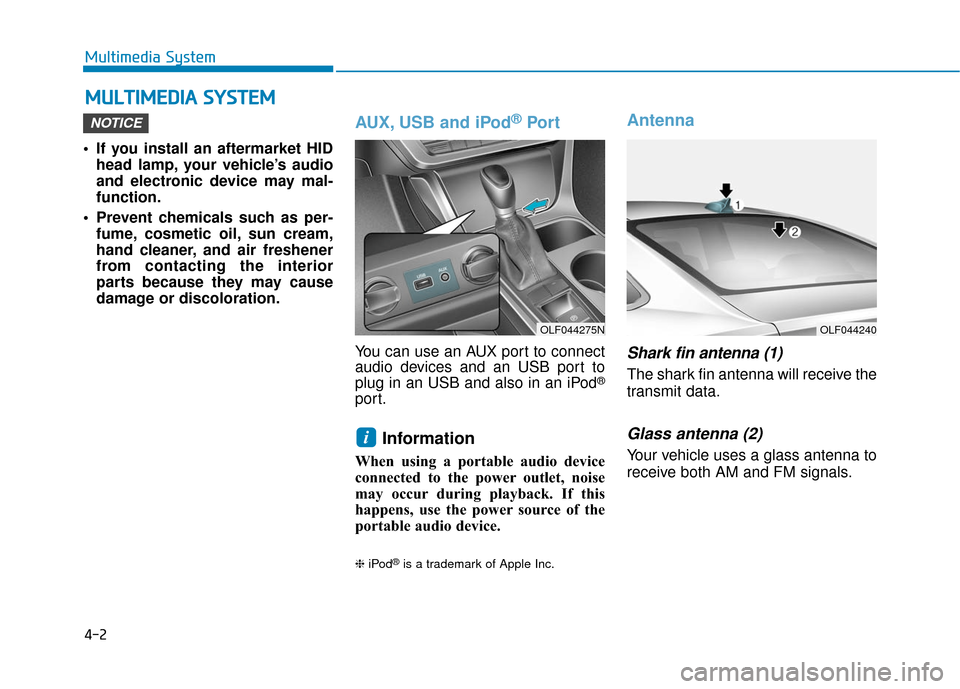
Antenna
Shark fin antenna (1)
The shark fin antenna will receive the
transmit data.
Glass antenna (2)
Your vehicle uses a glass antenna to
receive both AM and FM signals.
i
NOTICE
M MU
UL
LT
T I
IM
M E
ED
D I
IA
A
S
S Y
Y S
ST
T E
EM
M
Multimedia System
OLF044275NOLF044240
Page 264 of 562
4-4
MODE (3)
Press the MODE button to select
Radio, XM, Disc, or AUX.
Information
Detailed information for audio control
buttons are described in the following
pages in this chapter.
Audio (Display Audio) / Video /
Navigation System (AVN)
Detailed information for the AVN sys-
tem is described in a separately sup-
plied manual.
Bluetooth®Wireless
Technology Hands-Free
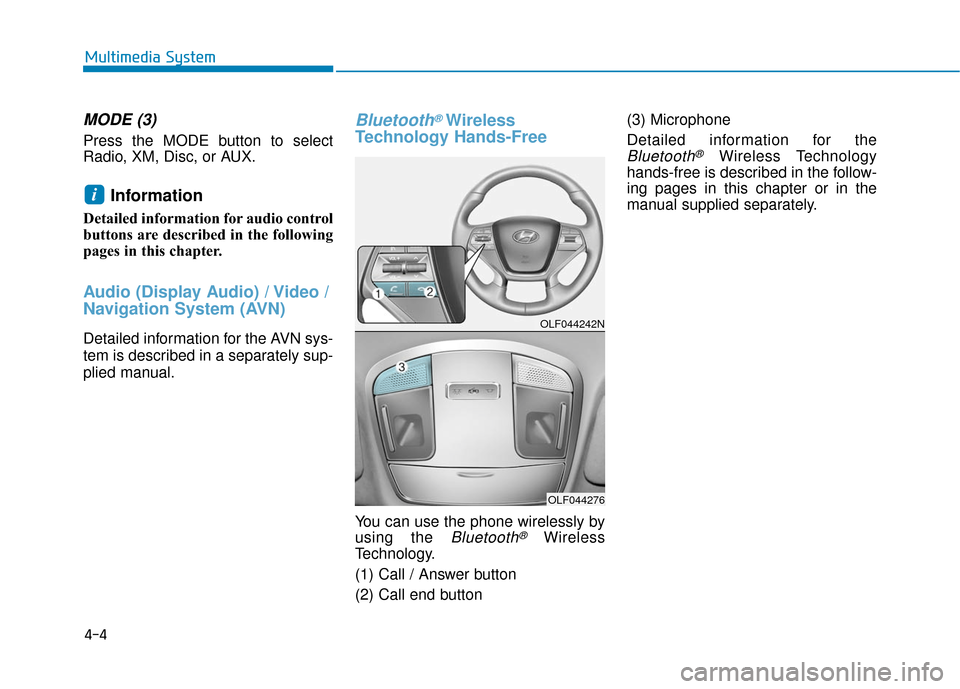
You can use the phone wirelessly by
using the
Bluetooth®Wireless
Technology.
(1) Call / Answer button
(2) Call end button (3) Microphone
Detailed information for the
Bluetooth®Wireless Technology
hands-free is described in the follow-
ing pages in this chapter or in the
manual supplied separately.
i
Multimedia System
OLF044242N
OLF044276
Page 273 of 562
4-13
Multimedia System
(Continued)
• Avoid use of USB mem-ory products that can
also be used as key
chains or mobile phone
accessories. Use of such products
may cause damage to the USB jack.
• Connecting an MP3 device or phone through various channels, such as
AUX/BT or Audio/ USB mode may
result in pop noises or abnormal
operation.Information - Using theiPod®device
• iPod
®is a registered trademark of
Apple Inc.
• In order to use the iPod
®while oper-
ating the keys, you must use a dedi-
cated iPod
®cable. (the cable that is
supplied when purchasing iPod®
/iPhone®products)
• If the iPod
®is connected to the vehi-
cle while it is playing, a high pitch
sound could occur for approximate-
ly 1-2 seconds immediately after
connecting. If possible, connect the
iPod to the vehicle with the iPod
®
stopped/ paused.
• During ACC ON state, connecting the iPod
®through the iPod®cable
will charge the iPod®through the
car audio system.
• When connecting with the iPod
®
cable, make sure to fully insert the
jack to prevent communication
interference. (Continued)(Continued)
• When the EQ features of an exter-
nal device, such as the iPod
®, and
the audio system are both active, EQ
effects could overlap and cause
sound deterioration and distortion.
Whenever possible, turn off the EQ
feature within the external device
upon use by connecting with the
audio system.
• Noise may occur when an iPod
®or
AUX device is connected. When
such devices are not being used, dis-
connect the device for storage.
• When the iPod
®or AUX device
power is connected to the power
jack, playing the external device
may result in noise. In such cases,
disconnect the power connection
before use.
• Skipping or improper operation may occur depending on the charac-
teristics of your iPod
® /Phone®
device.
(Continued)
i
4
Page 274 of 562
4-14
(Continued)
• If your iPhone
®is connected to both
the Bluetooth®Wireless Technology
and USB, the sound may not be
properly played. In your iPhone
®,
select the Dock c onnector or
Bluetooth
®Wireless Technology to
change the sound output (source).
• iPod mode cannot be operated when the iPod
®cannot be recognized due
to versions that do not support com-
munication protocols.
• For fifth generation iPod
®Nano
devices, the iPod®may not be recog-
nized when the battery level is low.
Please charge the iPod
®for use.
• Search/play orders shown within the iPod
®device may differ with the
orders shown within the audio sys-
tem.
• If the iPod
®malfunctions due to an
iPod®device defect, reset the iPod®
and try again. (To learn more, refer to
your iPod®manual)
(Continued) (Continued)
• Some iPod
®s may not sync with the
System depending on its version. If
the Media is removed before the
Media is recognized, then the sys-
tem may not properly restore the
previously operated mode. (iPad
®
charging is not supported.)
Information - Using the AUX
device
• If an external device connector is connected with the AUX terminal,
then AUX mode will automatically
operate. Once the connector is dis-
connected, the previous mode will
be restored.
• AUX mode can be used only when an external audio player (cam-
corder, car VCR, etc.) has been con-
nected.
• The AUX volume can be controlled separately from other audio modes.
• Connecting a connector jack to the AUX terminal without an external
device will convert the system to
AUX mode, but only output noise.
When an external device is not
being used, also remove the connec-
tor jack.
• When the external device power is connected to the power jack, play-
ing the external device may output
noise. In such cases, disconnect the
power connection before use.
• Fully insert the AUX cable to the AUX jack upon use.i
Multimedia System
Page 277 of 562
4-17
Multimedia System
4
S
SY
Y S
ST
T E
EM
M
C
C O
O N
NT
TR
R O
O L
LL
LE
E R
R S
S
A
A N
N D
D
F
F U
U N
NC
CT
T I
IO
O N
NS
S
Audio Head Unit
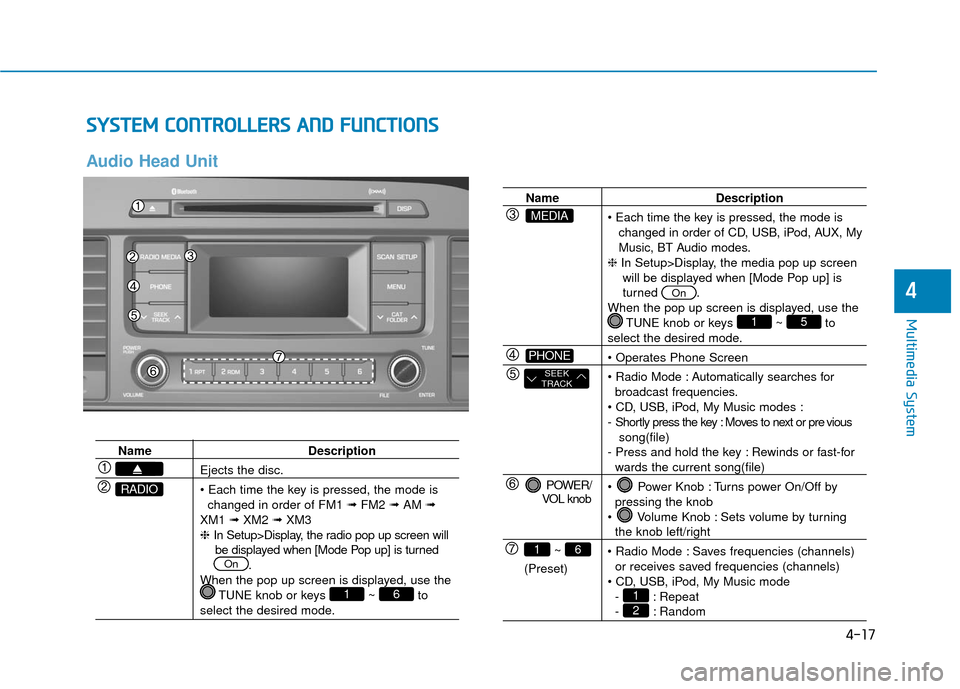
Name Description
Ejects the disc.
changed in order of FM1 ➟FM2 ➟AM ➟
XM1 ➟XM2 ➟XM3
❈ In Setup>Display, the radio pop up screen will
be displayed when [Mode Pop up] is turned .
When the pop up screen is displayed, use the TUNE knob or keys ~ to
select the desired mode.
61
On
RADIO
Name Description
changed in order of CD, USB, iPod, AUX, My
Music, BT Audio modes.
❈ In Setup>Display, the media pop up screen
will be displayed when [Mode Pop up] is
turned .
When the pop up screen is displayed, use the TUNE knob or keys ~ to
select the desired mode.
Automatically searches for broadcast frequencies.
- Shortly press the key : Moves to next or pre vious song(file)
- Press and hold the key : Rewinds or fast-for
wards the current song(file)
Power Knob : Turns power On/Off by pressing the knob
Volume Knob : Sets volume by turning
the knob left/right
Saves frequencies (channels) or receives saved frequencies (channels)
- : Repeat
- : Random21
51
On
POWER/
VOL knob
~
(Preset)
61
SEEK
TRACK
PHONE
MEDIA
Page 290 of 562
![Hyundai Sonata Hybrid 2017 Owners Manual 4-30
Multimedia System
Folder Repeat
Set [ F.RPT] through the TUNE
knob or key to repeat songs
within the current folder.
❈Press F.RPT again to turn off.
All Random
Set [ A.RDM] through the TUNE
kn](/img/35/19638/w960_19638-289.png "Hyundai Sonata Hybrid 2017 Owners Manual 4-30
Multimedia System
Folder Repeat
Set [ F.RPT] through the TUNE
knob or key to repeat songs
within the current folder.
❈Press F.RPT again to turn off.
All Random
Set [ A.RDM] through the TUNE
kn")
4-30
Multimedia System
Folder Repeat
Set [ F.RPT] through the TUNE
knob or key to repeat songs
within the current folder.
❈Press F.RPT again to turn off.
All Random
Set [ A.RDM] through the TUNE
knob or key to randomly play all
songs within the CD/USB.
❈Press A.RDM again to turn off.
Information
Set [ Info] through the TUNE
knob or key to display informa-
tion of the current song.
❈Press the key to turn off
info display.
Copy
Set [ Copy] through the TUNE
knob or key.
❈This is used to copy the current
song into My Music. You can play
the copied Music in My Music
mode.
❈ If another key is pressed while
copying is in progress, a pop up
asking you whether to cancel
copying is displayed.
❈ If another media is connected or
inserted (USB, CD, iPod
®, AUX)
while copying is in progress, copy-
ing is canceled.
❈ Music will not be played while
copying is in progress.
MENU : iPod®
In iPod mode, press key.
Repeat
Set [ RPT] through the TUNE
knob or key to repeat the cur-
rent song.
❈ Press RPT again to turn repeat off.
Random
Set [ RDM] through the TUNE
knob or key.
Plays all songs within the currently
playing category in random order.
❈ Press RDM again to turn off.
2 RDM
1 RPT
MENU
6
MENU
5
4
3