navigation HYUNDAI SONATA HYBRID 2019 User Guide
[x] Cancel search | Manufacturer: HYUNDAI, Model Year: 2019, Model line: SONATA HYBRID, Model: HYUNDAI SONATA HYBRID 2019Pages: 546, PDF Size: 78.75 MB
Page 280 of 546
3-144
Convenient features of your vehicle
Clock
With AVN system (if equipped)
You can set the clock by using the
Navigation system.
GPS Time check
The clock is automatically updated
through the navigation system.
GPS Time non-check
The clock can be manually adjusted.
1. Select the "System Settings" onthe "INFO/Setup" screen.
2. Select the "Date/Time".
3. Select the "Set time" by rotating the controller on the center con- sole panel.
4. Select the "Time Format" to the 12 hour or 24 hour format.
For more information, please refer to
the manual that was separately sup-
plied with your vehicle.
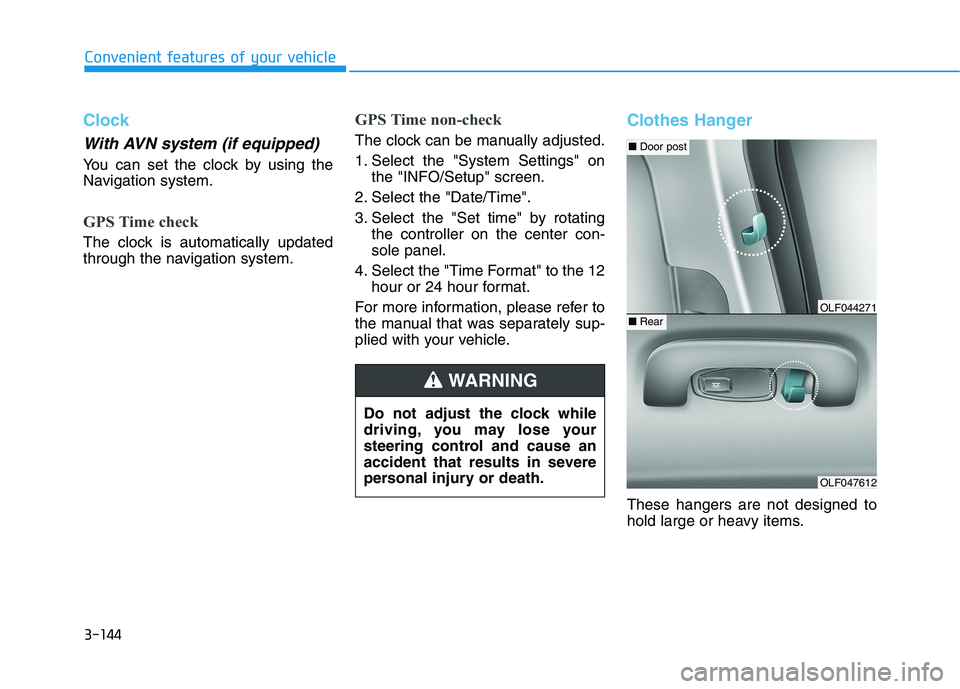
Clothes Hanger
These hangers are not designed to
hold large or heavy items.
Do not adjust the clock while
driving, you may lose your
steering control and cause an
accident that results in severe
personal injury or death.
WARNING
OLF047612
■
Door post
■RearOLF044271
Page 284 of 546
Multimedia System
Multimedia system .................................................4-2AUX, USB and iPod ®
Port ...............................................4-2
Antenna ...............................................................................4-2
Steering Wheel Audio Control........................................4-3
Audio / Video / Navigation System (AVN) ..................4-4
Bluetooth® Wireless Technology Hands-Free ...........4-4
How vehicle audio works ................................................4-5
Features of your vehicle .................................................4-7
4
Page 287 of 546
4-4
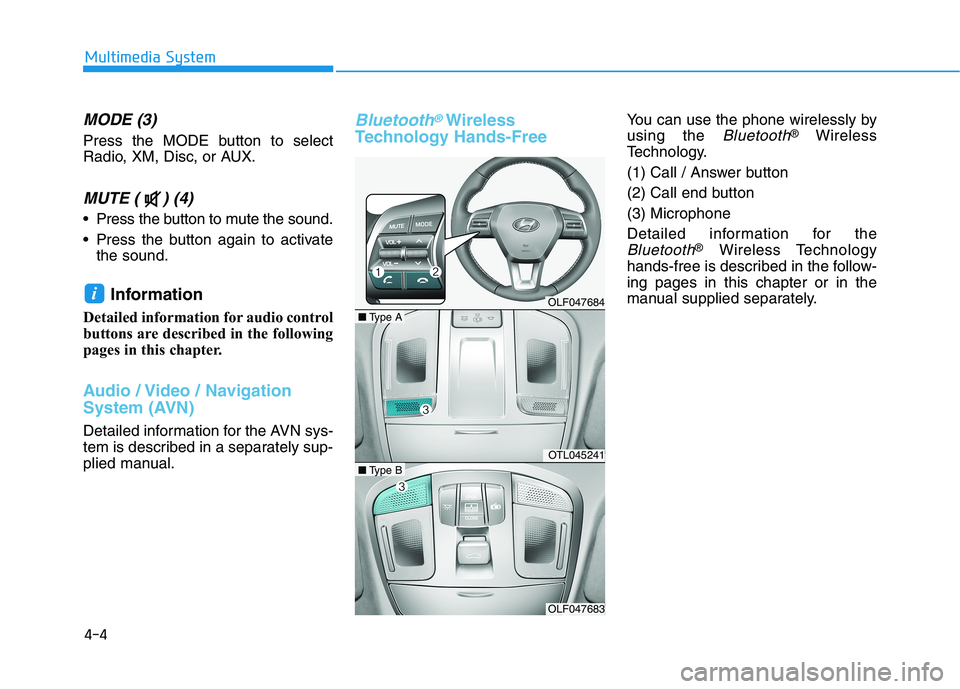
MODE (3)
Press the MODE button to select
Radio, XM, Disc, or AUX.
MUTE ( ) (4)
Press the button to mute the sound.
Press the button again to activatethe sound.
Information
Detailed information for audio control
buttons are described in the following
pages in this chapter.
Audio / Video / Navigation
System (AVN)
Detailed information for the AVN sys-
tem is described in a separately sup-
plied manual.
Bluetooth®Wireless
Technology Hands-FreeYou can use the phone wirelessly by using the
Bluetooth® Wireless
Technology.
(1) Call / Answer button
(2) Call end button(3) Microphone
Detailed information for the
Bluetooth® Wireless Technology
hands-free is described in the follow- ing pages in this chapter or in the
manual supplied separately.
i
Multimedia System
OLF047684
OTL045241
OLF047683
■ Type A
■Type B
Page 415 of 546
6-13
What to do in an emergency
The TPMS Malfunction Indicator
may illuminate after blinking for
one minute if the vehicle is near
electric power supply cables or
radio transmitters such as police
stations, government and public
offices, broadcasting stations,
military installations, airports,
transmitting towers, etc.
Additionally, the TPMS Malfunction
Indicator may illuminate if snow
chains are used or electronic
devices such as computers, charg-
ers, remote starters, navigation,
etc. This may interfere with normal
operation of the TPMS.
Changing a Tire with TPMS
If you have a flat tire, the Low Tire
Pressure and Position telltales will
come on. Have the flat tire repaired
by an authorized HYUNDAI dealer
as soon as possible or replace the
flat tire with the spare tire. The spare tire (if equipped) does not
come with a tire pressure monitoring
sensor. When the low pressure tire orthe flat tire is replaced with the spare
tire, the Low Tire Pressure Telltale
will remain on. Also, the TPMSMalfunction Indicator will illuminate
after blinking for one minute if the
vehicle is driven at speed above 25
km/h (15.5 mph) for approximately
20 minutes.Once the original tire equipped with
a tire pressure monitoring sensor isreinflated to the recommended pres-
sure and reinstalled on the vehicle,
the Low Tire Pressure Telltale andTPMS Malfunction Indicator will go
off within a few minutes of driving.
If the indicators do not extinguish
after a few minutes, please visit an
authorized HYUNDAI dealer. Each wheel is equipped with a tire pressure sensor mounted inside the
tire behind the valve stem (except for
the spare tire). You must use TPMS
specific wheels. It is recommended
that you always have your tires serv-
iced by an authorized HYUNDAI
dealer.
You may not be able to identify a tire
with low pressure by simply looking
at it. Always use a good quality tire
pressure gauge to measure. Pleasenote that a tire that is hot (from being
driven) will have a higher pressuremeasurement than a tire that is cold.
NOTICE
6
It is recommended that you do not use a puncture-repairing
agent not approved by
HYUNDAI dealer to repair
and/or inflate a low pressure
tire. Tire sealant not approved
by HYUNDAI dealer may dam-
age the tire pressure sensor.
CAUTION
Page 496 of 546
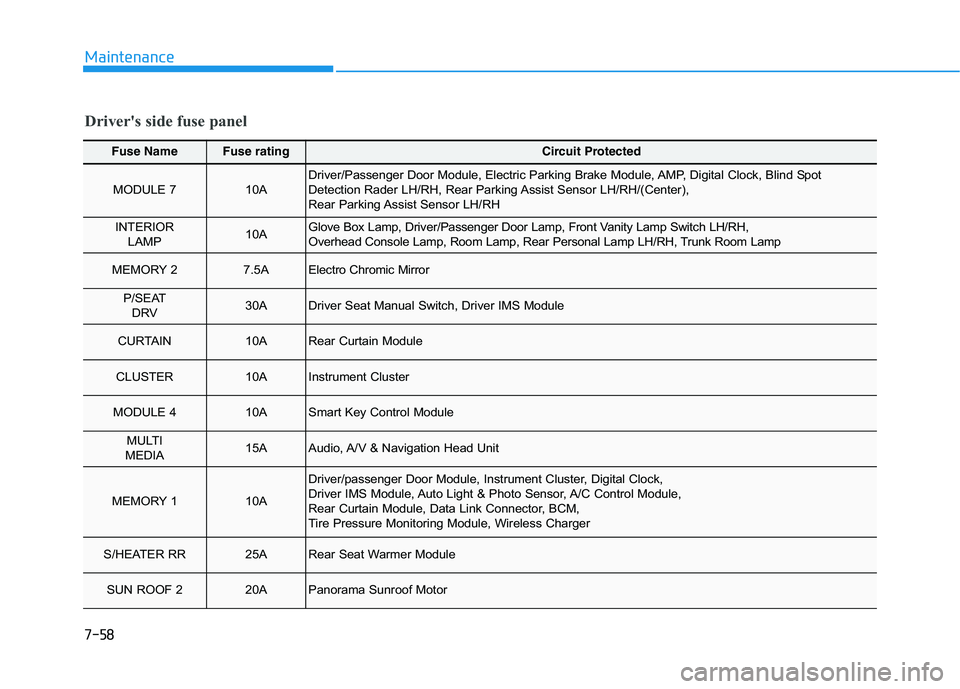
7-58
Maintenance
Fuse NameFuse ratingCircuit Protected
MODULE 7 10ADriver/Passenger Door Module, Electric Parking Brake Module, AMP, Digital Clock, Blind Spot
Detection Rader LH/RH, Rear Parking Assist Sensor LH/RH/(Center),
Rear Parking Assist Sensor LH/RH
INTERIOR LAMP10AGlove Box Lamp, Driver/Passenger Door Lamp, Front Vanity Lamp Switch LH/RH,
Overhead Console Lamp, Room Lamp, Rear Personal Lamp LH/RH, Tru nk Room Lamp
MEMORY 27.5AElectro Chromic Mirror
P/SEAT
DRV 30ADriver Seat Manual Switch, Driver IMS Module
CURTAIN 10ARear Curtain Module
CLUSTER 10AInstrument Cluster
MODULE 4 10ASmart Key Control Module
MULTI
MEDIA15AAudio, A/V & Navigation Head Unit
MEMORY 1 10A
Driver/passenger Door Module, Instrument Cluster, Digital Clock,
Driver IMS Module, Auto Light & Photo Sensor, A/C Control Module,
Rear Curtain Module, Data Link Connector, BCM,
Tire Pressure Monitoring Module, Wireless Charger
S/HEATER RR 25ARear Seat Warmer Module
SUN ROOF 2 20APanorama Sunroof Motor
Driver's side fuse panel
Page 497 of 546
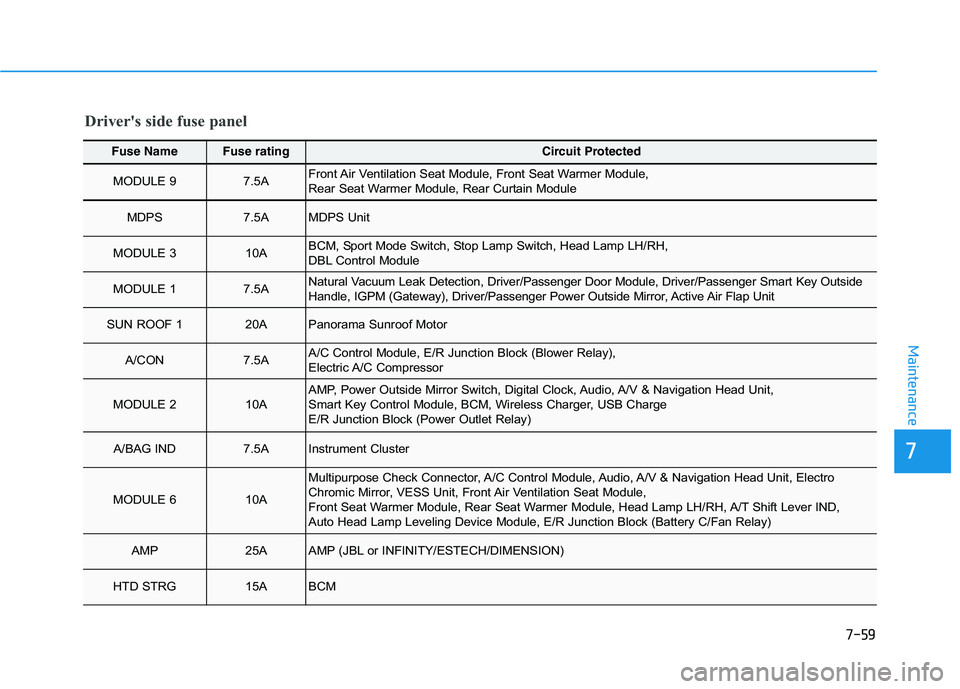
7-59
7
Maintenance
Fuse NameFuse ratingCircuit Protected
MODULE 9 7.5AFront Air Ventilation Seat Module, Front Seat Warmer Module,
Rear Seat Warmer Module, Rear Curtain Module
MDPS 7.5AMDPS Unit
MODULE 3 10ABCM, Sport Mode Switch, Stop Lamp Switch, Head Lamp LH/RH,
DBL Control Module
MODULE 1 7.5ANatural Vacuum Leak Detection, Driver/Passenger Door Module, Driver/Passenger Smart Key Outside
Handle, IGPM (Gateway), Driver/Passenger Power Outside Mirror, Active Air Flap Unit
SUN ROOF 1 20APanorama Sunroof Motor
A/CON 7.5AA/C Control Module, E/R Junction Block (Blower Relay),
Electric A/C Compressor
MODULE 2 10AAMP, Power Outside Mirror Switch, Digital Clock, Audio, A/V & Navigation Head Unit,
Smart Key Control Module, BCM, Wireless Charger, USB Charge
E/R Junction Block (Power Outlet Relay)
A/BAG IND 7.5AInstrument Cluster
MODULE 610A
Multipurpose Check Connector, A/C Control Module, Audio, A/V & N avigation Head Unit, Electro
Chromic Mirror, VESS Unit, Front Air Ventilation Seat Module,
Front Seat Warmer Module, Rear Seat Warmer Module, Head Lamp LH/ RH, A/T Shift Lever IND,
Auto Head Lamp Leveling Device Module, E/R Junction Block (Battery C/Fan Relay)
AMP25AAMP (JBL or INFINITY/ESTECH/DIMENSION)
HTD STRG 15ABCM
Driver's side fuse panel
Page 543 of 546
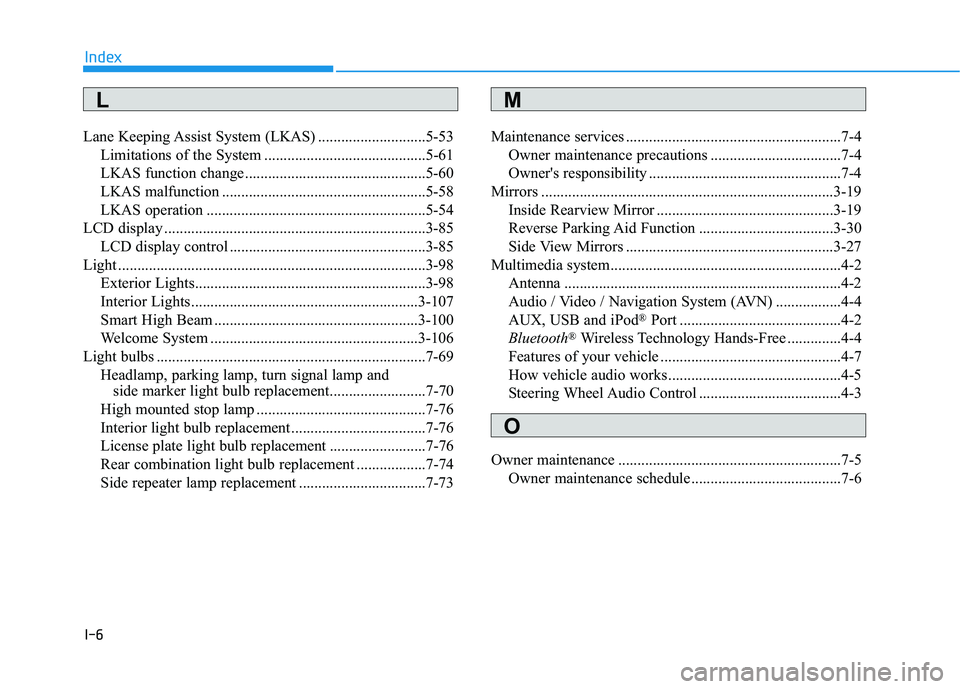
I-6
Lane Keeping Assist System (LKAS) ............................5-53
Limitations of the System ..........................................5-61
LKAS function change ...............................................5-60
LKAS malfunction .....................................................5-58
LKAS operation .........................................................5-54
LCD display ....................................................................3-85
LCD display control ...................................................3-85
Light ................................................................................3-98
Exterior Lights............................................................3-98
Interior Lights...........................................................3-107
Smart High Beam .....................................................3-100
Welcome System ......................................................3-106
Light bulbs ......................................................................7-69 Headlamp, parking lamp, turn signal lamp and side marker light bulb replacement.........................7-70
High mounted stop lamp ............................................7-76
Interior light bulb replacement ...................................7-76
License plate light bulb replacement .........................7-76
Rear combination light bulb replacement ..................7-74
Side repeater lamp replacement .................................7-73 Maintenance services ........................................................7-4
Owner maintenance precautions ..................................7-4
Owner's responsibility ..................................................7-4
Mirrors ............................................................................3-19 Inside Rearview Mirror ..............................................3-19
Reverse Parking Aid Function ...................................3-30
Side View Mirrors ......................................................3-27
Multimedia system............................................................4-2 Antenna ........................................................................4-2
Audio / Video / Navigation System (AVN) .................4-4
AUX, USB and iPod ®
Port ..........................................4-2
Bluetooth ®
Wireless Technology Hands-Free ..............4-4
Features of your vehicle ...............................................4-7
How vehicle audio works .............................................4-5
Steering Wheel Audio Control .....................................4-3
Owner maintenance ..........................................................7-5 Owner maintenance schedule .......................................7-6
Index
M
O
L