speed sensor HYUNDAI SONATA HYBRID 2019 User Guide
[x] Cancel search | Manufacturer: HYUNDAI, Model Year: 2019, Model line: SONATA HYBRID, Model: HYUNDAI SONATA HYBRID 2019Pages: 546, PDF Size: 78.75 MB
Page 345 of 546
5-55
Driving your vehicle
5
If you press the LKAS button again,
the indicator on the cluster display
will go off. The color of indicator will change
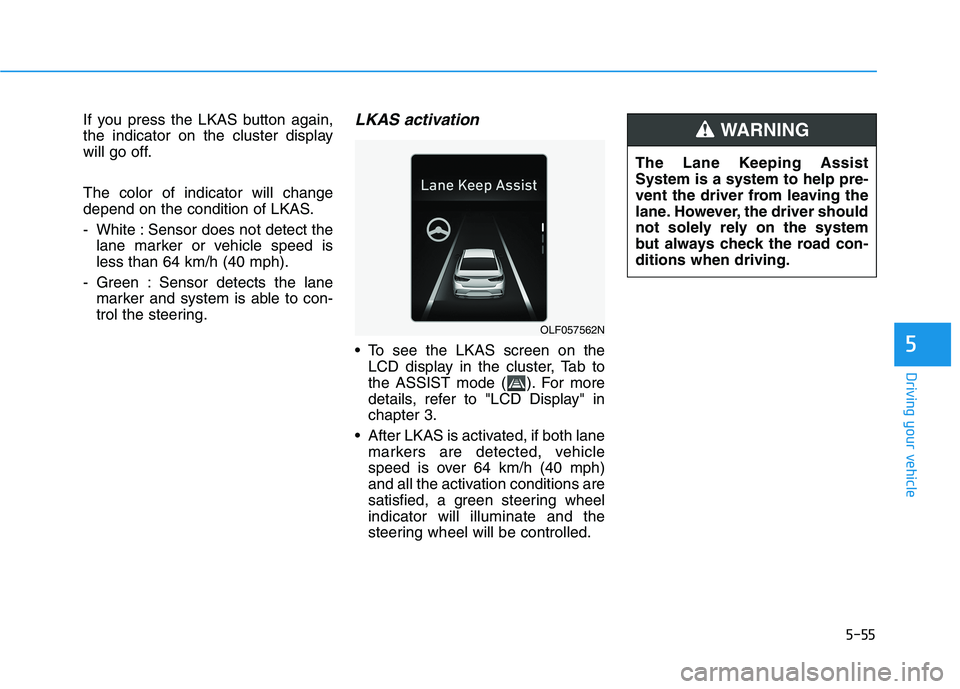
depend on the condition of LKAS.
- White : Sensor does not detect thelane marker or vehicle speed is less than 64 km/h (40 mph).
- Green : Sensor detects the lane marker and system is able to con-
trol the steering.LKAS activation
To see the LKAS screen on theLCD display in the cluster, Tab to
the ASSIST mode ( ). For more
details, refer to "LCD Display" inchapter 3.
After LKAS is activated, if both lane markers are detected, vehicle
speed is over 64 km/h (40 mph)
and all the activation conditions are
satisfied, a green steering wheelindicator will illuminate and the
steering wheel will be controlled.
OLF057562N The Lane Keeping Assist System is a system to help pre-
vent the driver from leaving the
lane. However, the driver should
not solely rely on the system
but always check the road con-ditions when driving.
WARNING
Page 354 of 546
5-64
Resetting the system
The last break time is set to 00:00and the driver's attention level is
set to 5 (very attentive) when the
driver resets the Driver Attention
Alert system.
The Driver Attention Alert system resets in the following situations.
- The engine is turned OFF.
- The driver unfastens the seat beltand then opens the driver’s door.
- Stop lasting more than 10 min- utes.
The Driver attention Alert system
operates again, when the driver
restarts driving.
System standby
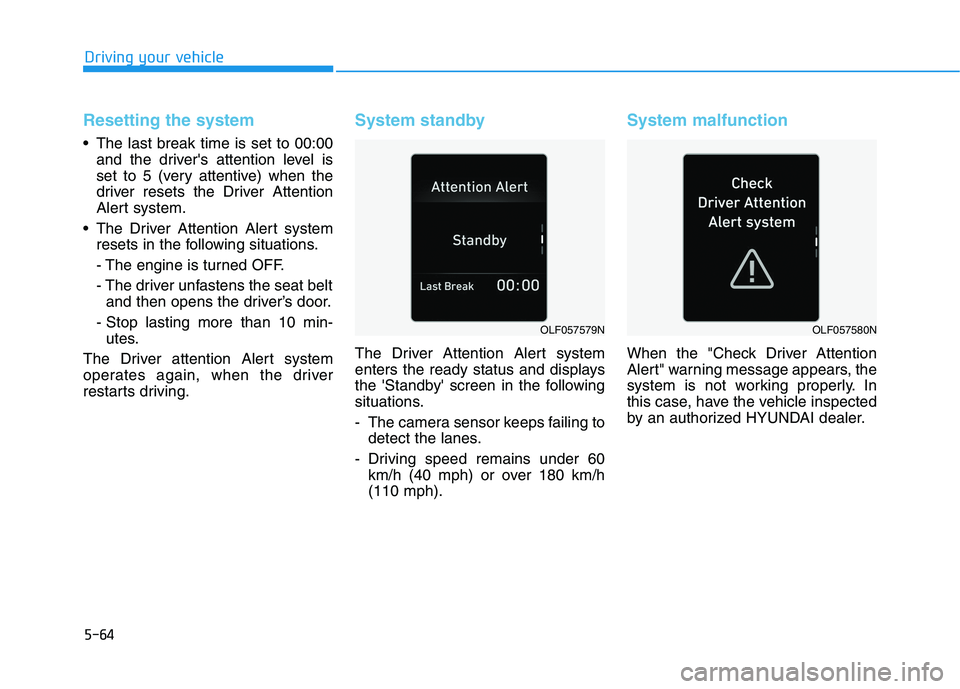
The Driver Attention Alert system
enters the ready status and displays
the 'Standby' screen in the following
situations.
- The camera sensor keeps failing to detect the lanes.
- Driving speed remains under 60 km/h (40 mph) or over 180 km/h (110 mph).
System malfunction
When the "Check Driver Attention
Alert" warning message appears, the
system is not working properly. In
this case, have the vehicle inspected
by an authorized HYUNDAI dealer.
Driving your vehicle
OLF057579NOLF057580N
Page 362 of 546
5-72
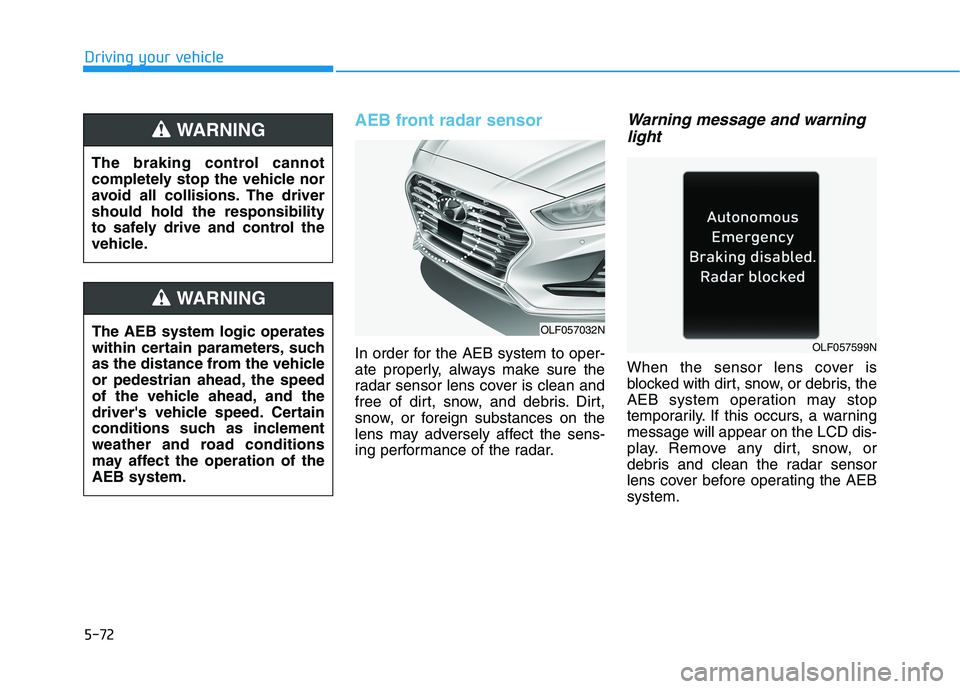
AEB front radar sensor
In order for the AEB system to oper-
ate properly, always make sure the
radar sensor lens cover is clean and
free of dirt, snow, and debris. Dirt,
snow, or foreign substances on the
lens may adversely affect the sens-
ing performance of the radar.
Warning message and warninglight
When the sensor lens cover is
blocked with dirt, snow, or debris, the
AEB system operation may stop
temporarily. If this occurs, a warningmessage will appear on the LCD dis-
play. Remove any dirt, snow, or
debris and clean the radar sensor
lens cover before operating the AEBsystem.
Driving your vehicle
OLF057032N
OLF057599N
The AEB system logic operates
within certain parameters, such
as the distance from the vehicle
or pedestrian ahead, the speed
of the vehicle ahead, and the
driver's vehicle speed. Certain
conditions such as inclement
weather and road conditions
may affect the operation of theAEB system.
WARNING
The braking control cannot
completely stop the vehicle nor
avoid all collisions. The drivershould hold the responsibility
to safely drive and control the
vehicle.
WARNING
Page 364 of 546
5-74
Driving your vehicle
The AEB is only a supplemen-
tal system for the driver’s con-
venience. The driver shouldhold the responsibility to con-
trol the vehicle operation. Do
not solely depend on the AEB
system. Rather, maintain a
safe braking distance, and, if
necessary, depress the brakepedal to reduce the drivingspeed.
In certain instances and
under certain driving condi-
tions, the AEB system may
activate prematurely. This ini-
tial warning message appears
on the LCD display with a
warning chime.
Also, in certain instances the
front radar sensor or camera
recognition system may not
detect the vehicle or pedestri-
an ahead. The AEB system
may not activate and the
warning message will not be
displayed. (Continued)
(Continued)
If there is a malfunction with
the AEB system, the automat-
ic emergency braking is not
applied even though the brak-ing system is operating nor-
mally.
The AEB system operates
only to help detect vehicles or
pedestrians in front of the
vehicle. The AEB system does not
operate when the vehicle is in
reverse. The AEB system is not designed to detect other
objects on the road such asanimals. The AEB system does not
detect cross traffic vehicles
that are approaching. The AEB system cannot
detect the driver approaching
the side view of a parked vehi-
cle (for example on a deadend street.)(Continued)
(Continued)
In these cases, you must
maintain a safe braking dis-
tance, and if necessary,depress the brake pedal toreduce the driving speed in
order to maintain a safe dis-
tance.WARNING
Page 366 of 546
5-76
- Driving on a curve
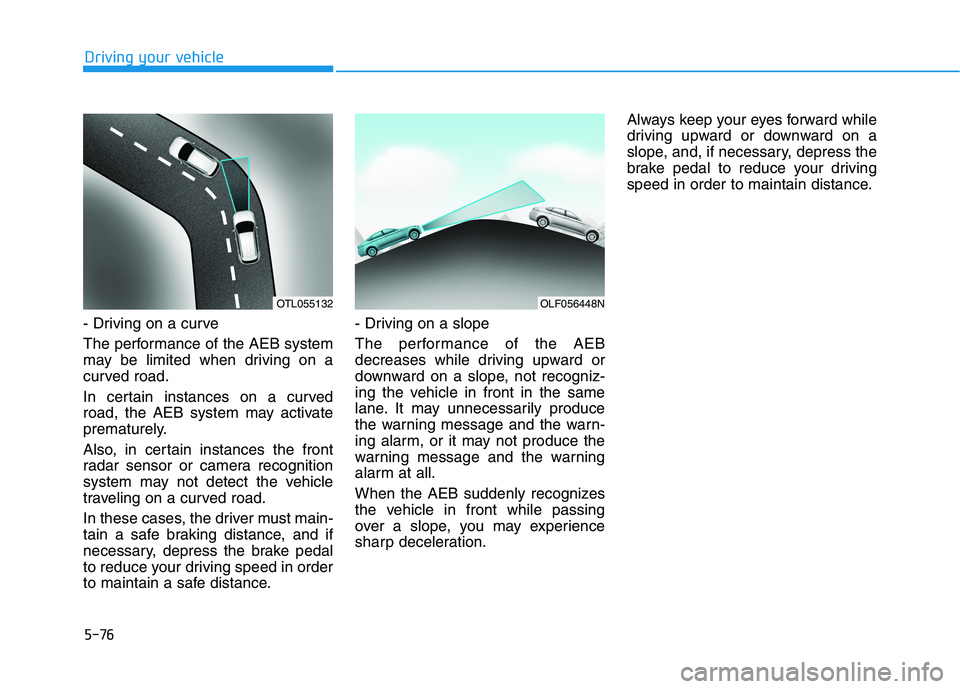
The performance of the AEB system
may be limited when driving on a
curved road.
In certain instances on a curved
road, the AEB system may activate
prematurely.
Also, in certain instances the front
radar sensor or camera recognition
system may not detect the vehicle
traveling on a curved road.
In these cases, the driver must main-
tain a safe braking distance, and if
necessary, depress the brake pedal
to reduce your driving speed in order
to maintain a safe distance.
- Driving on a slope
The performance of the AEB
decreases while driving upward or
downward on a slope, not recogniz-
ing the vehicle in front in the same
lane. It may unnecessarily produce
the warning message and the warn-
ing alarm, or it may not produce the
warning message and the warning
alarm at all.
When the AEB suddenly recognizes
the vehicle in front while passing
over a slope, you may experience
sharp deceleration.Always keep your eyes forward while
driving upward or downward on a
slope, and, if necessary, depress the
brake pedal to reduce your driving
speed in order to maintain distance.
Driving your vehicle
OLF056448NOTL055132
Page 383 of 546
5-93
Driving your vehicle
5
In traffic situation
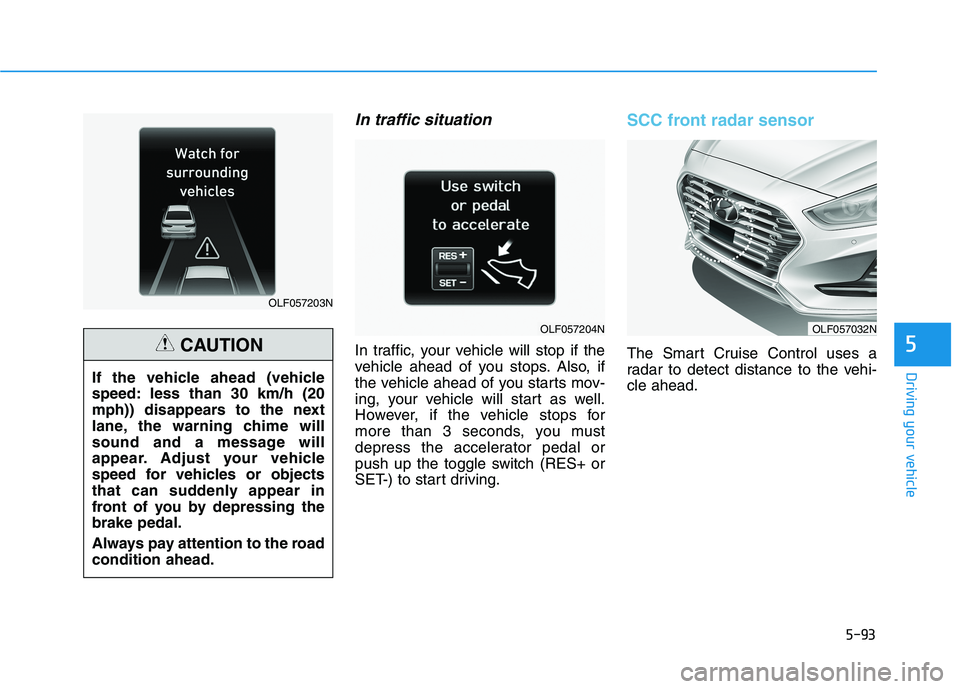
In traffic, your vehicle will stop if the
vehicle ahead of you stops. Also, if
the vehicle ahead of you starts mov-
ing, your vehicle will start as well.
However, if the vehicle stops for
more than 3 seconds, you must
depress the accelerator pedal or
push up the toggle switch (RES+ or
SET-) to start driving.
SCC front radar sensor
The Smart Cruise Control uses a
radar to detect distance to the vehi-cle ahead.
OLF057203N
OLF057204N
If the vehicle ahead (vehicle
speed: less than 30 km/h (20
mph)) disappears to the next
lane, the warning chime will
sound and a message will
appear. Adjust your vehicle
speed for vehicles or objects
that can suddenly appear in
front of you by depressing thebrake pedal.
Always pay attention to the road condition ahead.
CAUTION
OLF057032N
Page 385 of 546
5-95
Driving your vehicle
5
Limitations of the system
The Smart Cruise Control System
may have limits to its ability to detect
distance to the vehicle ahead due to
road and traffic conditions.
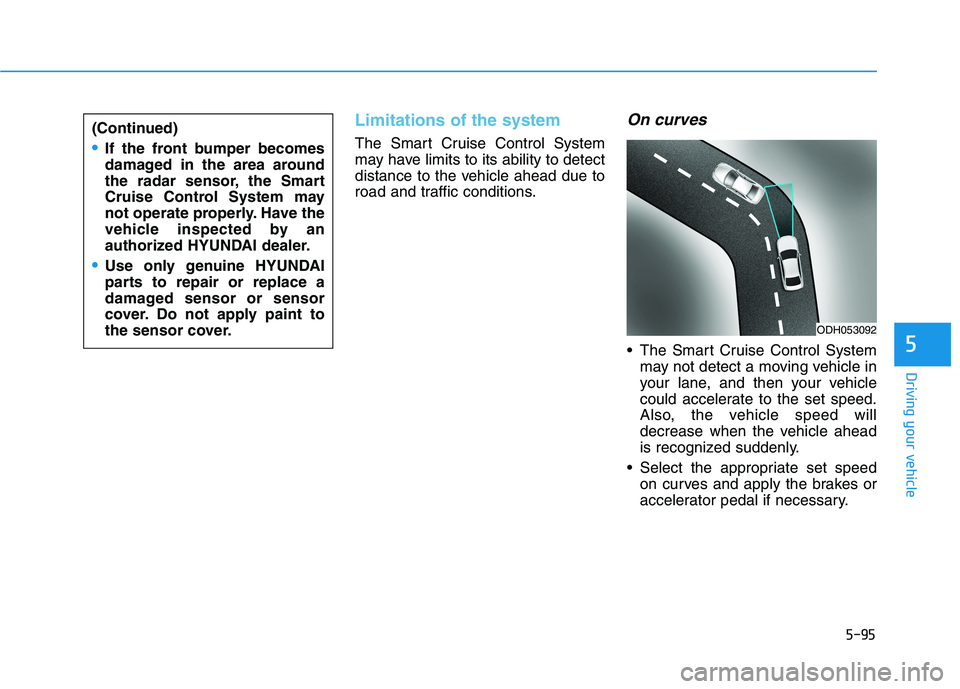
On curves
The Smart Cruise Control Systemmay not detect a moving vehicle in
your lane, and then your vehicle
could accelerate to the set speed.
Also, the vehicle speed will
decrease when the vehicle ahead
is recognized suddenly.
Select the appropriate set speed on curves and apply the brakes or
accelerator pedal if necessary.
ODH053092
(Continued)
If the front bumper becomes
damaged in the area around
the radar sensor, the Smart
Cruise Control System may
not operate properly. Have the
vehicle inspected by an
authorized HYUNDAI dealer.
Use only genuine HYUNDAI
parts to repair or replace a
damaged sensor or sensor
cover. Do not apply paint to
the sensor cover.
Page 413 of 546
6-11
What to do in an emergency
If any of the below happens, have
the system checked by an author-
ized HYUNDAI dealer.
1. The Low Tire Pressure Telltale/TPMS Malfunction Indicator
does not illuminate for 3 sec-
onds when the ignition switchis placed to the ON position orengine is running.
2. The TPMS Malfunction Indicator remains illuminated after blink-
ing for approximately 1 minute.
3. The Low Tire Pressure Position Telltale remains illuminated.
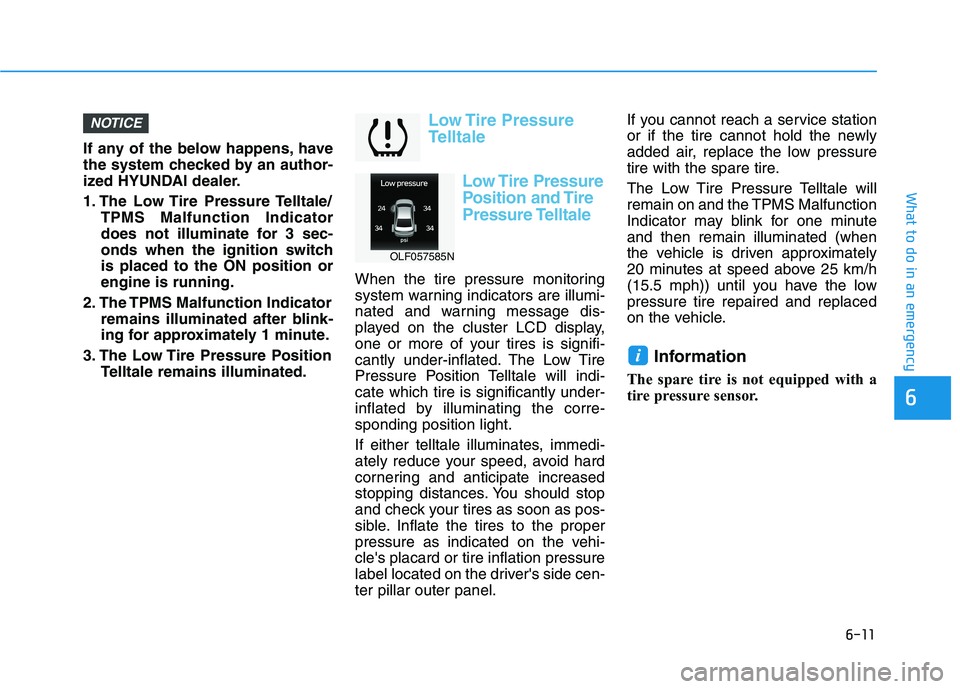
Low Tire Pressure
Telltale
Low Tire Pressure
Position and Tire
Pressure Telltale
When the tire pressure monitoring
system warning indicators are illumi-
nated and warning message dis-
played on the cluster LCD display,
one or more of your tires is signifi-
cantly under-inflated. The Low Tire
Pressure Position Telltale will indi-cate which tire is significantly under-
inflated by illuminating the corre-sponding position light.
If either telltale illuminates, immedi-
ately reduce your speed, avoid hard
cornering and anticipate increased
stopping distances. You should stop
and check your tires as soon as pos-
sible. Inflate the tires to the proper
pressure as indicated on the vehi-cle's placard or tire inflation pressure
label located on the driver's side cen-ter pillar outer panel. If you cannot reach a service station
or if the tire cannot hold the newly
added air, replace the low pressure
tire with the spare tire.
The Low Tire Pressure Telltale will
remain on and the TPMS Malfunction
Indicator may blink for one minuteand then remain illuminated (when
the vehicle is driven approximately
20 minutes at speed above 25 km/h
(15.5 mph)) until you have the lowpressure tire repaired and replaced
on the vehicle.
Information
The spare tire is not equipped with a
tire pressure sensor.
i
NOTICE
6
OLF057585N
Page 415 of 546
6-13
What to do in an emergency
The TPMS Malfunction Indicator
may illuminate after blinking for
one minute if the vehicle is near
electric power supply cables or
radio transmitters such as police
stations, government and public
offices, broadcasting stations,
military installations, airports,
transmitting towers, etc.
Additionally, the TPMS Malfunction
Indicator may illuminate if snow
chains are used or electronic
devices such as computers, charg-
ers, remote starters, navigation,
etc. This may interfere with normal
operation of the TPMS.
Changing a Tire with TPMS
If you have a flat tire, the Low Tire
Pressure and Position telltales will
come on. Have the flat tire repaired
by an authorized HYUNDAI dealer
as soon as possible or replace the
flat tire with the spare tire. The spare tire (if equipped) does not
come with a tire pressure monitoring
sensor. When the low pressure tire orthe flat tire is replaced with the spare
tire, the Low Tire Pressure Telltale
will remain on. Also, the TPMSMalfunction Indicator will illuminate
after blinking for one minute if the
vehicle is driven at speed above 25
km/h (15.5 mph) for approximately
20 minutes.Once the original tire equipped with
a tire pressure monitoring sensor isreinflated to the recommended pres-
sure and reinstalled on the vehicle,
the Low Tire Pressure Telltale andTPMS Malfunction Indicator will go
off within a few minutes of driving.
If the indicators do not extinguish
after a few minutes, please visit an
authorized HYUNDAI dealer. Each wheel is equipped with a tire pressure sensor mounted inside the
tire behind the valve stem (except for
the spare tire). You must use TPMS
specific wheels. It is recommended
that you always have your tires serv-
iced by an authorized HYUNDAI
dealer.
You may not be able to identify a tire
with low pressure by simply looking
at it. Always use a good quality tire
pressure gauge to measure. Pleasenote that a tire that is hot (from being
driven) will have a higher pressuremeasurement than a tire that is cold.
NOTICE
6
It is recommended that you do not use a puncture-repairing
agent not approved by
HYUNDAI dealer to repair
and/or inflate a low pressure
tire. Tire sealant not approved
by HYUNDAI dealer may dam-
age the tire pressure sensor.
CAUTION
Page 422 of 546
6-20
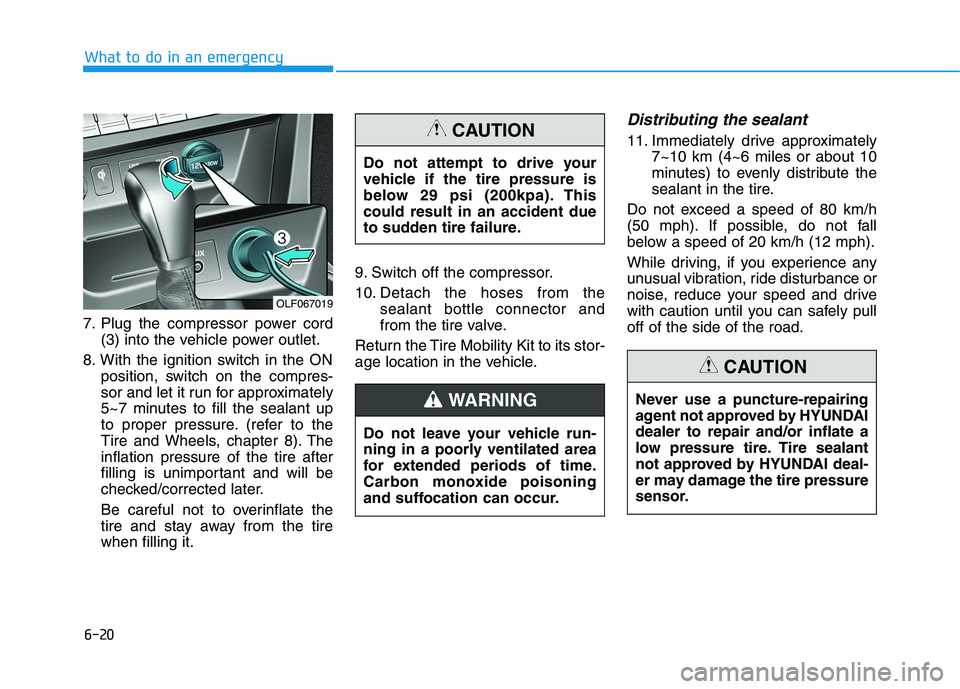
7. Plug the compressor power cord
(3) into the vehicle power outlet.
8. With the ignition switch in the ON position, switch on the compres-
sor and let it run for approximately
5~7 minutes to fill the sealant up
to proper pressure. (refer to the
Tire and Wheels, chapter 8). Theinflation pressure of the tire after
filling is unimportant and will be
checked/corrected later.
Be careful not to overinflate the
tire and stay away from the tirewhen filling it. 9. Switch off the compressor.
10. Detach the hoses from the
sealant bottle connector and
from the tire valve.
Return the Tire Mobility Kit to its stor-
age location in the vehicle.
Distributing the sealant
11. Immediately drive approximately 7~10 km (4~6 miles or about 10
minutes) to evenly distribute the
sealant in the tire.
Do not exceed a speed of 80 km/h
(50 mph). If possible, do not fall
below a speed of 20 km/h (12 mph).
While driving, if you experience any
unusual vibration, ride disturbance or
noise, reduce your speed and drive
with caution until you can safely pulloff of the side of the road.
What to do in an emergency
Never use a puncture-repairing
agent not approved by HYUNDAIdealer to repair and/or inflate a
low pressure tire. Tire sealant
not approved by HYUNDAI deal-
er may damage the tire pressure
sensor.
CAUTION
Do not attempt to drive your
vehicle if the tire pressure is
below 29 psi (200kpa). Thiscould result in an accident due
to sudden tire failure.
CAUTION
Do not leave your vehicle run-
ning in a poorly ventilated area
for extended periods of time.
Carbon monoxide poisoning
and suffocation can occur.
WARNING
OLF067019