speed sensor HYUNDAI SONATA HYBRID 2019 Owners Manual
[x] Cancel search | Manufacturer: HYUNDAI, Model Year: 2019, Model line: SONATA HYBRID, Model: HYUNDAI SONATA HYBRID 2019Pages: 546, PDF Size: 78.75 MB
Page 120 of 546
2-54
Safety system of your vehicle
During a frontal collision, sensors will
detect the vehicle's deceleration. If
the deceleration rate (measured in g-
force) is high enough, the control unit
will inflate the front air bags. The front air bags help protect the
driver and front passenger byresponding to frontal impacts inwhich seat belts alone cannot pro-
vide adequate restraint. When need-
ed, the side air bags help provide
protection in the event of a side
impact or rollover.
Air bags are activated (able toinflate if necessary) only when the
ignition switch is in the ON posi-tion.
Air bags inflate in the event of cer- tain frontal or side collisions to help
protect the occupants from serious
physical injury.
There is no single speed at which the air bags will inflate. Generally,air bags are designed to inflate
based upon the severity of a colli-
sion and its direction. These two
factors determine whether the sen-
sors produce an electronic deploy-ment/inflation signal. Air bag deployment depends on a
number of factors including vehiclespeed, angles of impact and the
density and stiffness of the vehi-
cles or objects which your vehicle
impacts during a collision. The
determining factors are not limited
to those mentioned above.
The front air bags will completely inflate and deflate in an instant. It is
virtually impossible for you to see
the air bags inflate during an acci-
dent. It is much more likely that youwill simply see the deflated air
bags hanging out of their storage
compartments after the collision.
In addition to inflating in certain side collisions, vehicles equipped
with a rollover sensor, side and
curtain air bags will inflate if the
sensing system detects a rollover.
When a rollover is detected, side
and curtain air bags will remain
inflated longer to help provide pro-tection from ejection, especiallywhen used in conjunction with the
seat belts.
If your SRS malfunctions, the air
bag may not inflate properly dur-ing an accident increasing the
risk of serious injury or death.
If any of the following condi-
tions occur, your SRS is mal-functioning:
The light does not turn on for
approximately six seconds
when the ignition switch is inthe ON position.
The light remains illuminated
after approximately six sec-onds.
The light comes on while the
vehicle is in motion.
The light blinks when the engine is running.
Have an authorized HYUNDAIdealer inspect the SRS as soon
as possible if any of these con-
ditions occur.
WARNING
Page 129 of 546
2-63
Safety system of your vehicle
2
Why Didn't My Air Bag Go Off in a Collision?
Air bags are not designed to inflate in
every collision. There are certaintypes of accidents in which the air
bag would not be expected to pro-
vide additional protection. These
include rear impacts, second or third
collisions in multiple impact acci-
dents, as well as low speed impacts.
Damage to the vehicle indicates a
collision energy absorption, and isnot an indicator of whether or not an
air bag should have inflated.
Air bag collision sensors
To reduce the risk of an air bag
deploying unexpectedly and
causing serious injury or death:
Do not hit or allow any objects to impact the locations where air
bags or sensors are installed.
Do not perform maintenance
on or around the air bag sen-
sors. If the location or angle of
the sensors is altered, the air
bags may deploy when they
should not or may not deploy
when they should.
Do not install bumper guards
or replace the bumper with a
non-genuine HYUNDAI parts.
This may adversely affect the
collision and air bag deploy-
ment performance.(Continued)
(Continued)
Place the ignition switch in
the LOCK/OFF or ACC posi-
tion when the vehicle is being
towed to prevent inadvertent
air bag deployment.
Have all air bag repairs conduct-
ed by an authorized HYUNDAI
dealer.
WARNING
Page 131 of 546
2-65
Safety system of your vehicle
2
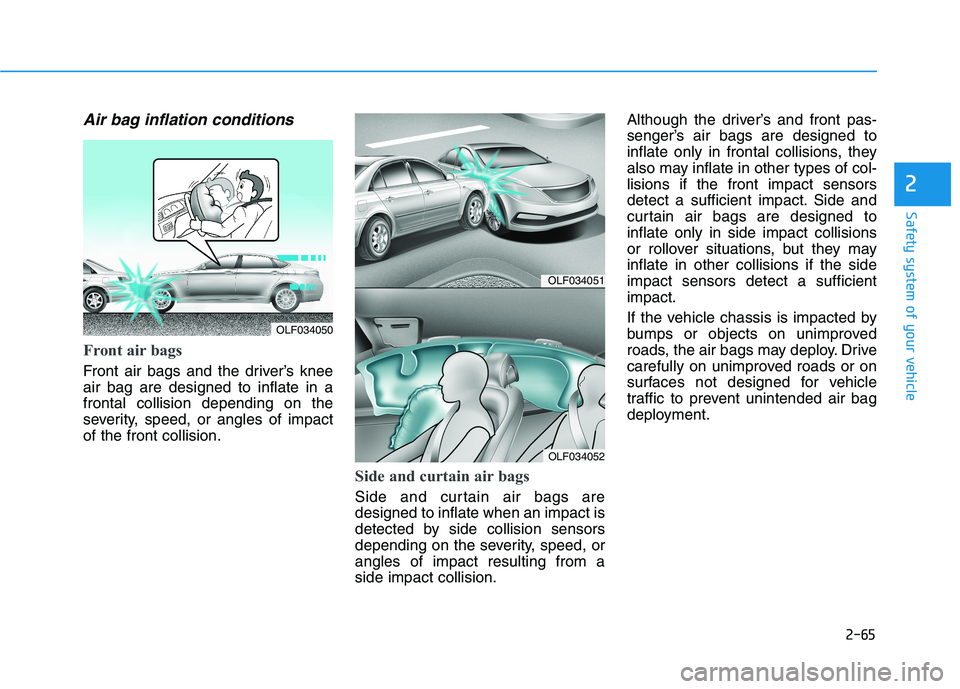
Air bag inflation conditions
Front air bags
Front air bags and the driver’s knee air bag are designed to inflate in afrontal collision depending on the
severity, speed, or angles of impactof the front collision.
Side and curtain air bags
Side and curtain air bags are designed to inflate when an impact is
detected by side collision sensors
depending on the severity, speed, orangles of impact resulting from aside impact collision.Although the driver’s and front pas-
senger’s air bags are designed to
inflate only in frontal collisions, they
also may inflate in other types of col-lisions if the front impact sensors
detect a sufficient impact. Side and
curtain air bags are designed toinflate only in side impact collisions
or rollover situations, but they mayinflate in other collisions if the sideimpact sensors detect a sufficientimpact.
If the vehicle chassis is impacted by
bumps or objects on unimproved
roads, the air bags may deploy. Drive
carefully on unimproved roads or on
surfaces not designed for vehicle
traffic to prevent unintended air bag
deployment.
OLF034051
OLF034052
OLF034050
Page 250 of 546
3-114
Convenient features of your vehicle
Rear parking assist system (if equipped)
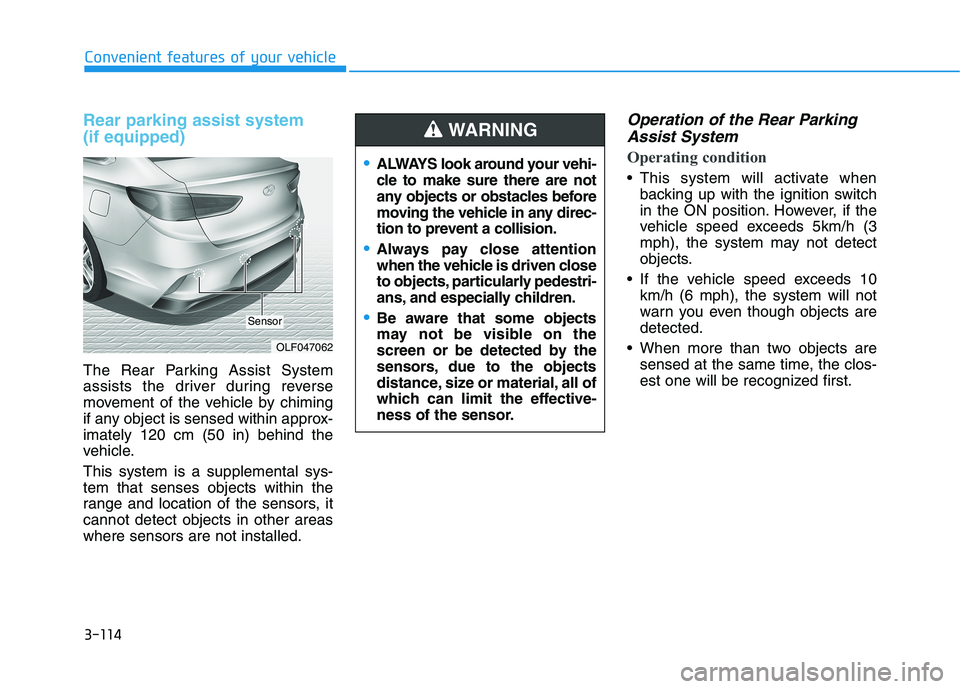
The Rear Parking Assist System
assists the driver during reverse
movement of the vehicle by chiming
if any object is sensed within approx-imately 120 cm (50 in) behind the
vehicle. This system is a supplemental sys- tem that senses objects within the
range and location of the sensors, itcannot detect objects in other areaswhere sensors are not installed.
Operation of the Rear ParkingAssist System
Operating condition
This system will activate when backing up with the ignition switch
in the ON position. However, if the
vehicle speed exceeds 5km/h (3
mph), the system may not detect
objects.
If the vehicle speed exceeds 10 km/h (6 mph), the system will not
warn you even though objects aredetected.
When more than two objects are sensed at the same time, the clos-
est one will be recognized first.
OLF047062
Sensor
ALWAYS look around your vehi-
cle to make sure there are not
any objects or obstacles before
moving the vehicle in any direc-
tion to prevent a collision.
Always pay close attention
when the vehicle is driven close
to objects, particularly pedestri-
ans, and especially children.
Be aware that some objects
may not be visible on the
screen or be detected by the
sensors, due to the objects
distance, size or material, all of
which can limit the effective-
ness of the sensor.
WARNING
Page 253 of 546
3-117
Convenient features of your vehicle
3
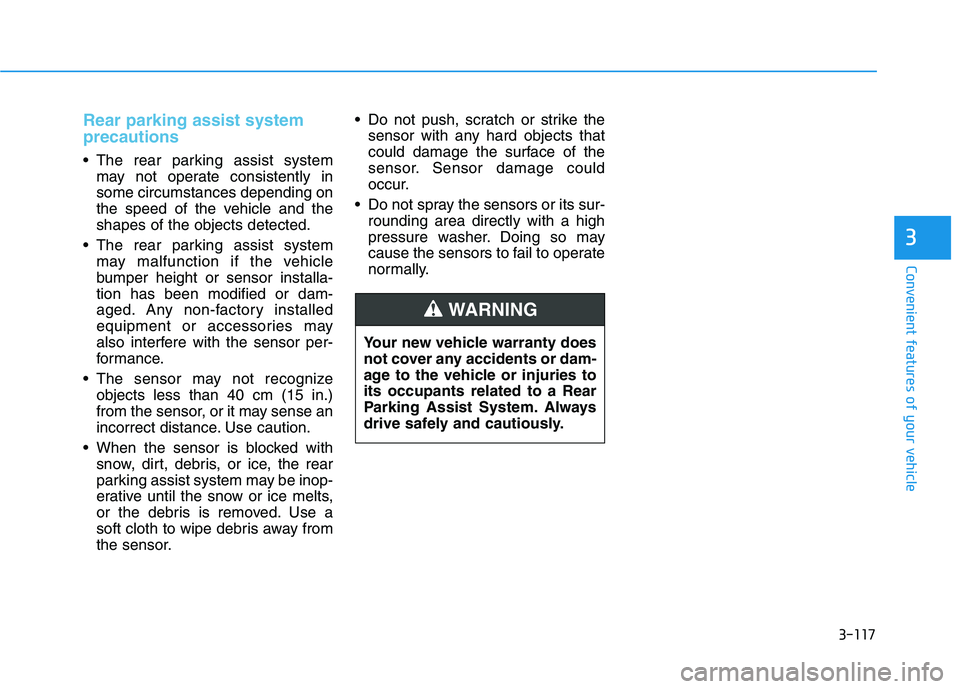
Rear parking assist system precautions
The rear parking assist systemmay not operate consistently in some circumstances depending on
the speed of the vehicle and theshapes of the objects detected.
The rear parking assist system may malfunction if the vehicle
bumper height or sensor installa-tion has been modified or dam-
aged. Any non-factory installed
equipment or accessories may
also interfere with the sensor per-
formance.
The sensor may not recognize objects less than 40 cm (15 in.)
from the sensor, or it may sense an
incorrect distance. Use caution.
When the sensor is blocked with snow, dirt, debris, or ice, the rear
parking assist system may be inop-
erative until the snow or ice melts,
or the debris is removed. Use a
soft cloth to wipe debris away from
the sensor. Do not push, scratch or strike the
sensor with any hard objects that
could damage the surface of the
sensor. Sensor damage could
occur.
Do not spray the sensors or its sur- rounding area directly with a high
pressure washer. Doing so may
cause the sensors to fail to operate
normally.
Your new vehicle warranty does
not cover any accidents or dam-
age to the vehicle or injuries toits occupants related to a Rear
Parking Assist System. Always
drive safely and cautiously.
WARNING
Page 257 of 546
3-121
Convenient features of your vehicle
3
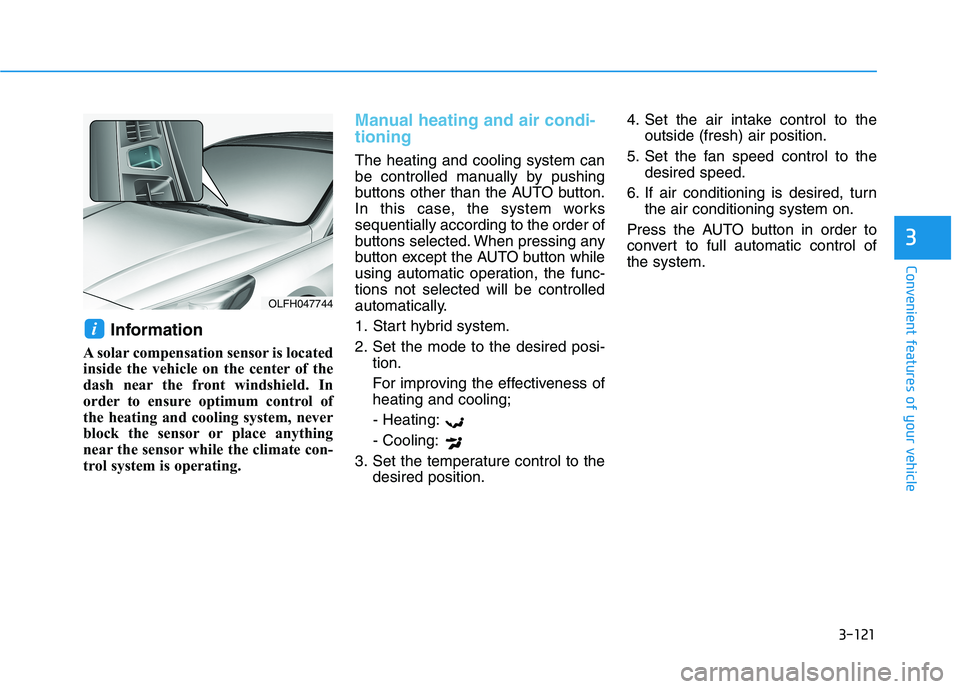
Information
A solar compensation sensor is located
inside the vehicle on the center of the
dash near the front windshield. In
order to ensure optimum control of
the heating and cooling system, never
block the sensor or place anything
near the sensor while the climate con-
trol system is operating.
Manual heating and air condi- tioning
The heating and cooling system can
be controlled manually by pushing
buttons other than the AUTO button.
In this case, the system workssequentially according to the order of
buttons selected. When pressing any
button except the AUTO button while
using automatic operation, the func-tions not selected will be controlled
automatically.
1. Start hybrid system.
2. Set the mode to the desired posi- tion.
For improving the effectiveness of heating and cooling;
- Heating: - Cooling:
3. Set the temperature control to the desired position. 4. Set the air intake control to the
outside (fresh) air position.
5. Set the fan speed control to the desired speed.
6. If air conditioning is desired, turn the air conditioning system on.
Press the AUTO button in order to
convert to full automatic control ofthe system.
i
OLFH047744
Page 292 of 546
5
Cruise control .......................................................5-79Cruise Control operation ...............................................5-79
Smart Cruise Control system..............................5-84 To adjust the sensitivity of Smart Cruise Control ..5-85
To convert to Cruise Control Mode ............................5-86
Smart Cruise Control speed ..........................................5-86
Smart Cruise Control vehicle-to-vehicle distance..5-91
SCC front radar sensor..................................................5-93
Limitations of the system .............................................5-95
Special driving conditions .................................5-100 Hazardous driving conditions ....................................5-100
Rocking the vehicle ......................................................5-100
Smooth cornering .........................................................5-101
Driving at night ..............................................................5-101
Driving in the rain .........................................................5-102
Driving in flooded areas..............................................5-102
Highway driving .............................................................5-103
Winter driving .....................................................5-104 Snow or icy conditions ................................................5-104
Winter Precautions .......................................................5-105
Vehicle load limit ................................................5-107 Tire loading information label ...................................5-108
Trailer towing .....................................................5-112
Page 335 of 546
5-45
Driving your vehicle
5
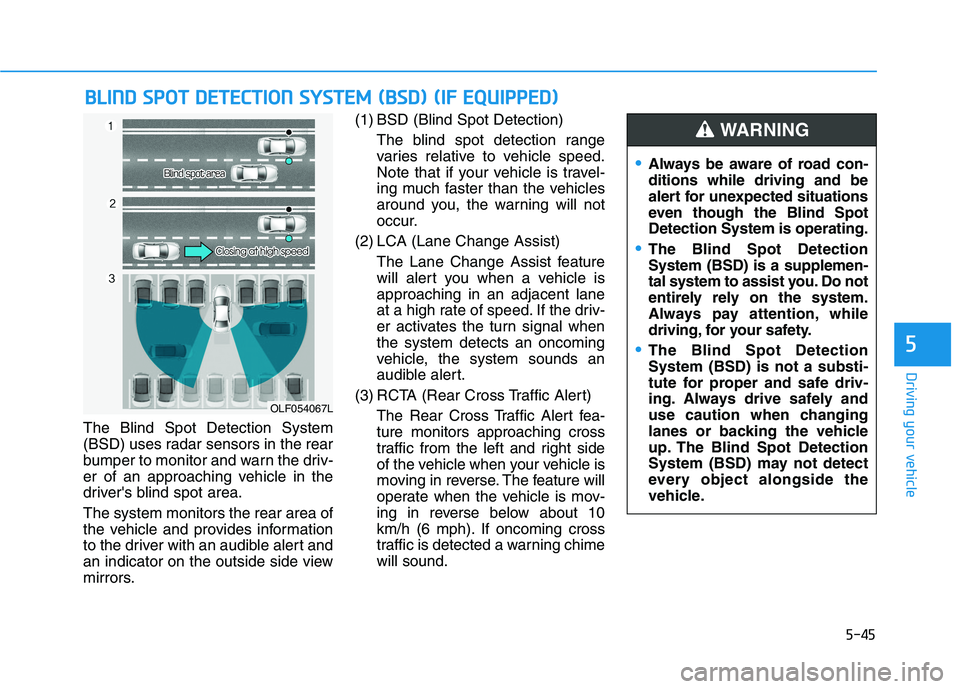
The Blind Spot Detection System
(BSD) uses radar sensors in the rear
bumper to monitor and warn the driv-
er of an approaching vehicle in the
driver's blind spot area. The system monitors the rear area of
the vehicle and provides information
to the driver with an audible alert and
an indicator on the outside side view
mirrors.(1) BSD (Blind Spot Detection)
The blind spot detection range
varies relative to vehicle speed.
Note that if your vehicle is travel-
ing much faster than the vehicles
around you, the warning will not
occur.
(2) LCA (Lane Change Assist) The Lane Change Assist feature
will alert you when a vehicle isapproaching in an adjacent lane
at a high rate of speed. If the driv-
er activates the turn signal whenthe system detects an oncoming
vehicle, the system sounds an
audible alert.
(3) RCTA (Rear Cross Traffic Alert) The Rear Cross Traffic Alert fea-ture monitors approaching cross
traffic from the left and right side
of the vehicle when your vehicle is
moving in reverse. The feature will
operate when the vehicle is mov-
ing in reverse below about 10
km/h (6 mph). If oncoming cross
traffic is detected a warning chimewill sound.
BBLLIINN DD SS PP OO TT DD EETT EECCTT IIOO NN SS YY SSTT EEMM (( BB SSDD )) (( IIFF EE QQ UUIIPP PPEEDD ))
OLF054067L
Always be aware of road con- ditions while driving and be
alert for unexpected situations
even though the Blind SpotDetection System is operating.
The Blind Spot Detection System (BSD) is a supplemen-
tal system to assist you. Do not
entirely rely on the system.
Always pay attention, while
driving, for your safety.
The Blind Spot Detection System (BSD) is not a substi-
tute for proper and safe driv-
ing. Always drive safely and
use caution when changing
lanes or backing the vehicle
up. The Blind Spot Detection
System (BSD) may not detect
every object alongside the
vehicle.
WARNING
Page 340 of 546
5-50
Driving your vehicle
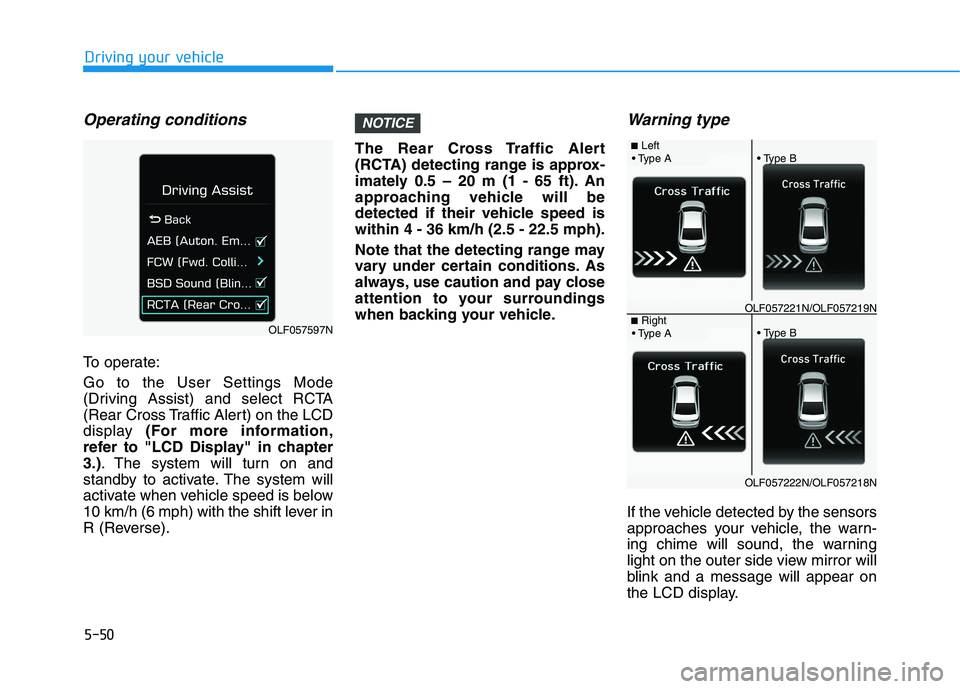
Operating conditions
To operate: Go to the User Settings Mode
(Driving Assist) and select RCTA
(Rear Cross Traffic Alert) on the LCD
display (For more information,
refer to "LCD Display" in chapter3.) . The system will turn on and
standby to activate. The system will
activate when vehicle speed is below
10 km/h (6 mph) with the shift lever in
R (Reverse). The Rear Cross Traffic Alert
(RCTA) detecting range is approx-
imately 0.5 – 20 m (1 - 65 ft). An
approaching vehicle will be
detected if their vehicle speed iswithin 4 - 36 km/h (2.5 - 22.5 mph).
Note that the detecting range may
vary under certain conditions. As
always, use caution and pay close
attention to your surroundings
when backing your vehicle.
Warning type
If the vehicle detected by the sensors
approaches your vehicle, the warn-
ing chime will sound, the warning
light on the outer side view mirror will
blink and a message will appear on
the LCD display.
NOTICE
OLF057597N
■
Left
OLF057221N/OLF057219N■ Right
OLF057222N/OLF057218N
Page 342 of 546
5-52
Driving your vehicle
Limitations of the system
The driver must be cautious in the
below situations, because the sys-
tem may not detect other vehicles or
objects in certain circumstances.
- The vehicle drives on a curved roador through a tollgate.
- The sensor is polluted with rain, snow, mud, etc.
- The rear bumper where the sensor is located is covered with a foreign
object such as a bumper sticker, a
bumper guard, a bike stand, etc.
- The rear bumper is damaged, or the sensor is out of the original
default position.
- The vehicle height gets lower or higher due to heavy loading in a
trunk, abnormal tire pressure, etc.
- The vehicle drives in inclement weather such as heavy rain or
snow.
- There is a fixed object near the vehicle, such as a guardrail.
- A big vehicle is near such as a bus or truck. - A motorcycle or bicycle is near.
- A flat trailer is near.
- If the vehicle has started at the
same time as the vehicle next to
you and has accelerated.
- When the other vehicle passes at a very fast speed.
- While changing lanes.
- While going down or up a steep road where the height of the lane is
different.
- When the other vehicle approaches very close.
- When a trailer or carrier is installed.
- When the temperature of the rear bumper is high.
- When the sensors are blocked by the other vehicles, walls or parking-
lot pillars.
- When the detected vehicle also moves back, as your vehicle drives
back.
- If there are small objects in the detecting area such as a shopping
cart or a baby carriage.
- If there is a low height vehicle such as a sports car. - When other vehicles are close to
your vehicle.
- When the vehicle in the next lane moves two lanes away from you
OR when the vehicle two lanes
away moves to the next lane from
you.
- When driving through a narrow road with many trees or bushes.
Information
This device complies with Industry
Canada RSS-210 standard(s).
Operation is subject to the following
two conditions:
1. This device may not cause interfer- ence, and
2. This device must accept any inter- ference, including interference that
may cause undesired operation of
the device.
i