ESP HYUNDAI SONATA HYBRID 2019 Service Manual
[x] Cancel search | Manufacturer: HYUNDAI, Model Year: 2019, Model line: SONATA HYBRID, Model: HYUNDAI SONATA HYBRID 2019Pages: 546, PDF Size: 78.75 MB
Page 348 of 546
5-58
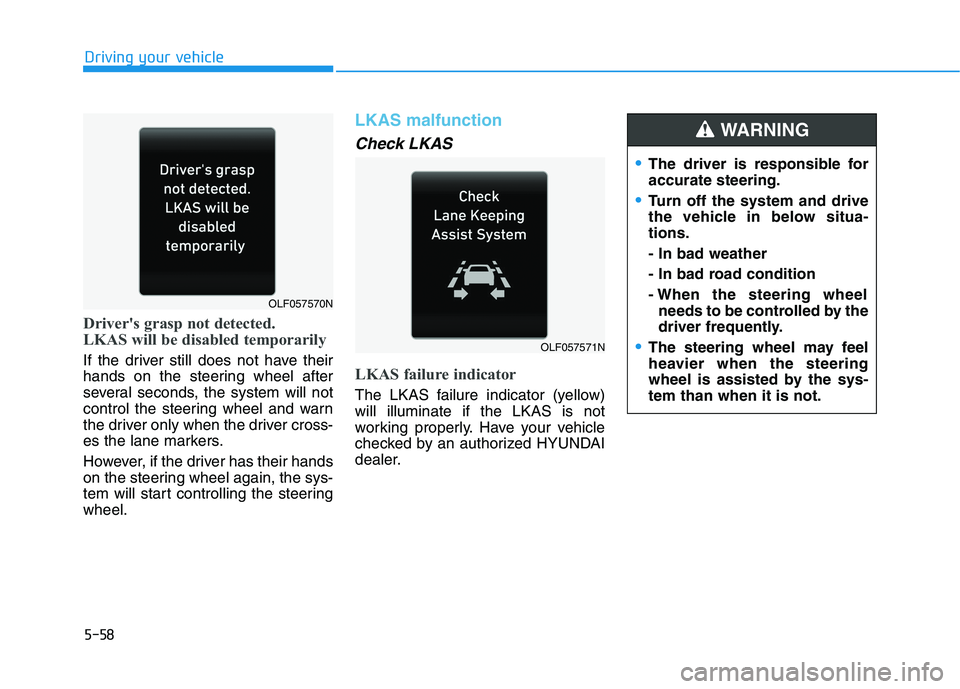
Driver's grasp not detected.
LKAS will be disabled temporarily
If the driver still does not have their
hands on the steering wheel after
several seconds, the system will not
control the steering wheel and warn
the driver only when the driver cross-
es the lane markers.
However, if the driver has their hands
on the steering wheel again, the sys-
tem will start controlling the steeringwheel.
LKAS malfunction
Check LKAS
LKAS failure indicator
The LKAS failure indicator (yellow) will illuminate if the LKAS is not
working properly. Have your vehicle
checked by an authorized HYUNDAI
dealer.
Driving your vehicle
OLF057571N
OLF057570N
The driver is responsible for accurate steering.
Turn off the system and drive
the vehicle in below situa-tions. - In bad weather
- In bad road condition
- When the steering wheelneeds to be controlled by the
driver frequently.
The steering wheel may feel
heavier when the steering
wheel is assisted by the sys-tem than when it is not.
WARNING
Page 355 of 546
5-65
Driving your vehicle
The Driver Attention Alert system
utilizes the camera sensor on the
front windshield for its operation.
To keep the camera sensor in the
best condition, you should
observe the followings:
Do not disassemble cameratemporarily for tinted window or
attaching any types of coatings
and accessories. If you disas-
semble a camera and assemble
it again, take your vehicle to an
authorized HYUNDAI dealer and
have the system checked for acalibration.
Do not locate any reflective objects (i.e. white paper, mirror)
over the dashboard. Any light
reflection may cause a mal-func-
tion of the Driver Attention Alert
(DAA) system.
Pay extreme caution to keep the camera sensor out of water.
(Continued)(Continued)
Do not arbitrarily disassemble
the camera assembly, nor apply
any impact on the camera
assembly.
Playing the vehicle audio sys- tem at high volume may offset
the Driver Attention Alert sys-tem warning sounds.
NOTICE
5
The Driver Attention Alert
system is not a substitute for
safe driving practices, but a
convenience function only. Itis the responsibility of the
driver to always drive cau-
tiously to prevent unexpected
and sudden situations from
occurring. Pay attention to the
road conditions at all times.
It may suggest a break
according to the driver's driv-
ing pattern or habits even if
the driver doesn't feelfatigued.
The driver, who feels fatigued,
should take a break, eventhough there is no break sug-
gestion by the Driver
Attention Alert system.
WARNING
Page 362 of 546
5-72
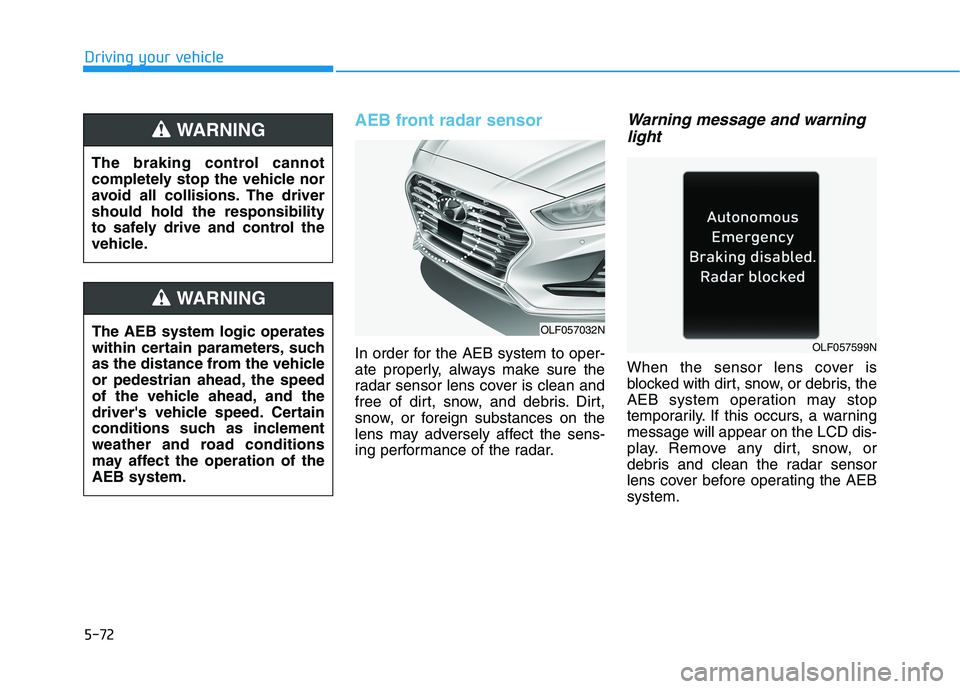
AEB front radar sensor
In order for the AEB system to oper-
ate properly, always make sure the
radar sensor lens cover is clean and
free of dirt, snow, and debris. Dirt,
snow, or foreign substances on the
lens may adversely affect the sens-
ing performance of the radar.
Warning message and warninglight
When the sensor lens cover is
blocked with dirt, snow, or debris, the
AEB system operation may stop
temporarily. If this occurs, a warningmessage will appear on the LCD dis-
play. Remove any dirt, snow, or
debris and clean the radar sensor
lens cover before operating the AEBsystem.
Driving your vehicle
OLF057032N
OLF057599N
The AEB system logic operates
within certain parameters, such
as the distance from the vehicle
or pedestrian ahead, the speed
of the vehicle ahead, and the
driver's vehicle speed. Certain
conditions such as inclement
weather and road conditions
may affect the operation of theAEB system.
WARNING
The braking control cannot
completely stop the vehicle nor
avoid all collisions. The drivershould hold the responsibility
to safely drive and control the
vehicle.
WARNING
Page 364 of 546
5-74
Driving your vehicle
The AEB is only a supplemen-
tal system for the driver’s con-
venience. The driver shouldhold the responsibility to con-
trol the vehicle operation. Do
not solely depend on the AEB
system. Rather, maintain a
safe braking distance, and, if
necessary, depress the brakepedal to reduce the drivingspeed.
In certain instances and
under certain driving condi-
tions, the AEB system may
activate prematurely. This ini-
tial warning message appears
on the LCD display with a
warning chime.
Also, in certain instances the
front radar sensor or camera
recognition system may not
detect the vehicle or pedestri-
an ahead. The AEB system
may not activate and the
warning message will not be
displayed. (Continued)
(Continued)
If there is a malfunction with
the AEB system, the automat-
ic emergency braking is not
applied even though the brak-ing system is operating nor-
mally.
The AEB system operates
only to help detect vehicles or
pedestrians in front of the
vehicle. The AEB system does not
operate when the vehicle is in
reverse. The AEB system is not designed to detect other
objects on the road such asanimals. The AEB system does not
detect cross traffic vehicles
that are approaching. The AEB system cannot
detect the driver approaching
the side view of a parked vehi-
cle (for example on a deadend street.)(Continued)
(Continued)
In these cases, you must
maintain a safe braking dis-
tance, and if necessary,depress the brake pedal toreduce the driving speed in
order to maintain a safe dis-
tance.WARNING
Page 367 of 546
5-77
Driving your vehicle
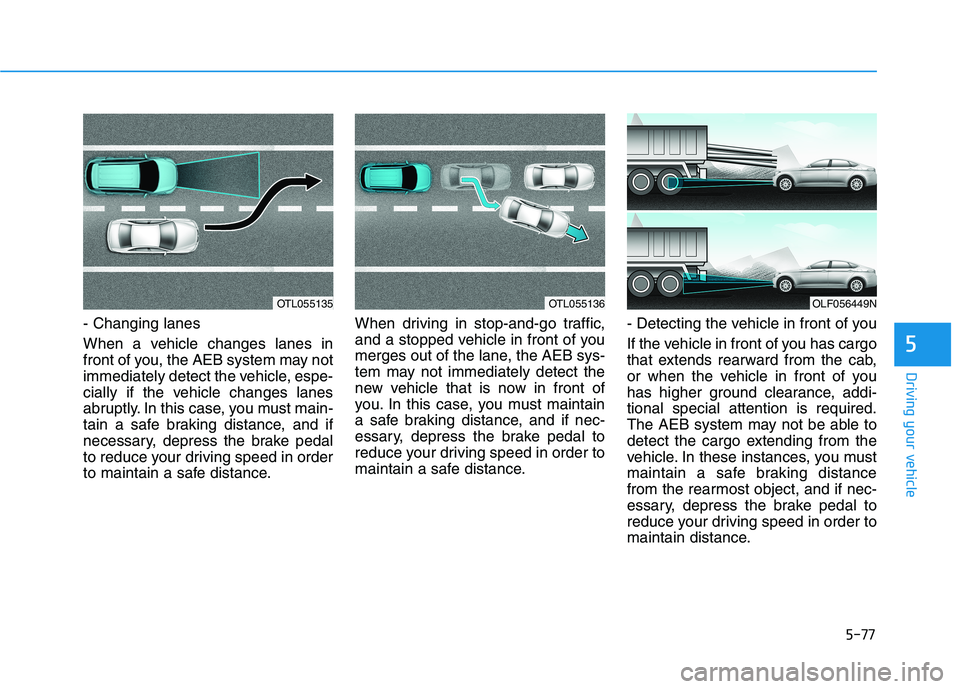
- Changing lanes
When a vehicle changes lanes in
front of you, the AEB system may not
immediately detect the vehicle, espe-
cially if the vehicle changes lanes
abruptly. In this case, you must main-
tain a safe braking distance, and if
necessary, depress the brake pedal
to reduce your driving speed in order
to maintain a safe distance.When driving in stop-and-go traffic,
and a stopped vehicle in front of you
merges out of the lane, the AEB sys-
tem may not immediately detect the
new vehicle that is now in front of
you. In this case, you must maintain
a safe braking distance, and if nec-
essary, depress the brake pedal to
reduce your driving speed in order to
maintain a safe distance.
- Detecting the vehicle in front of you
If the vehicle in front of you has cargo
that extends rearward from the cab,
or when the vehicle in front of you
has higher ground clearance, addi-tional special attention is required.
The AEB system may not be able to
detect the cargo extending from the
vehicle. In these instances, you must
maintain a safe braking distance
from the rearmost object, and if nec-
essary, depress the brake pedal to
reduce your driving speed in order to
maintain distance.
5
OLF056449NOTL055135OTL055136
Page 374 of 546
5-84
Driving your vehicle
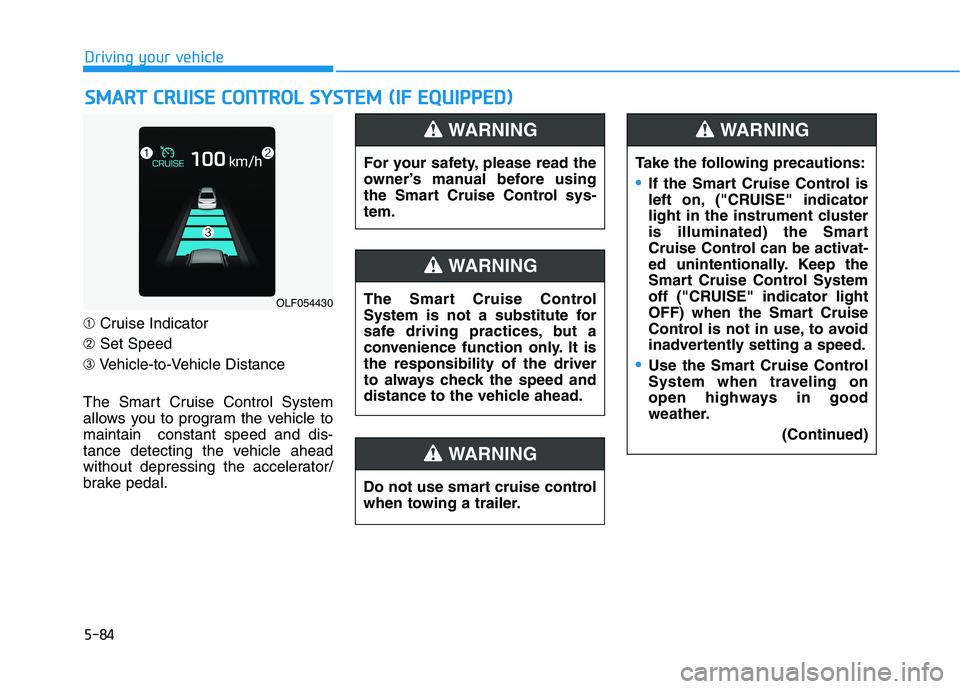
➀Cruise Indicator
➁ Set Speed
➂ Vehicle-to-Vehicle Distance
The Smart Cruise Control System
allows you to program the vehicle tomaintain constant speed and dis-
tance detecting the vehicle ahead
without depressing the accelerator/
brake pedal.
SS MM AARRTT CC RR UU IISS EE CC OO NNTTRR OO LL SS YY SSTT EEMM (( IIFF EE QQ UUIIPP PPEEDD ))
OLF054430 For your safety, please read the
owner’s manual before using
the Smart Cruise Control sys-tem.
WARNING
The Smart Cruise Control
System is not a substitute for
safe driving practices, but a
convenience function only. It isthe responsibility of the driver
to always check the speed and
distance to the vehicle ahead.
WARNING
Take the following precautions:
If the Smart Cruise Control is
left on, ("CRUISE" indicator
light in the instrument cluster
is illuminated) the Smart
Cruise Control can be activat-
ed unintentionally. Keep the
Smart Cruise Control System
off ("CRUISE" indicator light
OFF) when the Smart Cruise
Control is not in use, to avoid
inadvertently setting a speed.
Use the Smart Cruise Control
System when traveling on
open highways in good
weather.
(Continued)
WARNING
Do not use smart cruise control
when towing a trailer.
WARNING
Page 380 of 546
5-90
Driving your vehicle
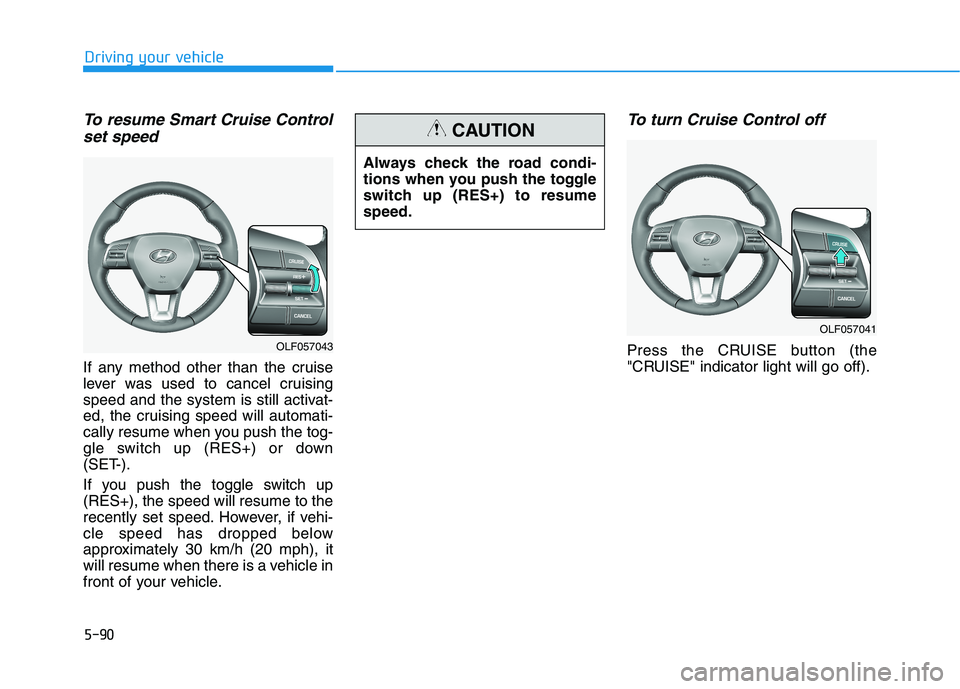
To resume Smart Cruise Controlset speed
If any method other than the cruise
lever was used to cancel cruising
speed and the system is still activat-
ed, the cruising speed will automati-
cally resume when you push the tog-
gle switch up (RES+) or down
(SET-).
If you push the toggle switch up (RES+), the speed will resume to the
recently set speed. However, if vehi-
cle speed has dropped below
approximately 30 km/h (20 mph), it
will resume when there is a vehicle in
front of your vehicle.
To turn Cruise Control off
Press the CRUISE button (the
"CRUISE" indicator light will go off).OLF057043 Always check the road condi-
tions when you push the toggle
switch up (RES+) to resumespeed.
CAUTION
OLF057041
Page 389 of 546
5-99
Driving your vehicle
5
The Smart Cruise Control System
may not operate temporarily dueto:
Electrical interference
Modifying the suspension
Differences of tire abrasion ortire pressure
Installing different type of tires
Information
This device complies with Industry
Canada RSS-210 standard(s).
Operation is subject to the following
three conditions:
1. This device may not cause interfer- ence, and
2. This device must accept any inter- ference, including interference that
may cause undesired operation of
the device.
3. Changes or modifications not expressly approved by the party
responsible for compliance could
void the user’s authority to operate
the device.
i
NOTICE
When using the Smart Cruise
Control take the following pre-cautions:
If an emergency stop is nec-
essary, you must apply the
brakes. The vehicle cannot be
stopped by using the Smart
Cruise Control System.
Keep a safe distance accord-
ing to road conditions and
vehicle speed. If the vehicle to
vehicle distance is too close
during a high-speed driving, a
serious collision may result.
Always maintain sufficient braking distance and deceler-
ate your vehicle by applying
the brakes if necessary.
The Smart Cruise Control
System cannot recognize a
stopped vehicle, pedestrians
or an oncoming vehicle.
Always look ahead cautiously
to prevent unexpected and
sudden situations from occur-ring.
(Continued)
WARNING (Continued)
Vehicles moving in front of
you with a frequent lane
change may cause a delay in
the system’s reaction or maycause the system to react to a
vehicle actually in an adjacent
lane. Always drive cautiously
to prevent unexpected and
sudden situations from occur-ring.
Always be aware of the select-
ed speed and vehicle to vehi-
cle distance.
The Smart Cruise Control
System may not recognize
complex driving situations so
always pay attention to driv-
ing conditions and control
your vehicle speed.
Page 391 of 546
5-101
Driving your vehicle
5
Information
The ESC system must be turned OFF
before rocking the vehicle.
If you are still stuck after rocking
the vehicle a few times, have the
vehicle pulled out by a tow vehicle
to avoid engine overheating, pos-
sible damage to the transmission,
and tire damage. See "Towing" in
chapter 6.Smooth cornering
Avoid braking or gear changing in
corners, especially when roads are
wet. Ideally, corners should always
be taken under gentle acceleration.
Driving at night
Night driving presents more hazards
than driving in the daylight. Here are
some important tips to remember:
Slow down and keep more dis- tance between you and other vehi-
cles, as it may be more difficult tosee at night, especially in areas
where there may not be any street
lights.
Adjust your mirrors to reduce the glare from other driver's head-
lamps.
Keep your headlamps clean and properly aimed. Dirty or improperly
aimed headlamps will make it
much more difficult to see at night.
Avoid staring directly at the head- lamps of oncoming vehicles. You
could be temporarily blinded, and it
will take several seconds for your
eyes to readjust to the darkness.
NOTICE
i
Page 412 of 546
6-10
Tire Pressure Monitoring System
Each tire, including the spare (if pro-
vided), should be checked monthlywhen cold and inflated to the inflation
pressure recommended by the vehi-
cle manufacturer on the vehicle plac-
ard or tire inflation pressure label. (If
your vehicle has tires of a different
size than the size indicated on the
vehicle placard or tire inflation pres-
sure label, you should determine the
proper tire inflation pressure for
those tires.)As an added safety feature, your
vehicle has been equipped with a tire
pressure monitoring system (TPMS)
that illuminates a low tire pressure
telltale when one or more of yourtires is significantly under-inflated.
Accordingly, when the low tire pres-
sure telltale illuminates, you should
stop and check your tires as soon as
possible, and inflate them to the
proper pressure. Driving on a signifi-
cantly underinflated tire causes the
tire to overheat and can lead to tire
failure. Under-inflation also reduces fuel effi-
ciency and tire tread life, and may
affect the vehicle's handling and
stopping ability.
Please note that the TPMS is not a
substitute for proper tire mainte-
nance, and it is the driver's responsi-bility to maintain correct tire pres-
sure, even if under-inflation has not
reached the level to trigger illumina-
tion of the TPMS low tire pressure
telltale.Your vehicle has also been equipped
with a TPMS malfunction indicator toindicate when the system is not
operating properly.
The TPMS malfunction indicator is
combined with the low tire pressure
telltale. When the system detects a
malfunction, the telltale will flash for
approximately one minute and then
remain continuously illuminated. This
sequence will continue upon subse-
quent vehicle start-ups as long as
the malfunction exists. When the malfunction indicator is
illuminated, the system may not be
able to detect or signal low tire pres-
sure as intended. TPMS malfunc-
tions may occur for a variety of rea-
sons, including the installation of
replacement or alternate tires or
wheels on the vehicle that prevent
the TPMS from functioning properly.
Always check the TPMS malfunctiontelltale after replacing one or more
tires or wheels on your vehicle toensure that the replacement or alter-
nate tires and wheels allow the
TPMS to continue to function proper-
ly.
What to do in an emergency
Over-inflation or under-inflation
can reduce tire life, adversely
affect vehicle handling, and
lead to sudden tire failure that
may cause loss of vehicle con-
trol resulting in an accident.
WARNING