charging HYUNDAI SONATA HYBRID 2019 Service Manual
[x] Cancel search | Manufacturer: HYUNDAI, Model Year: 2019, Model line: SONATA HYBRID, Model: HYUNDAI SONATA HYBRID 2019Pages: 546, PDF Size: 78.75 MB
Page 275 of 546
3-139
Convenient features of your vehicle
Wireless Cellular Phone
Charging System (if equipped)
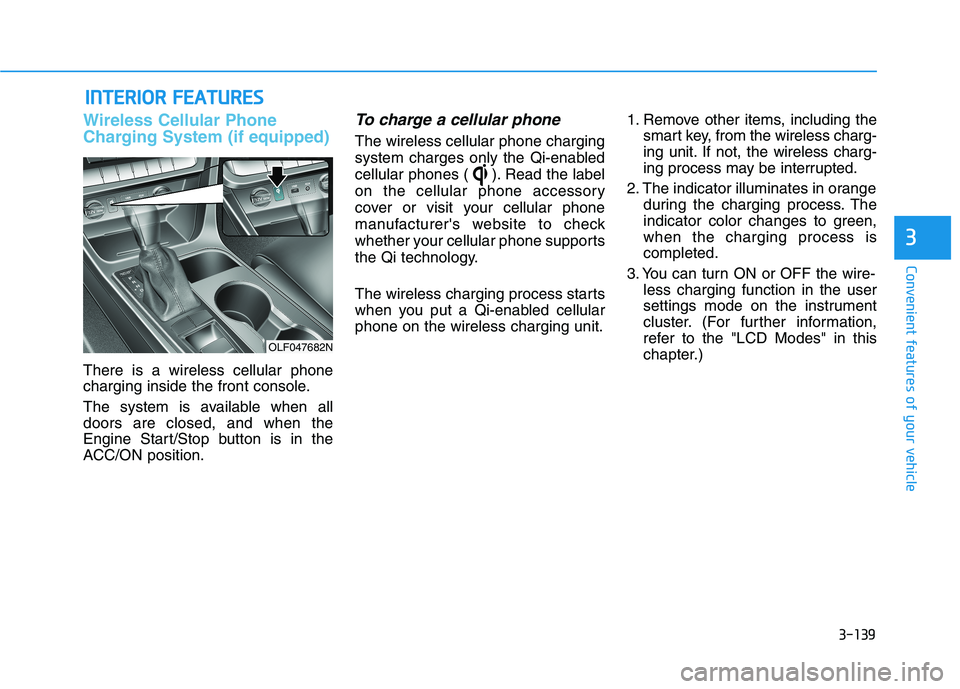
There is a wireless cellular phone
charging inside the front console.
The system is available when all doors are closed, and when the
Engine Start/Stop button is in the
ACC/ON position.
To charge a cellular phone
The wireless cellular phone charging
system charges only the Qi-enabled
cellular phones ( ). Read the label
on the cellular phone accessory
cover or visit your cellular phone
manufacturer's website to check
whether your cellular phone supports
the Qi technology.
The wireless charging process starts
when you put a Qi-enabled cellularphone on the wireless charging unit.1. Remove other items, including the
smart key, from the wireless charg-
ing unit. If not, the wireless charg-
ing process may be interrupted.
2. The indicator illuminates in orange during the charging process. The
indicator color changes to green,when the charging process iscompleted.
3. You can turn ON or OFF the wire- less charging function in the user
settings mode on the instrument
cluster. (For further information,
refer to the "LCD Modes" in this
chapter.)
IINN TTEERR IIOO RR FF EE AA TTUU RREESS
3
OLF047682N
Page 276 of 546
3-140
Slightly change the cellular phone position, when the cellular phone is
not being charged. Make sure that
the indicator illuminates in orange.
The indicator color may not change
to green in accordance with the cel-
lular phone type, even though the
charging process is completed. The
indicator blinks in orange for 10 sec-onds when there is a malfunction
with the wireless charging system. In
this case, temporarily stop the charg-
ing process, and re-attempt to wire-
lessly charge your cellular phoneagain.
The system warns you with a mes-
sage on the LCD display when you
do not take out the cellular phonefrom the wireless charging unit withthe front door open and the Engine
Start/Stop button in the OFF posi-tion.
The wireless cellular phone
charging system may not sup-
port certain cellular phones,
which are not verified for the Qi
specification ( ).
Locate your cell phone well in the middle of the wireless cellu-
lar phone charging system.
Even when your cell phone
locates slightly to one side, the
charging speed may decrease.
The wireless charging process may temporarily stop, when a
smart key function operates (i.e.
starting the engine, opening the
doors, closing the doors).
For certain cell phones, the indi- cator color may not change to
green, even when the wireless
charging process is properlycompleted.
(Continued)(Continued)
The wireless charging process
may temporarily stop, when tem-
perature abnormally increasesinside the wireless cellular
phone charging system. The
wireless charging process
restarts, when temperature falls
to a proper level.
The wireless charging process may temporarily stop when
there is any metallic item, such
as a coin, between the wireless
cellular phone charging system
and a cellular phone.
NOTICE
Convenient features of your vehicle
Page 297 of 546
5-7
Driving your vehicle
5
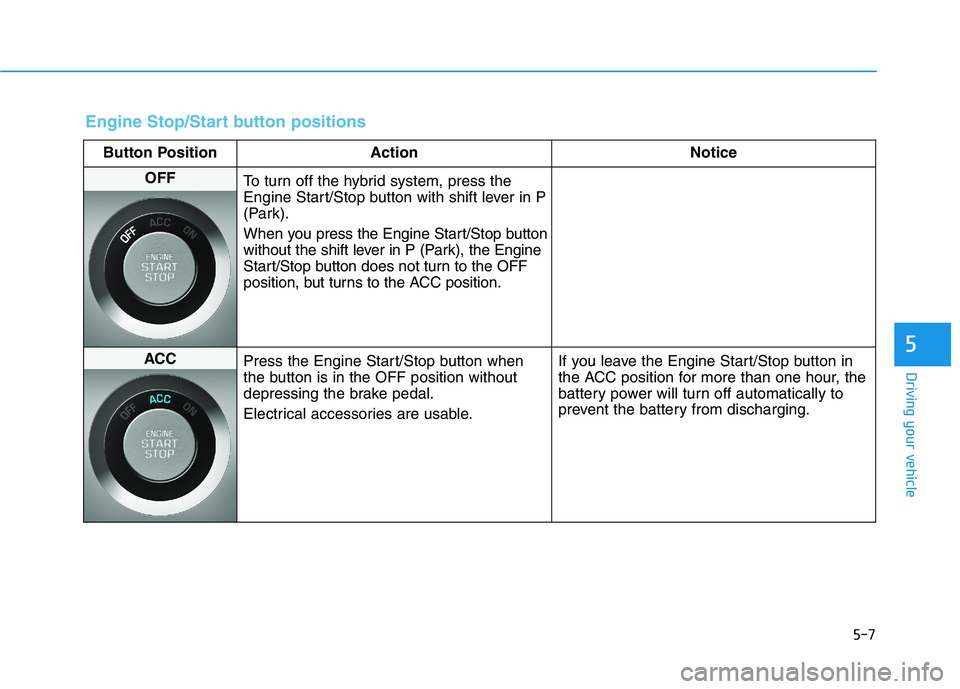
Engine Stop/Start button positions
Button Position ActionNotice
OFF
To turn off the hybrid system, press the
Engine Start/Stop button with shift lever in P
(Park).
When you press the Engine Start/Stop button
without the shift lever in P (Park), the Engine
Start/Stop button does not turn to the OFF
position, but turns to the ACC position.
ACC Press the Engine Start/Stop button when
the button is in the OFF position without
depressing the brake pedal.
Electrical accessories are usable. If you leave the Engine Start/Stop button in
the ACC position for more than one hour, the
battery power will turn off automatically to
prevent the battery from discharging.
Page 298 of 546
5-8
Driving your vehicle
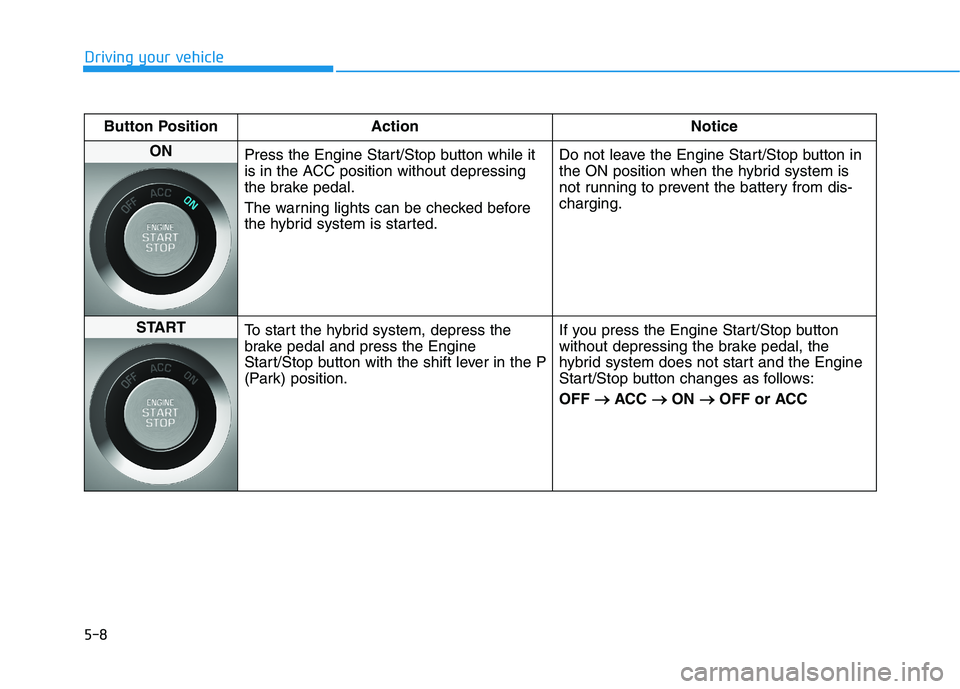
Button Position ActionNotice
ON
Press the Engine Start/Stop button while it
is in the ACC position without depressing
the brake pedal.
The warning lights can be checked before
the hybrid system is started. Do not leave the Engine Start/Stop button in
the ON position when the hybrid system is
not running to prevent the battery from dis-charging.
START
To start the hybrid system, depress the
brake pedal and press the Engine
Start/Stop button with the shift lever in the P
(Park) position. If you press the Engine Start/Stop button
without depressing the brake pedal, the
hybrid system does not start and the Engine
Start/Stop button changes as follows: OFF
ACC
ON
OFF or ACC
Page 395 of 546
5-105
Driving your vehicle
5
Winter Precautions
Use high quality ethylene glycol coolant
Your vehicle is delivered with high
quality ethylene glycol coolant in the
cooling system. It is the only type ofcoolant that should be used because
it helps prevent corrosion in the cool-
ing system, lubricates the water
pump and prevents freezing. Be sure
to replace or replenish your coolantin accordance with the maintenance
schedule in section 7. Before winter,
have your coolant tested to assure
that its freezing point is sufficient for
the temperatures anticipated during
the winter.Check battery and cables
The winter temperature increases
the battery consumption.
Inspect
the battery and cables, as speci-
fied in the chapter 7. The battery
charging level can be checked by an
authorized HYUNDAI dealer or in a
service station.
Change to "winter weight" oil if
necessary
In some regions during winter, it is recommended to use the "winter
weight" oil with lower viscosity. For
further information, refer to the chap-
ter 8. When you are not sure about a
type of winter weight oil, consult an
authorized HYUNDAI dealer. Check spark plugs and ignitionsystem
Inspect the spark plugs, as speci-
fied in the chapter 7.
If necessary,
replace them. Also check all ignition
wirings and components for any
cracks, wear-out, and damage.
To prevent locks from freezing
To prevent the locks from being
frozen, spray approved de-icing fluid
or glycerin into key holes. When a
lock opening is already covered with
ice, spray approved de-icing fluid
over the ice to remove it. When an
internal part of a lock freezes, try to
thaw it with a heated key. Carefully
use the heated key to avoid an injury.
Page 408 of 546
6-6
What to do in an emergency
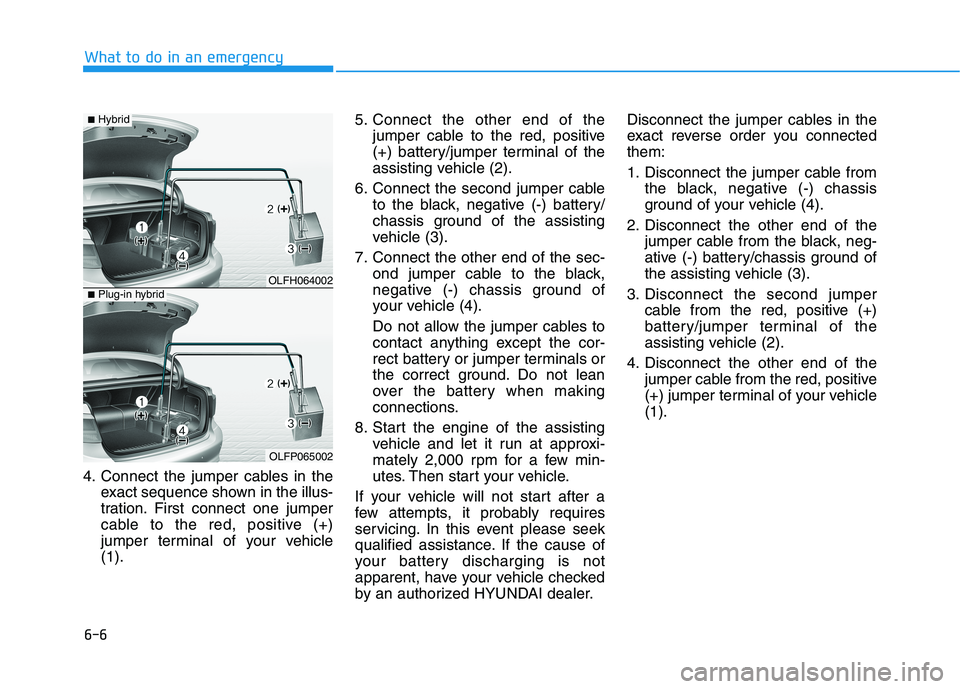
4. Connect the jumper cables in theexact sequence shown in the illus-
tration. First connect one jumper
cable to the red, positive (+)
jumper terminal of your vehicle(1). 5. Connect the other end of the
jumper cable to the red, positive
(+) battery/jumper terminal of the
assisting vehicle (2).
6. Connect the second jumper cable to the black, negative (-) battery/
chassis ground of the assisting
vehicle (3).
7. Connect the other end of the sec- ond jumper cable to the black,
negative (-) chassis ground of
your vehicle (4).
Do not allow the jumper cables to
contact anything except the cor-
rect battery or jumper terminals or
the correct ground. Do not lean
over the battery when making
connections.
8. Start the engine of the assisting vehicle and let it run at approxi-
mately 2,000 rpm for a few min-
utes. Then start your vehicle.
If your vehicle will not start after a
few attempts, it probably requires
servicing. In this event please seek
qualified assistance. If the cause of
your battery discharging is not
apparent, have your vehicle checked
by an authorized HYUNDAI dealer. Disconnect the jumper cables in the
exact reverse order you connectedthem:
1. Disconnect the jumper cable from
the black, negative (-) chassis
ground of your vehicle (4).
2. Disconnect the other end of the jumper cable from the black, neg-
ative (-) battery/chassis ground of
the assisting vehicle (3).
3. Disconnect the second jumper cable from the red, positive (+)
battery/jumper terminal of the
assisting vehicle (2).
4. Disconnect the other end of the jumper cable from the red, positive
(+) jumper terminal of your vehicle(1).
OLFH064002
OLFP065002
■Hybrid
■Plug-in hybrid
Page 439 of 546
7
Maintenance
7
Maintenance
Engine compartment .............................................7-3
Maintenance services ...........................................7-4Owner's responsibility ......................................................7-4
Owner maintenance precautions ..................................7-4
Owner maintenance ...............................................7-5 Owner maintenance schedule ........................................7-6
Scheduled maintenance services.........................7-8 Normal maintenance schedule .......................................7-9
Maintenance under severe usage conditions ..........7-13
Explanation of scheduled maintenance items .. 7-15
Engine oil ..............................................................7-18 Checking the engine oil level .......................................7-18
Checking the engine oil and filter ..............................7-19
Engine coolant/Inverter coolant .......................7-20 Checking the engine/inverter coolant level .............7-20
Changing engine coolant...............................................7-23
Hybrid starter & generator (HSG) belt.............7-23 Checking the hybrid starter &
generator (HSG) belt ......................................................7-23
Brake fluid ............................................................7-24 Checking the brake fluid level .....................................7-24
Washer fluid .........................................................7-25 Checking the washer fluid level ..................................7-25 Parking brake .......................................................7-25
Checking the parking brake .........................................7-25
Air cleaner ............................................................7-26 Filter replacement ...........................................................7-26
Climate control air filter .....................................7-28 Filter inspection ...............................................................7-28
Wiper blades .........................................................7-30 Blade inspection ..............................................................7-30
Blade replacement ..........................................................7-30
Battery...................................................................7-32 For best battery service................................................7-33
Battery recharging .........................................................7-33
Reset features .................................................................7-34
Tires and wheels ..................................................7-35 Tire care ............................................................................7-35
Recommended cold tire inflation pressures.............7-36
Check tire inflation pressure........................................7-37
Tire rotation .....................................................................7-38
Wheel alignment and tire balance ..............................7-39
Tire replacement .............................................................7-39
Wheel replacement .........................................................7-40
Tire traction ......................................................................7-40
7
Page 471 of 546
7-33
7
Maintenance
For best battery service
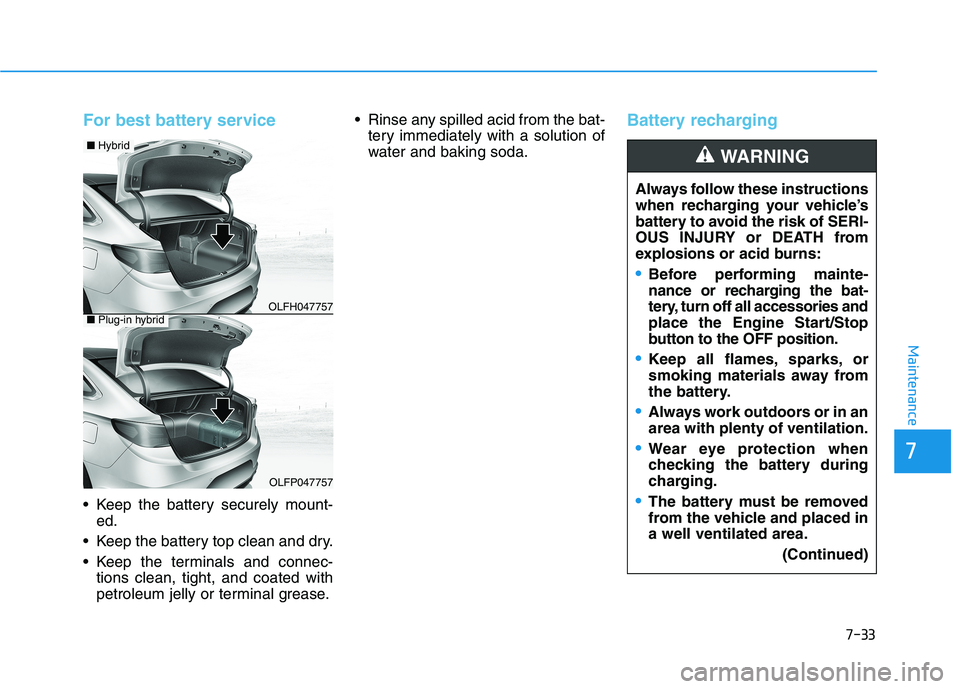
Keep the battery securely mount-ed.
Keep the battery top clean and dry.
Keep the terminals and connec- tions clean, tight, and coated with
petroleum jelly or terminal grease. Rinse any spilled acid from the bat-
tery immediately with a solution of
water and baking soda.
Battery recharging
Always follow these instructions
when recharging your vehicle’s
battery to avoid the risk of SERI-
OUS INJURY or DEATH from
explosions or acid burns:
Before performing mainte-
nance or recharging the bat-
tery, turn off all accessories and
place the Engine Start/Stop
button to the OFF position.
Keep all flames, sparks, or
smoking materials away from
the battery.
Always work outdoors or in an area with plenty of ventilation.
Wear eye protection when
checking the battery during
charging.
The battery must be removed
from the vehicle and placed ina well ventilated area.
(Continued)
WARNING
OLFH047757
OLFP047757
■Hybrid
■Plug-in hybrid
Page 472 of 546
7-34
Maintenance
By jump starting
After a jump start from a good bat-
tery, drive the vehicle for 20-30 min-
utes before it is shutoff. The vehicle
may not restart if you shut it off
before the battery had a chance to
adequately recharge. See "Jump
Starting" in chapter 6 for more infor-
mation on jump starting procedures.Information An inappropriately disposedbattery can be harmful to
the environment and human
health.
Dispose the battery according to your
local law(s) or regulation.
Reset features
Some items need to be reset after
the battery has been discharged or
the battery has been disconnected.
See chapter 3 for:
Power Windows
Trip Computer
Climate Control System
Clock
Audio System
Sunroof
i
(Continued)
Watch the battery during
charging, and stop or reduce
the charging rate if the battery
cells begin boiling violently.
The negative battery cable
must be removed first and
installed last when the battery
is disconnected. Disconnect
the battery charger in the fol-
lowing order:
(1) Turn off the battery charger main switch.
(2) Unhook the negative
clamp from the negative
battery terminal.
(3) Unhook the positive clamp from the positive batteryterminal.
Always use a genuine HYUNDAI
approved battery when you
replace the battery.
Page 517 of 546
7-79
7
Maintenance
Waxing
A good coat of wax provides a barri-
er between your paint and environ-
mental contamination. Keeping a
good coat of wax on your vehicle willhelp protect it.
Wax the vehicle when water will no longer bead on the paint.
Always wash and dry the vehicle
before waxing. Use a good quality
liquid or paste wax, and follow the
manufacturer’s instructions. Wax all
metal trim to protect it and to main-
tain its luster.
Removing oil, tar, and similar materi-
als with a spot remover will usually
strip the wax from the finish. Be sure
to re-wax these areas even if the rest
of the vehicle does not yet need wax-ing.
OLMB073082
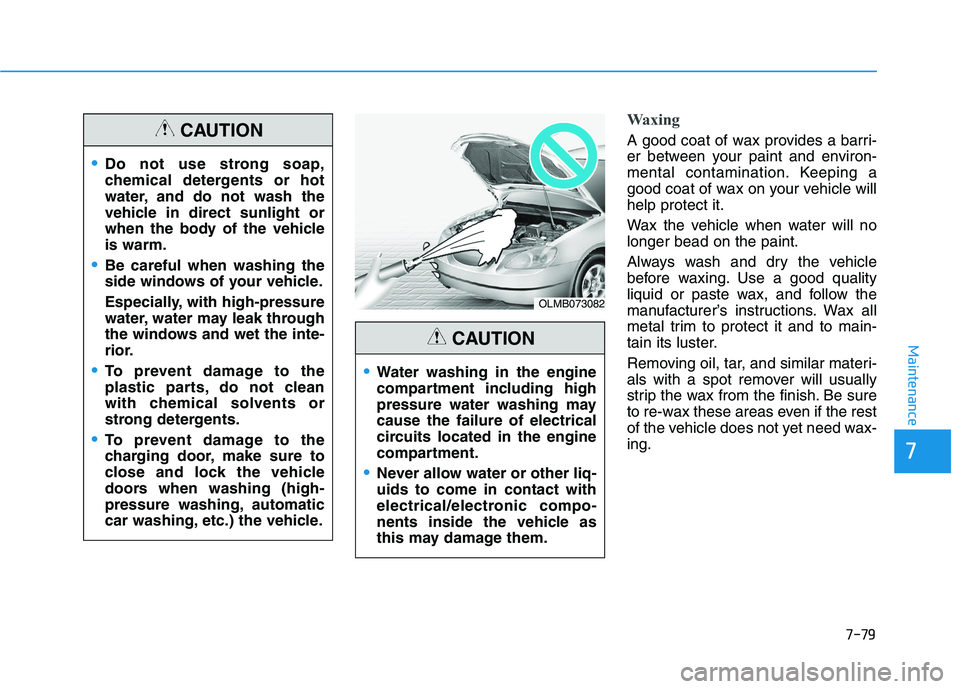
Water washing in the engine
compartment including high
pressure water washing maycause the failure of electrical
circuits located in the engine
compartment.
Never allow water or other liq- uids to come in contact with
electrical/electronic compo-
nents inside the vehicle as
this may damage them.
CAUTION
Do not use strong soap,
chemical detergents or hot
water, and do not wash the
vehicle in direct sunlight or
when the body of the vehicleis warm.
Be careful when washing the
side windows of your vehicle.
Especially, with high-pressure
water, water may leak through
the windows and wet the inte-
rior.
To prevent damage to the
plastic parts, do not clean
with chemical solvents or
strong detergents.
To prevent damage to the
charging door, make sure to
close and lock the vehicle
doors when washing (high-
pressure washing, automatic
car washing, etc.) the vehicle.
CAUTION