warning HYUNDAI SONATA HYBRID 2019 Manual PDF
[x] Cancel search | Manufacturer: HYUNDAI, Model Year: 2019, Model line: SONATA HYBRID, Model: HYUNDAI SONATA HYBRID 2019Pages: 546, PDF Size: 78.75 MB
Page 134 of 546
2-68
Safety system of your vehicle
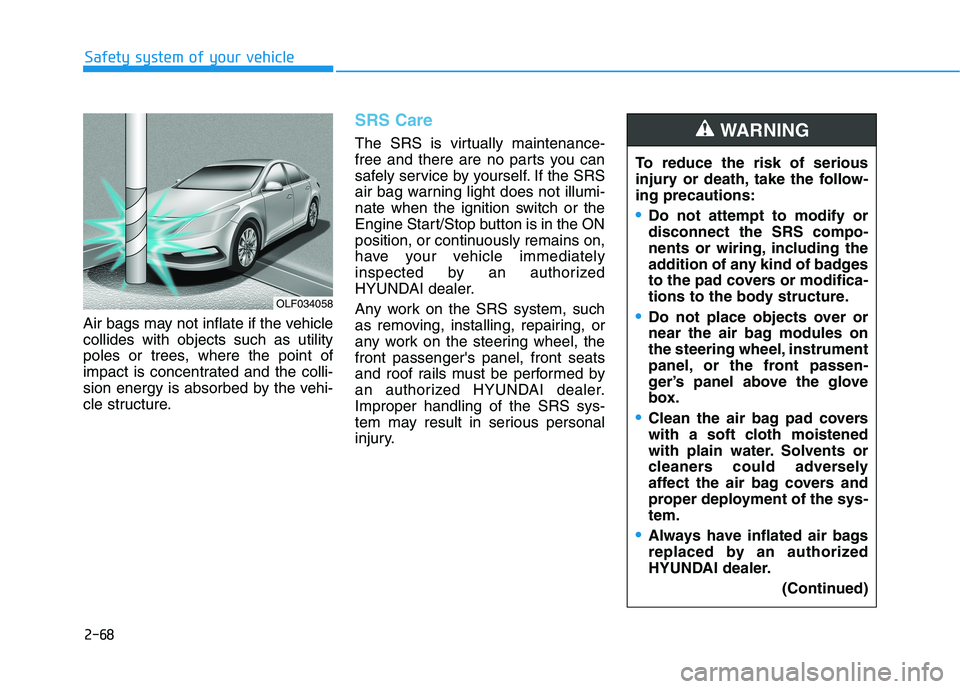
Air bags may not inflate if the vehicle collides with objects such as utility
poles or trees, where the point of
impact is concentrated and the colli-
sion energy is absorbed by the vehi-
cle structure.
SRS Care
The SRS is virtually maintenance-
free and there are no parts you can
safely service by yourself. If the SRS
air bag warning light does not illumi-
nate when the ignition switch or the
Engine Start/Stop button is in the ON
position, or continuously remains on,
have your vehicle immediately
inspected by an authorized
HYUNDAI dealer.
Any work on the SRS system, such
as removing, installing, repairing, or
any work on the steering wheel, thefront passenger's panel, front seats
and roof rails must be performed by
an authorized HYUNDAI dealer.Improper handling of the SRS sys-
tem may result in serious personal
injury.To reduce the risk of serious
injury or death, take the follow-ing precautions:
Do not attempt to modify or disconnect the SRS compo-
nents or wiring, including the
addition of any kind of badges
to the pad covers or modifica-
tions to the body structure.
Do not place objects over or
near the air bag modules on
the steering wheel, instrument
panel, or the front passen-
ger’s panel above the glove
box.
Clean the air bag pad covers
with a soft cloth moistened
with plain water. Solvents or
cleaners could adversely
affect the air bag covers and
proper deployment of the sys-tem.
Always have inflated air bags
replaced by an authorized
HYUNDAI dealer.
(Continued)
WARNING
OLF034058
Page 136 of 546
2-70
Air Bag Warning Labels
Safety system of your vehicle
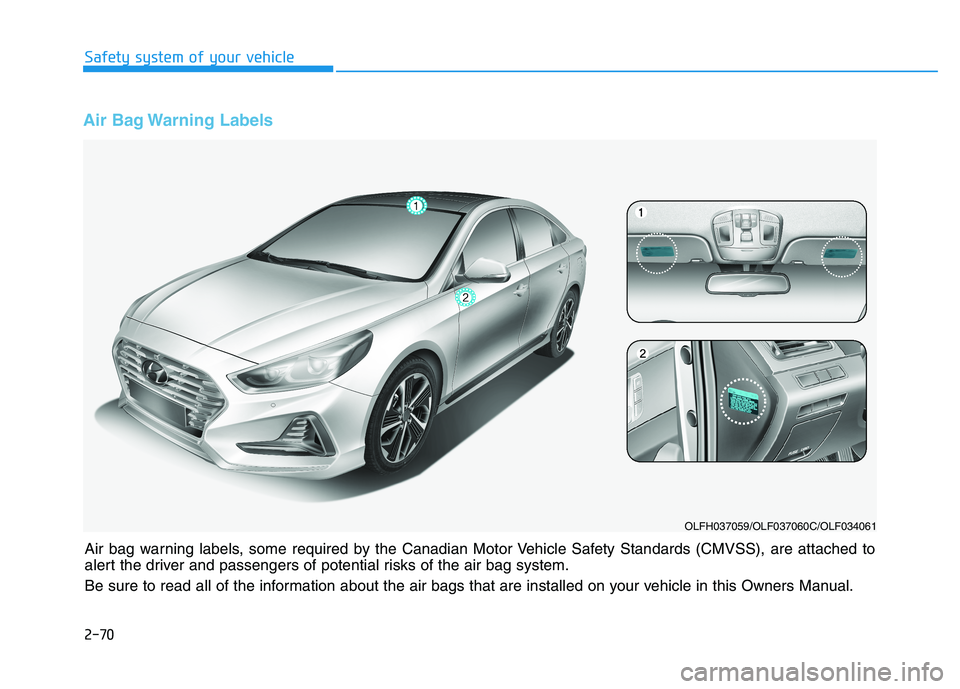
Air bag warning labels, some required by the Canadian Motor Vehicle Safety Standards (CMVSS), are attached to
alert the driver and passengers of potential risks of the air bag system.
Be sure to read all of the information about the air bags that are installed on your vehicle in this Owners Manual.
OLFH037059/OLF037060C/OLF034061
Page 137 of 546
Convenient features of your vehicle
Accessing your vehicle .........................................3-3Smart Key ............................................................................3-3
Immobilizer System ...........................................................3-8
Door locks ...............................................................3-9 Operating Door Locks from Outside the Vehicle ......3-9
Operating Door Locks from Inside the Vehicle .......3-10
Auto Door Lock/Unlock Features ...............................3-12
Child-Protector Rear Door locks ................................3-12
Theft-alarm system.............................................3-13
Driver position memory system .........................3-14 Storing Positions into Memory ....................................3-14
Easy Access Function ....................................................3-15
Steering wheel......................................................3-16 Electric Power Steering (EPS) .....................................3-16
Tilt Steering / Telescope Steering ..............................3-17
Heated Steering Wheel ..................................................3-18
Horn ....................................................................................3-18
Mirrors ...................................................................3-19 Inside Rearview Mirror ..................................................3-19
Side View Mirrors ...........................................................3-27
Reverse Parking Aid Function......................................3-30
Windows ................................................................3-31 Power Windows ...............................................................3-32 Panoramic sunroof ..............................................3-35
Sunshade ...........................................................................3-36
Sliding the sunroof .........................................................3-36
Tilting the sunroof ..........................................................3-37
Closing the sunroof ........................................................3-37
Resetting the sunroof ....................................................3-38
Exterior features .................................................3-39 Hood ...................................................................................3-39
Trunk ..................................................................................3-40
Smart Trunk ......................................................................3-43
Fuel Filler Door (Hybrid) ...............................................3-46
Fuel Filler Door (Plug-in hybrid).................................3-50
Instrument cluster................................................3-54 Instrument cluster control ............................................3-56
Gauges ...............................................................................3-57
Warning and indicator lights ........................................3-61
Warning messages ..........................................................3-75
LCD display ...........................................................3-85 LCD display control.........................................................3-85
Trip computer .......................................................3-93 Trip modes ........................................................................3-93
3
Page 139 of 546
3-3
Convenient features of your vehicle
3
AACCCCEE SSSSIINN GG YY OO UURR VV EEHH IICC LLEE
Smart Key
Your HYUNDAI uses a Smart Key,
which you can use to lock or unlock
a door (and trunk) and even start the
engine.
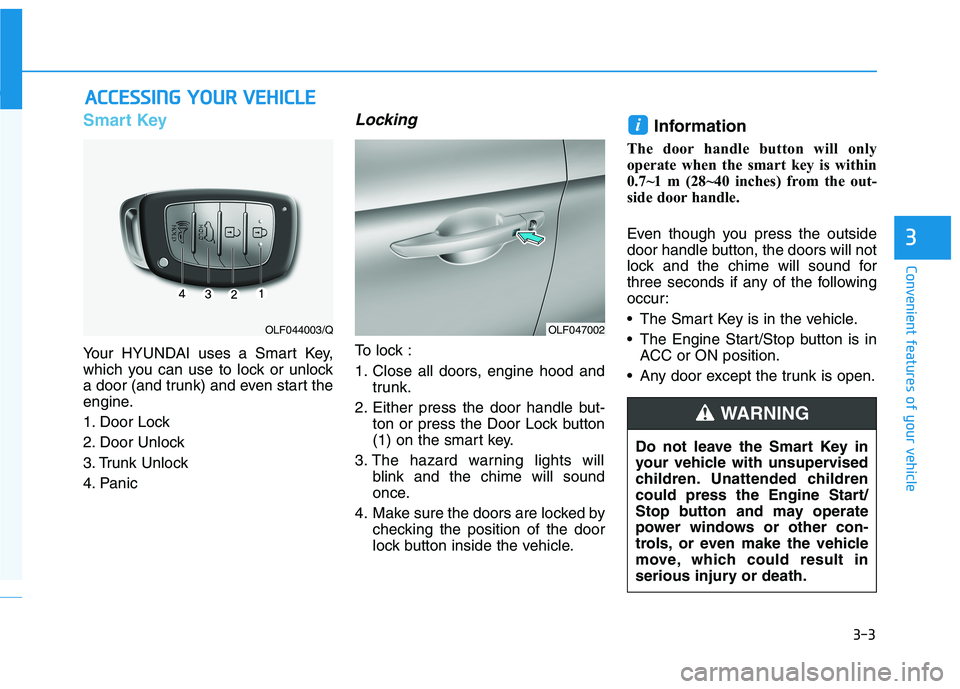
1. Door Lock
2. Door Unlock
3. Trunk Unlock
4. Panic
Locking
To lock :
1. Close all doors, engine hood and
trunk.
2. Either press the door handle but- ton or press the Door Lock button
(1) on the smart key.
3. The hazard warning lights will blink and the chime will sound
once.
4. Make sure the doors are locked by checking the position of the door
lock button inside the vehicle. Information
The door handle button will only
operate when the smart key is within
0.7~1 m (28~40 inches) from the out-
side door handle.
Even though you press the outside
door handle button, the doors will not
lock and the chime will sound for
three seconds if any of the following
occur:
• The Smart Key is in the vehicle.
The Engine Start/Stop button is in ACC or ON position.
Any door except the trunk is open.
i
OLF047002OLF044003/Q
Do not leave the Smart Key in
your vehicle with unsupervised
children. Unattended children
could press the Engine Start/
Stop button and may operate
power windows or other con-
trols, or even make the vehicle
move, which could result in
serious injury or death.
WARNING
Page 140 of 546
3-4
Convenient features of your vehicle
Unlocking your vehicle
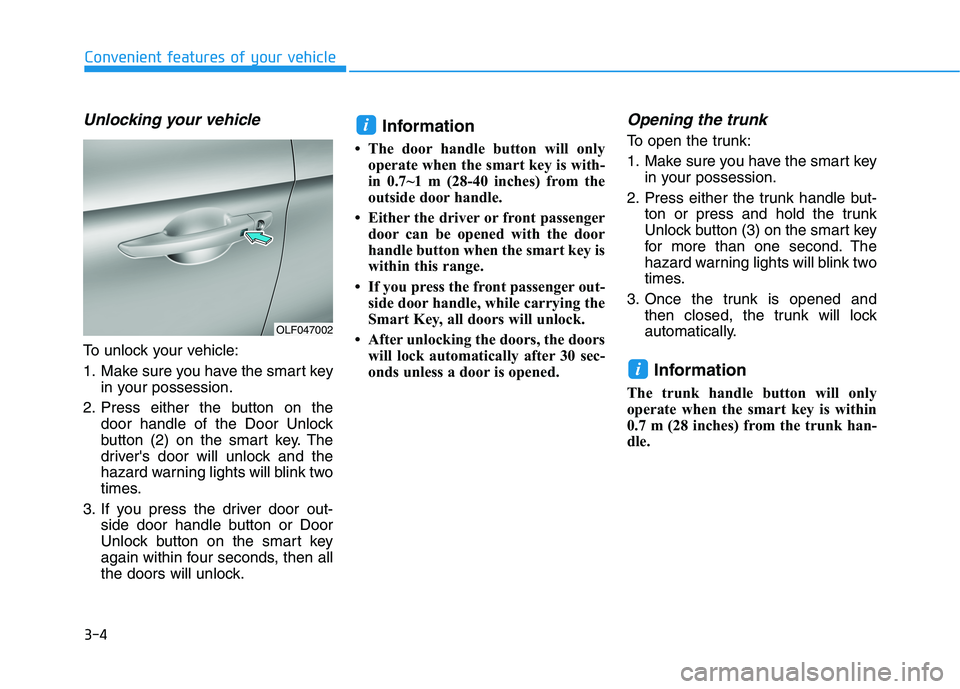
To unlock your vehicle:
1. Make sure you have the smart keyin your possession.
2. Press either the button on the door handle of the Door Unlock
button (2) on the smart key. The
driver's door will unlock and the
hazard warning lights will blink two
times.
3. If you press the driver door out- side door handle button or Door
Unlock button on the smart key
again within four seconds, then all
the doors will unlock. Information
The door handle button will only operate when the smart key is with-
in 0.7~1 m (28-40 inches) from the
outside door handle.
Either the driver or front passenger door can be opened with the door
handle button when the smart key is
within this range.
If you press the front passenger out- side door handle, while carrying the
Smart Key, all doors will unlock.
After unlocking the doors, the doors will lock automatically after 30 sec-
onds unless a door is opened.
Opening the trunk
To open the trunk:
1. Make sure you have the smart key in your possession.
2. Press either the trunk handle but- ton or press and hold the trunk
Unlock button (3) on the smart key
for more than one second. The
hazard warning lights will blink two
times.
3. Once the trunk is opened and then closed, the trunk will lock
automatically.
Information
The trunk handle button will only
operate when the smart key is within
0.7 m (28 inches) from the trunk han-
dle.
i
i
OLF047002
Page 141 of 546
3-5
Convenient features of your vehicle
3
Panic button
Press the Panic button (4) and hold
for more than one second. The horn
sounds and hazard warning lights
blink for about 30 seconds. To cancel
the panic mode, press any button on
the Smart Key.
Start-up
You can start the engine without
inserting the key.
For more information, refer to the
"Engine Start/Stop Button" sec-
tion in chapter 5.
To prevent damaging the smart key:
• Keep the smart key in a cool, dryplace to avoid damage or mal-
function. Exposure to moisture
or high temperature may cause
the internal circuit of the smart
key to malfunction which may
not be covered under warranty.
Avoid dropping or throwing the smart key.
Protect the smart key from extreme temperatures. Always have the smart key with
you when leaving the vehicle. If
the smart key is left near the vehi-
cle, the vehicle battery may be dis-
charged.
Mechanical key
If the Smart Key does not operate
normally, you can lock or unlock the
door by using the mechanical key.
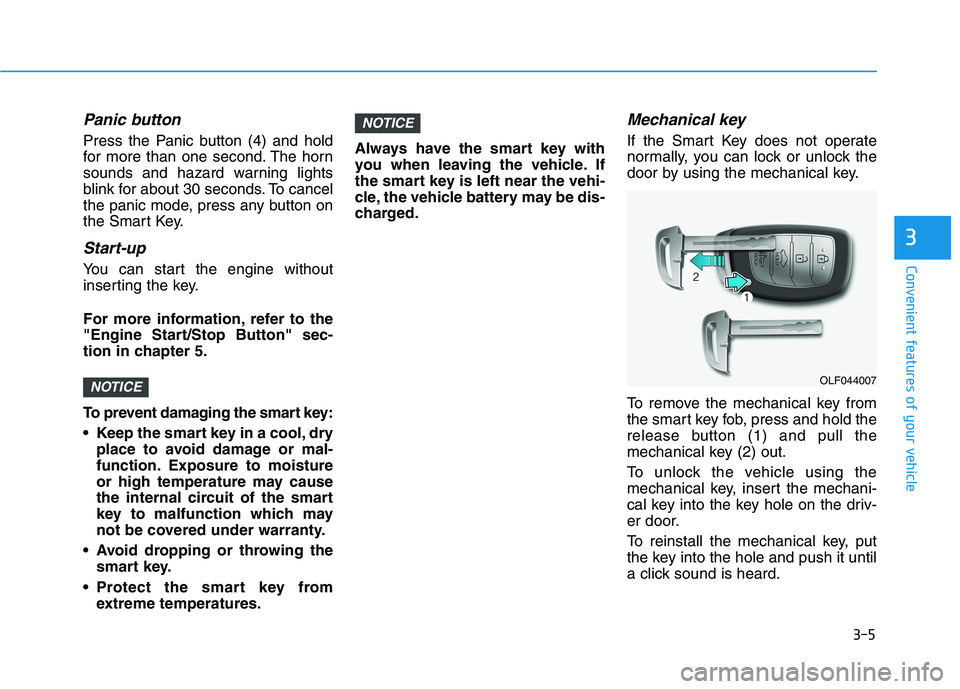
To remove the mechanical key from
the smart key fob, press and hold the
release button (1) and pull the
mechanical key (2) out.
To unlock the vehicle using the
mechanical key, insert the mechani-
cal key into the key hole on the driv-
er door.
To reinstall the mechanical key, put
the key into the hole and push it until
a click sound is heard.
NOTICE
NOTICEOLF044007
Page 143 of 546
3-7
Convenient features of your vehicle
3
Information
This device complies with Industry
Canada RSS-210 standard(s).
Operation is subject to the following
three conditions:
1. This device may not cause interfer- ence.
2. This device must accept any inter- ference, including interference that
may cause undesired operation of
the device.
3. Changes or modifications not expressly approved by the party
responsible for compliance could
void the user’s authority to operate
the device.Battery replacement
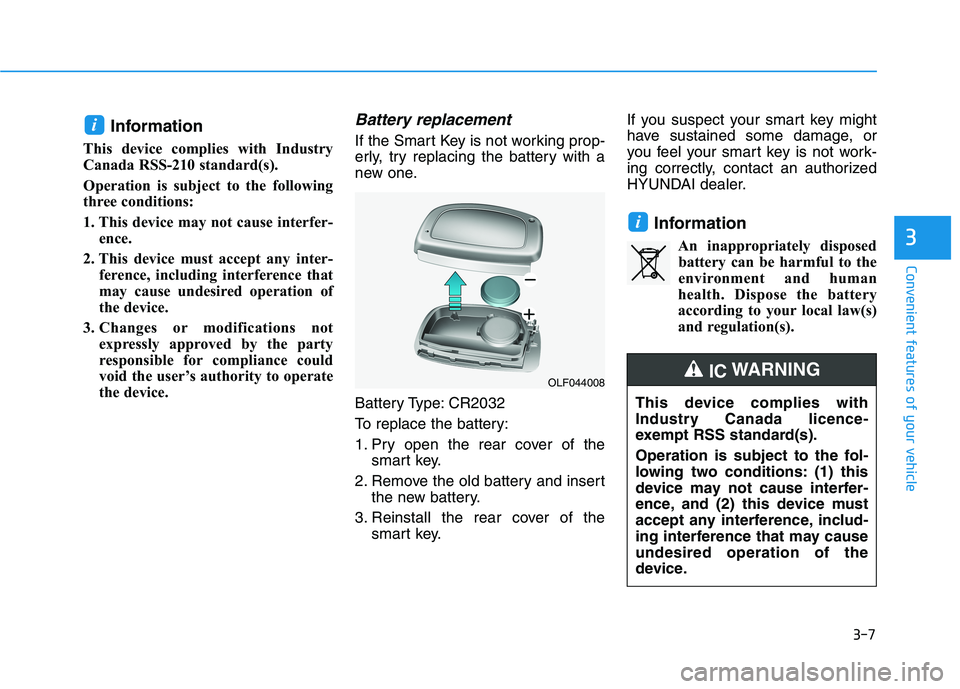
If the Smart Key is not working prop-
erly, try replacing the battery with a
new one.
Battery Type: CR2032
To replace the battery:
1. Pry open the rear cover of the smart key.
2. Remove the old battery and insert the new battery.
3. Reinstall the rear cover of the smart key. If you suspect your smart key might
have sustained some damage, or
you feel your smart key is not work-
ing correctly, contact an authorized
HYUNDAI dealer.
InformationAn inappropriately disposedbattery can be harmful to the
environment and human
health. Dispose the battery
according to your local law(s)
and regulation(s).
i
i
OLF044008
This device complies with
Industry Canada licence-
exempt RSS standard(s).
Operation is subject to the fol-
lowing two conditions: (1) this
device may not cause interfer-
ence, and (2) this device must
accept any interference, includ-
ing interference that may causeundesired operation of the
device.
IC WARNING
Page 144 of 546
3-8
Convenient features of your vehicle
Immobilizer System
The immobilizer system protects
your vehicle from theft. If an improp-
erly coded key (or other device) is
used, the engine’s fuel system is dis-
abled.
When the engine Start/Stop button is
in the ON position, the immobilizersystem indicator should come on
briefly, then go off. If the indicator
starts to blink, the system does not
recognize the coding of the key.
Place engine Start/Stop button to the OFF position, then place the engine
Start/Stop button to the ON positionagain.
The system may not recognize your
key’s coding if another immobilizer
key or other metal object (i.e., key
chain) is near the key. The engine
may not start because the metal may
interrupt the transponder signal from
transmitting normally. If the system repeatedly does not
recognize the coding of the key, it is
recommended that you contact your
HYUNDAI dealer.Do not attempt to alter this system or
add other devices to it. Electrical
problems could result that may make
your vehicle inoperable.
The transponder in your key is an
important part of the immobilizer
system. It is designed to give
years of trouble-free service, how-
ever you should avoid exposure to
moisture, static electricity and
rough handling. Immobilizer sys-
tem malfunction could occur.
Information
This device complies with Industry
Canada RSS-210 standard(s).
Operation is subject to the following
three conditions:
1. This device may not cause interfer- ence.
2. This device must accept any inter- ference, including interference that
may cause undesired operation of
the device.
3. Changes or modifications not expressly approved by the party
responsible for compliance could
void the user's authority to operate
the device.
i
NOTICE
In order to prevent theft of your
vehicle, do not leave spare keys
anywhere in your vehicle. Your
immobilizer password is a cus-
tomer unique password andshould be kept confidential.
WARNING
Page 146 of 546
3-10
Convenient features of your vehicle
Operating Door Locks from
Inside the Vehicle
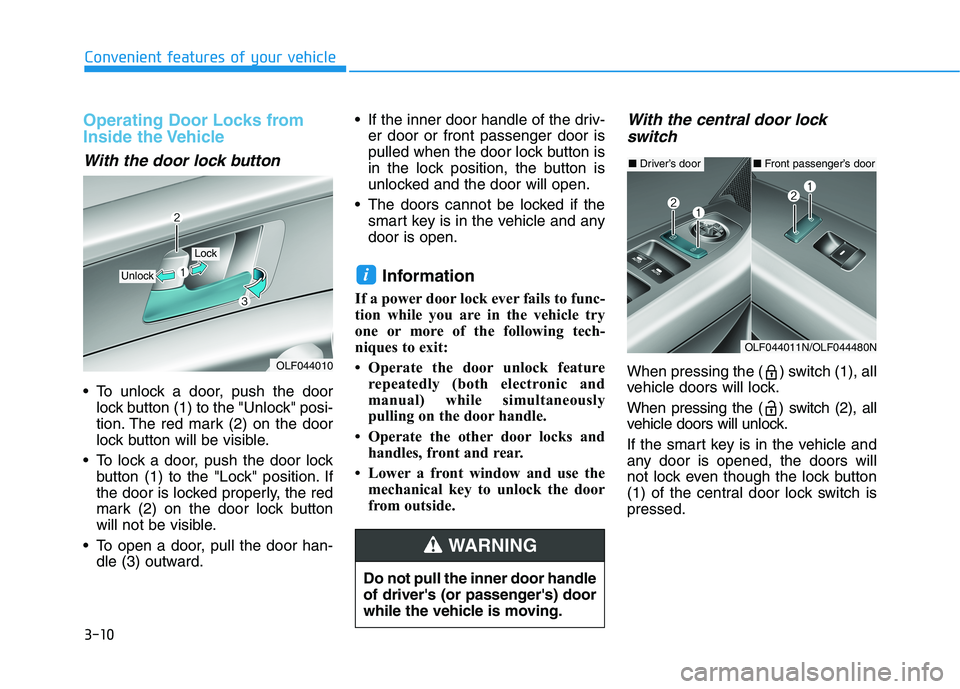
With the door lock button
To unlock a door, push the doorlock button (1) to the "Unlock" posi-
tion. The red mark (2) on the door
lock button will be visible.
To lock a door, push the door lock button (1) to the "Lock" position. If
the door is locked properly, the red
mark (2) on the door lock button
will not be visible.
To open a door, pull the door han- dle (3) outward. If the inner door handle of the driv-
er door or front passenger door is
pulled when the door lock button is
in the lock position, the button is
unlocked and the door will open.
The doors cannot be locked if the smart key is in the vehicle and anydoor is open.
Information
If a power door lock ever fails to func-
tion while you are in the vehicle try
one or more of the following tech-
niques to exit:
Operate the door unlock feature repeatedly (both electronic and
manual) while simultaneously
pulling on the door handle.
Operate the other door locks and handles, front and rear.
Lower a front window and use the mechanical key to unlock the door
from outside.
With the central door lock
switch
When pressing the ( ) switch (1), all
vehicle doors will lock.
When pressing the ( ) switch (2), all
vehicle doors will unlock.
If the smart key is in the vehicle and
any door is opened, the doors will
not lock even though the lock button
(1) of the central door lock switch ispressed.
i
OLF044010
Unlock
Lock
■ Driver’s door
OLF044011N/OLF044480N
■Front passenger’s door
Do not pull the inner door handle
of driver's (or passenger's) door
while the vehicle is moving.
WARNING
Page 147 of 546
3-11
Convenient features of your vehicle
3
The doors should always be
fully closed and locked while
the vehicle is in motion. If the
doors are unlocked, the risk of
being thrown from the vehicle ina crash is increased.
WARNING
Do not leave children or animals
unattended in your vehicle. An
enclosed vehicle can become
extremely hot, causing death or
serious injury to unattended
children or animals who cannot
escape the vehicle. Children
might operate features of the
vehicle that could injure them,
or they could encounter other
harm, possibly from someone
gaining entry to the vehicle.
WARNING
Always secure your vehicle.
Leaving your vehicle unlocked increases the potential risk to
you or others from someone
hiding in your vehicle.
To secure your vehicle, while
depressing the brake, move the
shift lever to the P (Park) posi-
tion, engage the parking brake,
and place engine Start/Stop
button to the OFF position,
close all windows, lock all
doors, and always take the key
with you.
WARNING
Opening a door when some-
thing is approaching may cause
damage or injury. Be careful
when opening doors and watch
for vehicles, motorcycles, bicy-
cles or pedestrians approach-
ing the vehicle in the path of the
door.
CAUTION
If people must spend a longer
time in the vehicle while it is
very hot or cold outside, there
is rick of injuries or danger to
life. Do not lock the vehicle fromthe outside when there are peo-ple in it.
WARNING