automatic transmission HYUNDAI SONATA HYBRID 2019 Owners Manual
[x] Cancel search | Manufacturer: HYUNDAI, Model Year: 2019, Model line: SONATA HYBRID, Model: HYUNDAI SONATA HYBRID 2019Pages: 546, PDF Size: 78.75 MB
Page 65 of 546
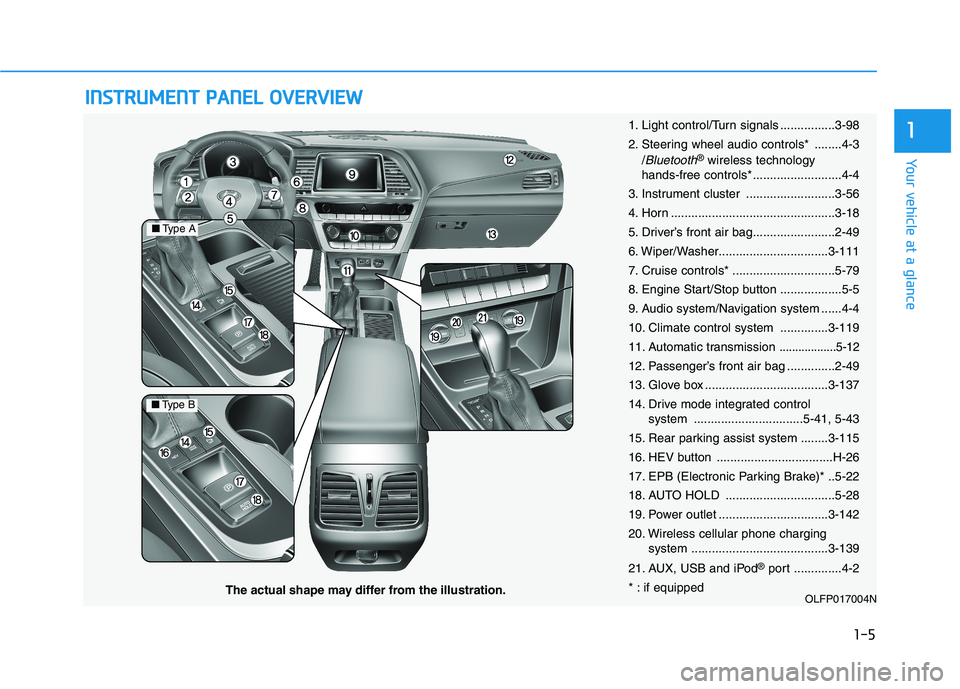
IINN SSTT RR UU MM EENN TT PP AA NN EELL OO VVEERR VV IIEE WW
1-5
Your vehicle at a glance
1
OLFP017004N
■Type A
■Type B
The actual shape may differ from the illustration. 1. Light control/Turn signals ................3-98
2. Steering wheel audio controls* ........4-3
/
Bluetooth®wireless technology
hands-free controls* ..........................4-4
3. Instrument cluster ..........................3-56
4. Horn ................................................3-18
5. Driver’s front air bag........................2-49
6. Wiper/Washer................................3-111
7. Cruise controls* ..............................5-79
8. Engine Start/Stop button ..................5-5
9. Audio system/Navigation system ......4-4
10. Climate control system ..............3-119
11. Automatic transmission
..................5-12
12. Passenger’s front air bag ..............2-49
13. Glove box ....................................3-137
14. Drive mode integrated control system ................................5-41, 5-43
15. Rear parking assist system ........3-115
16. HEV button ..................................H-26
17. EPB (Electronic Parking Brake)* ..5-22
18. AUTO HOLD ................................5-28
19. Power outlet ................................3-142
20. Wireless cellular phone charging system ........................................3-139
21. AUX, USB and iPod ®
port ..............4-2
* : if equipped
Page 81 of 546
2-15
Safety system of your vehicle
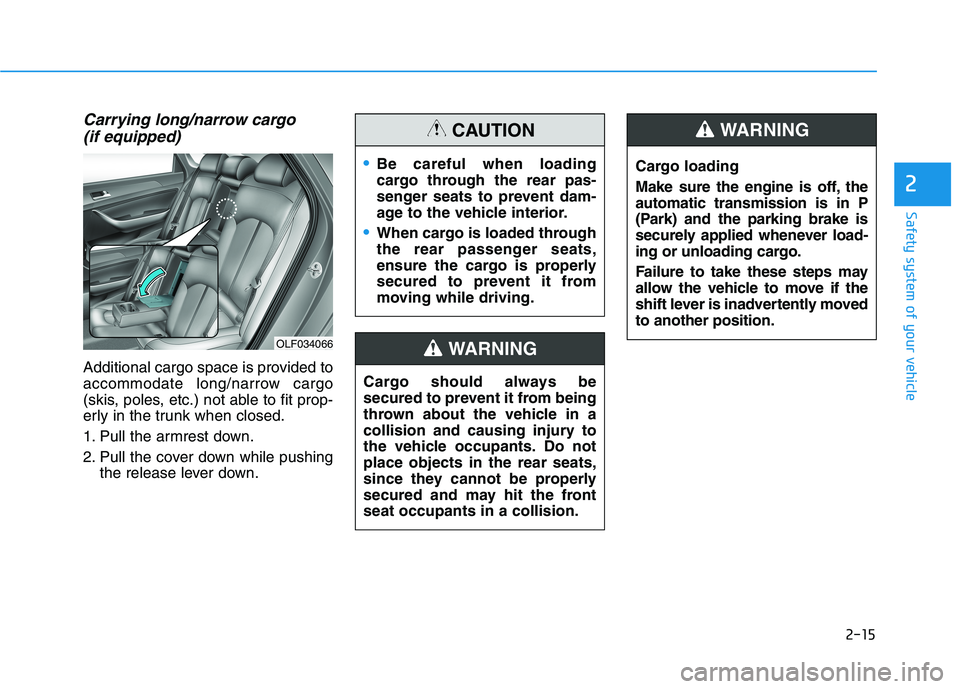
Carrying long/narrow cargo (if equipped)
Additional cargo space is provided to
accommodate long/narrow cargo
(skis, poles, etc.) not able to fit prop-
erly in the trunk when closed.
1. Pull the armrest down.
2. Pull the cover down while pushing the release lever down.
2
Cargo should always be
secured to prevent it from being
thrown about the vehicle in a
collision and causing injury to
the vehicle occupants. Do notplace objects in the rear seats,
since they cannot be properly
secured and may hit the frontseat occupants in a collision.
WARNING
Be careful when loading
cargo through the rear pas-
senger seats to prevent dam-
age to the vehicle interior.
When cargo is loaded through
the rear passenger seats,
ensure the cargo is properly
secured to prevent it from
moving while driving.
CAUTION
OLF034066 Cargo loading
Make sure the engine is off, the automatic transmission is in P
(Park) and the parking brake is
securely applied whenever load-
ing or unloading cargo.
Failure to take these steps may
allow the vehicle to move if the
shift lever is inadvertently movedto another position.
WARNING
Page 206 of 546
3-70
Convenient features of your vehicle
Immobilizer Indicator
This indicator illuminates up to 30
seconds:
When the vehicle detects thesmart key in the vehicle with the
Engine Start/Stop button in the
ACC or ON position.
- You can start the vehicle.
- The indicator light goes off afterstarting the vehicle.
This indicator blinks for a few sec-
onds:
When the smart key is not in the vehicle.
- You cannot start the vehicle.
This indicator illuminates for 2 sec-
onds and goes off:
When the Smart Key is not detect-ed inside the vehicle, when the
Engine Start/Stop button is in theON position.
In this case, have the vehicle
inspected by an authorized
HYUNDAI dealer.
This indicator blinks:
When the Smart Key battery isweak.
- In this case, you cannot start theengine. However, by pressing the
Engine Start/Stop button with the
smart key, you may start the
engine. (For more information,
refer to "Starting the vehicle"
in the chapter 5).
When there is a malfunction with the immobilizer system.
In this case, have the vehicle
inspected by an authorized
HYUNDAI dealer.
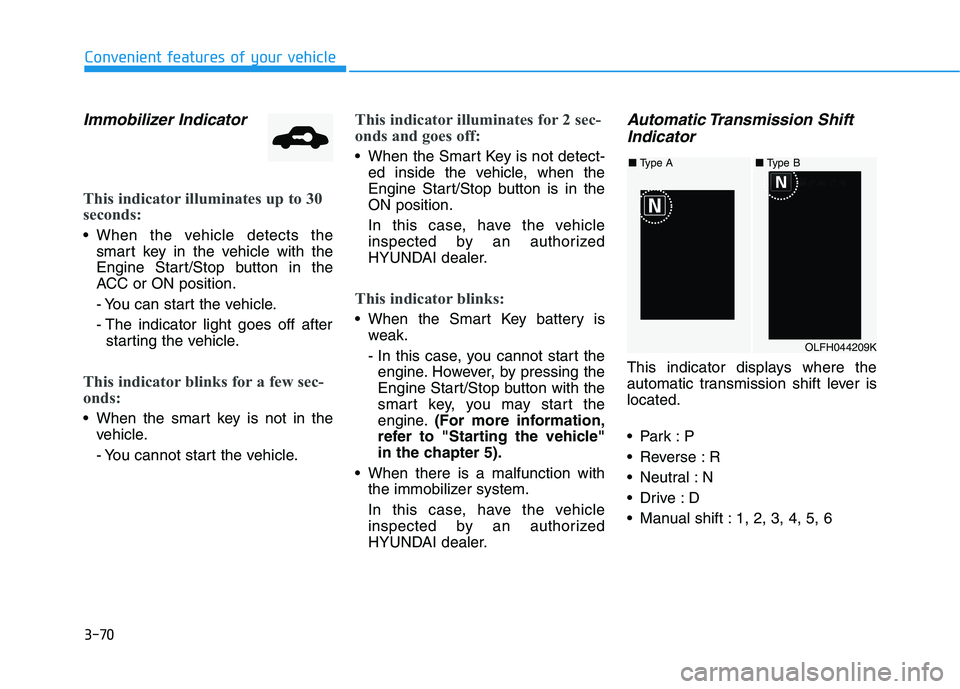
Automatic Transmission Shift
Indicator
This indicator displays where the
automatic transmission shift lever islocated.
Reverse : R
Neutral : N
Manual shift : 1, 2, 3, 4, 5, 6
OLFH044209K
■ Type A■ Type B
Page 225 of 546
3-89
Convenient features of your vehicle
3
SCC Response (Smart CruiseControl)
- Slow/Normal/Fast To adjust the sensitivity of the
Smart Cruise Control system.
For more information, refer to the
"Smart Cruise Control" in chapter5.
AEB (Auton. Emergency Braking)
To activate or deactivate the
Autonomous Emergency Braking(AEB).
For more information, refer to
"Autonomous Emergency Braking
(AEB)" in chapter 5.
FCW (Fwd. Collision Warning)
- Late/Normal/Early To adjust the initial warning alert
time for Autonomous Emergency
Braking system.
For more information, refer to
"Autonomous Emergency Braking
(AEB)" in chapter 5. BSD Sound (Blind Spot Detection)
To activate or deactivate the Blind Spot Detection sound.
For more information, refer to
"Blind Spot Detection" in chapter5.
RCTA (Rear Cross Traffic Alert)
To activate or deactivate the Rear
Cross Traffic Alert system.
For more information, refer to
"Blind Spot Detection" in chapter5.
- Coasting Guide: To activate or
deactivate the Coasting Guide sys- tem.
- Sound: To activate or deactivate the Coasting Guide system sound.
For more information, refer to
"Coasting Guide" in chapter 5. 2. Door
Automatic Lock
- Disable: The auto door lock opera-
tion will be canceled.
- Enable on Speed: All doors will be automatically locked when the
vehicle speed exceeds 15 km/h(9.3 mph).
- Enable on Shift: All doors will be automatically locked if the auto-
matic transmission shift lever is
shifted from the P (Park) position to
the R (Reverse), N (Neutral), or D
(Drive) position.
Page 226 of 546
3-90
Convenient features of your vehicle
Automatic Unlock
- Disable: The auto door unlockoperation will be canceled.
- Vehicle Off: All doors will be auto- matically unlocked when the
Engine Star/Stop button is set to
the OFF position. (if equipped with
smart key)
- On Key Out: All doors will be auto- matically unlocked when the igni-
tion key is removed from the igni-
tion switch. (if equipped with
remote key)
- Driver Door Unlock: All doors will be automatically unlocked when
the driver’s door is opened.
- On Shift to P: All doors will be auto- matically unlocked if the automatic
transmission shift lever is shifted to
the P (Park) position.
Smart Trunk
To activate or deactivate the Smart
Trunk system.
For more details, refer to "Smart
Trunk" in this chapter. 3. Lights
One Touch Turn Signal
- Off: The one touch turn signal func-
tion will be deactivated.
- 3, 5, 7 Flashes: The turn signal indicator will blink 3, 5, or 7 times
when the turn signal lever is moved
slightly.
For more information, refer to
"Light" in this chapter.
Head Lamp Delay
To activate or deactivate the head-
lamp delay function.
For more information, refer to
"Light" in this chapter
Welcome Light
To activate or deactivate the wel- come light function.
For more information, refer to
"Light" in this chapter. 4. Sound
Park Assist Volume
- Softer/Louder
To adjust the Park Assist System
volume.
Welcome Sound
To activate or deactivate the wel- come sound.
Page 291 of 546
Driving your vehicle
Before driving.........................................................5-4Before entering the vehicle ...........................................5-4
Before starting...................................................................5-4
Engine start/stop button ......................................5-5 Illuminated Engine Start/Stop button ..........................5-6
Engine Stop/Start button positions ..............................5-7
Starting the hybrid system .............................................5-9
Automatic transmission .......................................5-12 Automatic transmission operation ..............................5-12
Parking ...............................................................................5-17
Good driving practices ...................................................5-17
Braking system.....................................................5-19 Power brakes ...................................................................5-19
Disc brakes wear indicator ...........................................5-20
Foot parking brake .........................................................5-20
Electronic Parking Brake (EPB)...................................5-22
AUTO HOLD ......................................................................5-28
Anti-lock Brake System (ABS) ....................................5-32
Electronic Stability Control (ESC)................................5-34
Vehicle Stability Management (VSM).........................5-38
Hill-Start Assist Control (HAC) ....................................5-39
Good braking practices..................................................5-40 Drive mode integrated control system .............5-41
Hybrid vehicle ..................................................................5-41
Plug-in hybrid vehicle....................................................5-43
Blind Spot Detection system (BSD) ..................5-45 BSD (Blind Spot Detection) /
LCA (Lane Change Assist) .............................................5-46RCTA (Rear Cross Traffic Alert) ..................................5-49
Limitations of the system .............................................5-52
Lane Keeping Assist System (LKAS) .................5-53 LKAS operation ................................................................5-54
LKAS malfunction............................................................5-58
LKAS function change ...................................................5-60
Limitations of the System .............................................5-61
Driver Attention Alert system (DAA) ................5-62 System setting and activation......................................5-62
Resetting the system .....................................................5-64
System standby ...............................................................5-64
System malfunction ........................................................5-64
Automatic Emergency Braking (AEB) ...............5-67 System setting and activation......................................5-67
AEB warning message and system control ..............5-69
AEB front radar sensor .................................................5-72
System malfunction ........................................................5-73
Limitations of the system .............................................5-75
5
Page 302 of 546
5-12
Driving your vehicle
Automatic transmission opera- tion
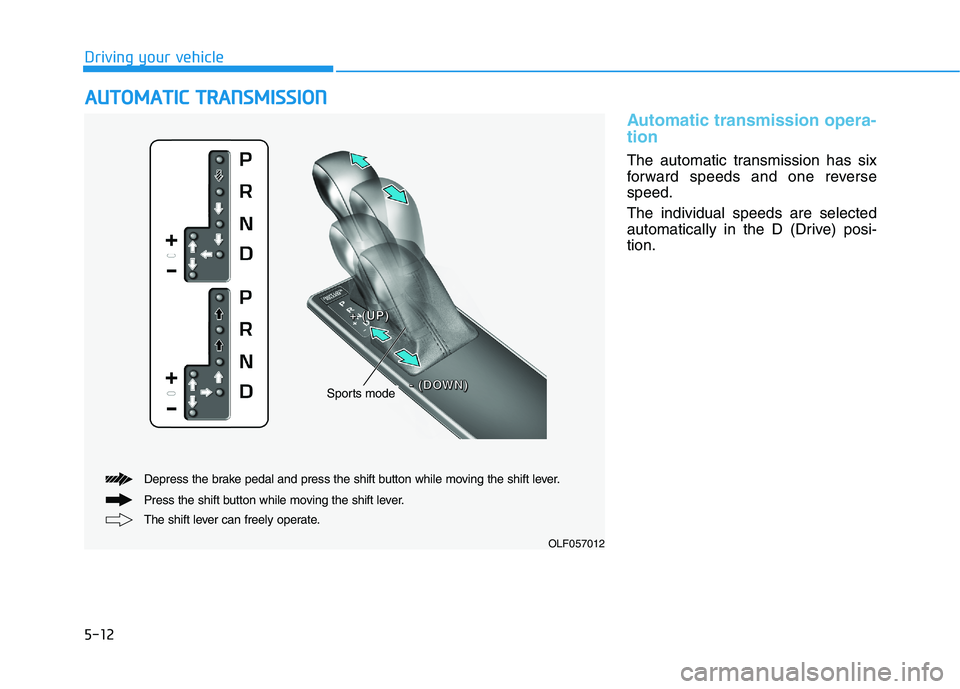
The automatic transmission has six
forward speeds and one reversespeed. The individual speeds are selected
automatically in the D (Drive) posi-tion.
AAUU TTOO MM AATTIICC TT RR AA NN SSMM IISS SSIIOO NN
The shift lever can freely operate.
Depress the brake pedal and press the shift button while moving the shift lever.
Press the shift button while moving the shift lever.
Sports mode
++++ ((((UUUUPPPP))))
---- ((((DDDDOOOOWWWWNNNN))))
OLF057012
Page 304 of 546
5-14
Driving your vehicle
R (Reverse)
Use this position to drive the vehicle
backward.
Always come to a complete stop
before shifting into or out of R
(Reverse); you may damage the
transmission if you shift into R
(Reverse) while the vehicle is inmotion.
N (Neutral)
The wheels and transmission are not
engaged. The vehicle will roll freely
even on the slightest incline unless
the parking brake or service brakesare applied.
D (Drive)
This is the normal driving position.
The transmission will automatically
shift through a 6-gear sequence, pro-
viding the best fuel economy and
power.
For extra power when passing anoth-
er vehicle or driving uphill, depress
the accelerator fully. The transmis-
sion will automatically downshift to
the next lower gear (or gears, as
appropriate).
The DRIVE MODE switch, located
on the shift lever console, allows the
driver to switch from NORMAL mode
to SPORT or ECO mode.
For more information, refer to
"Drive Mode Integrated Control
System" later in this chapter.
NOTICE
Page 305 of 546
5-15
Driving your vehicle
5
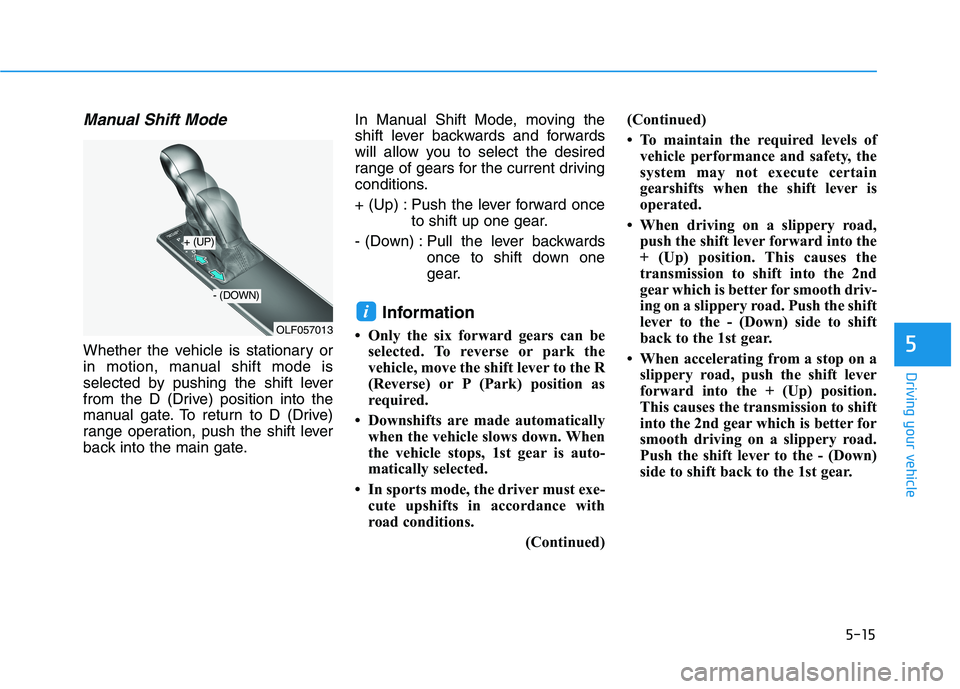
Manual Shift Mode
Whether the vehicle is stationary or
in motion, manual shift mode is
selected by pushing the shift lever
from the D (Drive) position into the
manual gate. To return to D (Drive)
range operation, push the shift lever
back into the main gate.In Manual Shift Mode, moving the
shift lever backwards and forwards
will allow you to select the desired
range of gears for the current driving
conditions.
+ (Up) : Push the lever forward once
to shift up one gear.
- (Down) : Pull the lever backwards once to shift down one
gear.
Information
Only the six forward gears can be selected. To reverse or park the
vehicle, move the shift lever to the R
(Reverse) or P (Park) position as
required.
Downshifts are made automatically when the vehicle slows down. When
the vehicle stops, 1st gear is auto-
matically selected.
In sports mode, the driver must exe- cute upshifts in accordance with
road conditions.
(Continued)(Continued)
To maintain the required levels of
vehicle performance and safety, the
system may not execute certain
gearshifts when the shift lever is
operated.
When driving on a slippery road, push the shift lever forward into the
+ (Up) position. This causes the
transmission to shift into the 2nd
gear which is better for smooth driv-
ing on a slippery road. Push the shift
lever to the - (Down) side to shift
back to the 1st gear.
When accelerating from a stop on a slippery road, push the shift lever
forward into the + (Up) position.
This causes the transmission to shift
into the 2nd gear which is better for
smooth driving on a slippery road.
Push the shift lever to the - (Down)
side to shift back to the 1st gear.
i
OLF057013
+ (UP)
- (DOWN)
Page 306 of 546
5-16
Driving your vehicle
Shift-lock system
For your safety, the automatic trans-
mission has a shift-lock system
which prevents shifting the transmis-
sion from P (Park) into R (Reverse)
unless the brake pedal is depressed.
To shift the transmission from P
(Park) into R (Reverse):
1. Depress and hold the brake pedal.
2. Start the hybrid system or placethe Engine Start/Stop button in the ON position.
3. Move the shift lever.
Shift-lock release
If the shift lever cannot be moved
from the P (Park) position into R
(Reverse) position with the brake
pedal depressed, continue depress-
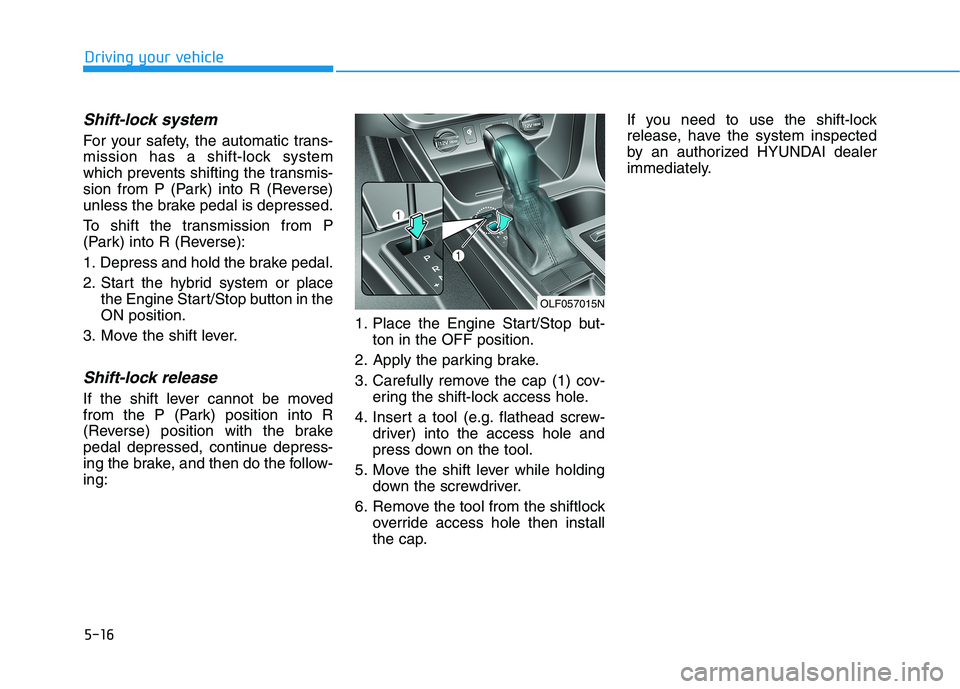
ing the brake, and then do the follow-ing: 1. Place the Engine Start/Stop but-
ton in the OFF position.
2. Apply the parking brake.
3. Carefully remove the cap (1) cov- ering the shift-lock access hole.
4. Insert a tool (e.g. flathead screw- driver) into the access hole and
press down on the tool.
5. Move the shift lever while holding down the screwdriver.
6. Remove the tool from the shiftlock override access hole then install
the cap. If you need to use the shift-lock
release, have the system inspected
by an authorized HYUNDAI dealer
immediately.
OLF057015N