warning HYUNDAI SONATA HYBRID 2020 Manual Online
[x] Cancel search | Manufacturer: HYUNDAI, Model Year: 2020, Model line: SONATA HYBRID, Model: HYUNDAI SONATA HYBRID 2020Pages: 527, PDF Size: 64.14 MB
Page 132 of 527
Instrument Cluster
4-28
OOSEV048172L
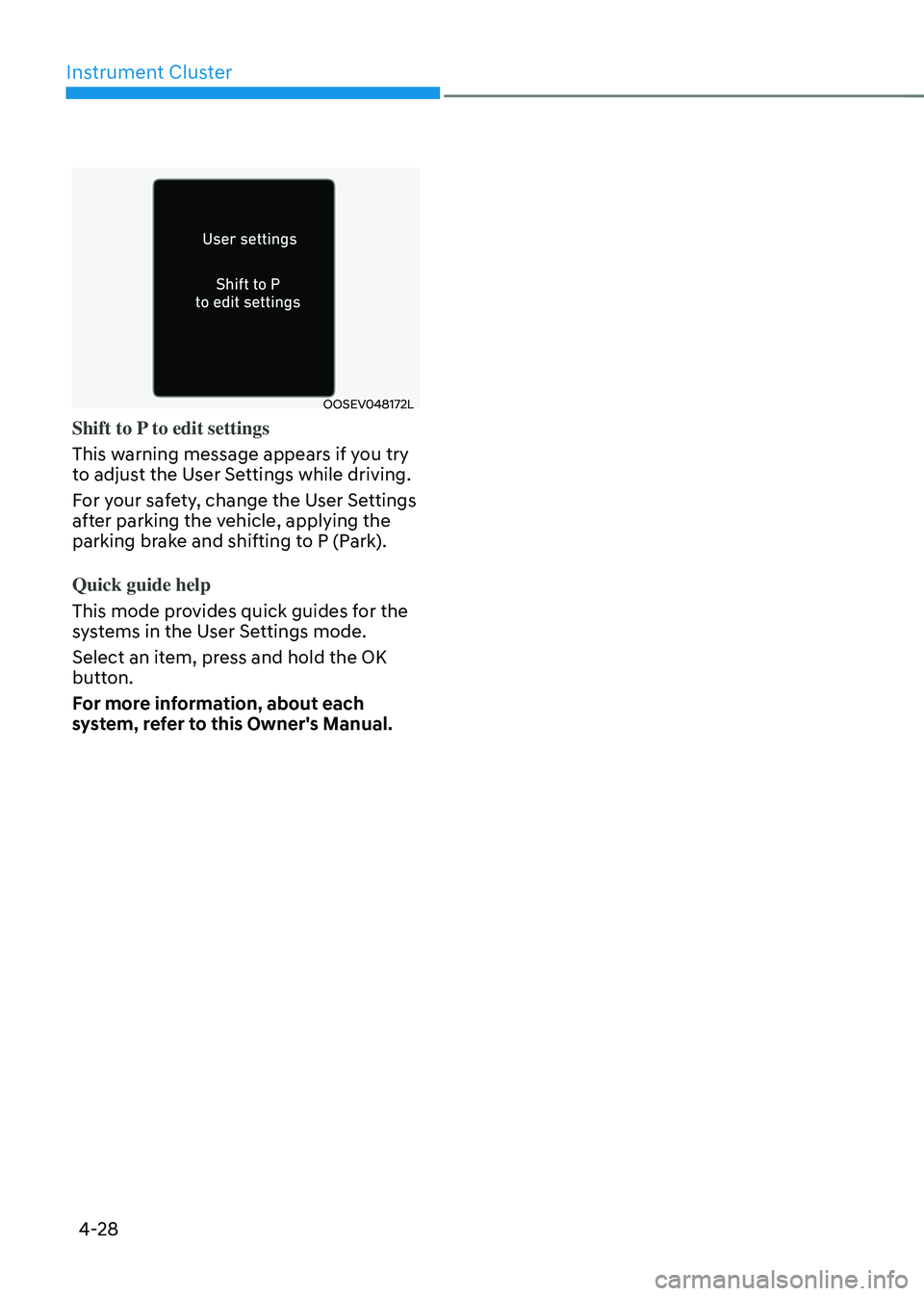
Shift to P to edit settings
This warning message appears if you try
to adjust the User Settings while driving.
For your safety, change the User Settings
after parking the vehicle, applying the
parking brake and shifting to P (Park).
Quick guide help
This mode provides quick guides for the
systems in the User Settings mode.
Select an item, press and hold the OK
button.
For more information, about each
system, refer to this Owner's Manual.
Page 134 of 527
Instrument Cluster
4-30
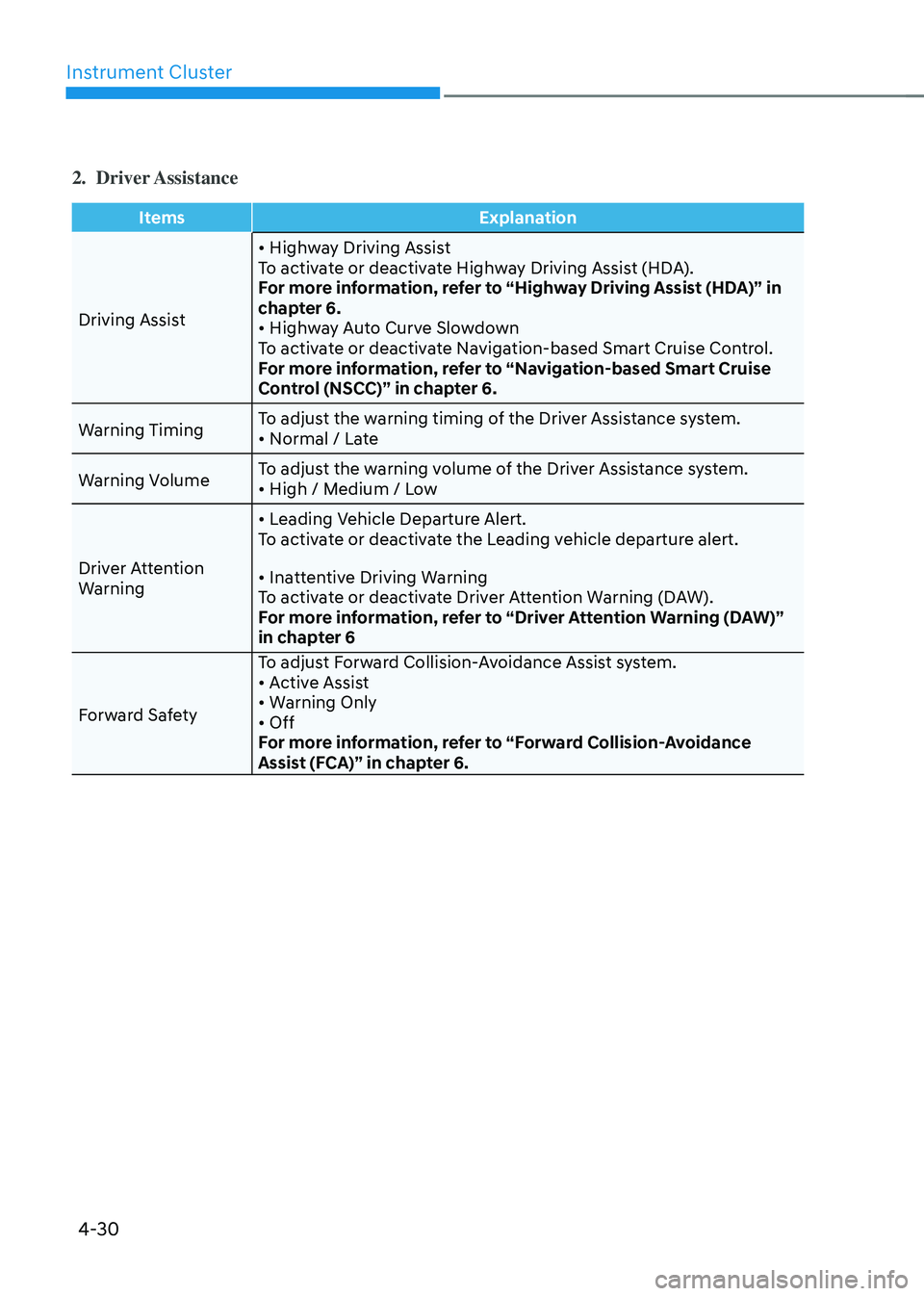
2. Driver Assistance
ItemsExplanation
Driving Assist
• Highway Driving AssistTo activate or deactivate Highway Driving Assist (HDA).
For more information, refer to “Highway Driving Assist (HDA)” in
chapter 6.
• Highway Auto Curve SlowdownTo activate or deactivate Navigation-based Smart Cruise Control.
For more information, refer to “Navigation-based Smart Cruise
Control (NSCC)” in chapter 6.
Warning Timing To adjust the warning timing of the Driver Assistance system.
• Normal / Late
Warning VolumeTo adjust the warning volume of the Driver Assistance system.• High / Medium / Low
Driver Attention
Warning
• Leading Vehicle Departure Alert.To activate or deactivate the Leading vehicle departure alert.
• Inattentive Driving WarningTo activate or deactivate Driver Attention Warning (DAW).
For more information, refer to “Driver Attention Warning (DAW)”
in chapter 6
Forward Safety To adjust Forward Collision-Avoidance Assist system.
• Active Assist• Warning Only• OffFor more information, refer to “Forward Collision-Avoidance
Assist (FCA)” in chapter 6.
Page 135 of 527
04
4-31
ItemsExplanation
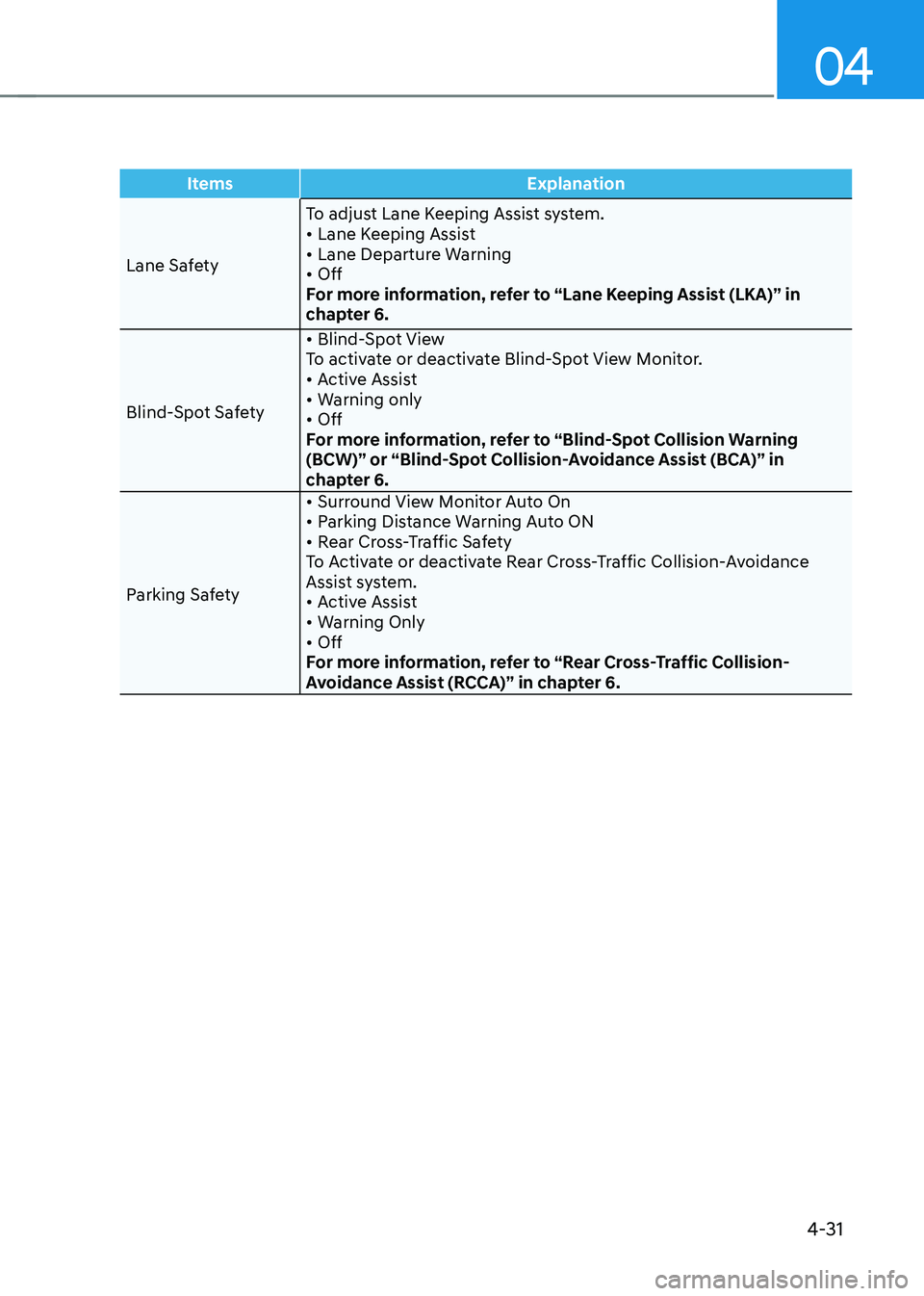
Lane Safety To adjust Lane Keeping Assist system.
• Lane Keeping Assist• Lane Departure Warning• OffFor more information, refer to “Lane Keeping Assist (LKA)” in
chapter 6.
Blind-Spot Safety
• Blind-Spot ViewTo activate or deactivate Blind-Spot View Monitor.• Active Assist• Warning only• OffFor more information, refer to “Blind-Spot Collision Warning
(BCW)” or “Blind-Spot Collision-Avoidance Assist (BCA)” in
chapter 6.
Parking Safety
• Surround View Monitor Auto On• Parking Distance Warning Auto ON • Rear Cross-Traffic Safety To Activate or deactivate Rear Cross-Traffic Collision-Avoidance
Assist system.
• Active Assist• Warning Only• Off For more information, refer to “Rear Cross-Traffic Collision-
Avoidance Assist (RCCA)” in chapter 6.
Page 145 of 527
04
4-41
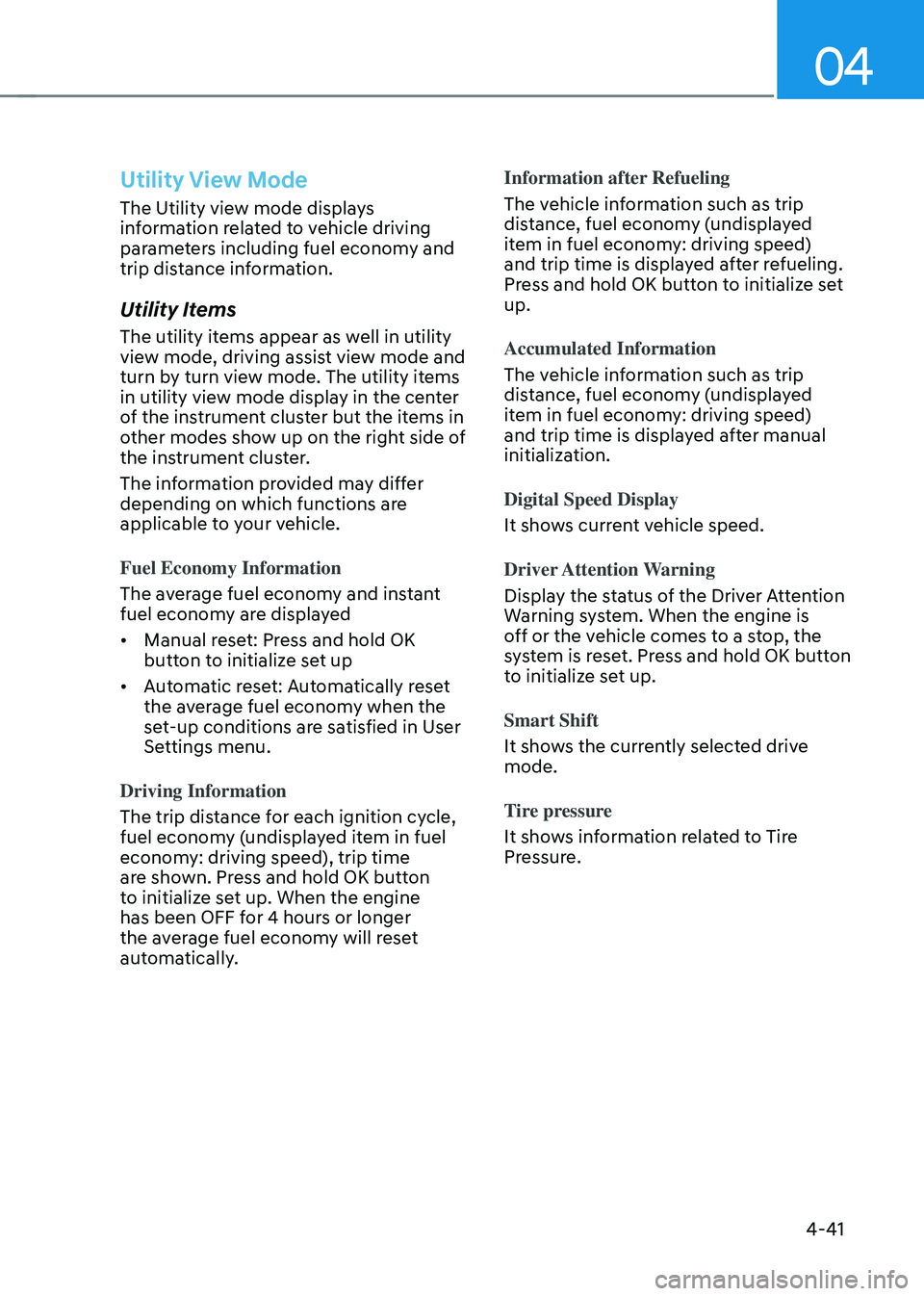
Utility View Mode
The Utility view mode displays
information related to vehicle driving
parameters including fuel economy and
trip distance information.
Utility Items
The utility items appear as well in utility
view mode, driving assist view mode and
turn by turn view mode. The utility items
in utility view mode display in the center
of the instrument cluster but the items in
other modes show up on the right side of
the instrument cluster.
The information provided may differ
depending on which functions are
applicable to your vehicle.
Fuel Economy Information
The average fuel economy and instant
fuel economy are displayed
• Manual reset: Press and hold OK
button to initialize set up
• Automatic reset: Automatically reset
the average fuel economy when the
set-up conditions are satisfied in User
Settings menu.
Driving Information
The trip distance for each ignition cycle,
fuel economy (undisplayed item in fuel
economy: driving speed), trip time
are shown. Press and hold OK button
to initialize set up. When the engine
has been OFF for 4 hours or longer
the average fuel economy will reset
automatically. Information after Refueling
The vehicle information such as trip
distance, fuel economy (undisplayed
item in fuel economy: driving speed)
and trip time is displayed after refueling.
Press and hold OK button to initialize set
up.
Accumulated Information
The vehicle information such as trip
distance, fuel economy (undisplayed
item in fuel economy: driving speed)
and trip time is displayed after manual
initialization.
Digital Speed Display
It shows current vehicle speed.
Driver Attention Warning
Display the status of the Driver Attention
Warning system. When the engine is
off or the vehicle comes to a stop, the
system is reset. Press and hold OK button
to initialize set up.
Smart Shift
It shows the currently selected drive
mode.
Tire pressure
It shows information related to Tire
Pressure.
Page 146 of 527
Instrument Cluster
4-42
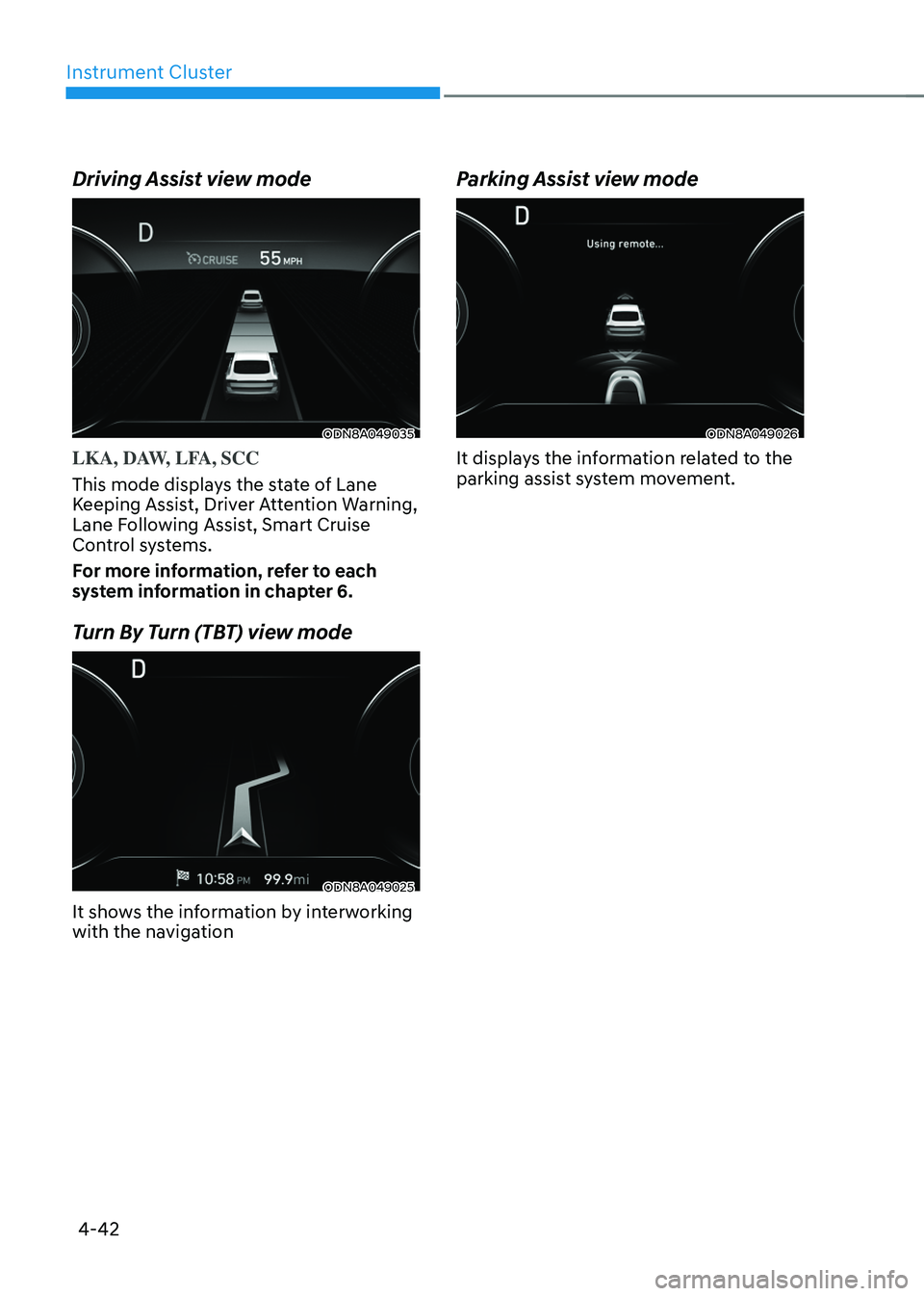
Driving Assist view mode
ODN8A049035
LKA, DAW, LFA, SCC
This mode displays the state of Lane
Keeping Assist, Driver Attention Warning,
Lane Following Assist, Smart Cruise
Control systems.
For more information, refer to each
system information in chapter 6.
Turn By Turn (TBT) view mode
ODN8A049025
It shows the information by interworking
with the navigation
Parking Assist view mode
ODN8A049026
It displays the information related to the
parking assist system movement.
Page 147 of 527
04
4-43
Option Menu
WARNING
While driving, please do not change
the setting mode. It may distract your
attention and cause an accident.
NOTICE
Displayed items may differ from the
content in this owner’s manual since
the contents vary with the vehicle’s
technical specifications.
ListSet-up messages
Service Interval Check the service
message
Head-up Display To activate or
deactivate head-up
display
Set up the height,
rotation and brightness
(if equipped)
Warning Time •
Normal/Later
To select when to
provide a warning for
all driver assistance
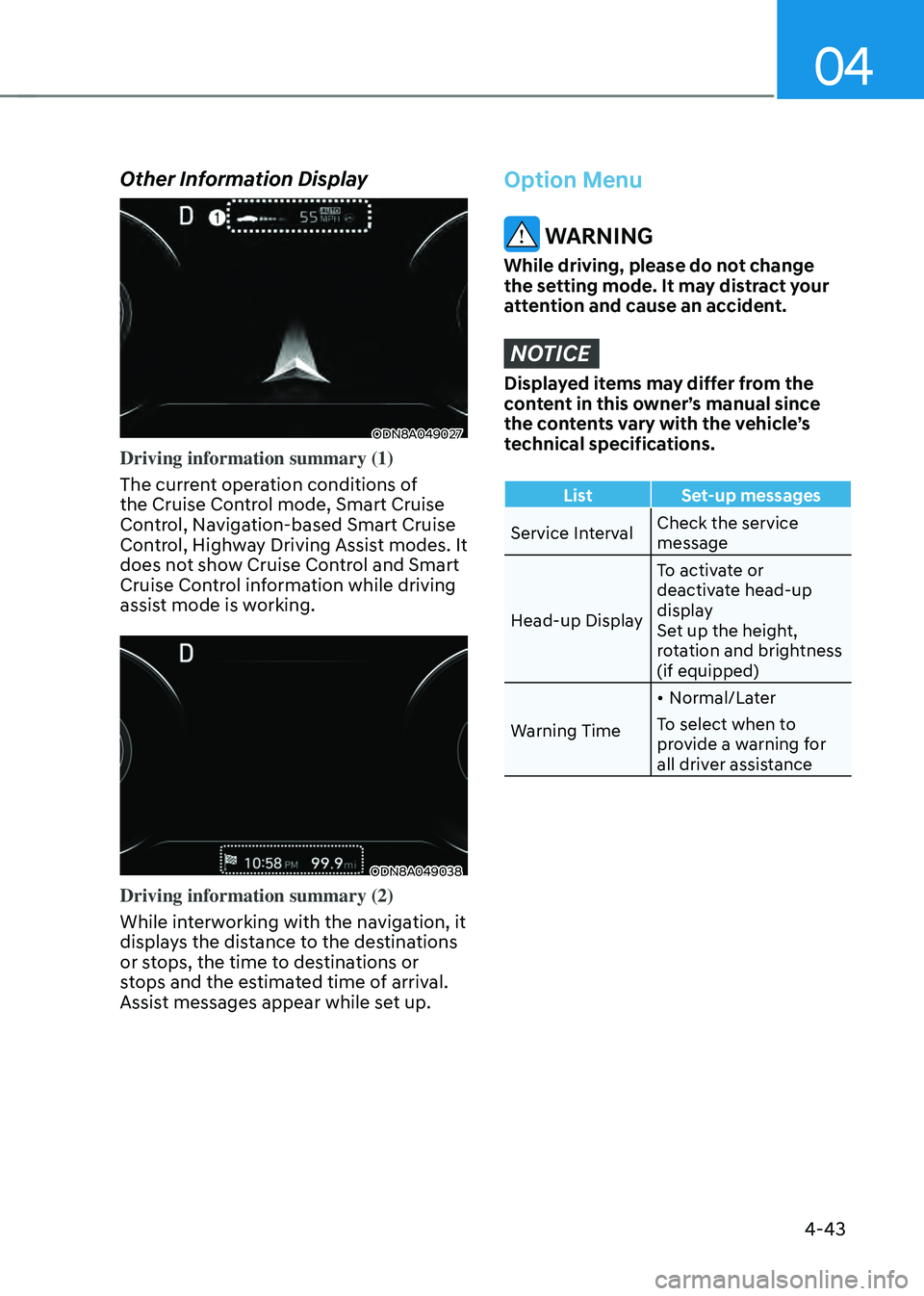
Other Information Display
ODN8A049027
Driving information summary (1)
The current operation conditions of
the Cruise Control mode, Smart Cruise
Control, Navigation-based Smart Cruise
Control, Highway Driving Assist modes. It
does not show Cruise Control and Smart
Cruise Control information while driving
assist mode is working.
ODN8A049038
Driving information summary (2)
While interworking with the navigation, it
displays the distance to the destinations
or stops, the time to destinations or
stops and the estimated time of arrival.
Assist messages appear while set up.
Page 148 of 527
Instrument Cluster
4-44
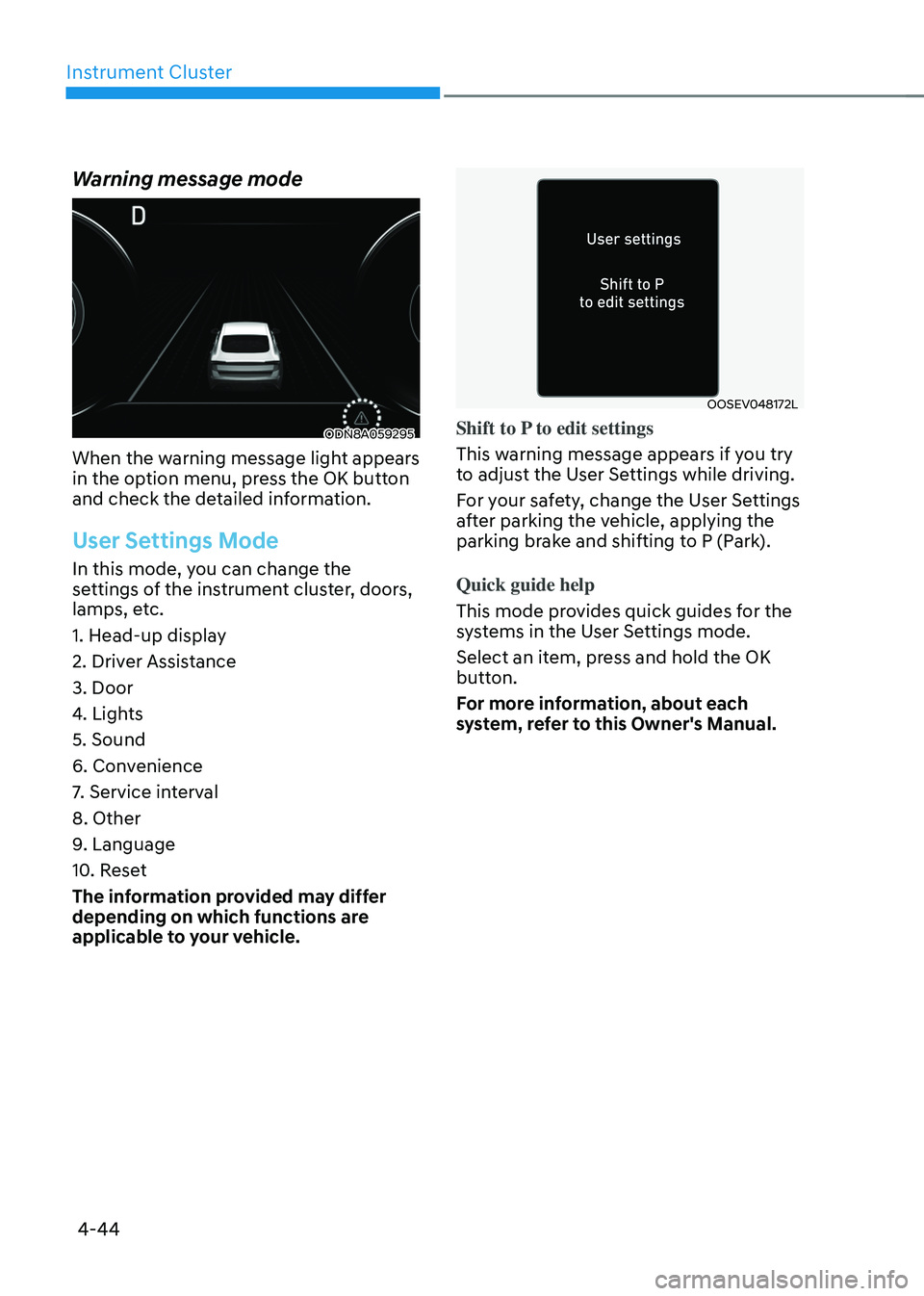
Warning message mode
ODN8A059295
When the warning message light appears
in the option menu, press the OK button
and check the detailed information.
User Settings Mode
In this mode, you can change the
settings of the instrument cluster, doors,
lamps, etc.
1. Head-up display
2. Driver Assistance
3. Door
4. Lights
5. Sound
6. Convenience
7. Service interval
8. Other
9. Language
10. Reset
The information provided may differ
depending on which functions are
applicable to your vehicle.
OOSEV048172L
Shift to P to edit settings
This warning message appears if you try
to adjust the User Settings while driving.
For your safety, change the User Settings
after parking the vehicle, applying the
parking brake and shifting to P (Park).
Quick guide help
This mode provides quick guides for the
systems in the User Settings mode.
Select an item, press and hold the OK
button.
For more information, about each
system, refer to this Owner's Manual.
Page 150 of 527

5
Closing the Sunroof ........................................................................\
...........................5-57
Resetting the Sunroof ........................................................................\
........................5-58
Sunroof Open Warning ........................................................................\
......................5-58
Solar Roof ........................................................................\
................................5-59How to Use ........................................................................\
.........................................5-59
Battery Charging Amount ........................................................................\
..................5-59
Solar Roof Operation Lamp ........................................................................\
...............5-59
Check Solar Roof Operation ........................................................................\
..............5-59
Consume and Generating amount up to environmental condition ......................5-60
System Malfunction ........................................................................\
...........................5-61
Exterior Features ........................................................................\
.....................5-62Hood ........................................................................\
....................................................5-62
Trunk ........................................................................\
....................................................5-63
Emergency Trunk Safety Release ........................................................................\
.....5-64
Fuel Filler Door ........................................................................\
..................................5-68
Head Up Display (HUD) ........................................................................\
..........5-70
Lighting
........................................................................\
.....................................5-72Exterior Lights ........................................................................\
....................................5-72
Interior Lights ........................................................................\
.....................................5-78
Welcome System ........................................................................\
................................5-81
Wipers and Washers ........................................................................\
...............5-82Windshield Wipers ........................................................................\
.............................5-82
Windshield Washers ........................................................................\
...........................5-83
Rear View Monitor (RVM) ........................................................................\
.......5-84Rear View Monitor with Parking Guidance ..............................................................5-84
Rear View Monitor - Top View ........................................................................\
..........5-84
Surround View Monitor (SVM) .......................................................................5-86
Reverse Parking Distance Warning (PDW)
....................................................5-87Operation of Reverse Parking Distance Warning System ........................................5-87
To Turn off Reverse Parking Distance Warning System ..........................................5-89
Non-Operational Conditions of Reverse Parking Distance Warning System ........5-89
Reverse Parking Distance Warning System Precautions ........................................5-90
Page 151 of 527
5
Forward/Reverse Parking Distance Warning (PDW) .....................................5-91Operation of Forward/Reverse Parking Distance Warning System ........................5-92
Non-Operational Conditions of Forward/
Reverse Parking Distance Warning System
.............................................................5-94
Forward/Reverse Parking Distance Warning System Precautions ........................5-94
Reverse Parking Collision-Avoidance Assist (PCA) .......................................5-95System Setting and Operation ........................................................................\
..........5-95
Warning and System Control ........................................................................\
............5-96
Detecting Sensor ........................................................................\
...............................5-98
System Malfunction ........................................................................\
..........................5-99
Limitations of the System ........................................................................\
.................5-99
Automatic Climate Control System ..............................................................5-101Automatic Heating and Air Conditioning ...............................................................5-102
Manual Temperature Control Mode ........................................................................\
5-103
System Operation ........................................................................\
.............................5-109
System Maintenance ........................................................................\
.........................5-111
Windshield Defrosting and Defogging ..........................................................5-113To Defog Inside Windshield ........................................................................\
..............5-113
To Defog Outside Windshield ........................................................................\
...........5-114
Defogging Logic ........................................................................\
................................5-114
Auto Defogging System ........................................................................\
....................5-115
Defroster ........................................................................\
............................................5-116
Climate Control Additional Features .............................................................5-117Sunroof Inside Air Recirculation ........................................................................\
.......5-117
Automatic Ventilation ........................................................................\
.......................5-117
Smart Seat Warmer/Air Ventilation Seat
(Automatic Control Interworking with the Driver’s Seat System)
..........................5-117
Washer Fluid Logic ........................................................................\
............................5-117
Storage Compartment ........................................................................\
...........5-118Center Console Storage ........................................................................\
....................5-118
Glove Box ........................................................................\
...........................................5-118
5. Convenient Features
Page 153 of 527
05
5-5
Smart Key
ODN8H050007N
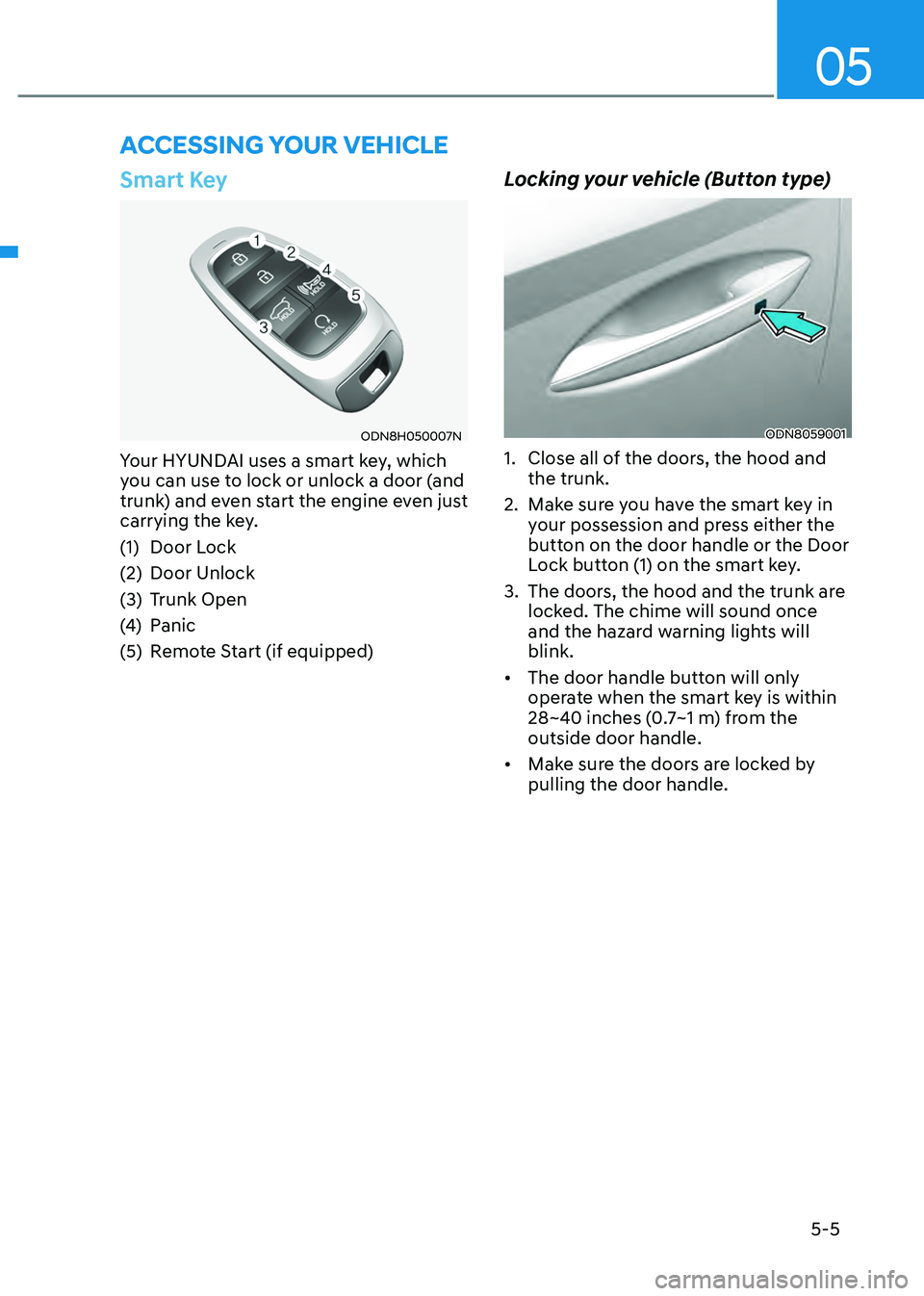
Your HYUNDAI uses a smart key, which
you can use to lock or unlock a door (and
trunk) and even start the engine even just
carrying the key.
(1) Door Lock
(2) Door Unlock
(3) Trunk Open
(4) Panic
(5) Remote Start (if equipped)
Locking your vehicle (Button type)
ODN8059001
1. Close all of the doors, the hood and
the trunk.
2. Make sure you have the smart key in
your possession and press either the
button on the door handle or the Door
Lock button (1) on the smart key.
3. The doors, the hood and the trunk are
locked. The chime will sound once
and the hazard warning lights will
blink.
• The door handle button will only
operate when the smart key is within
28~40 inches (0.7~1 m) from the
outside door handle.
• Make sure the doors are locked by
pulling the door handle.
ACCESSING YOUR VEHICLE