Door Unlock HYUNDAI SONATA HYBRID 2022 Owners Manual
[x] Cancel search | Manufacturer: HYUNDAI, Model Year: 2022, Model line: SONATA HYBRID, Model: HYUNDAI SONATA HYBRID 2022Pages: 527, PDF Size: 64.14 MB
Page 124 of 527
Instrument Cluster
4-20
Press START button with key
This warning message is displayed if you
press the Engine Start/Stop button while
the warning message "Key not detected"
is displayed.
At this time, the immobilizer indicator
light blinks.
Check BRAKE SWITCH fuse
This warning message is displayed if the
brake switch fuse is disconnected.
You need to replace the fuse with a new
one before starting the engine.
If that is not possible, you can start the
engine by pressing the Engine Start/
Stop button for 10 seconds in the ACC
position.
Press START button while turning
wheel
This message is displayed if the steering
wheel does not unlock normally when
the Engine Start/Stop button is pressed.
You should press the Engine Start/Stop
button while turning the steering wheel
right and left.
Check steering wheel lock system
This message is displayed if the steering
wheel does not lock normally while the
Engine Start/Stop button is pressed to
the OFF position.
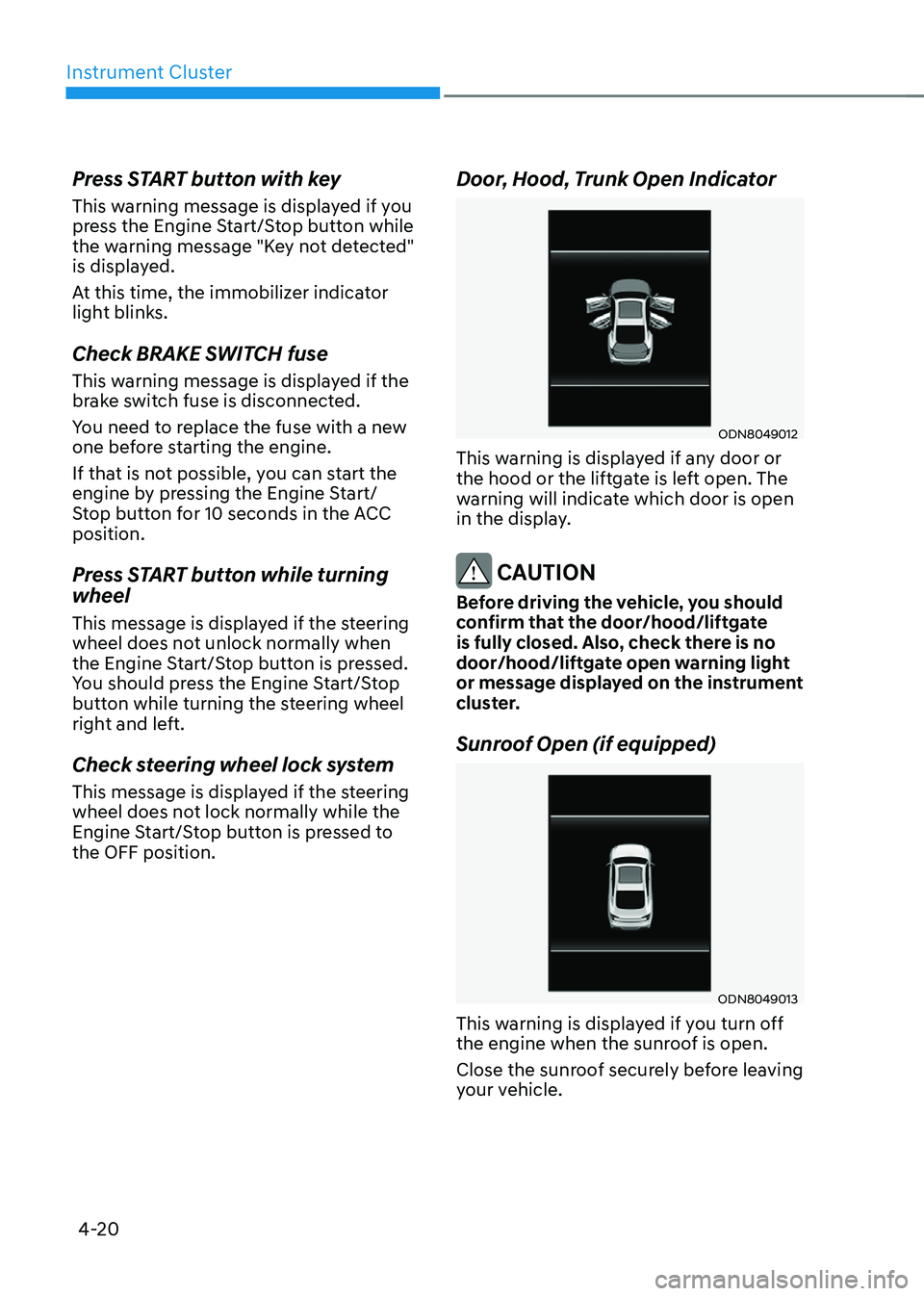
Door, Hood, Trunk Open Indicator
ODN8049012
This warning is displayed if any door or
the hood or the liftgate is left open. The
warning will indicate which door is open
in the display.
CAUTION
Before driving the vehicle, you should
confirm that the door/hood/liftgate
is fully closed. Also, check there is no
door/hood/liftgate open warning light
or message displayed on the instrument
cluster.
Sunroof Open (if equipped)
ODN8049013
This warning is displayed if you turn off
the engine when the sunroof is open.
Close the sunroof securely before leaving
your vehicle.
Page 129 of 527
04
4-25
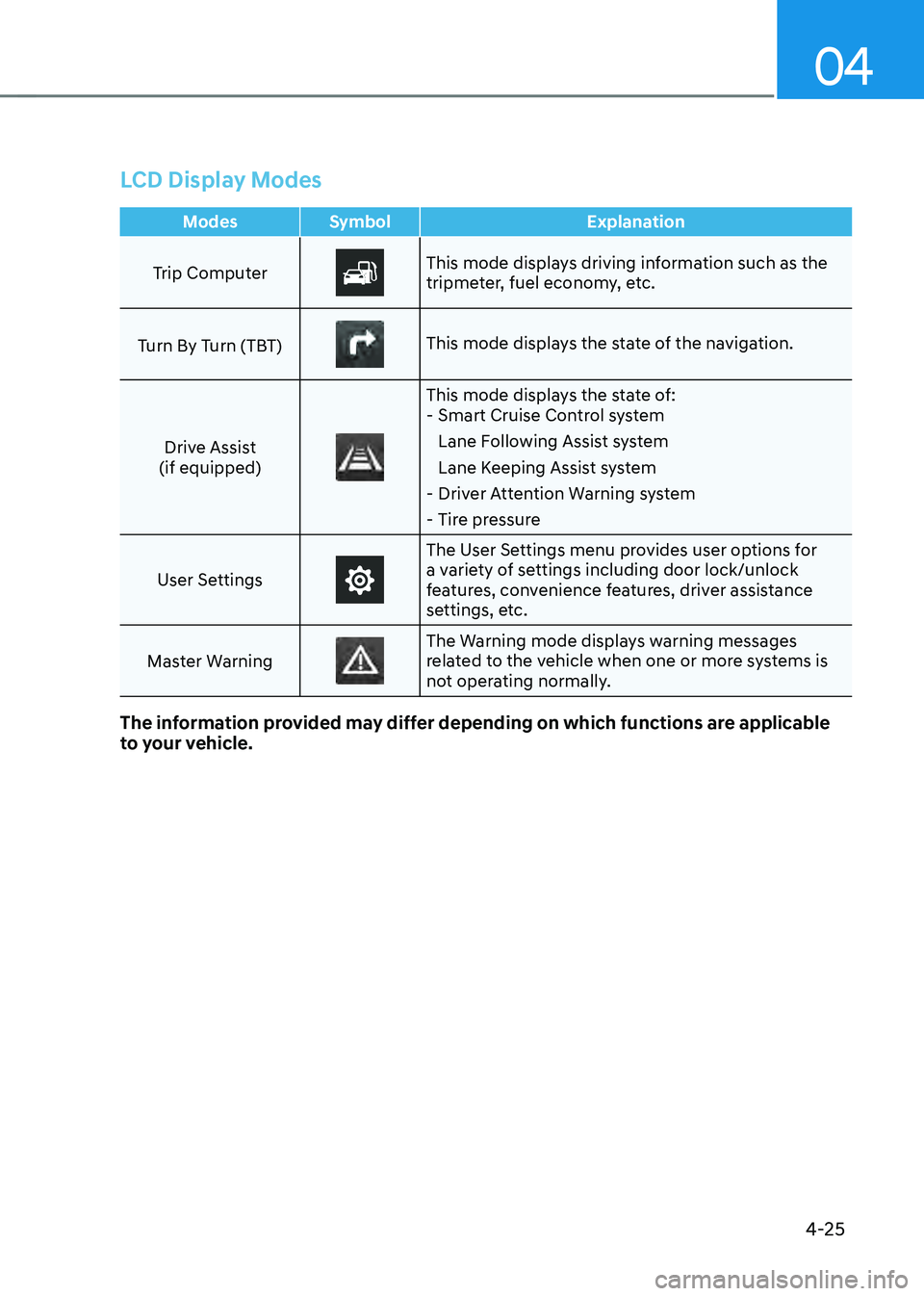
LCD Display Modes
ModesSymbol Explanation
Trip Computer
This mode displays driving information such as the
tripmeter, fuel economy, etc.
Turn By Turn (TBT)
This mode displays the state of the navigation.
Drive Assist
(if equipped)
This mode displays the state of: - Smart Cruise Control system
Lane Following Assist system
Lane Keeping Assist system
-Driver Attention Warning system
-Tire pressure
User Settings
The User Settings menu provides user options for
a variety of settings including door lock/unlock
features, convenience features, driver assistance
settings, etc.
Master Warning
The Warning mode displays warning messages
related to the vehicle when one or more systems is
not operating normally.
The information provided may differ depending on which functions are applicable
to your vehicle.
Page 136 of 527
Instrument Cluster
4-32
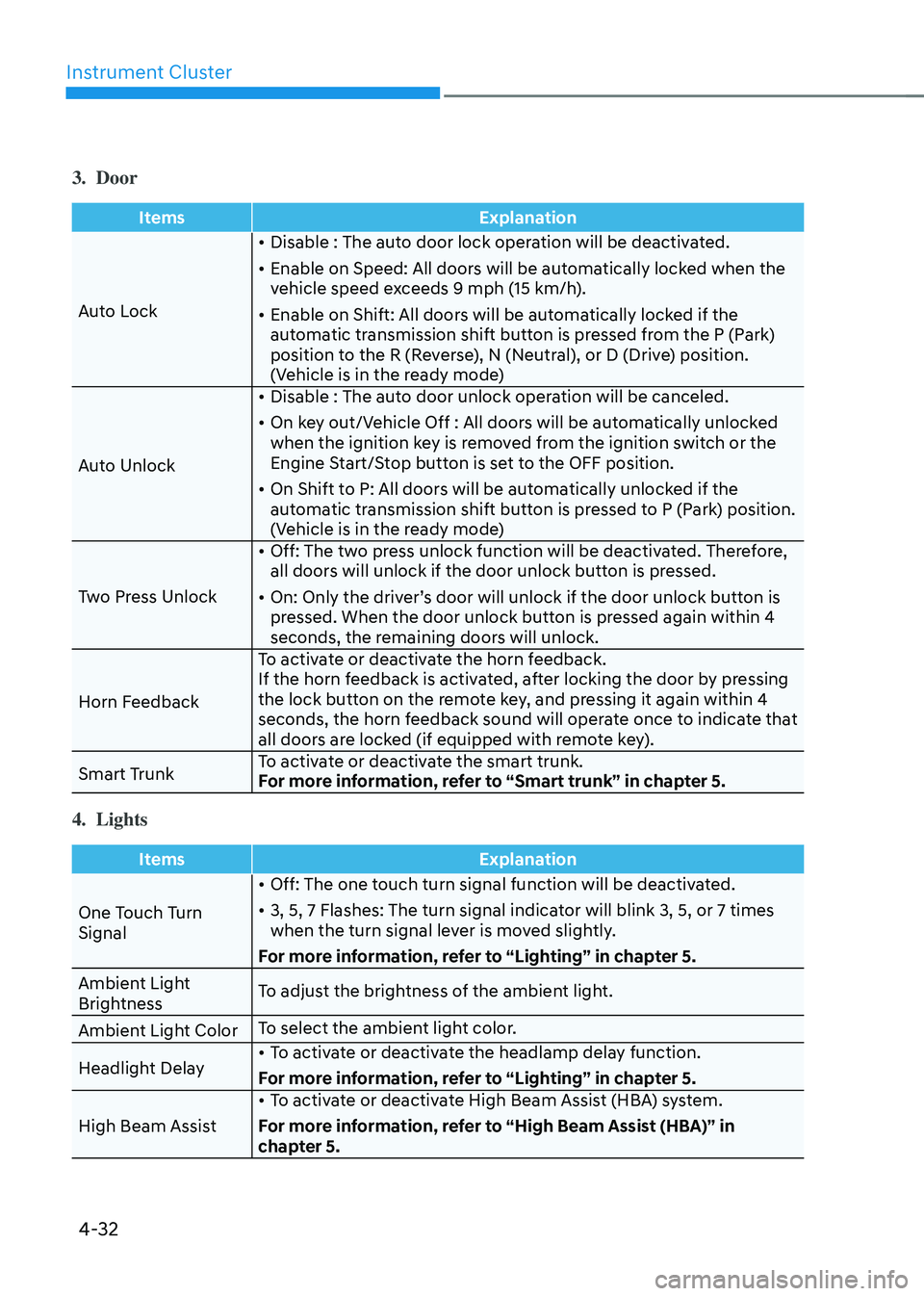
3. Door
ItemsExplanation
Auto Lock •
Disable : The auto door lock operation will be deactivated.
• Enable on Speed: All doors will be automatically locked when the
vehicle speed exceeds 9 mph (15 km/h).
• Enable on Shift: All doors will be automatically locked if the
automatic transmission shift button is pressed from the P (Park)
position to the R (Reverse), N (Neutral), or D (Drive) position.
(Vehicle is in the ready mode)
Auto Unlock •
Disable : The auto door unlock operation will be canceled.
• On key out/Vehicle Off : All doors will be automatically unlocked
when the ignition key is removed from the ignition switch or the
Engine Start/Stop button is set to the OFF position.
• On Shift to P: All doors will be automatically unlocked if the
automatic transmission shift button is pressed to P (Park) position.
(Vehicle is in the ready mode)
Two Press Unlock •
Off: The two press unlock function will be deactivated. Therefore,
all doors will unlock if the door unlock button is pressed.
• On: Only the driver’s door will unlock if the door unlock button is
pressed. When the door unlock button is pressed again within 4
seconds, the remaining doors will unlock.
Horn Feedback To activate or deactivate the horn feedback.
If the horn feedback is activated, after locking the door by pressing
the lock button on the remote key, and pressing it again within 4
seconds, the horn feedback sound will operate once to indicate that
all doors are locked (if equipped with remote key).
Smart Trunk To activate or deactivate the smart trunk.
For more information, refer to “Smart trunk” in chapter 5.
4. Lights
Items
Explanation
One Touch Turn
Signal •
Off: The one touch turn signal function will be deactivated.
• 3, 5, 7 Flashes: The turn signal indicator will blink 3, 5, or 7 times
when the turn signal lever is moved slightly.
For more information, refer to “Lighting” in chapter 5.
Ambient Light
Brightness To adjust the brightness of the ambient light.
Ambient Light Color To select the ambient light color.
Headlight Delay •
To activate or deactivate the headlamp delay function.
For more information, refer to “Lighting” in chapter 5.
High Beam Assist •
To activate or deactivate High Beam Assist (HBA) system.
For more information, refer to “High Beam Assist (HBA)” in
chapter 5.
Page 149 of 527

5. Convenient Features
Convenient Features
Accessing Your Vehicle ........................................................................\
.............5-5Smart Key ........................................................................\
..............................................5-5
Immobilizer System ........................................................................\
............................5-11
Hyundai Digital Key ........................................................................\
.............................5-12
Door Locks ........................................................................\
...............................5-28Operating Door Locks from Outside the Vehicle .....................................................5-28
Operating Door Locks from Inside the Vehicle ........................................................5-29
Automatic Door Lock and Unlock Features ...............................................................5-31
Rear Occupant Alert (ROA) System ........................................................................\
...5-32
Child-Protector Rear Door Locks ........................................................................\
......5-33
Vehicle Auto-Shut Off Function ........................................................................\
........5-33
Theft-Alarm System ........................................................................\
...............5-34
Driver Position Memory System
....................................................................5-35Storing Positions into Memory ........................................................................\
.........5-35
Recalling Positions from Memory ........................................................................\
.....5-36
Resetting the Driver’s Seat Memory System ............................................................5-36
Easy Access Function ........................................................................\
.........................5-37
Steering Wheel ........................................................................\
........................5-38Electric Power Steering (EPS) ........................................................................\
............5-38
Tilt Steering / Telescope Steering ........................................................................\
.....5-39
Heated Steering Wheel ........................................................................\
.....................5-40
Horn ........................................................................\
..................................................... 5-41
Mirrors ........................................................................\
.....................................5-42Inside Rearview Mirror ........................................................................\
.......................5-42
Side View Mirrors ........................................................................\
..............................5-49
Reverse Parking Aid Function ........................................................................\
...........5-50
Windows ........................................................................\
...................................5-51Power Windows ........................................................................\
..................................5-52
Panoramic SUNROOF ........................................................................\
.............5-55Sunshade ........................................................................\
............................................5-56
Sliding the Sunroof ........................................................................\
.............................5-56
Tilting the Sunroof ........................................................................\
.............................5-56
5
Page 153 of 527
05
5-5
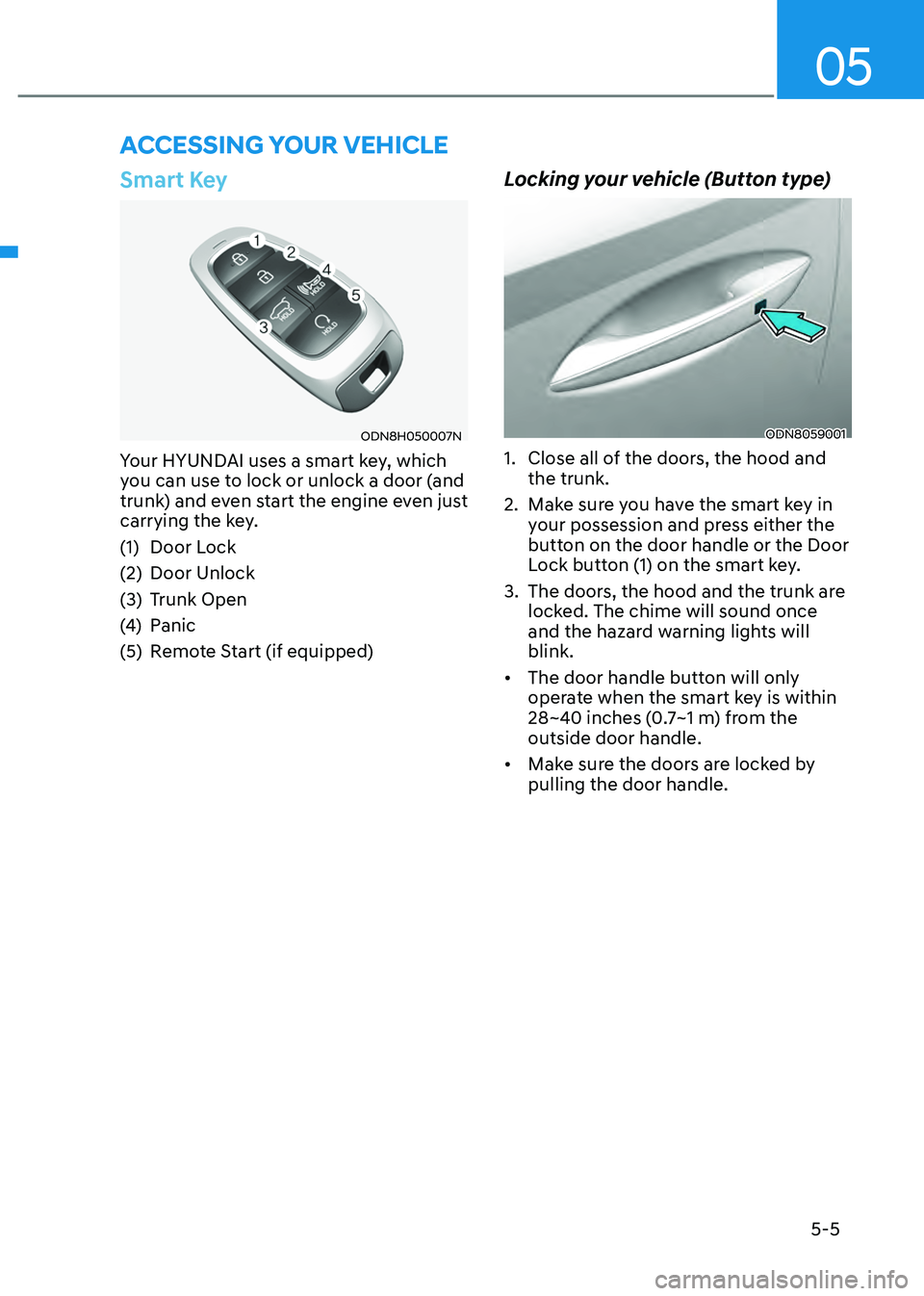
Smart Key
ODN8H050007N
Your HYUNDAI uses a smart key, which
you can use to lock or unlock a door (and
trunk) and even start the engine even just
carrying the key.
(1) Door Lock
(2) Door Unlock
(3) Trunk Open
(4) Panic
(5) Remote Start (if equipped)
Locking your vehicle (Button type)
ODN8059001
1. Close all of the doors, the hood and
the trunk.
2. Make sure you have the smart key in
your possession and press either the
button on the door handle or the Door
Lock button (1) on the smart key.
3. The doors, the hood and the trunk are
locked. The chime will sound once
and the hazard warning lights will
blink.
• The door handle button will only
operate when the smart key is within
28~40 inches (0.7~1 m) from the
outside door handle.
• Make sure the doors are locked by
pulling the door handle.
ACCESSING YOUR VEHICLE
Page 154 of 527
Convenient Features
5-6
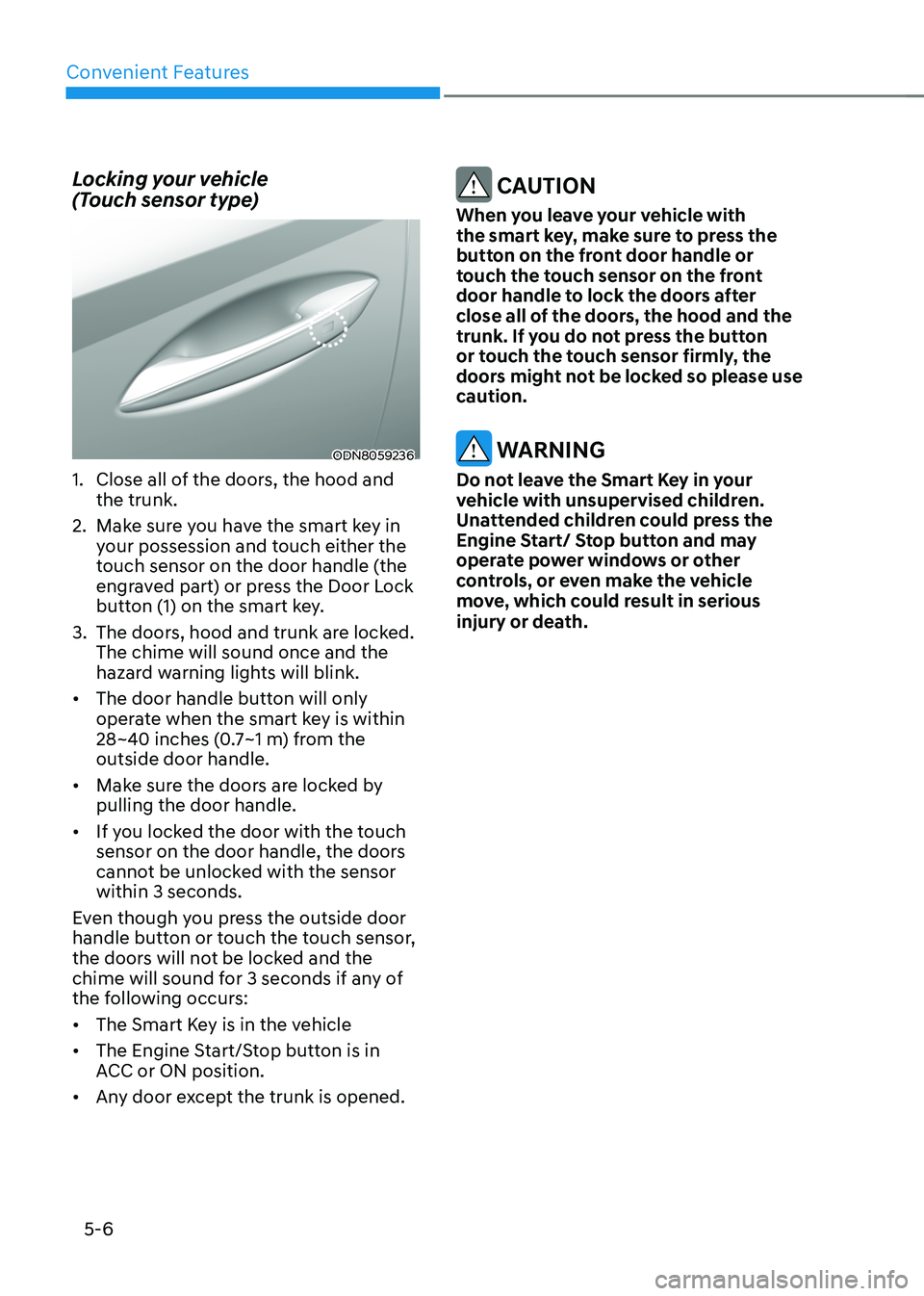
Locking your vehicle
(Touch sensor type)
ODN8059236
1. Close all of the doors, the hood and
the trunk.
2. Make sure you have the smart key in
your possession and touch either the
touch sensor on the door handle (the
engraved part) or press the Door Lock
button (1) on the smart key.
3. The doors, hood and trunk are locked.
The chime will sound once and the
hazard warning lights will blink.
• The door handle button will only
operate when the smart key is within
28~40 inches (0.7~1 m) from the
outside door handle.
• Make sure the doors are locked by
pulling the door handle.
• If you locked the door with the touch
sensor on the door handle, the doors
cannot be unlocked with the sensor
within 3 seconds.
Even though you press the outside door
handle button or touch the touch sensor,
the doors will not be locked and the
chime will sound for 3 seconds if any of
the following occurs:
• The Smart Key is in the vehicle
• The Engine Start/Stop button is in
ACC or ON position.
• Any door except the trunk is opened.
CAUTION
When you leave your vehicle with
the smart key, make sure to press the
button on the front door handle or
touch the touch sensor on the front
door handle to lock the doors after
close all of the doors, the hood and the
trunk. If you do not press the button
or touch the touch sensor firmly, the
doors might not be locked so please use
caution.
WARNING
Do not leave the Smart Key in your
vehicle with unsupervised children.
Unattended children could press the
Engine Start/ Stop button and may
operate power windows or other
controls, or even make the vehicle
move, which could result in serious
injury or death.
Page 155 of 527
05
5 -7
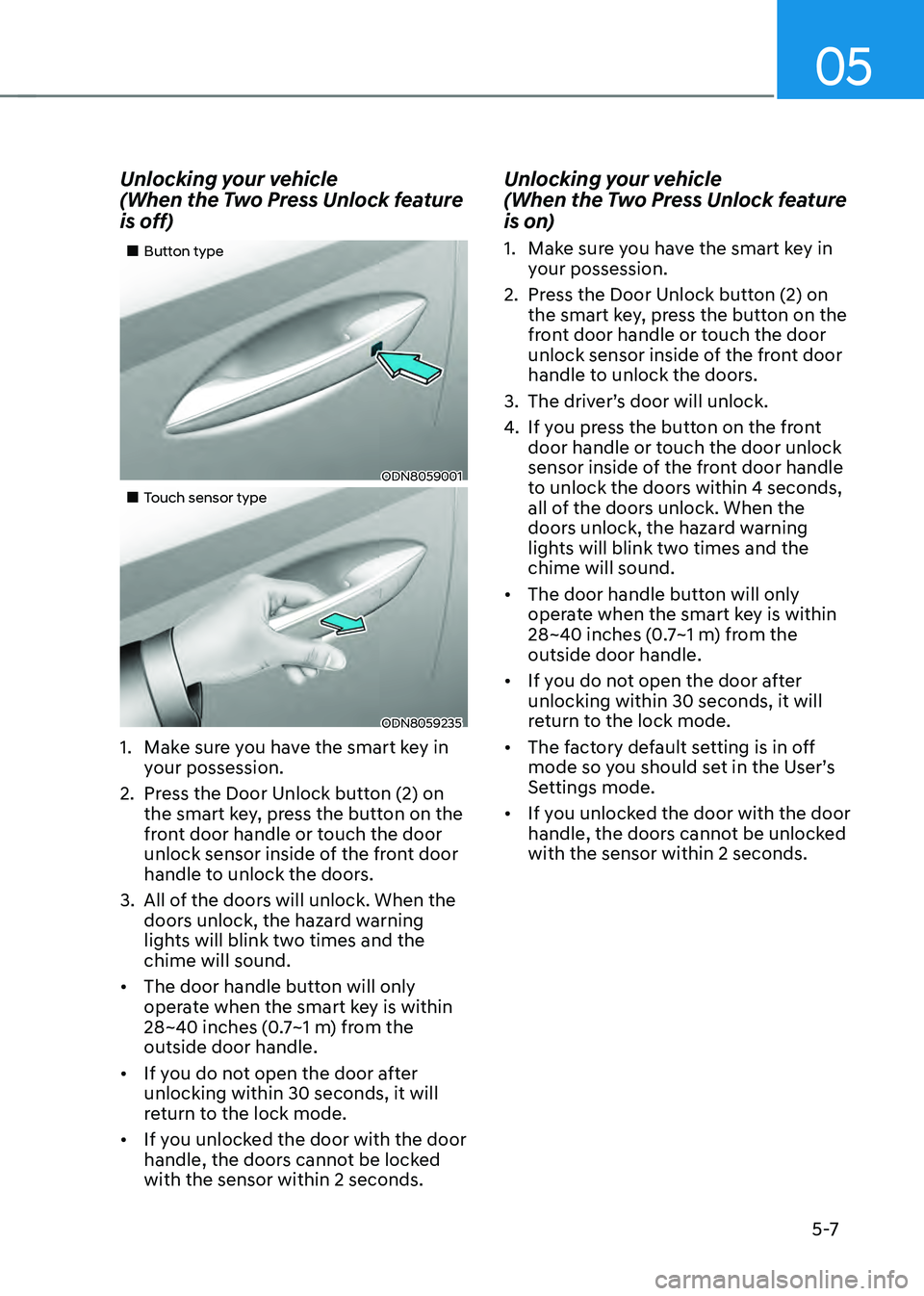
Unlocking your vehicle
(When the Two Press Unlock feature
is off)
„„Button type
ODN8059001
„„Touch sensor type
ODN8059235
1. Make sure you have the smart key in
your possession.
2. Press the Door Unlock button (2) on
the smart key, press the button on the
front door handle or touch the door
unlock sensor inside of the front door
handle to unlock the doors.
3. All of the doors will unlock. When the
doors unlock, the hazard warning
lights will blink two times and the
chime will sound.
• The door handle button will only
operate when the smart key is within
28~40 inches (0.7~1 m) from the
outside door handle.
• If you do not open the door after
unlocking within 30 seconds, it will
return to the lock mode.
• If you unlocked the door with the door
handle, the doors cannot be locked
with the sensor within 2 seconds.
Unlocking your vehicle
(When the Two Press Unlock feature
is on)
1. Make sure you have the smart key in
your possession.
2. Press the Door Unlock button (2) on
the smart key, press the button on the
front door handle or touch the door
unlock sensor inside of the front door
handle to unlock the doors.
3. The driver’s door will unlock.
4. If you press the button on the front
door handle or touch the door unlock
sensor inside of the front door handle
to unlock the doors within 4 seconds,
all of the doors unlock. When the
doors unlock, the hazard warning
lights will blink two times and the
chime will sound.
• The door handle button will only
operate when the smart key is within
28~40 inches (0.7~1 m) from the
outside door handle.
• If you do not open the door after
unlocking within 30 seconds, it will
return to the lock mode.
• The factory default setting is in off
mode so you should set in the User’s
Settings mode.
• If you unlocked the door with the door
handle, the doors cannot be unlocked
with the sensor within 2 seconds.
Page 156 of 527
Convenient Features
5-8
Two Press Unlock Feature
The priority for unlocking the driver door
only, or unlocking all the doors with
one press may be adjusted in the User
Settings mode in the cluster LCD display.
The Two Press Unlock feature, when
enabled, will require the user to press
the door unlock button once for driver
door only and twice for unlocking all the
doors.
Select or Deselect the Two Press Unlock
feature in the User Settings mode in the
cluster LCD display. The option can be
found under the following menu:
User Settings → Door → Two Press Unlock
The Two Press Unlock feature can also be
enabled or disabled by pressing the door
lock and unlock buttons simultaneously
on the Key FOB:
Press and hold both the Door Lock
button and the Door Unlock button
simultaneously until the hazard warning
lights blink.
This will enable or disable the Two Press
Unlock feature. Repeat this procedure to
enable/disable the mode again.
Information
If you press the front passenger outside
door handle with the smart key in your
possession, all the doors will unlock.
Smart Key Reminder
If the smart key is in the vehicle and
any door is opened, the doors will not
lock even though the lock button of the
central door lock switch is pressed.
Trunk opening
To open:
1. Make sure you have the smart key
in your possession and either press
inside the trunk emblem or press the
Trunk Unlock button (3) on the smart
key for more than one second.
2. Once the trunk is opened, the hazard
warning lights will blink two times.
• The trunk handle button will only
operate when the smart key is within
28~40 inches (0.7 ~1 m) from the trunk
handle.
• Once the trunk is opened and then
closed, the trunk will automatically
re-lock and the hazard warning will
blink once.
• If you leave the smart key and close
the trunk, the chime will sound for 5
seconds. In the case, the trunk cannot
be locked so open it with the trunk
handle button.
Panic button
Press and hold the Panic button (4) for
more than one second. The horn sounds
and hazard warning lights blink for about
30 seconds. To cancel the panic mode,
press any button on the Smart Key.
Page 157 of 527
05
5-9
Start-up
You can start the vehicle without
inserting the key.
For information, refer to the “Engine
Start/Stop Button” section in chapter 6.
NOTICE
To prevent damaging the smart key:
• Keep the smart key in a cool,
dry place to avoid damage or
malfunction. Exposure to moisture
or high temperature may cause
the internal circuit of the smart key
to malfunction which may not be
covered under warranty.
• Avoid dropping or throwing the
smart key.
• Protect the smart key from extreme
temperatures.
Remote start
You can start the vehicle using the
Remote Start button (5) of the smart key.
To start the vehicle remotely:
• Lock the doors by pressing the door
lock button within 32 feet (10 m)
distance from the vehicle.
• Press the remote start button for over
2 seconds within 4 seconds after
locking the doors and the hazard
warning will blink.
To turn off the remote start function,
press the remote start button once.
In case of the manual operation,
the climate control system will be
maintained even when the engine is
turned OFF. However, the automatic
operation is set to 72°F (22°C).
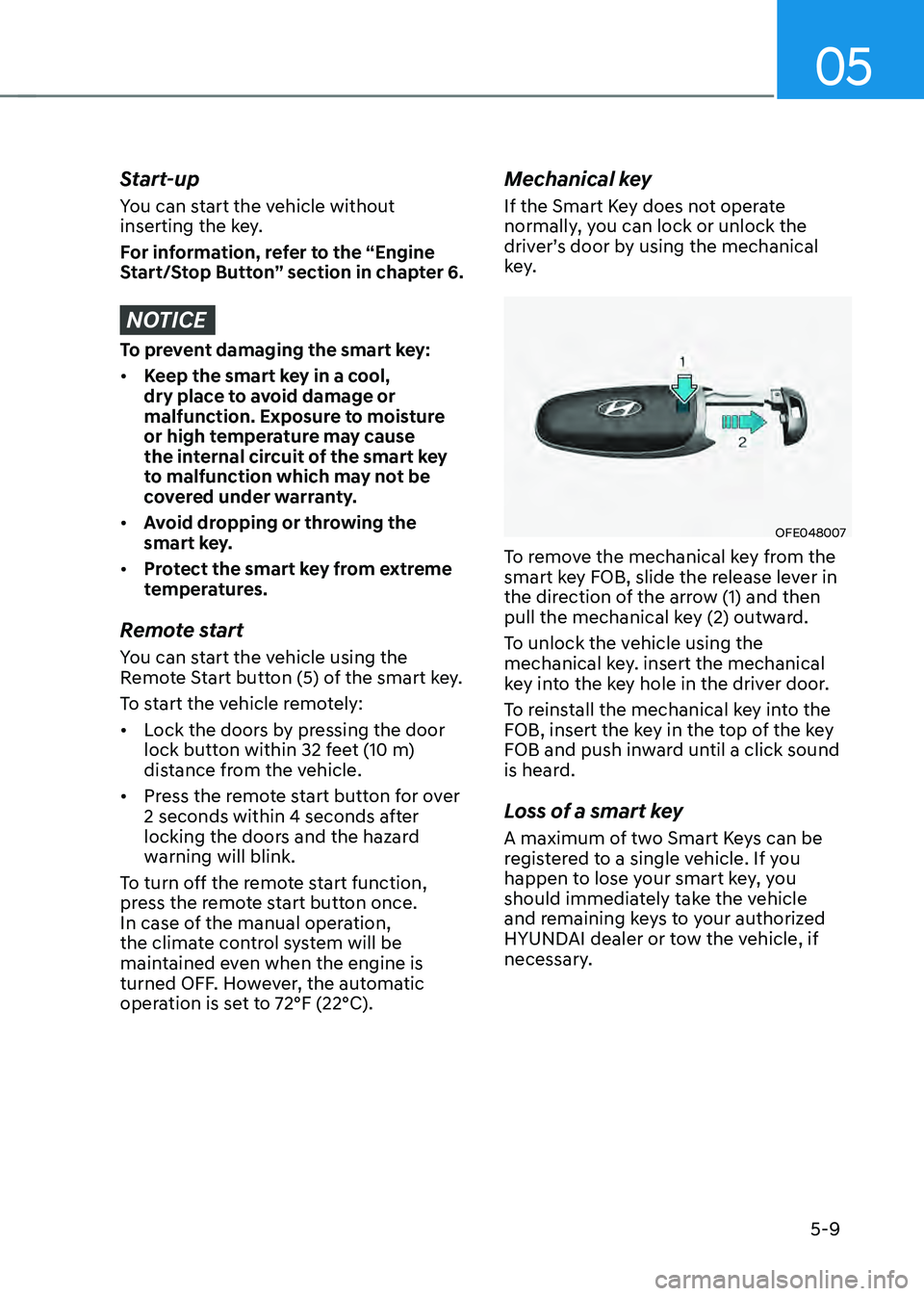
Mechanical key
If the Smart Key does not operate
normally, you can lock or unlock the
driver’s door by using the mechanical
key.
OFE048007
To remove the mechanical key from the
smart key FOB, slide the release lever in
the direction of the arrow (1) and then
pull the mechanical key (2) outward.
To unlock the vehicle using the
mechanical key. insert the mechanical
key into the key hole in the driver door.
To reinstall the mechanical key into the
FOB, insert the key in the top of the key
FOB and push inward until a click sound
is heard.
Loss of a smart key
A maximum of two Smart Keys can be
registered to a single vehicle. If you
happen to lose your smart key, you
should immediately take the vehicle
and remaining keys to your authorized
HYUNDAI dealer or tow the vehicle, if
necessary.
Page 160 of 527
Convenient Features
5-12
WARNING
In order to prevent theft of your
vehicle, do not leave spare keys
anywhere in your vehicle. Your
immobilizer password is a customer
unique password and should be kept
confidential.
NOTICE
The transponder in your key is an
important part of the immobilizer
system. It is designed to give years
of trouble-free service, however you
should avoid exposure to moisture,
static electricity and rough handling.
Immobilizer system malfunction could
occur.
Information
This device complies with Part 15 of the
FCC rules.
Operation is subject to the following three
conditions:
1. This device may not cause harmful
interference.
2. This device must accept any
interference received, including
interference that may cause undesired
operation.
3. Changes or modifications not expressly
approved by the party responsible
for compliance could void the user’s
authority to operate the device
Hyundai Digital Key (if equipped)
Digital Key Application
To use Hyundai Digital Key mobile app,
you should install Hyundai digital key
application. Search ‘Hyundai digital key’
in the Google Play Store and download
the app. Please refer to the detailed
manual of the digital key app. The option
can be found under the following app
menu:
Menu → Application Info → Tutorial
Please note the manual before using the
app.
ÃThis service is only available for
Android smartphones. Please confirm
supported/compatible devices on our
website.
WARNING
For used vehicle
If any of the digital key (smartphone key
or card key) is already registered when
you press ON button after unlocking the
doors, the message ‘Digital key(s) active’
appears on the instrument cluster once.
If you buy a used vehicle, you should
confirm the message and delete the
registered smartphone key and card key.
In addition, please notify the Hyundai
Customer Care Center.
If the card key does not work properly,
please delete the card key and register
the smartphone key and re-register the
card key.
For vehicle maintenance
If you need to have your Digital Key
System repaired or replaced please
ensure you Smartphone Key is still active.
You may have to pair your phone again.
In the case, re-initialize your Digital Keys
using the Hyundai Digital Key mobile
app.