HYUNDAI SONATA HYBRID 2023 Owners Manual
Manufacturer: HYUNDAI, Model Year: 2023, Model line: SONATA HYBRID, Model: HYUNDAI SONATA HYBRID 2023Pages: 549
Page 321 of 549
06
6-31
Indicator lights
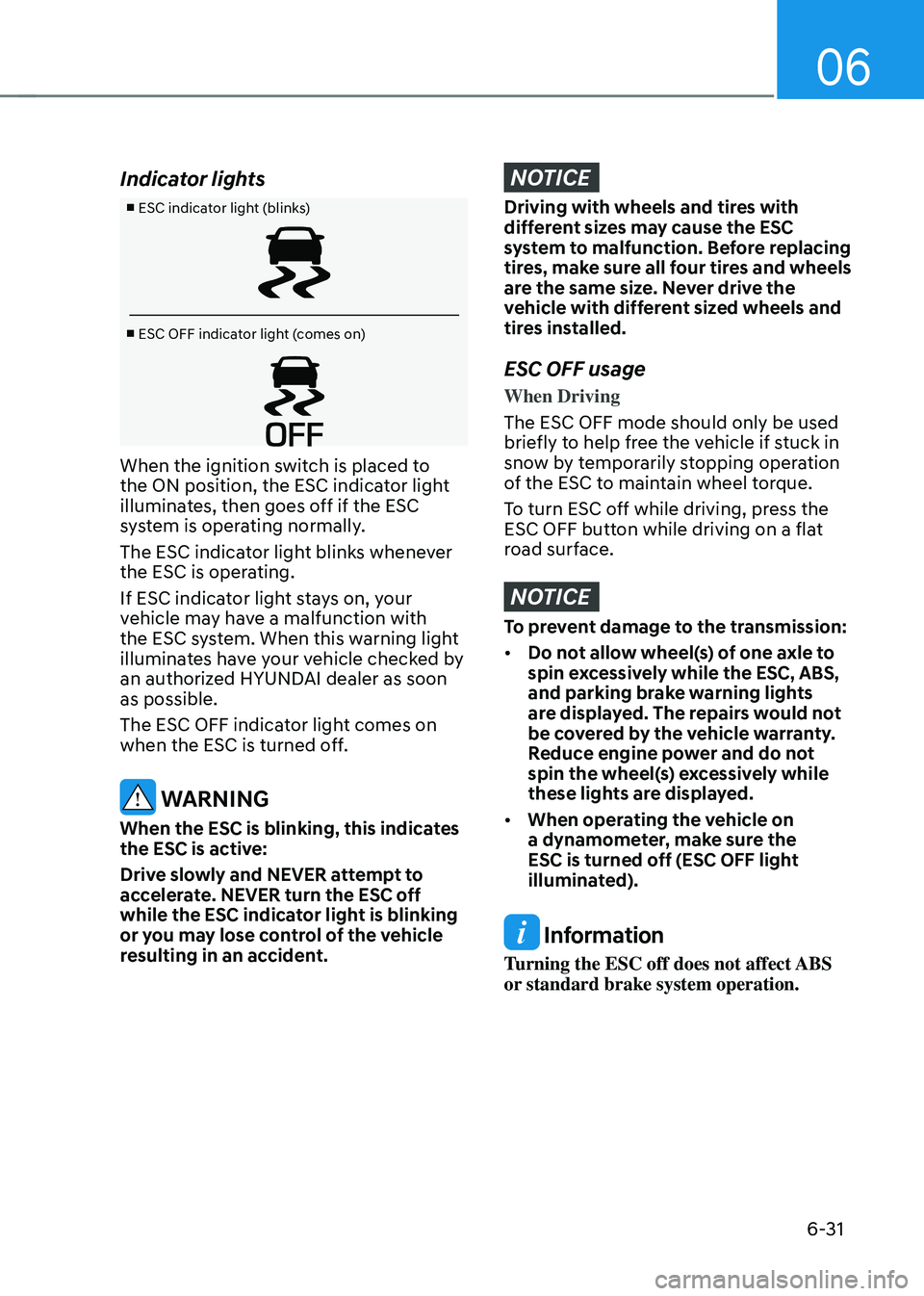
■ ESC indicator light (blinks)
■ ESC OFF indicator light (comes on)
When the ignition switch is placed to
the ON position, the ESC indicator light
illuminates, then goes off if the ESC
system is operating normally.
The ESC indicator light blinks whenever
the ESC is operating.
If ESC indicator light stays on, your
vehicle may have a malfunction with
the ESC system. When this warning light
illuminates have your vehicle checked by
an authorized HYUNDAI dealer as soon
as possible.
The ESC OFF indicator light comes on
when the ESC is turned off.
WARNING
When the ESC is blinking, this indicates
the ESC is active:
Drive slowly and NEVER attempt to
accelerate. NEVER turn the ESC off
while the ESC indicator light is blinking
or you may lose control of the vehicle
resulting in an accident.
NOTICE
Driving with wheels and tires with
different sizes may cause the ESC
system to malfunction. Before replacing
tires, make sure all four tires and wheels
are the same size. Never drive the
vehicle with different sized wheels and
tires installed.
ESC OFF usage
When Driving
The ESC OFF mode should only be used
briefly to help free the vehicle if stuck in
snow by temporarily stopping operation
of the ESC to maintain wheel torque.
To turn ESC off while driving, press the
ESC OFF button while driving on a flat
road surface.
NOTICE
To prevent damage to the transmission:
• Do not allow wheel(s) of one axle to
spin excessively while the ESC, ABS,
and parking brake warning lights
are displayed. The repairs would not
be covered by the vehicle warranty.
Reduce engine power and do not
spin the wheel(s) excessively while
these lights are displayed.
• When operating the vehicle on
a dynamometer, make sure the
ESC is turned off (ESC OFF light
illuminated).
Information
Turning the ESC off does not affect ABS
or standard brake system operation.
Page 322 of 549
While Driving
6-32
Vehicle Stability Management
(VSM)
The Vehicle Stability Management (VSM)
is a function of the Electronic Stability
Control (ESC) system. It helps ensure the
vehicle stays stable when accelerating
or braking suddenly on wet, slippery and
rough roads where traction over the four
tires can suddenly become uneven.
WARNING
Take the following precautions when
using the Vehicle Stability Management
(VSM):
• ALWAYS check the speed and the
distance to the vehicle ahead. The
VSM is not a substitute for safe
driving practices.
• Never drive too fast for the road
conditions. The VSM system will not
prevent accidents. Excessive speed
in bad weather, slippery and uneven
roads can result in severe accidents.
VSM operation
VSM ON condition
The VSM operates when:
• The Electronic Stability Control (ESC)
is on.
When operating
When you apply your brakes under
conditions which may activate the ESC,
you may hear sounds from the brakes,
or feel a corresponding sensation in the
brake pedal. This is normal and it means
your VSM is active.
NOTICE
The VSM does not operate when:
• Driving on a banked road such as
gradient or incline.
• Driving rearward.
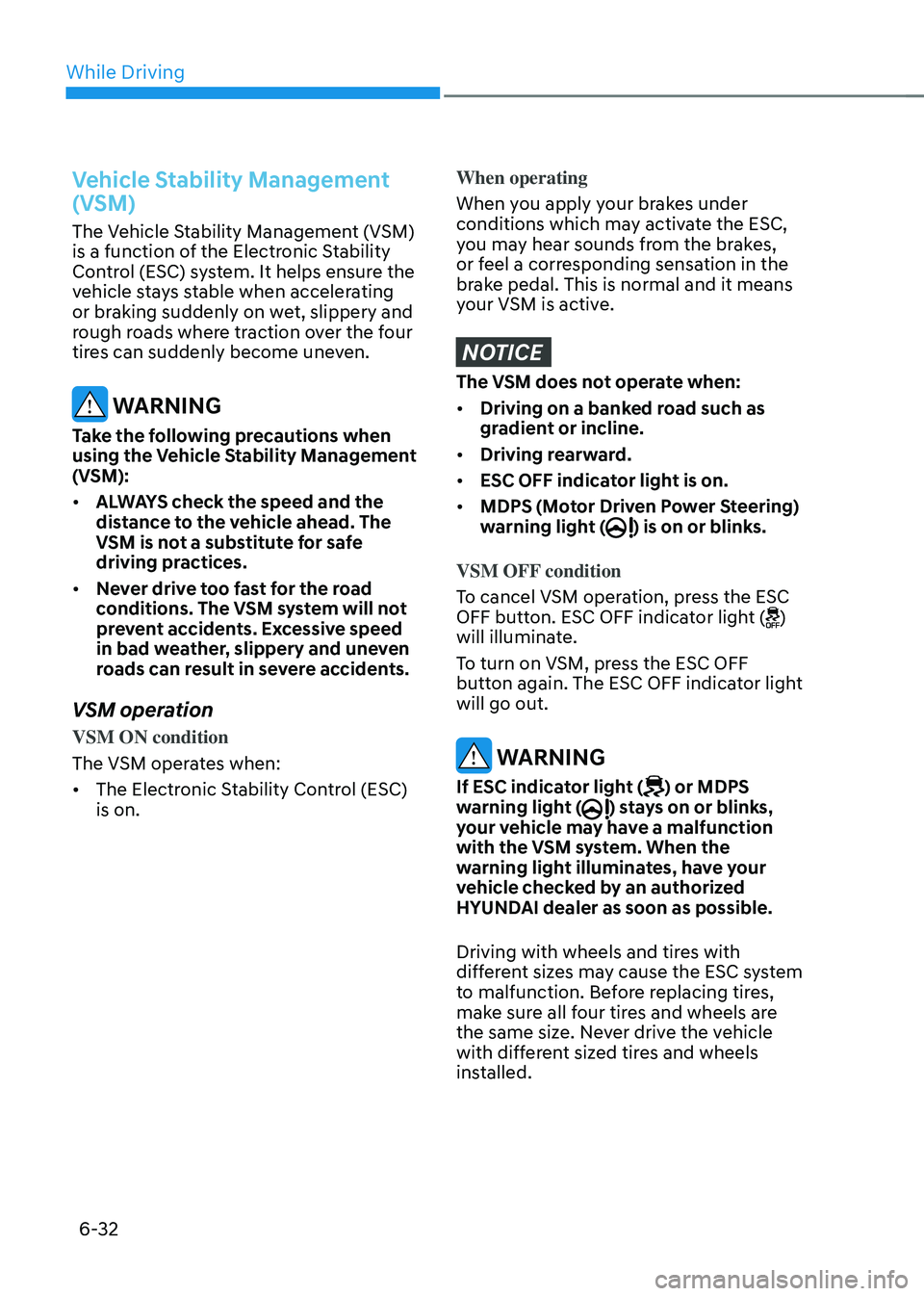
• ESC OFF indicator light is on.
• MDPS (Motor Driven Power Steering)
warning light () is on or blinks.
VSM OFF condition
To cancel VSM operation, press the ESC
OFF button. ESC OFF indicator light (
)
will illuminate.
To turn on VSM, press the ESC OFF
button again. The ESC OFF indicator light
will go out.
WARNING
If ESC indicator light () or MDPS
warning light () stays on or blinks,
your vehicle may have a malfunction
with the VSM system. When the
warning light illuminates, have your
vehicle checked by an authorized
HYUNDAI dealer as soon as possible.
Driving with wheels and tires with
different sizes may cause the ESC system
to malfunction. Before replacing tires,
make sure all four tires and wheels are
the same size. Never drive the vehicle
with different sized tires and wheels
installed.
Page 323 of 549
06
6-33
Hill-Start Assist Control (HAC)
The Hill-Start Assist Control (HAC)
helps prevent the vehicle from rolling
backwards when starting a vehicle from
a stop on a hill. The system operates the
brakes automatically for approximately
2 seconds and releases the brake after 2
seconds or when the accelerator pedal is
depressed.
WARNING
Always be ready to depress the
accelerator pedal when starting off on
a incline. The HAC activates only for
approximately 2 seconds.
NOTICE
• The HAC does not operate when
the shift button is in P (Park) or N
(Neutral)
• The HAC activates even though the
ESC (Electronic Stability Control) is
off but does not activate when the
ESC has malfunctioned.
Good Braking Practices
WARNING
Whenever leaving the vehicle or
parking, always come to a complete
stop and continue to depress the brake
pedal. Move the shift button into P
(Park) position, then apply the parking
brake, and place the ignition switch in
the LOCK/OFF position.
Vehicles parked with the parking brake
not applied or not fully engaged may
roll inadvertently and may cause injury
to the driver and others. ALWAYS apply
the parking brake before exiting the
vehicle.Wet brakes can be dangerous! The
brakes may get wet if the vehicle is
driven through standing water or if it
is washed. Your vehicle will not stop as
quickly if the brakes are wet. Wet brakes
may cause the vehicle to pull to one side.
To dry the brakes, apply the brakes
lightly until the braking action returns to
normal, taking care to keep the vehicle
under control at all times. If the braking
action does not return to normal, stop
as soon as it is safe to do so and call
an authorized HYUNDAI dealer for
assistance.
DO NOT drive with your foot resting on
the brake pedal. Even light, but constant
pedal pressure can result in the brakes
overheating, brake wear, and possibly
even brake failure.
If a tire goes flat while you are driving,
apply the brakes gently and keep the
vehicle pointed straight ahead while you
slow down. When you are moving slowly
enough for it to be safe to do so, pull off
the road and stop in a safe location.
Keep your foot firmly on the brake pedal
when the vehicle is stopped to prevent
the vehicle from rolling forward.
Page 324 of 549
While Driving
6-34
DRIVE MODE INTEGRATED CONTROL SYSTEM (IF EQUIPPED)
Drive Mode
ODN8069020ODN8069020
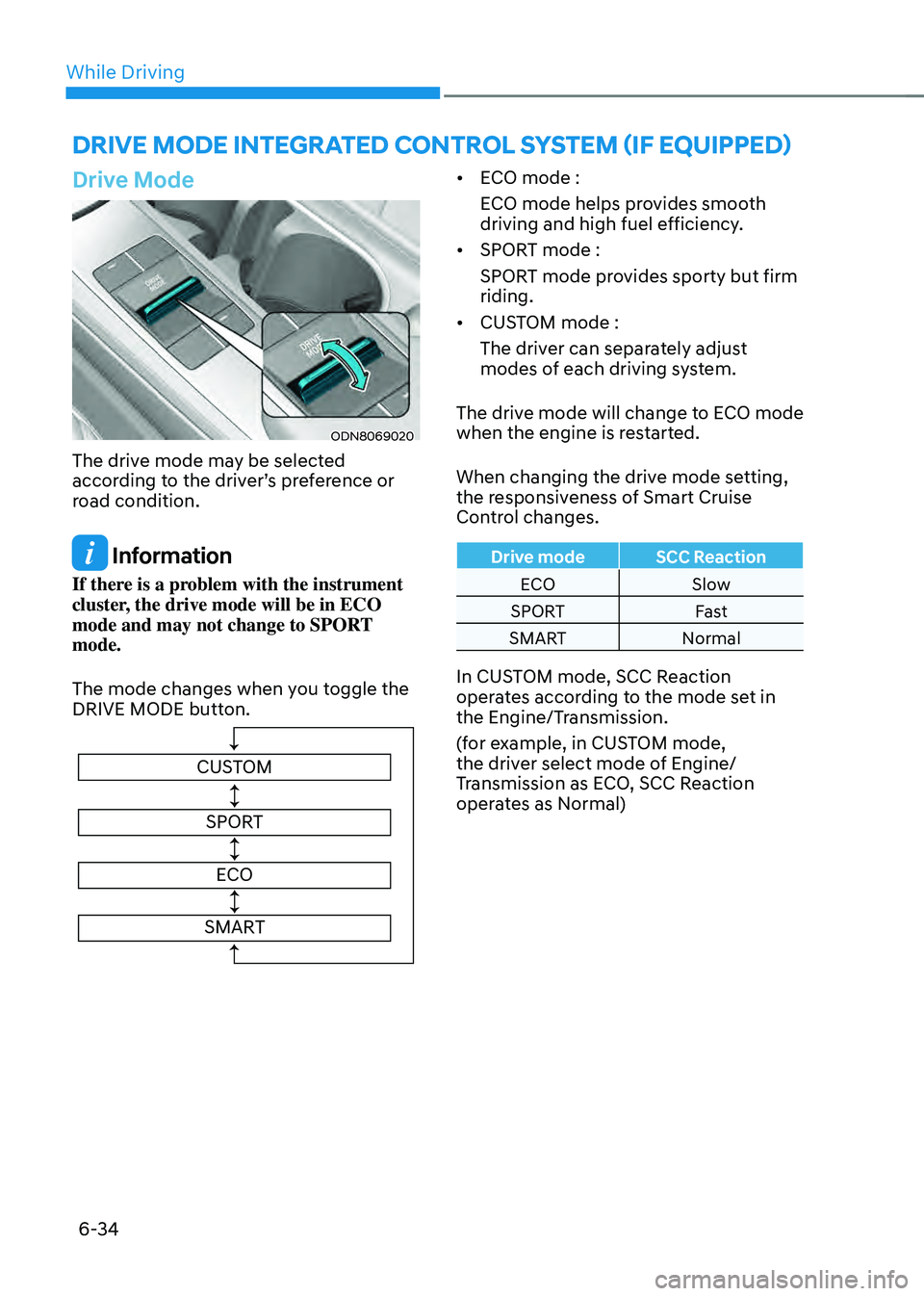
The drive mode may be selected
according to the driver’s preference or
road condition.
Information
If there is a problem with the instrument
cluster, the drive mode will be in ECO
mode and may not change to SPORT
mode.
The mode changes when you toggle the
DRIVE MODE button.
CUSTOMSPORT
ECO
SMART
• ECO mode :
ECO mode helps provides smooth
driving and high fuel efficiency.
• SPORT mode :
SPORT mode provides sporty but firm
riding.
• CUSTOM mode :
The driver can separately adjust
modes of each driving system.
The drive mode will change to ECO mode
when the engine is restarted.
When changing the drive mode setting,
the responsiveness of Smart Cruise
Control changes.
Drive mode SCC Reaction
ECO Slow
SPORT Fast
SMART Normal
In CUSTOM mode, SCC Reaction
operates according to the mode set in
the Engine/Transmission.
(for example, in CUSTOM mode,
the driver select mode of Engine/
Transmission as ECO, SCC Reaction
operates as Normal)
Page 325 of 549
06
6-35
CUSTOM mode
In CUSTOM mode, the driver can select separate modes
and combine them on the
infotainment system screen.
-Engine/Transmission: ECO/SPORT
-Steering wheel: SPORT
For more details, refer to the separately
supplied manual with your vehicle.
• When CUSTOM mode is selected
by using the DRIVE MODE button,
the CUSTOM mode indicator will
illuminate.
ECO mode
When the Drive Mode is set
to ECO mode, the engine and
transmission control logic are
changed to maximize fuel
efficiency.
• When the ECO mode is selected by
using the DRIVE MODE button, the
ECO indicator will illuminate.
• Whenever the engine is restarted, the
drive mode remains in ECO mode.
Information
Fuel efficiency depends on the driver’s
driving habit and road condition.
When ECO mode is activated:
• The acceleration response may be
slightly reduced as the accelerator
pedal is depressed moderately.
• The air conditioner performance may
be limited.
• The shift pattern of the automatic
transmission may change.
• The engine noise may get louder.
The above situations are normal
conditions when ECO mode is activated
to improve fuel efficiency.
Limitation of ECO mode operation:
If the following conditions occur while
ECO mode is operating, the system
operation is limited even though there is
no change in ECO indicator.
• When the coolant temperature is low:
The system will be limited until engine
performance becomes normal.
• When driving up a hill:
The system will be limited to gain
power when driving uphill because
engine torque is restricted.
• When the accelerator pedal is deeply
depressed for a few seconds:
The system will be limited, judging
that the driver wants to speed up.
Page 326 of 549
While Driving
6-36
SPORT mode
SPORT mode manages
the driving dynamics by
automatically adjusting the
steering effort, the engine
and transmission control
logic for enhanced driver
performance.
• When SPORT mode is selected by
using the DRIVE MODE button, the
SPORT indicator will illuminate.
• Whenever the engine is restarted, the
Drive Mode will revert back to ECO
mode. If SPORT mode is desired, re-
select SPORT mode from the DRIVE
MODE button.
• When SPORT mode is activated:
-The engine rpm will tend to remain
raised over a certain length of time
even after releasing the accelerator
-Upshifts are delayed when
accelerating
Information
In SPORT mode, the fuel efficiency may
decrease.
SMART mode
SMART mode selects the proper driving mode among
ECO and SPORT by judging
the driver’s driving habits
(for example, Economic or
Aggressive (Sportive)) from
the brake pedal depression or
the steering wheel operation.
• Toggle the DRIVE MODE button to
select SMART mode. When SMART
mode is selected, the indicator
illuminates on the instrument cluster.
• SMART mode automatically controls
the vehicle driving, such as gear
shifting patterns and engine torque,
in accordance with the driver’s driving
habits.
Information
• When you mildly drive the vehicle
in SMART mode, the driving mode
changes to ECO mode to improve fuel
efficiency. However, the actual fuel
efficiency may differ in accordance
with your driving situations (for
example, upward/downward slope,
vehicle deceleration/acceleration).
• When you dynamically drive the
vehicle in SMART mode by abruptly
decelerating or sharply turning the
driving mode changes to SPORT mode.
However, it may adversely affect fuel
economy.
Page 327 of 549
06
6-37
Various driving situations, which you may
encounter in SMART mode
• The driving mode automatically
changes to ECO mode after a
certain period of time, when you
gently depress the accelerator pedal
(Your driving is categorized to be
economic.).
• The driving mode automatically
changes to SMART SPORT, when
you abruptly accelerate the vehicle
or repetitively operate the steering
wheel (Your driving is categorized
to be sporty.). In this mode, your
vehicle drives in a lower gear for
abrupt accelerating/decelerating
and increases the engine brake
performance.
• You may still sense the engine
braking performance, even when
you release the accelerator pedal in
SMART SPORT mode. It is because
your vehicle remains in lower gear
over a certain period of time for next
acceleration. Thus, it is a normal
driving situation, not indicating any
malfunction.
• The driving mode automatically
changes to SMART SPORT mode only
in harsh driving situations. In most
of the normal driving situations, the
driving mode sets to be in SMART
ECO mode.Limitation of SMART mode
The SMART mode may be limited in
following situations. (The OFF indicator
illuminates in those situations.)
• The cruise control is activated :
The cruise control system may
deactivate the SMART mode when
the vehicle is controlled by the set
speed of Smart Cruise Control system.
(SMART mode is not deactivated
just by activating the cruise control
system.)
• The transmission oil temperature is
either extremely low or extremely
high :
The SMART mode can be active in
most of the normal driving situations.
However, an extremely high/ low
transmission oil temperature may
temporarily deactivate the SMART
mode, because the transmission
condition is out of normal operation
condition.
Page 328 of 549
While Driving
6-38
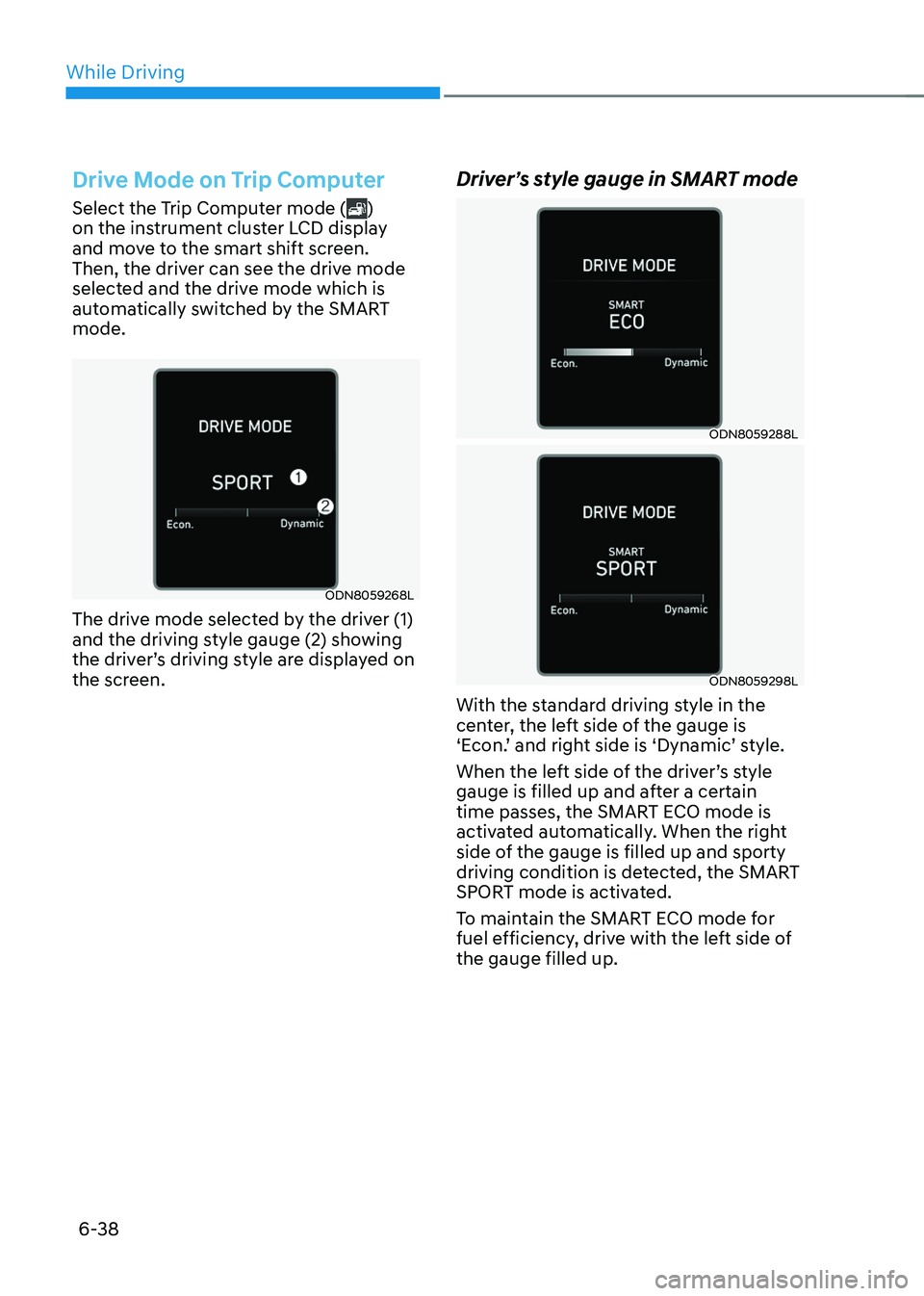
Drive Mode on Trip Computer
Select the Trip Computer mode ()
on the instrument cluster LCD display
and move to the smart shift screen.
Then, the driver can see the drive mode
selected and the drive mode which is
automatically switched by the SMART
mode.
ODN8059268LODN8059268L
The drive mode selected by the driver (1)
and the driving style gauge (2) showing
the driver’s driving style are displayed on
the screen.
Driver’s style gauge in SMART mode
ODN8059288LODN8059288L
ODN8059298LODN8059298L
With the standard driving style in the
center, the left side of the gauge is
‘Econ.’ and right side is ‘Dynamic’ style.
When the left side of the driver’s style
gauge is filled up and after a certain
time passes, the SMART ECO mode is
activated automatically. When the right
side of the gauge is filled up and sporty
driving condition is detected, the SMART
SPORT mode is activated.
To maintain the SMART ECO mode for
fuel efficiency, drive with the left side of
the gauge filled up.
Page 329 of 549
06
6-39
Forward Collision-Avoidance Assist
is designed to detect the vehicle, a
pedestrian or cyclist ahead in the
roadway through front view camera
recognition and front radar signals
to warn the driver that a collision is
imminent, and if necessary, application
of emergency braking.
WARNING
Take the following precautions when
using Forward Collision-Avoidance
Assist:
• This Forward Collision-Avoidance
Assist is only a supplemental Forward
Collision-Avoidance Assist and it is
not intended to, nor does it replace
the need for extreme care and
attention of the driver. The sensing
range and objects detectable by the
sensors are limited. Pay attention to
the road conditions at all times.
• Drive at posted speed limits and
accordance to road conditions.
• Always drive cautiously to prevent
unexpected and sudden situations
from occurring. Forward Collision-
Avoidance Assist does not always
stop the vehicle completely.
Forward Collision-Avoidance
Assist Settings
Setting features
OTMA058186OTMA058186
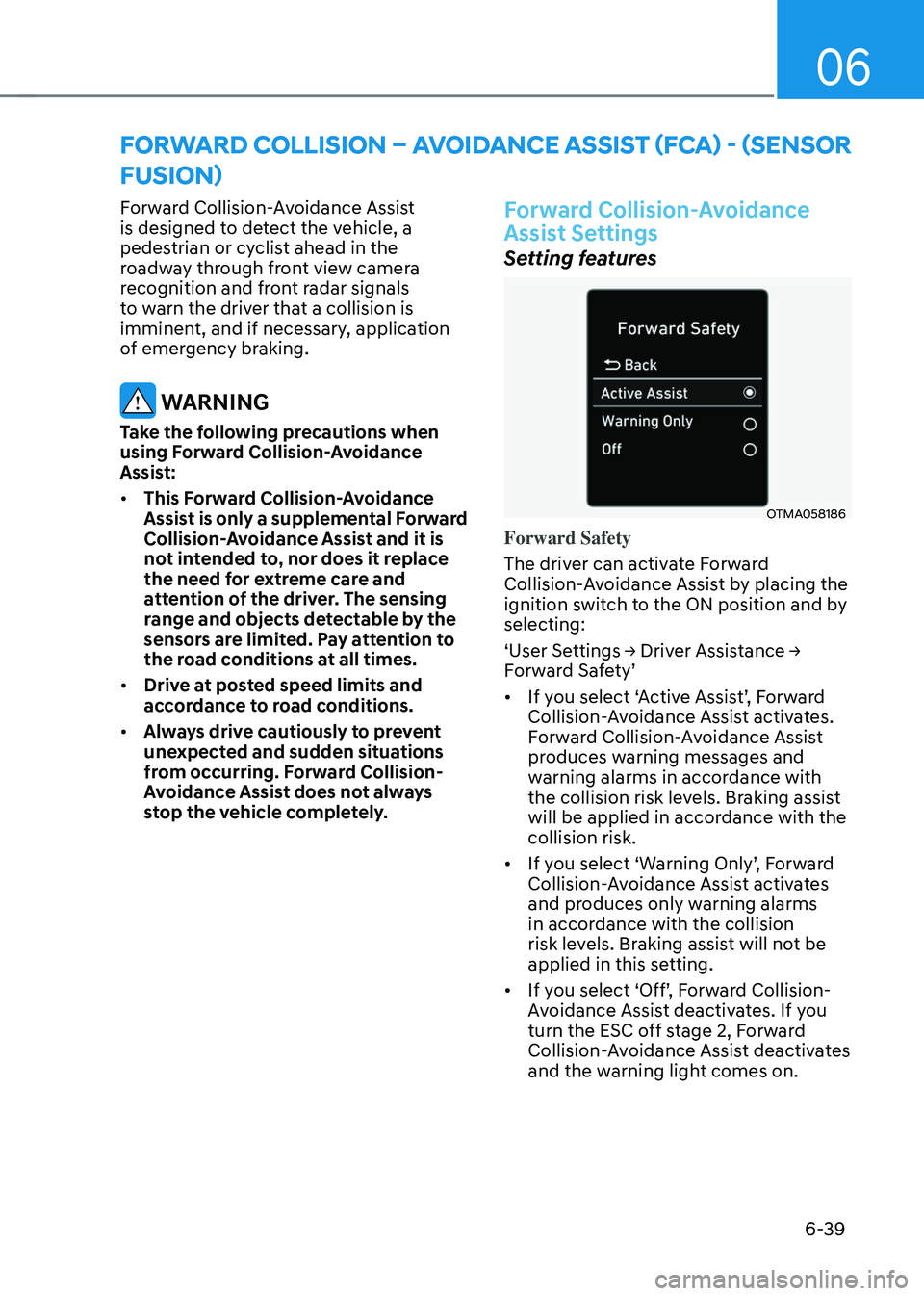
Forward Safety
The driver can activate Forward
Collision-Avoidance Assist by placing the
ignition switch to the ON position and by
selecting:
‘User Settings → Driver Assistance →
Forward Safety’
• If you select ‘Active Assist’, Forward
Collision-Avoidance Assist activates.
Forward Collision-Avoidance Assist
produces warning messages and
warning alarms in accordance with
the collision risk levels. Braking assist
will be applied in accordance with the
collision risk.
• If you select ‘Warning Only’, Forward
Collision-Avoidance Assist activates
and produces only warning alarms
in accordance with the collision
risk levels. Braking assist will not be
applied in this setting.
• If you select ‘Off’, Forward Collision-
Avoidance Assist deactivates. If you
turn the ESC off stage 2, Forward
Collision-Avoidance Assist deactivates
and the warning light comes on.
FORWARD COLLISION – AVOIDANCE ASSIST (FCA) - (SENSOR
FUSION)
Page 330 of 549
While Driving
6-40
• The warning light illuminates
on the instrument cluster,
when you cancel Forward
Collision-Avoidance Assist.
The driver can monitor the Forward
Collision-Avoidance Assist ON/OFF
status on the LCD display or infotainment
system display (if equipped). Also, the
warning light illuminates when ESC
(Electronic Stability Control) is turned
off. If the warning light remains ON when
Forward Collision-Avoidance Assist is
activated, have the vehicle inspected by
an authorized HYUNDAI dealer.
ODN8H069207LODN8H069207L
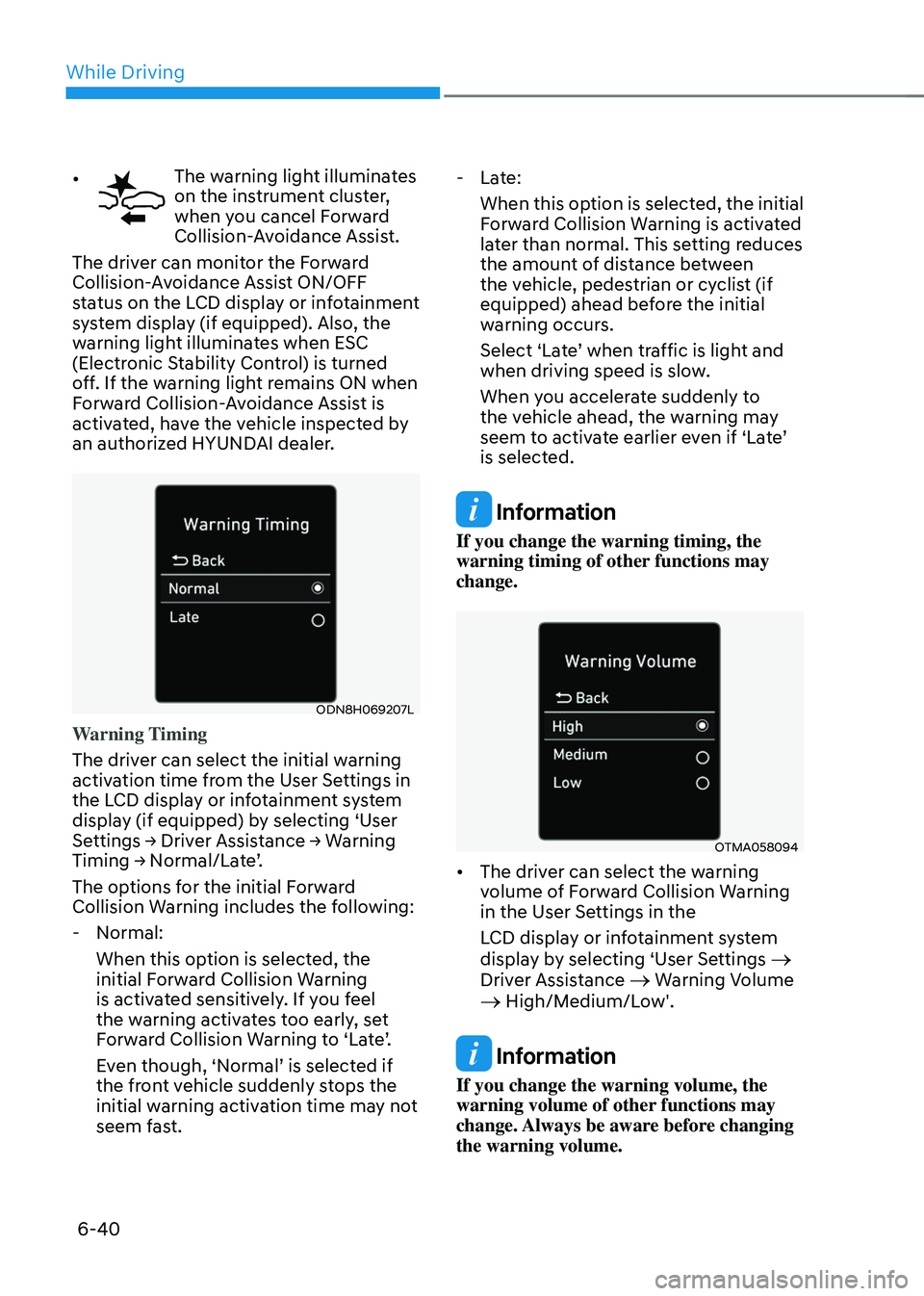
Warning Timing
The driver can select the initial warning
activation time from the User Settings in
the LCD display or infotainment system
display (if equipped) by selecting ‘User
Settings → Driver Assistance → Warning
Timing → Normal/Late’.
The options for the initial Forward
Collision Warning includes the following:
- Normal:
When this option is selected, the
initial Forward Collision Warning
is activated sensitively. If you feel
the warning activates too early, set
Forward Collision Warning to ‘Late’.
Even though, ‘Normal’ is selected if
the front vehicle suddenly stops the
initial warning activation time may not
seem fast.
-Late:
When this option is selected, the initial
Forward Collision Warning is activated
later than normal. This setting reduces
the amount of distance between
the vehicle, pedestrian or cyclist (if
equipped) ahead before the initial
warning occurs.
Select ‘Late’ when traffic is light and
when driving speed is slow.
When you accelerate suddenly to
the vehicle ahead, the warning may
seem to activate earlier even if ‘Late’
is selected.
Information
If you change the warning timing, the
warning timing of other functions may
change.
OTMA058094OTMA058094
• The driver can select the warning
volume of Forward Collision Warning
in the User Settings in the
LCD display or infotainment system
display by selecting ‘User Settings
→
Driver Assistance → Warning Volume → High/Medium/Low'.
Information
If you change the warning volume, the
warning volume of other functions may
change. Always be aware before changing
the warning volume.