HYUNDAI SONATA HYBRID 2023 Owners Manual
Manufacturer: HYUNDAI, Model Year: 2023, Model line: SONATA HYBRID, Model: HYUNDAI SONATA HYBRID 2023Pages: 549
Page 291 of 549

While Driving
6. While Driving
Before Driving ........................................................................\
...........................6-5Before Entering the Vehicle ........................................................................\
.................6-5
Before Starting ........................................................................\
.....................................6-5
Ignition Switch ........................................................................\
..........................6-6Engine Start/Stop Button ........................................................................\
...................6-6
Remote Start ........................................................................\
........................................6-9
Vehicle Auto-Shut Off ........................................................................\
..............6-10Operating Conditions ........................................................................\
.........................6-10
Deactivating Conditions ........................................................................\
....................6-10
System Operation ........................................................................\
...............................6-10
Automatic Transmission ........................................................................\
...........6-11Automatic Transmission Operation ........................................................................\
....6-11
Parking ........................................................................\
................................................6-14
LCD Display Message ........................................................................\
.........................6-15
Good Driving Practices ........................................................................\
.....................6-16
Paddle Shifter(Manual Shift Mode) ........................................................................\
....6-17
Coasting guide ........................................................................\
........................6-18
Brake System
........................................................................\
............................6-19Power Brakes ........................................................................\
......................................6-19
Disc Brakes Wear Indicator ........................................................................\
............... 6-20
Electronic Parking Brake (EPB)
........................................................................\
.........6-20
Auto Hold ........................................................................\
............................................6-25
Anti-lock Brake System (ABS) ........................................................................\
6-28Electronic Stability Control (ESC) ........................................................................\
.....6-29
Vehicle Stability Management (VSM) .......................................................................6-32
Hill-Start Assist Control (HAC) ........................................................................\
...........6-33
Good Braking Practices ........................................................................\
.....................6-33
Drive Mode Integrated Control System ........................................................6-34Drive Mode ........................................................................\
.........................................6-34
Drive Mode on Trip Computer ........................................................................\
..........6-38
Forward Collision – Avoidance Assist (FCA) - (Sensor Fusion) ....................6-39Forward Collision-Avoidance Assist Settings ...........................................................6-39
Forward Collision-Avoidance Assist Warning Message and Brake Control ...........6-41
Detecting sensor ........................................................................\
...............................6-44
Forward Collision-Avoidance Assist Malfunction ...................................................6-46
Limitations of Forward Collision-Avoidance Assist .................................................6-48
Junction Turning ........................................................................\
...............................6-54
6
Page 292 of 549
 ........................................................................\
......6-58Lane Keeping Assist Operation ............................................................")
Lane Keeping Assist (LKA) ........................................................................\
......6-58Lane Keeping Assist Operation ........................................................................\
........6-60
Lane Keeping Assist Function Change ....................................................................6-60
Warning Light and Message ........................................................................\
.............6-63
Limitations of Lane Keeping Assist ........................................................................\
..6-64
Blind-Spot Collision-Avoidance Assist (BCA) ................................................6-66Blind-Spot Collision-Avoidance Assist Settings .......................................................6-67
Warning and Function Control ........................................................................\
.........6-69
Detecting Sensors ........................................................................\
...............................6-71
Limitations of Blind-Spot Collision Avoidance Assist ..............................................6 -74
Declaration of Conformity ........................................................................\
......6-78Front radar ........................................................................\
..........................................6-78
Rear corner radar ........................................................................\
...............................6-79
Safe Exit Warning (SEW) ........................................................................\
.........6-80Safe Exit Warning Settings ........................................................................\
................6-81
Safe Exit Warning Operation ........................................................................\
............6-82
Safe Exit Warning Malfunction and Limitations ......................................................6-84
Driver Attention Warning (DAW) ....................................................................6-86Driver Attention Warning settings ........................................................................\
....6-86
Resetting the Driver Attention Warning ..................................................................6-88
Driver Attention Warning Standby ........................................................................\
...6-89
Driver Attention Warning Malfunction and Limitations .........................................6-89
Leading Vehicle Departure Alert ........................................................................\
.......6-91
Blind-Spot View Monitor (BVM) .....................................................................6-94
Smart cruise control (SCC)
........................................................................\
.....6-95Smart Cruise Control Switch ........................................................................\
............6-96
To Convert to Cruise Control Mode ........................................................................\
.6-96
Smart Cruise Control Settings ........................................................................\
...........6-97
Smart Cruise Control Headway ........................................................................\
.......6-103
Limitations of Smart Cruise Control .......................................................................6-108
Navigation-Based Smart Cruise Control (NSCC) .........................................6-112Navigation-based Smart Cruise Control Setting and Operation ...........................6-112
Lane Following Assist (LFA) ........................................................................\
...6-116Lane Following Assist Operation ........................................................................\
......6-118
Warning Message ........................................................................\
..............................6-118
Limitations of Lane Following Assist .......................................................................6-120
6
Page 293 of 549
Highway Driving Assist (HDA) .......................................................................6-122Highway Driving Assist Setting and Operation ......................................................6-123
Warning Message ........................................................................\
.............................6-125
Rear Cross-Traffic Collision-Avoidance Assist (RCCA) ................................6-128Function Setting and Activation ........................................................................\
......6-128
Warning and Function Control ........................................................................\
........6-130
Detecting Sensors ........................................................................\
............................6-132
Limitations of Rear Cross-Traffic Collision-Avoidance Assist ................................6-133
Special Driving Conditions ........................................................................\
....6-138Hazardous Driving Conditions ........................................................................\
........6-138
Rocking the Vehicle ........................................................................\
.........................6-138
Smooth Cornering ........................................................................\
............................6-139
Driving at Night ........................................................................\
................................6-139
Driving in the Rain ........................................................................\
............................6-139
Driving in Flooded Areas ........................................................................\
..................6-140
Highway Driving ........................................................................\
...............................6-140
Winter Driving ........................................................................\
........................6-141Snow or Icy Conditions ........................................................................\
.....................6-141
Winter Precautions ........................................................................\
...........................6-143
Vehicle load limit ........................................................................\
.................... 6-145Tire Loading Information Label ........................................................................\
.......6-145
Trailer Towing ........................................................................\
.........................6-150
6. While Driving
6
Page 294 of 549
While Driving
6-4
WARNING
Carbon monoxide (CO) gas is toxic. Breathing CO can cause unconsciousness and
death.
Engine exhaust contains carbon monoxide which cannot be seen or smelled.
Do not inhale engine exhaust.
If at any time you smell engine exhaust inside the vehicle, open the windows
immediately. Exposure to CO can cause unconsciousness and death by asphyxiation.
Be sure the exhaust system does not leak.
The exhaust system should be checked whenever the vehicle is raised to change the
oil or for any other purpose. If you hear a change in the sound of the exhaust or if you
drive over something that strikes the underneath side of the vehicle, have the exhaust
system checked as soon as possible by an authorized HYUNDAI dealer.
Do not run the engine in an enclosed area.
Letting the engine idle in your garage, even with the garage door open, is a hazardous
practice. Run the engine only long enough to start the engine and to move the vehicle
out of the garage.
Avoid idling the engine for prolonged periods with people inside the vehicle.
If it is necessary to idle the engine for a prolonged period with people inside the
vehicle, be sure to do so only in an open area with the air intake set at "Fresh" and fan
control set to high so fresh air is drawn into the interior.
Keep the air intakes clear.
To assure proper operation of the ventilation system, keep the ventilation air intakes
located in front of the windshield clear of snow, ice, leaves, or other obstructions.
If you must drive with the trunk open:
Close all windows.
Open instrument panel air vents.
Set the air intake control at "Fresh", the air flow control at "Floor" or "Face", and the fan
control set to high.
WARNING
CALIFORNIA PROPOSITION 65 WARNING
Engine exhaust and a wide variety of automobile components including
components found in the interior furnishings in a vehicle, contain or emit harmful
chemicals known to the State of California to cause cancer and birth defects and
reproductive harm. In addition, certain fluids contained in vehicles and certain
products of components contain or emit chemicals known to the State of California
to cause cancer and birth defects or other reproductive harm.
Page 295 of 549
06
6-5
Before Entering the Vehicle
• Be sure all windows, outside mirror(s),
and outside lights are clean and
unobstructed.
• Remove frost, snow, or ice.
• Visually check the tires for uneven
wear and damage.
• Check under the vehicle for any sign
of leaks.
• Be sure there are no obstacles behind
you if you intend to back up.
Before Starting
• Make sure the hood, the trunk, and
the doors are securely closed and
locked.
• Adjust the position of the seat and
steering wheel.
• Adjust the inside and side view
mirrors.
• Verify all the lights work.
• Fasten your seatbelt. Check that
all passengers have fastened their
seatbelts.
• Check the gauges and indicators
in the instrument panel and the
messages on the instrument display
when the ignition switch is in the ON
position.
• Check that any items you are carrying
are stored properly or fastened down
securely.
WARNING
To reduce the risk of SERIOUS INJURY or
DEATH, take the following precautions:
• ALWAYS wear your seat belt. All
passengers must be properly belted
whenever the vehicle is moving.
For more information, refer to "Seat
Belts" in chapter 3.
• Always drive defensively. Assume
other drivers or pedestrians may be
careless and make mistakes.
• Stay focused on the task of driving.
Driver distraction can cause
accidents.
• Leave plenty of space between you
and the vehicle in front of you.
WARNING
NEVER drink alcohol or take drugs and
drive.
Drinking alcohol or taking drugs and
driving is dangerous and may result in
an accident and SERIOUS INJURY or
DEATH.
Drunk driving is the number one
contributor to the highway death
toll each year. Even a small amount
of alcohol will affect your reflexes,
perceptions and judgment. Just
one drink can reduce your ability to
respond to changing conditions and
emergencies and your reaction time
gets worse with each additional drink.
Driving while under the influence
of drugs is as dangerous as or more
dangerous than driving under the
influence of alcohol.
You are much more likely to have a
serious accident if you drink or take
drugs and drive. If you are drinking or
taking drugs, don't drive. Do not ride
with a driver who has been drinking
or taking drugs. Choose a designated
driver or call a taxi.
BEFORE DRIVING
Page 296 of 549
While Driving
6-6
Engine Start/Stop Button
ODN8069001ODN8069001
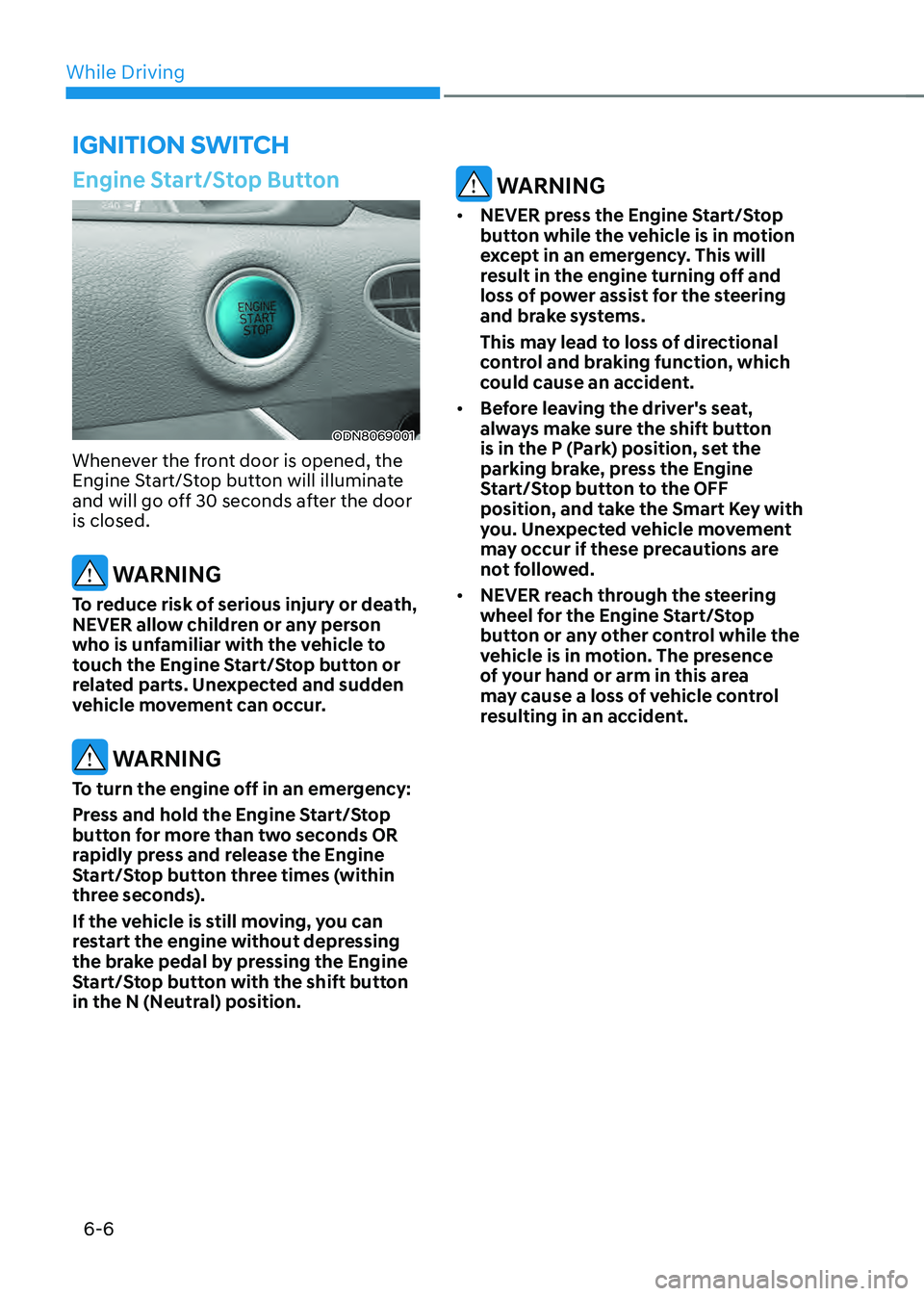
Whenever the front door is opened, the
Engine Start/Stop button will illuminate
and will go off 30 seconds after the door
is closed.
WARNING
To reduce risk of serious injury or death,
NEVER allow children or any person
who is unfamiliar with the vehicle to
touch the Engine Start/Stop button or
related parts. Unexpected and sudden
vehicle movement can occur.
WARNING
To turn the engine off in an emergency:
Press and hold the Engine Start/Stop
button for more than two seconds OR
rapidly press and release the Engine
Start/Stop button three times (within
three seconds).
If the vehicle is still moving, you can
restart the engine without depressing
the brake pedal by pressing the Engine
Start/Stop button with the shift button
in the N (Neutral) position.
WARNING
• NEVER press the Engine Start/Stop
button while the vehicle is in motion
except in an emergency. This will
result in the engine turning off and
loss of power assist for the steering
and brake systems.
This may lead to loss of directional
control and braking function, which
could cause an accident.
• Before leaving the driver's seat,
always make sure the shift button
is in the P (Park) position, set the
parking brake, press the Engine
Start/Stop button to the OFF
position, and take the Smart Key with
you. Unexpected vehicle movement
may occur if these precautions are
not followed.
• NEVER reach through the steering
wheel for the Engine Start/Stop
button or any other control while the
vehicle is in motion. The presence
of your hand or arm in this area
may cause a loss of vehicle control
resulting in an accident.
IGNITION SWITCH
Page 297 of 549
06
6 -7
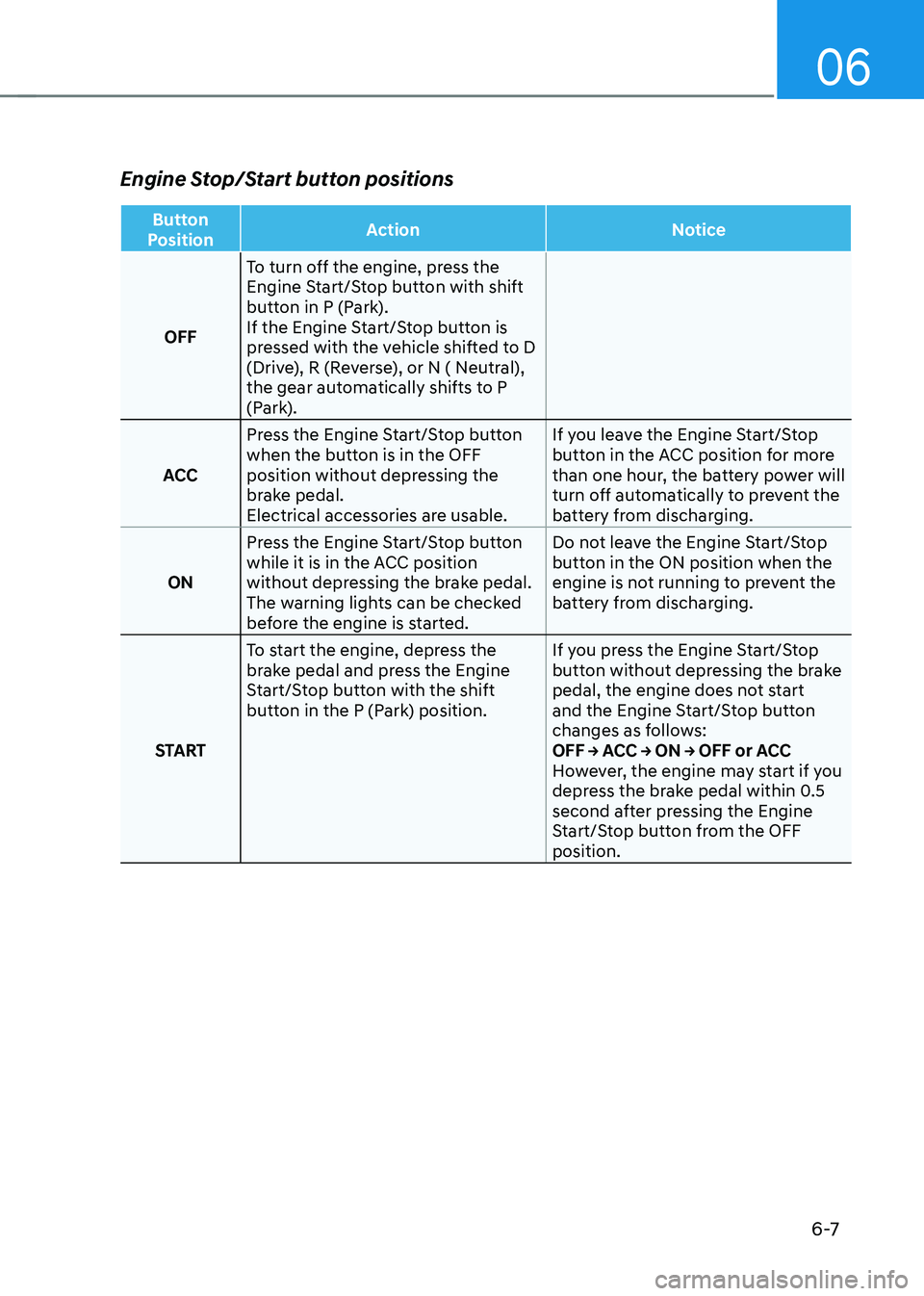
Engine Stop/Start button positions
Button
Position Action
Notice
OFF To turn off the engine, press the
Engine Start/Stop button with shift
button in P (Park).
If the Engine Start/Stop button is
pressed with the vehicle shifted to D
(Drive), R (Reverse), or N ( Neutral),
the gear automatically shifts to P
(Park).
ACC Press the Engine Start/Stop button
when the button is in the OFF
position without depressing the
brake pedal.
Electrical accessories are usable. If you leave the Engine Start/Stop
button in the ACC position for more
than one hour, the battery power will
turn off automatically to prevent the
battery from discharging.
ON Press the Engine Start/Stop button
while it is in the ACC position
without depressing the brake pedal.
The warning lights can be checked
before the engine is started. Do not leave the Engine Start/Stop
button in the ON position when the
engine is not running to prevent the
battery from discharging.
START To start the engine, depress the
brake pedal and press the Engine
Start/Stop button with the shift
button in the P (Park) position.
If you press the Engine Start/Stop
button without depressing the brake
pedal, the engine does not start
and the Engine Start/Stop button
changes as follows:
OFF → ACC → ON → OFF or ACC
However, the engine may start if you
depress the brake pedal within 0.5
second after pressing the Engine
Start/Stop button from the OFF
position.
Page 298 of 549
While Driving
6-8
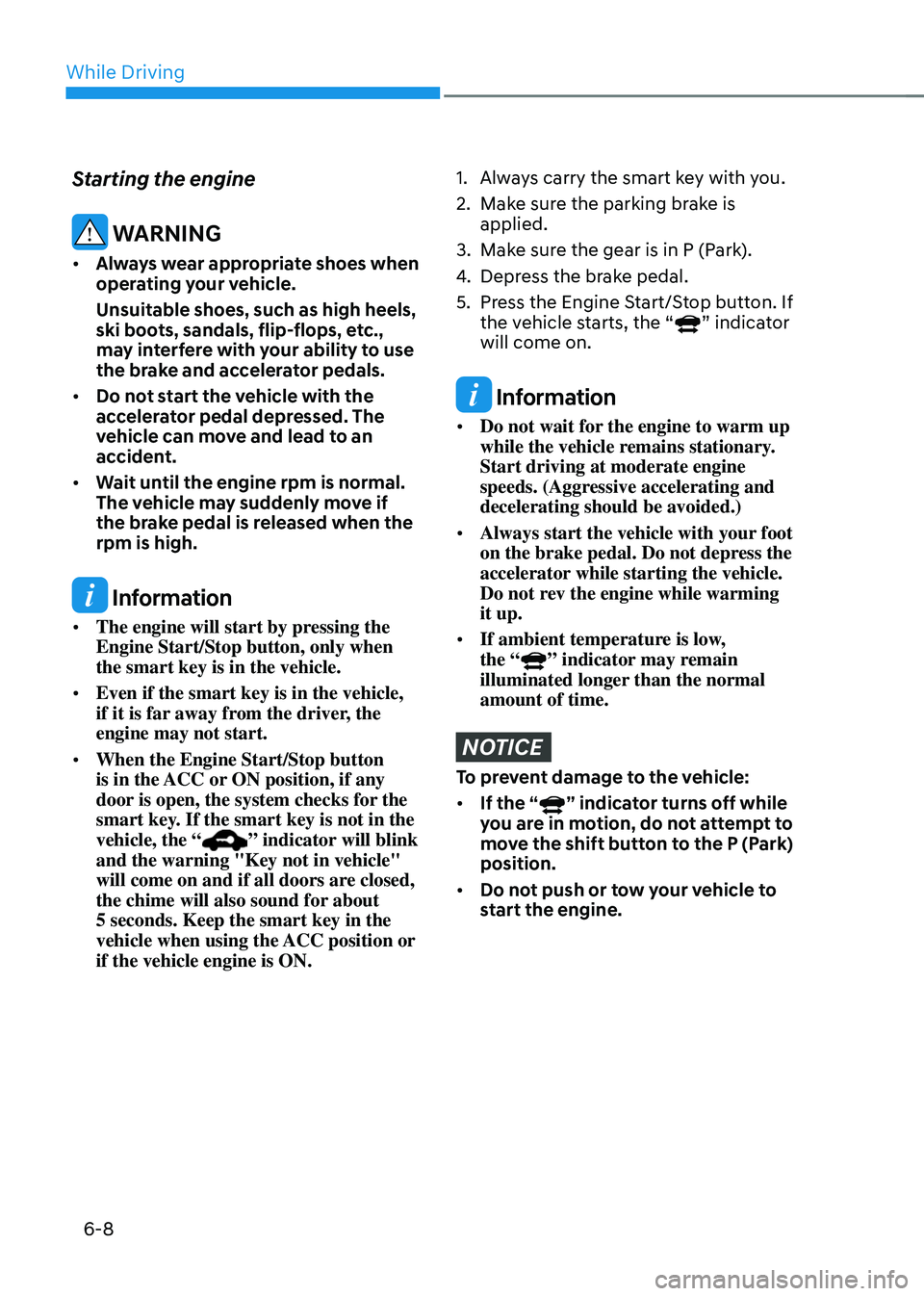
Starting the engine
WARNING
• Always wear appropriate shoes when
operating your vehicle.
Unsuitable shoes, such as high heels,
ski boots, sandals, flip-flops, etc.,
may interfere with your ability to use
the brake and accelerator pedals.
• Do not start the vehicle with the
accelerator pedal depressed. The
vehicle can move and lead to an
accident.
• Wait until the engine rpm is normal.
The vehicle may suddenly move if
the brake pedal is released when the
rpm is high.
Information
• The engine will start by pressing the
Engine Start/Stop button, only when
the smart key is in the vehicle.
• Even if the smart key is in the vehicle,
if it is far away from the driver, the
engine may not start.
• When the Engine Start/Stop button
is in the ACC or ON position, if any
door is open, the system checks for the
smart key. If the smart key is not in the
vehicle, the “
” indicator will blink
and the warning "Key not in vehicle"
will come on and if all doors are closed,
the chime will also sound for about
5 seconds. Keep the smart key in the
vehicle when using the ACC position or
if the vehicle engine is ON.
1. Always carry the smart key with you.
2. Make sure the parking brake is
applied.
3. Make sure the gear is in P (Park).
4. Depress the brake pedal.
5. Press the Engine Start/Stop button. If
the vehicle starts, the “” indicator
will come on.
Information
• Do not wait for the engine to warm up
while the vehicle remains stationary.
Start driving at moderate engine
speeds. (Aggressive accelerating and
decelerating should be avoided.)
• Always start the vehicle with your foot
on the brake pedal. Do not depress the
accelerator while starting the vehicle.
Do not rev the engine while warming
it up.
• If ambient temperature is low,
the “” indicator may remain
illuminated longer than the normal
amount of time.
NOTICE
To prevent damage to the vehicle:
• If the “” indicator turns off while
you are in motion, do not attempt to
move the shift button to the P (Park)
position.
• Do not push or tow your vehicle to
start the engine.
Page 299 of 549
06
6-9
NOTICE
To prevent damage to the vehicle:
When the stop lamp switch fuse is
blown, you can't start the engine
normally. Replace the fuse with a new
one. If you are not able to replace
the fuse, you can start the engine by
pressing and holding the Engine Start/
Stop button for 10 seconds with the
Engine Start/Stop button in the ACC
position.
Do not press the Engine Start/Stop
button for more than 10 seconds except
when the stop lamp switch fuse is
blown.
For your safety always depress the
brake pedal before starting the engine.
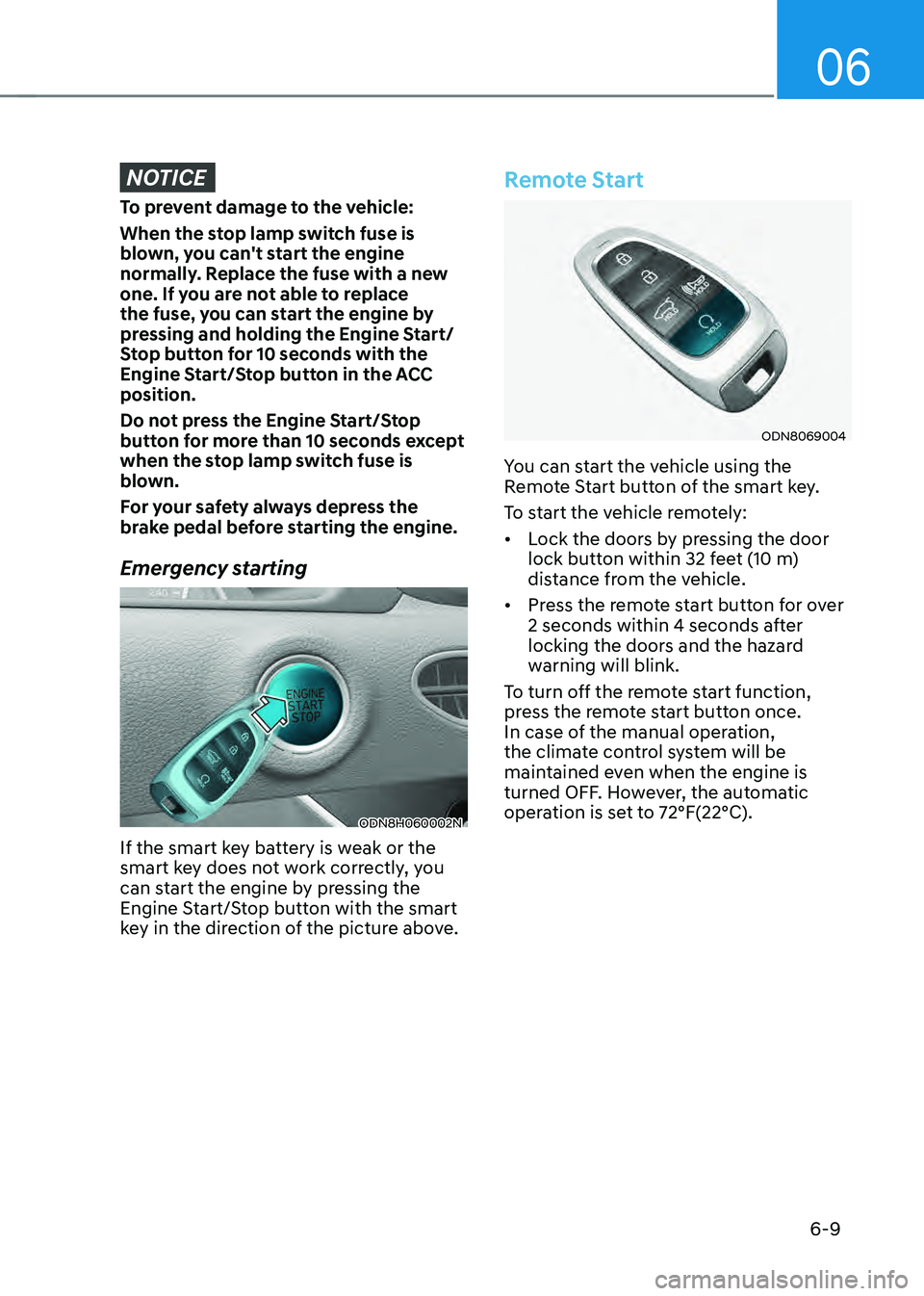
Emergency starting
ODN8H060002NODN8H060002N
If the smart key battery is weak or the
smart key does not work correctly, you
can start the engine by pressing the
Engine Start/Stop button with the smart
key in the direction of the picture above.
Remote Start
ODN8069004ODN8069004
You can start the vehicle using the
Remote Start button of the smart key.
To start the vehicle remotely:
• Lock the doors by pressing the door
lock button within 32 feet (10 m)
distance from the vehicle.
• Press the remote start button for over
2 seconds within 4 seconds after
locking the doors and the hazard
warning will blink.
To turn off the remote start function,
press the remote start button once.
In case of the manual operation,
the climate control system will be
maintained even when the engine is
turned OFF. However, the automatic
operation is set to 72°F(22°C).
Page 300 of 549
While Driving6-10
If your vehicle is parked and the engine
is left on for a long period of time, the
engine will turn off automatically to help
reduce fuel consumption and prevent
accidents caused by carbon dioxide
poisoning.
Operating Conditions
Vehicle Auto-Shut Off timer operates
when all the following conditions are
satisfied:
• Vehicle speed is below 1.8 mph (3
km/h), and the gear is shifted to P
(Park)
• The brake pedal and accelerator pedal
are not depressed
• The driver’s seat belt is unfastened
• The passenger seat is empty
• The infotainment system is being
updated
Deactivating Conditions
Vehicle Auto-Shut Off timer turns off
when one of the situation occur:
• Vehicle speed is above 1.8 mph (3
km/h)
• The gear is shifted to R (Reverse), D
(Drive) or N (Neutral)
• The brake pedal or accelerator pedal
is depressed
• The driver’s seat belt is fastened
• A passenger is in the passenger’s seat
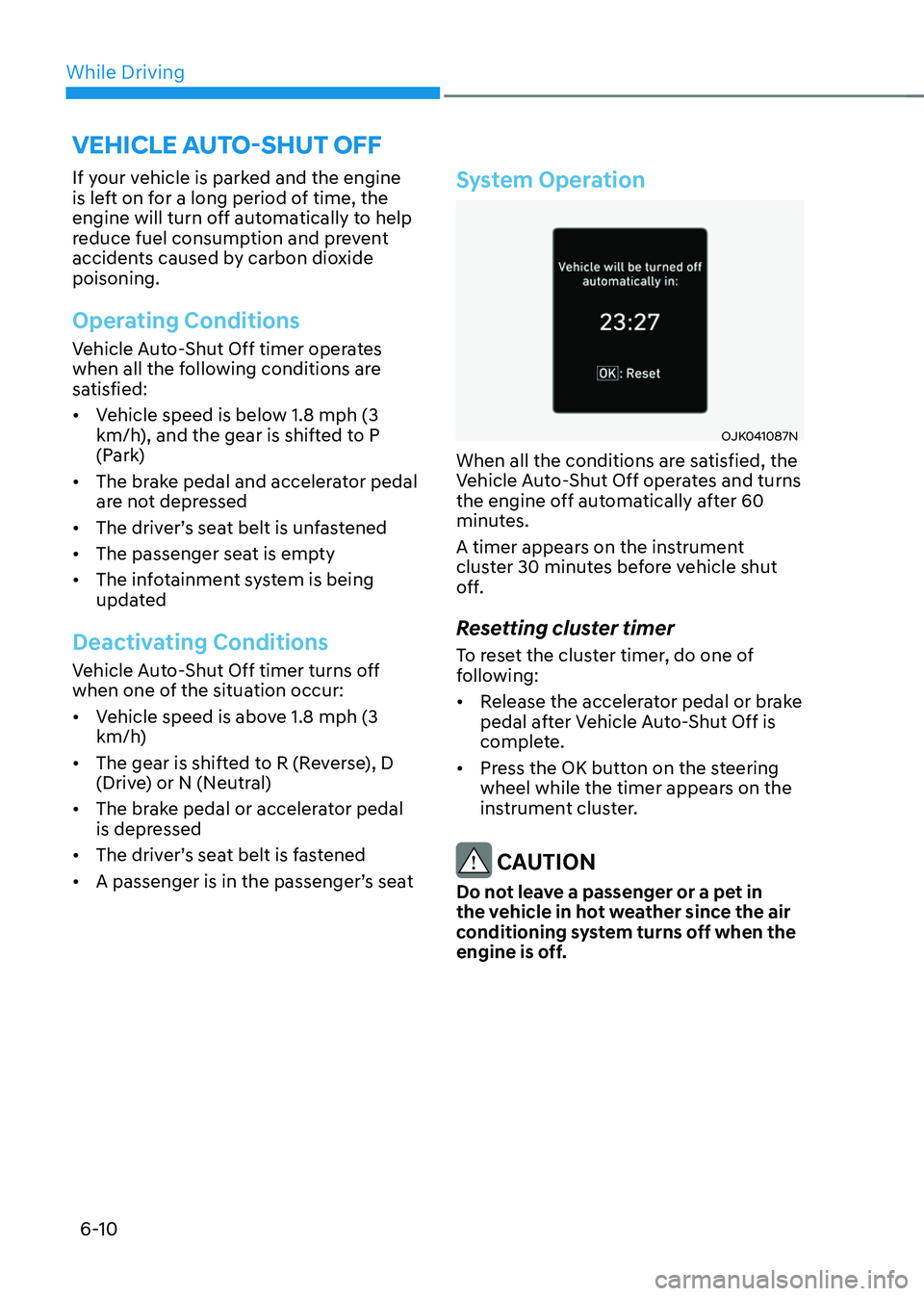
System Operation
OJK041087NOJK041087N
When all the conditions are satisfied, the
Vehicle Auto-Shut Off operates and turns
the engine off automatically after 60
minutes.
A timer appears on the instrument
cluster 30 minutes before vehicle shut
off.
Resetting cluster timer
To reset the cluster timer, do one of
following:
• Release the accelerator pedal or brake
pedal after Vehicle Auto-Shut Off is
complete.
• Press the OK button on the steering
wheel while the timer appears on the
instrument cluster.
CAUTION
Do not leave a passenger or a pet in
the vehicle in hot weather since the air
conditioning system turns off when the
engine is off.
VEHICLE AUTO-SHUT OFF