warning light HYUNDAI SONATA LIMITED 2016 Service Manual
[x] Cancel search | Manufacturer: HYUNDAI, Model Year: 2016, Model line: SONATA LIMITED, Model: HYUNDAI SONATA LIMITED 2016Pages: 708, PDF Size: 25.96 MB
Page 174 of 708
3-79
Convenient features of your vehicle
3
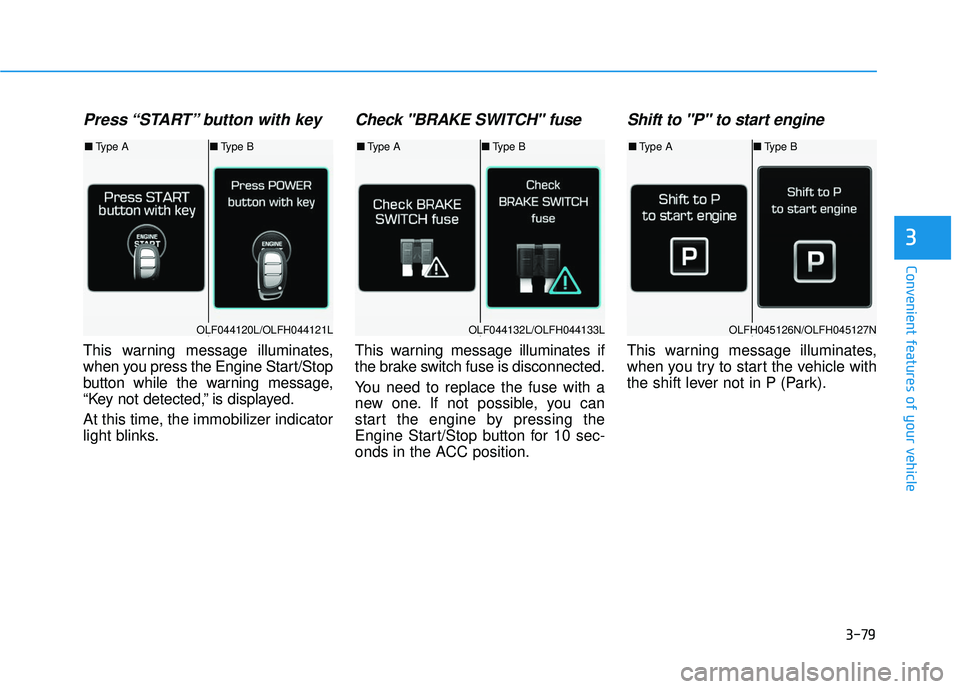
Press “START” button with key
This warning message illuminates,
when you press the Engine Start/Stop
button while the warning message,
“Key not detected,” is displayed.
At this time, the immobilizer indicator
light blinks.
Check "BRAKE SWITCH" fuse
This warning message illuminates if
the brake switch fuse is disconnected.
You need to replace the fuse with a
new one. If not possible, you can
start the engine by pressing the
Engine Start/Stop button for 10 sec-
onds in the ACC position.
Shift to "P" to start engine
This warning message illuminates,
when you try to start the vehicle with
the shift lever not in P (Park).
OLF044120L/OLFH044121LOLF044132L/OLFH044133LOLFH045126N/OLFH045127N
■Type A ■Type B■Type A ■Type B■Type A ■Type B
Page 177 of 708
3-82
Convenient features of your vehicle
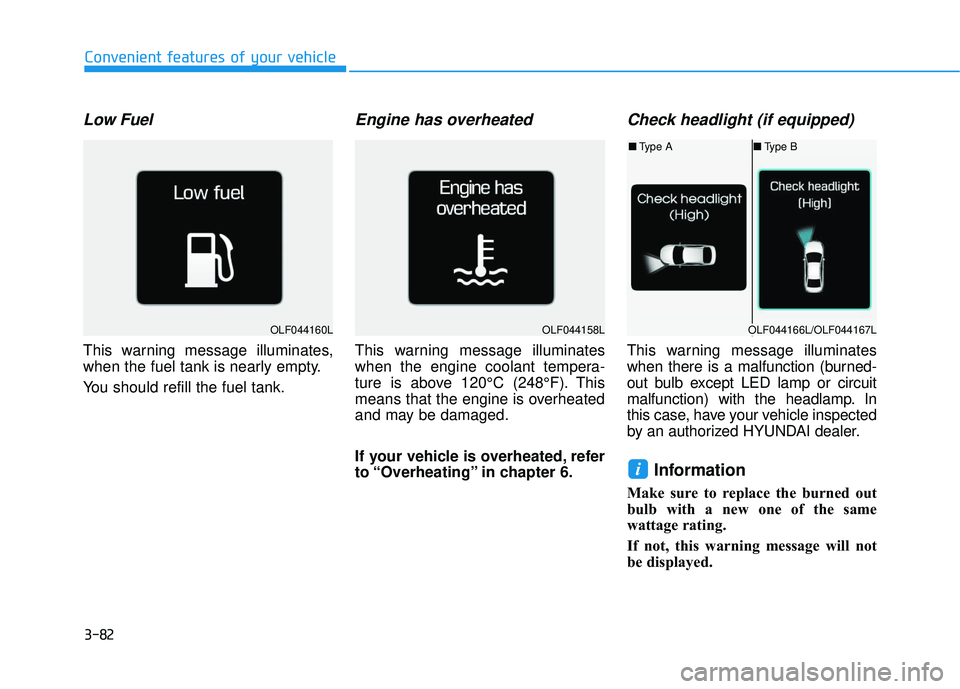
Low Fuel
This warning message illuminates,
when the fuel tank is nearly empty.
You should refill the fuel tank.
Engine has overheated
This warning message illuminates
when the engine coolant tempera-
ture is above 120°C (248°F). This
means that the engine is overheated
and may be damaged.
If your vehicle is overheated, refer
to “Overheating” in chapter 6.
Check headlight (if equipped)
This warning message illuminates
when there is a malfunction (burned-
out bulb except LED lamp or circuit
malfunction) with the headlamp. In
this case, have your vehicle inspected
by an authorized HYUNDAI dealer.
Information
Make sure to replace the burned out
bulb with a new one of the same
wattage rating.
If not, this warning message will not
be displayed.
i
OLF044160LOLF044158LOLF044166L/OLF044167L
■Type A ■Type B
Page 192 of 708
3-97
Convenient features of your vehicle
3
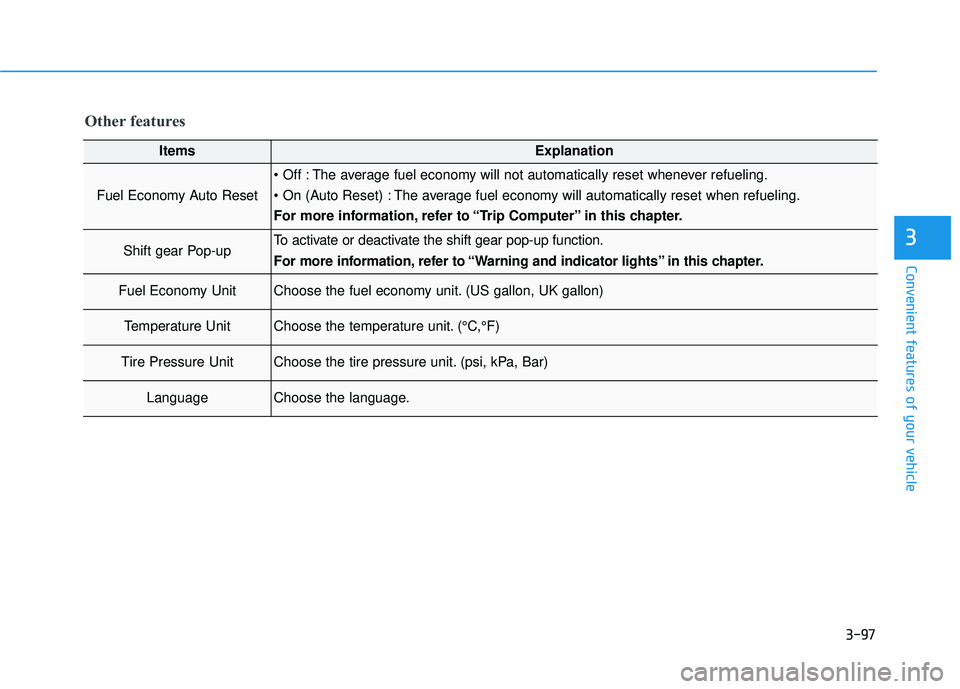
Other features
ItemsExplanation
Fuel Economy Auto Reset
The average fuel economy will not automatically reset whenever refueling.
The average fuel economy will automatically reset when refueling.
For more information, refer to “Trip Computer” in this chapter.
Shift gear Pop-upTo activate or deactivate the shift gear pop-up function.
For more information, refer to “Warning and indicator lights” in this chapter.
Fuel Economy UnitChoose the fuel economy unit. (US gallon, UK gallon)
Temperature UnitChoose the temperature unit. (°C,°F)
Tire Pressure UnitChoose the tire pressure unit. (psi, kPa, Bar)
LanguageChoose the language.
Page 204 of 708
3-109
Convenient features of your vehicle
3
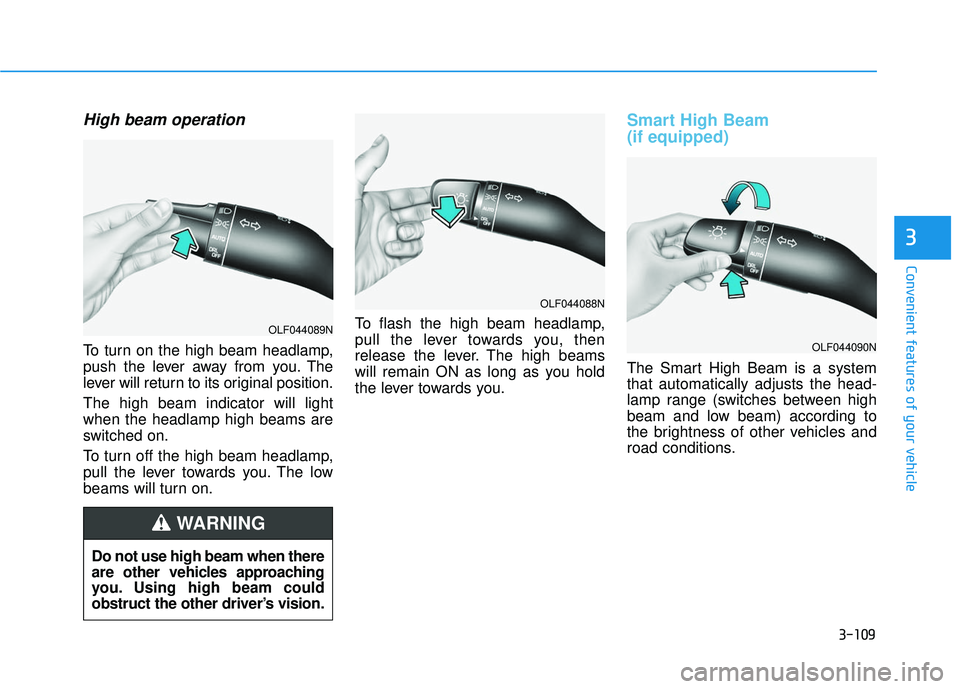
High beam operation
To turn on the high beam headlamp,
push the lever away from you. The
lever will return to its original position.
The high beam indicator will light
when the headlamp high beams are
switched on.
To turn off the high beam headlamp,
pull the lever towards you. The low
beams will turn on.To flash the high beam headlamp,
pull the lever towards you, then
release the lever. The high beams
will remain ON as long as you hold
the lever towards you.
Smart High Beam
(if equipped)
The Smart High Beam is a system
that automatically adjusts the head-
lamp range (switches between high
beam and low beam) according to
the brightness of other vehicles and
road conditions.
OLF044088N
OLF044090N
Do not use high beam when there
are other vehicles approaching
you. Using high beam could
obstruct the other driver’s vision.
WARNING
OLF044089N
Page 205 of 708
3-110
Convenient features of your vehicle
Operating condition
1. Place the light switch in the AUTOposition.
2. Turn on the high beam by pushing the lever away from you.
The smart high beam ( ) indica- tor will illuminate.
3. The Smart High Beam will turn on when vehicle speed is above 28
mph (45km/h).
the Smart High Beam is operating,
the Smart High Beam will turn off
and the high beam will be on con-
tinuously. The smarthigh beam
( ) indicator will turn off.
when the Smart High Beam is
operating, the Smart High Beam
will turn off.
4. If the light switch is placed to the headlamp position, the Smart
High Beam will turn off and the low
beam will be on continuously. The high beam switches to low beam
in the below conditions.
- When the Smart High Beam is off.
- When the light switch is not in the
AUTO position.
- When the headlamp is detected from the on-coming vehicle.
- When the tail lamp is detected from the front vehicle.
- When the surrounding is bright enough high beams are not need-
ed.
- When streetlights or other lights are detected.
- When vehicle speed is below 18 mph (35km/h).
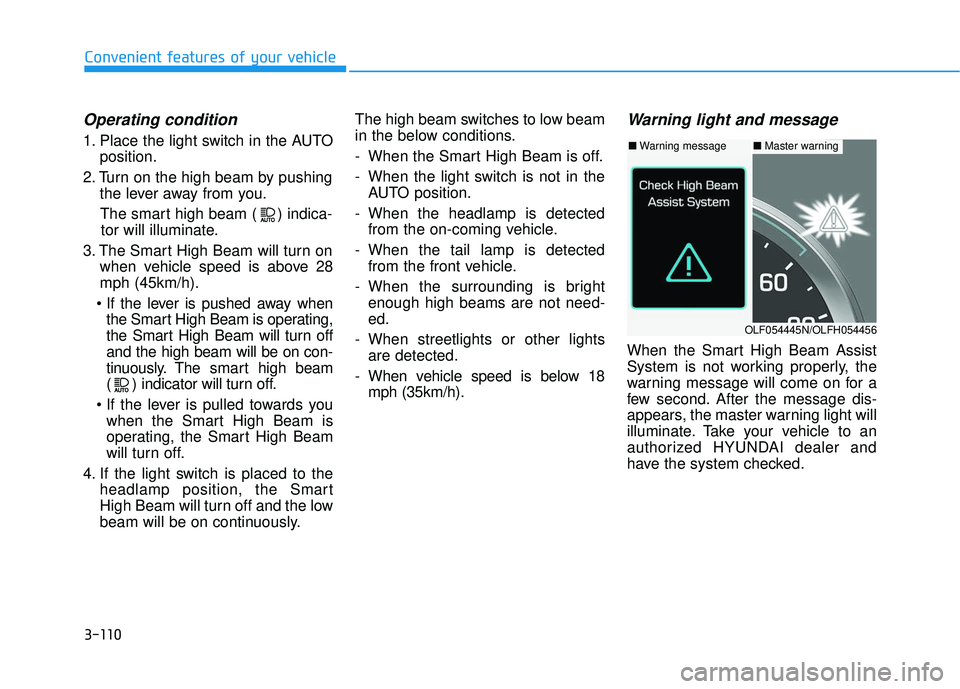
Warning light and message
When the Smart High Beam Assist
System is not working properly, the
warning message will come on for a
few second. After the message dis-
appears, the master warning light will
illuminate. Take your vehicle to an
authorized HYUNDAI dealer and
have the system checked.
■ Warning message■ Master warning
OLF054445N/OLFH054456
Page 206 of 708
3-111
Convenient features of your vehicle
3
The system may not operate nor-
mally in the below conditions.
When the light from the on-
coming or front vehicle is not
detected because of lamp dam-
age, hidden from sight, etc.
When the lamp of the on-com-
ing or front vehicle is covered
with dust, snow or water.
When the light from the on-
coming or front vehicle is not
detected because of exhaust
fume, smoke, fog, snow, etc.
When the front window is cov-
ered with foreign matters such
as ice, dust, fog, or is damaged.(Continued)
CAUTION(Continued)
When there is a similar shape
lamp with the front vehicle’s
lamps.
When it is hard to see because
of fog, heavy rain or snow.
When the headlamp is not
repaired or replaced at an
authorized dealer.
When headlamp aiming is not
properly adjusted.
When driving on a narrow
curved road or rough road.
When driving downhill or uphill.
When only part of the vehicle
in front is visible on a cross-
road or curved road.
When there is a traffic light,
reflecting sign, flashing sign
or mirror.(Continued)
(Continued)
When the road conditions are
bad such as being wet or cov-
ered with snow.
When the front vehicle’s head-
lamps are off but the fog lamps
on.
When a vehicle suddenly
appears from a curve.
When the vehicle is tilted from
a flat tire or being towed.
When the LDWS (Lane
Departure Warning System)
warning light illuminates. (if
equipped)
Page 207 of 708
3-112
Convenient features of your vehicle
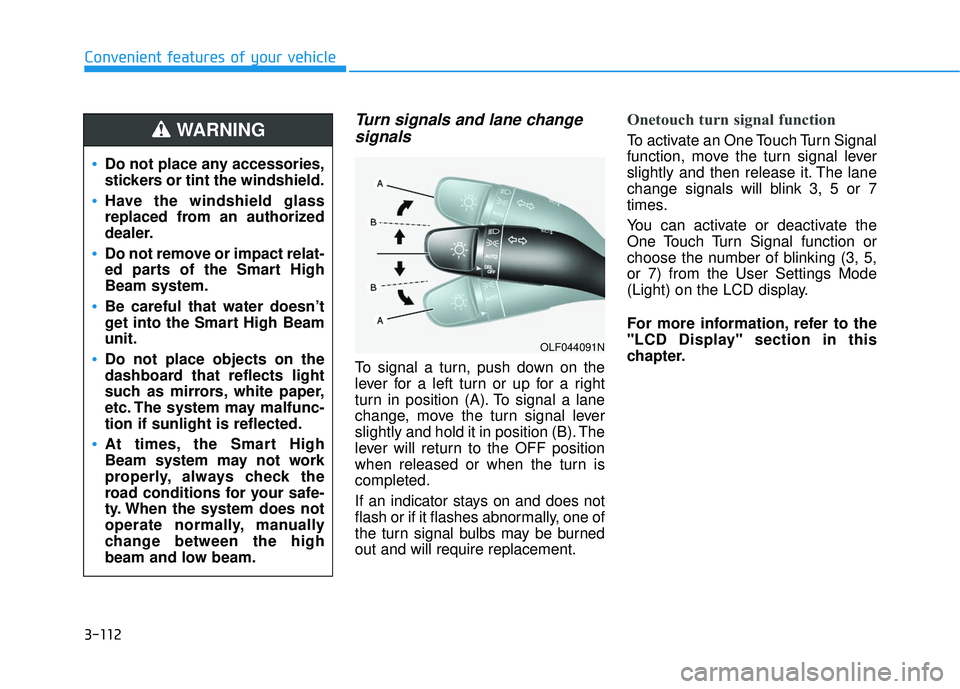
Turn signals and lane changesignals
To signal a turn, push down on the
lever for a left turn or up for a right
turn in position (A). To signal a lane
change, move the turn signal lever
slightly and hold it in position (B). The
lever will return to the OFF position
when released or when the turn is
completed.
If an indicator stays on and does not
flash or if it flashes abnormally, one of
the turn signal bulbs may be burned
out and will require replacement.
Onetouch turn signal function
To activate an One Touch Turn Signal
function, move the turn signal lever
slightly and then release it. The lane
change signals will blink 3, 5 or 7
times.
You can activate or deactivate the
One Touch Turn Signal function or
choose the number of blinking (3, 5,
or 7) from the User Settings Mode
(Light) on the LCD display.
For more information, refer to the
"LCD Display" section in this
chapter.
OLF044091N
Do not place any accessories,
stickers or tint the windshield.
Have the windshield glass
replaced from an authorized
dealer.
Do not remove or impact relat-
ed parts of the Smart High
Beam system.
Be careful that water doesn’t
get into the Smart High Beam
unit.
Do not place objects on the
dashboard that reflects light
such as mirrors, white paper,
etc. The system may malfunc-
tion if sunlight is reflected.
At times, the Smart High
Beam system may not work
properly, always check the
road conditions for your safe-
ty. When the system does not
operate normally, manually
change between the high
beam and low beam.
WARNING
Page 211 of 708
3-116
Convenient features of your vehicle
Interior Lights
Do not use the interior lights for
extended periods when the engine
is turned off or the battery will dis-
charge.
Interior lamp AUTO cut
The interior lamps will automatically
go off approximately 20 minutes after
the engine is turned off and the
doors closed. If a door is opened, the
lamp will go off 40 minutes after the
engine is turned off. If the doors are
locked by the smart key and the vehi-
cle enters the armed stage of the
theft alarm system, the lamps will go
off five seconds later.
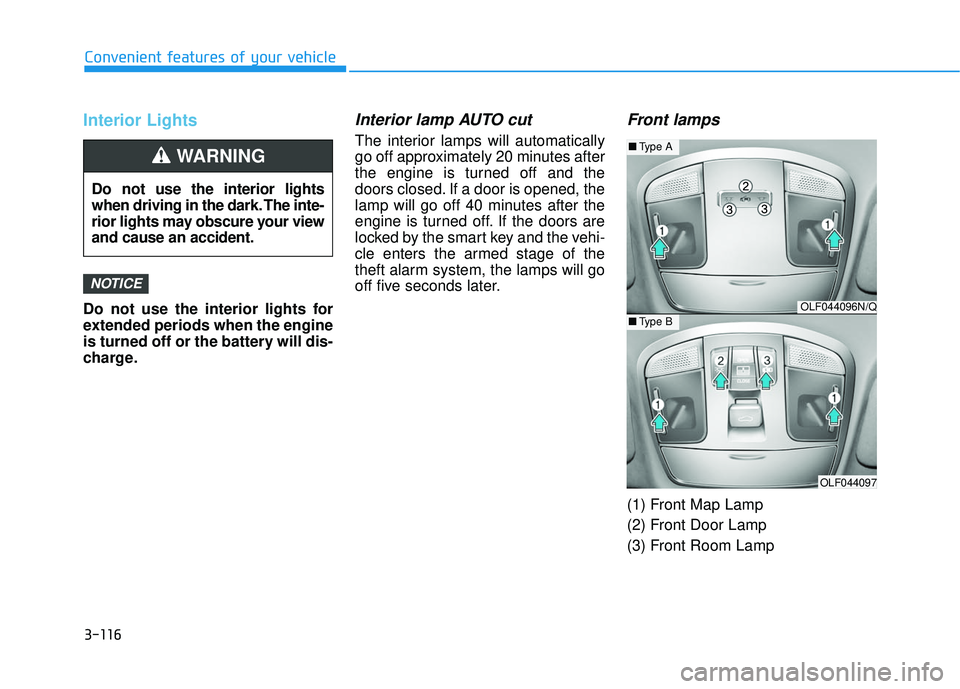
Front lamps
(1) Front Map Lamp
(2) Front Door Lamp
(3) Front Room Lamp
NOTICE
Do not use the interior lights
when driving in the dark. The inte-
rior lights may obscure your view
and cause an accident.
WARNING
OLF044096N/Q
OLF044097
■Type A
■Type B
Page 216 of 708
3-121
Convenient features of your vehicle
3
Windshield Washers
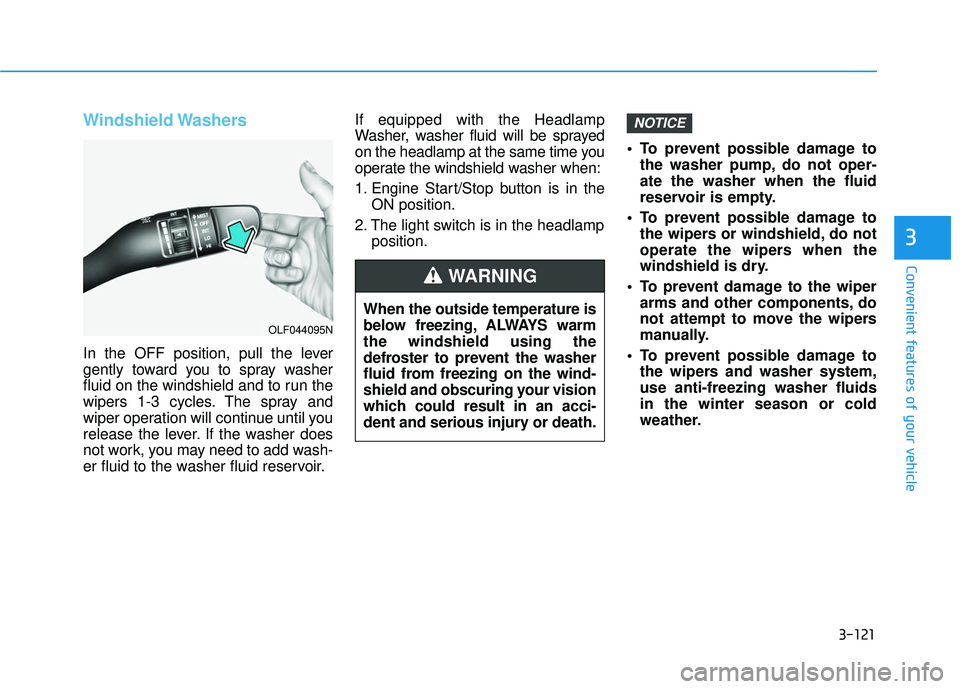
In the OFF position, pull the lever
gently toward you to spray washer
fluid on the windshield and to run the
wipers 1-3 cycles. The spray and
wiper operation will continue until you
release the lever. If the washer does
not work, you may need to add wash-
er fluid to the washer fluid reservoir.If equipped with the Headlamp
Washer, washer fluid will be sprayed
on the headlamp at the same time you
operate the windshield washer when:
1. Engine Start/Stop button is in the
ON position.
2. The light switch is in the headlamp position. To prevent possible damage to
the washer pump, do not oper-
ate the washer when the fluid
reservoir is empty.
To prevent possible damage to the wipers or windshield, do not
operate the wipers when the
windshield is dry.
To prevent damage to the wiper arms and other components, do
not attempt to move the wipers
manually.
To prevent possible damage to the wipers and washer system,
use anti-freezing washer fluids
in the winter season or cold
weather.
NOTICE
When the outside temperature is
below freezing, ALWAYS warm
the windshield using the
defroster to prevent the washer
fluid from freezing on the wind-
shield and obscuring your vision
which could result in an acci-
dent and serious injury or death.
WARNING
OLF044095N
Page 219 of 708
3-124
Convenient features of your vehicle
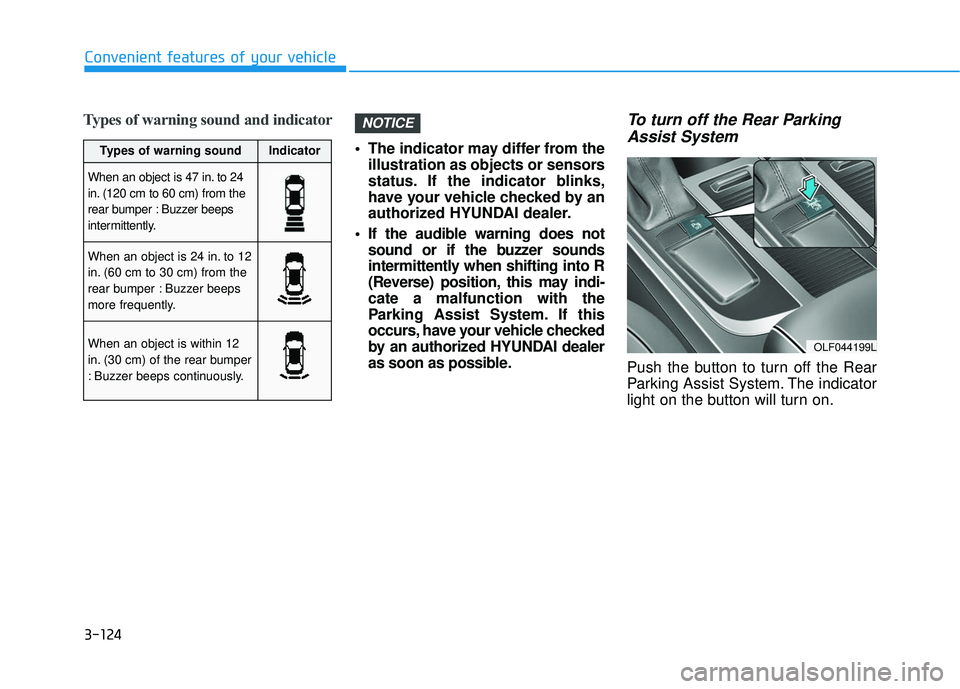
Types of warning sound and indicator
The indicator may differ from theillustration as objects or sensors
status. If the indicator blinks,
have your vehicle checked by an
authorized HYUNDAI dealer.
If the audible warning does not sound or if the buzzer sounds
intermittently when shifting into R
(Reverse) position, this may indi-
cate a malfunction with the
Parking Assist System. If this
occurs, have your vehicle checked
by an authorized HYUNDAI dealer
as soon as possible.
To turn off the Rear ParkingAssist System
Push the button to turn off the Rear
Parking Assist System. The indicator
light on the button will turn on.
NOTICE
OLF044199L
Types of warning soundIndicator
When an object is 47 in. to 24
in. (120 cm to 60 cm) from the
rear bumper : Buzzer beeps
intermittently.
When an object is 24 in. to 12
in. (60 cm to 30 cm) from the
rear bumper : Buzzer beeps
more frequently.
When an object is within 12
in. (30 cm) of the rear bumper
: Buzzer beeps continuously.