trip computer HYUNDAI SONATA LIMITED 2016 Owners Manual
[x] Cancel search | Manufacturer: HYUNDAI, Model Year: 2016, Model line: SONATA LIMITED, Model: HYUNDAI SONATA LIMITED 2016Pages: 708, PDF Size: 25.96 MB
Page 13 of 708

F13F13
Accessing your vehicle .........................................3-3
Smart Key ........................................................................\
....3-3
Immobilizer System ...........................................................3-7
Door locks ...............................................................3-9
Operating Door Locks from Outside the Vehicle ......3-9
Operating Door Locks from Inside the Vehicle .......3-10
Auto Door Lock/Unlock Features ...............................3-12
Child-Protector Rear Door locks ................................3-12
Theft-alarm system.............................................3-13
Driver position memory system .........................3-14
Storing Positions into Memory ....................................3-14
Easy Access Function ....................................................3-15
Steering wheel......................................................3-16
Electric Power Steering (EPS) .....................................3-16
Tilt Steering / Telescope Steering ..............................3-17
Heated Steering Wheel ..................................................3-17
Horn ........................................................................\
............3-18
Mirrors ...................................................................3-19
Inside Rearview Mirror ..................................................3-19
Outside Rearview Mirror ...............................................3-34
Reverse Parking Aid Function......................................3-37
Windows ................................................................3-38
Power Windows ...............................................................3-39
Panoramic sunroof ..............................................3-42
Sunshade ........................................................................\
...3-42
Sliding the Sunroof .........................................................3-43
Tilting the Sunroof .........................................................3-43
Closing the Sunroof........................................................3-44
To Reset the Sunroof.....................................................3-45
Exterior features .................................................3-46
Hood ........................................................................\
...........3-46
Trunk ........................................................................\
..........3-47
Smart Trunk ......................................................................3-\
50
Fuel Filler Door ................................................................3-53
Instrument cluster................................................3-57
Instrument cluster control ............................................3-58
Gauges ........................................................................\
.......3-59
Engine coolant temperature gauge ............................3-61
Warning and indicator lights ........................................3-63
Warning messages ..........................................................3-76
LCD Display .......................................................................3\
-88
Trip computer ...................................................................3-98
Light .....................................................................3-1\
07
Exterior Lights ...............................................................3-107
Smart High Beam ..........................................................3-109
Welcome System ...........................................................3-115
Interior Lights ................................................................3-116
3Convenient features of your vehicle
Page 96 of 708

Convenient features of your vehicle
Accessing your vehicle .........................................3-3
Smart Key ........................................................................\
....3-3
Immobilizer System ...........................................................3-7
Door locks ...............................................................3-9
Operating Door Locks from Outside the Vehicle ......3-9
Operating Door Locks from Inside the Vehicle .......3-10
Auto Door Lock/Unlock Features ...............................3-12
Child-Protector Rear Door locks ................................3-12
Theft-alarm system.............................................3-13
Driver position memory system .........................3-14
Storing Positions into Memory ..................................3-14
Easy Access Function ....................................................3-15
Steering wheel......................................................3-16
Electric Power Steering (EPS) .....................................3-16
Tilt Steering / Telescope Steering ..............................3-17
Heated Steering Wheel ..................................................3-17
Horn ........................................................................\
............3-18
Mirrors ...................................................................3-19
Inside Rearview Mirror ..................................................3-19
Outside Rearview Mirror ...............................................3-34
Reverse Parking Aid Function......................................3-37
Windows ................................................................3-38
Power Windows ...............................................................3-39
Panoramic sunroof ..............................................3-42
Sunshade ........................................................................\
...3-42
Sliding the Sunroof .........................................................3-43
Tilting the Sunroof .........................................................3-43
Closing the Sunroof........................................................3-44
To Reset the Sunroof.....................................................3-45
Exterior features .................................................3-46
Hood ........................................................................\
...........3-46
Trunk ........................................................................\
..........3-47
Smart Trunk ......................................................................3-\
50
Fuel Filler Door ................................................................3-53
Instrument cluster................................................3-57
Instrument cluster control ............................................3-58
Gauges ........................................................................\
.......3-59
Engine coolant temperature gauge ............................3-61
Warning and indicator lights ........................................3-63
Warning messages ..........................................................3-76
LCD Display .......................................................................3\
-88
Trip computer ...................................................................3-98
Light .....................................................................3-1\
07
Exterior Lights ...............................................................3-107
Smart High Beam ..........................................................3-109
Welcome System ...........................................................3-115
Interior Lights ................................................................3-116
3
Page 152 of 708
3-57
Convenient features of your vehicle
3
I
IN
N S
ST
T R
R U
U M
M E
EN
N T
T
C
C L
LU
U S
ST
T E
ER
R
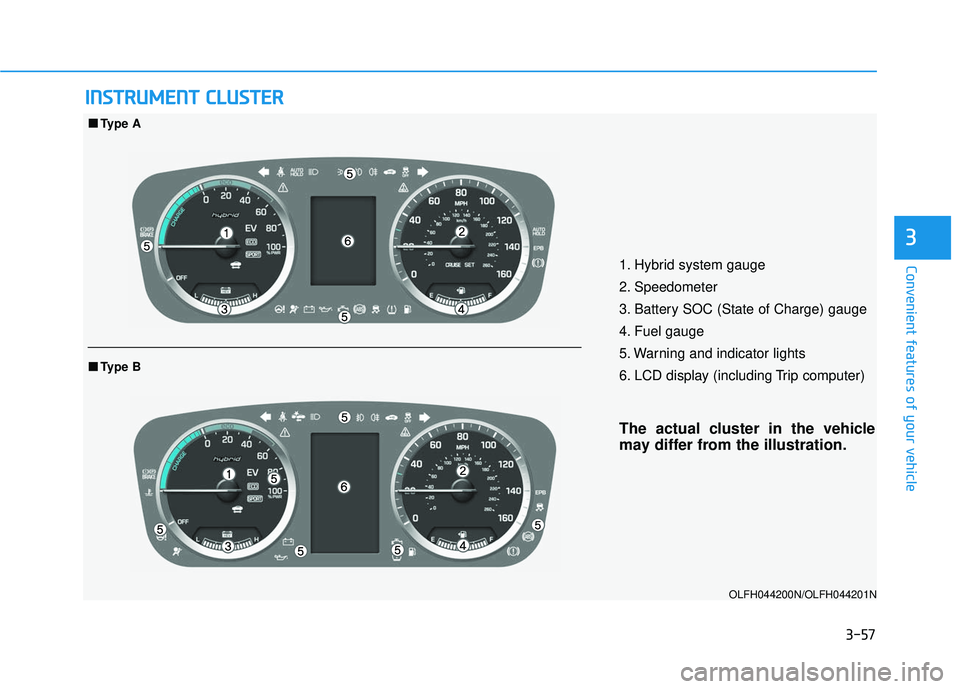
1. Hybrid system gauge
2. Speedometer
3. Battery SOC (State of Charge) gauge
4. Fuel gauge
5. Warning and indicator lights
6. LCD display (including Trip computer)
The actual cluster in the vehicle
may differ from the illustration.
OLFH044200N/OLFH044201N
■ ■
Type A
■
■Type B
Page 183 of 708
3-88
Convenient features of your vehicle
LCD Display
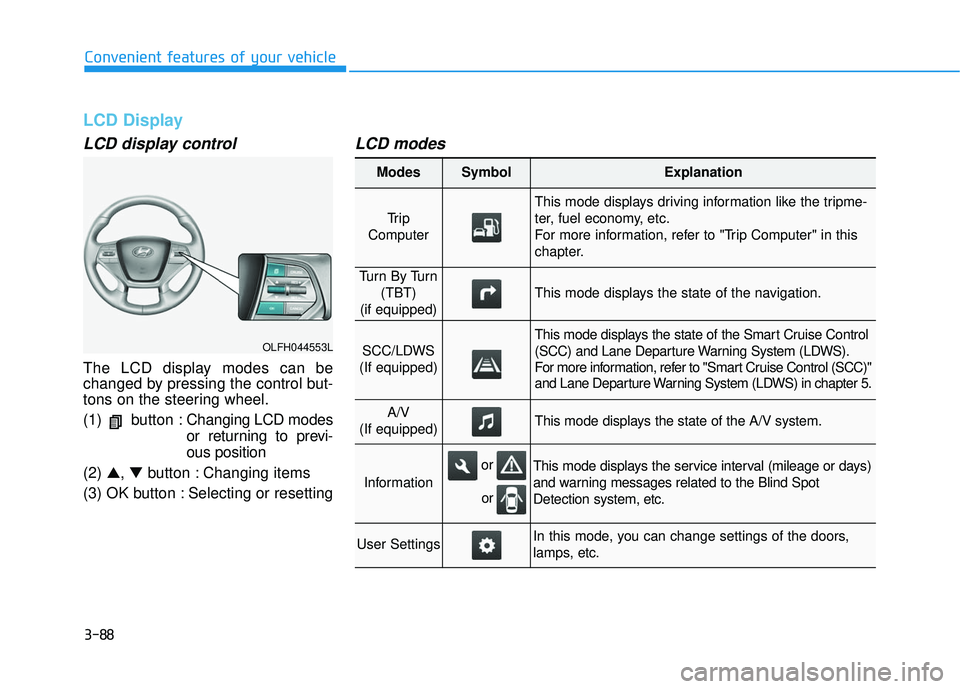
LCD display control
The LCD display modes can be
changed by pressing the control but-
tons on the steering wheel.
(1) button :Changing LCD modes
or returning to previ-
ous position
(2) ▲, ▼button : Changing items
(3) OK button : Selecting or resetting
LCD modes
OLFH044553L
Modes SymbolExplanation
Tr i p
Computer
This mode displays driving information like the tripme-
ter, fuel economy, etc.
For more information, refer to "Trip Computer" in this
chapter.
Tu r n B y Tu r n (TBT)
(if equipped)
This mode displays the state of the navigation.
SCC/LDWS
(If equipped)
This mode displays the state of the Smart Cruise Control
(SCC) and Lane Departure Warning System (LDWS).
For more information, refer to "Smart Cruise Control (SCC)"
and Lane Departure Warning System (LDWS) in chapter 5.
A/V
(If equipped)This mode displays the state of the A/V system.
Information
This mode displays the service interval (mileage or days)
and warning messages related to the Blind Spot
Detection system, etc.
User SettingsIn this mode, you can change settings of the doors,
lamps, etc.
or
or
Page 184 of 708
3-89
Convenient features of your vehicle
3
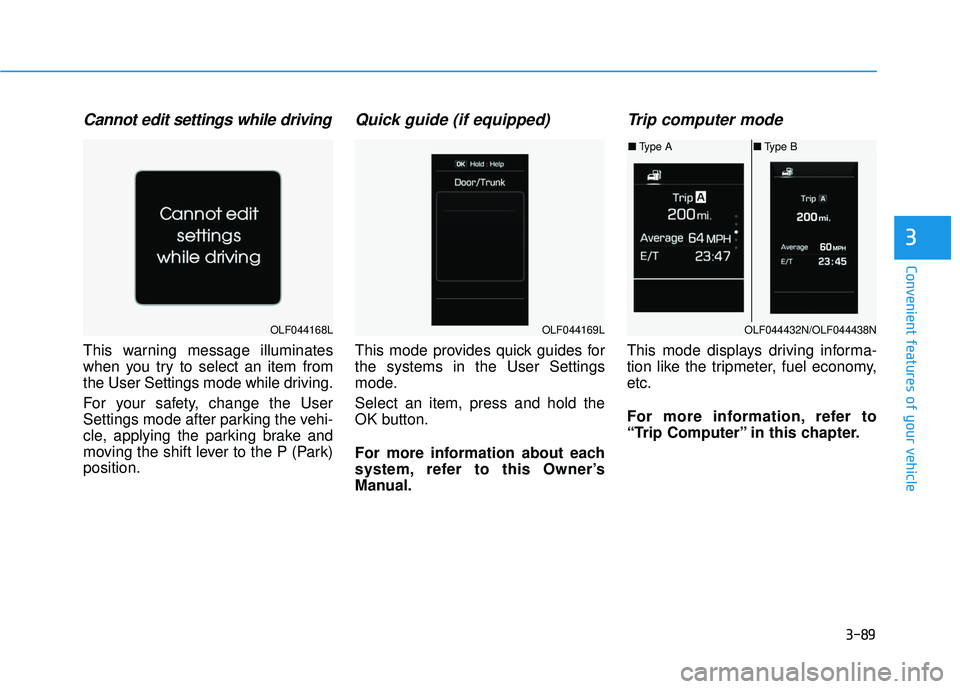
Cannot edit settings while driving
This warning message illuminates
when you try to select an item from
the User Settings mode while driving.
For your safety, change the User
Settings mode after parking the vehi-
cle, applying the parking brake and
moving the shift lever to the P (Park)
position.
Quick guide (if equipped)
This mode provides quick guides for
the systems in the User Settings
mode.
Select an item, press and hold the
OK button.
For more information about each
system, refer to this Owner’s
Manual.
Trip computer mode
This mode displays driving informa-
tion like the tripmeter, fuel economy,
etc.
For more information, refer to
“Trip Computer” in this chapter.
OLF044168LOLF044169LOLF044432N/OLF044438N
■Type A ■Type B
Page 192 of 708
3-97
Convenient features of your vehicle
3
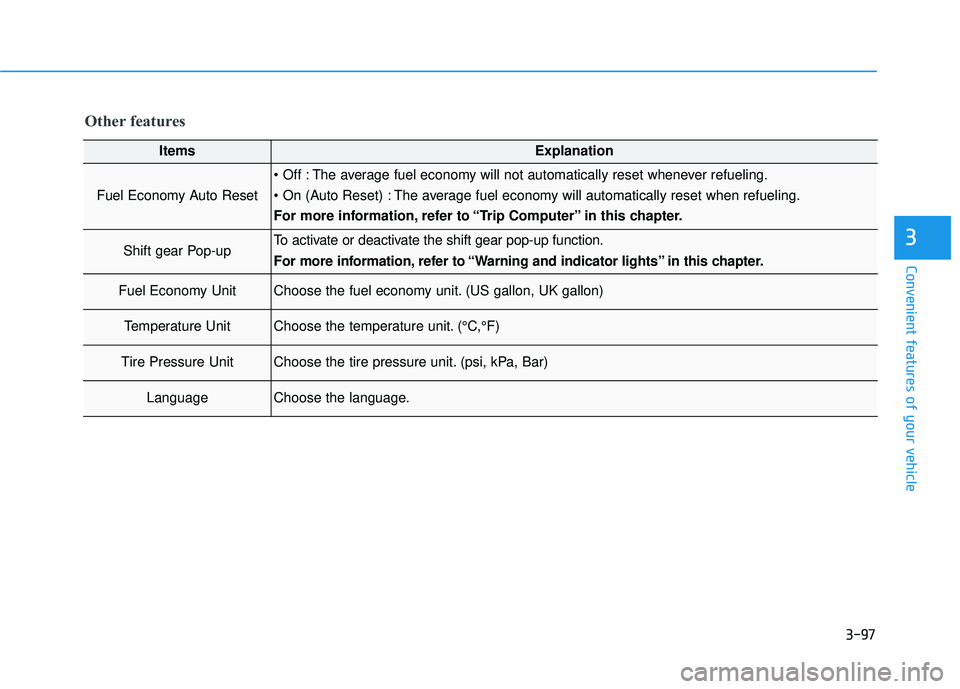
Other features
ItemsExplanation
Fuel Economy Auto Reset
The average fuel economy will not automatically reset whenever refueling.
The average fuel economy will automatically reset when refueling.
For more information, refer to “Trip Computer” in this chapter.
Shift gear Pop-upTo activate or deactivate the shift gear pop-up function.
For more information, refer to “Warning and indicator lights” in this chapter.
Fuel Economy UnitChoose the fuel economy unit. (US gallon, UK gallon)
Temperature UnitChoose the temperature unit. (°C,°F)
Tire Pressure UnitChoose the tire pressure unit. (psi, kPa, Bar)
LanguageChoose the language.
Page 193 of 708
3-98
Convenient features of your vehicle
Trip computer
The trip computer is a driving infor-
mation system controlled by a micro-
computer. This displays driving-relat-
ed information.
Information
Some driving information, stored in
the trip computer (i.e. average vehicle
speed) is reset when the battery is dis-
connected
One time driving informationmode
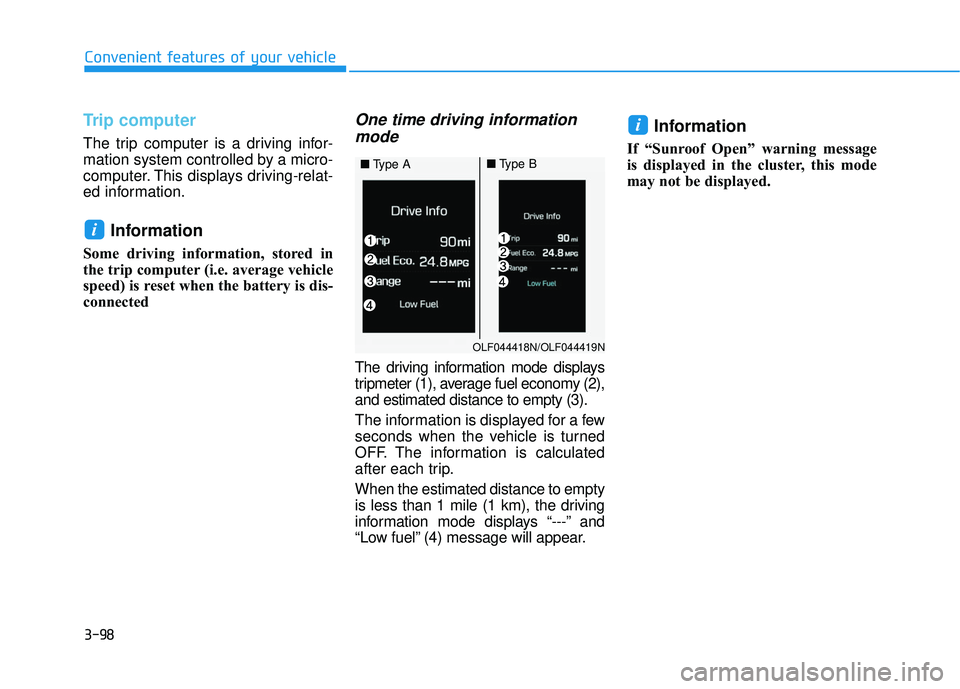
The driving information mode displays
tripmeter (1), average fuel economy (2),
and estimated distance to empty (3).
The information is displayed for a few
seconds when the vehicle is turned
OFF. The information is calculated
after each trip.
When the estimated distance to empty
is less than 1 mile (1 km), the driving
information mode displays “---” and
“Low fuel” (4) message will appear.
Information
If “Sunroof Open” warning message
is displayed in the cluster, this mode
may not be displayed.
i
i
OLF044418N/OLF044419N
■ Type A■Type B
Page 195 of 708
3-100
Convenient features of your vehicle
Elapsed Time (3)
The elapsed time is the total driv-ing time since the last elapsed time
reset.
- Time range (hh:mm): 00:00 ~ 99:59
To reset the elapsed time, press the [OK] button on the steering
wheel for more than 1 second when
the elapsed time is displayed.
Information
Even though the vehicle is not in
motion, the elapsed time keeps being
recorded, while the engine is running.
Fuel economy
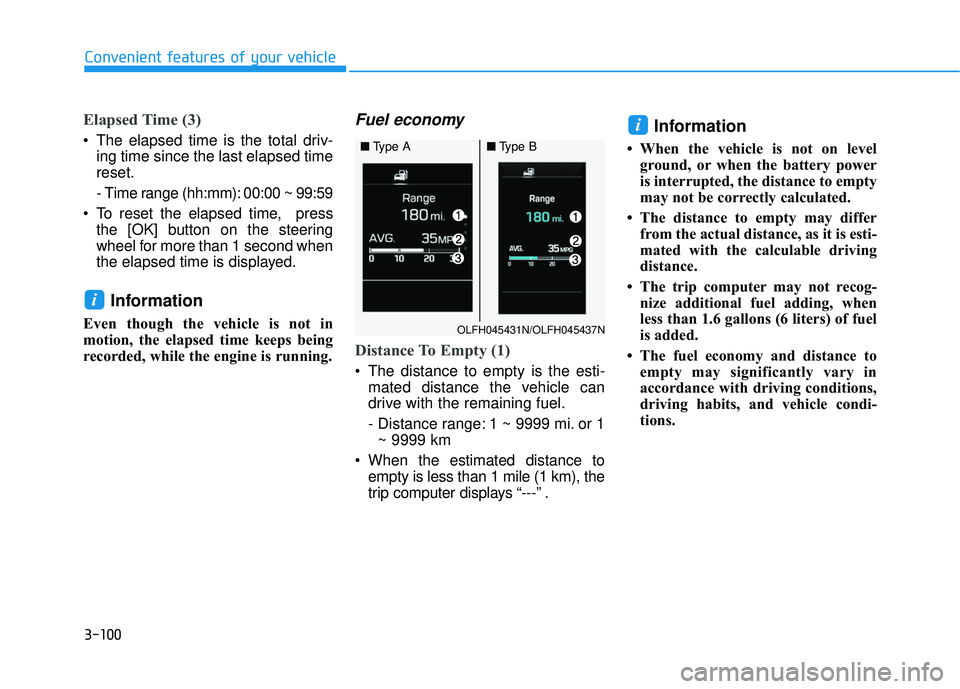
Distance To Empty (1)
The distance to empty is the esti-mated distance the vehicle can
drive with the remaining fuel.
- Distance range: 1 ~ 9999 mi. or 1~ 9999 km
When the estimated distance to empty is less than 1 mile (1 km), the
trip computer displays “---” .
Information
• When the vehicle is not on levelground, or when the battery power
is interrupted, the distance to empty
may not be correctly calculated.
• The distance to empty may differ from the actual distance, as it is esti-
mated with the calculable driving
distance.
• The trip computer may not recog- nize additional fuel adding, when
less than 1.6 gallons (6 liters) of fuel
is added.
• The fuel economy and distance to empty may significantly vary in
accordance with driving conditions,
driving habits, and vehicle condi-
tions.
i
i
OLFH045431N/OLFH045437N
■ Type A■Type B
Page 607 of 708
7-43
7
Maintenance
By jump starting
After a jump start from a good bat-
tery, drive the vehicle for 20-30 min-
utes before it is shutoff. The vehicle
may not restart if you shut it off
before the battery had a chance to
adequately recharge. See “Jump
Starting” in chapter 6 for more infor-
mation on jump starting procedures.
Information
An inappropriately dis-posed battery can be
harmful to the environ-
ment and human health.
Dispose the battery according to
your local law(s) or regulation.
Reset features
Some items need to be reset after
the battery has been discharged or
the battery has been disconnected.
See chapter 3 for:
Power Windows
Trip Computer
Climate Control System
Clock
Audio System
Sunroof
i
(Continued)
Watch the battery during
charging, and stop or reduce
the charging rate if the battery
cells begin boiling violently.
The negative battery cable
must be removed first and
installed last when the battery
is disconnected. Disconnect
the battery charger in the fol-
lowing order:
(1) Turn off the battery charger main switch.
(2) Unhook the negative
clamp from the negative
battery terminal.
(3) Unhook the positive clamp from the positive battery
terminal.
Always use a genuine HYUNDAI
approved battery when you
replace the battery.
Page 679 of 708

I-7
Jump starting .....................................................................6-4\
Keys ........................................................................\
..........3-3Smart key......................................................................3-\
3
Label Air bag warning labels ...............................................2-70
Tire sidewall labeling .................................................7-50
Tire specification and pressure label ............................8-9
Vehicle certification label .............................................8-8
Lane departure warnings system (LDWS) .....................5-66
LCD display ....................................................................3-88\
A/V mode ...................................................................3-90
Information Mode ......................................................3-91
LCD modes ................................................................3-88
Trip computer modes..................................................3-88\
Turn by turn (TBT) mode ..........................................3-90
User settings mode .....................................................3-93
Warning Messages......................................................3-76
LCD Display Control......................................................3-88
LCD modes .....................................................................3-8\
8 License plate light bulb replacement ..............................7-84
Light ........................................................................\
......3-107
Auto light position....................................................3-107
Battery saver function ..............................................3-113
Daytime running light ..............................................3-114
Headlamp delay function..........................................3-113
Headlamp position....................................................3-108
High - beam operation..............................................3-109
Interior lights ............................................................3-116
Parking lamp position ..............................................3-108
Smart high beam ......................................................3-109
Turn signals ..............................................................3-112
Welcome system .......................................................3-115
Light bulbs ......................................................................7-\
73
Lubricants and capacities..................................................8-6
Luggage net holder .......................................................3-153
Main fuse ........................................................................\
7-63
Maintenance Explanation of scheduled maintenance items ............7-24
Maintenance services ...................................................7-4
Owner maintenance ......................................................7-5
Tire maintenance ........................................................7-50
Maintenance schedule .......................................................7-8 Maintenance under severe usage conditions ..............7-22
Normal maintenance schedule .....................................7-9
I
Index
J
K
L
M