wheel Hyundai Sonata Plug-in Hybrid 2017 Owner's Guide
[x] Cancel search | Manufacturer: HYUNDAI, Model Year: 2017, Model line: Sonata Plug-in Hybrid, Model: Hyundai Sonata Plug-in Hybrid 2017Pages: 744, PDF Size: 27.87 MB
Page 193 of 744
3-106
Convenient features of your vehicle
Information
If “Sunroof Open” warning message is
displayed in the cluster, the Driving
Information message may not be dis-
played.
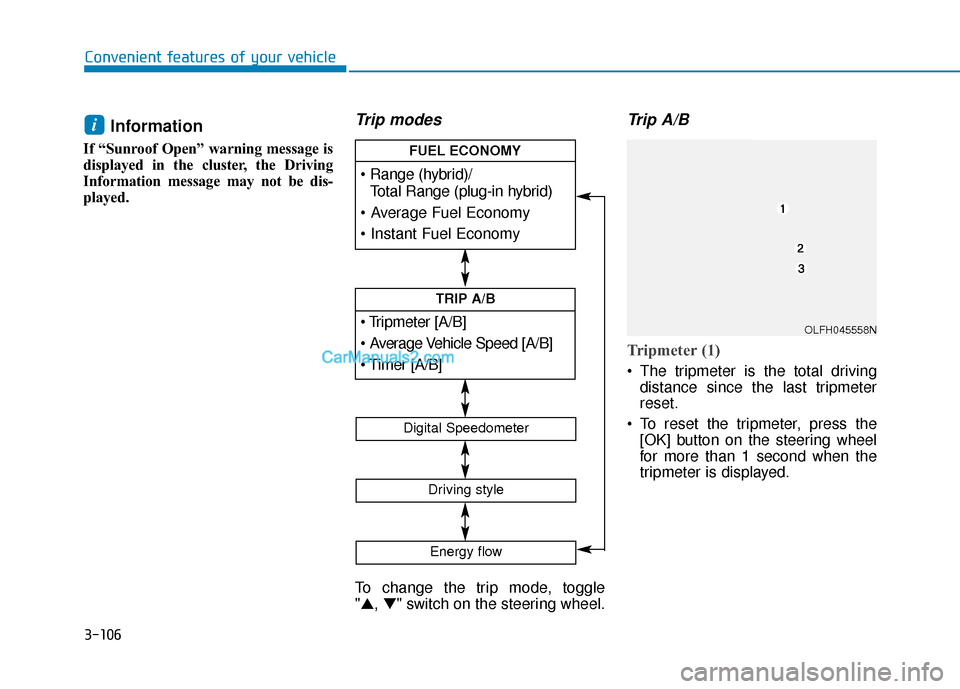
Trip modes
To change the trip mode, toggle
"▲, ▼" switch on the steering wheel.
Trip A/B
Tripmeter (1)
The tripmeter is the total driving
distance since the last tripmeter
reset.
To reset the tripmeter, press the [OK] button on the steering wheel
for more than 1 second when the
tripmeter is displayed.
i
[A/B]
TRIP A/B
Total Range (plug-in hybrid)
FUEL ECONOMY
Digital Speedometer
Driving style
Energy flow
OLFH045558N
Page 194 of 744
3-107
Convenient features of your vehicle
3
Average Vehicle Speed (2)
The average vehicle speed is cal-culated by the total driving dis-
tance and driving time since the
last average vehicle speed reset.
To reset the average vehicle speed, press the [OK] button on the steer-
ing wheel for more than 1 second
when the average vehicle speed is
displayed.
Information
• The average vehicle speed is not dis- played, when the vehicle drives
shorter than 0.19 miles (300 meters)
or less than 10 seconds after turning
ON the Engine Start/Stop button.
• The average vehicle speed will con- tinue to be calculated and will start
to decrease if the vehicle is stopped
while the engine is still running (for
example, when the vehicle is in traf-
fic or stopped at a stop light.)
Timer (3)
The timer is the total driving timesince the last timer reset.
To reset the timer , press the [OK]
button on the steering wheel for
more than 1 second when the timer
is displayed.
Information
The timer will continue to be counted
while the engine is still running (for
example, when the vehicle is in traffic
or stopped at a stop light.)
Fuel economy
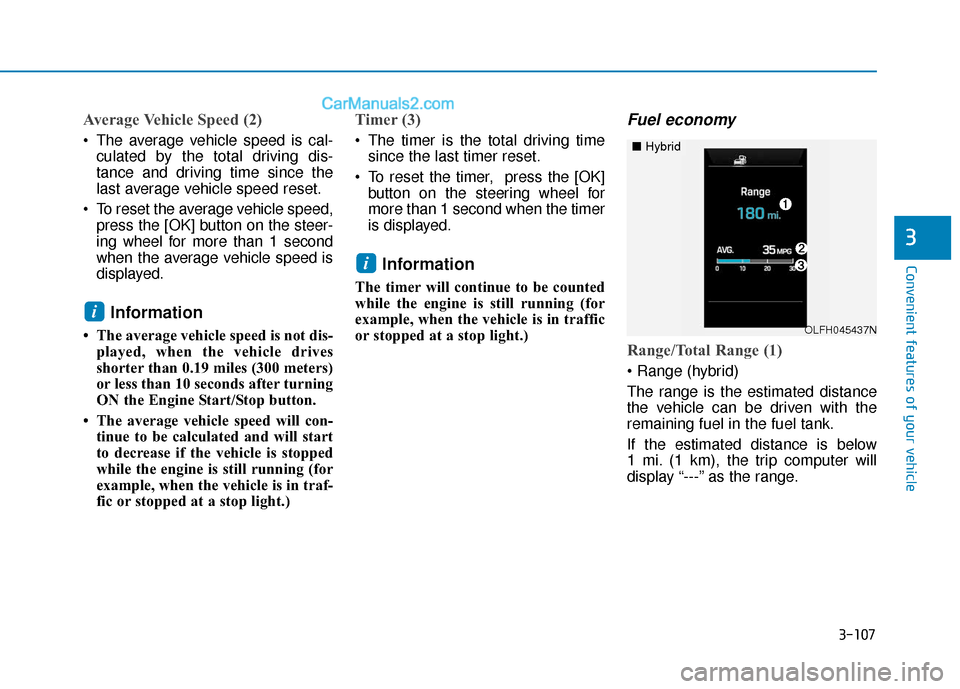
Range/Total Range (1)
The range is the estimated distance
the vehicle can be driven with the
remaining fuel in the fuel tank.
If the estimated distance is below
1 mi. (1 km), the trip computer will
display “---” as the range.
i
i
OLFH045437N
■ Hybrid
Page 195 of 744
3-108
Convenient features of your vehicle
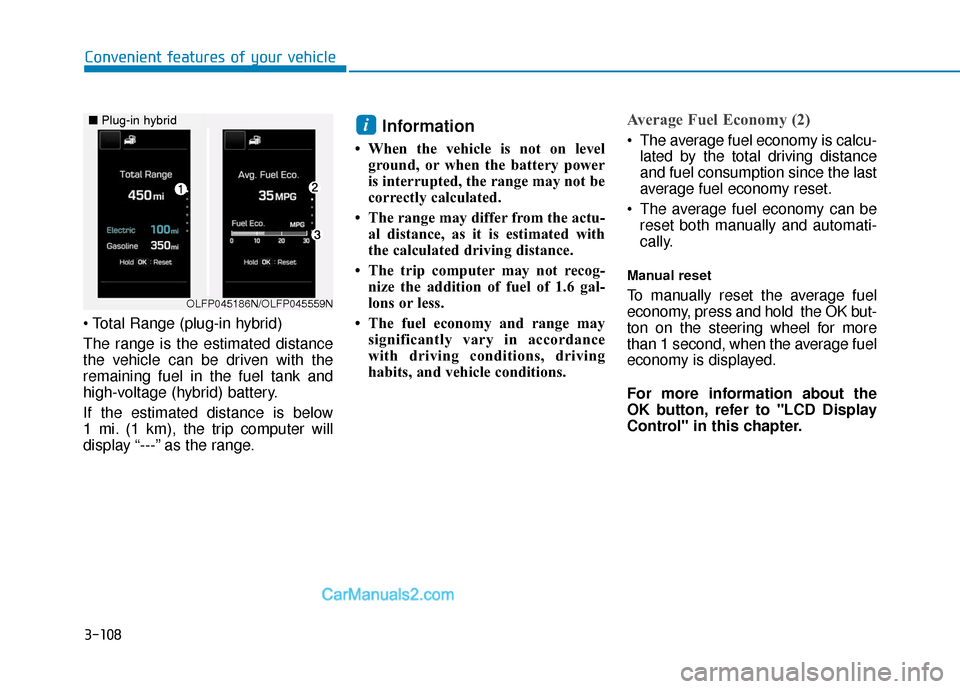
The range is the estimated distance
the vehicle can be driven with the
remaining fuel in the fuel tank and
high-voltage (hybrid) battery.
If the estimated distance is below
1 mi. (1 km), the trip computer will
display “---” as the range.
Information
• When the vehicle is not on level ground, or when the battery power
is interrupted, the range may not be
correctly calculated.
• The range may differ from the actu- al distance, as it is estimated with
the calculated driving distance.
• The trip computer may not recog- nize the addition of fuel of 1.6 gal-
lons or less.
• The fuel economy and range may significantly vary in accordance
with driving conditions, driving
habits, and vehicle conditions.
Average Fuel Economy (2)
The average fuel economy is calcu-lated by the total driving distance
and fuel consumption since the last
average fuel economy reset.
The average fuel economy can be reset both manually and automati-
cally.
Manual reset
To manually reset the average fuel
economy, press and hold the OK but-
ton on the steering wheel for more
than 1 second, when the average fuel
economy is displayed.
For more information about the
OK button, refer to "LCD Display
Control" in this chapter.
i
OLFP045186N/OLFP045559N
■ Plug-in hybrid
Page 197 of 744
3-110
Convenient features of your vehicle
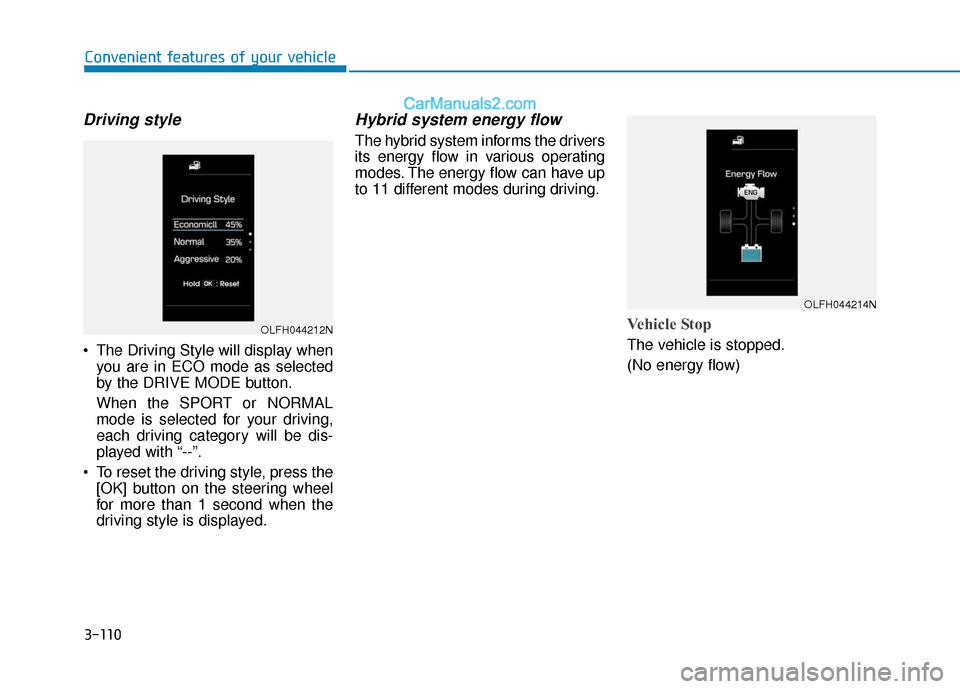
Driving style
The Driving Style will display whenyou are in ECO mode as selected
by the DRIVE MODE button.
When the SPORT or NORMAL
mode is selected for your driving,
each driving category will be dis-
played with “--”.
To reset the driving style, press the [OK] button on the steering wheel
for more than 1 second when the
driving style is displayed.
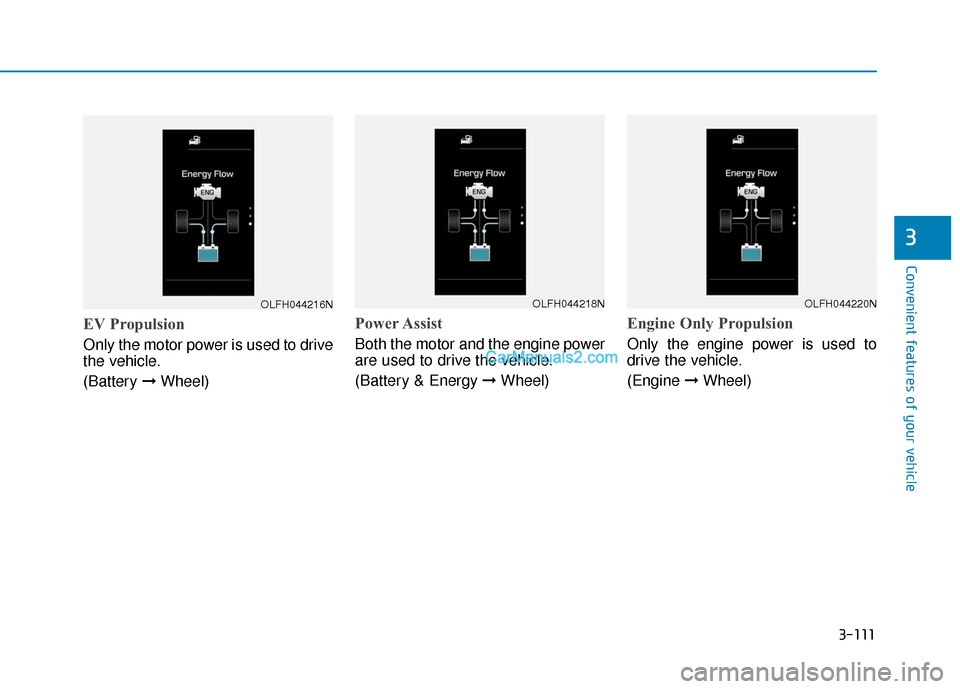
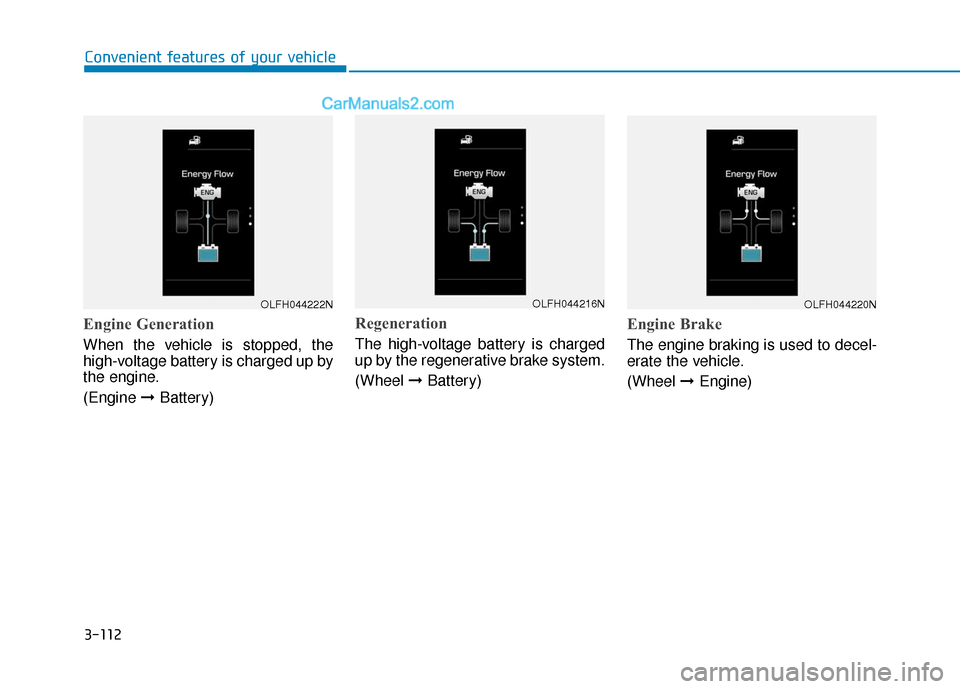
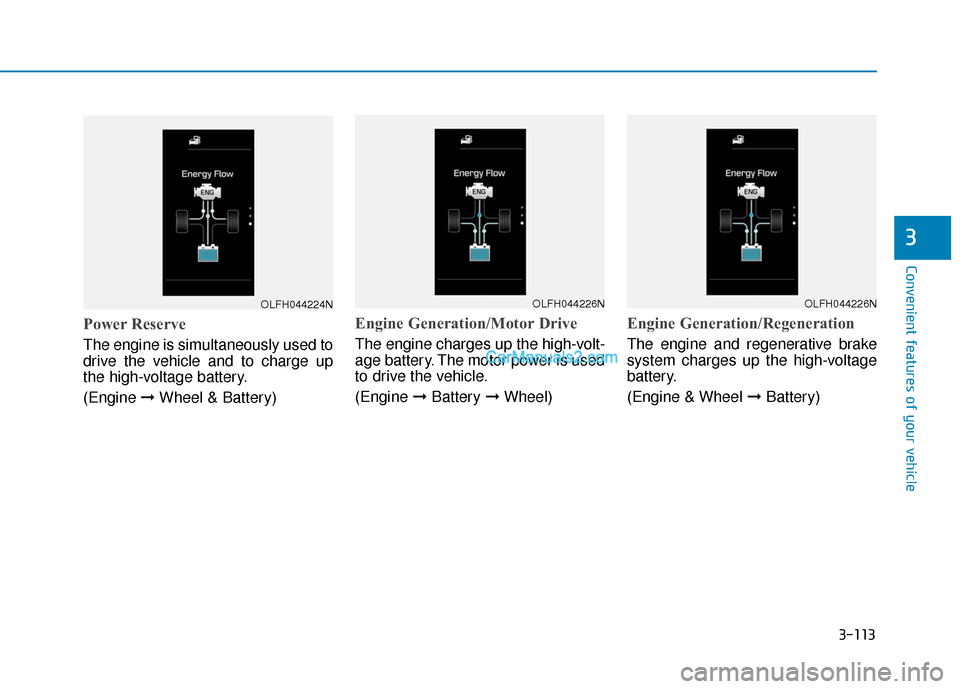
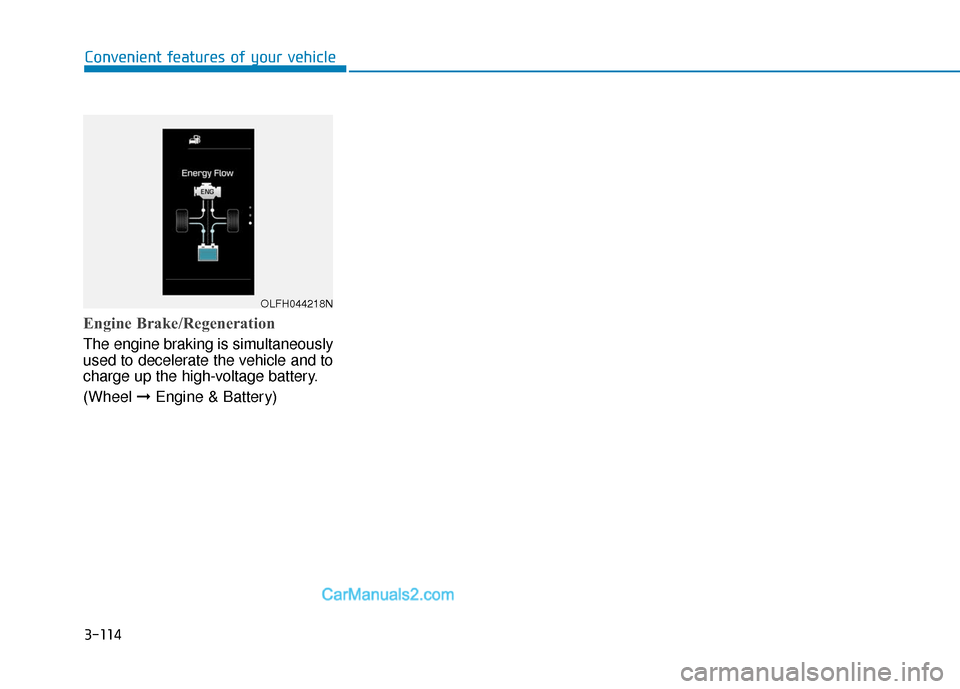
Hybrid system energy flow
The hybrid system informs the drivers
its energy flow in various operating
modes. The energy flow can have up
to 11 different modes during driving.
Vehicle Stop
The vehicle is stopped.
(No energy flow)
OLFH044212N
OLFH044214N
Page 198 of 744
3-111
Convenient features of your vehicle
3
EV Propulsion
Only the motor power is used to drive
the vehicle.
(Battery \bWheel)
Power Assist
Both the motor and the engine power
are used to drive the vehicle.
(Battery & Energy \b Wheel)
Engine Only Propulsion
Only the engine power is used to
drive the vehicle.
(Engine \bWheel)
OLFH044216NOLFH044218NOLFH044220N
Page 199 of 744
3-112
Convenient features of your vehicle
Engine Generation
When the vehicle is stopped, the
high-voltage battery is charged up by
the engine.
(Engine \bBattery)
Regeneration
The high-voltage battery is charged
up by the regenerative brake system.
(Wheel \bBattery)
Engine Brake
The engine braking is used to decel-
erate the vehicle.
(Wheel \bEngine)
OLFH044222NOLFH044216NOLFH044220N
Page 200 of 744
3-113
Convenient features of your vehicle
3
Power Reserve
The engine is simultaneously used to
drive the vehicle and to charge up
the high-voltage battery.
(Engine \bWheel & Battery)
Engine Generation/Motor Drive
The engine charges up the high-volt-
age battery. The motor power is used
to drive the vehicle.
(Engine \bBattery \bWheel)
Engine Generation/Regeneration
The engine and regenerative brake
system charges up the high-voltage
battery.
(Engine & Wheel \b Battery)
OLFH044224NOLFH044226NOLFH044226N
Page 201 of 744
3-114
Convenient features of your vehicle
Engine Brake/Regeneration
The engine braking is simultaneously
used to decelerate the vehicle and to
charge up the high-voltage battery.
(Wheel \bEngine & Battery)
OLFH044218N
Page 227 of 744
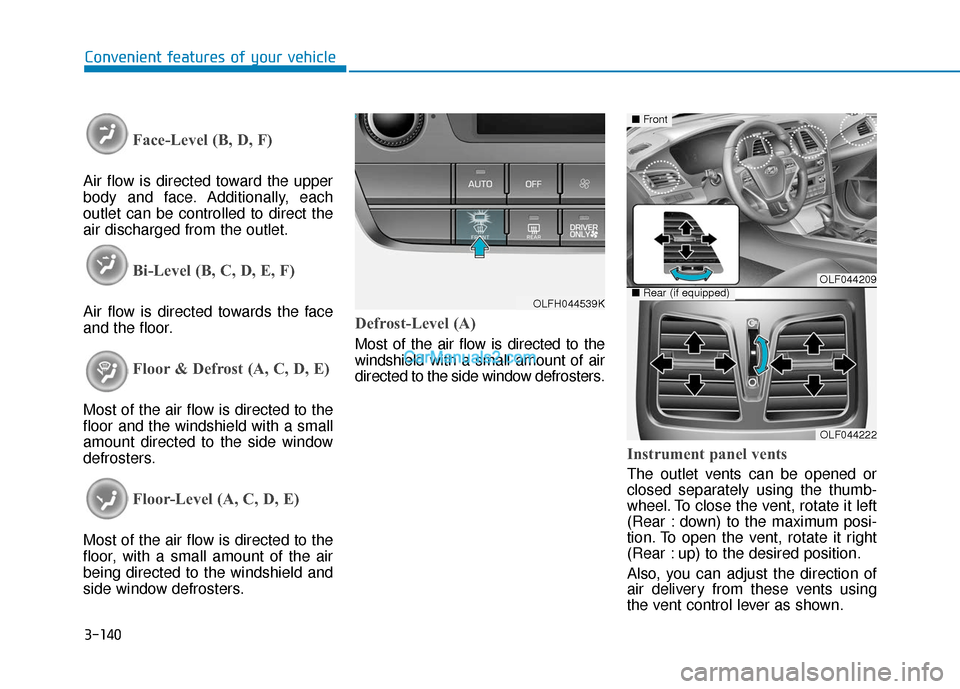
3-140
Convenient features of your vehicle
Face-Level (B, D, F)
Air flow is directed toward the upper
body and face. Additionally, each
outlet can be controlled to direct the
air discharged from the outlet.
Bi-Level (B, C, D, E, F)
Air flow is directed towards the face
and the floor.
Floor & Defrost (A, C, D, E)
Most of the air flow is directed to the
floor and the windshield with a small
amount directed to the side window
defrosters.
Floor-Level (A, C, D, E)
Most of the air flow is directed to the
floor, with a small amount of the air
being directed to the windshield and
side window defrosters.
Defrost-Level (A)
Most of the air flow is directed to the
windshield with a small amount of air
directed to the side window defrosters.
Instrument panel vents
The outlet vents can be opened or
closed separately using the thumb-
wheel. To close the vent, rotate it left
(Rear : down) to the maximum posi-
tion. To open the vent, rotate it right
(Rear : up) to the desired position.
Also, you can adjust the direction of
air delivery from these vents using
the vent control lever as shown.
OLFH044539K
OLF044209
OLF044222
■Front
■Rear (if equipped)
Page 250 of 744

Multimedia System
Multimedia System.................................................4-2
AUX, USB and iPod®Port ...............................................4-2
Antenna ........................................................................\
.......4-2
Steering Wheel Audio Control........................................4-3
Audio / Video / Navigation System (AVN) ..................4-4
Bluetooth®Wireless Technology Hands-Free ...........4-4
How Vehicle Audio Works ...............................................4-5
Features of Your Vehicle.................................................4-7
System Controllers and Functions
-3.8 Inch Mono TFT ................................4-18, 4-111
Audio Head Unit .................................................4-18, 4-111
Setup .....................................................................4-2\
0, 4-113
Radio : FM, AM, SiriusXM ...............................4-23, 4-116
SiriusXM, XM
TMRADIO ......................................4-26, 4-117
Basic Method of Use : Audio CD /
MP3 CD / USB / iPod
®/ My Music .............4-28, 4-119
Bluetooth®Wireless Technology Audio .......4-34, 4-125
Bluetooth®Wireless Technology ...................4-36, 4-127
Voice Recognition ..............................................4-47, 4-138
Ending Voice Recognition ................................4-48, 4-139
System Controllers and Functions
- 5 Inch Color TFT LCD ..........................4-55, 4-145
Audio Head Unit .................................................4-55, 4-145
Steering-Wheel Mounted Controls ...............4-57, 4-147
Radio Mode .........................................................4-59, 4-149
SiriusXM, XM
TMRadio Mode ...........................4-63, 4-151
Media Mode ........................................................4-65, 4-153
Audio CD Mode ..................................................4-66, 4-154
MP3 CD Mode.....................................................4-68, 4-156
USB Mode............................................................4-71, 4-159
iPod
®Mode .........................................................4-74, 4-162
AUX Mode ...........................................................4-76, 4-164
MY Music Mode .................................................4-77, 4-165
Bluetooth®Wireless Technology
Audio Mode .........................................................4-80, 4-168
Voice Recognition ..............................................4-95, 4-183
Setup...................................................................4-101\
, 4-190
Rear View Camera ...........................................4-106, 4-194
Blue Link
®..........................................................4-106, 4-194
Declaration of conformity ..........................................4-198
4