USB Hyundai Sonata
[x] Cancel search | Manufacturer: HYUNDAI, Model Year: , Model line: , Model:Pages: 411, PDF Size: 8.68 MB
Page 229 of 411
4 147
Features of your vehicle
Bluetooth
®Audio
Before using Bluetooth
®
audio fea-
tures
Bluetooth
®audio may not be supported
depending on the compatibility of your
Bluetooth®mobile phone.
In order to use Bluetooth
®audio, you
must first pair and connect the
Bluetooth
®mobile phone.
Bluetooth®
audio can be used only
when the [Audio Streaming] of Phone is
turned .
❈ Setting Bluetooth
®Audio Streaming :
Press the key Select [Phone]
through the tune knob or key
Select [Audio Streaming] through the TUNE knob Set
/
Starting Bluetooth
®Audio
Press the key to change themode in order of CD
➟USB
➟AUX
➟My
Music
➟BT Audio.
If BT Audio is selected, Bluetooth
®
audio will start playing.
❈ Audio may not automatically start play-
ing in some mobile phones.
Using the Bluetooth
®audio fea-
tures
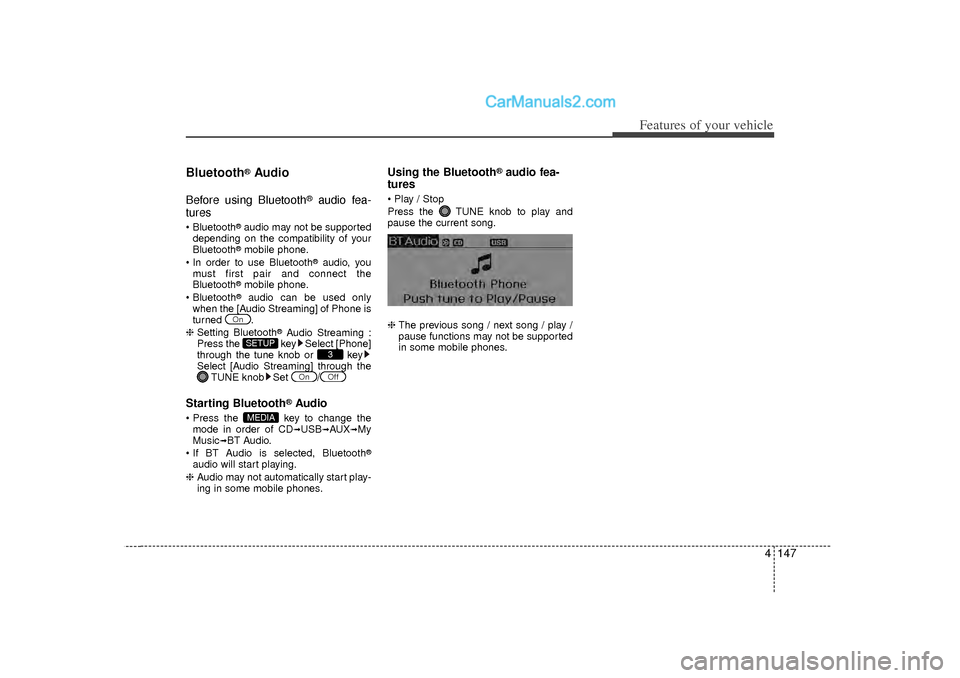
Play / Stop
Press the TUNE knob to play and
pause the current song.
❈ The previous song / next song / play /
pause functions may not be supported
in some mobile phones.
MEDIA
Off
On
3
SETUP
On
Page 234 of 411
Features of your vehicle152
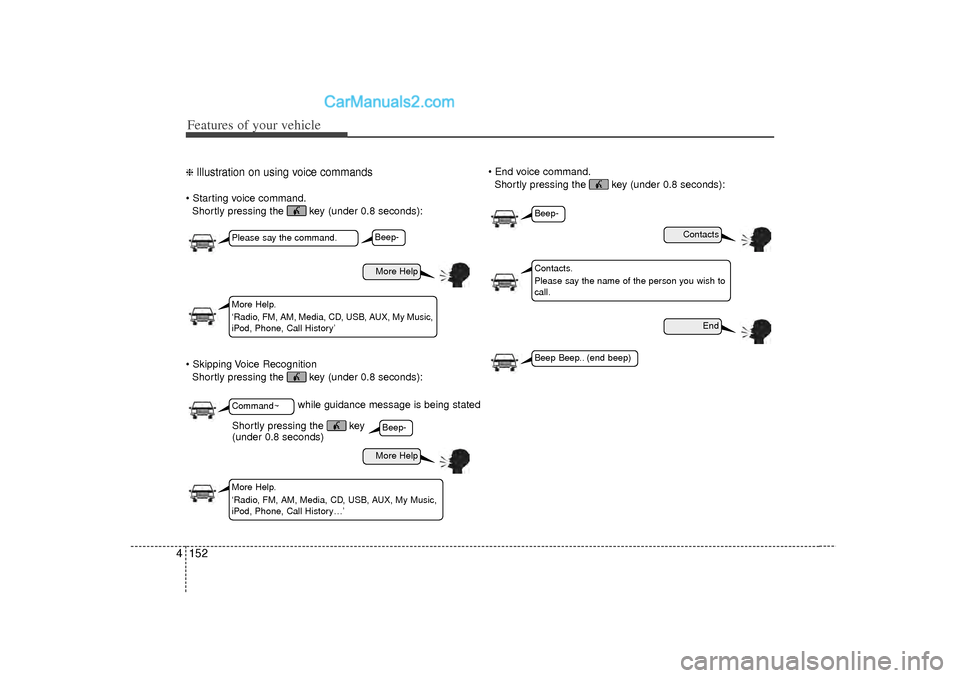
4❈ Illustration on using voice commands Starting voice command.
Shortly pressing the key (under 0.8 seconds):
Skipping Voice Recognition Shortly pressing the key (under 0.8 seconds): End voice command.
Shortly pressing the key (under 0.8 seconds):
while guidance message is being stated
More Help
Contacts
End
More Help
Please say the command.Command~More Help.
‘Radio, FM, AM, Media, CD, USB, AUX, My Music,
iPod, Phone, Call History’
Contacts.
Please say the name of the person you wish to
call.
More Help.
‘Radio, FM, AM, Media, CD, USB, AUX, My Music,
iPod, Phone, Call History…’
Beep-Beep-
Beep-Beep Beep.. (end beep)
Shortly pressing the key
(under 0.8 seconds)
Page 236 of 411
Features of your vehicle154
4
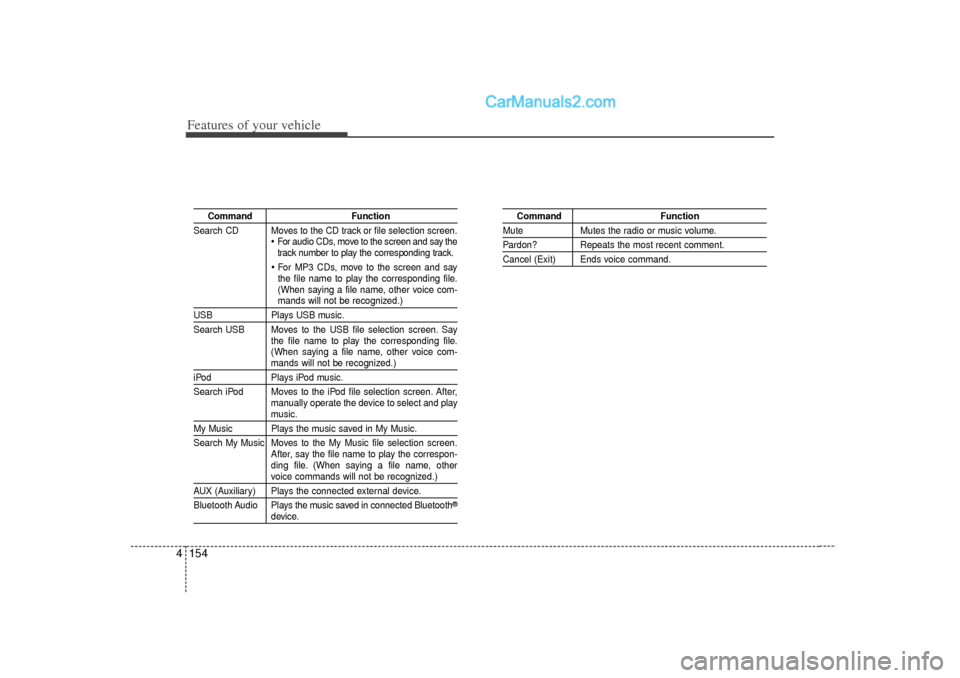
Command Function
Search CD Moves to the CD track or file selection screen.
For audio CDs, move to the screen and say the
track number to play the corresponding track. For MP3 CDs, move to the screen and say
the file name to play the corresponding file.
(When saying a file name, other voice com-mands will not be recognized.)
USB Plays USB music.
Search USB Moves to the USB file selection screen. Say the file name to play the corresponding file.
(When saying a file name, other voice com-
mands will not be recognized.)
iPodPlays iPod music.
Search iPod Moves to the iPod file selection screen. After, manually operate the device to select and play
music.
My Music Plays the music saved in My Music.
Search My Music Moves to the My Music file selection screen.After, say the file name to play the correspon-
ding file. (When saying a file name, other
voice commands will not be recognized.)
AUX (Auxiliary) Plays the connected external device.
Bluetooth Audio Plays the music saved in connected Bluetooth
®
device.
Command Function
MuteMutes the radio or music volume.Pardon? Repeats the most recent comment.Cancel (Exit) Ends voice command.
Page 238 of 411
Features of your vehicle156
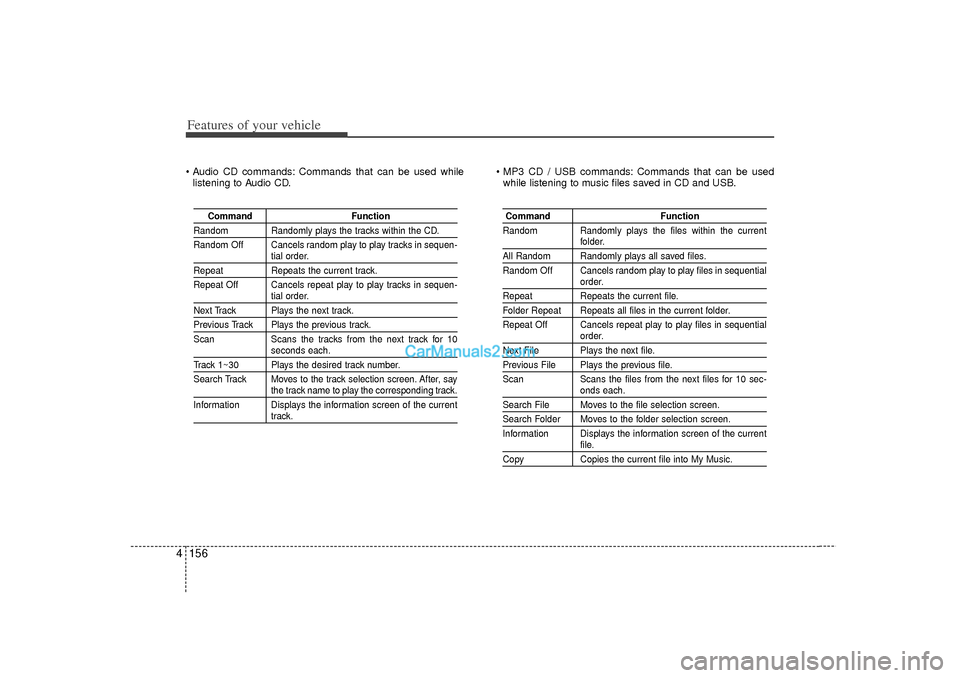
4 Audio CD commands: Commands that can be used while
listening to Audio CD. MP3 CD / USB commands: Commands that can be used
while listening to music files saved in CD and USB.
Command Function
Random Randomly plays the tracks within the CD.
Random Off Cancels random play to play tracks in sequen-
tial order.
RepeatRepeats the current track.
Repeat Off Cancels repeat play to play tracks in sequen-
tial order.
Next Track Plays the next track.Previous Track Plays the previous track.
Scan Scans the tracks from the next track for 10
seconds each.
Track 1~30 Plays the desired track number.
Search Track Moves to the track selection screen. After, say
the track name to play the corresponding track.
Information Displays the information screen of the currenttrack.
Command Function
Random Randomly plays the files within the current
folder.
All Random Randomly plays all saved files.
Random Off Cancels random play to play files in sequential
order.
Repeat Repeats the current file.Folder Repeat Repeats all files in the current folder.
Repeat Off Cancels repeat play to play files in sequential
order.
Next File Plays the next file.Previous File Plays the previous file.
Scan Scans the files from the next files for 10 sec-
onds each.
Search File Moves to the file selection screen.Search Folder Moves to the folder selection screen.
Information Displays the information screen of the current
file.
CopyCopies the current file into My Music.
Page 407 of 411

Index6I
Instrument cluster ··················\
··················\
··················\
····4-50Engine temperature gauge··················\
··················\
·····4-52
Fuel gauge ··················\
··················\
··················\
···········4-53
Instrument panel illumination ··················\
·················4-51\
Odometer ··················\
··················\
··················\
·············4-54
Speedometer ··················\
··················\
··················\
········4-51
Tachometer ··················\
··················\
··················\
··········4-51
Trip computer ··················\
··················\
··················\
······4-53
Vehicle setting ··················\
··················\
··················\
·····4-57
Warning and indicators ··················\
··················\
·········4-59
Instrument panel illumination··················\
··················\
····4-51
Instrument panel overview ··················\
··················\
··········2-3
Interior care··················\
··················\
··················\
··············7-71
Interior features··················\
··················\
··················\
······4-107 Clothes hanger··················\
··················\
··················\
···4-109
Cup holder ··················\
··················\
··················\
·········4-107
Digital clock ··················\
··················\
··················\
······4-109
Aux, USB and iPod ··················\
··················\
·············4-110
Floor mat anchor(s) ··················\
··················\
·············4-110
Power outlet ··················\
··················\
··················\
······4-108
Sunvisor··················\
··················\
··················\
·············4-107
Interior light ··················\
··················\
··················\
·············4-79
Interior overview ··················\
··················\
··················\
·······2-2
Interlock system ··················\
··················\
··················\
·······5-19 Jack and tools··················\
··················\
··················\
···········6-12
Jump starting··················\
··················\
··················\
··············6-4
Key positions ··················\
··················\
··················\
·············5-5
Keys ··················\
··················\
··················\
··················\
·········4-3
Label
Air bag warning label··················\
··················\
············3-63
Tire sidewall labeling ··················\
··················\
············7-43
Tire specification and pressure label··················\
·········8-7
Vehicle certification label ··················\
················5-49, 8-\
6
Latch system, see lower anchor system ··················\
······3-35
Light bulbs ··················\
··················\
··················\
···············7-59
Lighting··················\
··················\
··················\
··················\
··4-72 Battery saver function ··················\
··················\
···········4-72
Daytime running light ··················\
··················\
···········4-73
Headlamp delay··················\
··················\
··················\
···4-72
Headlamp welcome function ··················\
··················\
4-72
Lower anchor system ··················\
··················\
·················3-35\
Lubricants and capacities··················\
··················\
·············8-4
Lumbar support··················\
··················\
··················\
··········3-7
JKL