ECO mode Hyundai Terracan 2003 User Guide
[x] Cancel search | Manufacturer: HYUNDAI, Model Year: 2003, Model line: Terracan, Model: Hyundai Terracan 2003Pages: 349, PDF Size: 4.56 MB
Page 98 of 349
FEATURES OF YOUR HYUNDAI
1- 90
H290D01O-AAT
1. FF/REW Button
o Fast forward tape winding starts when the FF
( ) button is pressed during the PLAY or REW mode.
o Tape play starts when the FF ( ) button is pressed again during the FF mode.
o Tape rewinding starts when the REW ( ) button is pressed during the PLAY or FF mode.
o Tape play starts when the REW ( ) button
pressed again during the REW mode.
2. AUTO MUSIC Select Button Press the button to find the starting point of each song in a prerecorded music tape. The quiet space between songs (must have at least a 4 sec. gap) can be identified by the AUTO MUSIC Select button.
o Pressing the button will play the beginn- ing of the next music segment.
o Pressing the button will start replay at the beginning of the music just listened to.
3. TAPE PROGRAM Button This allows you to play the reverse side of the tape by merely depressing the program button. An arrow will appear in the display to show tape direction. 4. TAPE EJECT button
o When the button is pressed with the
cassette loaded, the cassette is ejected.
o When the button is pressed during the FF/
REW mode, the cassette is ejected.
5. EQ ButtonPress the EQ button to select the CLASSIC, JAZZ, ROCK and DEFEAT MODE for the de- sired tone quality. Each press of the button changes the display as follows;
6. DOLBY Button If you get background noise during tape PLAY, you can reduce this considerably by merely pressing the DOLBY button. If you want to cancel the DOLBY feature, press the button again. CLASSIC
JAZZ ROCK DEFEAT
Page 100 of 349
FEATURES OF YOUR HYUNDAI
1- 92
H290F02O-GAT
1. CD Select Button
o Insert the CD with the label facing upward.
o Insert the CD to start CD playback, during
radio operation or cassette tape playing.
o When a disc is in the CD deck, if you press the
CD/CDC button the CD player will beginplaying even if the radio or cassette player is being used.
o The CD player can be used when the ignition
switch is in either the "ON" or "ACC" position.
2. FF/REW ( / ) If you want to fast forward or reverse through the compact disc track, push and hold the FF ( ) or REW ( ) button. When you release the button, the compact disc player will resume playing.
3. TRACK UP/DOWN
o The desired track on the disc currently being played can be selected using the track num- ber.
o Press button once to skip forward to the
beginning of the next track. Press button once to skip back to the beginning of the track.
4. REPEAT
o To repeat the track you are currently listening to, press the RPT button. To cancel, press again. o If you do not release RPT operation when the
track ends, it will automatically be replayed. This process will be continued until you push the button again.
5. EQUALIZER Button Press the EQ button to select the CLASSIC, JAZZ, ROCK and DEFEAT MODE for the de- sired tone quality. Each press of the button changes the display as follows; NOTE:
o To assure proper operation of the unit,
keep the vehicle interior temperaturewithin a normal range by using the vehicle's air conditioning or heating sys- tem.
o When replacing the fuse, replace it with a
fuse having the correct capacity.
o The preset station frequencies are all
erased when the car battery is discon- nected. Therefore, all data will have to be set again if this should occur.
o Do not add any oil to the rotating parts.
Keep magnets, screwdrivers and other metallic objects away from the tape mecha- nism and head.
o This equipment is designed to be used
only in a 12 volt DC battery system with negative ground.
o This unit is made of precision parts. Do not attempt to disassemble or adjust any parts.
o When driving your vehicle, be sure to keep
the volume of the unit set low enough to allow you to hear sounds coming from the outside.
o Do not expose this equipment (including
the speakers and tape) to water or exces- sive moisture.
CAUTION: Do not insert warped or poor quality discs into the CD player as damage to the unit may occur.
CLASSIC JAZZ ROCK DEFEAT
6. CD EJECT Button When the button is pressed with a CD loaded, the CD will eject.
7. SCAN Button (If installed)
o Press the SCAN button to playback the first 10 seconds of each track.
o Press the SCAN button again within 10 sec. when you have reached the desired track.
Page 102 of 349
FEATURES OF YOUR HYUNDAI
1- 94
3. TRACK UP/DOWN
o The desired track on the disc currently being played can be selected using the track num- ber.
o Press once to skip forward to the begin- ning of the next track. Press once to skip back to the beginning of the track.
4. FF/REW ( / ) If you want to fast forward or reverse through the compact disc track, push and hold in the FF ( ) or REW ( ) button. When you release the button, the compact disc player will resume playing. 5. REPEAT
o To repeat the track you are listening to, press the RPT button. To cancel, press again.
o If you do not release RPT operation when the track ends, it will automatically be replayed. This process will be continued until you push the button again.B290H02HP-GAT The CD auto changer is located in the right side of the luggage compartment.
o To use the CD auto changer.
1. Open the sliding lid of the CD auto chang- er.
2. To eject the compact disc magazine, press
the EJECT button located inside the CD auto changer.
3. Insert the discs into the magazine.
4. Push the magazine into the CD auto chang- er and close the sliding lid.
o The CD auto changer can be used when the ignition switch is in either "ON" or "ACC"position.
1. CD CHANGER Select Button When the CD changer magazine contains discs, press the "CD/CDC" button and the CD changer can be used even if the radio or cassette player is being used. The Hyundai CD changer can hold up to eight discs. The disc number will be lit, and the track number, and elapsed time will be dis- played. 2. DISC Select Button To select the CD you want, push " " to change the disc number. 6. SCAN Button (If installed)
o Press the SCAN button to playback the first
10 seconds of each track.
o Press the SCAN button again within 10 sec.
for the desired track.
7. EQ ButtonPress the EQ button to select the CLASSIC, JAZZ, ROCK and DEFEAT MODE for the de- sired tone quality. Each press of the button changes the display as follows;
CLASSIC JAZZ ROCK DEFEAT
NOTE:
o When replacing the fuse, replace it with a fuse having the correct capacity.
o This equipment is designed to be used
only in a 12 volt DC battery system withnegative ground.
o This unit is made of precision parts. Do not attempt to disassemble or adjust any parts.
o When driving your vehicle, be sure to keep
the volume of the unit set low enough to allow you to hear sounds coming from the outside.
CAUTION: Do not insert warped or poor quality discs into the CD changer as damage to the unit may occur.
TUNE DISC
Page 110 of 349
DRIVING YOUR HYUNDAI
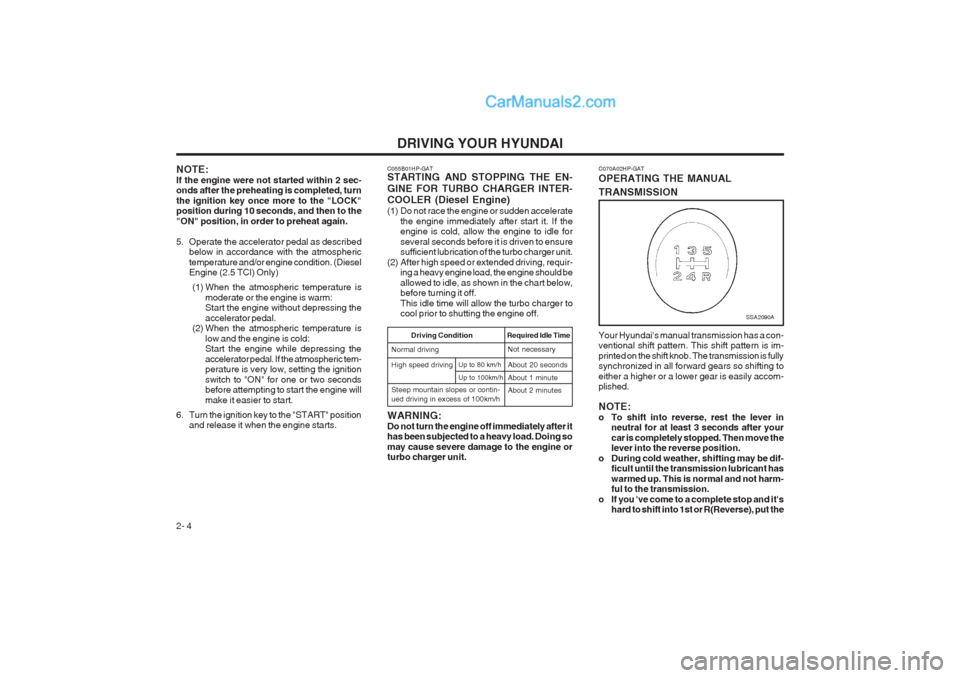
2- 4 C070A02HP-GAT OPERATING THE MANUAL TRANSMISSION Your Hyundai's manual transmission has a con- ventional shift pattern. This shift pattern is im- printed on the shift knob. The transmission is fully synchronized in all forward gears so shifting to either a higher or a lower gear is easily accom- plished. NOTE:
o To shift into reverse, rest the lever in
neutral for at least 3 seconds after yourcar is completely stopped. Then move the lever into the reverse position.
o During cold weather, shifting may be dif- ficult until the transmission lubricant has warmed up. This is normal and not harm- ful to the transmission.
o If you 've come to a complete stop and it's hard to shift into 1st or R(Reverse), put the
SSA2090A
NOTE: If the engine were not started within 2 sec- onds after the preheating is completed, turn the ignition key once more to the "LOCK" position during 10 seconds, and then to the "ON" position, in order to preheat again.
5. Operate the accelerator pedal as describedbelow in accordance with the atmospheric temperature and/or engine condition. (Diesel Engine (2.5 TCI) Only)
(1) When the atmospheric temperature is moderate or the engine is warm:Start the engine without depressing the accelerator pedal.
(2) When the atmospheric temperature is
low and the engine is cold: Start the engine while depressing the accelerator pedal. If the atmospheric tem- perature is very low, setting the ignition switch to "ON" for one or two seconds before attempting to start the engine will make it easier to start.
6. Turn the ignition key to the "START" position and release it when the engine starts. C055B01HP-GAT STARTING AND STOPPING THE EN- GINE FOR TURBO CHARGER INTER- COOLER (Diesel Engine)
(1) Do not race the engine or sudden accelerate
the engine immediately after start it. If the engine is cold, allow the engine to idle for several seconds before it is driven to ensure sufficient lubrication of the turbo charger unit.
(2) After high speed or extended driving, requir- ing a heavy engine load, the engine should be allowed to idle, as shown in the chart below, before turning it off. This idle time will allow the turbo charger to cool prior to shutting the engine off.
Required Idle Time
High speed driving Driving Condition
Normal drivingNot necessary About 20 seconds About 1 minute
Up to 100km/h
Up to 80 km/h
Steep mountain slopes or contin- ued driving in excess of 100km/h About 2 minutes
WARNING: Do not turn the engine off immediately after it has been subjected to a heavy load. Doing so may cause severe damage to the engine or turbo charger unit.
Page 116 of 349
DRIVING YOUR HYUNDAI
2- 10
conventional 2-wheel drive vehicles any more than low-slung sports cars are designed to perform satisfactorily under off-road condi- tions. If at all possible, avoid sharp turns or abrupt maneuvers. As with other vehicles of this type, failure to operate this vehicle cor- rectly may result in loss of control or vehicle rollover.
o Do not grip the inside or spokes of the steer-
ing wheel when driving off-road. The steering wheel could jerk and injure your hands. Al- ways firmly hold the outer steering wheel when you are driving off-road.
o Drive at lower speeds in strong crosswinds. Because of your vehicle’s high center of gravity, its stability will be affected in cross- winds. Slower speeds ensure better vehicle control.
o Check your brake condition once you are out
of mud or water. Press the brake several times as you move slowly until your feel normal braking forces return.
o Four-wheel driving on flat and normal roads
can result in a severe binding condition when turning the steering wheel.
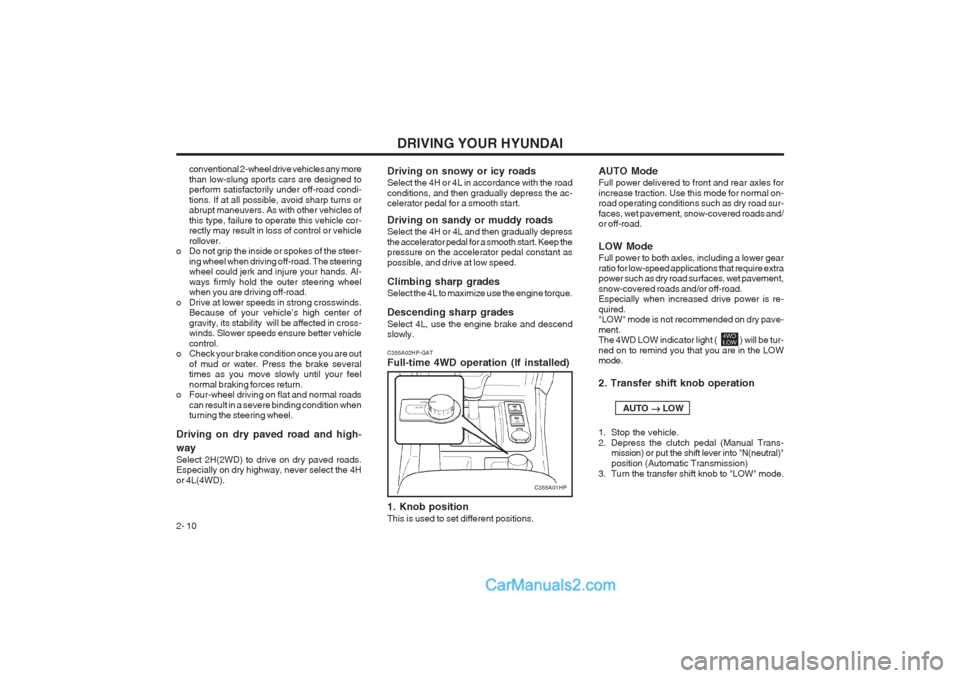
Driving on dry paved road and high- way Select 2H(2WD) to drive on dry paved roads. Especially on dry highway, never select the 4H or 4L(4WD). C355A02HP-GAT Full-time 4WD operation (If installed) 1. Knob position This is used to set different positions.Driving on snowy or icy roads Select the 4H or 4L in accordance with the road conditions, and then gradually depress the ac- celerator pedal for a smooth start. Driving on sandy or muddy roads Select the 4H or 4L and then gradually depress the accelerator pedal for a smooth start. Keep the pressure on the accelerator pedal constant as possible, and drive at low speed. Climbing sharp grades Select the 4L to maximize use the engine torque. Descending sharp grades Select 4L, use the engine brake and descend slowly. AUTO Mode Full power delivered to front and rear axles for increase traction. Use this mode for normal on- road operating conditions such as dry road sur- faces, wet pavement, snow-covered roads and/ or off-road. LOW Mode Full power to both axles, including a lower gear ratio for low-speed applications that require extra power such as dry road surfaces, wet pavement, snow-covered roads and/or off-road. Especially when increased drive power is re- quired. "LOW" mode is not recommended on dry pave- ment. The 4WD LOW indicator light ( ) will be tur- ned on to remind you that you are in the LOW mode. 2. Transfer shift knob operation AUTO
LOW
1. Stop the vehicle.
2. Depress the clutch pedal (Manual Trans- mission) or put the shift lever into "N(neutral)"position (Automatic Transmission)
3. Turn the transfer shift knob to "LOW" mode.
C355A01HP
Page 117 of 349
DRIVING YOUR HYUNDAI 2- 11
LOW
AUTO
1. Stop the vehicle.
2. Depress the clutch pedal (Manual Trans- mission) or put the shift lever into "N (neu-tral)" position (Automatic Transmission).
3. Turn the transfer shift knob to "AUTO" mode. Driving 4WD Safely
(1) Be sure to wear the seat belt.
(2) Drive at lower speeds in strong crosswinds. Because of your vehicle’s high center of gravity, its stability will be affected in cross- winds. Slower speeds ensure better vehicle control.
(3) Check the brake condition after driving in wet or muddy conditions. Press the brakeseveral times as you move slowly until you feel normal braking forces return.
(4) Do not drive the vehicle through water. (i.e. streams, rivers, lakes, etc.)
(5) The stopping distance of the full-time 4WD vehicle differs very little from that of the 2WD vehicle.
When driving on a snow-covered road or a slippery, muddy surface, make sure thatyou keep a sufficient distance between your vehicle and the one ahead of you.
(6) Since the driving torque is always applied to
the 4 wheels, the performance of the full- time 4WD vehicle is greatly affected by the condition of the tires. Be sure to equip it with all four tires of the same size and type. o When replacement of any of the tires or
disc wheels is necessary, replace all ofthem.
o Rotate the tires and check the tire pres- sure at regular intervals.
(7) The full-time 4WD vehicle cannot be towed by an ordinary tow truck. Makesure that the vehicle is towed with its four wheels raised off the ground.
o If the vehicle is towed with its only two wheels raised off the ground, the 4WDsystem could be damaged.
o In unavoidable case, if the vehicle is being towed with all four wheels on theground, it should be towed only forward direction with rope.
o While towing, check the following items. 1. The ignition switch is in "ACC" or"ON".
2. Place the shift lever in neutral (For Automatic Transmission, "N" posi-tion).
3. Release the parking brake.
NOTE: To avoid serious damage to your 4WD ve- hicle, limit towing to 15km/h (10 mph) and not for more than 1.5km (1 mile) at ANY TIME.
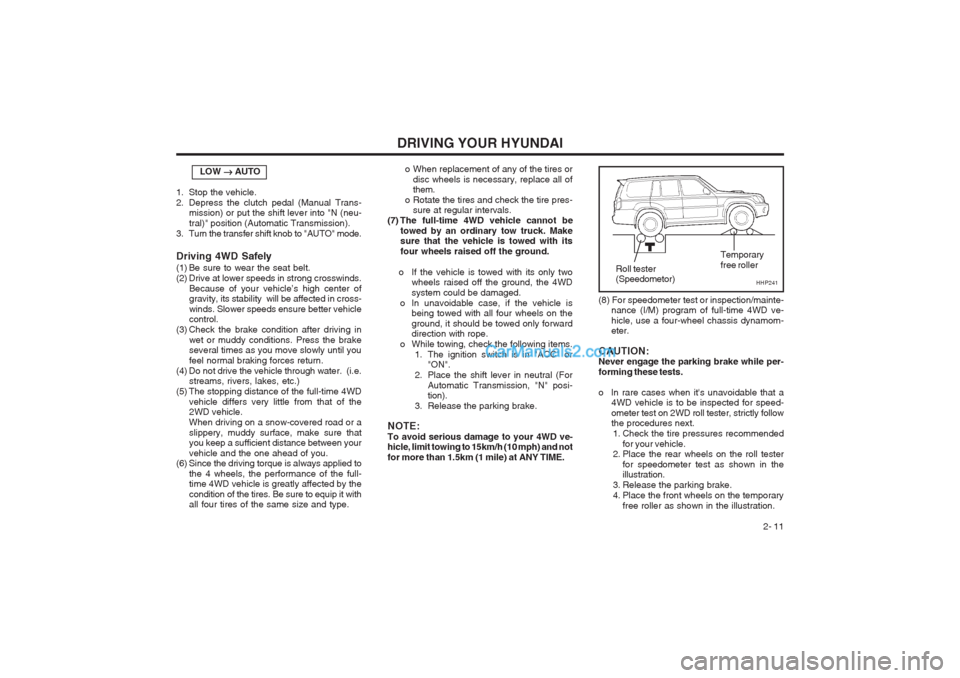
(8) For speedometer test or inspection/mainte- nance (I/M) program of full-time 4WD ve- hicle, use a four-wheel chassis dynamom- eter.
CAUTION:Never engage the parking brake while per- forming these tests.
o In rare cases when it's unavoidable that a 4WD vehicle is to be inspected for speed- ometer test on 2WD roll tester, strictly follow the procedures next.
1. Check the tire pressures recommended for your vehicle.
2. Place the rear wheels on the roll tester
for speedometer test as shown in theillustration.
3. Release the parking brake.
4. Place the front wheels on the temporary free roller as shown in the illustration.
HHP241
Roll tester (Speedometor) Temporary free roller
Page 119 of 349
DRIVING YOUR HYUNDAI 2- 13
o Don’t "ride" the brake pedal. Resting your foot
on the brake pedal while driving can be dan- gerous because it can result in the brakes overheating and losing their effectiveness. It also increases the wear of the brake com- ponents.
o If a tire goes flat while you are driving, apply
the brakes gently and keep the car pointed straight ahead while you slow down. When you are moving slowly enough for it to be safe to do so, pull off the road and stop in a safe place.
o If your car is equipped with an automatic
transmission, don’t let your car creep for- ward. To avoid creeping forward, keep your foot firmly on the brake pedal when the car is stopped.
o Use caution when parking on a hill. Engage the parking brake and place the gear selector lever in "P" (automatic transmission) or in first or reverse gear (manual transmission). If your car is facing downhill, turn the front wheels into the curb to help keep the car from rolling. If your car is facing uphill, turn the front wheels away from the curb to help keep the car from rolling. If there is no curb or if it is required by other conditions to keep the car from rolling, block the wheels.
o Under some conditions your parking brake
can freeze in the engaged position. This is most likely to happen when there is an ac- cumulation of snow or ice around or near the rear brakes or if the brakes are wet. If there is a risk that the parking brake may freeze, apply it only temporarily while you put thegear selector lever in "P" (automatic) or in first or reverse gear (manual transmission) and block the rear wheels so the car cannot roll. Then release the parking brake.
o Do not hold the vehicle on the upgrade with the accelerator pedal. This can cause the transmission to overheat. Always use the brake pedal or parking brake.
C140A01A-AAT DRIVING FOR ECONOMY You can save fuel and get more miles from your car if you follow these suggestions:
o Drive smoothly. Accelerate at a moderate rate. Don't make "jack-rabbit" starts or full- throttle shifts and maintain a steady cruising speed. Don't race between stoplights. Try to adjust your speed to that of the other traffic so you don't have to change speeds unneces- sarily. Avoid heavy traffic whenever possible. Always maintain a safe distance from other vehicles so you can avoid unnecessary brak- ing. This also reduces brake wear.
o Drive at a moderate speed. The faster you drive, the more fuel your car uses. Driving at a moderate speed, especially on the high- way, is one of the most effective ways to reduce fuel consumption.
o Don't "ride" the brake or clutch pedal. This
can increase fuel consumption and also in- crease wear on these components. In addi- tion, driving with your foot resting on the brake pedal may cause the brakes to overheat,which reduces their effectiveness and may lead to more serious consequences.
o Take care of your tires. Keep them inflated to the recommended pressure. Incorrect infla- tion, either too much or too little, results in unnecessary tire wear. Check the tire pres- sures at least once a month.
o Be sure that the wheels are aligned correctly.
Improper alignment can result from hitting curbs or driving too fast over irregular surfac- es. Poor alignment causes faster tire wear and may also result in other problems as well as greater fuel consumption.
o Keep your car in good condition. For better
fuel economy and reduced maintenance costs, maintain your car in accordance with the maintenance schedule in Section 5. If you drive your car in severe conditions, more frequent maintenance is required (see Sec- tion 5 for details).
o Keep your car clean. For maximum service, your Hyundai should be kept clean and free of corrosive materials. It is especially important that mud, dirt, ice, etc. not be allowed to accumulate on the underside of the car. This extra weight can result in increased fuel con- sumption and also contribute to corrosion.
o Travel lightly. Don't carry unnecessary weight
in your car. Weight reduces fuel economy.
o Don't let the engine idle longer than neces-
sary. If you are waiting (and not in traffic), turn off your engine and restart only when you're ready to go.
Page 123 of 349
DRIVING YOUR HYUNDAI 2- 17
NOTE:
1. Never load the trailer with more weight in
the back than in the front. About 60% ofthe trailer load should be in the front half on the trailer and the remaining 40% in the rear.
2. The total gross vehicle weight with trailer
must not exceed the Gross Vehicle Weight Rating (GVWR) shown on the vehicle iden- tification plate (see page 8-1). The total gross vehicle weight is the combined weight of the vehicle, driver, all passen- gers and their luggage, cargo, hitch, trailer tongue load and other optional equip- ment.
3. The front or rear mission weight must not exceed the Gross Axle Weight Rating (GAWR) shown on the vehicle identifica- tion plate (see page 8-1). It is possible that your towing package does not exceed the GVWR but exceeds the GAWR. Improper trailer loading and/or too much luggage in the cargo area can overload the rear mis- sion. Redistribute the load and check the mission weight again.
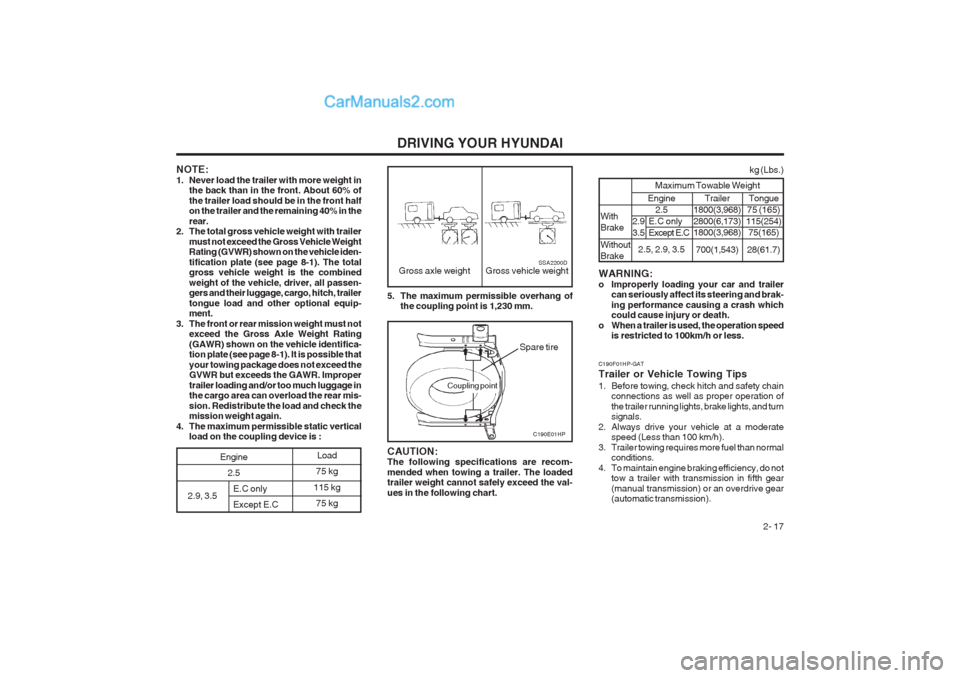
4. The maximum permissible static vertical load on the coupling device is : 5. The maximum permissible overhang of
the coupling point is 1,230 mm.
Gross axle weight Gross vehicle weightSSA2200D
C190E01HP
CAUTION: The following specifications are recom- mended when towing a trailer. The loaded trailer weight cannot safely exceed the val- ues in the following chart.
Spare tire
2.9, 3.5 E.C only Except E.C Load
75 kg
115 kg 75 kg
Engine 2.5
Coupling point
C190F01HP-GAT Trailer or Vehicle Towing Tips
1. Before towing, check hitch and safety chain connections as well as proper operation of the trailer running lights, brake lights, and turn
signals.
2. Always drive your vehicle at a moderate speed (Less than 100 km/h).
3. Trailer towing requires more fuel than normal conditions.
4. To maintain engine braking efficiency, do not tow a trailer with transmission in fifth gear(manual transmission) or an overdrive gear (automatic transmission).
WARNING:
o Improperly loading your car and trailer
can seriously affect its steering and brak-ing performance causing a crash which could cause injury or death.
o When a trailer is used, the operation speed is restricted to 100km/h or less. Engine
2.5
2.5, 2.9, 3.5
2.9 E.C only
3.5 Except E.C
kg (Lbs.)
Maximum Towable Weight
With Brake Without Brake Trailer
1800(3,968) 2800(6,173) 1800(3,968)
700(1,543) Tongue
75 (165)
115(254) 75(165)
28(61.7)
Page 196 of 349
CONTROLS AND EQUIPMENT
1- 2 YB020A1-E BEFORE ENTERING THE VEHICLE
o Ensure that all windows, mirrors and lamps are clean.
o Check condition of all tyres.
o Ensure that no fluid leaks are evident.
o Ensure that the area around the vehicle is clear before driving off.
YB020B1-E AFTER ENTERING THE VEHICLE
o Ensure that all occupants fasten and cor- rectly adjust seat belts.
o Ensure that seat and headrestraint positions are adjusted for optimum safety, control and comfort.
o Adjust interior and exterior rear view mir- rors.
o Verify correct operation of lamps, horn and other electrical equipment.
o Ensure that warning lamps illuminate when ignition is turned on.
NOTE: Fluid levels such as engine oil, engine cool- ant, brake and windscreen washer fluidshould be checked daily or at each refuel-ling, whichever occurs sooner. B020A01FC-EAT RUNNING IN YOUR NEW HYUNDAIThe longevity and performance of the vehicle are greatly affected by the care exercised dur-ing the first 1000 miles of motoring. Because ofmodern manufacturing techniques, rigid guide-lines regarding maximum road speeds havebecome unnecessary. However, certain pre-cautions should be observed in order to obtainthe best possible performance and useful lifefrom the vehicle.
1) Do not race the engine without a load (i.e revving the engine in neutral).
2) During the first 500 miles the maximum engine speed should be restricted to 3000rpm and gradually increased thereafter.
3) Avoid prolonged constant speed operation. The internal components of the engine willbecome run-in more quickly if the operation
speed is varied during the running in period.
4) Never allow the engine to labour. Use the gearbox freely and avoid large throttle open-ings when the engine speed is below 1500rpm.
5) Avoid rapid acceleration and maximum throttle openings.
6) Avoid harsh braking during the first 100 miles of urban motoring or 1000 miles ofmotorway driving to allow the friction facingsof the brake pads and shoes to bed againstthe discs and drums properly.
7) No trailer towing should be undertaken dur- ing the running-in period. B880A01HP-EAT IMMOBILISER SYSTEM
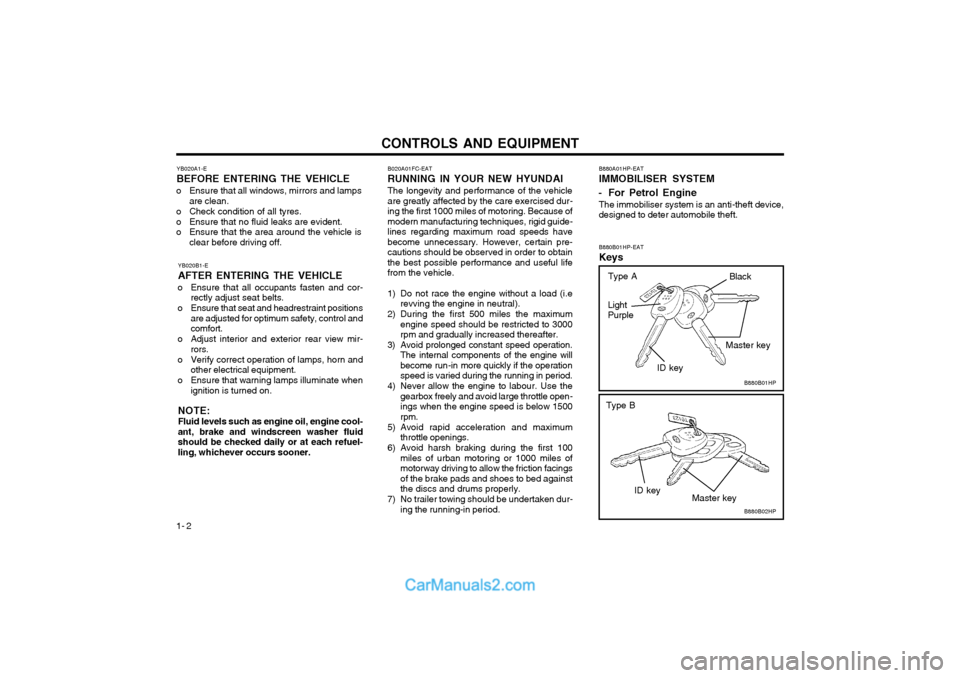
- For Petrol Engine The immobiliser system is an anti-theft device, designed to deter automobile theft. B880B01HP-EAT Keys
B880B01HP
B880B02HP
Light Purple
ID key
ID key Master key
Master key
Type B
Black
Type A
Page 199 of 349
CONTROLS AND EQUIPMENT1- 5
B030C01Y-EAT ILLUMINATED IGNITION SWITCH (Not all models)
B030C01E
Whenever a door is opened, the ignition switch
will be illuminated for your convenience, provid- ed the ignition switch is not in the "ON" position.The light will go off approximately 10 secondsafter closing the door or when the ignition switchis turned on.
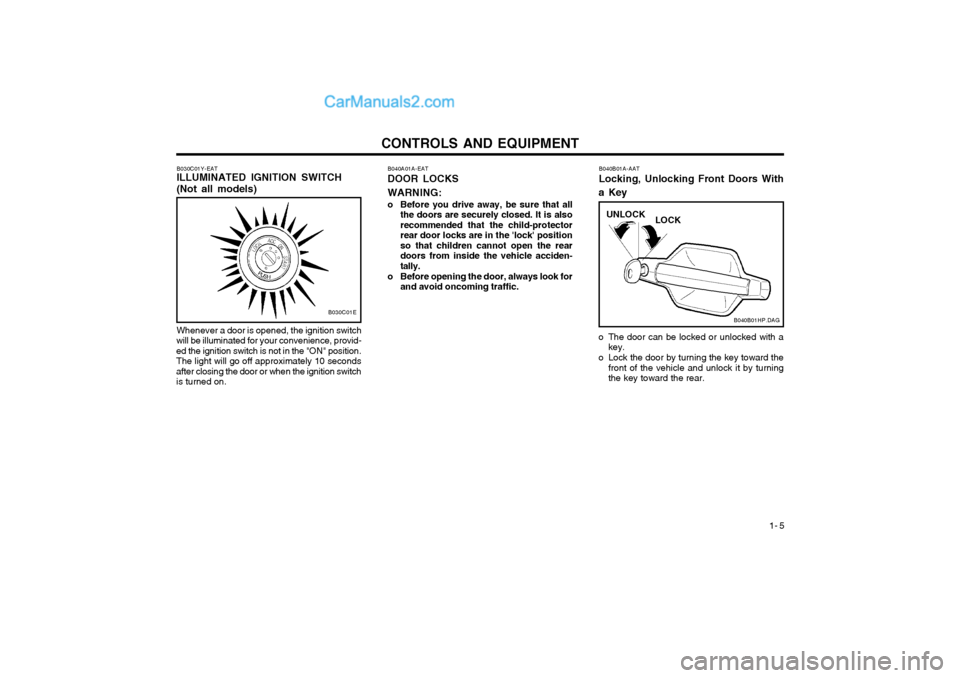
o The door can be locked or unlocked with a key.
o Lock the door by turning the key toward the front of the vehicle and unlock it by turning the key toward the rear.
B040A01A-EAT DOOR LOCKS WARNING:
o Before you drive away, be sure that all
the doors are securely closed. It is also recommended that the child-protectorrear door locks are in the 'lock' positionso that children cannot open the reardoors from inside the vehicle acciden-tally.
o Before opening the door, always look for and avoid oncoming traffic. B040B01A-AAT Locking, Unlocking Front Doors With
a Key
B040B01HP.DAG
UNLOCK
LOCK