ECO mode Hyundai Terracan 2003 Owner's Guide
[x] Cancel search | Manufacturer: HYUNDAI, Model Year: 2003, Model line: Terracan, Model: Hyundai Terracan 2003Pages: 349, PDF Size: 4.56 MB
Page 249 of 349
CONTROLS AND EQUIPMENT1- 55
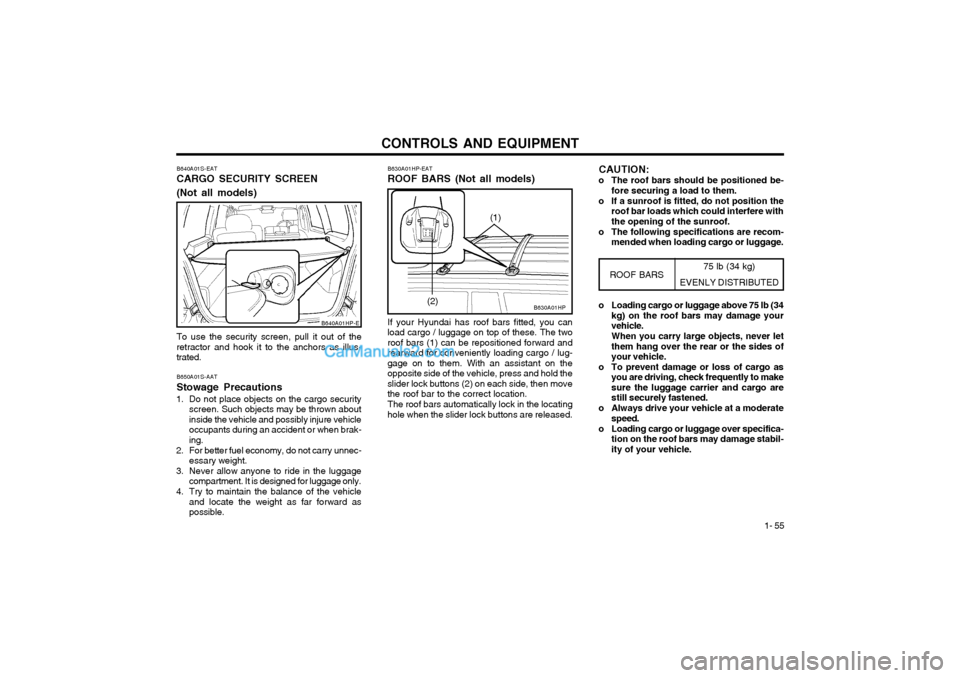
B640A01S-EAT CARGO SECURITY SCREEN (Not all models) To use the security screen, pull it out of the retractor and hook it to the anchors as illus-trated. B650A01S-AAT Stowage Precautions
1. Do not place objects on the cargo security screen. Such objects may be thrown about inside the vehicle and possibly injure vehicleoccupants during an accident or when brak-ing.
2. For better fuel economy, do not carry unnec- essary weight.
3. Never allow anyone to ride in the luggage compartment. It is designed for luggage only.
4. Try to maintain the balance of the vehicle and locate the weight as far forward aspossible.
B640A01HP-E
75 lb (34 kg)
EVENLY DISTRIBUTED
B630A01HP
B630A01HP-EAT ROOF BARS (Not all models) If your Hyundai has roof bars fitted, you can
load cargo / luggage on top of these. The two roof bars (1) can be repositioned forward andrearward for conveniently loading cargo / lug-gage on to them. With an assistant on theopposite side of the vehicle, press and hold theslider lock buttons (2) on each side, then movethe roof bar to the correct location.
The roof bars automatically lock in the locating
hole when the slider lock buttons are released.
ROOF BARS
(2) o Loading cargo or luggage above 75 lb (34
kg) on the roof bars may damage your vehicle. When you carry large objects, never let them hang over the rear or the sides ofyour vehicle.
o To prevent damage or loss of cargo as you are driving, check frequently to makesure the luggage carrier and cargo arestill securely fastened.
o Always drive your vehicle at a moderate speed.
o Loading cargo or luggage over specifica- tion on the roof bars may damage stabil-ity of your vehicle.
(1)
CAUTION:
o The roof bars should be positioned be- fore securing a load to them.
o If a sunroof is fitted, do not position the roof bar loads which could interfere with the opening of the sunroof.
o The following specifications are recom- mended when loading cargo or luggage.
Page 254 of 349
CONTROLS AND EQUIPMENT
1- 60 B660A01S-EAT CRUISE CONTROL (Not all models)
B660C02L-EATTo Cancel the Cruise Speed
B660B02L-EATTo Set the Cruise Speed
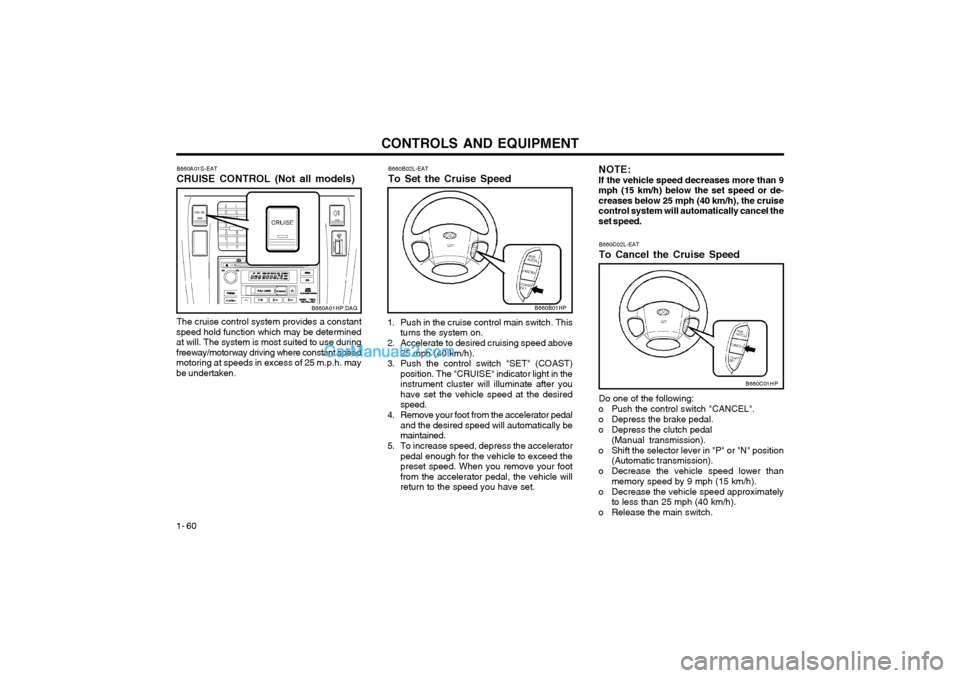
The cruise control system provides a constant
speed hold function which may be determined at will. The system is most suited to use duringfreeway/motorway driving where constant speedmotoring at speeds in excess of 25 m.p.h. maybe undertaken.
B660A01HP.DAG
1. Push in the cruise control main switch. This turns the system on.
2. Accelerate to desired cruising speed above 25 mph (40 km/h).
3. Push the control switch "SET" (COAST) position. The "CRUISE" indicator light in the instrument cluster will illuminate after youhave set the vehicle speed at the desiredspeed.
4. Remove your foot from the accelerator pedal and the desired speed will automatically bemaintained.
5. To increase speed, depress the accelerator pedal enough for the vehicle to exceed thepreset speed. When you remove your footfrom the accelerator pedal, the vehicle willreturn to the speed you have set.
B660B01HP
NOTE: If the vehicle speed decreases more than 9mph (15 km/h) below the set speed or de-creases below 25 mph (40 km/h), the cruisecontrol system will automatically cancel theset speed.
Do one of the following:
o Push the control switch "CANCEL".
o Depress the brake pedal.
o Depress the clutch pedal (Manual transmission).
o Shift the selector lever in "P" or "N" position (Automatic transmission).
o Decrease the vehicle speed lower than memory speed by 9 mph (15 km/h).
o Decrease the vehicle speed approximately to less than 25 mph (40 km/h).
o Release the main switch.
B660C01HP
Page 257 of 349
CONTROLS AND EQUIPMENT1- 63
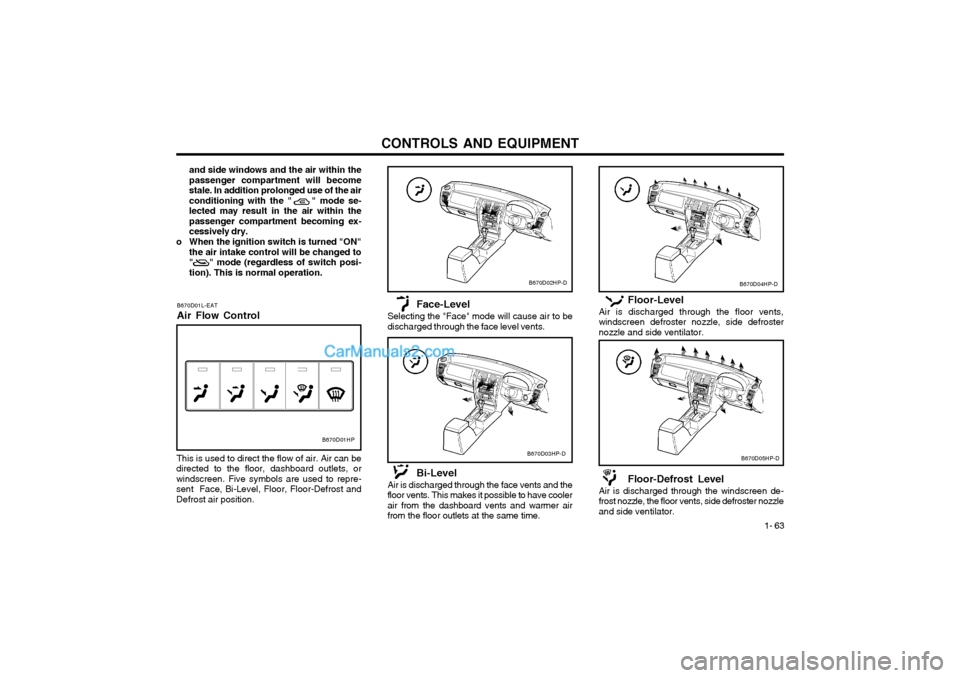
Floor-Level
Air is discharged through the floor vents, windscreen defroster nozzle, side defrosternozzle and side ventilator.
Floor-Defrost Level
Air is discharged through the windscreen de- frost nozzle, the floor vents, side defroster nozzleand side ventilator.
B670D04HP-D
B670D05HP-D
and side windows and the air within the passenger compartment will becomestale. In addition prolonged use of the airconditioning with the " " mode se-lected may result in the air within thepassenger compartment becoming ex-cessively dry.
o When the ignition switch is turned "ON" the air intake control will be changed to" " mode (regardless of switch posi-tion). This is normal operation.
B670D01L-EAT Air Flow Control
B670D01HP
This is used to direct the flow of air. Air can be
directed to the floor, dashboard outlets, or windscreen. Five symbols are used to repre-sent Face, Bi-Level, Floor, Floor-Defrost andDefrost air position. Face-Level
Selecting the "Face" mode will cause air to bedischarged through the face level vents.
Bi-Level
Air is discharged through the face vents and the floor vents. This makes it possible to have coolerair from the dashboard vents and warmer airfrom the floor outlets at the same time.
B670D02HP-D
B670D03HP-D
Page 264 of 349
CONTROLS AND EQUIPMENT
1- 70
B970C02L-EAT Automatic Operation
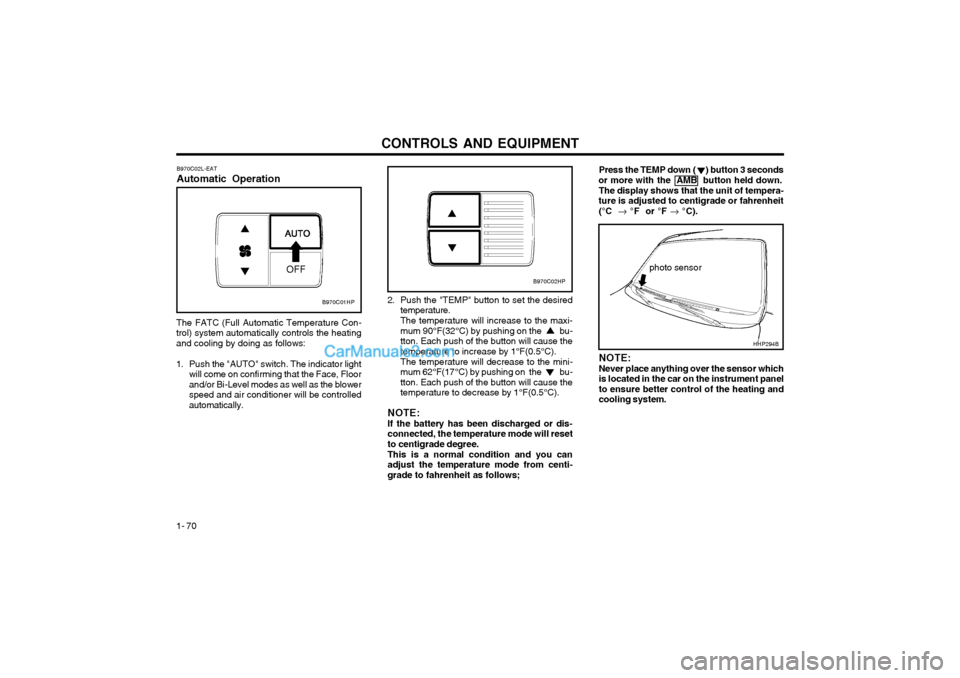
The FATC (Full Automatic Temperature Con- trol) system automatically controls the heatingand cooling by doing as follows:
1. Push the "AUTO" switch. The indicator light will come on confirming that the Face, Floorand/or Bi-Level modes as well as the blowerspeed and air conditioner will be controlledautomatically. Press the TEMP down ( ) button 3 seconds
or more with the AMB button held down.
The display shows that the unit of tempera-
ture is adjusted to centigrade or fahrenheit
(°C °F or °F °C).
photo sensor
HHP294B
2. Push the "TEMP" button to set the desired
temperature. The temperature will increase to the maxi- mum 90°F(32°C) by pushing on the bu-tton. Each push of the button will cause thetemperature to increase by 1°F(0.5°C). The temperature will decrease to the mini- mum 62°F(17°C) by pushing on the bu-tton. Each push of the button will cause thetemperature to decrease by 1°F(0.5°C).
NOTE: If the battery has been discharged or dis- connected, the temperature mode will resetto centigrade degree. This is a normal condition and you can adjust the temperature mode from centi-grade to fahrenheit as follows; NOTE: Never place anything over the sensor which is located in the car on the instrument panelto ensure better control of the heating andcooling system.
B970C01HP
B970C02HP
Page 266 of 349
CONTROLS AND EQUIPMENT
1- 72 B980D01Y-AAT Heating and Cooling System OffPress the "OFF" button to stop the operation of
the heating and cooling system. With the "Recirculation" mode selected, air from
within the passenger compartment will be drawn through the heating system heated or cooledaccording to the function selected. NOTE:
o It should be noted that prolonged opera- tion of the heating in "recirculation" modewill give rise to fogging of the windscreenand side windows and the air within thepassenger compartment will becomestale. In addition, prolonged use of theair conditioning with the "Recirculation"mode selected may result in the air withinthe passenger compartment becomingexcessively dry.
o When the ignition switch is turned "ON" the air intake control will be changed to"FRESH" mode (regardless of switch po-sition). This is normal operation. The airintake control operates in "AUTO" modewhen turning the ignition to the ON posi-tion if the "AUTO" mode was used beforeshutting off the engine. B980E01L-EAT Air Flow Control
B980E01HP
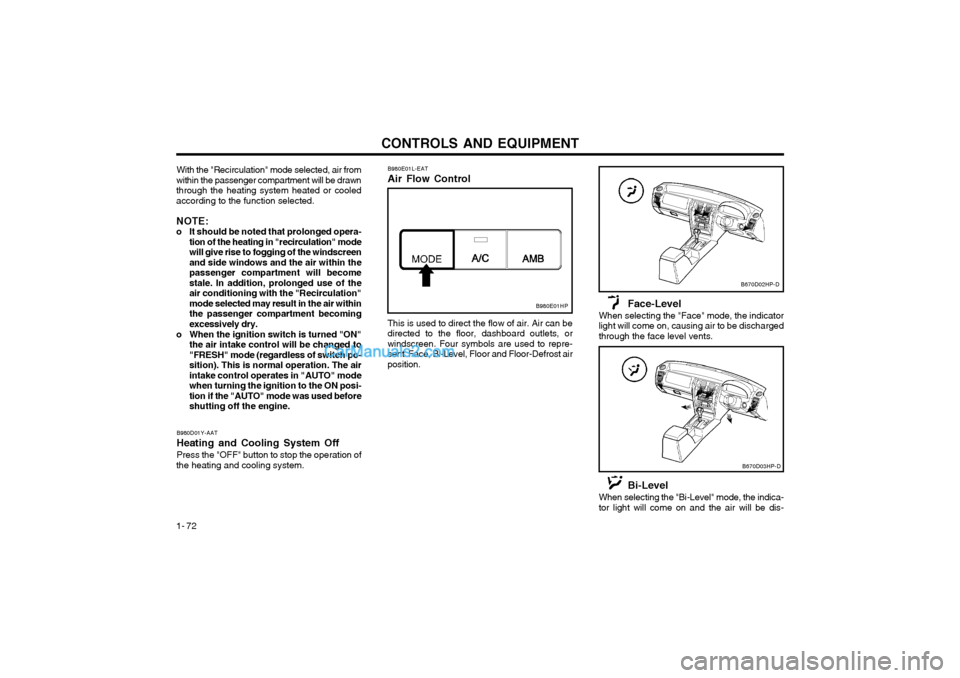
This is used to direct the flow of air. Air can be directed to the floor, dashboard outlets, orwindscreen. Four symbols are used to repre-sent Face, Bi-Level, Floor and Floor-Defrost airposition.
Face-Level
When selecting the "Face" mode, the indicatorlight will come on, causing air to be dischargedthrough the face level vents.
B670D02HP-D
B670D03HP-D
Bi-Level
When selecting the "Bi-Level" mode, the indica- tor light will come on and the air will be dis-
Page 277 of 349
DRIVING YOUR HYUNDAI
2- 6
o Ensure that the engine is not over-revved
by upshifting before the tachometer needle enters the red zone.
o Do not coast with the shift lever at the neutral position.
o When descending long gradients, make use of the engine braking to assist thefootbrake to avoid brake fade or over-heating.
o When slippery conditions are encoun- tered, increased caution should be exer-cised when gear changing, braking oraccelerating. Abrupt changes in speedmay cause a loss of traction or control ofthe vehicle.
o During cold weather, shifting may be dif- ficult until the transmission lubricant haswarmed up. This is normal and not harm-ful to the transmission.
o If you've come to a complete stop and it's hard to shift into 1 st
or R(Reverse), put
the shift lever in N(Neutral) position andrelease the clutch. Press the clutch pedalback down, and then shift into 1 st
or
R(Reverse) gear position.
o Do not use the shift lever as a handrest during driving, as this can result in pre-mature wear of the transmission shiftforks. C070B01A-EAT
Using the Clutch
The clutch should be pressed all the way to the
floor before shifting, then released slowly. Theclutch pedal should aways be used after fullyreturning to the original position. Do not restyour foot on the clutch pedal whilst driving. Thiscan cause unnecessary wear.
Do not partially engage the clutch to hold the
car on an incline. This causes unnecessarywear. Use the parking brake to hold the car onan incline. Do not operate the clutch pedalrapidly and repeatedly.
The shift points as shown above are recom-
mended for optimum fuel economy and per-formance. C070E03A-EAT
RECOMMENDED SHIFT POINTS
Shift
from-to
1-2 2-33-4 4-5 Recommended
mph (km/h)
15 (20)25 (40) 35 (55)45 (75)
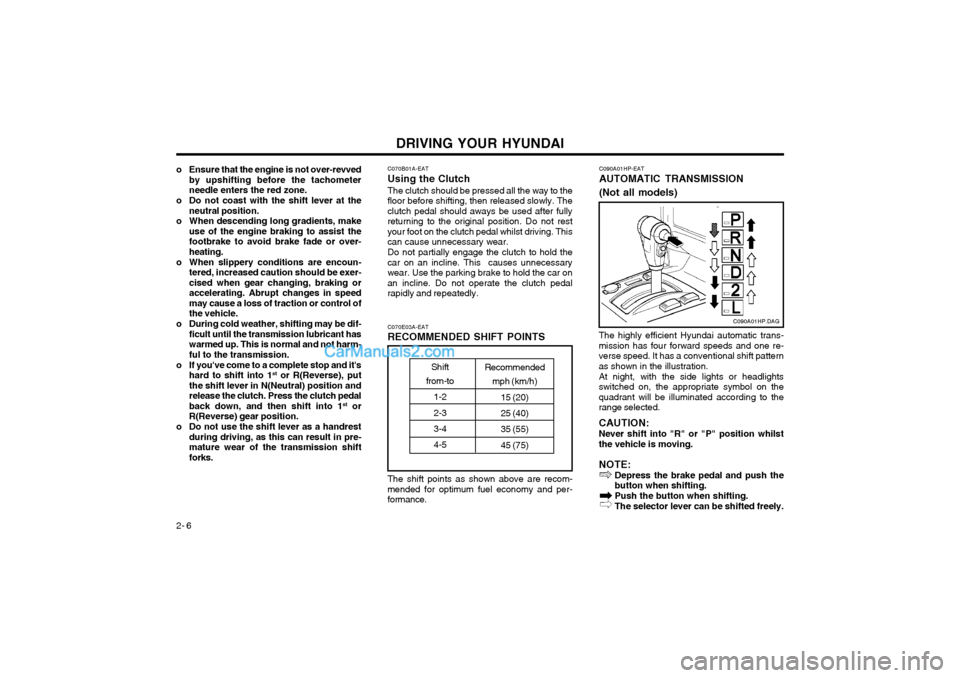
The highly efficient Hyundai automatic trans- mission has four forward speeds and one re-verse speed. It has a conventional shift patternas shown in the illustration. At night, with the side lights or headlights switched on, the appropriate symbol on thequadrant will be illuminated according to therange selected. CAUTION: Never shift into "R" or "P" position whilst the vehicle is moving. NOTE: Depress the brake pedal and push the button when shifting. Push the button when shifting. The selector lever can be shifted freely.
C090A01HP-EAT
AUTOMATIC TRANSMISSION (Not all models)
C090A01HP.DAG
Page 279 of 349
DRIVING YOUR HYUNDAI
2- 8
HPC120D1-E General Operating Instructions
o The button in the selector handle must be depressed before the selector can be moved.
o The engine may only be started when the selector is at position "P" or "N".
o Ensure that the footbrake is firmly applied when shifting from "P" or "N" to "D", "2" or "L" and vice versa.
o Always engage the parking brake when the vehicle is unattended, never use the "P"position in place of the parking brake.
o Under normal circumstances, the selector should be placed in the "D" position and thetransmission allowed to select the most idealratio for the circumstances. In this positionmaximum fuel economy will be achieved.
o When descending steep gradients where engine braking is required, the selectorshould be placed at the "2" or "L" positiondepending upon the vehicle speed.
o When ascending steep gradients and using large throttle openings, the transmission mayrepeatedly change between two adjacentratios. This is a normal characteristic andmay be prevented by selecting "2" or "L"depending upon the vehicle speed.
o Never move the selector to or from the "P" or "N" position with the accelerator de-pressed.
o Only with the brake pedal fully depressed, the shift lever is shifted from "P" (parking)position to other position. (Not all models)
C090I01E-EAT
CAUTION:
o Shift into "R" and "P" only when the vehicle has completely stopped.
o Do not accelerate the engine in reverse or any of the forward positions with the brakes applied.
o Always apply the footbrake when shift- ing from "P" or "N", to "R", "D", "2" or"L" position.
o Do not use the "P" (Park) position in place of the parking brake. Always setthe parking brake, shift the transmissioninto "P" (Park) and turn off the ignitionwhen you leave the vehicle, even mo-mentarily. Never leave the vehicle unat-tended whilst the engine is running.
o Check the automatic transmission fluid level regularly, and add fluid as neces-sary. SC130A1-E OVERDRIVE SWITCH
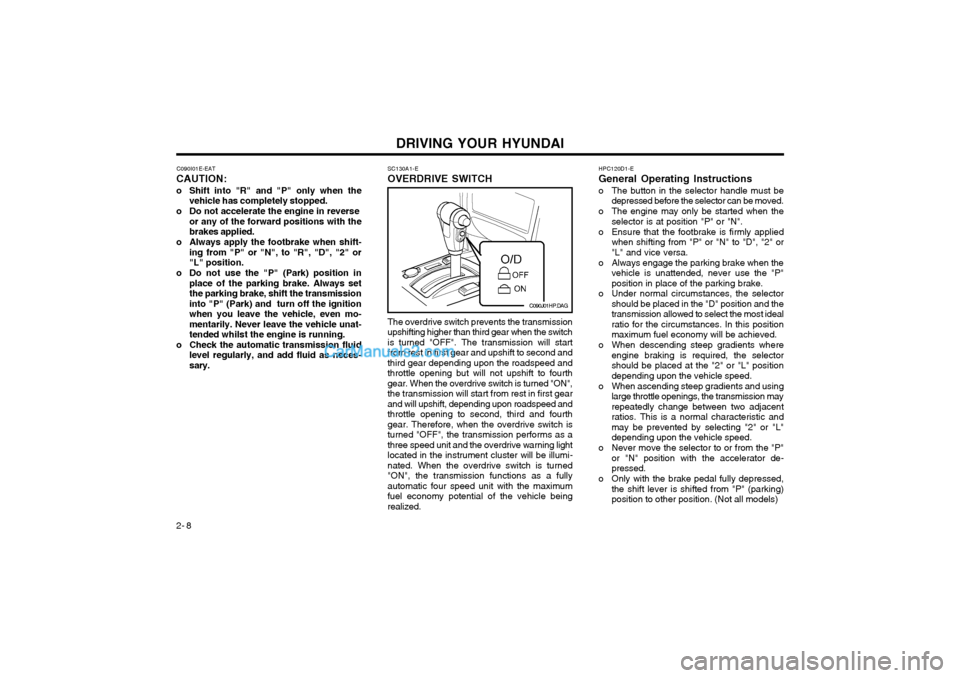
The overdrive switch prevents the transmission upshifting higher than third gear when the switchis turned "OFF". The transmission will startfrom rest in first gear and upshift to second andthird gear depending upon the roadspeed andthrottle opening but will not upshift to fourthgear. When the overdrive switch is turned "ON",the transmission will start from rest in first gearand will upshift, depending upon roadspeed andthrottle opening to second, third and fourthgear. Therefore, when the overdrive switch isturned "OFF", the transmission performs as athree speed unit and the overdrive warning lightlocated in the instrument cluster will be illumi-nated. When the overdrive switch is turned"ON", the transmission functions as a fullyautomatic four speed unit with the maximumfuel economy potential of the vehicle beingrealized.
C090J01HP.DAG
Page 280 of 349
DRIVING YOUR HYUNDAI 2- 9
o Ensure that the overdrive switch is at the
"ON" position for maximum economy.
o If rapid acceleration is required, fully de- press the accelerator pedal. In this condi- tion, the kickdown mechanism will be oper-ated and the transmission will automaticallydownshift according to the vehicle speed.
C120A02A-EAT
ANTI-LOCK BRAKE SYSTEM (Not all models)
The Anti-Lock Brake System (ABS) is designed
to prevent wheel lock-up during sudden braking or on hazardous road surfaces. The ABS con-trol module monitors the wheel speed and con-trols the pressure applied to each brake. Thus,in emergency situations or on slick roads, ABSwill increase vehicle control during braking.
NOTE: During ABS operation, a slight pulsation
may be felt in the brake pedal when the brakes are applied. Also, a noise may beheard in the engine compartment whilst brak-ing. These conditions are normal and indi-cate that the anti-lock brake system is func-tioning properly. WARNING: ABS will not prevent accidents due to im-
proper or dangerous driving manoeuvres. Even though vehicle control is improvedduring emergency braking, always maintaina safe distance between you and objectsahead. Vehicle speeds should always bereduced during extreme road conditions.
The braking distance for cars equipped with
an anti-lock braking system may be longerthan for those without it in the followingroad conditions.
o Driving on rough, gravel or snow-cov- ered roads.
o Driving with tire chains installed.
o Driving on roads where the road surface is pitted or has different surface height.
These roads should be driven at reduced
speeds. The safety features of an ABS equipped vehicle should not be tested byhigh speed driving or cornering. This couldendanger the safety of yourself or others.
C350A01HP-EAT
Part-time 4WD operation
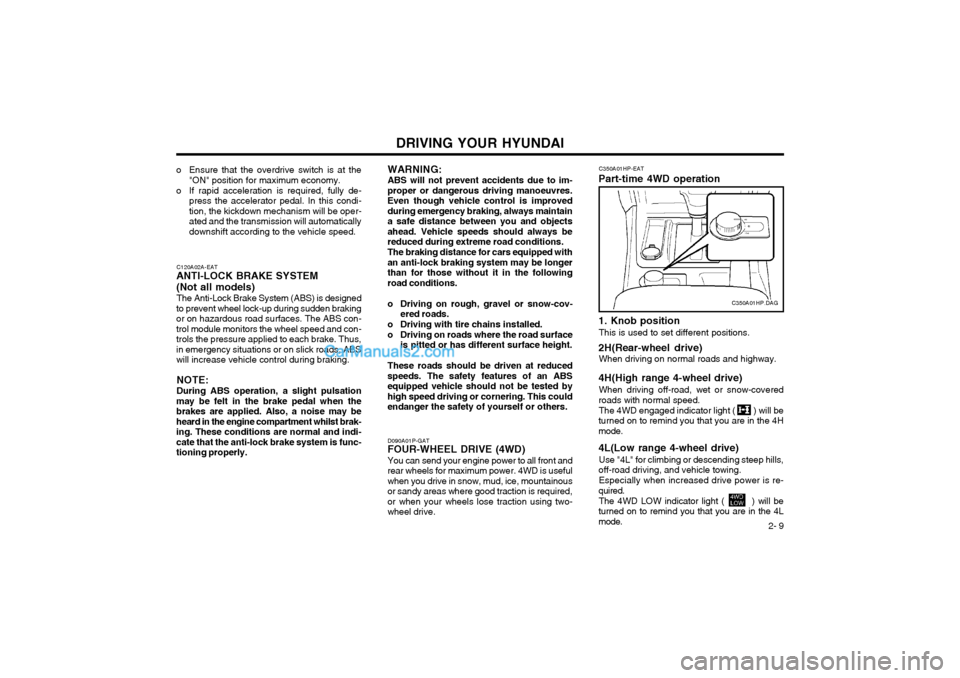
1. Knob position
This is used to set different positions.
2H(Rear-wheel drive) When driving on normal roads and highway.
4H(High range 4-wheel drive) When driving off-road, wet or snow-covered
roads with normal speed.
The 4WD engaged indicator light ( ) will be
turned on to remind you that you are in the 4H mode. 4L(Low range 4-wheel drive)
Use "4L" for climbing or descending steep hills,
off-road driving, and vehicle towing.
Especially when increased drive power is re-
quired.
The 4WD LOW indicator light ( ) will be
turned on to remind you that you are in the 4L mode.
C350A01HP.DAG
D090A01P-GAT
FOUR-WHEEL DRIVE (4WD)
You can send your engine power to all front and
rear wheels for maximum power. 4WD is useful when you drive in snow, mud, ice, mountainousor sandy areas where good traction is required,or when your wheels lose traction using two-wheel drive.
Page 281 of 349
DRIVING YOUR HYUNDAI
2- 10
2. Transfer shift knob operation By turning the transfer shift knob(4H, 4L), both
axles of the vehicle are rigidly connected with each other. This improves the traction charac-teristics.
2H
4H
Turn the transfer shift knob from the 2H mode
to the 4H mode at speed below 50mph (80 km/h). It is not necessary to depress the clutchpedal (Manual Transmission) or put the shiftlever into "N(neutral)" position (Automatic Trans-mission). Perform this operation when drivingstraight.
4H
2H
Turn the transfer shift knob from the 4H mode
to the 2H mode at speed below 50mph (80 km/h). It is not necessary to depress the clutchpedal (Manual Transmission) or put the shiftlever into "N(neutral)" position (Automatic Trans-
mission). Perform this operation when driving straight.
4H
4L
1. Stop the vehicle.
2. Depress the clutch pedal (Manual Trans- mission) or put the shift lever into "N (neu- tral)" position (Automatic Transmission).
3. Select the 4L mode.
4L
4H
1. Stop the vehicle.
2. Depress the clutch pedal (Manual Trans- mission) or put the shift lever into "N (neu- tral)" position (Automatic Transmission).
3. Select the 4H mode.CAUTION: Do not select 4WD (4H or 4L) mode on dry
paved roads. Especially on dry highway, never select the 4WD mode.
Four-wheel driving on dry paved roads for a
long period will increase the fuel consump-tion with possible noise generation and ear-ly tyre wear. In addition, axle gear oil tem-perature increases with possible driving sys-tem part wear. D090E01HP-EAT
Driving Four-wheel drive safely
o The driving posture should be more upright; adjust the seat to a good position for easy steering and pedal operation.
o Be sure to wear the seat belt.
o Drive carefully when off the road and avoid dangerous areas.
o 4WD has higher ground clearance and a narrower track to make them capable of performing in a wide variety of off roadapplications. Specific design characteristicsgive them a higher centre of gravity thanordinary cars. An advantage of the higherground clearance is a better view of the roadallowing you to anticipate problems. Theyare not designed for cornering at the samespeeds as conventional 2-wheel drive vehi-cles any more than low-slung sports carsare designed to perform satisfactorily underoff-road conditions. If at all possible, avoidsharp turns or abrupt maneuvers. As withother vehicles of this type, failure to operatethis vehicle correctly may result in loss ofcontrol or vehicle rollover.
o Do not grip the inside or spokes of the steering wheel when driving off-road. Thesteering wheel could jerk and injure yourhands. Always firmly hold the outer steeringwheel when you are driving off-road.
o Drive at lower speeds in strong crosswinds. Because of your vehicle’s high centre ofgravity, its stability will be affected in cross-winds. Slower speeds ensure better vehiclecontrol.
Page 283 of 349
DRIVING YOUR HYUNDAI
2- 12 Driving 4WD Safely
(1) Be sure to wear the seat belt.
(2) Drive at lower speeds in strong crosswinds.
Because of your vehicle's high centre of gravity, its stability will be affected in cross-winds. Slower speeds ensure better vehiclecontrol.
(3) Check the brake condition after driving in wet or muddy conditions. Press the brakeseveral times as you move slowly until youfeel normal braking forces return.
(4) Do not drive the vehicle through water. (i.e. streams, rivers, lakes, etc.)
(5) The stopping distance of the full-time 4WD vehicle differs very little from that of the2WD vehicle.
When driving on a snow-covered road or a slippery, muddy surface, make sure thatyou keep a sufficient distance between yourvehicle and the one ahead of you.
(6) Since the driving torque is always applied to the 4 wheels, the performance of the full-time 4WD vehicle is greatly affected by thecondition of the tyres. Be sure to equip itwith all four tyres of the same size and type.o When replacement of any of the tyres or disc wheels is necessary, replace all ofthem.
o Rotate the tyres and check the tyre pres- sure at regular intervals.
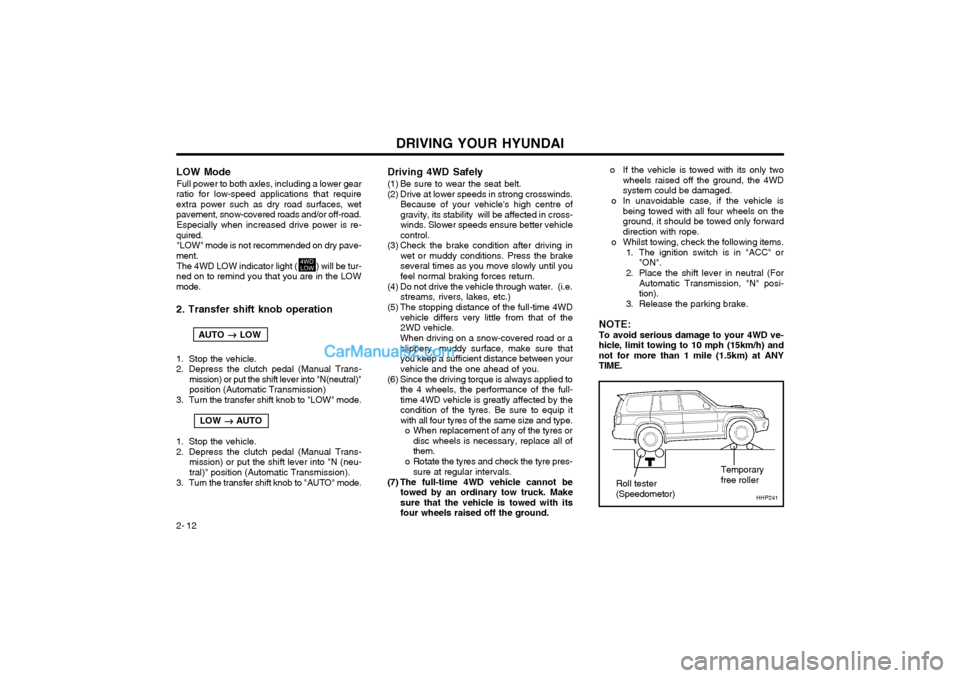
(7) The full-time 4WD vehicle cannot be towed by an ordinary tow truck. Makesure that the vehicle is towed with itsfour wheels raised off the ground. o If the vehicle is towed with its only two
wheels raised off the ground, the 4WDsystem could be damaged.
o In unavoidable case, if the vehicle is being towed with all four wheels on theground, it should be towed only forwarddirection with rope.
o Whilst towing, check the following items.
1. The ignition switch is in "ACC" or"ON".
2. Place the shift lever in neutral (For Automatic Transmission, "N" posi-tion).
3. Release the parking brake.
NOTE: To avoid serious damage to your 4WD ve- hicle, limit towing to 10 mph (15km/h) andnot for more than 1 mile (1.5km) at ANYTIME.
HHP241
Roll tester (Speedometor) Temporaryfree roller
LOW Mode
Full power to both axles, including a lower gear
ratio for low-speed applications that require extra power such as dry road surfaces, wetpavement, snow-covered roads and/or off-road.
Especially when increased drive power is re-
quired. "LOW" mode is not recommended on dry pave-
ment.
The 4WD LOW indicator light ( ) will be tur-
ned on to remind you that you are in the LOWmode. 2. Transfer shift knob operation
AUTO
LOW
1. Stop the vehicle.
2. Depress the clutch pedal (Manual Trans- mission) or put the shift lever into "N(neutral)"position (Automatic Transmission)
3. Turn the transfer shift knob to "LOW" mode.
LOW
AUTO
1. Stop the vehicle.
2. Depress the clutch pedal (Manual Trans- mission) or put the shift lever into "N (neu-tral)" position (Automatic Transmission).
3. Turn the transfer shift knob to "AUTO" mode.