automatic transmission Hyundai Terracan 2003 Owner's Manual
[x] Cancel search | Manufacturer: HYUNDAI, Model Year: 2003, Model line: Terracan, Model: Hyundai Terracan 2003Pages: 349, PDF Size: 4.56 MB
Page 43 of 349
FEATURES OF YOUR HYUNDAI 1- 35
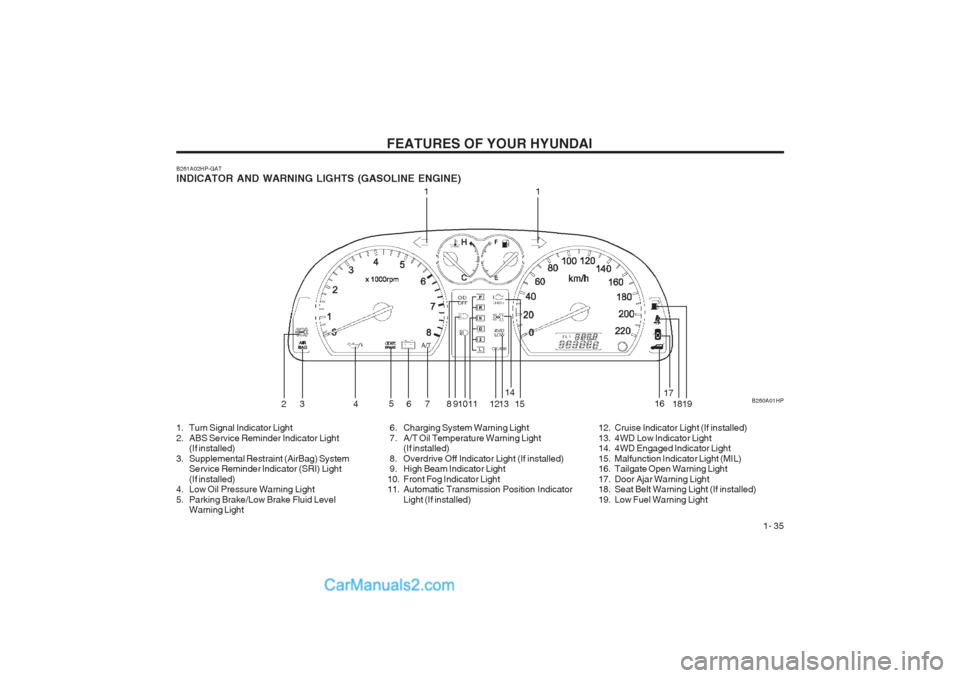
B261A02HP-GAT INDICATOR AND WARNING LIGHTS (GASOLINE ENGINE) B260A01HP
11
23 4 5
6 7 8 910 11 1213 14
15 1617
18
19
1. Turn Signal Indicator Light
2. ABS Service Reminder Indicator Light (If installed)
3. Supplemental Restraint (AirBag) System Service Reminder lndicator (SRI) Light(If installed)
4. Low Oil Pressure Warning Light
5. Parking Brake/Low Brake Fluid Level Warning Light 6. Charging System Warning Light
7. A/T Oil Temperature Warning Light
(If installed)
8. Overdrive Off Indicator Light (If installed)
9. High Beam Indicator Light
10. Front Fog Indicator Light
11. Automatic Transmission Position Indicator Light (If installed) 12. Cruise Indicator Light (If installed)
13. 4WD Low Indicator Light
14. 4WD Engaged Indicator Light
15. Malfunction Indicator Light (MIL)
16. Tailgate Open Warning Light
17. Door Ajar Warning Light
18. Seat Belt Warning Light (If installed)
19. Low Fuel Warning Light
Page 45 of 349
FEATURES OF YOUR HYUNDAI 1- 37
B260A02HP
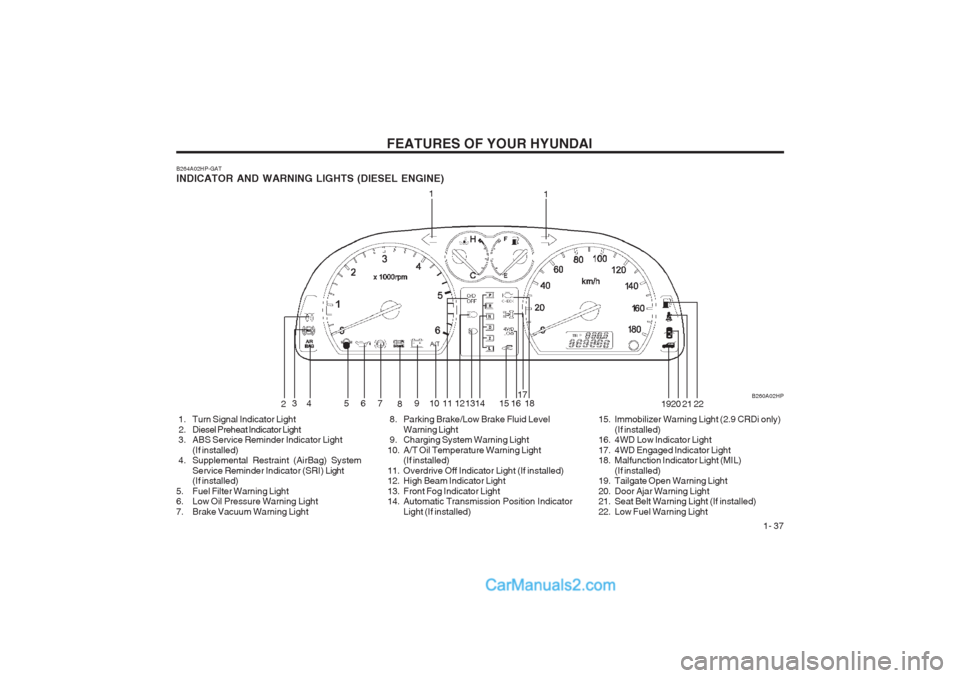
B264A02HP-GAT INDICATOR AND WARNING LIGHTS (DIESEL ENGINE)
1
2 34 5 6
7
8910111213 15 17
18 1920 21
1
22
1416
1. Turn Signal Indicator Light
2. Diesel Preheat Indicator Light
3. ABS Service Reminder Indicator Light(If installed)
4. Supplemental Restraint (AirBag) System
Service Reminder Indicator (SRI) Light
(If installed)
5. Fuel Filter Warning Light
6. Low Oil Pressure Warning Light
7. Brake Vacuum Warning Light 8. Parking Brake/Low Brake Fluid Level
Warning Light
9. Charging System Warning Light
10. A/T Oil Temperature Warning Light (If installed)
11. Overdrive Off Indicator Light (If installed)
12. High Beam Indicator Light
13. Front Fog Indicator Light
14. Automatic Transmission Position Indicator Light (If installed) 15. Immobilizer Warning Light (2.9 CRDi only)
(If installed)
16. 4WD Low Indicator Light
17. 4WD Engaged Indicator Light
18. Malfunction Indicator Light (MIL)
(If installed)
19. Tailgate Open Warning Light
20. Door Ajar Warning Light
21. Seat Belt Warning Light (If installed)
22. Low Fuel Warning Light
Page 48 of 349
FEATURES OF YOUR HYUNDAI
1- 40
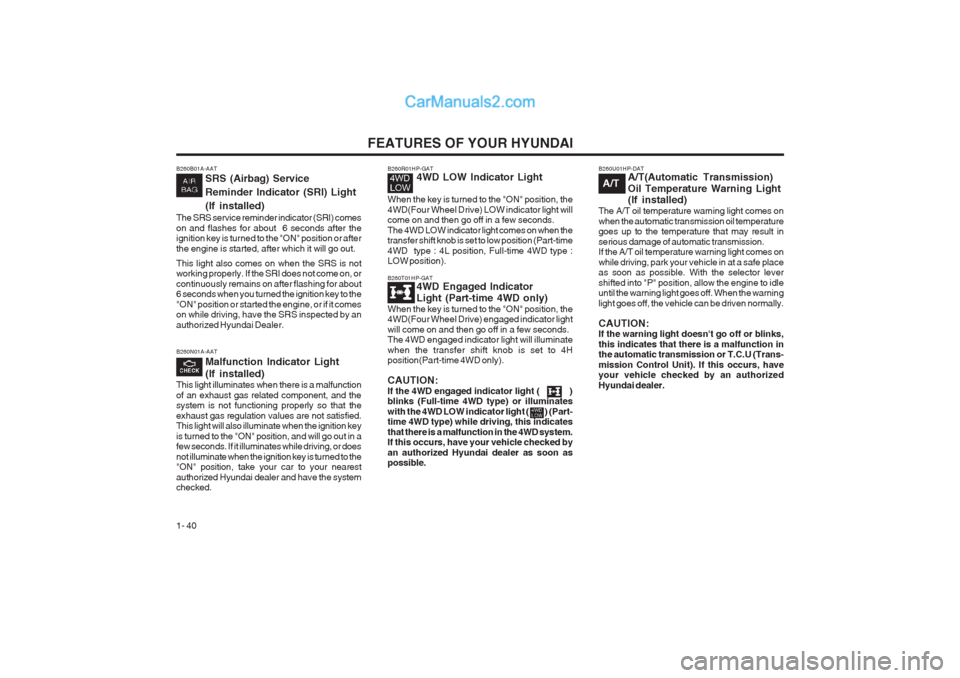
B260T01HP-GAT 4WD Engaged Indicator Light (Part-time 4WD only)
When the key is turned to the "ON" position, the 4WD(Four Wheel Drive) engaged indicator light will come on and then go off in a few seconds. The 4WD engaged indicator light will illuminate when the transfer shift knob is set to 4H position(Part-time 4WD only). CAUTION: If the 4WD engaged indicator light ( ) blinks (Full-time 4WD type) or illuminates
with the 4WD LOW indicator light ( ) (Part- time 4WD type) while driving, this indicates that there is a malfunction in the 4WD system. If this occurs, have your vehicle checked by an authorized Hyundai dealer as soon as possible. B260U01HP-DAT
A/T(Automatic Transmission)
Oil Temperature Warning Light (If installed)
The A/T oil temperature warning light comes on when the automatic transmission oil temperature goes up to the temperature that may result in serious damage of automatic transmission. If the A/T oil temperature warning light comes on while driving, park your vehicle in at a safe place
as soon as possible. With the selector levershifted into "P" position, allow the engine to idle until the warning light goes off. When the warning light goes off, the vehicle can be driven normally. CAUTION: If the warning light doesn't go off or blinks, this indicates that there is a malfunction in
the automatic transmission or T.C.U (Trans- mission Control Unit). If this occurs, have your vehicle checked by an authorized Hyundai dealer.
A/T
B260N01A-AAT
Malfunction Indicator Light (If installed)
This light illuminates when there is a malfunction of an exhaust gas related component, and the system is not functioning properly so that the exhaust gas regulation values are not satisfied. This light will also illuminate when the ignition key is turned to the "ON" position, and will go out in a few seconds. If it illuminates while driving, or does not illuminate when the ignition key is turned to the "ON" position, take your car to your nearest authorized Hyundai dealer and have the system checked.
B260R01HP-GAT 4WD LOW Indicator Light
When the key is turned to the "ON" position, the 4WD(Four Wheel Drive) LOW indicator light will come on and then go off in a few seconds.
The 4WD LOW indicator light comes on when the transfer shift knob is set to low position (Part-time 4WD type : 4L position, Full-time 4WD type :
LOW position).B260B01A-AAT SRS (Airbag) Service Reminder Indicator (SRI) Light(If installed)
The SRS service reminder indicator (SRI) comes on and flashes for about 6 seconds after the ignition key is turned to the "ON" position or after the engine is started, after which it will go out. This light also comes on when the SRS is not working properly. If the SRI does not come on, or continuously remains on after flashing for about 6 seconds when you turned the ignition key to the "ON" position or started the engine, or if it comes on while driving, have the SRS inspected by an authorized Hyundai Dealer.
Page 73 of 349
FEATURES OF YOUR HYUNDAI 1- 65
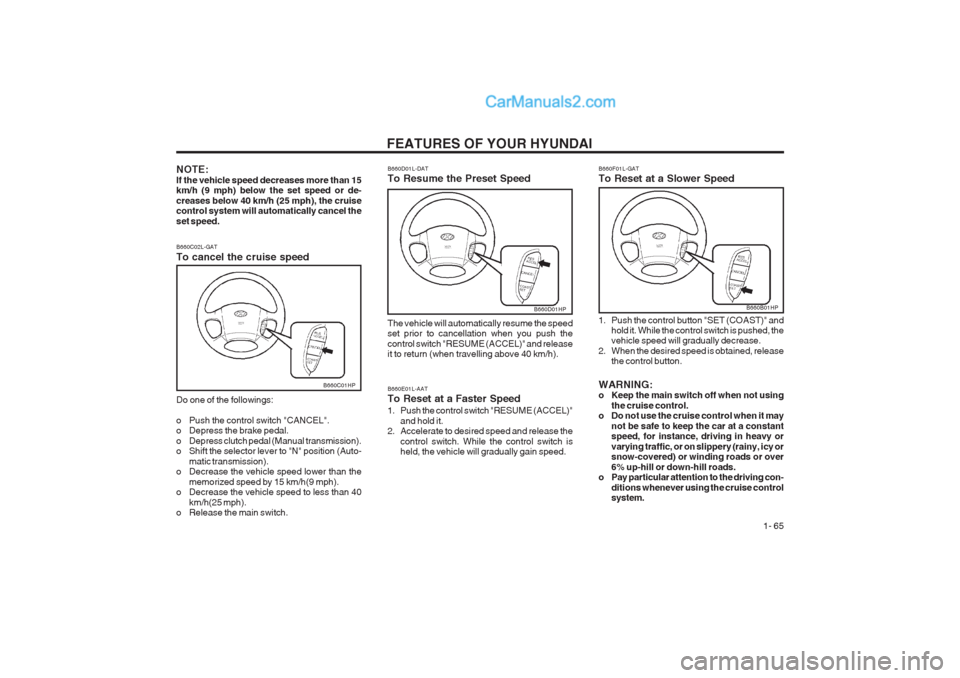
B660D01HP
B660E01L-AAT To Reset at a Faster Speed
1. Push the control switch "RESUME (ACCEL)" and hold it.
2. Accelerate to desired speed and release the
control switch. While the control switch is held, the vehicle will gradually gain speed.
B660C02L-GAT To cancel the cruise speed Do one of the followings:
o Push the control switch "CANCEL".
o Depress the brake pedal.
o Depress clutch pedal (Manual transmission).
o Shift the selector lever to "N" position (Auto-
matic transmission).
o Decrease the vehicle speed lower than the
memorized speed by 15 km/h(9 mph).
o Decrease the vehicle speed to less than 40
km/h(25 mph).
o Release the main switch.
B660C01HP
B660F01L-GAT To Reset at a Slower Speed
1. Push the control button "SET (COAST)" and
hold it. While the control switch is pushed, the vehicle speed will gradually decrease.
2. When the desired speed is obtained, release the control button.
WARNING:
o Keep the main switch off when not using the cruise control.
o Do not use the cruise control when it may
not be safe to keep the car at a constantspeed, for instance, driving in heavy or varying traffic, or on slippery (rainy, icy or snow-covered) or winding roads or over 6% up-hill or down-hill roads.
o Pay particular attention to the driving con-
ditions whenever using the cruise control system.
B660B01HP
NOTE: If the vehicle speed decreases more than 15 km/h (9 mph) below the set speed or de- creases below 40 km/h (25 mph), the cruise control system will automatically cancel the set speed. B660D01L-DAT To Resume the Preset Speed The vehicle will automatically resume the speed set prior to cancellation when you push the control switch "RESUME (ACCEL)" and release it to return (when travelling above 40 km/h).
Page 108 of 349
DRIVING YOUR HYUNDAI
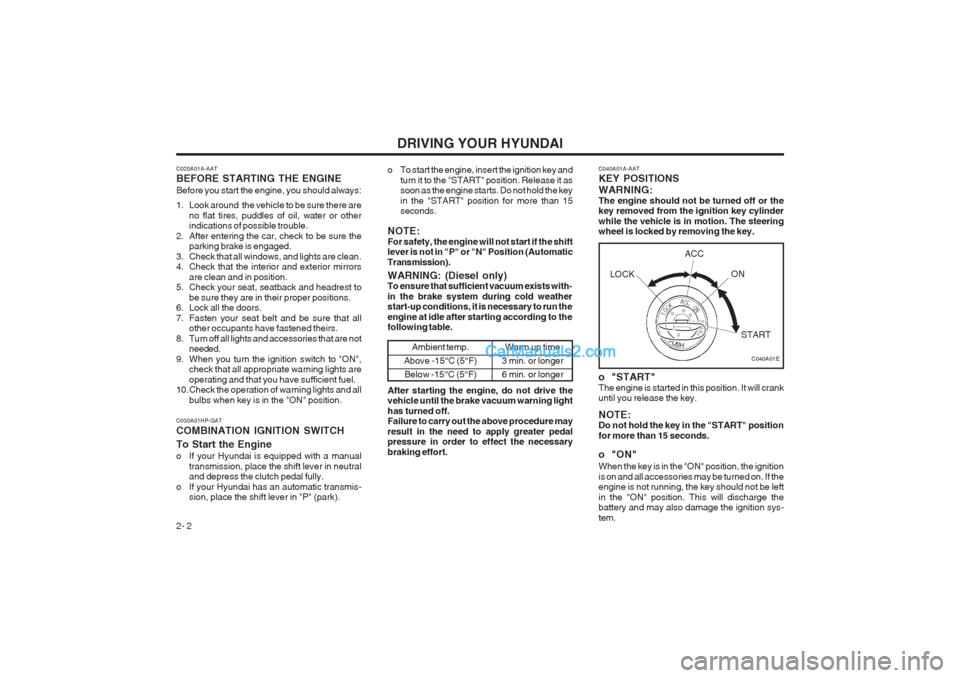
2- 2 C040A01A-AAT KEY POSITIONS WARNING: The engine should not be turned off or the key removed from the ignition key cylinder while the vehicle is in motion. The steering wheel is locked by removing the key.
o "START" The engine is started in this position. It will crank until you release the key. NOTE: Do not hold the key in the "START" position for more than 15 seconds.
o "ON" When the key is in the "ON" position, the ignition is on and all accessories may be turned on. If the engine is not running, the key should not be left in the "ON" position. This will discharge the battery and may also damage the ignition sys- tem.
C020A01A-AAT BEFORE STARTING THE ENGINE Before you start the engine, you should always:
1. Look around the vehicle to be sure there are
no flat tires, puddles of oil, water or other indications of possible trouble.
2. After entering the car, check to be sure the parking brake is engaged.
3. Check that all windows, and lights are clean.
4. Check that the interior and exterior mirrors are clean and in position.
5. Check your seat, seatback and headrest to
be sure they are in their proper positions.
6. Lock all the doors.
7. Fasten your seat belt and be sure that all other occupants have fastened theirs.
8. Turn off all lights and accessories that are not needed.
9. When you turn the ignition switch to "ON", check that all appropriate warning lights areoperating and that you have sufficient fuel.
10. Check the operation of warning lights and all
bulbs when key is in the "ON" position. o To start the engine, insert the ignition key and
turn it to the "START" position. Release it as soon as the engine starts. Do not hold the key in the "START" position for more than 15 seconds.
NOTE: For safety, the engine will not start if the shift lever is not in "P" or "N" Position (Automatic Transmission).
C030A01HP-GAT COMBINATION IGNITION SWITCH To Start the Engine
o If your Hyundai is equipped with a manual transmission, place the shift lever in neutral and depress the clutch pedal fully.
o If your Hyundai has an automatic transmis- sion, place the shift lever in "P" (park).
C040A01E
WARNING: (Diesel only) To ensure that sufficient vacuum exists with- in the brake system during cold weather start-up conditions, it is necessary to run the engine at idle after starting according to the following table.
Ambient temp.
Above -15°C (5°F) Below -15°C (5°F)Warm up time
3 min. or longer 6 min. or longer
After starting the engine, do not drive the vehicle until the brake vacuum warning light has turned off. Failure to carry out the above procedure may result in the need to apply greater pedal pressure in order to effect the necessary braking effort. LOCK
ACC
ON
START
Page 109 of 349
DRIVING YOUR HYUNDAI 2- 3
C070C01A-AAT
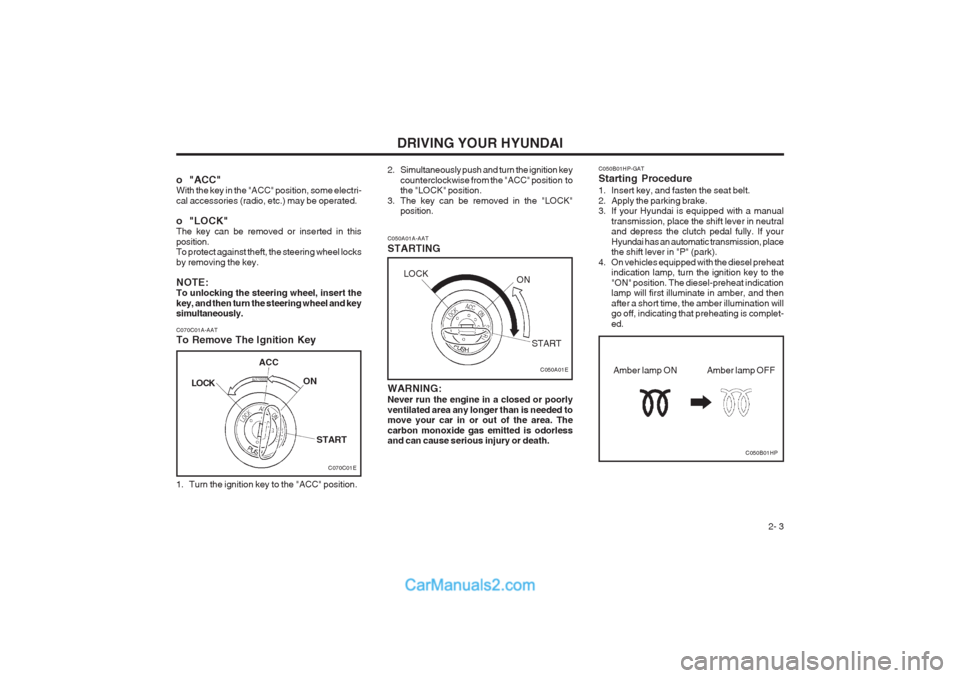
To Remove The Ignition Key
1. Turn the ignition key to the "ACC" position. C050A01A-AAT STARTING
C050A01E
WARNING: Never run the engine in a closed or poorly ventilated area any longer than is needed to move your car in or out of the area. The carbon monoxide gas emitted is odorless and can cause serious injury or death.
o "ACC"With the key in the "ACC" position, some electri- cal accessories (radio, etc.) may be operated.
o "LOCK" The key can be removed or inserted in this position. To protect against theft, the steering wheel locks by removing the key. NOTE: To unlocking the steering wheel, insert the key, and then turn the steering wheel and key simultaneously.
2. Simultaneously push and turn the ignition key
counterclockwise from the "ACC" position to the "LOCK" position.
3. The key can be removed in the "LOCK" position. C050B01HP-GAT Starting Procedure
1. Insert key, and fasten the seat belt.
2. Apply the parking brake.
3. If your Hyundai is equipped with a manual
transmission, place the shift lever in neutraland depress the clutch pedal fully. If your Hyundai has an automatic transmission, place the shift lever in "P" (park).
4. On vehicles equipped with the diesel preheat indication lamp, turn the ignition key to the "ON" position. The diesel-preheat indication lamp will first illuminate in amber, and then after a short time, the amber illumination will go off, indicating that preheating is complet- ed.
C050B01HP
Amber lamp OFF
Amber lamp ON
C070C01E
LOCK
ACC
ON
START
LOCK ON
START
Page 112 of 349
DRIVING YOUR HYUNDAI
2- 6 C090B01HP-GAT The function of each position is as follows:
o P (Park): Use to hold the vehicle in place when parked or while starting the engine. Whenever parking the car, apply the parking brake and shift the selector lever to the "P" (Park) position. CAUTION: Never place the selector lever in the "P" (Park) position unless the vehicle is fully stopped. Failure to observe this caution will cause severe damage to the transmission. C090C01A-AAT
o R (Reverse): Use for backing up the vehicle. Bring the car to a complete stop before shifting the selector lever to "R" position. C090D01HP-GAT
o N (Neutral): In the "N" position, the transmission is in neutral, which means that no gears are engaged. The engine can be started with the shift lever in "N" position, although this is not recommended ex- cept if the engine stalls while the car is moving. C090E01HP-GAT
o D (Drive): Use for normal driving. The transmission will automatically shift through a four-gear sequence, giving best economy and power. Never down- shift manually to "2" position or "L" position when vehicle speed is more than 96 km/h (60 mph). C090F01A-AAT
o 2 (Second gear): Use for driving on slippery road, hill climbing or engine braking downhill. "2" automatically shifts between 1st and 2nd gears. This means that no shift-up to 3rd gear is per- formed. However, the shift-up to 3rd gear is done when the car speed exceeds a certain value to prevent the engine from over-running. Manually move the selector to "D" returning to normal driving condition. C090G01HP-GAT
o L (Low gear):Use for driving up a very steep grade or for engine braking when descending steep hills. When downshifting to "L", the transmission will temporarily remain in second gear until the ve- hicle has slowed enough for low gear to engage. Do not exceed 50 km/h (30 mph) in low gear. "L" engages 1st gear only. However, shift-up to 2nd is performed when the vehicle exceeds a certain speed, and as the speed increases, shift- up to 3rd gear occurs to prevent over-running the engine.
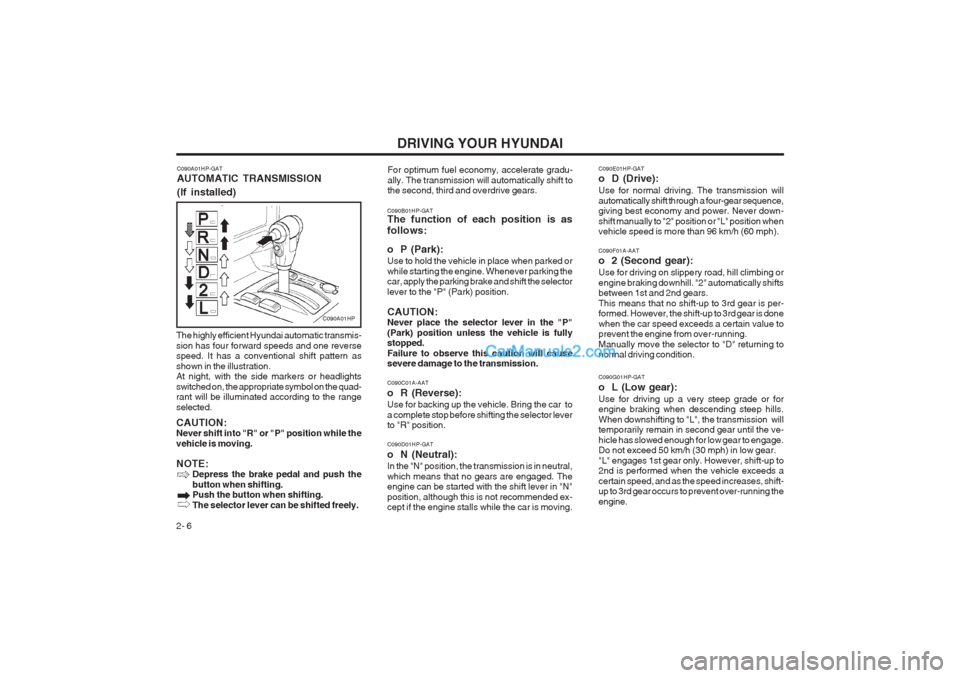
The highly efficient Hyundai automatic transmis-sion has four forward speeds and one reverse speed. It has a conventional shift pattern as shown in the illustration. At night, with the side markers or headlights switched on, the appropriate symbol on the quad- rant will be illuminated according to the range selected. CAUTION: Never shift into "R" or "P" position while the vehicle is moving. NOTE:
Depress the brake pedal and push the button when shifting. Push the button when shifting. The selector lever can be shifted freely.
C090A01HP-GAT AUTOMATIC TRANSMISSION (If installed)
C090A01HP
For optimum fuel economy, accelerate gradu- ally. The transmission will automatically shift to the second, third and overdrive gears.
Page 113 of 349
DRIVING YOUR HYUNDAI 2- 7
C090H01HP-DAT CAUTION:
o P (Park): Use this range to park the vehicle. This range is also used when engine is started and warmed up.
o N (Neutral): The engine can be started in this range, but the use of "P" range is recommended for safer start up. NOTE:
o For smooth operation, depress the brake
pedal when shifting from NEUTRAL orPARK to a forward or reverse gear.
o The ignition key must be in the "ON" position and the brake pedal fully de- pressed in order to move the shift lever from the "P" (Park)position to any of the other positions.
o It is always possible to shift from "R", "N",
"D", "2", "L" positions to "P" position. However, the vehicle must be fully stopped to avoid transmission damage.
C090I01HP-GAT CAUTION:
o Shift into "R" and "P" position only when the vehicle has completely stopped.
o Do not accelerate the engine in the re-
verse or any of the forward positions withthe brakes applied. o Always apply the footbrake when shifting
from "P" or "N" to "R", "D", "2" or "L"position.
o Do not use the P(Park) position in place of the parking brake. Always set the parking brake, shift the transmission into P(Park) and turn off the ignition when you leave the vehicle, even momentarily. Never leave the vehicle unattended while the engine is running.
o Check the automatic transmission fluid
level regularly, and add fluid as neces- sary.
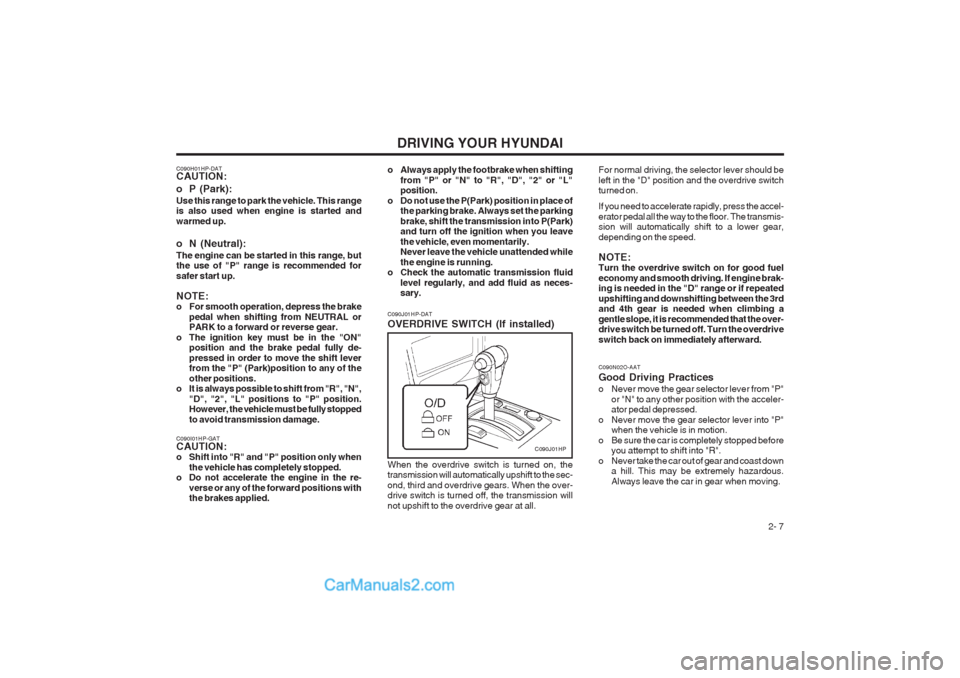
When the overdrive switch is turned on, thetransmission will automatically upshift to the sec- ond, third and overdrive gears. When the over- drive switch is turned off, the transmission will not upshift to the overdrive gear at all.
C090J01HP-DAT OVERDRIVE SWITCH (If installed)
C090J01HP
C090N02O-AAT Good Driving Practices
o Never move the gear selector lever from "P"
or "N" to any other position with the acceler- ator pedal depressed.
o Never move the gear selector lever into "P" when the vehicle is in motion.
o Be sure the car is completely stopped before you attempt to shift into "R".
o Never take the car out of gear and coast down a hill. This may be extremely hazardous. Always leave the car in gear when moving.
For normal driving, the selector lever should beleft in the "D" position and the overdrive switch turned on. If you need to accelerate rapidly, press the accel- erator pedal all the way to the floor. The transmis- sion will automatically shift to a lower gear, depending on the speed. NOTE: Turn the overdrive switch on for good fuel economy and smooth driving. If engine brak- ing is needed in the "D" range or if repeated upshifting and downshifting between the 3rd and 4th gear is needed when climbing a gentle slope, it is recommended that the over- drive switch be turned off. Turn the overdrive switch back on immediately afterward.
Page 115 of 349
DRIVING YOUR HYUNDAI 2- 9
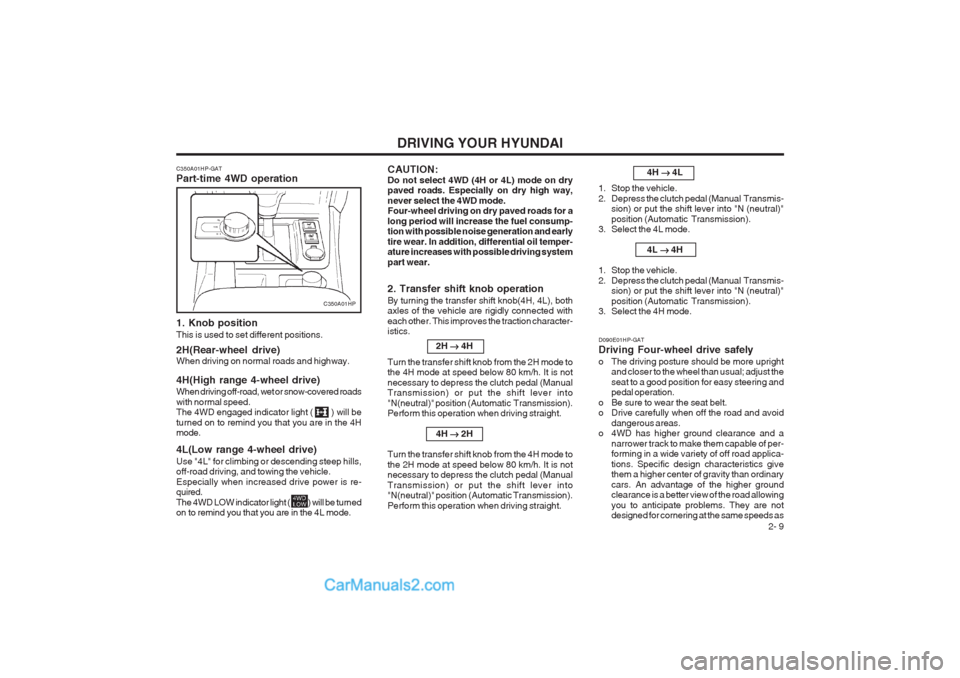
C350A01HP-GAT Part-time 4WD operation
1. Knob position This is used to set different positions. 2H(Rear-wheel drive) When driving on normal roads and highway. 4H(High range 4-wheel drive) When driving off-road, wet or snow-covered roads with normal speed. The 4WD engaged indicator light ( ) will be turned on to remind you that you are in the 4H mode. 4L(Low range 4-wheel drive) Use "4L" for climbing or descending steep hills, off-road driving, and towing the vehicle. Especially when increased drive power is re- quired. The 4WD LOW indicator light ( ) will be turned on to remind you that you are in the 4L mode.
2. Transfer shift knob operation By turning the transfer shift knob(4H, 4L), both axles of the vehicle are rigidly connected with each other. This improves the traction character- istics.2H
4H
Turn the transfer shift knob from the 2H mode tothe 4H mode at speed below 80 km/h. It is not necessary to depress the clutch pedal (Manual Transmission) or put the shift lever into "N(neutral)" position (Automatic Transmission). Perform this operation when driving straight.
4H
2H
Turn the transfer shift knob from the 4H mode to the 2H mode at speed below 80 km/h. It is not necessary to depress the clutch pedal (Manual Transmission) or put the shift lever into "N(neutral)" position (Automatic Transmission). Perform this operation when driving straight.
C350A01HP
D090E01HP-GAT Driving Four-wheel drive safely
o The driving posture should be more uprightand closer to the wheel than usual; adjust the seat to a good position for easy steering and pedal operation.
o Be sure to wear the seat belt.
o Drive carefully when off the road and avoid dangerous areas.
o 4WD has higher ground clearance and a
narrower track to make them capable of per-forming in a wide variety of off road applica- tions. Specific design characteristics give them a higher center of gravity than ordinary cars. An advantage of the higher ground clearance is a better view of the road allowing you to anticipate problems. They are not designed for cornering at the same speeds as 4H
4L
1. Stop the vehicle.
2. Depress the clutch pedal (Manual Transmis- sion) or put the shift lever into "N (neutral)"position (Automatic Transmission).
3. Select the 4L mode.
4L
4H
1. Stop the vehicle.
2. Depress the clutch pedal (Manual Transmis- sion) or put the shift lever into "N (neutral)"position (Automatic Transmission).
3. Select the 4H mode.
CAUTION: Do not select 4WD (4H or 4L) mode on dry paved roads. Especially on dry high way, never select the 4WD mode. Four-wheel driving on dry paved roads for a long period will increase the fuel consump- tion with possible noise generation and early tire wear. In addition, differential oil temper- ature increases with possible driving system part wear.
Page 116 of 349
DRIVING YOUR HYUNDAI
2- 10
conventional 2-wheel drive vehicles any more than low-slung sports cars are designed to perform satisfactorily under off-road condi- tions. If at all possible, avoid sharp turns or abrupt maneuvers. As with other vehicles of this type, failure to operate this vehicle cor- rectly may result in loss of control or vehicle rollover.
o Do not grip the inside or spokes of the steer-
ing wheel when driving off-road. The steering wheel could jerk and injure your hands. Al- ways firmly hold the outer steering wheel when you are driving off-road.
o Drive at lower speeds in strong crosswinds. Because of your vehicle’s high center of gravity, its stability will be affected in cross- winds. Slower speeds ensure better vehicle control.
o Check your brake condition once you are out
of mud or water. Press the brake several times as you move slowly until your feel normal braking forces return.
o Four-wheel driving on flat and normal roads
can result in a severe binding condition when turning the steering wheel.
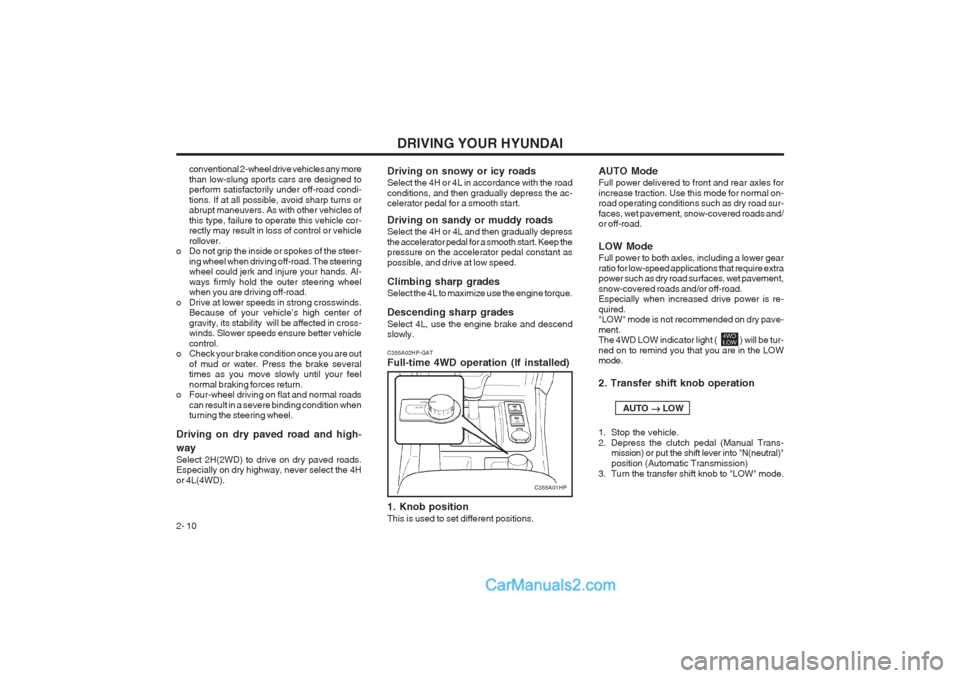
Driving on dry paved road and high- way Select 2H(2WD) to drive on dry paved roads. Especially on dry highway, never select the 4H or 4L(4WD). C355A02HP-GAT Full-time 4WD operation (If installed) 1. Knob position This is used to set different positions.Driving on snowy or icy roads Select the 4H or 4L in accordance with the road conditions, and then gradually depress the ac- celerator pedal for a smooth start. Driving on sandy or muddy roads Select the 4H or 4L and then gradually depress the accelerator pedal for a smooth start. Keep the pressure on the accelerator pedal constant as possible, and drive at low speed. Climbing sharp grades Select the 4L to maximize use the engine torque. Descending sharp grades Select 4L, use the engine brake and descend slowly. AUTO Mode Full power delivered to front and rear axles for increase traction. Use this mode for normal on- road operating conditions such as dry road sur- faces, wet pavement, snow-covered roads and/ or off-road. LOW Mode Full power to both axles, including a lower gear ratio for low-speed applications that require extra power such as dry road surfaces, wet pavement, snow-covered roads and/or off-road. Especially when increased drive power is re- quired. "LOW" mode is not recommended on dry pave- ment. The 4WD LOW indicator light ( ) will be tur- ned on to remind you that you are in the LOW mode. 2. Transfer shift knob operation AUTO
LOW
1. Stop the vehicle.
2. Depress the clutch pedal (Manual Trans- mission) or put the shift lever into "N(neutral)"position (Automatic Transmission)
3. Turn the transfer shift knob to "LOW" mode.
C355A01HP