automatic Hyundai Terracan 2005 Owner's Guide
[x] Cancel search | Manufacturer: HYUNDAI, Model Year: 2005, Model line: Terracan, Model: Hyundai Terracan 2005Pages: 539, PDF Size: 18.03 MB
Page 121 of 539
1
FEATURES OF YOUR HYUNDAI
107
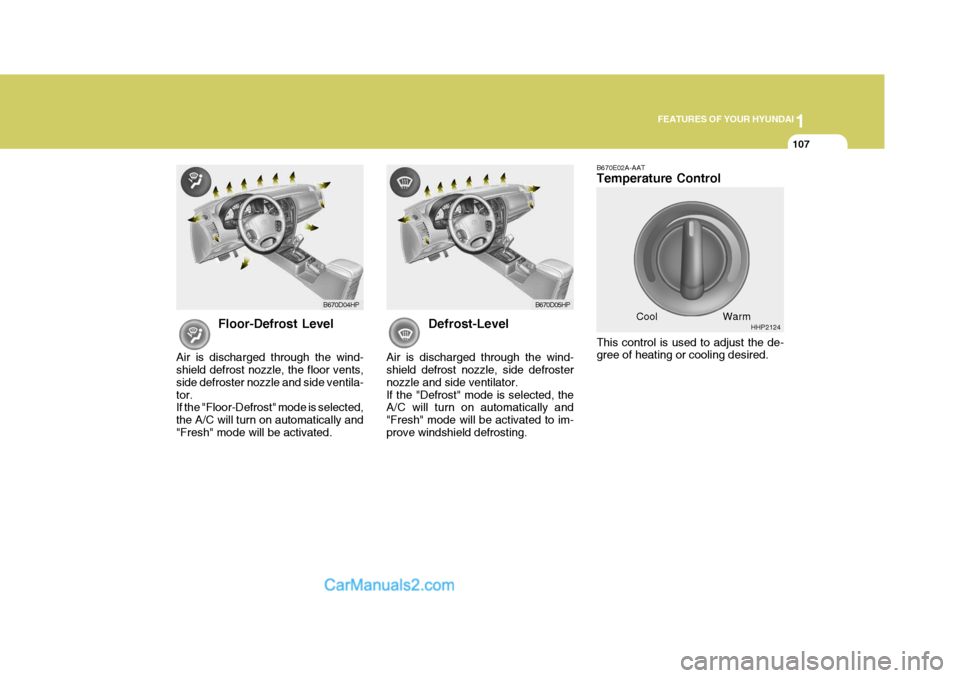
Floor-Defrost Level
Air is discharged through the wind- shield defrost nozzle, the floor vents, side defroster nozzle and side ventila-tor. If the "Floor-Defrost" mode is selected, the A/C will turn on automatically and"Fresh" mode will be activated. Defrost-Level
Air is discharged through the wind- shield defrost nozzle, side defroster nozzle and side ventilator.If the "Defrost" mode is selected, the A/C will turn on automatically and "Fresh" mode will be activated to im-prove windshield defrosting. B670E02A-AAT Temperature Control This control is used to adjust the de- gree of heating or cooling desired.
Cool
B670D04HP
B670D05HP
HHP2124
Warm
Page 122 of 539
1FEATURES OF YOUR HYUNDAI
108VENTILATIONHEATING CONTROLS
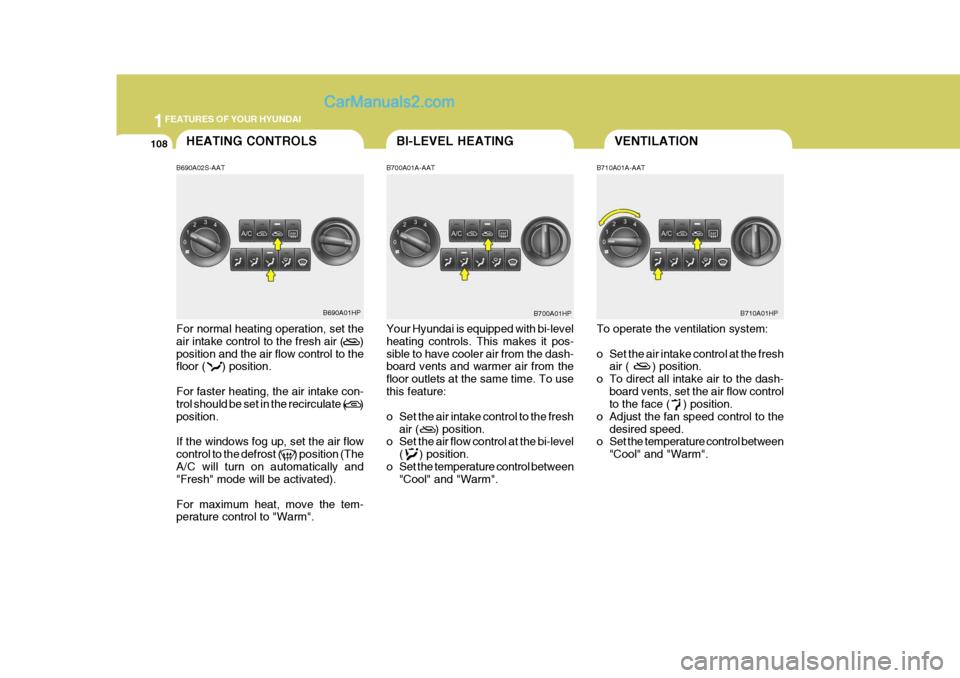
B690A02S-AAT For normal heating operation, set the air intake control to the fresh air ( ) position and the air flow control to the floor ( ) position. For faster heating, the air intake con- trol should be set in the recirculate ( ) position. If the windows fog up, set the air flow control to the defrost ( ) position (TheA/C will turn on automatically and "Fresh" mode will be activated). For maximum heat, move the tem- perature control to "Warm". B700A01A-AAT Your Hyundai is equipped with bi-level heating controls. This makes it pos- sible to have cooler air from the dash- board vents and warmer air from the floor outlets at the same time. To usethis feature:
o Set the air intake control to the fresh
air ( ) position.
o Set the air flow control at the bi-level
( ) position.
o Set the temperature control between "Cool" and "Warm". B710A01A-AAT To operate the ventilation system:
o Set the air intake control at the fresh
air ( ) position.
o To direct all intake air to the dash- board vents, set the air flow control to the face ( ) position.
o Adjust the fan speed control to the desired speed.
o Set the temperature control between
"Cool" and "Warm".
B690A01HP B700A01HP
BI-LEVEL HEATING
B710A01HP
Page 123 of 539
1
FEATURES OF YOUR HYUNDAI
109DEFROSTING/DEFOGGING
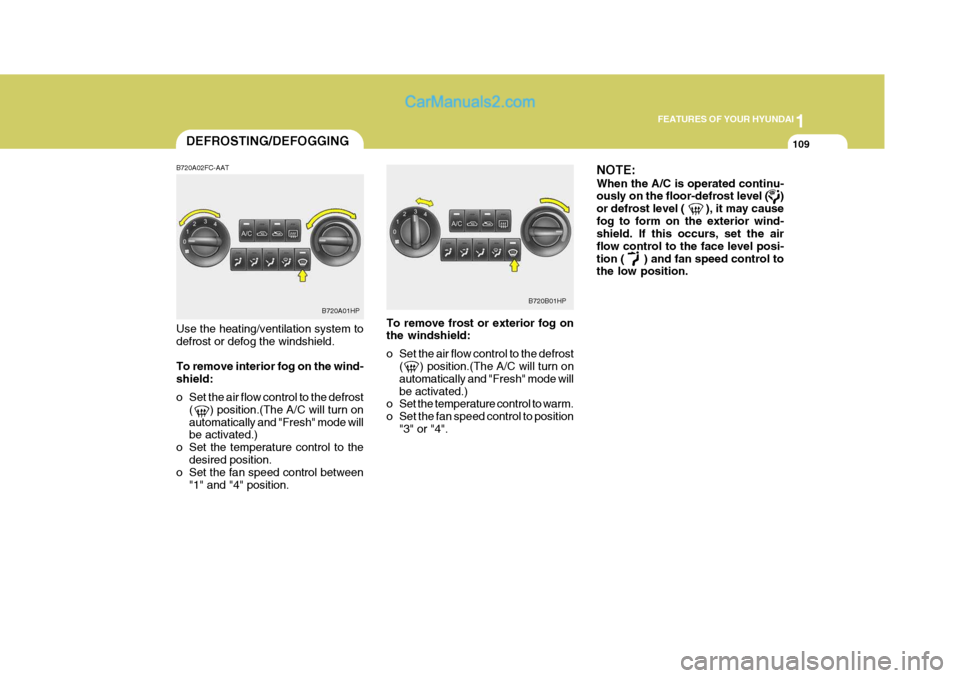
B720A02FC-AAT Use the heating/ventilation system to defrost or defog the windshield. To remove interior fog on the wind- shield:
o Set the air flow control to the defrost ( ) position.(The A/C will turn on automatically and "Fresh" mode will be activated.)
o Set the temperature control to the desired position.
o Set the fan speed control between
"1" and "4" position. To remove frost or exterior fog onthe windshield:
o Set the air flow control to the defrost
( ) position.(The A/C will turn on automatically and "Fresh" mode willbe activated.)
o Set the temperature control to warm.
o Set the fan speed control to position
"3" or "4". NOTE: When the A/C is operated continu- ously on the floor-defrost level ( ) or defrost level ( ), it may causefog to form on the exterior wind- shield. If this occurs, set the air flow control to the face level posi-tion ( ) and fan speed control to the low position.
B720A01HP
B720B01HP
Page 126 of 539
1FEATURES OF YOUR HYUNDAI
112AUTOMATIC HEATING AND COOLING CONTROL SYSTEM
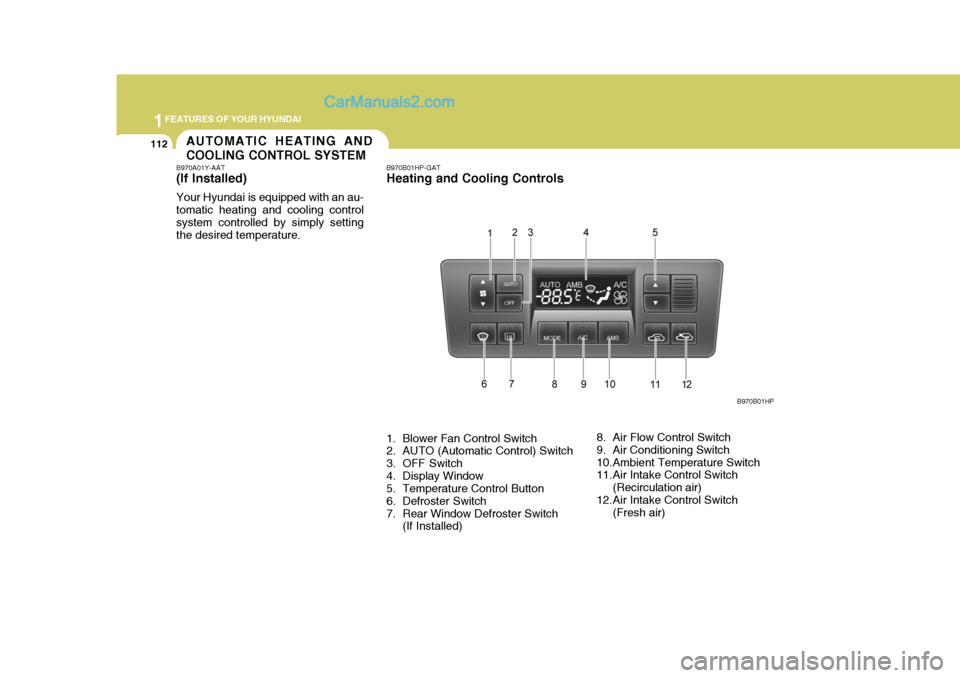
B970A01Y-AAT (If lnstalled) Your Hyundai is equipped with an au- tomatic heating and cooling controlsystem controlled by simply setting the desired temperature. B970B01HP-GAT Heating and Cooling Controls
1. Blower Fan Control Switch
2. AUTO (Automatic Control) Switch
3. OFF Switch
4. Display Window
5. Temperature Control Button
6. Defroster Switch
7. Rear Window Defroster Switch
(If Installed) 8. Air Flow Control Switch
9. Air Conditioning Switch
10.Ambient Temperature Switch
11.Air Intake Control Switch
(Recirculation air)
12.Air Intake Control Switch (Fresh air) B970B01HP
Page 127 of 539
1
FEATURES OF YOUR HYUNDAI
113
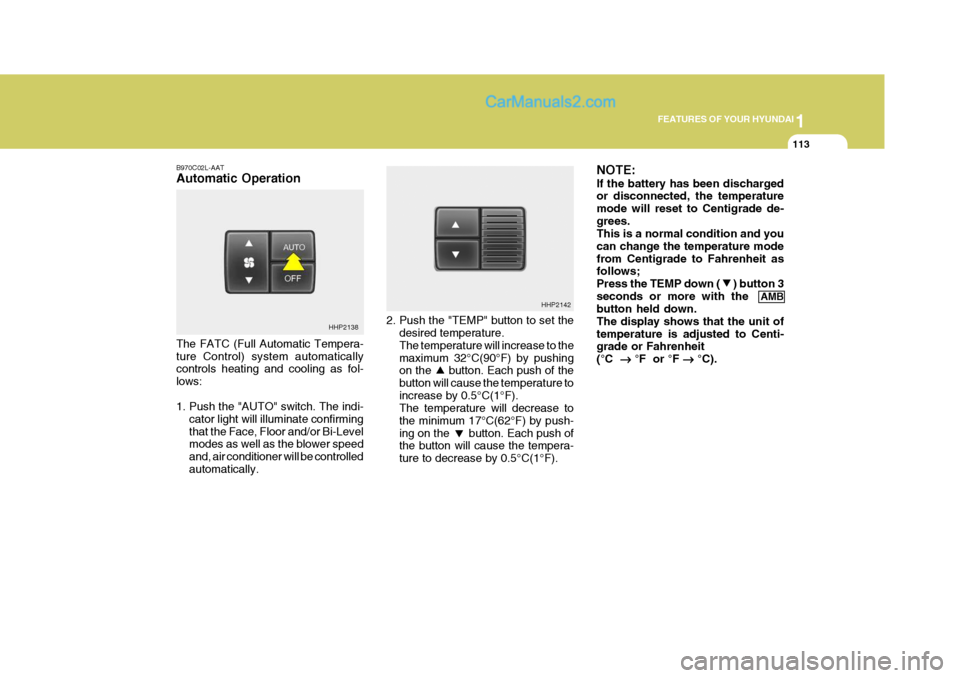
B970C02L-AAT Automatic Operation The FATC (Full Automatic Tempera- ture Control) system automatically controls heating and cooling as fol- lows:
1. Push the "AUTO" switch. The indi-
cator light will illuminate confirming that the Face, Floor and/or Bi-Level modes as well as the blower speed and, air conditioner will be controlledautomatically. 2. Push the "TEMP" button to set the
desired temperature. The temperature will increase to the maximum 32°C(90°F) by pushing on the button. Each push of the button will cause the temperature toincrease by 0.5°C(1°F). The temperature will decrease to the minimum 17°C(62°F) by push-ing on the button. Each push of the button will cause the tempera- ture to decrease by 0.5°C(1°F). NOTE: If the battery has been discharged or disconnected, the temperature mode will reset to Centigrade de-grees. This is a normal condition and you can change the temperature modefrom Centigrade to Fahrenheit as follows; Press the TEMP down ( ) button 3seconds or more with the
AMB
button held down.The display shows that the unit oftemperature is adjusted to Centi- grade or Fahrenheit (°C
°F or °F
°C).
HHP2138 HHP2142
Page 128 of 539
1FEATURES OF YOUR HYUNDAI
114
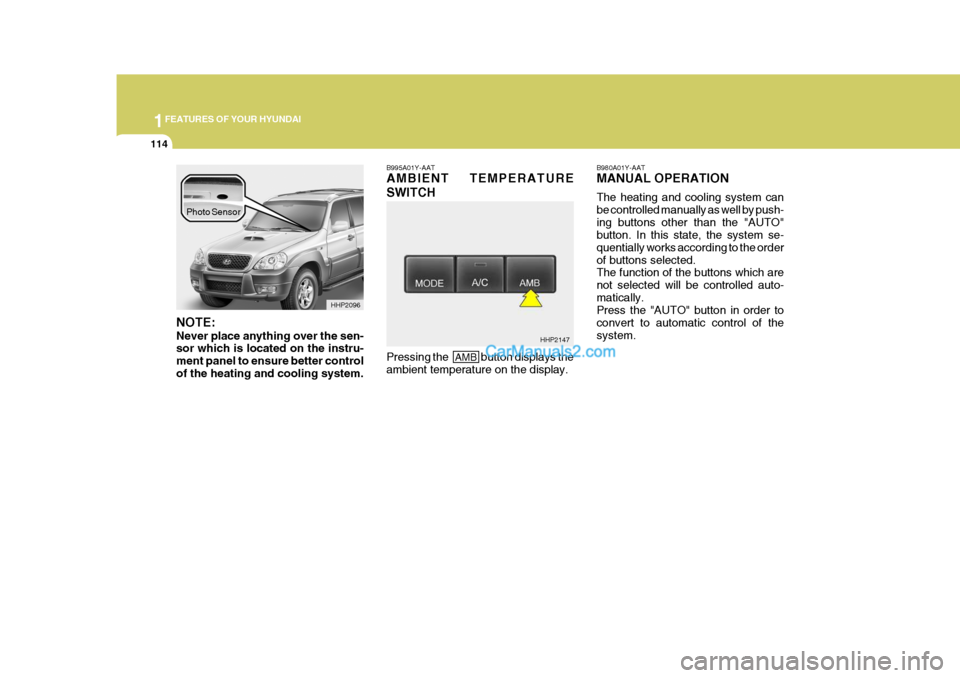
NOTE: Never place anything over the sen- sor which is located on the instru- ment panel to ensure better controlof the heating and cooling system. B995A01Y-AAT AMBIENT TEMPERATURE SWITCH
B980A01Y-AAT MANUAL OPERATION The heating and cooling system can be controlled manually as well by push-ing buttons other than the "AUTO" button. In this state, the system se- quentially works according to the orderof buttons selected. The function of the buttons which are not selected will be controlled auto-matically. Press the "AUTO" button in order to convert to automatic control of thesystem.
HHP2096
Pressing the
AMB button displays the
ambient temperature on the display. HHP2147
Photo Sensor
Page 132 of 539
1FEATURES OF YOUR HYUNDAI
118AIR CONDITIONER FILTER
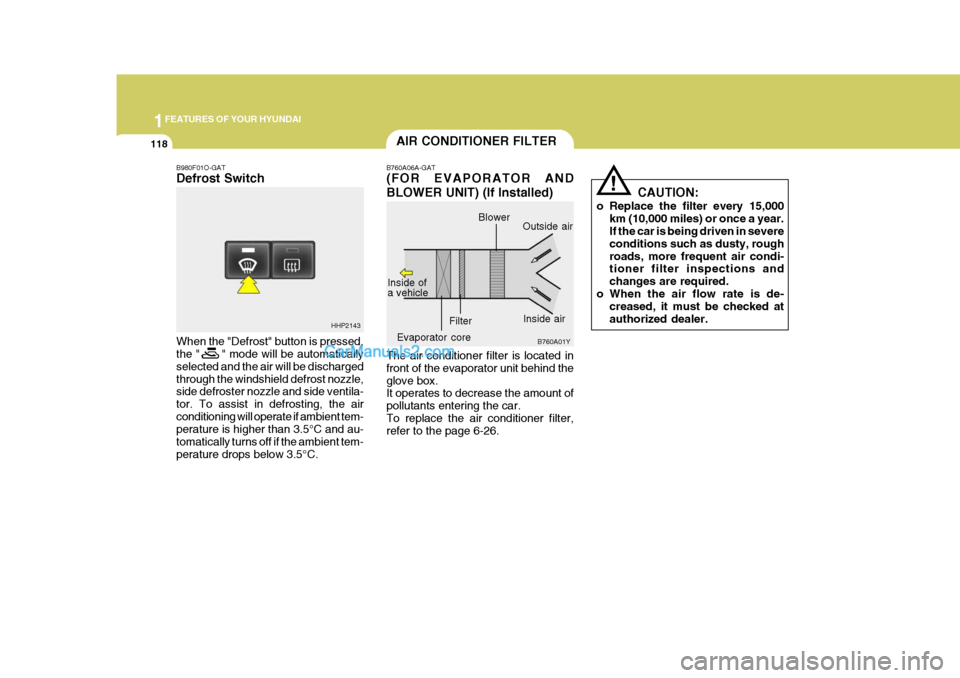
B760A06A-GAT (FOR EVAPORATOR AND BLOWER UNIT) (If Installed) The air conditioner filter is located in front of the evaporator unit behind theglove box. It operates to decrease the amount of pollutants entering the car.To replace the air conditioner filter, refer to the page 6-26.
B980F01O-GAT Defrost Switch When the "Defrost" button is pressed, the " " mode will be automatically selected and the air will be dischargedthrough the windshield defrost nozzle, side defroster nozzle and side ventila- tor. To assist in defrosting, the airconditioning will operate if ambient tem- perature is higher than 3.5°C and au- tomatically turns off if the ambient tem-perature drops below 3.5°C.
B760A01Y
!
CAUTION:
o Replace the filter every 15,000 km (10,000 miles) or once a year. If the car is being driven in severe conditions such as dusty, roughroads, more frequent air condi- tioner filter inspections and changes are required.
o When the air flow rate is de- creased, it must be checked atauthorized dealer.
HHP2143
Inside air
Blower
Evaporator core Filter Outside air
Inside of a vehicle
Page 136 of 539
1FEATURES OF YOUR HYUNDAI
122
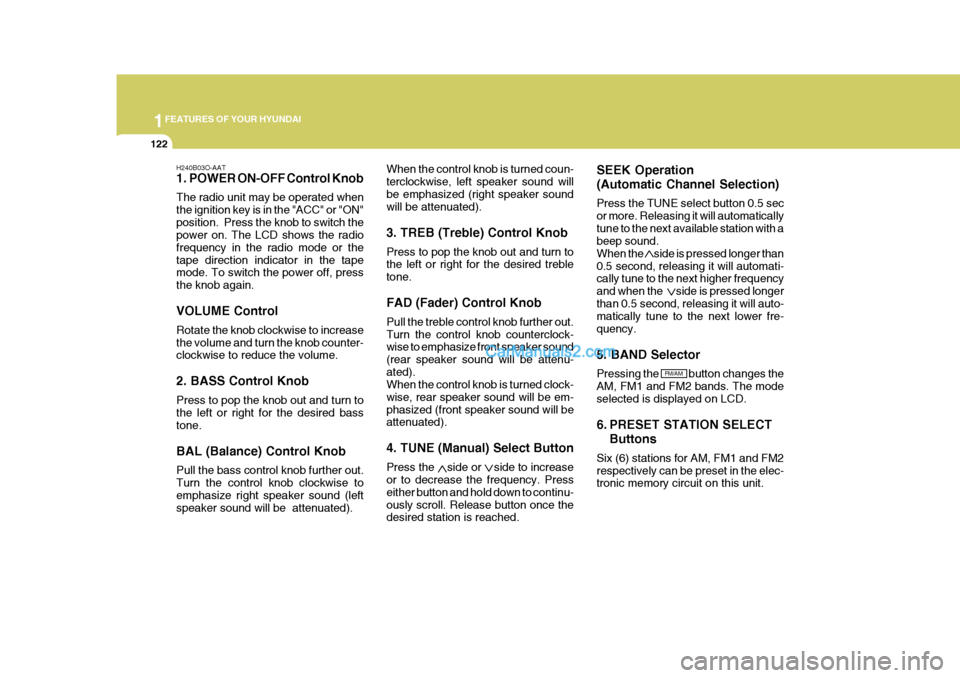
H240B03O-AAT
1. POWER ON-OFF Control Knob The radio unit may be operated when the ignition key is in the "ACC" or "ON"position. Press the knob to switch the power on. The LCD shows the radio frequency in the radio mode or thetape direction indicator in the tape mode. To switch the power off, press the knob again. VOLUME Control Rotate the knob clockwise to increase the volume and turn the knob counter- clockwise to reduce the volume. 2. BASS Control Knob Press to pop the knob out and turn to the left or right for the desired bass tone. BAL (Balance) Control Knob Pull the bass control knob further out. Turn the control knob clockwise to emphasize right speaker sound (left speaker sound will be attenuated). When the control knob is turned coun-terclockwise, left speaker sound willbe emphasized (right speaker sound will be attenuated). 3. TREB (Treble) Control Knob Press to pop the knob out and turn to the left or right for the desired treble tone. FAD (Fader) Control Knob Pull the treble control knob further out. Turn the control knob counterclock- wise to emphasize front speaker sound (rear speaker sound will be attenu-ated). When the control knob is turned clock- wise, rear speaker sound will be em-phasized (front speaker sound will be attenuated). 4. TUNE (Manual) Select Button Press the side or side to increase or to decrease the frequency. Press either button and hold down to continu-ously scroll. Release button once the desired station is reached. SEEK Operation (Automatic Channel Selection) Press the TUNE select button 0.5 sec or more. Releasing it will automaticallytune to the next available station with a beep sound. When the side is pressed longer than0.5 second, releasing it will automati- cally tune to the next higher frequency and when the side is pressed longerthan 0.5 second, releasing it will auto- matically tune to the next lower fre- quency. 5. BAND Selector Pressing the button changes the AM, FM1 and FM2 bands. The modeselected is displayed on LCD.
6. PRESET STATION SELECT
Buttons
Six (6) stations for AM, FM1 and FM2 respectively can be preset in the elec- tronic memory circuit on this unit.
FM/AM
Page 141 of 539
1
FEATURES OF YOUR HYUNDAI
127
H290B03E-AAT
1. POWER ON-OFF Control Knob The radio unit may be operated when the ignition key is in the "ACC" or "ON"position. Press the button to switch the power on. The display shows the radio frequency in the radio mode or thetape direction indicator in the tape mode, or CD track either the CD mode or CD AUTO CHANGER mode. Toswitch the power off, press the button again. VOLUME Control Rotate the knob clockwise to increase the volume and turn the knob counter-clockwise to reduce the volume.
2. BASS/BALANCE Control Knob
BASS Control Knob Press to pop the knob out. To increase the bass, rotate the knob clockwise, while to decrease the bass, rotate the knob counterclockwise. BALANCE Control knob Pull the Bass control knob out further. Rotate the knob clockwise to empha-size right speaker sound (left speaker sound will be attenuated). When the control knob is turned coun-terclockwise, left speaker sound will be emphasized (right speaker sound will be attenuated).
3. TREBLE/FAD Knob TREBLE Control Knob Press to pop the knob out and turn to the left or right for the desired treble tone. FAD (Fader) Control Knob Further pull the popped-up knob. Turn the control knob counterclockwise to emphasize front speaker sound (rearspeaker sound will be attenuated). When the control knob is turned clock- wise, rear speaker sound will be em-phasized (front speaker sound will be attenuated).
4. TUNE (Manual) Select Button Press the ( ) side or ( ) side to increase or to decrease the frequency.With the button held down for 0.5 sec. or more, the stop signal (broadcasting radio wave) is ignored and channelselection continues. SEEK Operation (Automatic Channel Selection) Press the TUNE select button for 0.5 sec or more. Releasing it will automati- cally tune to the next available station with a beep sound.When the ( ) side is pressed longer than 0.5 second, releasing it will auto- matically tune to the next higher fre-quency and when the ( ) side is pressed longer than 0.5 second, re- leasing it will automatically tune to thenext lower frequency.
5. PRESET STATION Select
Buttons
Six (6) stations for AM, FM1 and FM2 respectively can be preset in the elec- tronic memory circuit.
Page 151 of 539
1
FEATURES OF YOUR HYUNDAI
137
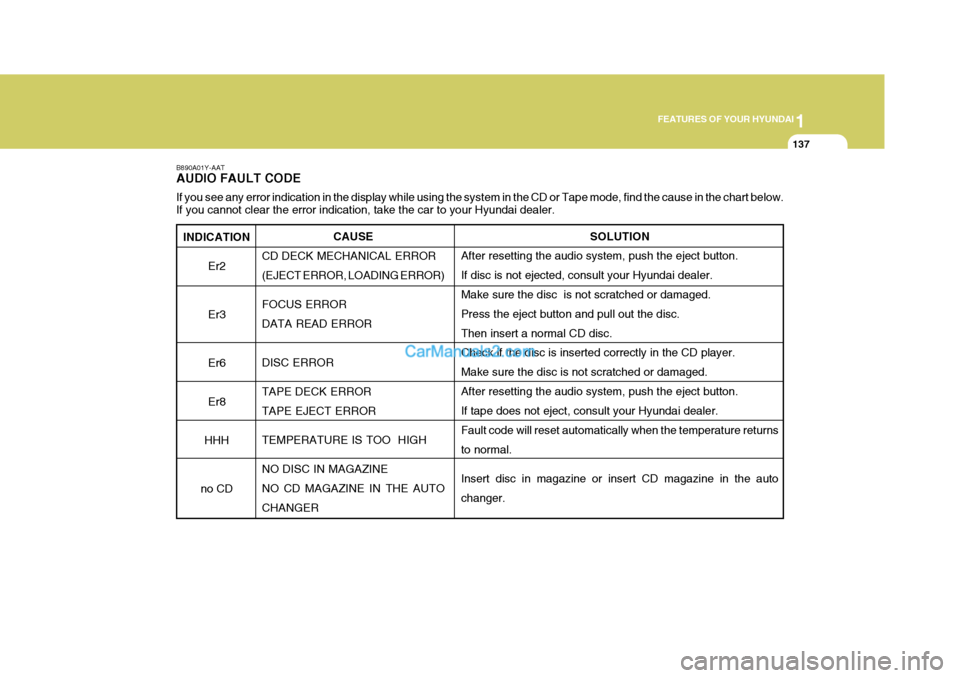
INDICATION Er2 Er3Er6 Er8
HHH
no CD
B890A01Y-AAT AUDIO FAULT CODE If you see any error indication in the display while using the system in the CD or Tape mode, find the cause in the chart below .
If you cannot clear the error indication, take the car to your Hyundai dealer.
SOLUTION
After resetting the audio system, push the eject button. If disc is not ejected, consult your Hyundai dealer.Make sure the disc is not scratched or damaged. Press the eject button and pull out the disc. Then insert a normal CD disc. Check if the disc is inserted correctly in the CD player. Make sure the disc is not scratched or damaged.After resetting the audio system, push the eject button. If tape does not eject, consult your Hyundai dealer. Fault code will reset automatically when the temperature returnsto normal. Insert disc in magazine or insert CD magazine in the auto changer.
CAUSE
CD DECK MECHANICAL ERROR(EJECT ERROR, LOADING ERROR) FOCUS ERROR DATA READ ERROR DISC ERROR TAPE DECK ERROR TAPE EJECT ERROR TEMPERATURE IS TOO HIGH NO DISC IN MAGAZINE NO CD MAGAZINE IN THE AUTO CHANGER