audio Hyundai Tiburon 2006 User Guide
[x] Cancel search | Manufacturer: HYUNDAI, Model Year: 2006, Model line: Tiburon, Model: Hyundai Tiburon 2006Pages: 266, PDF Size: 10.94 MB
Page 112 of 266
1FEATURES OF YOUR HYUNDAI
100
o This unit is made of precision parts. Do
not attempt to disassemble or adjust
any parts.
o When driving your vehicle, be sure to
keep the volume of the unit set low
enough to allow you to hear sounds
coming from the outside.
o Do not expose this equipment (includ-
ing the speakers) to water or excessive
moisture.
!
CAUTION:
o Do not insert warped or poor quality
discs into the CD player as damage to the
unit may occur.
o Do not insert anything like coins into the
player slot as damage to the unit may
occur.
o Do not place beverages close to the
audio system. The playback mechanism
may be damaged if you spill them.
o Do not impact on the audio system, or
the playback mechanism could be dam-
aged.
o Driving off-road or other vibrations may
skip your compact disc.
Do not use the audio system off-road as
the discs could be scratched and dam-
aged.o Do not grip or pull out the disc with your
hand while the disc is being pulled into
the unit by the self loading mechanism.
These can cause poor disc scratching to
occur or trouble in the compact disc
player.
o Avoid using CD-Recordable or CD-
Rewritable to ensure proper operation.
When using the compact disc player,
genuine CDs are recommended.
Page 115 of 266
1
FEATURES OF YOUR HYUNDAI
103
CAUTION:
o Do not insert warped or poor quality
discs into the CD changer as damage to
the unit may occur.
o Do not insert anything like coins into the
changer slot as damage to the unit may
occur.
o Do not place beverages close to the
audio system. The playback mechanism
may be damaged if you spill them.
o Do not impact on the audio system, or
the playback mechanism could be dam-
aged.
o Driving off-road or other vibrations may
skip your compact disc.
Do not use the audio system off-road as
the discs could be scratched and dam-
aged.
o Do not grip or pull out the disc with your
hand while the disc is being pulled into
the unit by the self loading mechanism.
These can cause disc scratching to oc-
cur or trouble in the compact disc
changer.
o Avoid using CD-Recordable or CD-
Rewritable to ensure proper operation.
When using the compact disc changer,
genuine CDs are recommended.
!
Page 118 of 266
1FEATURES OF YOUR HYUNDAI
106
o Press band selector to set the band for AM,
FM or FM2.
o Select the desired station to be stored by
seek or manual tuning.
o Determine the preset station select button
you wish to use to access that station.
o Press the station select button for more than
two seconds. A select button indicator will
show in the display indicating which select
button you have depressed. The frequency
display will flash after it has been stored into
the memory with beep sound. You should
then release the button, and proceed to
program the next desired station. A total of
18 stations can be programmed by selecting
one AM and two FM station per button.
o When completed, any preset station may be
recalled by selecting AM, FM or FM2 band
and the appropriate station button.
6. BAND SelectorPressing the button changes the AM,
FM1 and FM2 bands. The mode selected is
shown on the display.
7. EQUALIZER ButtonPress the EQ button to select the CLASSIC,
JAZZ, ROCK and DEFEAT MODE for the
desired tone quality. Each press of the button
changes the display as follows;
CLASSIC → JAZZ → ROCK → DEFEAT
FM/AM
8. SCAN Button (If installed)When the scan button is pressed, the frequency
will increase and the receivable stations will be
tuned in one after another, receiving each sta-
tion for 5 seconds. To stop scanning, press the
scan button again.
!
CAUTION:
o Do not place beverages close to the
audio system. The audio system mecha-
nism may be damaged if you spill them.
o Do not impact on the audio system, or
the audio system mechanism could be
damaged.
Page 120 of 266
1FEATURES OF YOUR HYUNDAI
108
H290D02O-GAT1. FF/REW Buttono Fast forward tape winding starts when the
FF ( ) button is pressed during the PLAY
or REW mode.
o Tape play starts when the FF ( ) button
is pressed again during the FF mode.
o Tape rewinding starts when the REW
( ) button is pressed during the PLAY or
FF mode.
o Tape play starts when the REW ( ) button
pressed again during the REW mode.2. AUTO MUSIC Select ButtonPress the button to find the starting point of each
song in a prerecorded music tape. The quiet
space between songs (must have at least a 4
sec. gap) can be identified by the AUTO MUSIC
Select button.
o Pressing the button will play the beginn-
ing of the next music segment.
o Pressing the button will start replay at
the beginning of the music just listened to.
3. TAPE PROGRAM ButtonThis allows you to play the reverse side of the
tape by merely depressing the program button.
An arrow will appear in the display to show tape
direction.4. TAPE EJECT buttono When the button is pressed with the
cassette loaded, the cassette is ejected.
o When the button is pressed during the
FF/REW mode, the cassette is ejected.5. EQ ButtonPress the EQ button to select the CLASSIC,
JAZZ, ROCK and DEFEAT MODE for the
desired tone quality. Each press of the button
changes the display as follows;
CLASSIC → JAZZ → ROCK → DEFEAT6. DOLBY ButtonIf you get background noise during tape PLAY,
you can reduce this considerably by merely
pressing the DOLBY button. If you want to
cancel the DOLBY feature, press the button
again.
!
CAUTION:
o Do not insert anything like coins into the
player slot as damage to the unit may
occur.
o Do not place beverages close to the
audio system. The playback mechanism
may be damaged if you spill them.
o Do not impact on the audio system, or
the playback mechanism could be dam-
aged.
Page 123 of 266
1
FEATURES OF YOUR HYUNDAI
111
o When driving your vehicle, be sure to
keep the volume of the unit set low
enough to allow you to hear sounds
coming from the outside.
o Do not expose this equipment (includ-
ing the speakers and tape) to water or
excessive moisture.
!
CAUTION:
o Do not insert warped or poor quality
discs into the CD player as damage to the
unit may occur.
o Do not insert anything like coins into the
player slot as damage to the unit may
occur.
o Do not place beverages close to the
audio system. The playback mechanism
may be damaged if you spill them.
o Do not impact on the audio system, or
the playback mechanism could be dam-
aged.
o Driving off-road or other vibrations may
skip your compact disc.
Do not use the audio system off-road as
the discs could be scratched and dam-
aged.o Do not grip or pull out the disc with your
hand while the disc is being pulled into
the unit by the self loading mechanism.
These can cause disc scratching to oc-
cur or trouble in the compact disc player.
o Avoid using CD-Recordable or CD-
Rewritable to ensure porper operation.
When using the compact disc player,
genuine CDs are recommended.
Page 126 of 266
1FEATURES OF YOUR HYUNDAI
114
CAUTION:
o Do not insert warped or poor quality
discs into the changer as damage to the
unit may occur.
o Do not insert anything like coins into the
changer slot as damage to the unit may
occur.
o Do not place beverages close to the
audio system. The playback mechanism
may be damaged if you spill them.
o Do not impact on the audio system, or
the playback mechanism could be dam-
aged.
o Driving off-road or other vibrations may
skip your compact disc.
Do not use the audio system off-road as
the discs could be scratched and dam-
aged.
o Do not grip or pull out the disc with your
hand while the disc is being pulled into
the unit by the self loading mechanism.
These can cause disc scratching to oc-
cur or trouble in the compact disc
changer.
o Avoid using CD-Recordable or CD-
Rewritable to ensure proper operation.
When using the compact disc changer,
genuine CDs are recommended.
!
Page 129 of 266
1
FEATURES OF YOUR HYUNDAI
117
Mode Select KnobPressing the MODE button changes the BASS,
MIDDLE, TREBLE, FADER and BALANCE
mode.
The mode selected is shown on the display.
After selecting the each mode, rotate the mode
select knob clockwise or counterclockwise.BASS ControlTo increase the BASS, rotate the knob clock-
wise, while to decrease the BASS, rotate the
knob counterclockwise.MID ControlTo increase the MID, rotate the knob clockwise,
while to decrease the MID, rotate the knob
counterclockwise.TREBLE ControlTo increase the TREBLE, rotate the knob clock-
wise, while to decrease the TREBLE, rotate the
knob counterclockwise.
FAD (Fader Control)Rotate the control knob clockwise to empha-
size rear speaker sound (front speaker sound
will be attenuated). When the control knob is
turned counterclockwise, front speaker sound
will be emphasized (rear speaker sound will be
attenuated).BALANCE ControlRotate the knob clockwise to emphasize right
speaker sound (left speaker sound will be
attenuated). When the control knob is turned
counterclockwise, left speaker sound will be
emphasized (right speaker sound will be at-
tenuated).
!
CAUTION:
o Do not place beverages close to the
audio system. The audio system mecha-
nism may be damaged if you spill them.
o Do not impact on the audio system, or
the audio system mechanism could be
damaged.
Page 131 of 266
1
FEATURES OF YOUR HYUNDAI
119
J290D01JM-GAT1. TAPE PROGRAM ButtonThis allows you to play the reverse side of the
tape by merely pressing the program button.
The PLAY and an arrow will appear in the display
to show tape direction.2. EJECT Buttono When the EJECT button is pressed with a
cassette loaded, the cassette will eject.
o When the EJECT button is pressed during
FF/REW mode, the cassette will eject.3. DOLBY ButtonIf you get background noise during tape PLAY,
you can reduce this considerably by merely
pressing the DOLBY button. If you want to
cancel the DOLBY feature, press the button
again.4. REPEAT Buttono To repeat the track you are currently listen-
ing to, press the RPT button. To cancel,
press again.
o If you do not release RPT operation when the
track ends, it will automatically be replayed.
This process will be continued until you push
the button again.
5. AUTO MUSIC Select ButtonPress the button to find the starting point of each
song in a prerecorded music tape. The quiet
space between songs (must have at least a 4
sec. gap) can be identified by the AUTO MUSIC
Select button.
o Pressing the will play the beginning of
the next music segment.
o Pressing the will start replay at the
beginning of the music just listened to.
o To stop FF or REW action, press the button
again.6. FF/REW Buttono Fast forward tape winding starts when the
FF button is pressed during PLAY or REW
mode.
o PLAY starts when the FF ( ) button is
pressed again during FF mode.
o Tape rewinding starts when the REW ( )
button is pressed during PLAY or FF mode.
o PLAY starts when the REW button pressed
again during REW mode.
CAUTION:
o Do not insert anything like coins into the
player slot as damage to the unit may
occur.
o Do not place beverages close to the
audio system. The playback mechanism
may be damaged if you spill them.
o Do not impact on the audio system, or
the playback mechanism could be dam-
aged.
!
Page 135 of 266
1
FEATURES OF YOUR HYUNDAI
123
!
CAUTION:
o Do not insert warped or poor quality
discs into the CD player as damage to the
unit may occur.
o Do not insert anything like coins into the
player slot as damage to the unit may
occur.
o Do not place beverages close to the
audio system. The playback mechanism
may be damaged if you spill them.
o Do not impact on the audio system, or
the playback mechanism could be dam-
aged.
o Driving off-road or other vibrations may
skip your compact disc.
Do not use the audio system off-roads
as the discs could be scratched and
damaged.
o Do not grip or pull out the disc with your
hand while the disc is being pulled into
the unit by the self loading mechanism.
These can cause disc scratching to oc-
cur or trouble in the compact disc player.
o Avoid using CD-Recordable or CD-
Rewritable to ensure proper operation.
When using the compact disc player,
genuine CDs are recommended.
Page 136 of 266
1FEATURES OF YOUR HYUNDAI
124
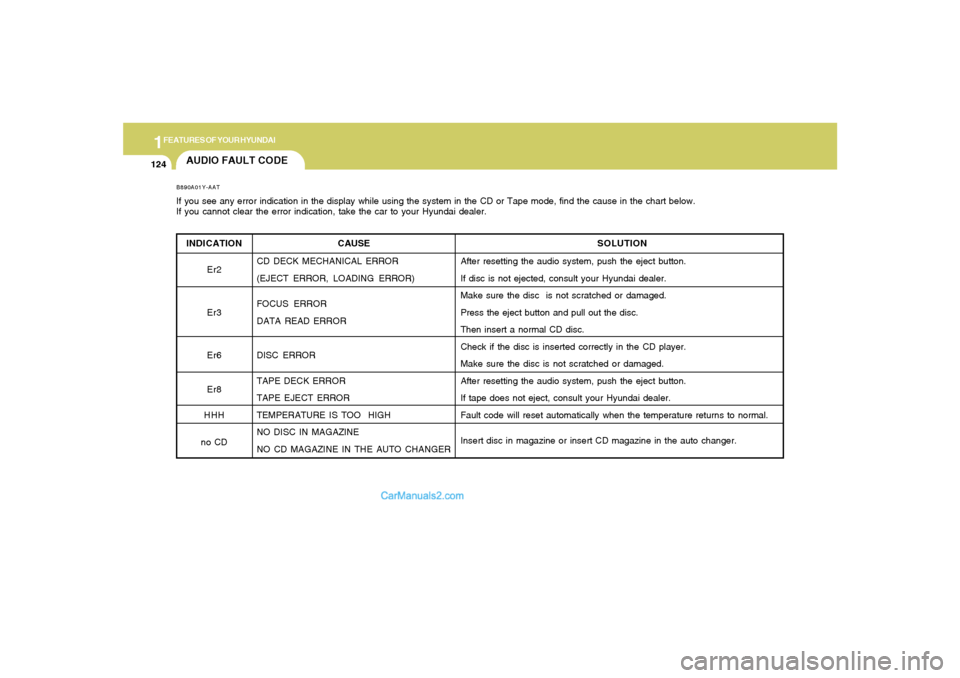
AUDIO FAULT CODEINDICATION
Er2
Er3
Er6
Er8
HHH
no CDB890A01Y-AATIf you see any error indication in the display while using the system in the CD or Tape mode, find the cause in the chart below.
If you cannot clear the error indication, take the car to your Hyundai dealer.
SOLUTION
After resetting the audio system, push the eject button.
If disc is not ejected, consult your Hyundai dealer.
Make sure the disc is not scratched or damaged.
Press the eject button and pull out the disc.
Then insert a normal CD disc.
Check if the disc is inserted correctly in the CD player.
Make sure the disc is not scratched or damaged.
After resetting the audio system, push the eject button.
If tape does not eject, consult your Hyundai dealer.
Fault code will reset automatically when the temperature returns to normal.
Insert disc in magazine or insert CD magazine in the auto changer. CAUSE
CD DECK MECHANICAL ERROR
(EJECT ERROR, LOADING ERROR)
FOCUS ERROR
DATA READ ERROR
DISC ERROR
TAPE DECK ERROR
TAPE EJECT ERROR
TEMPERATURE IS TOO HIGH
NO DISC IN MAGAZINE
NO CD MAGAZINE IN THE AUTO CHANGER