radio Hyundai Tiburon 2006 Owner's Manual
[x] Cancel search | Manufacturer: HYUNDAI, Model Year: 2006, Model line: Tiburon, Model: Hyundai Tiburon 2006Pages: 266, PDF Size: 10.94 MB
Page 4 of 266
A070A01A-AAT
CAUTION: MODIFICATIONS TO YOUR HYUNDAI
Your Hyundai should not be modified in any way. Such modifications may adversely affect the performance, safety
or durability of your Hyundai and may, in addition, violate conditions of the limited warranties covering the vehicle.
Certain modifications may also be in violation of regulations established by the U.S. Department of Transportation
and other federal or state agencies.A080A01S-AAT
TWO-WAY RADIO OR CELLULAR TELEPHONE INSTALLATION
Your vehicle is equipped with electronic fuel injection and other electronic components. It is possible for an
improperly installed/adjusted two-way radio or cellular telephone to adversely affect electronic systems. For this
reason, we recommend that you carefully follow the radio manufacturer's instructions or consult your Hyundai
dealer for precautionary measures or special instructions if you choose to install one of these devices.
!
Page 20 of 266
1FEATURES OF YOUR HYUNDAI8
!
B070F02A-AATKEYLESS ENTRY SYSTEM (If installed)
NOTE:This device complies with Part 15 of the
FCC rules. Operation is subject to the fol-
lowing two conditions:
(1) This device may not cause harmful in-
terference, and (2) this device must accept
any interference received, including inter-
ference that may cause undesired opera-
tion.
WARNING:
Changes or modifications not expressly
approved by the party responsible for com-
pliance could void the user's authority to
operate the equipment.Locking doors1. Close all doors.
2. Push the "LOCK" button on the transmitter.
3. At the same time all doors lock, the turn signal
lights will blink once to indicate that the
system is armed.Unlocking doors1. Push the "UNLOCK" button on the transmitter.
2. At the same time all doors unlock, the turn
signal lights will blink twice to indicate that the
system is disarmed.
NOTE:The transmitter will not work if any of fol-
lowing occur:
- The ignition key is in ignition switch.
- You exceed the operating distance limit
(10 m).
- The battery in the transmitter is weak.
- Other vehicles or objects may be block-
ing the signal.
- The weather is extremely cold.
- The transmitter is close to a radio trans-
mitter such as a radio station or an
airport which can interfere with normal
operation of the transmitter.
When the transmitter does not work cor-
rectly, open and close the door with the
ignition key. If you have a problem with the
transmitter, contact an authorized Hyundai
Dealer.NOTE:Keep the transmitter away from water or
any liquid. If the keyless entry system is
inoperative due to exposure to water or
liquids, it will not be covered by your manu-
facturer vehicle warranty.
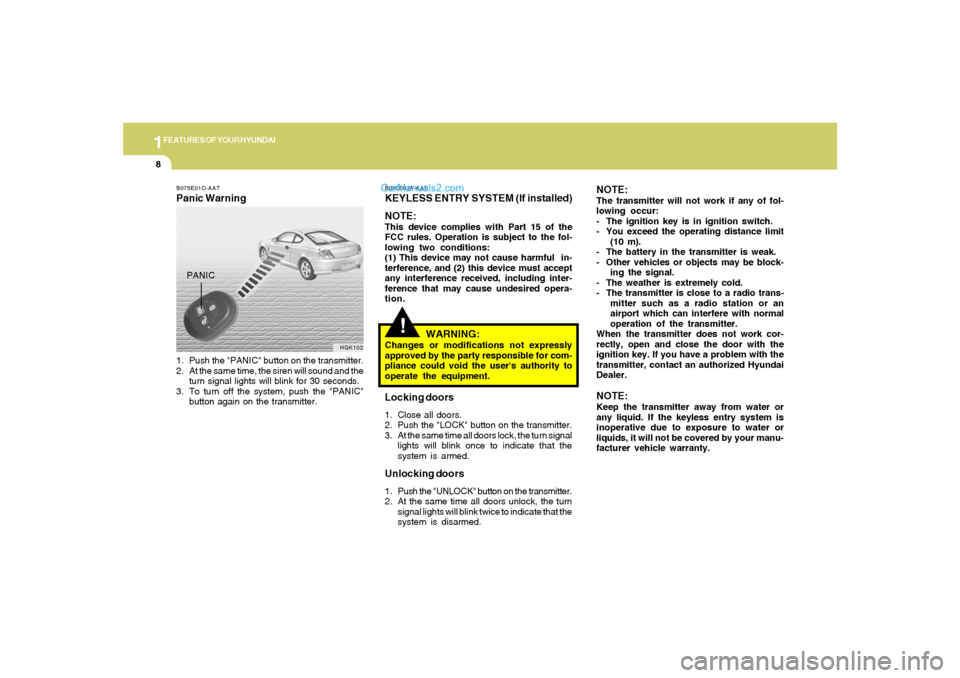
B075E01O-AATPanic Warning1. Push the "PANIC" button on the transmitter.
2. At the same time, the siren will sound and the
turn signal lights will blink for 30 seconds.
3. To turn off the system, push the "PANIC"
button again on the transmitter.
HGK102
PANIC
Page 82 of 266
1FEATURES OF YOUR HYUNDAI70
SEEK (UP / ) SwitchPress the SEEK UP ( ) switch 1 sec. or more.1. RADIO modeWhen the SEEK UP ( ) switch is pressed, the
unit will automatically tune to the next higher
frequency.2. TAPE modePressing the SEEK UP ( ) switch will play the
beginning of the next music segment.3. CD (compact disc)/CDC
(compact disc changer) modePress the SEEK UP ( ) switch once to skip
forward to the beginning of the next track.VOL ( / ) Switcho Press the VOL ( ) button to increase
volume.
o Press the VOL ( ) button to decease
volume.
AUDIO REMOTE CONTROL
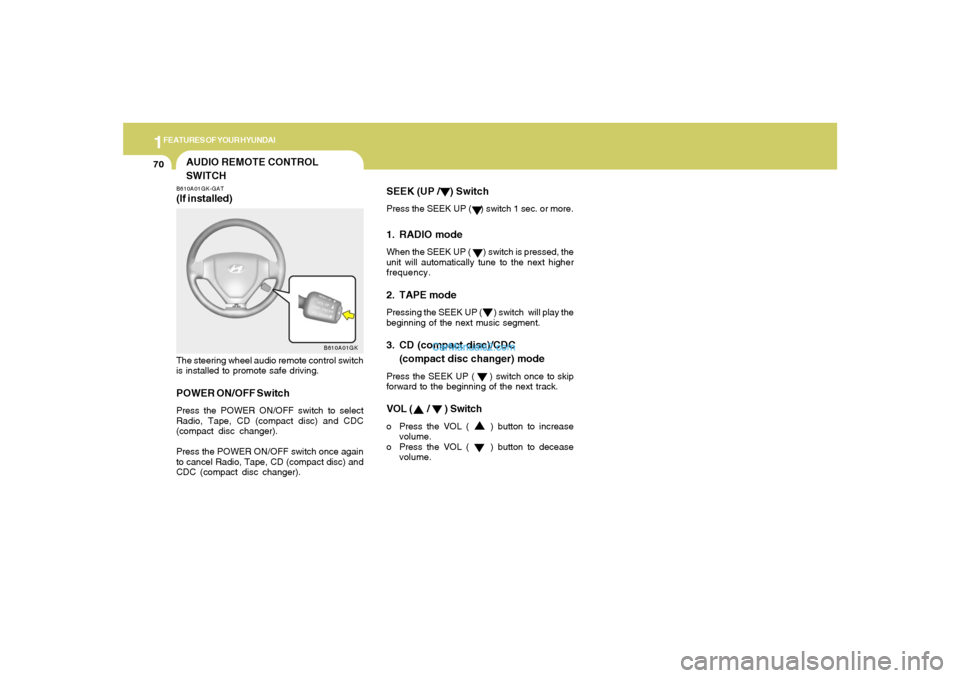
SWITCHB610A01GK-GAT(If installed)The steering wheel audio remote control switch
is installed to promote safe driving.POWER ON/OFF SwitchPress the POWER ON/OFF switch to select
Radio, Tape, CD (compact disc) and CDC
(compact disc changer).
Press the POWER ON/OFF switch once again
to cancel Radio, Tape, CD (compact disc) and
CDC (compact disc changer).
B610A01GK
Page 100 of 266
1FEATURES OF YOUR HYUNDAI88
STEREO SOUND SYSTEM
Ionosphere
B750A02L
AM reception
Mountains
BuildingsUnobstructed
area FM radio station
B750A03L
FM reception
B750A01L
Obstructed areaIron bridges
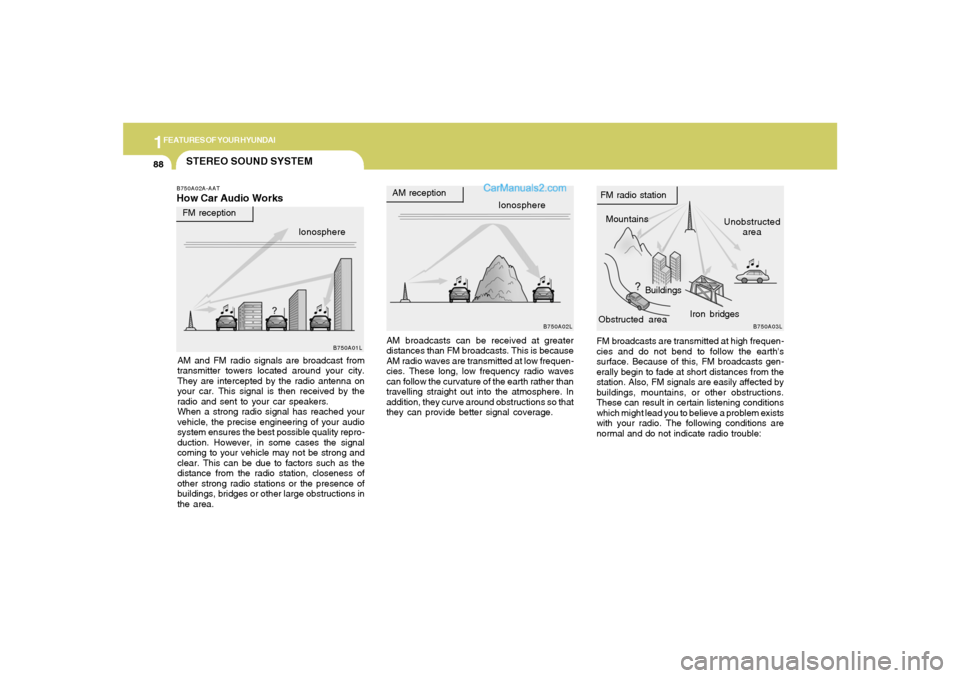
FM broadcasts are transmitted at high frequen-
cies and do not bend to follow the earth's
surface. Because of this, FM broadcasts gen-
erally begin to fade at short distances from the
station. Also, FM signals are easily affected by
buildings, mountains, or other obstructions.
These can result in certain listening conditions
which might lead you to believe a problem exists
with your radio. The following conditions are
normal and do not indicate radio trouble: AM broadcasts can be received at greater
distances than FM broadcasts. This is because
AM radio waves are transmitted at low frequen-
cies. These long, low frequency radio waves
can follow the curvature of the earth rather than
travelling straight out into the atmosphere. In
addition, they curve around obstructions so that
they can provide better signal coverage.
B750A02A-AATHow Car Audio WorksAM and FM radio signals are broadcast from
transmitter towers located around your city.
They are intercepted by the radio antenna on
your car. This signal is then received by the
radio and sent to your car speakers.
When a strong radio signal has reached your
vehicle, the precise engineering of your audio
system ensures the best possible quality repro-
duction. However, in some cases the signal
coming to your vehicle may not be strong and
clear. This can be due to factors such as the
distance from the radio station, closeness of
other strong radio stations or the presence of
buildings, bridges or other large obstructions in
the area.Ionosphere
Page 101 of 266
1
FEATURES OF YOUR HYUNDAI
89
B750A04L B750A05L
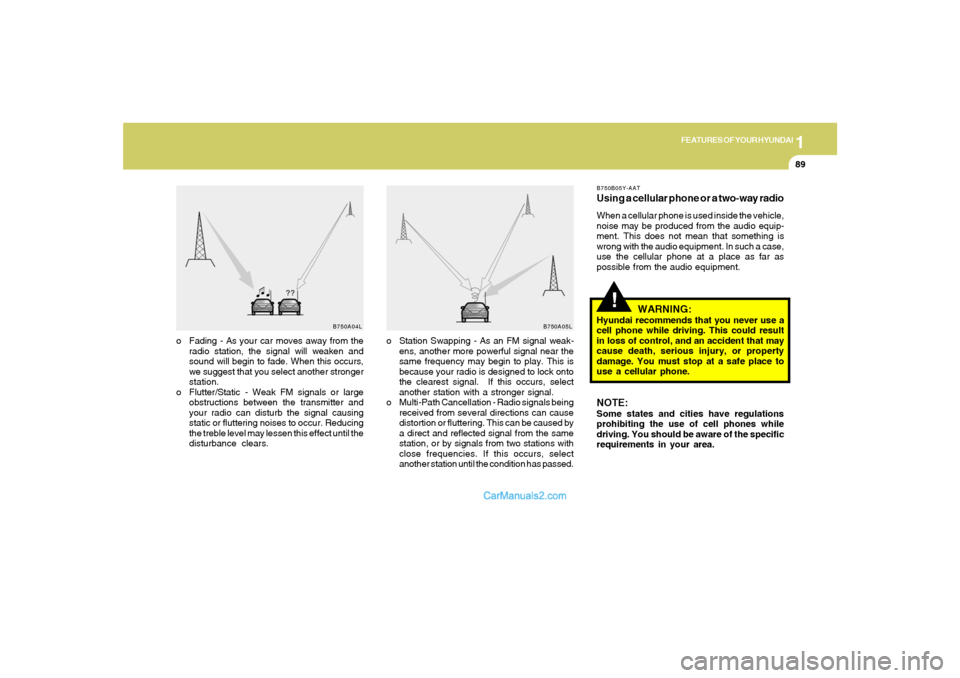
o Station Swapping - As an FM signal weak-
ens, another more powerful signal near the
same frequency may begin to play. This is
because your radio is designed to lock onto
the clearest signal. If this occurs, select
another station with a stronger signal.
o Multi-Path Cancellation - Radio signals being
received from several directions can cause
distortion or fluttering. This can be caused by
a direct and reflected signal from the same
station, or by signals from two stations with
close frequencies. If this occurs, select
another station until the condition has passed. o Fading - As your car moves away from the
radio station, the signal will weaken and
sound will begin to fade. When this occurs,
we suggest that you select another stronger
station.
o Flutter/Static - Weak FM signals or large
obstructions between the transmitter and
your radio can disturb the signal causing
static or fluttering noises to occur. Reducing
the treble level may lessen this effect until the
disturbance clears.
!
B750B05Y-AATUsing a cellular phone or a two-way radioWhen a cellular phone is used inside the vehicle,
noise may be produced from the audio equip-
ment. This does not mean that something is
wrong with the audio equipment. In such a case,
use the cellular phone at a place as far as
possible from the audio equipment.
WARNING:
Hyundai recommends that you never use a
cell phone while driving. This could result
in loss of control, and an accident that may
cause death, serious injury, or property
damage. You must stop at a safe place to
use a cellular phone.NOTE:Some states and cities have regulations
prohibiting the use of cell phones while
driving. You should be aware of the specific
requirements in your area.
Page 102 of 266
1FEATURES OF YOUR HYUNDAI90
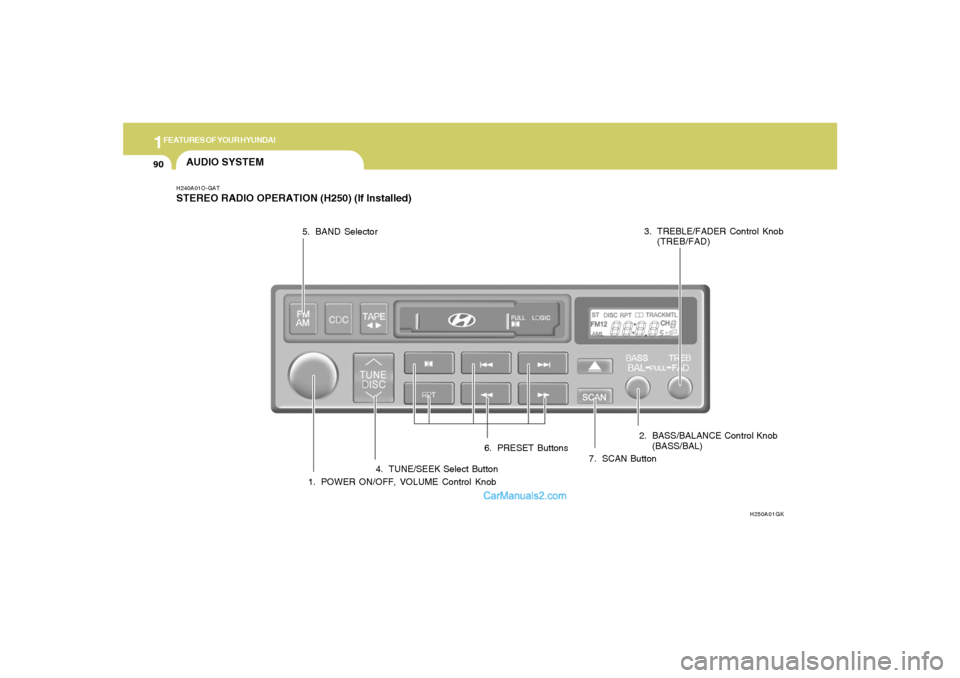
AUDIO SYSTEMH240A01O-GATSTEREO RADIO OPERATION (H250) (If Installed)
1. POWER ON/OFF, VOLUME Control Knob
H250A01GK
2. BASS/BALANCE Control Knob
(BASS/BAL) 3. TREBLE/FADER Control Knob
(TREB/FAD)
4. TUNE/SEEK Select Button 5. BAND Selector
6. PRESET Buttons
7. SCAN Button
Page 103 of 266
1
FEATURES OF YOUR HYUNDAI
91
H240B02A-GAT1. POWER ON-OFF Control
KnobThe radio unit may be operated when the ignition
key is in the "ACC" or "ON" position. Press the
knob to switch the power on. The LCD shows
the radio frequency in the radio mode or the tape
direction indicator in the tape mode. To switch
the power off, press the knob again.VOLUME ControlRotate the knob clockwise to increase the
volume and turn the knob counterclockwise to
reduce the volume.2. BASS Control KnobPress to pop the knob out and turn to the left or
right for the desired bass tone.BAL (Balance Control) KnobPull the bass control knob further out. Turn the
control knob clockwise to emphasize right
speaker sound (left speaker sound will be
attenuated).
When the control knob is turned counterclock-
wise, left speaker sound will be emphasized
(right speaker sound will be attenuated).
3. TREB (Treble Control) KnobPress to pop the knob out and turn to the left or
right for the desired treble tone.FAD (Fader Control) KnobPull the treble control knob further out.
Turn the control knob counterclockwise to
emphasize front speaker sound (rear speaker
sound will be attenuated).
When the control knob is turned clockwise, rear
speaker sound will be emphasized (front
speaker sound will be attenuated).4. TUNE (Manual) Select ButtonPress the side or side to increase or to
decrease the frequency. Press either button
and hold down to continuously scroll. Release
button once the desired station is reached.SEEK Operation
(Automatic Channel Selection)Press the TUNE select button 1 sec or
more.Releasing it will automatically tune to the
next available station with a beep sound.
When the side is pressed longer than 1 second,
releasing will automatically tune to the next
higher frequency and when the side is pressed
longer than 1 second, releasing will automati-
cally tune to the next lower frequency.
5. BAND SelectorPressing the button changes the AM,
FM1 and FM2 bands. The mode selected is
displayed on LCD.6. PRESET STATION SELECT
ButtonSix (6) stations for AM, FM1 and FM2 respec-
tively can be preset in the electronic memory
circuit on this unit.HOW TO PRESET STATIONSSix AM and twelve FM stations may be pro-
grammed into the memory of the radio. Then, by
simply pressing the band select button and/or
one of the six station select buttons, you may
recall any of these stations instantly. To pro-
gram the stations, follow these steps:
o Press band selector to set the band for AM,
FM1, or FM2.
o Select the desired station to be stored by
seek or manual tuning.
o Determine the preset station select button
you wish to use to access that station.
FM/AM
Page 107 of 266
1
FEATURES OF YOUR HYUNDAI
95
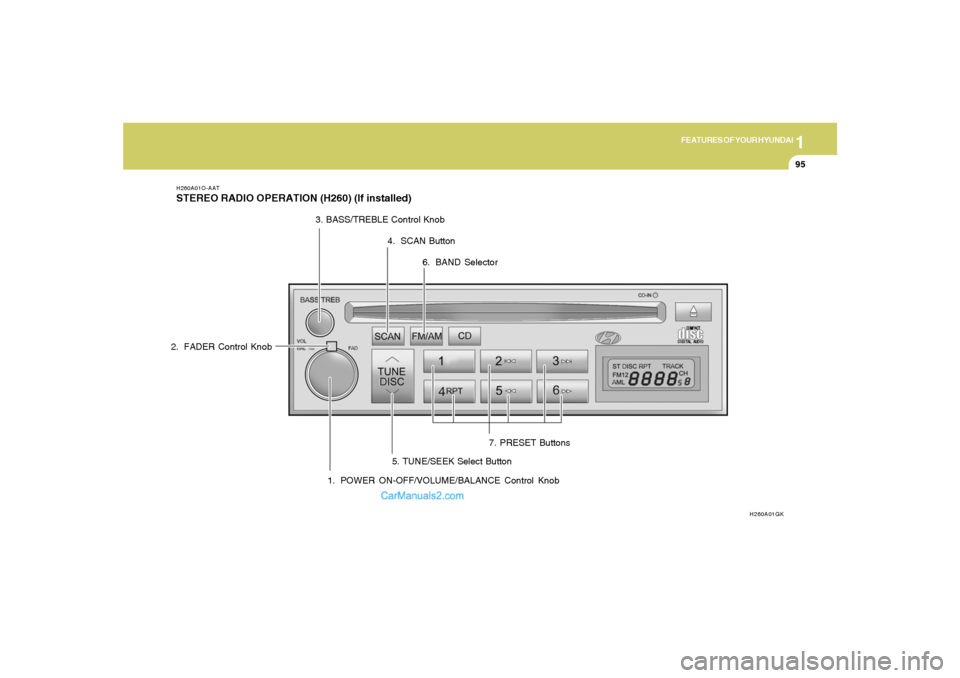
H260A01O-AATSTEREO RADIO OPERATION (H260) (If installed)
H260A01GK
1. POWER ON-OFF/VOLUME/BALANCE Control Knob 2. FADER Control Knob3. BASS/TREBLE Control Knob
4. SCAN Button
7. PRESET Buttons
5. TUNE/SEEK Select Button6. BAND Selector
Page 108 of 266
1FEATURES OF YOUR HYUNDAI96
H260B03E-AAT1. POWER ON-OFF Control KnobThe radio unit may be operated when the ignition
key is in the "ACC" or "ON" position. Press the
knob to switch the power on. The LCD shows
the radio frequency in the radio mode or the CD
track indicator in either the CD mode or CD
AUTO CHANGER mode. To switch the power
off, press the knob again.VOLUME ControlRotate the knob clockwise to increase the
volume and turn the knob counterclockwise to
reduce the volume.BALANCE ControlPull and turn the control knob clockwise to
emphasize right speaker sound (left speaker
sound will be attenuated). When the control
knob is turned counterclockwise, left speaker
sound will be emphasized (right speaker sound
will be attenuated).
2. FAD (Fader Control) KnobTurn the control knob counterclockwise to
emphasize front speaker sound (rear speaker
sound will be attenuated). When the control
knob is turned clockwise, rear speaker sound
will be emphasized (front speaker sound will be
attenuated).3. BASS Control KnobPress to pop the knob out and turn to the left or
right for the desired bass tone.TREB (Treble Control) KnobPull the bass control knob further out. Turn to the
left or right for the desired treble tone.4. SCAN ButtonWhen the scan button is pressed, the frequency
will increase and the receivable stations will be
tuned in one after another, receiving each sta-
tion for 5 seconds. To stop scanning, press the
scan button again.
5. TUNE (Manual) Select ButtonPress the ( ) side or ( ) side to increase or to
decrease the frequency. Press either button
and hold down to continuously scroll. Release
button once the desired station is reached.SEEK Operation (Automatic Channel
Selection)Press the TUNE select button for 1 sec or more.
Releasing it will automatically tune to the next
available station with a beep sound.
When the ( ) side is pressed longer than 1
second, releasing will automatically tune to the
next higher frequency and when the ( ) side
is pressed longer than 1 second, releasing will
automatically tune to the next lower frequency.
Page 109 of 266
1
FEATURES OF YOUR HYUNDAI
97
6. BAND SelectorPressing the button changes the AM,
FM1 and FM2 bands. The mode selected is
displayed on LCD.7. PRESET STATION SELECT
ButtonSix (6) stations for AM, FM1 or FM2 respec-
tively can be preset in the electronic memory
circuit on this unit.HOW TO PRESET STATIONSSix AM and twelve FM stations may be pro-
grammed into the memory of the radio. Then, by
simply pressing the band select button and/or
one of the six station select buttons, you may
recall any of these stations instantly. To pro-
gram the stations, follow these steps:o Press band selector to set the band for AM,
FM1 or FM2.
o Select the desired station to be stored by
seek, scan or manual tuning.
o Determine the preset station select button
you wish to use to access that station.
o Press the station select button for more than
two seconds. A select button indicator will
show in the display indicating which select
button you have depressed. The frequency
display will flash after it has been stored into
the memory.
You should then release the button, and
proceed to program the next desired station.
A total of 18 stations can be programmed by
selecting one AM and two FM stations per
button.
o When completed, any preset station may be
recalled by selecting AM, FM1 or FM2 band
and the appropriate station button.
CAUTION:
o Do not place beverages close to the
audio system. The audio system mecha-
nism may be damaged if you spill them.
o Do not impact on the audio system, or
the audio system mechanism could be
damaged.
!
FM/AM