CD player HYUNDAI TUCSON 2006 User Guide
[x] Cancel search | Manufacturer: HYUNDAI, Model Year: 2006, Model line: TUCSON, Model: HYUNDAI TUCSON 2006Pages: 289, PDF Size: 11.55 MB
Page 138 of 289
1FEATURES OF YOUR HYUNDAI
126
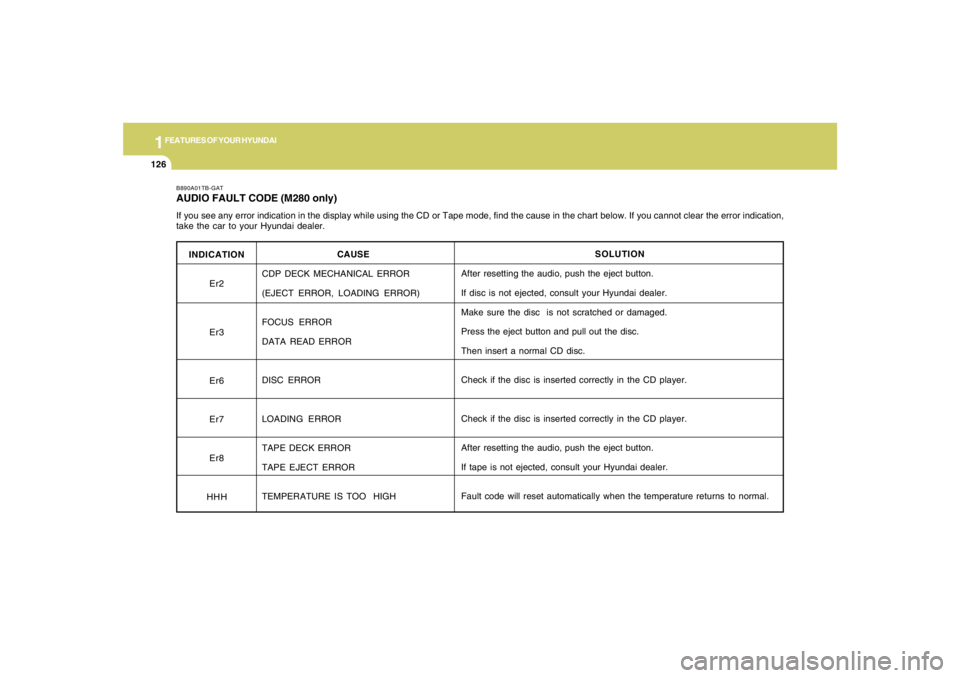
INDICATION
Er2
Er3
Er6
Er7
Er8
HHH
B890A01TB-GATAUDIO FAULT CODE (M280 only)If you see any error indication in the display while using the CD or Tape mode, find the cause in the chart below. If you cannot clear the error indication,
take the car to your Hyundai dealer.
SOLUTION
After resetting the audio, push the eject button.
If disc is not ejected, consult your Hyundai dealer.
Make sure the disc is not scratched or damaged.
Press the eject button and pull out the disc.
Then insert a normal CD disc.
Check if the disc is inserted correctly in the CD player.
Check if the disc is inserted correctly in the CD player.
After resetting the audio, push the eject button.
If tape is not ejected, consult your Hyundai dealer.
Fault code will reset automatically when the temperature returns to normal. CAUSE
CDP DECK MECHANICAL ERROR
(EJECT ERROR, LOADING ERROR)
FOCUS ERROR
DATA READ ERROR
DISC ERROR
LOADING ERROR
TAPE DECK ERROR
TAPE EJECT ERROR
TEMPERATURE IS TOO HIGH
Page 142 of 289
1FEATURES OF YOUR HYUNDAI
130
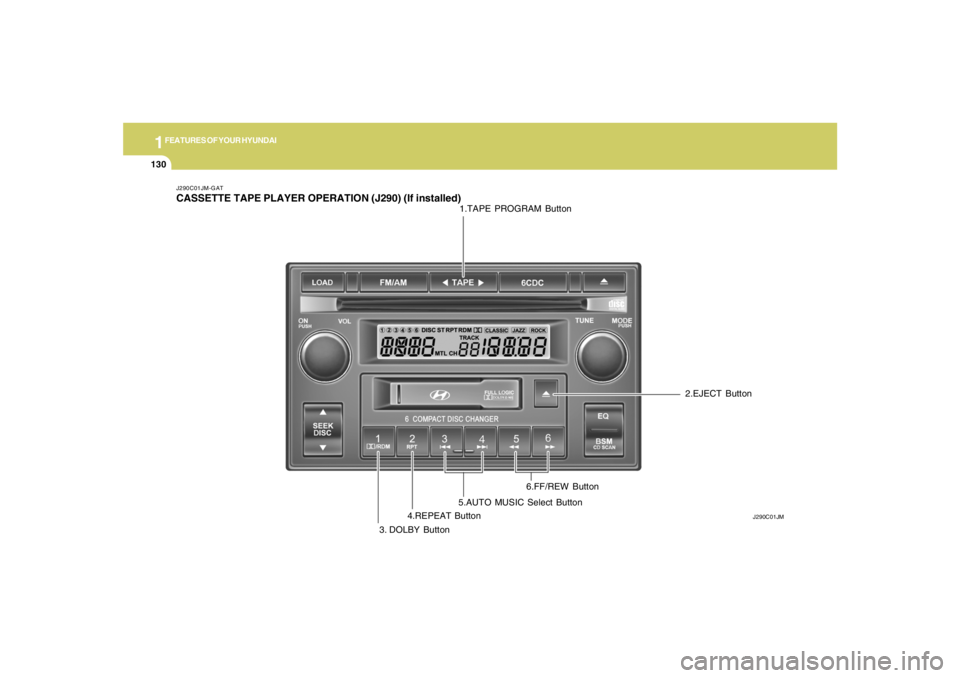
J290C01JM-GATCASSETTE TAPE PLAYER OPERATION (J290) (If installed)
J290C01JM
1.TAPE PROGRAM Button
3. DOLBY Button4.REPEAT Button5.AUTO MUSIC Select Button6.FF/REW Button2.EJECT Button
Page 143 of 289
1
FEATURES OF YOUR HYUNDAI
131131131131131
J290D01JM-GAT1. TAPE PROGRAM ButtonThis allows you to play the reverse side of the
tape by merely pressing the program button.
The PLAY and an arrow will appear in the display
to show tape direction.2. EJECT Buttono When the EJECT button is pressed with a
cassette loaded, the cassette will eject.
o When the EJECT button is pressed during
FF/REW mode, the cassette will eject.3. DOLBY ButtonIf you get background noise during tape PLAY,
you can reduce this considerably by merely
pressing the DOLBY button. If you want to
cancel the DOLBY feature, press the button
again.4. REPEAT Buttono To repeat the track you are currently listen-
ing to, press the RPT button. To cancel,
press again.
o If you do not release RPT operation when the
track ends, it will automatically be replayed.
This process will be continued until you push
the button again.
5. AUTO MUSIC Select ButtonPress the button to find the starting point of each
song in a prerecorded music tape. The quiet
space between songs (must have at least a 4
sec. gap) can be identified by the AUTO MUSIC
Select button.
o Pressing the will play the begin-ning of
the next music segment.
o Pressing the will start replay at the
beginning of the music just listened to.
o To stop FF or REW action, press the button
again.6. FF/REW Buttono Fast forward tape winding starts when the
FF button is pressed during PLAY or REW
mode.
o PLAY starts when the FF button is pressed
again during FF mode.
o Tape rewinding starts when the REW button
is pressed during PLAY or FF mode.
o PLAY starts when the REW button pressed
again during REW mode.
CAUTION:
o Do not insert anything like coins into the
player slot as damage to the unit may
occur.
o Do not place beverages close to the
audio system. The playback mechanism
may be damaged if you spill them.
o Do not impact on the audio system, or
the playback mechanism could be dam-
aged.
!
Page 144 of 289
1FEATURES OF YOUR HYUNDAI
132
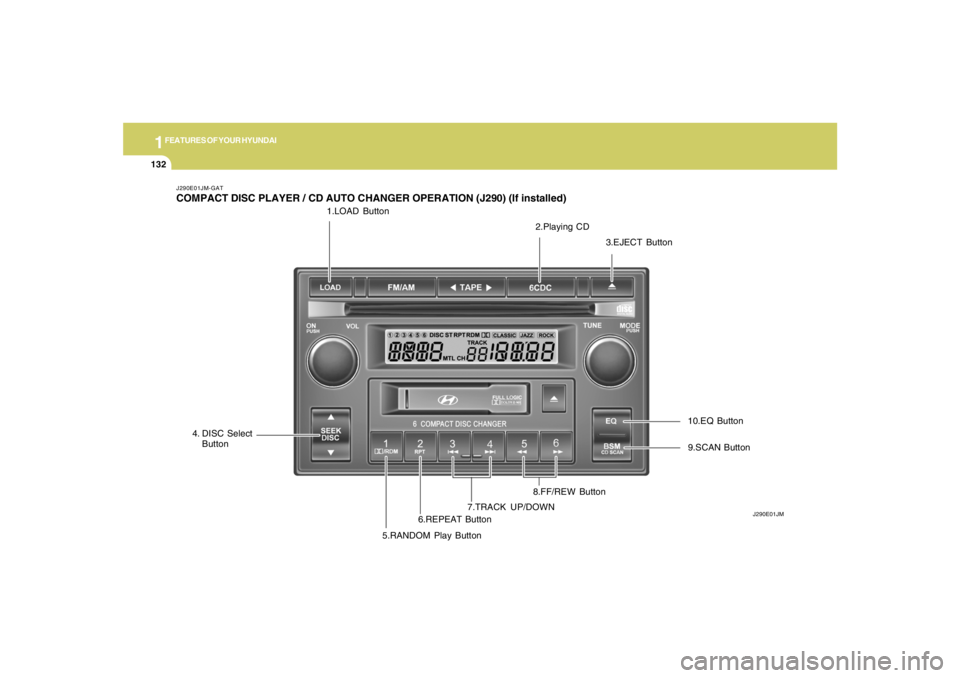
1.LOAD Button
J290E01JM-GATCOMPACT DISC PLAYER / CD AUTO CHANGER OPERATION (J290) (If installed)
J290E01JM
2.Playing CD
3.EJECT Button
4. DISC Select
Button
5.RANDOM Play Button6.REPEAT Button7.TRACK UP/DOWN8.FF/REW Button9.SCAN Button 10.EQ Button
Page 145 of 289
1
FEATURES OF YOUR HYUNDAI
133133133133133
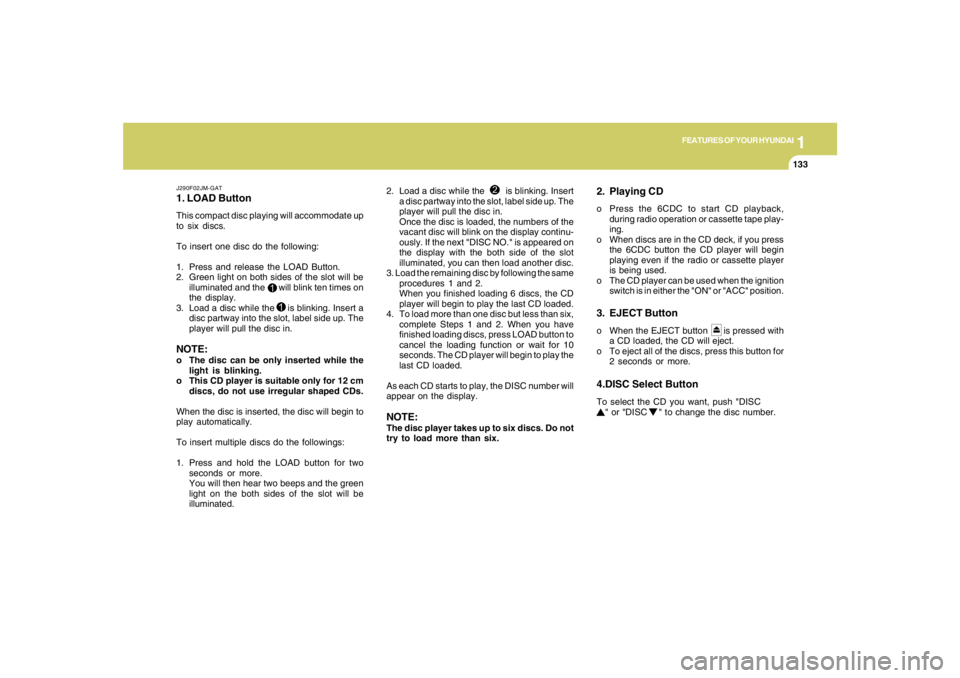
J290F02JM-GAT1. LOAD ButtonThis compact disc playing will accommodate up
to six discs.
To insert one disc do the following:
1. Press and release the LOAD Button.
2. Green light on both sides of the slot will be
illuminated and the will blink ten times on
the display.
3. Load a disc while the is blinking. Insert a
disc partway into the slot, label side up. The
player will pull the disc in.NOTE:o The disc can be only inserted while the
light is blinking.
o This CD player is suitable only for 12 cm
discs, do not use irregular shaped CDs.
When the disc is inserted, the disc will begin to
play automatically.
To insert multiple discs do the followings:
1. Press and hold the LOAD button for two
seconds or more.
You will then hear two beeps and the green
light on the both sides of the slot will be
illuminated.2. Load a disc while the is blinking. Insert
a disc partway into the slot, label side up. The
player will pull the disc in.
Once the disc is loaded, the numbers of the
vacant disc will blink on the display continu-
ously. If the next "DISC NO." is appeared on
the display with the both side of the slot
illuminated, you can then load another disc.
3. Load the remaining disc by following the same
procedures 1 and 2.
When you finished loading 6 discs, the CD
player will begin to play the last CD loaded.
4. To load more than one disc but less than six,
complete Steps 1 and 2. When you have
finished loading discs, press LOAD button to
cancel the loading function or wait for 10
seconds. The CD player will begin to play the
last CD loaded.
As each CD starts to play, the DISC number will
appear on the display.
NOTE:The disc player takes up to six discs. Do not
try to load more than six.
2. Playing CDo Press the 6CDC to start CD playback,
during radio operation or cassette tape play-
ing.
o When discs are in the CD deck, if you press
the 6CDC button the CD player will begin
playing even if the radio or cassette player
is being used.
o The CD player can be used when the ignition
switch is in either the "ON" or "ACC" position.3. EJECT Buttono When the EJECT button is pressed with
a CD loaded, the CD will eject.
o To eject all of the discs, press this button for
2 seconds or more.4.DISC Select ButtonTo select the CD you want, push "DISC
" or "DISC " to change the disc number.
Page 147 of 289
1
FEATURES OF YOUR HYUNDAI
135135135135135
CAUTION:
o Do not insert warped or poor quality
discs into the CD player as damage to the
unit may occur.
o Do not insert anything like coins into the
player slot as damage to the unit may
occur.
o Do not place beverages close to the
audio system. The playback mechanism
may be damaged if you spill them.
o Do not impact on the audio system, or
the playback mechanism could be dam-
aged.
o Driving off-road or other vibrations may
skip your compact disc.
Do not use the audio system off-roads
as the discs could be scratched and
damaged.
o Do not grip or pull out the disc with your
hand while the disc is being pulled into
the unit by the self loading mechanism.
These can cause disc scratching to oc-
cur or trouble in the compact disc player.
o Avoid using CD-Recordable or CD-
Rewritable to ensure proper operation.
When using the compact disc player,
genuine CDs are recommended.
!
Page 148 of 289
1FEATURES OF YOUR HYUNDAI
136
INDICATION
Er2
Er3
Er6
Er8
HHH
no CD
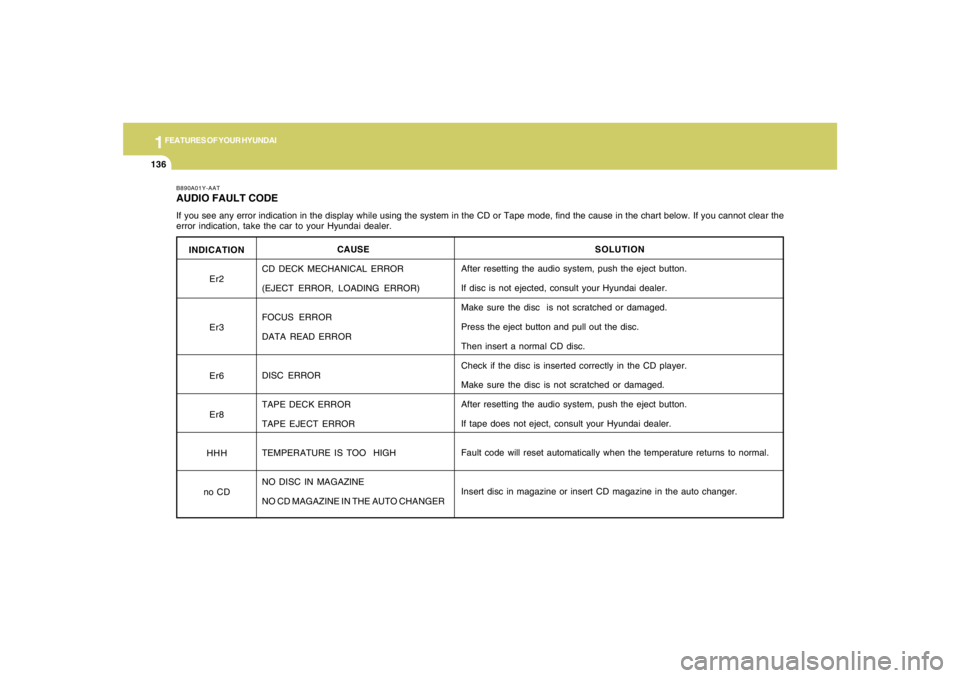
B890A01Y-AATAUDIO FAULT CODEIf you see any error indication in the display while using the system in the CD or Tape mode, find the cause in the chart below. If you cannot clear the
error indication, take the car to your Hyundai dealer.
SOLUTION
After resetting the audio system, push the eject button.
If disc is not ejected, consult your Hyundai dealer.
Make sure the disc is not scratched or damaged.
Press the eject button and pull out the disc.
Then insert a normal CD disc.
Check if the disc is inserted correctly in the CD player.
Make sure the disc is not scratched or damaged.
After resetting the audio system, push the eject button.
If tape does not eject, consult your Hyundai dealer.
Fault code will reset automatically when the temperature returns to normal.
Insert disc in magazine or insert CD magazine in the auto changer. CAUSE
CD DECK MECHANICAL ERROR
(EJECT ERROR, LOADING ERROR)
FOCUS ERROR
DATA READ ERROR
DISC ERROR
TAPE DECK ERROR
TAPE EJECT ERROR
TEMPERATURE IS TOO HIGH
NO DISC IN MAGAZINE
NO CD MAGAZINE IN THE AUTO CHANGER
Page 150 of 289
1FEATURES OF YOUR HYUNDAI
138
o Be sure that the cassette label is not loose
or peeling off or tape ejection may be difficult.
o Never touch or soil the actual audio tape
surfaces.
o Keep all magnetized objects, such as elec-
tric motors, speakers or transformers away
from your cassette tapes and tape player
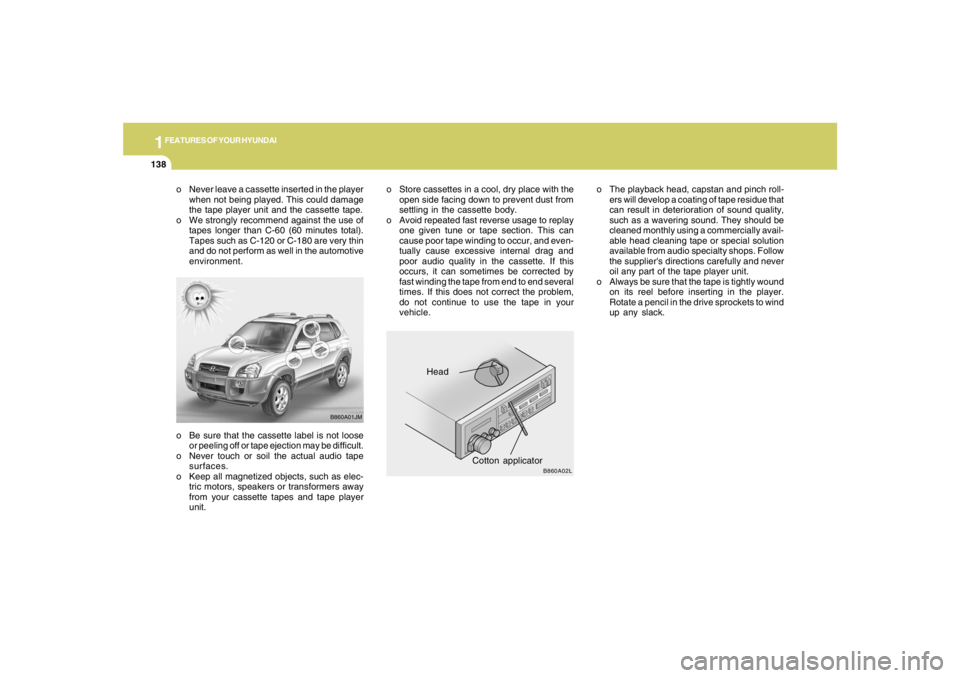
unit.Head
Cotton applicator
B860A01JM
B860A02L
o The playback head, capstan and pinch roll-
ers will develop a coating of tape residue that
can result in deterioration of sound quality,
such as a wavering sound. They should be
cleaned monthly using a commercially avail-
able head cleaning tape or special solution
available from audio specialty shops. Follow
the supplier's directions carefully and never
oil any part of the tape player unit.
o Always be sure that the tape is tightly wound
on its reel before inserting in the player.
Rotate a pencil in the drive sprockets to wind
up any slack. o Never leave a cassette inserted in the player
when not being played. This could damage
the tape player unit and the cassette tape.
o We strongly recommend against the use of
tapes longer than C-60 (60 minutes total).
Tapes such as C-120 or C-180 are very thin
and do not perform as well in the automotive
environment.o Store cassettes in a cool, dry place with the
open side facing down to prevent dust from
settling in the cassette body.
o Avoid repeated fast reverse usage to replay
one given tune or tape section. This can
cause poor tape winding to occur, and even-
tually cause excessive internal drag and
poor audio quality in the cassette. If this
occurs, it can sometimes be corrected by
fast winding the tape from end to end several
times. If this does not correct the problem,
do not continue to use the tape in your
vehicle.
Page 151 of 289
1
FEATURES OF YOUR HYUNDAI
139139139139139
CAUTION:
o Be sure to remove the antenna before
washing the car in an automatic car
wash or it may be damaged.
o Before entering a place with a low height
clearance, be sure to adjust the roof
antenna low.
o In some vehicles, the antenna can be
folded into only front position.
o When reinstalling your antenna, it is
important that it is fully tightened to
ensure proper reception.
!
ANTENNA
B870D02JM-U B870D02JM-AAT
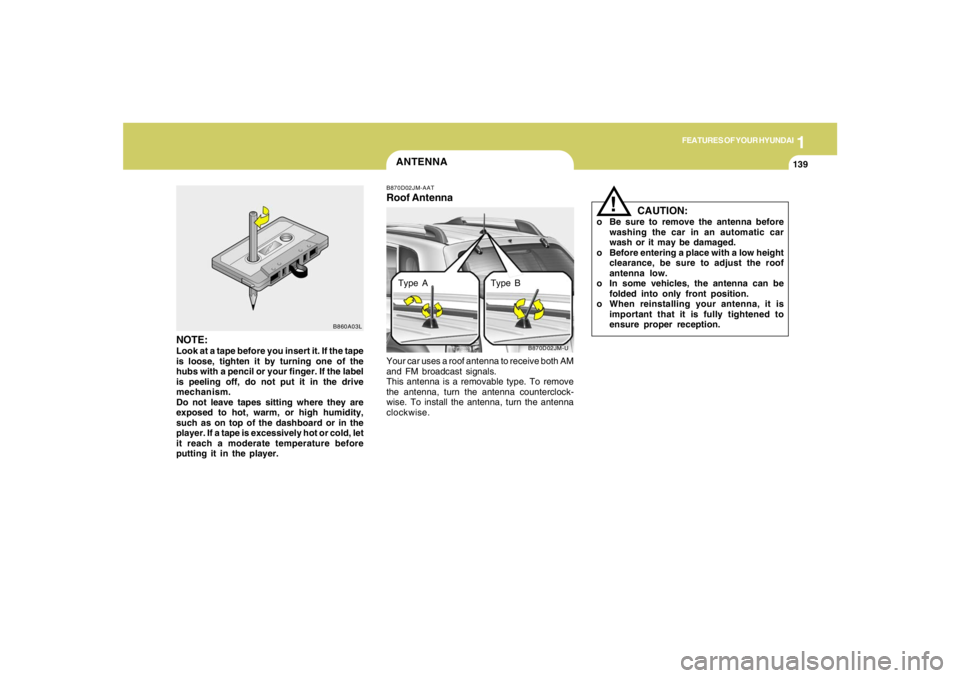
Roof AntennaYour car uses a roof antenna to receive both AM
and FM broadcast signals.
This antenna is a removable type. To remove
the antenna, turn the antenna counterclock-
wise. To install the antenna, turn the antenna
clockwise.
NOTE:Look at a tape before you insert it. If the tape
is loose, tighten it by turning one of the
hubs with a pencil or your finger. If the label
is peeling off, do not put it in the drive
mechanism.
Do not leave tapes sitting where they are
exposed to hot, warm, or high humidity,
such as on top of the dashboard or in the
player. If a tape is excessively hot or cold, let
it reach a moderate temperature before
putting it in the player.
B860A03L
Type A Type B
Page 283 of 289
10
INDEX
2
A
Air bag ...............................................................................................1-33
Air Cleaner Filter ...............................................................................6-10
Air Conditioning
Care..............................................................................................6-16
Operation............................................................................ 1-95, 6-16
Switch...........................................................................................1-95
Antenna..........................................................................................1-139
Ashtray..............................................................................................1-65
Audio System
Cassette Tape player operation (J290)...................................1-132
Cassete tape player operation (M280)....................................1-116
Compact disc player operation (K260)....................................1-110
Compact disc player operation (M280)....................................1-119
CD changer operation (M280) ..................................................1-123
Compact disc player / CD Auto changer operation (J290) .....1-132
Stereo radio operation (J290) ...................................................1-127
Stereo radio operation (K260)..................................................1-107
Stereo radio operation (M280) ..................................................1-113
B
Battery...............................................................................................6-23
Binding Arbitration (U.S.A Only) .......................................................8-17
Brake
Anti-lock brake system ................................................................2-13
Traction control system (TCS) ...................................................2-13
Checking the brakes ....................................................................6-14Electronic Stability Control (ESC) .....................................................2-15
Fluid ..............................................................................................6-11
Pedal clearance...........................................................................6-20
Pedal free-play.............................................................................6-19
Practices......................................................................................2-19
Breaking-In your New Hyundai .......................................................... 1-3
Bulb Replacement.............................................................................6-27
C
Care of Cassette Tapes ................................................................1-137
Care of Disc ...................................................................................1-137
Catalytic Converter............................................................................. 7-3
Child-Protector Rear Door Lock ......................................................... 1-7
Child Restraint System.....................................................................1-25
Installing a Child Restraint Seat with the
"Tether Anchorage" System .....................................................1-26
Securing the Child Restraint Seat with the "ISOFIX" System ....1-28
Cigarette Lighter................................................................................1-64
Clock.................................................................................................1-63
Clutch
Checking fluid...............................................................................6-16
Pedal free-play.............................................................................6-19
Combination Light
Auto light.......................................................................................1-59
Headlight flasher..........................................................................1-58
Headlight switch...........................................................................1-58
High-beam switch........................................................................1-58
Lane change signal ......................................................................1-57
Parking light auto off .....................................................................1-58
Turn signal operation...................................................................1-57