radio HYUNDAI TUCSON 2006 User Guide
[x] Cancel search | Manufacturer: HYUNDAI, Model Year: 2006, Model line: TUCSON, Model: HYUNDAI TUCSON 2006Pages: 289, PDF Size: 11.55 MB
Page 139 of 289
1
FEATURES OF YOUR HYUNDAI
127127127127127
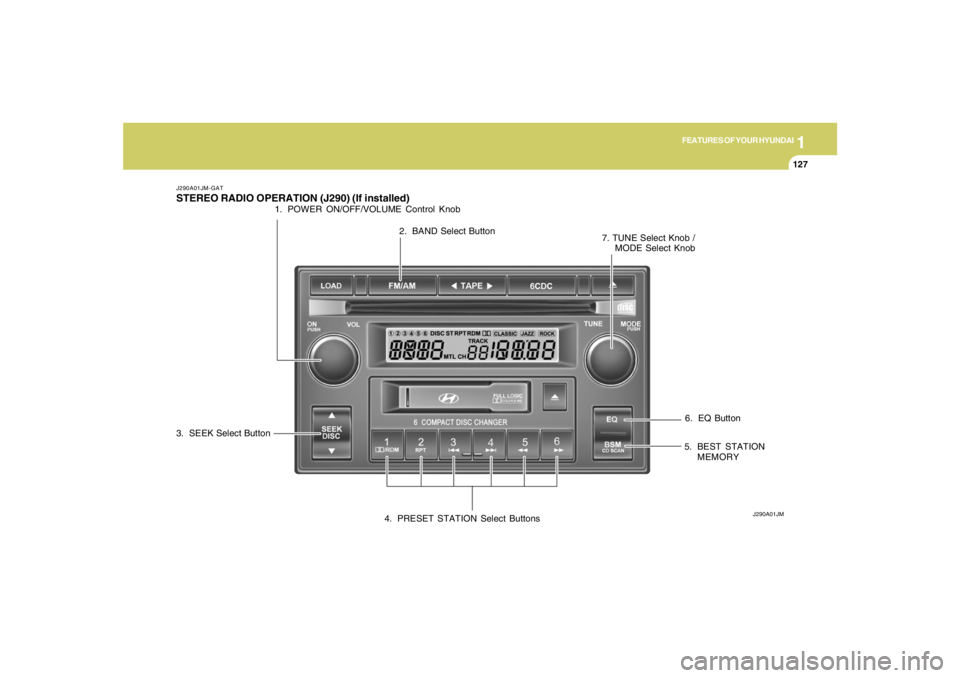
6. EQ Button
J290A01JM-GATSTEREO RADIO OPERATION (J290) (If installed)
J290A01JM
1. POWER ON/OFF/VOLUME Control Knob
2. BAND Select Button
3. SEEK Select Button
4. PRESET STATION Select Buttons5. BEST STATION
MEMORY 7. TUNE Select Knob /
MODE Select Knob
Page 140 of 289

1FEATURES OF YOUR HYUNDAI
128
CLASSIC → JAZZ → ROCK → DEFEAT
J290B01JM-GAT1. POWER ON-OFF/VOLUME
Control KnobThe radio unit may be operated when the ignition
key is in the "ACC" or "ON" position. Press the
button to switch the power on. The display
shows the radio frequency in the radio mode,
the tape direction indicator in the tape mode, or
CD track in the CD AUTO CHANGER mode. To
switch the power off, press the button again.VOLUME ControlRotate the knob clockwise to increase the
volume and turn the knob counterclockwise to
reduce the volume.2. BAND SelectorPressing the button changes the AM, FM1 and
FM2 bands. The mode selected is shown on the
display.3. SEEK Select Button
(Automatic Channel Selection)Press the SEEK select button 1 sec. or more.
When the ( ) side is pressed, the unit will
automatically tune to the next higher frequency
and when the ( ) side is pressed, it will
automatically tune to the next lower frequency.o When completed, any preset station may be
recalled by selecting AM, FM1 or FM2 band
and the appropriate station button.
5. Best Station Memory Button
(BSM)When the BSM button is pressed for two sec-
onds or longer, the six channels from the high-
est field intensity are selected next and stored
in memory. The stations selected are stored in
the sequence frequency from the first preset
key.6. EQ ButtonPress the EQ button to select the CLASSIC,
JAZZ, ROCK and DEFEAT MODE for the
desired tone quality. Each press of the button
changes the display as follows;
4. PRESET STATION Select
ButtonsSix (6) stations for AM, FM and FM2 respec-
tively can be preset in the electronic memory
circuit.HOW TO PRESET STATIONSSix AM and twelve FM stations may be pro-
grammed into the memory of the radio. Then, by
simply pressing the AM / FM select button and/
or one of the six station select buttons, you may
recall any of these stations instantly. To pro-
gram the stations, follow these steps:
o Press AM/FM selector to set the band for
AM, FM1 and FM2.
o Select the desired station to be stored by
seek, scan or manual tuning.
o Determine the preset station select button
you wish to use to access that station.
o Press the station select button for more than
two seconds. A select button indicator will
show in the display indicating which select
button you have depressed. The frequency
display will flash after it has been stored into
the memory. You should then release the
button, and proceed to program the next
desired station. A total of 18 stations can be
programmed by selecting one AM and two
FM station per button.
7. TUNE (Manual) Select KnobRotate the knob clockwise to increase the
frequency and turn the knob counterclockwise
to reduce the frequency.
Page 145 of 289

1
FEATURES OF YOUR HYUNDAI
133133133133133
J290F02JM-GAT1. LOAD ButtonThis compact disc playing will accommodate up
to six discs.
To insert one disc do the following:
1. Press and release the LOAD Button.
2. Green light on both sides of the slot will be
illuminated and the will blink ten times on
the display.
3. Load a disc while the is blinking. Insert a
disc partway into the slot, label side up. The
player will pull the disc in.NOTE:o The disc can be only inserted while the
light is blinking.
o This CD player is suitable only for 12 cm
discs, do not use irregular shaped CDs.
When the disc is inserted, the disc will begin to
play automatically.
To insert multiple discs do the followings:
1. Press and hold the LOAD button for two
seconds or more.
You will then hear two beeps and the green
light on the both sides of the slot will be
illuminated.2. Load a disc while the is blinking. Insert
a disc partway into the slot, label side up. The
player will pull the disc in.
Once the disc is loaded, the numbers of the
vacant disc will blink on the display continu-
ously. If the next "DISC NO." is appeared on
the display with the both side of the slot
illuminated, you can then load another disc.
3. Load the remaining disc by following the same
procedures 1 and 2.
When you finished loading 6 discs, the CD
player will begin to play the last CD loaded.
4. To load more than one disc but less than six,
complete Steps 1 and 2. When you have
finished loading discs, press LOAD button to
cancel the loading function or wait for 10
seconds. The CD player will begin to play the
last CD loaded.
As each CD starts to play, the DISC number will
appear on the display.
NOTE:The disc player takes up to six discs. Do not
try to load more than six.
2. Playing CDo Press the 6CDC to start CD playback,
during radio operation or cassette tape play-
ing.
o When discs are in the CD deck, if you press
the 6CDC button the CD player will begin
playing even if the radio or cassette player
is being used.
o The CD player can be used when the ignition
switch is in either the "ON" or "ACC" position.3. EJECT Buttono When the EJECT button is pressed with
a CD loaded, the CD will eject.
o To eject all of the discs, press this button for
2 seconds or more.4.DISC Select ButtonTo select the CD you want, push "DISC
" or "DISC " to change the disc number.
Page 156 of 289
2
DRIVING YOUR HYUNDAI
5
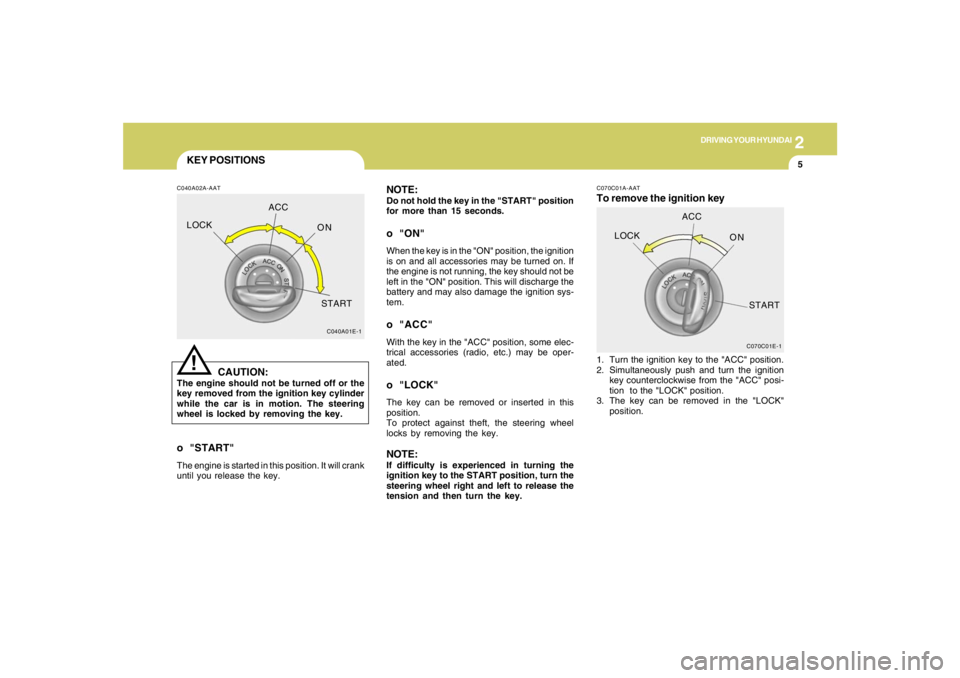
KEY POSITIONSC040A02A-AAT
CAUTION:
The engine should not be turned off or the
key removed from the ignition key cylinder
while the car is in motion. The steering
wheel is locked by removing the key.
!
o "START"The engine is started in this position. It will crank
until you release the key.
C040A01E-1
LOCKACC
ON
START
NOTE:Do not hold the key in the "START" position
for more than 15 seconds.o "ON"When the key is in the "ON" position, the ignition
is on and all accessories may be turned on. If
the engine is not running, the key should not be
left in the "ON" position. This will discharge the
battery and may also damage the ignition sys-
tem.o "ACC"With the key in the "ACC" position, some elec-
trical accessories (radio, etc.) may be oper-
ated.o "LOCK"The key can be removed or inserted in this
position.
To protect against theft, the steering wheel
locks by removing the key.NOTE:If difficulty is experienced in turning the
ignition key to the START position, turn the
steering wheel right and left to release the
tension and then turn the key.
C070C01E-1
LOCKACC
ON
START
C070C01A-AATTo remove the ignition key1. Turn the ignition key to the "ACC" position.
2. Simultaneously push and turn the ignition
key counterclockwise from the "ACC" posi-
tion to the "LOCK" position.
3. The key can be removed in the "LOCK"
position.
Page 192 of 289

3
WHAT TO DO IN AN EMERGENCY
7
Have the system checked by an autho-
rized Hyundai dealer as soon as pos-
sible to determine the cause of the
problem.
NOTE:
o The TPMS malfunction indicator
may be illuminated if the vehicle
is moving around electric power
supply cable or radio transmitter
such as police stations, govern-
ment and public offices, broad-
casting stations, military installa-
tions, airports, or transmitting
tower, etc. which can interfere with
normal operation of the Tire Moni-
toring System (TPMS).
o The TPMS malfunction indicator
may be illuminated if some elec-
tronic devices, such as notebook
computer, are used in the vehicle.
This can interfere with normal op-
eration of the Tire Monitoring Sys-
tem (TPMS).Changing a tire with TPMS
If you have a flat tire, the Low Tire
Pressure telltale will come on. Have the
flat tire repaired by an authorized
Hyundai dealer as soon as possible or
replace the flat tire with the temporary
spare tire. NEVER use a puncture-
repairing agent to repair and/or inflate a
low pressure tire. If used, you will have
to replace the tire pressure sensor.
Each wheel is equipped with a tire
pressure sensor mounted inside the
tire behind the valve stem. You must
use TPMS specific wheels. It is recom-
mended that you always have your
tires serviced by an authorized Hyundai
dealer as soon as possible.
After you replace the low pressure tire
with the temporary spare tire, the TPMS
malfunction indicator will illuminate af-
ter restarting and about 20 minutes of
continuous driving because the tempo-
rary spare tire does not have a sensor.Once the low pressure tire is re-inflated
to the recommended pressure and in-
stalled on the vehicle, the TPMS mal-
function indicator and the low tire pres-
sure telltale will be soon extinguished.
If the low pressure and TPMS malfunc-
tion indicators are not extinguished af-
ter about 20 minutes of continuous
driving, please visit an authorized
Hyundai dealer.
You may not be able to identify a low tire
by simply looking at it. Always use a
good quality tire pressure gauge to
measure the tire's inflation pressure.
Please note that a tire that is hot (from
being driven) will have a higher pres-
sure measurement than a tire that is
cold (from sitting stationary for at least
3 hours and driven less than 1 mile
during that 3 hour period). Allow the tire
to cool before measuring the inflation
pressure.
Always be sure the tire is cold before
inflating to the recommended pressure.
A cold tire means the vehicle has been
sitting for 3 hours and driven for less
than 1 mile in that 3 hour period.
Page 241 of 289
6
DO-IT-YOURSELF MAINTENANCE
22
G200B02L
!
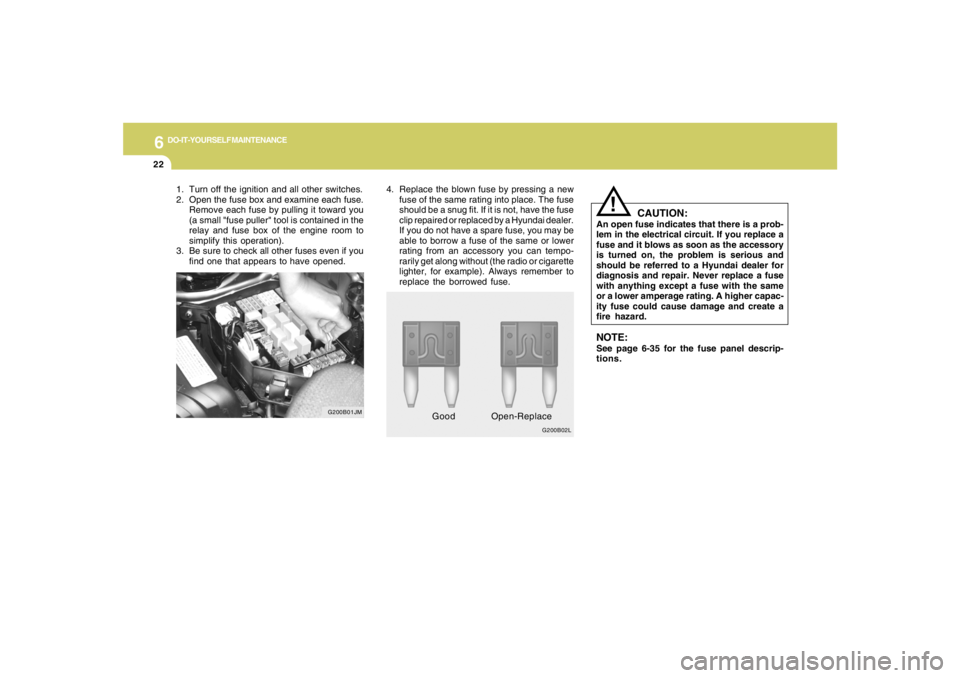
4. Replace the blown fuse by pressing a new
fuse of the same rating into place. The fuse
should be a snug fit. If it is not, have the fuse
clip repaired or replaced by a Hyundai dealer.
If you do not have a spare fuse, you may be
able to borrow a fuse of the same or lower
rating from an accessory you can tempo-
rarily get along without (the radio or cigarette
lighter, for example). Always remember to
replace the borrowed fuse.
CAUTION:
An open fuse indicates that there is a prob-
lem in the electrical circuit. If you replace a
fuse and it blows as soon as the accessory
is turned on, the problem is serious and
should be referred to a Hyundai dealer for
diagnosis and repair. Never replace a fuse
with anything except a fuse with the same
or a lower amperage rating. A higher capac-
ity fuse could cause damage and create a
fire hazard.NOTE:See page 6-35 for the fuse panel descrip-
tions.
GoodOpen-Replace 1. Turn off the ignition and all other switches.
2. Open the fuse box and examine each fuse.
Remove each fuse by pulling it toward you
(a small "fuse puller" tool is contained in the
relay and fuse box of the engine room to
simplify this operation).
3. Be sure to check all other fuses even if you
find one that appears to have opened.
G200B01JM
Page 283 of 289

10
INDEX
2
A
Air bag ...............................................................................................1-33
Air Cleaner Filter ...............................................................................6-10
Air Conditioning
Care..............................................................................................6-16
Operation............................................................................ 1-95, 6-16
Switch...........................................................................................1-95
Antenna..........................................................................................1-139
Ashtray..............................................................................................1-65
Audio System
Cassette Tape player operation (J290)...................................1-132
Cassete tape player operation (M280)....................................1-116
Compact disc player operation (K260)....................................1-110
Compact disc player operation (M280)....................................1-119
CD changer operation (M280) ..................................................1-123
Compact disc player / CD Auto changer operation (J290) .....1-132
Stereo radio operation (J290) ...................................................1-127
Stereo radio operation (K260)..................................................1-107
Stereo radio operation (M280) ..................................................1-113
B
Battery...............................................................................................6-23
Binding Arbitration (U.S.A Only) .......................................................8-17
Brake
Anti-lock brake system ................................................................2-13
Traction control system (TCS) ...................................................2-13
Checking the brakes ....................................................................6-14Electronic Stability Control (ESC) .....................................................2-15
Fluid ..............................................................................................6-11
Pedal clearance...........................................................................6-20
Pedal free-play.............................................................................6-19
Practices......................................................................................2-19
Breaking-In your New Hyundai .......................................................... 1-3
Bulb Replacement.............................................................................6-27
C
Care of Cassette Tapes ................................................................1-137
Care of Disc ...................................................................................1-137
Catalytic Converter............................................................................. 7-3
Child-Protector Rear Door Lock ......................................................... 1-7
Child Restraint System.....................................................................1-25
Installing a Child Restraint Seat with the
"Tether Anchorage" System .....................................................1-26
Securing the Child Restraint Seat with the "ISOFIX" System ....1-28
Cigarette Lighter................................................................................1-64
Clock.................................................................................................1-63
Clutch
Checking fluid...............................................................................6-16
Pedal free-play.............................................................................6-19
Combination Light
Auto light.......................................................................................1-59
Headlight flasher..........................................................................1-58
Headlight switch...........................................................................1-58
High-beam switch........................................................................1-58
Lane change signal ......................................................................1-57
Parking light auto off .....................................................................1-58
Turn signal operation...................................................................1-57