steering wheel HYUNDAI TUCSON 2006 User Guide
[x] Cancel search | Manufacturer: HYUNDAI, Model Year: 2006, Model line: TUCSON, Model: HYUNDAI TUCSON 2006Pages: 289, PDF Size: 11.55 MB
Page 97 of 289
1
FEATURES OF YOUR HYUNDAI
85
B610A01JM
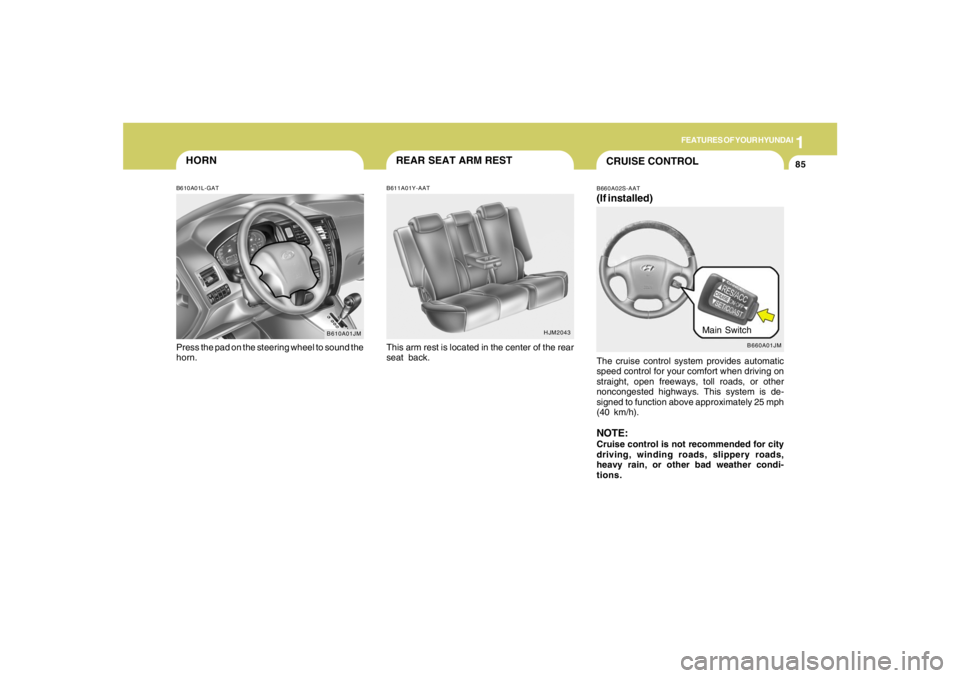
HORNB610A01L-GATPress the pad on the steering wheel to sound the
horn.
HJM2043
REAR SEAT ARM RESTB611A01Y-AATThis arm rest is located in the center of the rear
seat back.
B660A01JM
Main Switch
CRUISE CONTROLB660A02S-AAT(If installed)The cruise control system provides automatic
speed control for your comfort when driving on
straight, open freeways, toll roads, or other
noncongested highways. This system is de-
signed to function above approximately 25 mph
(40 km/h).NOTE:Cruise control is not recommended for city
driving, winding roads, slippery roads,
heavy rain, or other bad weather condi-
tions.
Page 98 of 289
1FEATURES OF YOUR HYUNDAI86
!
5. To momently increase speed, depress the
accelerator pedal enough for the vehicle to
exceed the preset speed. When you remove
your foot from the accelerator pedal, the
vehicle will return to the speed you have set.
WARNING:
To avoid accidental cruise control engage-
ment, keep the cruise control main switch
off when not using the cruise control.
B660B01JM B660B02E-AAT
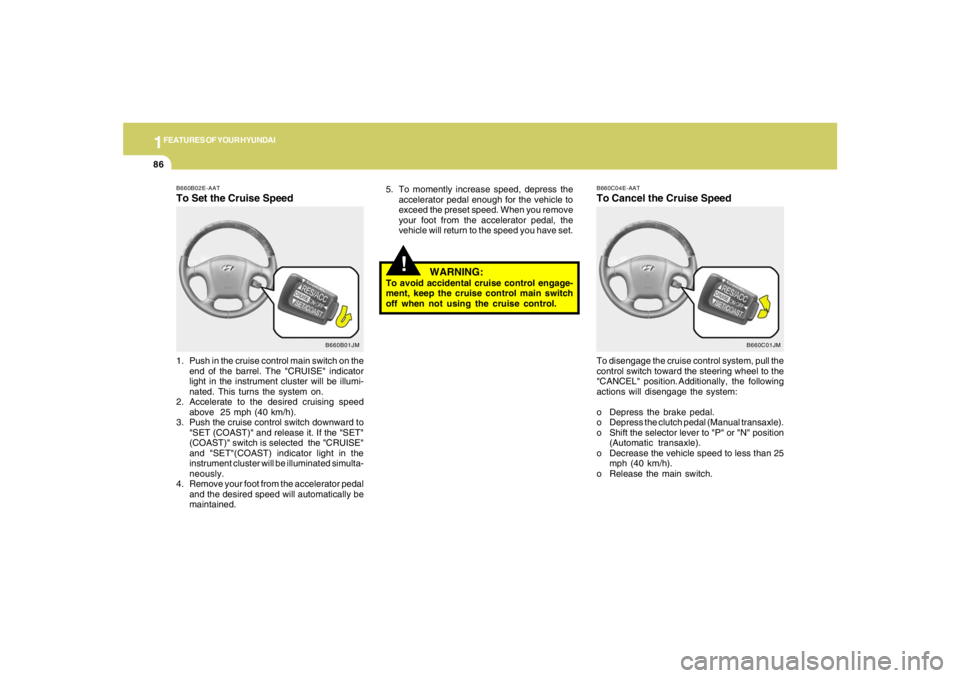
To Set the Cruise Speed1. Push in the cruise control main switch on the
end of the barrel. The "CRUISE" indicator
light in the instrument cluster will be illumi-
nated. This turns the system on.
2. Accelerate to the desired cruising speed
above 25 mph (40 km/h).
3. Push the cruise control switch downward to
"SET (COAST)" and release it. If the "SET"
(COAST)" switch is selected the "CRUISE"
and "SET"(COAST) indicator light in the
instrument cluster will be illuminated simulta-
neously.
4. Remove your foot from the accelerator pedal
and the desired speed will automatically be
maintained.
B660C01JM B660C04E-AAT
To Cancel the Cruise SpeedTo disengage the cruise control system, pull the
control switch toward the steering wheel to the
"CANCEL" position. Additionally, the following
actions will disengage the system:
o Depress the brake pedal.
o Depress the clutch pedal (Manual transaxle).
o Shift the selector lever to "P" or "N" position
(Automatic transaxle).
o Decrease the vehicle speed to less than 25
mph (40 km/h).
o Release the main switch.
Page 156 of 289
2
DRIVING YOUR HYUNDAI
5
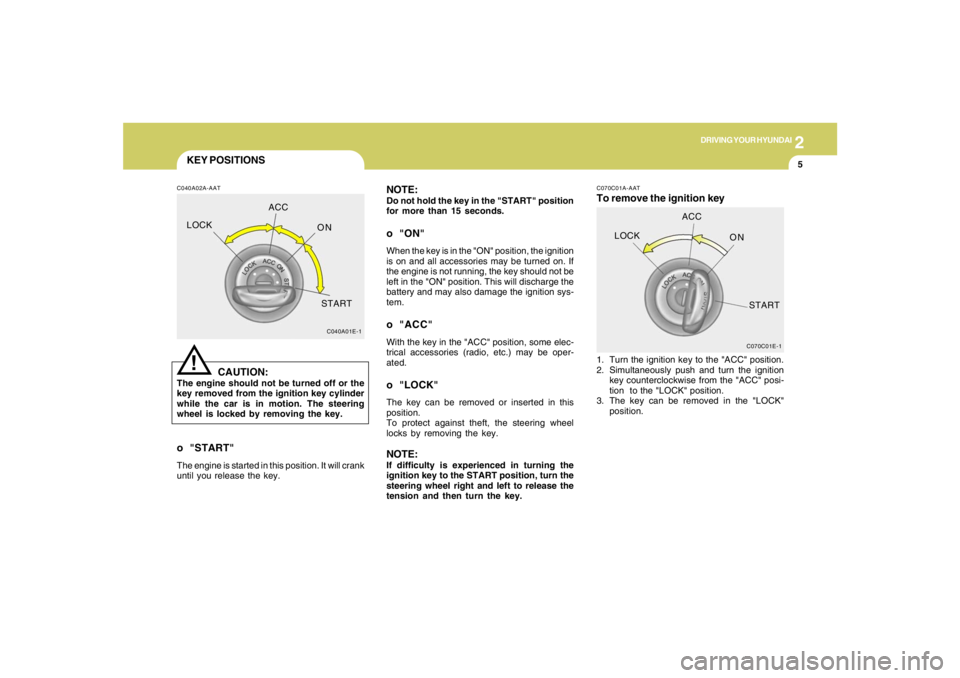
KEY POSITIONSC040A02A-AAT
CAUTION:
The engine should not be turned off or the
key removed from the ignition key cylinder
while the car is in motion. The steering
wheel is locked by removing the key.
!
o "START"The engine is started in this position. It will crank
until you release the key.
C040A01E-1
LOCKACC
ON
START
NOTE:Do not hold the key in the "START" position
for more than 15 seconds.o "ON"When the key is in the "ON" position, the ignition
is on and all accessories may be turned on. If
the engine is not running, the key should not be
left in the "ON" position. This will discharge the
battery and may also damage the ignition sys-
tem.o "ACC"With the key in the "ACC" position, some elec-
trical accessories (radio, etc.) may be oper-
ated.o "LOCK"The key can be removed or inserted in this
position.
To protect against theft, the steering wheel
locks by removing the key.NOTE:If difficulty is experienced in turning the
ignition key to the START position, turn the
steering wheel right and left to release the
tension and then turn the key.
C070C01E-1
LOCKACC
ON
START
C070C01A-AATTo remove the ignition key1. Turn the ignition key to the "ACC" position.
2. Simultaneously push and turn the ignition
key counterclockwise from the "ACC" posi-
tion to the "LOCK" position.
3. The key can be removed in the "LOCK"
position.
Page 159 of 289
2
DRIVING YOUR HYUNDAI
8
!
WARNING:
o Always buckle-up! In a collision, an
unbelted occupant is significantly more
likely to be seriously injured or killed
than a properly belted occupant.
o Avoid high speeds when cornering or
turning.
o Do not make quick steering wheel move-
ments, such as sharp lane changes or
fast, sharp turns.
o The risk of rollover is greatly increased if
you lose control of your vehicle at high-
way speeds.
o Loss of control often occurs if two or
more wheels drop off the roadway and
the driver oversteers to reenter the road-
way.
o In the event your vehicle leaves the road-
way, do not steer sharply. Instead, slow
down before pulling back into the travel
lanes.
o Never exceed posted speed limits.
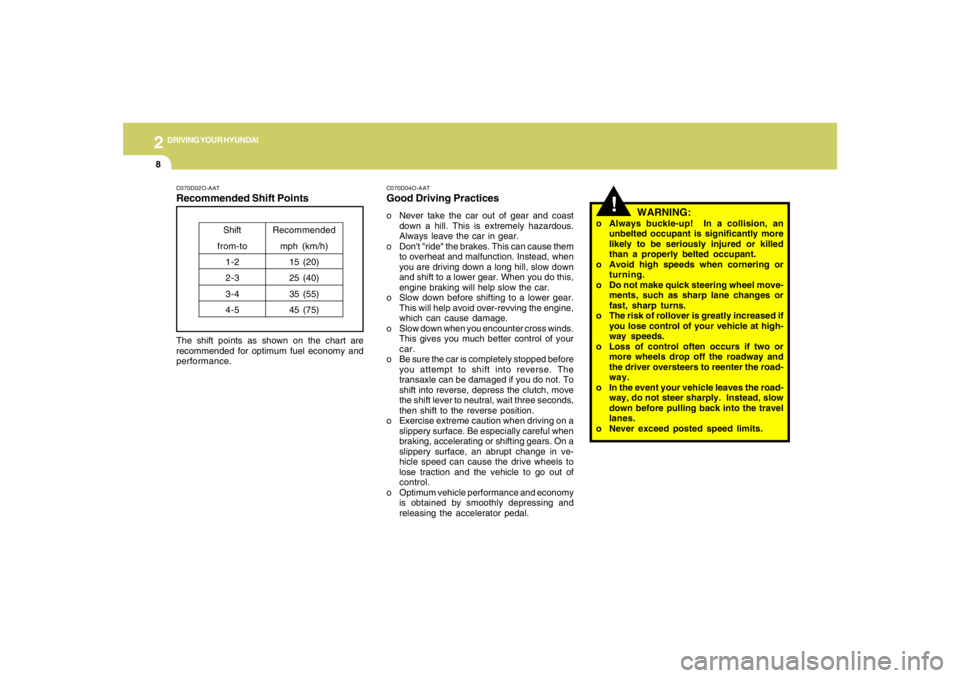
C070D02O-AATRecommended Shift PointsThe shift points as shown on the chart are
recommended for optimum fuel economy and
performance.
Shift
from-to
1-2
2-3
3-4
4-5Recommended
mph (km/h)
15 (20)
25 (40)
35 (55)
45 (75)
C070D04O-AATGood Driving Practiceso Never take the car out of gear and coast
down a hill. This is extremely hazardous.
Always leave the car in gear.
o Don't "ride" the brakes. This can cause them
to overheat and malfunction. Instead, when
you are driving down a long hill, slow down
and shift to a lower gear. When you do this,
engine braking will help slow the car.
o Slow down before shifting to a lower gear.
This will help avoid over-revving the engine,
which can cause damage.
o Slow down when you encounter cross winds.
This gives you much better control of your
car.
o Be sure the car is completely stopped before
you attempt to shift into reverse. The
transaxle can be damaged if you do not. To
shift into reverse, depress the clutch, move
the shift lever to neutral, wait three seconds,
then shift to the reverse position.
o Exercise extreme caution when driving on a
slippery surface. Be especially careful when
braking, accelerating or shifting gears. On a
slippery surface, an abrupt change in ve-
hicle speed can cause the drive wheels to
lose traction and the vehicle to go out of
control.
o Optimum vehicle performance and economy
is obtained by smoothly depressing and
releasing the accelerator pedal.
Page 163 of 289
2
DRIVING YOUR HYUNDAI
12
!
C090N05O-AATGood Driving Practiceso Never move the gear selector lever from "P"
or "N" to any other position with the accelera-
tor pedal depressed.
o Never move the gear selector lever into "P"
when the vehicle is in motion.
o Be sure the car is completely stopped before
you attempt to shift into "R".
o Never take the car out of gear and coast
down a hill. This may be extremely hazard-
ous. Always leave the car in gear when
moving.
o Do not "ride" the brakes. This can cause
them to overheat and malfunction. Instead,
when you are driving down a long hill, slow
down and shift to a lower gear. When you do
this, engine braking will help slow the car.
o Slow down before shifting to a lower gear.
Otherwise, the lower gear may not be en-
gaged.
o Always use the parking brake. Do not de-
pend on placing the transaxle in "P" to keep
the car from moving.
o Exercise extreme caution when driving on a
slippery surface. Be especially careful when
braking, accelerating or shifting gears. On a
slippery surface, an abrupt change in ve-
hicle speed can cause the drive wheels to
lose traction and the vehicle to go out of
control.
WARNING:
o Always buckle-up! In a collision, an
unbelted occupant is significantly more
likely to be seriously injured or killed
than a properly belted occupant.
o Avoid high speeds when cornering or
turning.
o Do not make quick steering wheel move-
ments, such as sharp lane changes or
fast, sharp turns.
o The risk of rollover is greatly increased if
you lose control of your vehicle at high-
way speeds.
o Loss of control often occurs if two or
more wheels drop off the roadway and
the driver oversteers to reenter the road-
way.
o In the event your vehicle leaves the road-
way, do not steer sharply. Instead, slow
down before pulling back into the travel
lanes.
o Never exceed posted speed limits. o Optimum vehicle performance and economy
is obtained by smoothly depressing and
releasing the accelerator pedal.
CAUTION:
If your vehicle becomes stuck in snow,
mud, sand, etc., then you may attempt to
rock the vehicle free by moving it forward
and backward. Do not attempt this proce-
dure if people or objects are anywhere near
the vehicle. During the rocking operation
the vehicle may suddenly move forward of
backward as it becomes unstuck, causing
injury to nearby people or damage to ob-
jects.
!
Page 164 of 289
2
DRIVING YOUR HYUNDAI
13
!
WARNING:
ABS / TCS / ESC will not prevent accidents
due to improper or dangerous driving ma-
neuvers. Even though vehicle control is
improved during emergency braking, al-
ways maintain a safe distance between you
and objects ahead. Vehicle speeds should
always be reduced during extreme road
conditions.
The braking distance for cars equipped
with an anti-lock braking system / TCS / ESC
may be longer than for those without it in
the following road conditions. During these
conditions the vehicle should be driven at
reduced speeds:
o Rough, gravel or snow-covered roads.
o With tire chains installed.
o On roads where the road surface is pit-
ted or has different surface height.
The safety features of an ABS / TCS / ESC
equipped vehicle should not be tested by
high speed driving or cornering. This could
endanger the safety of yourself or others.
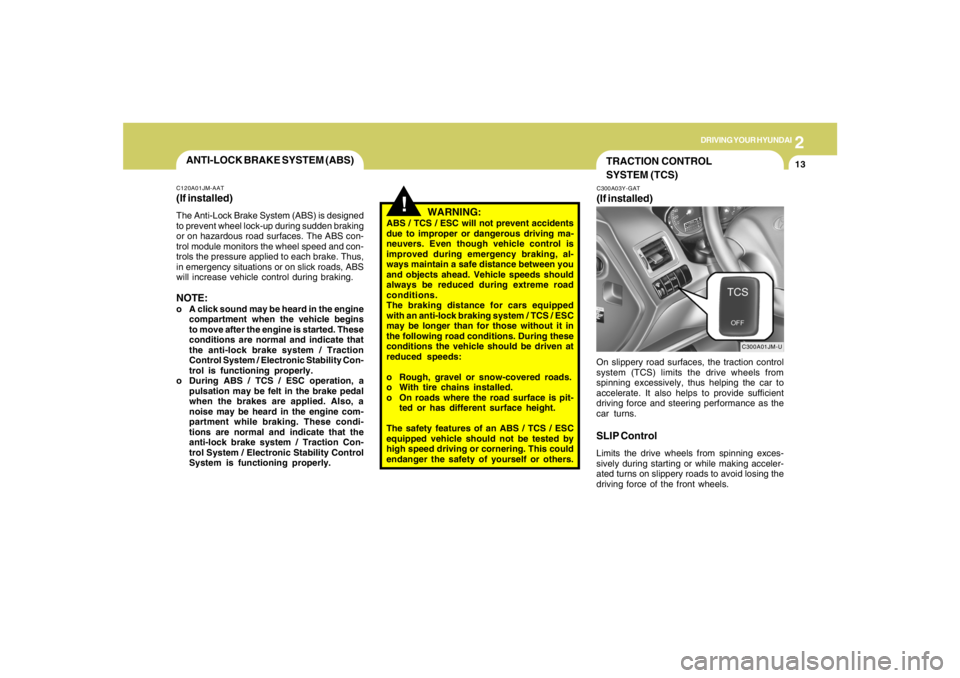
TRACTION CONTROL
SYSTEM (TCS)C300A03Y-GAT(If installed)
C300A01JM-U
On slippery road surfaces, the traction control
system (TCS) limits the drive wheels from
spinning excessively, thus helping the car to
accelerate. It also helps to provide sufficient
driving force and steering performance as the
car turns.SLIP ControlLimits the drive wheels from spinning exces-
sively during starting or while making acceler-
ated turns on slippery roads to avoid losing the
driving force of the front wheels.
ANTI-LOCK BRAKE SYSTEM (ABS)C120A01JM-AAT(If installed)The Anti-Lock Brake System (ABS) is designed
to prevent wheel lock-up during sudden braking
or on hazardous road surfaces. The ABS con-
trol module monitors the wheel speed and con-
trols the pressure applied to each brake. Thus,
in emergency situations or on slick roads, ABS
will increase vehicle control during braking.NOTE:o A click sound may be heard in the engine
compartment when the vehicle begins
to move after the engine is started. These
conditions are normal and indicate that
the anti-lock brake system / Traction
Control System / Electronic Stability Con-
trol is functioning properly.
o During ABS / TCS / ESC operation, a
pulsation may be felt in the brake pedal
when the brakes are applied. Also, a
noise may be heard in the engine com-
partment while braking. These condi-
tions are normal and indicate that the
anti-lock brake system / Traction Con-
trol System / Electronic Stability Control
System is functioning properly.
Page 166 of 289
2
DRIVING YOUR HYUNDAI
15
!
CAUTION:
Driving with varying tire or wheel size may
cause the ESC system to malfunction. When
replacing tires, make sure they are the same
size as your original tires.
!
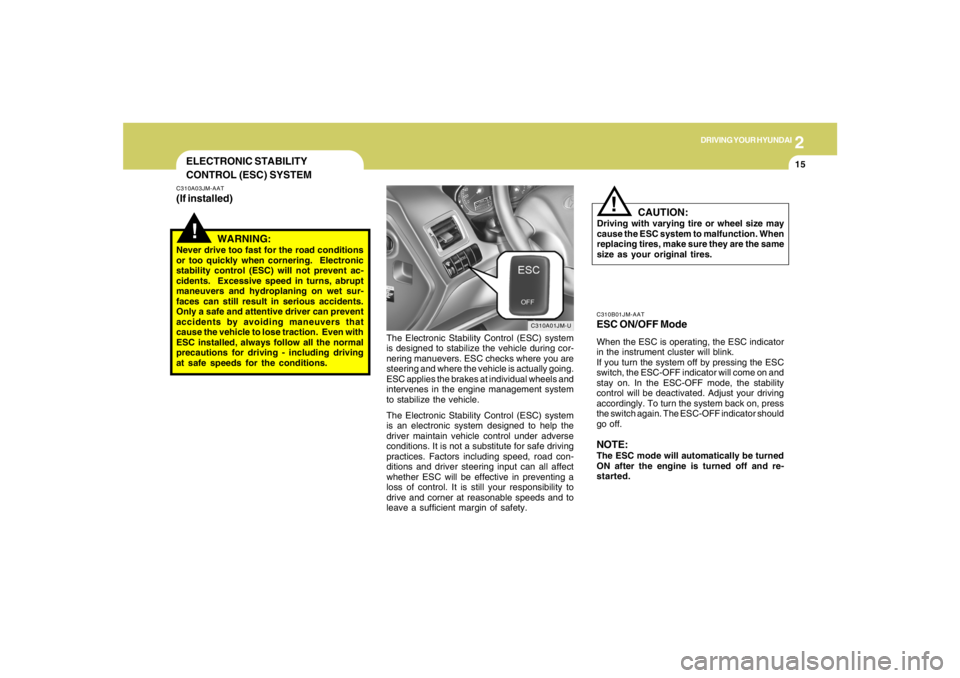
ELECTRONIC STABILITY
CONTROL (ESC) SYSTEMC310A03JM-AAT(If installed)
C310A01JM-U
The Electronic Stability Control (ESC) system
is designed to stabilize the vehicle during cor-
nering manuevers. ESC checks where you are
steering and where the vehicle is actually going.
ESC applies the brakes at individual wheels and
intervenes in the engine management system
to stabilize the vehicle.
The Electronic Stability Control (ESC) system
is an electronic system designed to help the
driver maintain vehicle control under adverse
conditions. It is not a substitute for safe driving
practices. Factors including speed, road con-
ditions and driver steering input can all affect
whether ESC will be effective in preventing a
loss of control. It is still your responsibility to
drive and corner at reasonable speeds and to
leave a sufficient margin of safety.
WARNING:
Never drive too fast for the road conditions
or too quickly when cornering. Electronic
stability control (ESC) will not prevent ac-
cidents. Excessive speed in turns, abrupt
maneuvers and hydroplaning on wet sur-
faces can still result in serious accidents.
Only a safe and attentive driver can prevent
accidents by avoiding maneuvers that
cause the vehicle to lose traction. Even with
ESC installed, always follow all the normal
precautions for driving - including driving
at safe speeds for the conditions.
C310B01JM-AATESC ON/OFF ModeWhen the ESC is operating, the ESC indicator
in the instrument cluster will blink.
If you turn the system off by pressing the ESC
switch, the ESC-OFF indicator will come on and
stay on. In the ESC-OFF mode, the stability
control will be deactivated. Adjust your driving
accordingly. To turn the system back on, press
the switch again. The ESC-OFF indicator should
go off.NOTE:The ESC mode will automatically be turned
ON after the engine is turned off and re-
started.
Page 169 of 289
2
DRIVING YOUR HYUNDAI
18
!
CAUTION:
o While the full-time 4WD vehicle is being
raised on a jack, never start the engine or
cause the tires to rotate.
There is danger that rotating tires touch-
ing the ground could cause the vehicle
to go off the jack and to jump forward.
o If one of the front or rear wheels begins
to spin in mud, snow, etc., the vehicle
can sometimes be driven out by de-
pressing the accelerator pedal further;
however, avoid running the engine con-
tinuously at high rpm because doing so
could damage the 4WD system. (10)When using tire chains, always attach them
to the front wheels.
(11)If the front or rear wheels get stuck in the
mud, do not spin them recklessly. The 4WD
system could be damaged.
o In rare cases when it's unavoidable that
a 4WD vehicle is to be inspected on a
2WD roll tester, strictly follow the proce-
dures.
1. Check the tire pressures recom-
mended for your vehicle.
2. Place the front wheels on the roll
tester as shown in the illustration.
3. Release the parking brake.
4. Place the rear wheels on the tempo-
rary free roller as shown in the illustra-
tion.
!!
WARNING:
Keep away from the front of the vehicle
while inspecting. This is very dangerous as
the vehicle can jump forward and cause
serious injury or death.
!
WARNING:
o Avoid high cornering speeds.
o Do not make quick steering wheel move-
ments, such as sharp lane charges or
fast, sharp turns.
o The risk of rollover is greatly increased if
you lose control of your vehicle at high-
way speeds.
o In a collision, an unbelted person is
signicantly more likely to be seriously
injured or killed than a person wearing a
seat belt.
o Loss of control may occurs if two or
more wheels drop off the roadway and
the driver oversteers to reenter the road-
way.
o In the event your vehicle leaves the road-
way, do not steer sharply. Instead, slow
down before pulling back into the travel
lanes. (9) For a speedometer test or inspection/main-
tenance (I/M) program of a Tucson 4WD
vehicle, use a four wheel chassis dynamom-
eter.
CAUTION:
Never engage the parking brake while per-
forming these tests.
Page 175 of 289

2
DRIVING YOUR HYUNDAI
24
C160K01A-AATCarry Emergency EquipmentDepending on the severity of the weather where
you drive your car, you should carry appropri-
ate emergency equipment. Some of the items
you may want to carry include tire chains, tow
straps or chains, flashlight, emergency flares,
sand, a shovel, jumper cables, a window scraper,
gloves, ground cloth, coveralls, a blanket, etc.
C160H02A-AATUse Approved Window Washer Anti-
Freeze in SystemTo keep the water in the window washer system
from freezing, add an approved window washer
anti-freeze solution in accordance with instruc-
tions on the container. Window washer anti-
freeze is available from Hyundai dealers and
most auto parts outlets. Do not use engine
coolant or other types of anti-freeze as these
may damage the paint finish.
C160G01A-AATTo Keep Locks from FreezingTo keep the locks from freezing, squirt an
approved de-icer fluid or glycerine into the key
opening. If a lock is covered with ice, squirt it with
an approved de-icing fluid to remove the ice. If
the lock is frozen internally, you may be able to
thaw it out by using a heated key. Handle the
heated key with care to avoid injury.
C160J01A-AATDon't Let Ice and Snow Accumulate
UnderneathUnder some conditions, snow and ice can build
up under the fenders and interfere with the
steering. When driving in severe winter condi-
tions where this may happen, you should peri-
odically check underneath the car to be sure the
movement of the front wheels and the steering
components is not obstructed.
C160I01A-AATDon't Let Your Parking Brake FreezeUnder some conditions your parking brake can
freeze in the engaged position. This is most
likely to happen when there is an accumulation
of snow or ice around or near the rear brakes
or if the brakes are wet. If there is a risk the
parking brake may freeze, apply it only tempo-
rarily while you put the gear selector lever in "P"
(automatic) or in first or reverse gear (manual
transaxle) and block the rear wheels so the car
cannot roll. Then release the parking brake.
C160F01A-AATCheck Spark Plugs and Ignition
SystemInspect your spark plugs as described in Sec-
tion 6 and replace them if necessary. Also
check all ignition wiring and components to be
sure they are not cracked, worn or damaged in
any way.C160E01A-AATChange to "Winter Weight" Oil if
NecessaryIn some climates it is recommended that a lower
viscosity "winter weight" oil be used during cold
weather. See Section 9 for recommendations.
If you aren't sure what weight oil you should use,
consult your Hyundai dealer.
Page 179 of 289
2
DRIVING YOUR HYUNDAI
28
C190F01O-AATTrailer or Vehicle Towing Tips1. Before towing, check hitch and safety chain
connections as well as proper operation of
the trailer running lights, brake lights, and
turn signals.
2. Trailer towing requires more fuel than normal
conditions.
3. To maintain engine braking efficiency, do not
tow a trailer with the transaxle in fifth gear
(manual transaxle) or overdrive (automatic
transaxle).
4. Always secure items in the trailer to prevent
load shift while driving.
5. Check the condition and air pressure of all
tires on the trailer and your car. Low tire
pressure can seriously affect the handling.
Also check the spare tire.
6. The vehicle/trailer combination is more af-
fected by crosswind and buffeting.
When being passed by a large vehicle, keep
a constant speed and steer straight ahead.
If there is too much wind buffeting, slow down
to get out of the other vehicle's air turbulence.
7. When parking your car and trailer, especially
on a hill, be sure to follow all the normal
precautions. Turn your front wheel into the
curb, set the parking brake firmly, and put the
transaxle in 1st or Reverse (manual) or Park
(automatic). In addition, place wheel chocks
at each of the trailer's tires.8. If the trailer has electric brakes, start your
vehicle and trailer moving, and then apply the
trailer brake controller by hand to be sure the
brakes are working. This lets you check
your electrical connection at the same time.
9. During your trip, check occasionally to be
sure that the load is secure, and that the
lights and any trailer brakes are still working.
10.Avoid jerky starts, sudden acceleration or
sudden stops.
11.Avoid sharp turns and rapid lane changes.
12.Avoid holding the brake pedal down too long
or too frequently. This could cause the brakes
to overheat, resulting in reduced braking
efficiency.
13.When going down a hill, shift into a lower gear
and use the engine braking effect.
When ascending a long grade, downshift the
transaxle to a lower gear and reduce speed
to reduce chances of engine overloading
and/or overheating.
14.If you have to stop while going uphill, do not
hold the vehicle in place by pressing on the
accelerator. This can cause the automatic
transaxle to overheat. Use the parking brake
or footbrake.
15.If the transaxle shifts frequently while going
up a hill, shift down one gear.
NOTE:When towing check transaxle fluid more
frequently.
!
WARNING:
o Improperly loading your vehicle and
trailer can seriously affect its steering
and braking performance causing a
crash which could cause serious injury
or death.
o Towing a trailer affected vehicle han-
dling and braking.
o Drive more slowly when towing a trailer
and allow more distance when braking.
o Be careful when driving in slippery and
windy conditions.
o Be careful when turning and while driv-
ing up and down hills.
o Do not exceed 45 mph or the posted
towing speed limit, whichever is lower.