ignition HYUNDAI TUCSON 2009 Owner's Manual
[x] Cancel search | Manufacturer: HYUNDAI, Model Year: 2009, Model line: TUCSON, Model: HYUNDAI TUCSON 2009Pages: 273, PDF Size: 10.29 MB
Page 71 of 273
1FEATURES OF YOUR HYUNDAI60
B340D01A-AATHigh-beam SwitchTo turn on the headlight high beams, push
the lever forward (away from you). The
High Beam Indicator Light will come on at
the same time. For low beams, pull the
lever back toward you.
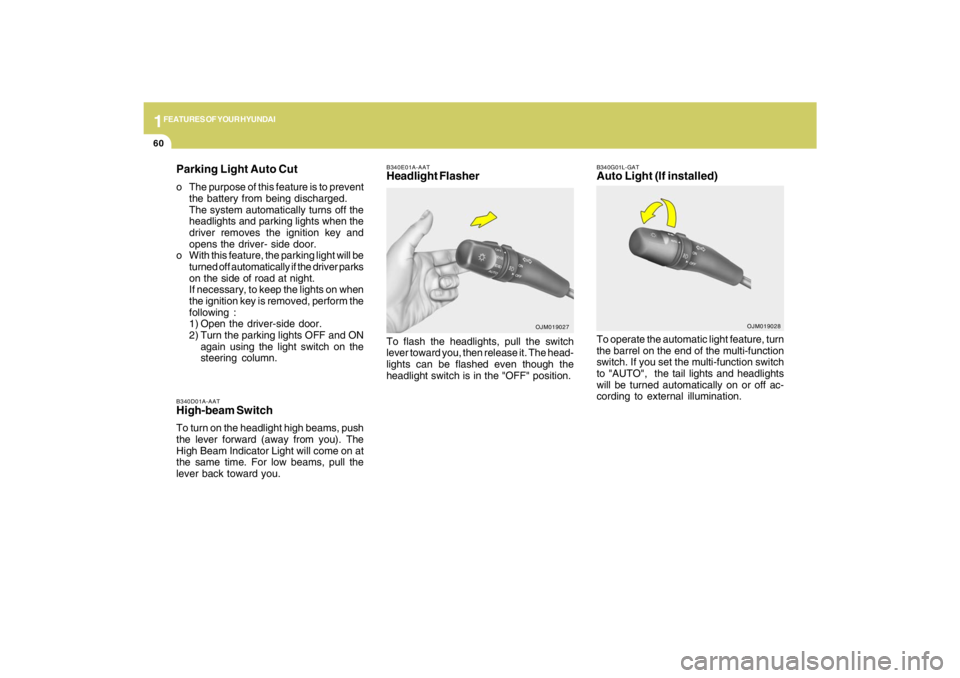
B340E01A-AATHeadlight FlasherTo flash the headlights, pull the switch
lever toward you, then release it. The head-
lights can be flashed even though the
headlight switch is in the "OFF" position.
OJM019027
Parking Light Auto Cuto The purpose of this feature is to prevent
the battery from being discharged.
The system automatically turns off the
headlights and parking lights when the
driver removes the ignition key and
opens the driver- side door.
o With this feature, the parking light will be
turned off automatically if the driver parks
on the side of road at night.
If necessary, to keep the lights on when
the ignition key is removed, perform the
following :
1) Open the driver-side door.
2) Turn the parking lights OFF and ON
again using the light switch on the
steering column.
B340G01L-GATAuto Light (If installed)To operate the automatic light feature, turn
the barrel on the end of the multi-function
switch. If you set the multi-function switch
to "AUTO", the tail lights and headlights
will be turned automatically on or off ac-
cording to external illumination.
OJM019028
Page 72 of 273
1
FEATURES OF YOUR HYUNDAI
61
WINDSHIELD WIPER AND WASHER SWITCH
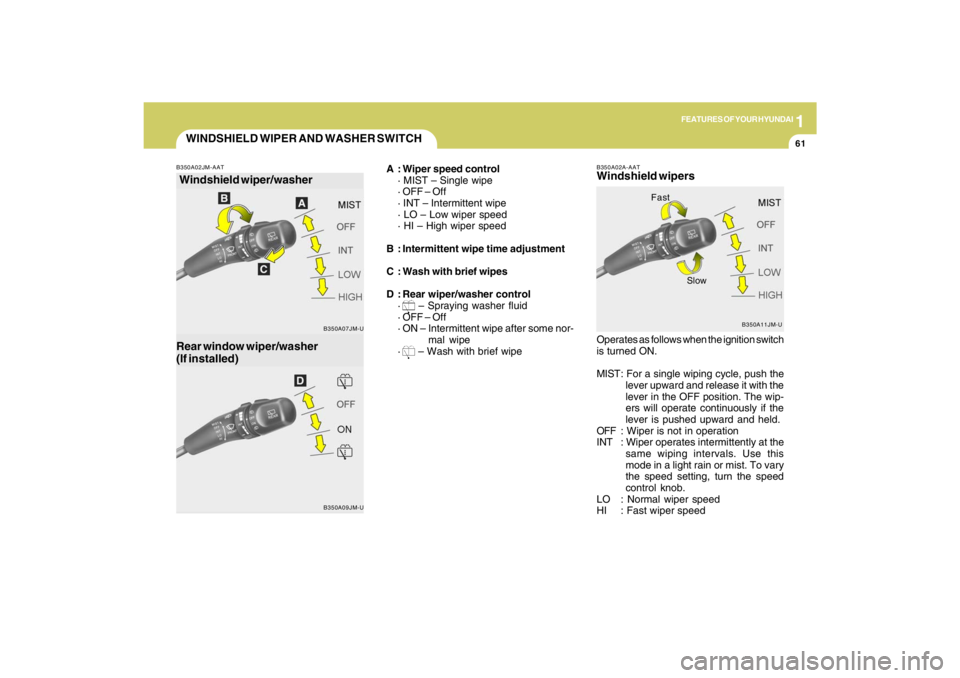
A : Wiper speed control
· MIST – Single wipe
· OFF – Off
· INT – Intermittent wipe
· LO – Low wiper speed
· HI – High wiper speed
B : Intermittent wipe time adjustment
C : Wash with brief wipes
D : Rear wiper/washer control
·
– Spraying washer fluid
· OFF – Off
· ON – Intermittent wipe after some nor-
mal wipe
· – Wash with brief wipe
Windshield wiper/washer
B350A09JM-U B350A02JM-AAT
Rear window wiper/washer
(If installed)
B350A07JM-UB350A02A-AAT
Windshield wipers
B350A11JM-U
Operates as follows when the ignition switch
is turned ON.
MIST: For a single wiping cycle, push the
lever upward and release it with the
lever in the OFF position. The wip-
ers will operate continuously if the
lever is pushed upward and held.
OFF : Wiper is not in operation
INT : Wiper operates intermittently at the
same wiping intervals. Use this
mode in a light rain or mist. To vary
the speed setting, turn the speed
control knob.
LO : Normal wiper speed
HI : Fast wiper speed
Fast
Slow
Page 75 of 273
1FEATURES OF YOUR HYUNDAI64
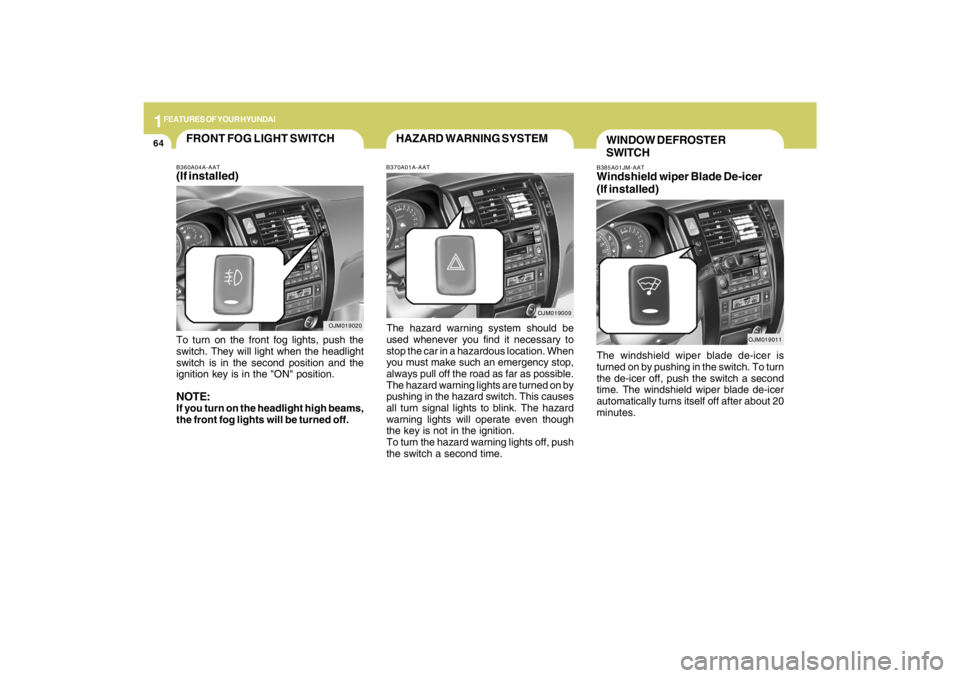
B385A01JM-AATWindshield wiper Blade De-icer
(If installed)The windshield wiper blade de-icer is
turned on by pushing in the switch. To turn
the de-icer off, push the switch a second
time. The windshield wiper blade de-icer
automatically turns itself off after about 20
minutes.
OJM019011
WINDOW DEFROSTER
SWITCH
OJM019009
HAZARD WARNING SYSTEMB370A01A-AATThe hazard warning system should be
used whenever you find it necessary to
stop the car in a hazardous location. When
you must make such an emergency stop,
always pull off the road as far as possible.
The hazard warning lights are turned on by
pushing in the hazard switch. This causes
all turn signal lights to blink. The hazard
warning lights will operate even though
the key is not in the ignition.
To turn the hazard warning lights off, push
the switch a second time.
OJM019020
FRONT FOG LIGHT SWITCHB360A04A-AAT(If installed)To turn on the front fog lights, push the
switch. They will light when the headlight
switch is in the second position and the
ignition key is in the "ON" position.NOTE:If you turn on the headlight high beams,
the front fog lights will be turned off.
Page 80 of 273
1
FEATURES OF YOUR HYUNDAI
69
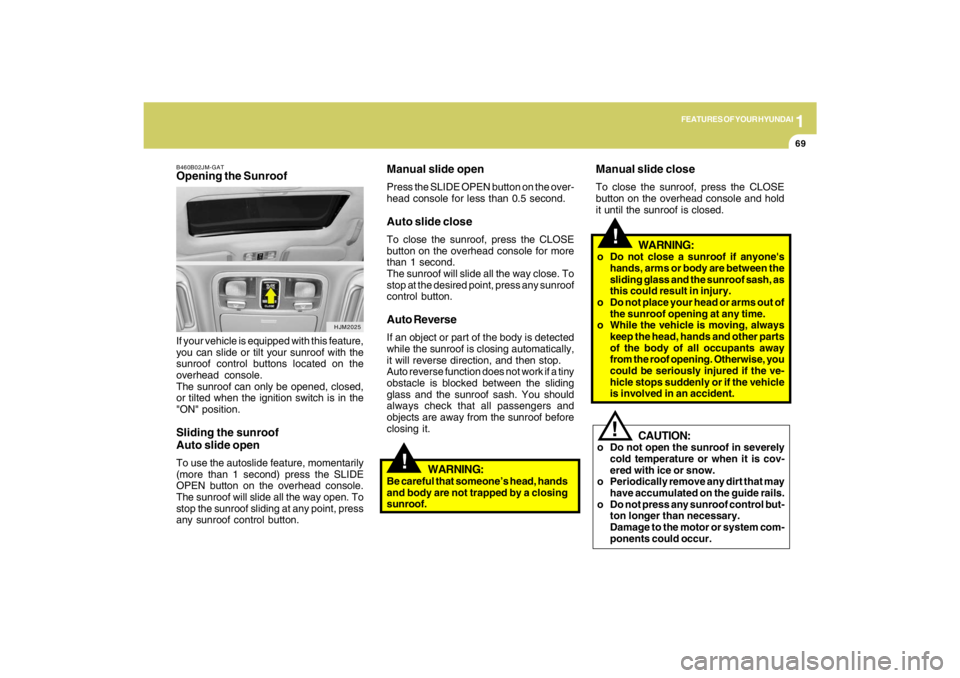
B460B02JM-GATOpening the SunroofIf your vehicle is equipped with this feature,
you can slide or tilt your sunroof with the
sunroof control buttons located on the
overhead console.
The sunroof can only be opened, closed,
or tilted when the ignition switch is in the
"ON" position.Sliding the sunroof
Auto slide openTo use the autoslide feature, momentarily
(more than 1 second) press the SLIDE
OPEN button on the overhead console.
The sunroof will slide all the way open. To
stop the sunroof sliding at any point, press
any sunroof control button.
HJM2025
!
Manual slide openPress the SLIDE OPEN button on the over-
head console for less than 0.5 second.Auto slide closeTo close the sunroof, press the CLOSE
button on the overhead console for more
than 1 second.
The sunroof will slide all the way close. To
stop at the desired point, press any sunroof
control button.Auto ReverseIf an object or part of the body is detected
while the sunroof is closing automatically,
it will reverse direction, and then stop.
Auto reverse function does not work if a tiny
obstacle is blocked between the sliding
glass and the sunroof sash. You should
always check that all passengers and
objects are away from the sunroof before
closing it.
!
WARNING:
o Do not close a sunroof if anyone's
hands, arms or body are between the
sliding glass and the sunroof sash, as
this could result in injury.
o Do not place your head or arms out of
the sunroof opening at any time.
o While the vehicle is moving, always
keep the head, hands and other parts
of the body of all occupants away
from the roof opening. Otherwise, you
could be seriously injured if the ve-
hicle stops suddenly or if the vehicle
is involved in an accident.
!
CAUTION:
o Do not open the sunroof in severely
cold temperature or when it is cov-
ered with ice or snow.
o Periodically remove any dirt that may
have accumulated on the guide rails.
o Do not press any sunroof control but-
ton longer than necessary.
Damage to the motor or system com-
ponents could occur.
WARNING:
Be careful that someone’s head, hands
and body are not trapped by a closing
sunroof.
Manual slide closeTo close the sunroof, press the CLOSE
button on the overhead console and hold
it until the sunroof is closed.
Page 81 of 273
1FEATURES OF YOUR HYUNDAI70
B460E02JM-GATResetting the sunroofWhenever the vehicle battery is disconnected
or discharged, you have to reset your sunroof
system as follows:
1. Turn the ignition key to the ON position.
2. According to the position of the sunroof,
do as follows.
1) In case that the sunroof has closed
completely or been tilted : Press the
TILT UP button for 1 second.
2) In case that the sunroof has slide-
opened: Press and hold the CLOSE
button for more than 5 seconds until
the sunroof has closed completely.
And then press the TILT UP button for
1 second
3. Then, release it.
4. Press and hold the TILT UP button once
again until the sunroof has returned to
the original position of TILT UP after it is
raised a little higher than the maximum
TILT UP position. When this is com-
plete, the sunroof system is reset.
CAUTION:
If the sunroof is not reset, it may not
operate properly.
!
CloseTo close the sunroof, press the CLOSE
button on the overhead console and hold
it until the sunroof is closed.NOTE:After washing the car or after there is
rain, be sure to wipe off any water that is
on the sunroof before operating it.
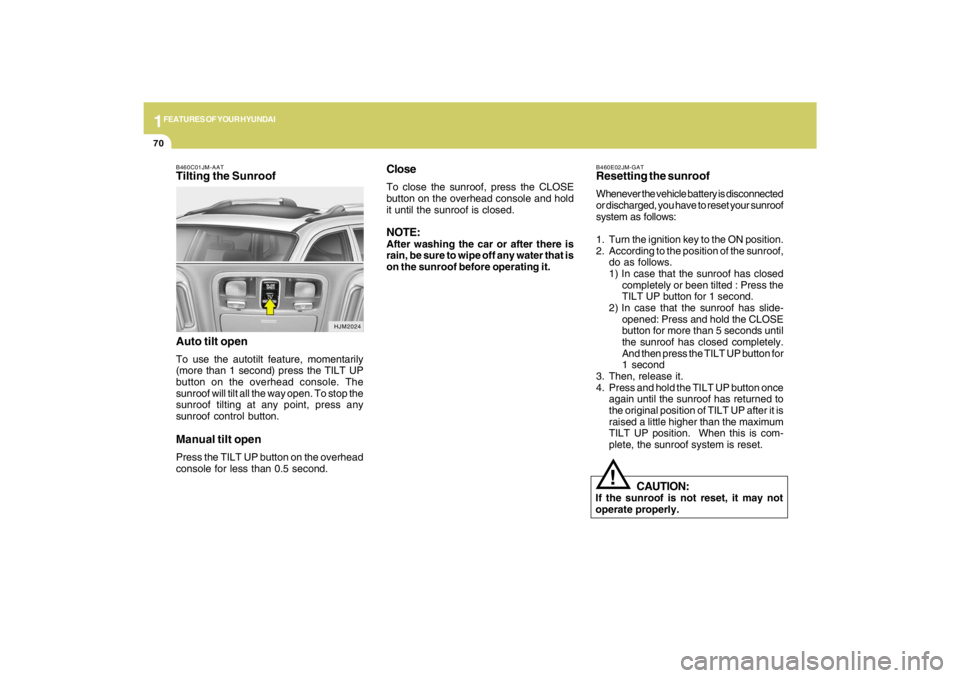
B460C01JM-AATTilting the Sunroof
Auto tilt openTo use the autotilt feature, momentarily
(more than 1 second) press the TILT UP
button on the overhead console. The
sunroof will tilt all the way open. To stop the
sunroof tilting at any point, press any
sunroof control button.Manual tilt openPress the TILT UP button on the overhead
console for less than 0.5 second.
HJM2024
Page 82 of 273
1
FEATURES OF YOUR HYUNDAI
71
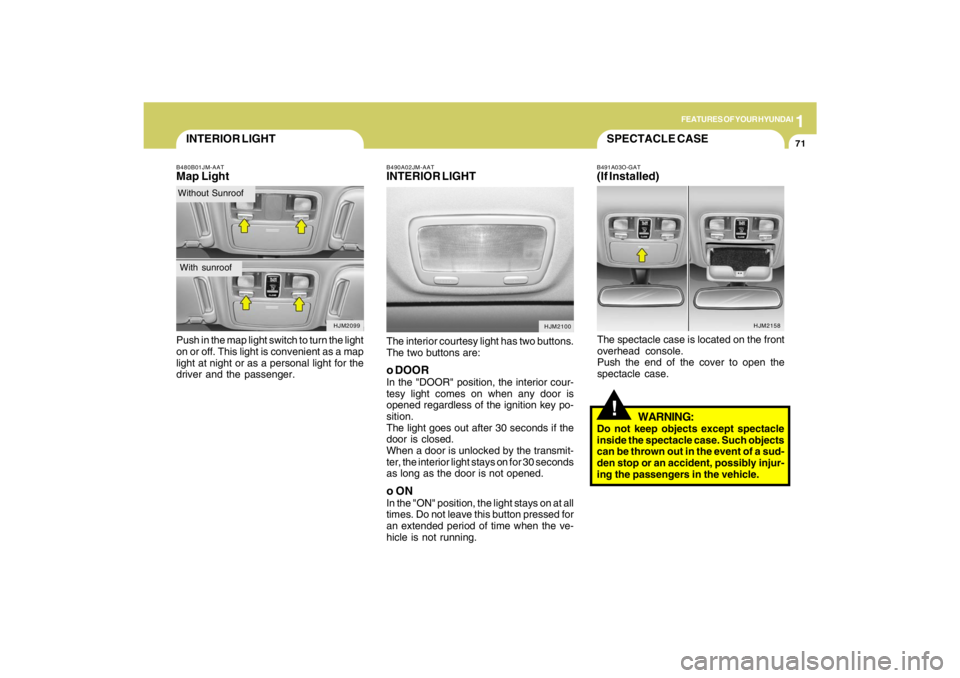
INTERIOR LIGHTB480B01JM-AATMap LightPush in the map light switch to turn the light
on or off. This light is convenient as a map
light at night or as a personal light for the
driver and the passenger.
HJM2099
Without SunroofWith sunroof
B490A02JM-AATINTERIOR LIGHTThe interior courtesy light has two buttons.
The two buttons are:o DOORIn the "DOOR" position, the interior cour-
tesy light comes on when any door is
opened regardless of the ignition key po-
sition.
The light goes out after 30 seconds if the
door is closed.
When a door is unlocked by the transmit-
ter, the interior light stays on for 30 seconds
as long as the door is not opened.o ONIn the "ON" position, the light stays on at all
times. Do not leave this button pressed for
an extended period of time when the ve-
hicle is not running.
HJM2100
HJM2158
SPECTACLE CASE!
B491A03O-GAT(If Installed)The spectacle case is located on the front
overhead console.
Push the end of the cover to open the
spectacle case.
WARNING:
Do not keep objects except spectacle
inside the spectacle case. Such objects
can be thrown out in the event of a sud-
den stop or an accident, possibly injur-
ing the passengers in the vehicle.
Page 125 of 273

1FEATURES OF YOUR HYUNDAI
114
1. FM Selection ButtonTurns to FM mode and toggles FM1 and
FM2 when the button is pressed each time.2. AM Selection ButtonTurns to AM mode, and toggles in the order
of AM1➟AM2➟···➟AM1···when the button
is pressed each time.3. XM Selection ButtonTurns to XM mode, and toggles in the order
of XM1➟XM2➟XM3➟···➟XM1··· when the
button is pressed each time.4. CD/AUX Selection ButtonIf there is a cd in the CDP DECK it turns to
CD mode, and if a device is connected to
AUX then it toggles.
CD➟AUX➟CD··· when the button is
pressed each time.(It will not turn to AUX if
the auxiliary device is not connected)
5. Automatic Channel Selection
Buttono When the [SEEK
]button is pressed,
it reduces the band frequency by 200khz
to automatically select channel. Stops
at the previous frequency if no channel
is found.
o When the [SEEK ]button is pressed,
it increases the band frequency by
50khz to automatically select channel.
Stops at the previous frequency if no
channel is found.
6. Power ON/OFF & Volume Control
ButtonTurns on/off the set when the IGNITION
SWITCH is on ACC or ON. If the button is
turned to the right, it increases the volume
and left, decreases the volume.7. MUTE ButtonPress to temporarily cut off the Sound.8. SCAN ButtonIf this button is pressed, the frequencies
will become increased and receive the
corresponding broadcasts.
This function will play the frequencies for
5 seconds (XM MODE : 10 seconds) each
and find other broadcasts as the frequency
increases.Press the button again when desiring to
continue listening to the currently playing
broadcast.
9. Information Display ButtonInformation Display function operation (In-
formation is displayed each time (the) Key
is pressed) : Pressing the Category
➟Channel Name ➟Artist Name➟Song
Title➟Category-KEY for 3 seconds will
display the corresponding text then be-
come restored.
Text Scroll operation :
After pressing (the) Key, if the text to be
displayed is longer than the LCD text line,
then rotating the Tune Knob will operate
the Page up function displaying 8 charac-
ters for 3 seconds each - displays the
maximum lines of text supported by XM.10. SET UP ButtonPress this button to turn to the XMoption,
SCROLL and adjustment mode.
If no action is taken for 5 seconds after
pressing the button, it will return to the play
mode.(After entering SET UP mode, move
between items using the left, right and
PUSH functions of the TUNE button.)
The set up item changes from AUDIO ad-
justment, TEXT SCROLL, XM setup.
Page 128 of 273

1
FEATURES OF YOUR HYUNDAI
117117117117117
1. CD Loading SlotPlease face printed side upward and gen-
tly push in. When the ignition switch is on
ACC or ON and power is off, power is
automatically turned on if the CD is loaded.
This CDP supports both 8cm and 12 cm
CDs. But if VCD, Data CD, MP3 CD are
loaded, "Er-6" message will appear and
CD will be ejected.2. CD IndicatorWhen car ignition switch is ACC or ON and
if the CD is loaded, this indicator is lighted.
If the CD is ejected the light is turned off.3. CD Eject ButtonPush
button to eject the CD during CD
playback. This button is enabled when
ignition switch is off.
4. CD/AUX Selection ButtonIf there is a cd in the CDP DECK it turns to
CD mode, and if a device is connected to
AUX then it toggles.
CD➟AUX➟CD··· when the button is
pressed each time.(It will not turn to AUX if
the auxiliary device is not connected)
5. Automatic Track Selection Buttono Push [SEEK
] button for less than 0.8
seconds to play from the beginning of
current song.
o Push [SEEK ] button for less than 0.8
seconds and press again within 1 sec-
onds to play the previous song.
o Push [SEEK ] button for 0.8 or longer
to initiate reverse direction high speed
sound search of current song.
o Push [SEEK ] button for less than 0.8
seconds to play the next song.
o Push [SEEK ] button for 0.8 or longer
to initiate high speed sound search of
current song.
6. INFO ButtonDisplays the information of the current CD
TRACK in the order of DISC TITLE ➟DISC
ARTIST➟TRACK TITLE➟ TRACK ART-
IST ➟TOTAL TRACK➟ Play Screen ➟DISC
TITLE➟···.(not displayed if the information
is not available on the DISC.)7. TUNE/ENTER ButtonTurn this button clockwise to display songs
after current song.
Also, turn this button counterclockwise to
display songs before current song.
To listen to the displayed song, press the
button to skip to the song and play.Pressing the changes the BASS, MIDR-
ANGE, TREBLE, FADER and BALANCE
TUNE mode.
The mode selected is shown on the dis-
play. After selecting each mode, rotate the
Audio control knob clockwise or counter-
clockwise.
o BASS Control
To increase the BASS, rotate the knob
clockwise, while to decrease the BASS,
rotate the knob counterclockwise.
o MID-RANGE Control
To increase the MID-RANGE, rotate the
knob clockwise, while to decrease the
MID-RANGE, rotate the knob counterclock-
wise.
o TREBLE Control
To increase the TREBLE, rotate the knob
clockwise, while to decrease the TREBLE,
rotate the knob counterclockwise.
o FADER Control
Turn the control knob clockwise to emph-
asize rear speaker sound (front speaker
sound will be attenuated). When the con-
trol knob is turned counterclockwise, front
speaker sound will be emphasized (rear
speaker sound will be attenuated).
Page 131 of 273

1FEATURES OF YOUR HYUNDAI
120
1. FM Selection ButtonTurns to FM mode and toggles FM1 and
FM2 when the button is pressed each time.2. AM Selection ButtonTurns to AM mode, and toggles in the order
of AM1➟AM2➟···➟AM1···when the button
is pressed each time.3. XM Selection ButtonTurns to XM mode, and toggles in the order
of XM1➟XM2➟XM3➟···➟XM1··· when the
button is pressed each time.4. CD/AUX Selection ButtonIf there is a cd in the CDP DECK it turns to
CD mode, and if a device is connected to
AUX then it toggles.
CD➟AUX➟CD··· when the button is
pressed each time.(It will not turn to AUX if
the auxiliary device is not connected)
5. Automatic Channel Selection
Buttono When the [SEEK
]button is pressed,
it reduces the band frequency by 200khz
to automatically select channel. Stops
at the previous frequency if no channel
is found.
o When the [SEEK ]button is pressed,
it increases the band frequency by
50khz to automatically select channel.
Stops at the previous frequency if no
channel is found.
6. Power ON/OFF & Volume Control
ButtonTurns on/off the set when the IGNITION
SWITCH is on ACC or ON. If the button is
turned to the right, it increases the volume
and left, decreases the volume.7. MUTE ButtonPress to temporarily cut off the Sound.8. SCAN ButtonIf this button is pressed, the frequencies
will become increased and receive the
corresponding broadcasts.
This function will play the frequencies for
5 seconds (XM MODE : 10 seconds) each
and find other broadcasts as the frequency
increases.Press the button again when desiring to
continue listening to the currently playing
broadcast.
9. Information Display ButtonInformation Display function operation (In-
formation is displayed each time (the) Key
is pressed) : Pressing the Category
➟Channel Name ➟Artist Name➟Song
Title➟Category-KEY for 3 seconds will
display the corresponding text then be-
come restored.
Text Scroll operation :
After pressing (the) Key, if the text to be
displayed is longer than the LCD text line,
then rotating the Tune Knob will operate
the Page up function displaying 8 charac-
ters for 3 seconds each - displays the
maximum lines of text supported by XM.10. SET UP ButtonPress this button to turn to the XMoption,
SCROLL and adjustment mode.
If no action is taken for 5 seconds after
pressing the button, it will return to the play
mode.(After entering SET UP mode, move
between items using the left, right and
PUSH functions of the TUNE button.)
The set up item changes from AUDIO ad-
justment, TEXT SCROLL, XM setup.
Page 134 of 273

1
FEATURES OF YOUR HYUNDAI
123123123123123
1. CD Loading SlotPlease face printed side upward and gen-
tly push in. When the ignition switch is on
ACC or ON and power is off, power is
automatically turned on if the CD is loaded.
This CDP supports both 8cm and 12 cm
CDs. But if VCD, Data CD, MP3 CD are
loaded, "Er-6" message will appear and
CD will be ejected.2. CD Eject ButtonPush
button to eject the CD during CD
playback. This button is enabled when
ignition switch is off.
3. CD LOAD ButtonPush [LOAD] button to load CDs to avail-
able CDC deck (from 1~6). Push [LOAD]
button for more than 2 seconds to load into
all available decks.
The last CD will play. 10 seconds idle
status will disable loading process.4. CD/AUX Selection ButtonIf the auxiliary device is connected, it turns
to AUX MODE to play the sound from the
auxiliary player.
If no auxiliary device is connected, it dis-
plays ""NO MEDIA"" for 5 seconds and
returns to the previous mode."
5. Automatic Track Selection Buttono Push [SEEK
] button for less than 0.8
seconds to play from the beginning of
current song.
o Push [SEEK ] button for less than 0.8
seconds and press again within 1 sec-
onds to play the previous song.
o Push [SEEK ] button for 0.8 or longer
to initiate reverse direction high speed
sound search of current song.
o Push [SEEK ] button for less than 0.8
seconds to play the next song.
o Push [SEEK ] button for 0.8 or longer
to initiate high speed sound search of
current song.
6. INFO ButtonDisplays the information of the current CD
TRACK in the order of DISC TITLE ➟DISC
ARTIST➟TRACK TITLE➟ TRACK
ARTIST➟TOTAL TRACK➟Play Screen
➟DISC TITLE➟···.(not displayed if the in-
formation is not available on the DISC.)7. TUNE/ENTER ButtonTurn this button clockwise to display songs
after current song.
Also, turn this button counterclockwise to
display songs before current song.
To listen to the displayed song, press the
button to skip to the song and play.Pressing the changes the BASS, MIDR-
ANGE, TREBLE, FADER and BALANCE
TUNE mode.
The mode selected is shown on the dis-
play. After selecting each mode, rotate the
Audio control knob clockwise or counter-
clockwise.
o BASS Control
To increase the BASS, rotate the knob
clockwise, while to decrease the BASS,
rotate the knob counterclockwise.
o MID-RANGE Control
To increase the MID-RANGE, rotate the
knob clockwise, while to decrease the
MID-RANGE, rotate the knob counterclock-
wise.
o TREBLE Control
To increase the TREBLE, rotate the knob
clockwise, while to decrease the TREBLE,
rotate the knob counterclockwise.
o FADER Control
Turn the control knob clockwise to emph-
asize rear speaker sound (front speaker
sound will be attenuated). When the con-
trol knob is turned counterclockwise, front
speaker sound will be emphasized (rear
speaker sound will be attenuated).