instrument cluster HYUNDAI TUCSON 2009 Owners Manual
[x] Cancel search | Manufacturer: HYUNDAI, Model Year: 2009, Model line: TUCSON, Model: HYUNDAI TUCSON 2009Pages: 273, PDF Size: 10.29 MB
Page 10 of 273

F9
1. Panel Brightness Control Knob (Rheostat Switch)
2. 4WD Lock Switch (If installed)
3. Traction Control System (TCS) Switch (If installed) /
Electronic Stability Control (ESC) Switch (If installed)
4. Instrument Cluster
5. Multi-Function Light Switch (If installed)
6. Front Window Defroster (If installed) / Aux Outlet (If
installed)
7. Hazard Warning Light Switch
8. Digital Clock
9. Windshield Wiper/Washer Switch10. Rear Defroster and Outside Rearview Mirror Heater Switch
(If installed)
11. Front Fog Light Switch (If installed)
12. Passenger's Airbag
13. Hood Release Lever
14. Horn and Driver's Airbag
15. Small Article Tray / Ashtray (If installed)
16. Cruise Control Switch (If installed)
17. Heating/Air Conditioning Control Panel (If installed)
18. Shift Lever (If installed)
19. Glove Box
CAUTION:
When installing a container of liquid air freshener inside the vehicle, do not place it near the instrument cluster
nor on the instrument panel surface. If there is any leakage from the air freshener onto these areas
(Instrument cluster, instrument panel or air ventilator), it may damage these parts. If the liquid from the air
freshener does leak onto these areas, wash them with water immediately.
!
Page 12 of 273
1
Fuel Recommendations ................................................ 1-2
Breaking in Your New Hyundai ..................................... 1-3
Keys.............................................................................. 1-3
Door .............................................................................. 1-4
Power Windows..........................................................1-12
Seats...........................................................................1-13
Seat Belts....................................................................1-19
Child Restraint System ...............................................1-26
Supplemental Restraint (AIRBAG) system .................1-34
Instrument Cluster and Indicator Lights...................... 1-48
Warning and Indicator Lights......................................1-50
Multi-Function Light Switch .........................................1-60
Windshield Wiper/Washer Switch...............................1-62
Sunroof.......................................................................1-72
Mirror...........................................................................1-76
How to use Luggage Room ........................................1-80
Hood Release .............................................................1-85
Cruise Control.............................................................1-88
Heating and Cooling Control .......................................1-93
Stereo Sound System...............................................1-109
Antenna.....................................................................1-111
Audio System............................................................1-113
1
FEATURES OF YOUR HYUNDAI
Page 50 of 273
1
FEATURES OF YOUR HYUNDAI
39
!
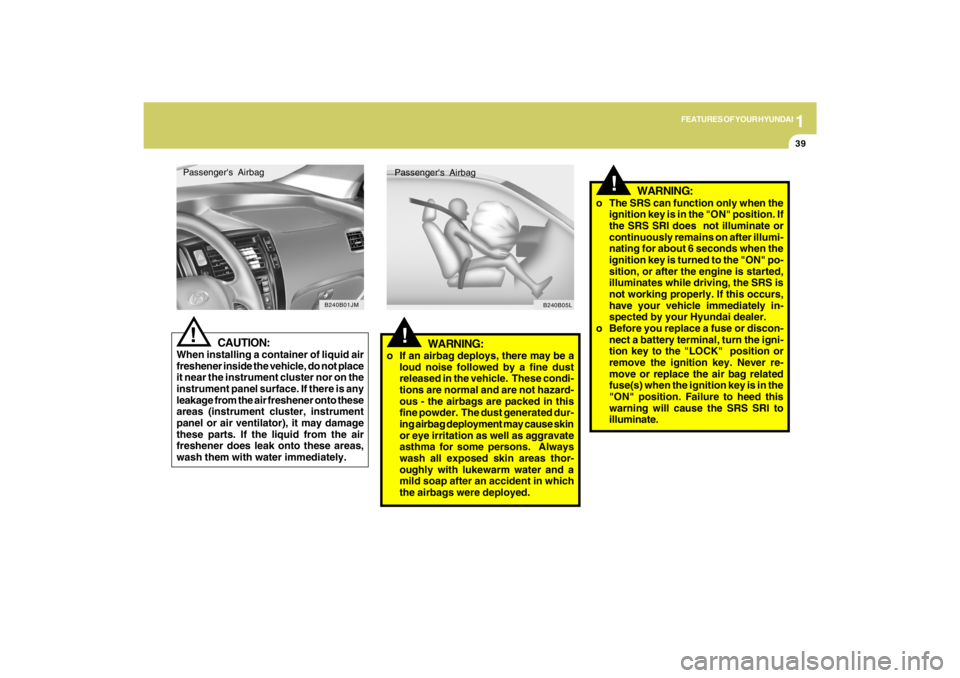
WARNING:
o If an airbag deploys, there may be a
loud noise followed by a fine dust
released in the vehicle. These condi-
tions are normal and are not hazard-
ous - the airbags are packed in this
fine powder. The dust generated dur-
ing airbag deployment may cause skin
or eye irritation as well as aggravate
asthma for some persons. Always
wash all exposed skin areas thor-
oughly with lukewarm water and a
mild soap after an accident in which
the airbags were deployed.Passenger's Airbag
B240B05L
!
o The SRS can function only when the
ignition key is in the "ON" position. If
the SRS SRI does not illuminate or
continuously remains on after illumi-
nating for about 6 seconds when the
ignition key is turned to the "ON" po-
sition, or after the engine is started,
illuminates while driving, the SRS is
not working properly. If this occurs,
have your vehicle immediately in-
spected by your Hyundai dealer.
o Before you replace a fuse or discon-
nect a battery terminal, turn the igni-
tion key to the "LOCK" position or
remove the ignition key. Never re-
move or replace the air bag related
fuse(s) when the ignition key is in the
"ON" position. Failure to heed this
warning will cause the SRS SRI to
illuminate.
WARNING:
CAUTION:
When installing a container of liquid air
freshener inside the vehicle, do not place
it near the instrument cluster nor on the
instrument panel surface. If there is any
leakage from the air freshener onto these
areas (instrument cluster, instrument
panel or air ventilator), it may damage
these parts. If the liquid from the air
freshener does leak onto these areas,
wash them with water immediately.
!Passenger's Airbag
B240B01JM
Page 59 of 273
1FEATURES OF YOUR HYUNDAI48
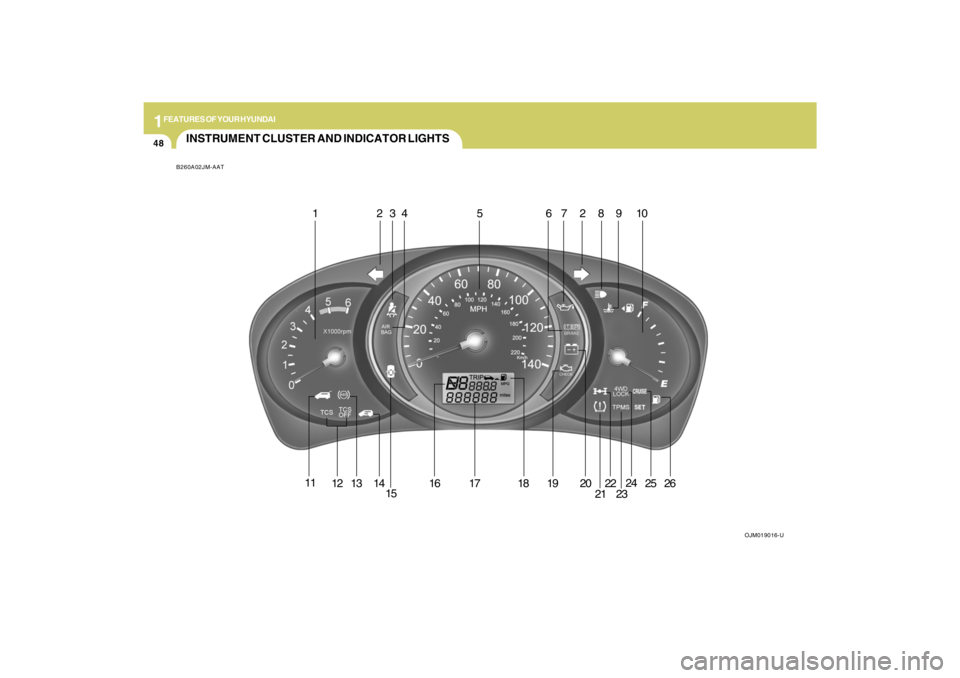
INSTRUMENT CLUSTER AND INDICATOR LIGHTSB260A02JM-AAT
OJM019016-U
1 234 5 67289 10
11
12
13
14
1516 17 18 19 20
2122
2324
2526
Page 64 of 273

1
FEATURES OF YOUR HYUNDAI
53
B260T01O-GAT
4WD System Warning Light
(If installed)
When the key is turned to the "ON" position,
the 4WD(Four Wheel Drive) system warn-
ing light will come on and then go off in a
few seconds.CAUTION:
If the 4WD system warning light ( )
blinks while driving, this indicates that
there is a malfunction in the 4WD sys-
tem. If this occurs, have your vehicle
checked by an authorized Hyundai dealer
as soon as possible.
!
B265C02LZ-AAT
Electronic Stability
Control Indicator Lights(If installed)
The electronic stability control indicators
change operation according to the ignition
switch position and whether the system is
in operation or not.
They will illuminate when the ignition key
is turned to the "ON" position, but should go
out after three seconds. If the ESC or ESC-
OFF indicator stays on, take your car to
your authorized Hyundai dealer and have
the system checked. See section 2 for
more information about the ESC.
B260V01JM-GAT
4WD Lock Indicator Light
(If installed)
The 4WD (Four Wheel Drive) lock indica-
tor light in the instrument cluster is illumi-
nated when the The 4WD lock switch is
pushed. The purpose of this switch is to
increase the drive power when driving on
wet pavement, snow-covered roads and/
or off-road. The 4WD lock indicator light is
turned off by pushing the switch again.
NOTE:Do not use 4WD on normal dry pavement
conditions.
B260R01E-GAT
SET Indicator Light
(If installed)
The SET indicator light in the instrument
cluster is illuminated when the cruise con-
trol switch is pushed downward to "SET
(COAST)".
The SET indicator light does not illuminate
when the control switch is in the "CANCEL"
position.
B260Q01E-GAT
Cruise Indicator Light
(If installed)
The cruise indicator light in the instrument
cluster is illuminated when the cruise con-
trol main switch on the end of the barrel is
pushed.
When the cruise control main switch is
pushed a second time, the cruise control
system will be and the light will turn off.
Information on the use of cruise control
may be found on page 1-88.
B265C01O-AAT
Traction Control Indicator
Lights (If installed)
The traction control indicators change op-
eration according to the ignition switch
position and whether the system is in
operation or not.
They will illuminate when the ignition key
is turned to the "ON" position, but should go
out after three seconds. If the TCS or TCS-
OFF indicator stays on, take your car to
your authorized Hyundai dealer and have
the system checked. See section 2 for
more information about the TCS.
Page 66 of 273
1
FEATURES OF YOUR HYUNDAI
55
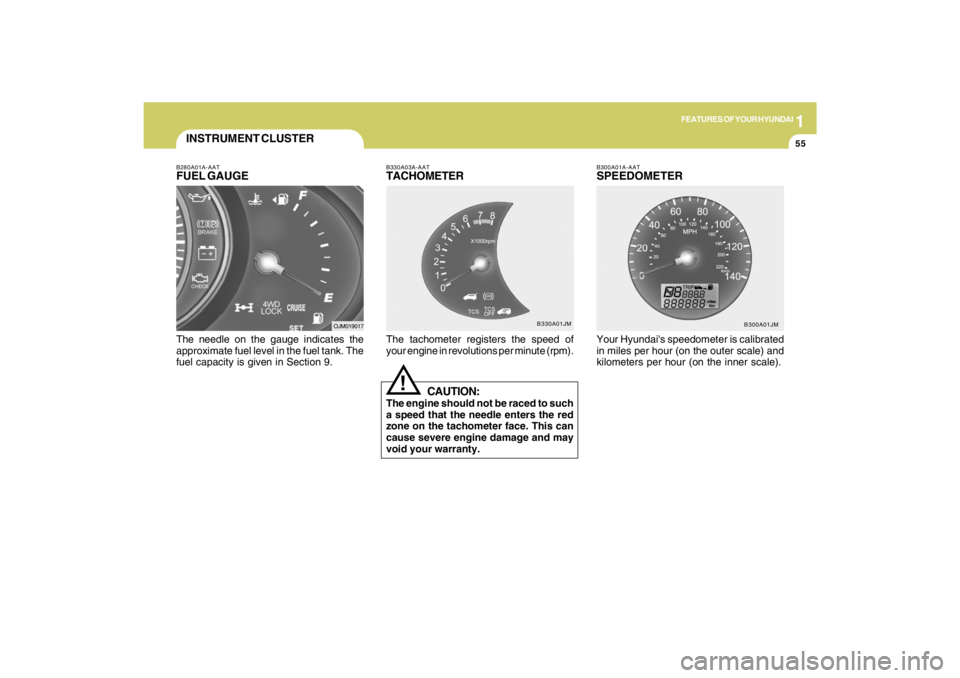
B280A01A-AATFUEL GAUGEThe needle on the gauge indicates the
approximate fuel level in the fuel tank. The
fuel capacity is given in Section 9.INSTRUMENT CLUSTER
OJM019017B330A03A-AAT
TACHOMETERThe tachometer registers the speed of
your engine in revolutions per minute (rpm).
CAUTION:
The engine should not be raced to such
a speed that the needle enters the red
zone on the tachometer face. This can
cause severe engine damage and may
void your warranty.
!
B300A01A-AATSPEEDOMETERYour Hyundai's speedometer is calibrated
in miles per hour (on the outer scale) and
kilometers per hour (on the inner scale).
B300A01JM B330A01JM
Page 100 of 273
1
FEATURES OF YOUR HYUNDAI
89
!
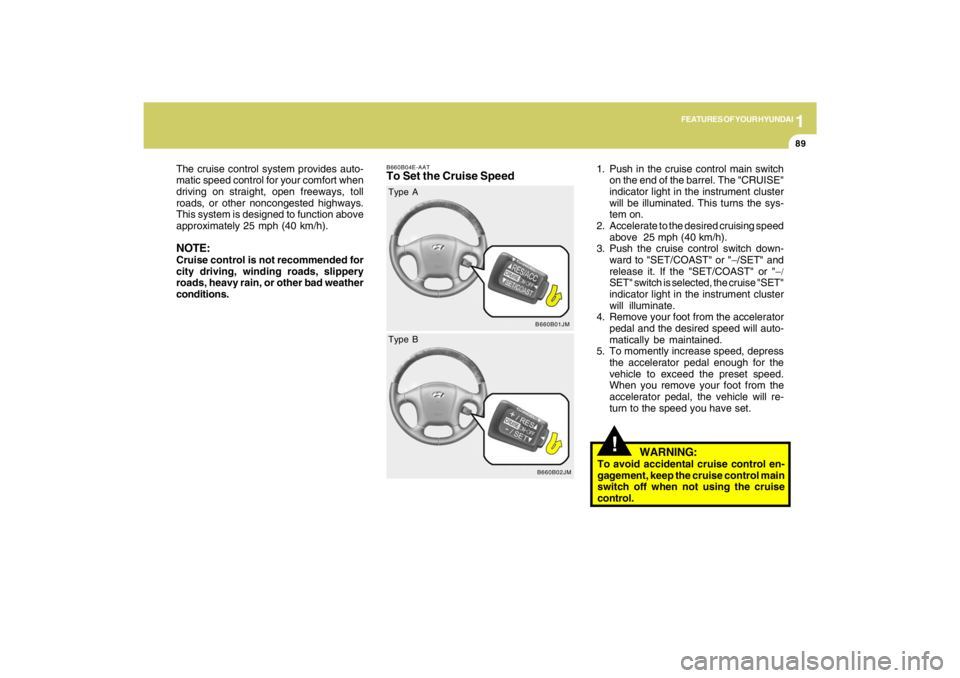
B660B04E-AATTo Set the Cruise Speed
1. Push in the cruise control main switch
on the end of the barrel. The "CRUISE"
indicator light in the instrument cluster
will be illuminated. This turns the sys-
tem on.
2. Accelerate to the desired cruising speed
above 25 mph (40 km/h).
3. Push the cruise control switch down-
ward to "SET/COAST" or "−/SET" and
release it. If the "SET/COAST" or "−/
SET" switch is selected, the cruise "SET"
indicator light in the instrument cluster
will illuminate.
4. Remove your foot from the accelerator
pedal and the desired speed will auto-
matically be maintained.
5. To momently increase speed, depress
the accelerator pedal enough for the
vehicle to exceed the preset speed.
When you remove your foot from the
accelerator pedal, the vehicle will re-
turn to the speed you have set. The cruise control system provides auto-
matic speed control for your comfort when
driving on straight, open freeways, toll
roads, or other noncongested highways.
This system is designed to function above
approximately 25 mph (40 km/h).
NOTE:Cruise control is not recommended for
city driving, winding roads, slippery
roads, heavy rain, or other bad weather
conditions.
B660B01JM
Type A
B660B02JM
Type B
WARNING:
To avoid accidental cruise control en-
gagement, keep the cruise control main
switch off when not using the cruise
control.
Page 102 of 273
1
FEATURES OF YOUR HYUNDAI
91
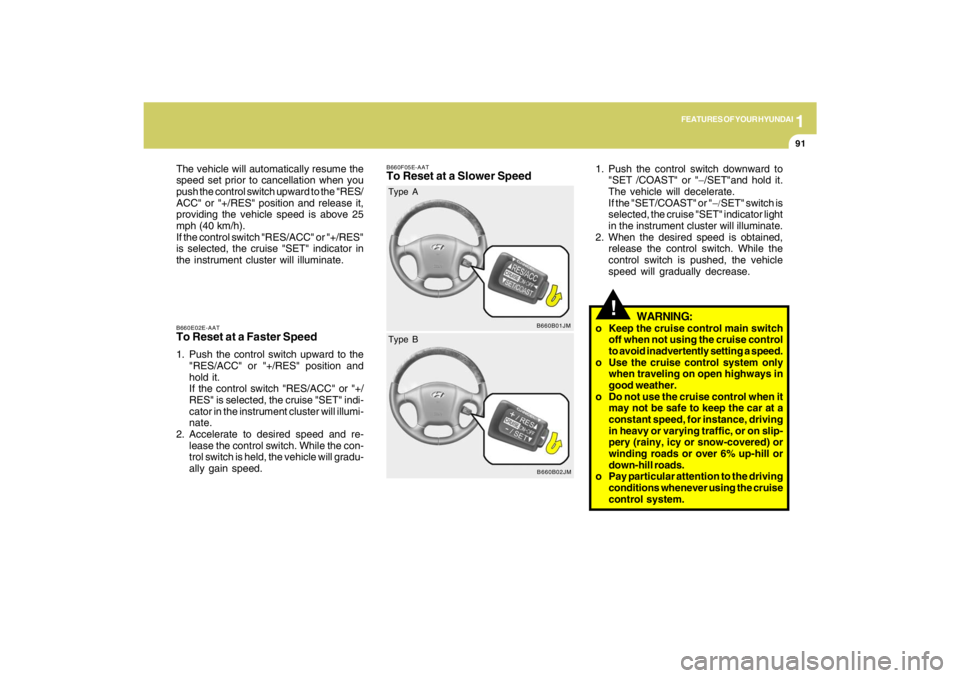
B660E02E-AATTo Reset at a Faster Speed1. Push the control switch upward to the
"RES/ACC" or "+/RES" position and
hold it.
If the control switch "RES/ACC" or "+/
RES" is selected, the cruise "SET" indi-
cator in the instrument cluster will illumi-
nate.
2. Accelerate to desired speed and re-
lease the control switch. While the con-
trol switch is held, the vehicle will gradu-
ally gain speed. The vehicle will automatically resume the
speed set prior to cancellation when you
push the control switch upward to the "RES/
ACC" or "+/RES" position and release it,
providing the vehicle speed is above 25
mph (40 km/h).
If the control switch "RES/ACC" or "+/RES"
is selected, the cruise "SET" indicator in
the instrument cluster will illuminate.
B660F05E-AATTo Reset at a Slower Speed
1. Push the control switch downward to
"SET /COAST" or "−/SET"and hold it.
The vehicle will decelerate.
If the "SET/COAST" or "−/SET" switch is
selected, the cruise "SET" indicator light
in the instrument cluster will illuminate.
2. When the desired speed is obtained,
release the control switch. While the
control switch is pushed, the vehicle
speed will gradually decrease.
!
WARNING:
o Keep the cruise control main switch
off when not using the cruise control
to avoid inadvertently setting a speed.
o Use the cruise control system only
when traveling on open highways in
good weather.
o Do not use the cruise control when it
may not be safe to keep the car at a
constant speed, for instance, driving
in heavy or varying traffic, or on slip-
pery (rainy, icy or snow-covered) or
winding roads or over 6% up-hill or
down-hill roads.
o Pay particular attention to the driving
conditions whenever using the cruise
control system.
B660B01JM
Type A
B660B02JM
Type B
Page 149 of 273
2
DRIVING YOUR HYUNDAI
14
!
Driving HintsTCS does not actively apply brakes. Be
sure to decelerate the car sufficiently be-
fore entering curves.
CAUTION:
When the TCS indicator blinks, SLIP
control function has been activated. It
also means that the road is slippery or
your car is accelerating excessively. In
this situation, gently release foot pres-
sure from the accelerator pedal and
maintain moderate speed.
!
WARNING:
Traction control is a driving aid; all nor-
mal precautions for driving in inclement
weather and on slippery driving surfaces
should be observed.
C310B02O-AATTCS ON/OFF ModeWhen the TCS is operating, the TCS indi-
cator in the instrument cluster will blink.
If you turn the system off by pressing the
TCS switch, the TCS-OFF indicator will
come on and stay on. In the TCS-OFF
mode, the SLIP control will be deactivated.
Adjust you driving accordingly. To turn the
system back on, press the switch again.
The TCS-OFF indicator should go off.NOTE:1) The TCS mode will automatically be
turned ON after the engine is turned
off and restarted.
2) When the traction control system is
operating properly, you can feel a
slight pulsation in the vehicle. This is
only the effect of brake control and
indicates nothing unusual.
3) When the engine starts, a click may
be heard from the engine compart-
ment; this is the sound of the traction
control being checked.
4) When moving out of the mud or fresh
snow, pressing the accelerator pedal
may not cause the engine speed to
increase due to TCS operation.
C310D01JM-AATIndicators and WarningThe indicators should illuminate when the
ignition key is turned to ON or START but
should go out after approximately three
seconds.
If the indicators do not illuminate, or the
TCS or TCS-OFF indicator does not go out
after 3 seconds, have the system checked
by an authorized dealer.
Should there be any unusual conditions in
the TCS System while driving, TCS-OFF
indicator illuminates as a warning.
If TCS-OFF indicator illuminates, pull your
car to a safe place and stop the engine.
Then, start the engine again to check if the
TCS-OFF indicator goes out.
If the indicator remains lit even after the
engine has been started, have your car
checked by an authorized Hyundai dealer.NOTE:When the TCS-OFF indicator illuminates,
traction control is automatically deacti-
vated.
Page 150 of 273
2
DRIVING YOUR HYUNDAI
15
!
CAUTION:
Driving with varying tire or wheel size
may cause the ESC system to malfunc-
tion. When replacing tires, make sure
they are the same size as your original
tires.
!
ELECTRONIC STABILITY
CONTROL (ESC) SYSTEMC310A03JM-AAT(If installed)
C310A01JM-U
The Electronic Stability Control (ESC) sys-
tem is designed to stabilize the vehicle
during cornering manuevers. ESC checks
where you are steering and where the
vehicle is actually going. ESC applies the
brakes at individual wheels and intervenes
in the engine management system to sta-
bilize the vehicle.
The Electronic Stability Control (ESC) sys-
tem is an electronic system designed to
help the driver maintain vehicle control
under adverse conditions. It is not a substi-
tute for safe driving practices. Factors in-
cluding speed, road conditions and driver
steering input can all affect whether ESC
will be effective in preventing a loss of
control. It is still your responsibility to drive
and corner at reasonable speeds and to
leave a sufficient margin of safety.
WARNING:
Never drive too fast for the road condi-
tions or too quickly when cornering. Elec-
tronic stability control (ESC) will not pre-
vent accidents. Excessive speed in
turns, abrupt maneuvers and hydroplan-
ing on wet surfaces can still result in
serious accidents. Only a safe and at-
tentive driver can prevent accidents by
avoiding maneuvers that cause the ve-
hicle to lose traction. Even with ESC
installed, always follow all the normal
precautions for driving - including driv-
ing at safe speeds for the conditions.
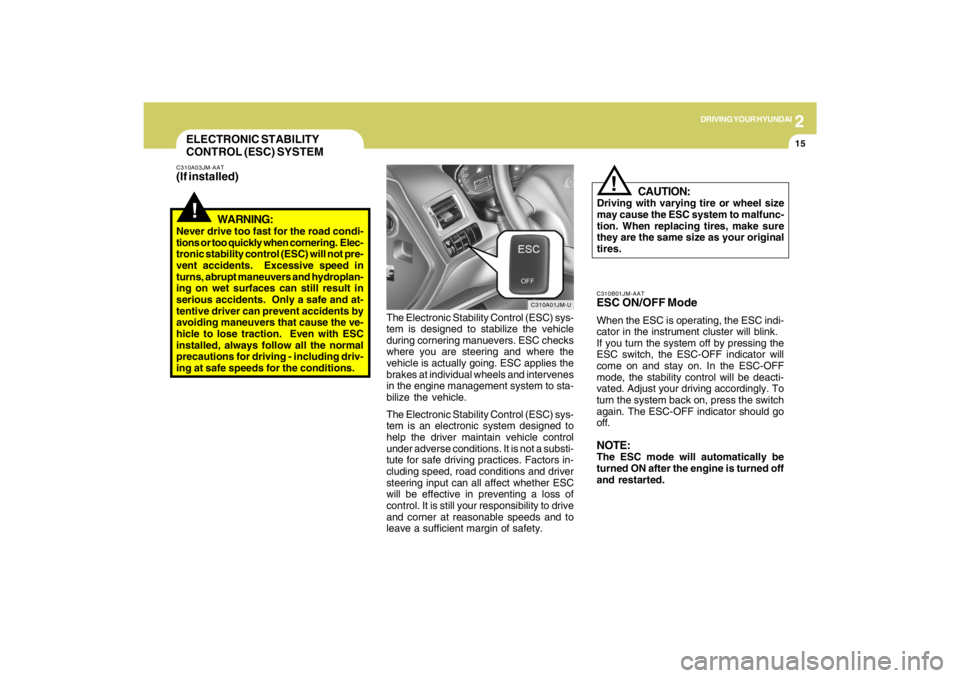
C310B01JM-AATESC ON/OFF ModeWhen the ESC is operating, the ESC indi-
cator in the instrument cluster will blink.
If you turn the system off by pressing the
ESC switch, the ESC-OFF indicator will
come on and stay on. In the ESC-OFF
mode, the stability control will be deacti-
vated. Adjust your driving accordingly. To
turn the system back on, press the switch
again. The ESC-OFF indicator should go
off.NOTE:The ESC mode will automatically be
turned ON after the engine is turned off
and restarted.