ECO mode HYUNDAI TUCSON 2011 Owner's Manual
[x] Cancel search | Manufacturer: HYUNDAI, Model Year: 2011, Model line: TUCSON, Model: HYUNDAI TUCSON 2011Pages: 382, PDF Size: 5.43 MB
Page 193 of 382
Features of your vehicle
112
4
■
Voice Recognition Activation
The voice recognition engine con-
tained in the Bluetooth ®
System can be
activated in the following conditions:
- Button Activation The voice recognition system will be
active when the button is pressed
and after the sound of a Beep.
- Active Listening The voice recognition system will be
active for a period of time when the
Voice Recognition system has asked
for a customer response.
The system can recognize single dig- itsfrom zero to nine while number
greater than ten will not be recognized.
If the command is not recognized, the system will announce "Pardon" or No
input voice signal from microphone.(No response)
The system shall cancel voice recogni- tion mode in following cases : When
pressing the button and saying
cancel following the beep. When not
making a call and pressing the but-
ton. When voice recognition has failed
3 consecutive times. At any time if you say “help”, the sys-
tem will announce what commands are
available.
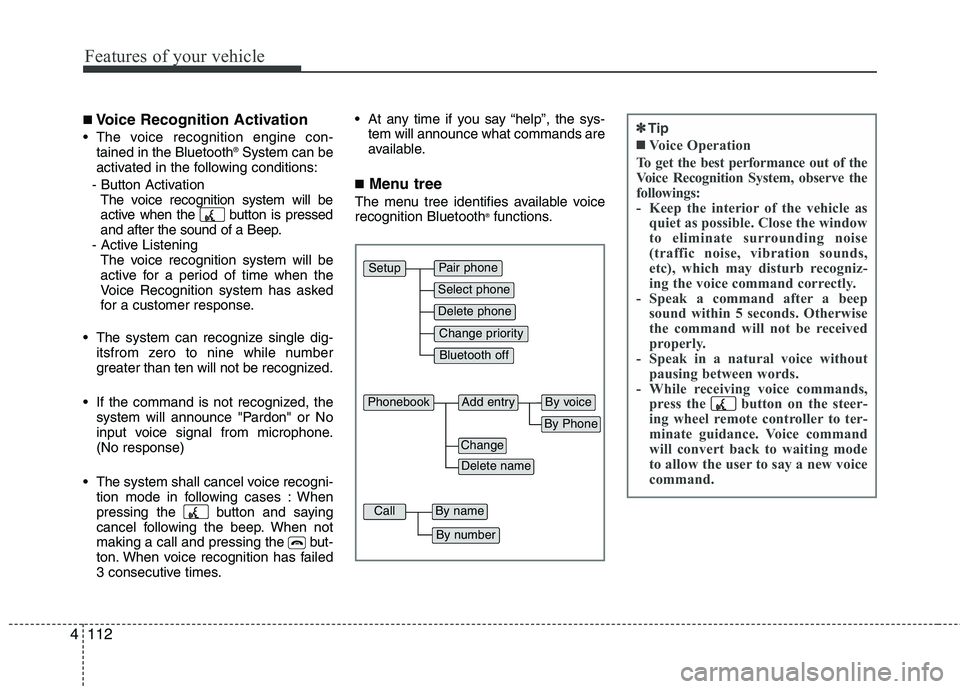
■ Menu tree
The menu tree identifies available voicerecognition Bluetooth ®
functions.
Pair phone
Select phone
Change priority
Delete phone
Bluetooth off
Setup
Add entryPhonebook
Change
Delete name
By Phone
By voice
CallBy name
By number
✽✽ Tip
■Voice Operation
To get the best performance out of the
Voice Recognition System, observe the
followings:
- Keep the interior of the vehicle as quiet as possible. Close the window
to eliminate surrounding noise
(traffic noise, vibration sounds,
etc), which may disturb recogniz-
ing the voice command correctly.
- Speak a command after a beep sound within 5 seconds. Otherwise
the command will not be received
properly.
- Speak in a natural voice without pausing between words.
- While receiving voice commands, press the button on the steer-
ing wheel remote controller to ter-
minate guidance. Voice command
will convert back to waiting mode
to allow the user to say a new voice
command.
Page 194 of 382
4113
Features of your vehicle
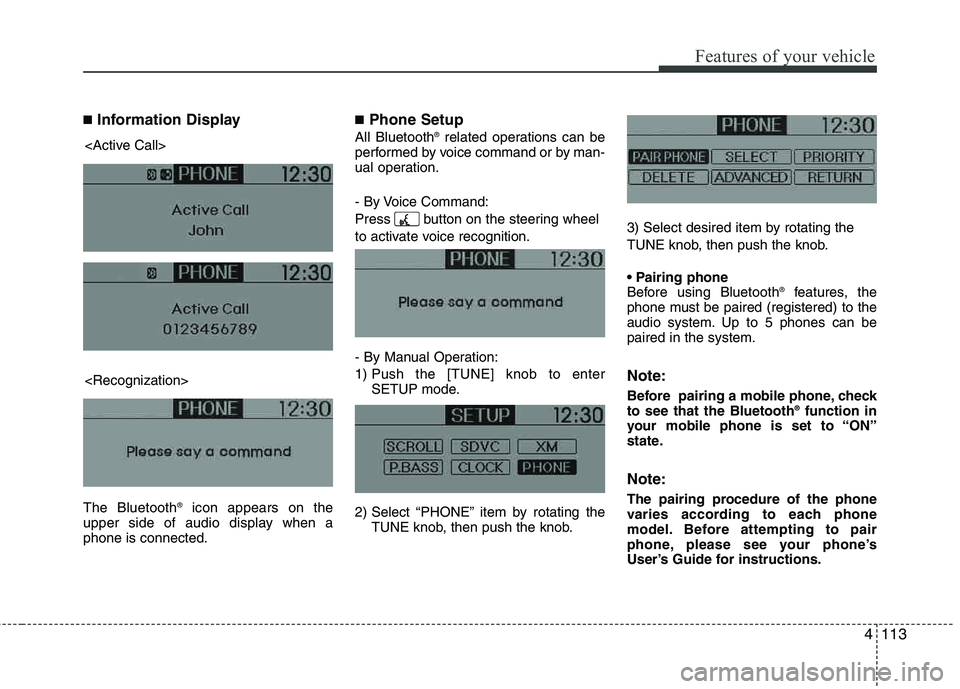
■Information Display
The Bluetooth ®
icon appears on the
upper side of audio display when a phone is connected.
■ Phone Setup
All Bluetooth ®
related operations can be
performed by voice command or by man-
ual operation.
- By Voice Command:
Press button on the steering wheel
to activate voice recognition.
- By Manual Operation:
1) Push the [TUNE] knob to enter SETUP mode.
2) Select “PHONE” item by rotating the TUNE knob, then push the knob. 3) Select desired item by rotating the
TUNE knob, then push the knob.
Before using Bluetooth
®
features, the
phone must be paired (registered) to the
audio system. Up to 5 phones can bepaired in the system.
Note:
Before pairing a mobile phone, check to see that the Bluetooth ®
function in
your mobile phone is set to “ON”
state.
Note:
The pairing procedure of the phone
varies according to each phone
model. Before attempting to pair
phone, please see your phone’s
User’s Guide for instructions.
Page 195 of 382
Features of your vehicle
114
4
Note:
Once pairing with the phone is com-
pleted, there is no need to pair with
that phone again unless the phone is
deleted manually from the audio sys-
tem (refer “Deleting Phone” section)
or the vehicle’s information is
removed from the phone.
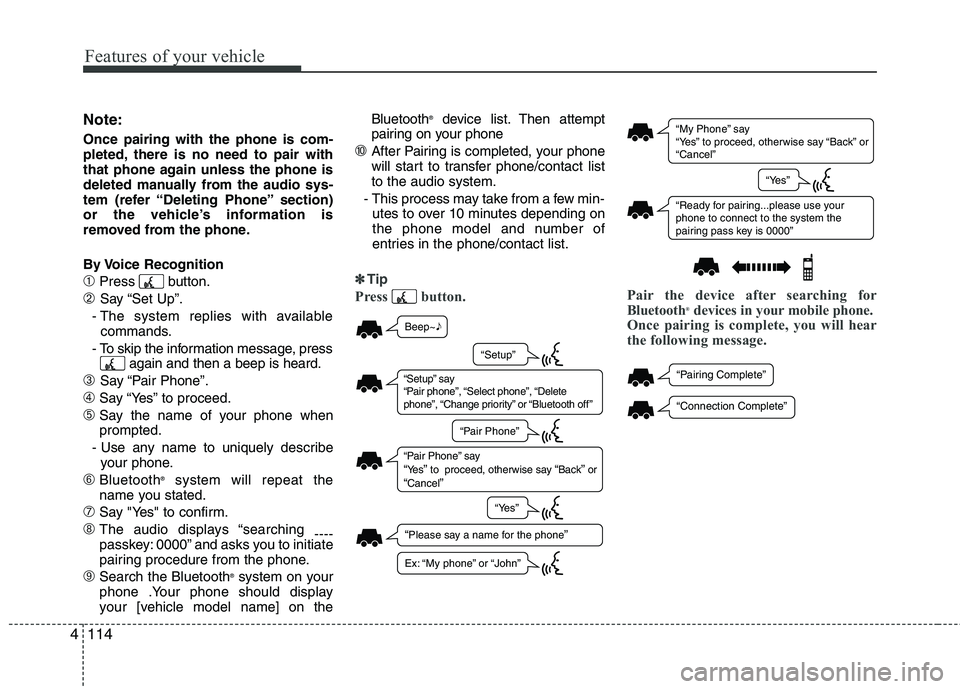
By Voice Recognition
➀Press button.
➁ Say “Set Up”.
- The system replies with available commands.
- To skip the information message, press again and then a beep is heard.
➂ Say “Pair Phone”.
➃Say “Yes” to proceed.
➄Say the name of your phone when prompted.
- Use any name to uniquely describe your phone.
➅Bluetooth ®
system will repeat the
name you stated.
➆Say "Yes" to confirm.
➇The audio displays “searching ----
passkey: 0000” and asks you to initiate
pairing procedure from the phone.
➈Search the Bluetooth ®
system on your
phone .Your phone should display
your [vehicle model name] on the Bluetooth
®
device list. Then attempt
pairing on your phone
➉After Pairing is completed, your phone
will start to transfer phone /contact list
to the audio system.
- This process may take from a few min- utes to over 10 minutes depending on
the phone model and number of
entries in the phone/contact list.
✽✽ Tip
Press button. Pair the device after searching for
Bluetooth®
devices in your mobile phone.
Once pairing is complete, you will hear
the following message.
“ My Phone ” sa y
“ Ye s” to proceed, otherwi se sa y “B ack ” or
“ C ancel ”
“Re ady for p airing...ple ase us e yo ur
phone to connect to the system the
p airing p ass key i s 0000 ”
“Ye s”
“P airing Complete ”
“Connection Complete ”
Beep~♪
“Ple ase sa y a n ame for the phone”
“S etup” sa y
“ P air phone ”, “S elect phone ”, “Delete
phone ”, “Ch ange priority ” or “Bl uetooth off ”
“P air Phone ” sa y “Ye s” to proceed, otherwi se sa y “Back” or “C ancel”
“S etup”
“P air Phone ”
“Ye s”
Ex: “My phone ” or “John ”
Page 196 of 382
4115
Features of your vehicle
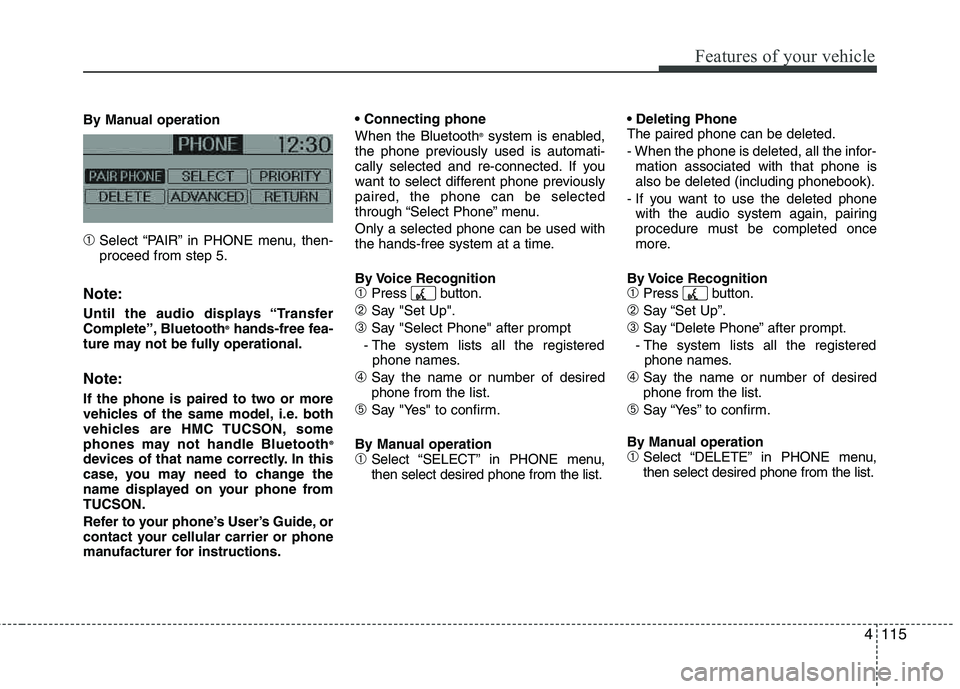
By Manual operation
➀Select “PAIR” in PHONE menu, then- proceed from step 5.
Note:
Until the audio displays “Transfer
Complete”, Bluetooth®
hands-free fea-
ture may not be fully operational.
Note:
If the phone is paired to two or more
vehicles of the same model, i.e. both
vehicles are HMC TUCSON, some
phones may not handle Bluetooth ®
devices of that name correctly. In this
case, you may need to change the
name displayed on your phone fromTUCSON.
Refer to your phone’s User’s Guide, or
contact your cellular carrier or phone
manufacturer for instructions. When the Bluetooth
®
system is enabled,
the phone previously used is automati-
cally selected and re-connected. If you
want to select different phone previously paired, the phone can be selected
through “Select Phone” menu. Only a selected phone can be used with
the hands-free system at a time.
By Voice Recognition
➀Press button.
➁Say "Set Up".
➂Say "Select Phone" after prompt
- The system lists all the registered phone names.
➃Say the name or number of desired phone from the list.
➄Say "Yes" to confirm.
By Manual operation
➀Select “SELECT” in PHONE menu, then select desired phone from the list. The paired phone can be deleted.
- When the phone is deleted, all the infor-
mation associated with that phone is also be deleted (including phonebook).
- If you want to use the deleted phone with the audio system again, pairing
procedure must be completed once
more.
By Voice Recognition
➀Press button.
➁Say “Set Up”.
➂Say “Delete Phone” after prompt.
- The system lists all the registered phone names.
➃Say the name or number of desiredphone from the list.
➄Say “Yes” to confirm.
By Manual operation
➀Select “DELETE” in PHONE menu, then select desired phone from the list.
Page 199 of 382
Features of your vehicle
118
4
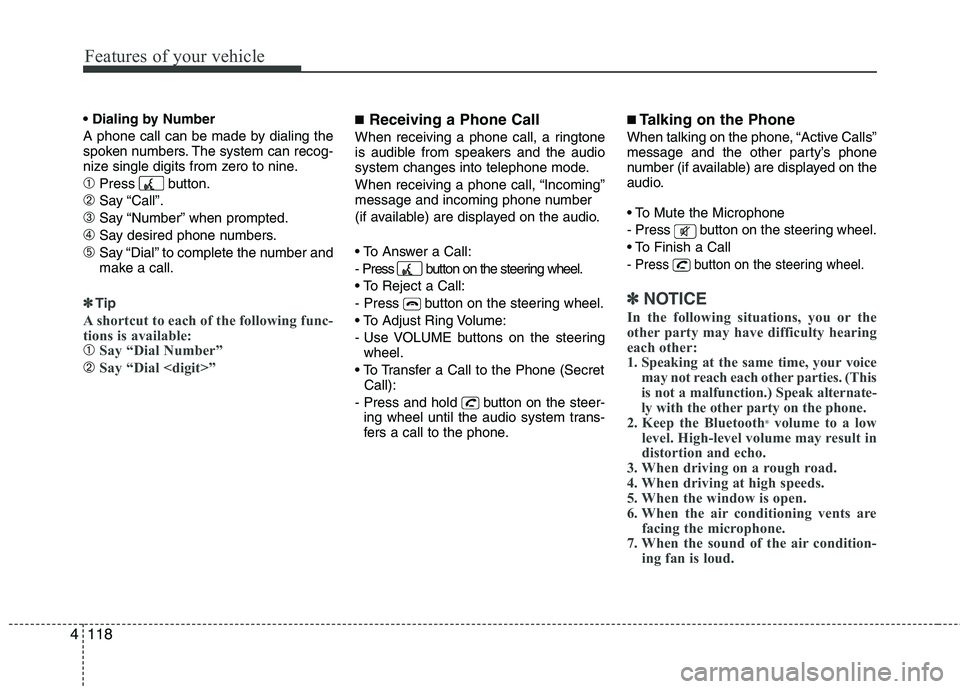
A phone call can be made by dialing the
spoken numbers. The system can recog-
nize single digits from zero to nine.
➀Press button.
➁Say “Call”.
➂Say “Number” when prompted.
➃Say desired phone numbers.
➄Say “Dial” to complete the number and
make a call.
✽✽
Tip
A shortcut to each of the following func-
tions is available:
➀Say “Dial Number”
➁Say “Dial
■ Receiving a Phone Call
When receiving a phone call, a ringtone
is audible from speakers and the audio
system changes into telephone mode.
When receiving a phone call, “Incoming”
message and incoming phone number
(if available) are displayed on the audio.
- Press button on the steering wheel.
- Press button on the steering wheel.
- Use VOLUME buttons on the steering
wheel.
Call):
- Press and hold button on the steer- ing wheel until the audio system trans-
fers a call to the phone.
■ Talking on the Phone
When talking on the phone, “Active Calls”
message and the other party’s phone
number (if available) are displayed on the
audio.
- Press button on the steering wheel.
- Press button on the steering wheel.
✽✽ NOTICE
In the following situations, you or the
other party may have difficulty hearing
each other:
1. Speaking at the same time, your voice may not reach each other parties. (This
is not a malfunction.) Speak alternate-
ly with the other party on the phone.
2. Keep the Bluetooth ®
volume to a low
level. High-level volume may result in
distortion and echo.
3. When driving on a rough road.
4. When driving at high speeds.
5. When the window is open.
6. When the air conditioning vents are facing the microphone.
7. When the sound of the air condition- ing fan is loud.
Page 200 of 382
4119
Features of your vehicle
■Using the head unit as Bluetooth ®
music
The head unit supports A2DP (Audio
Advanced Distribution Profile) and AVRCP
(Audio Video Remote Control Profile).
Both profiles are available for listening to the
MP3 music via Bluetooth ®
cellular phone
supporting above Bluetooth ®
profiles.
To play MP3 music from the Bluetooth ®
cellular phone, press the [AUX] button
until “MP3 Play” is displayed on the LCD.
Then try playing music by phone.
When playing music from the Bluetooth ®
cellular phone, the head unit displays MP3 MODE.
NOTE:
all the sounds that the phone supports can be
heard by the audio system.
Bluetooth ®
cellular phones shall
feature A2DP and AVRCP functions.
®
cellular phones may not play music
through the head unit on first try.
Please try the below;
i.e : Menu
➟Filemanager➟Music➟
Option➟Play via Bluetooth
phone for more detailed informa-
tions. To stop music, try stop music
by the phone and change audio
mode to different one. (e.g. FM, CD,
iPod, ...)
■ ADVANCED Menu
After pressing the [SETUP] button, press
the PHONE menu. while in PHONE
menu, press the “ADVANCED” menu to
make Bluetooth ®
Phone settings.(The
ADVANCED menu may differ according to
audio specifications.)
(Bluetooth ®
call volume adjustments)
While in ADVANCED menu, press “IN
VOL.” Use the knob key to set the desired
volume and press the [ ENTER] button.
(Automatic Phonebook do wnload setting)
While in ADVANCED menu, press
“CONTACTS”. To automatically save the
contacts and call history in your mobile
phone each time you connect a mobile
device, press Yes. If you do not wish for
automatic download, press No. (Language of Bluetooth
®
voice recognition)
While in ADVANCED menu, press
“LANGUAGE”. To change the language, select the desired language and press
the [ENTER] button. BT OFF
While in ADVANCED menu, press “BT
OFF” to turn off the Bluetooth ®
System.
Page 221 of 382
Driving your vehicle
20
5
You must consciously take the effort to
learn how to corner in a AWD vehicle.
Do not rely on your experience in con-
ventional 2WD vehicles in choosing
safe cornering speed in AWD mode.
For starters, you must drive more slow-
ly in AWD.
Drive carefully off-road because your vehicle may be damaged by rocks or
roots of trees. Become familiar with the
off-road conditions where you are
going to drive before you begin driving.
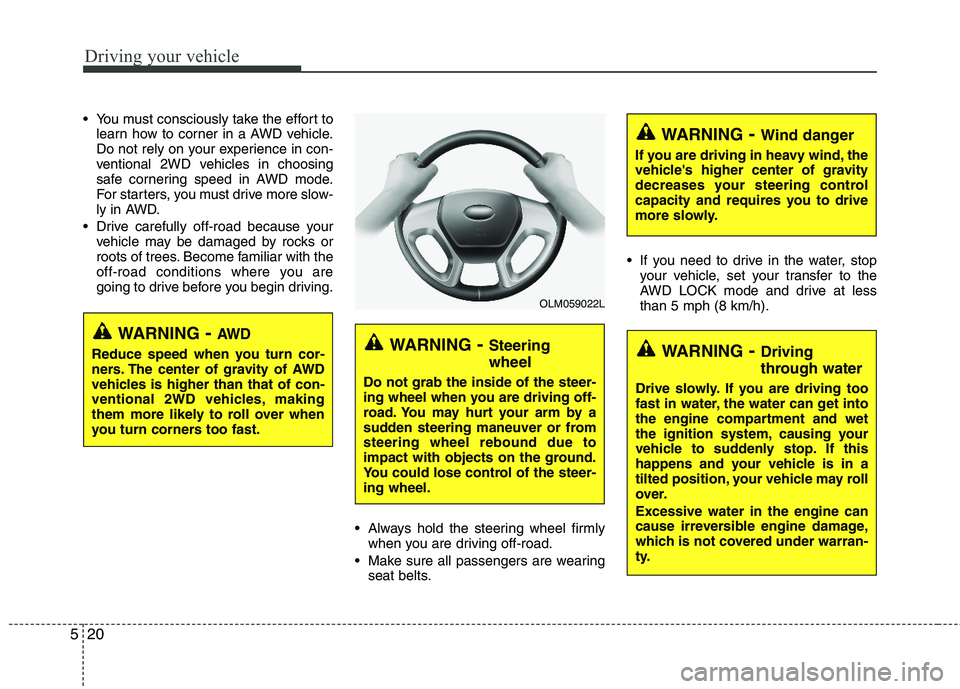
Always hold the steering wheel firmlywhen you are driving off-road.
Make sure all passengers are wearing seat belts. If you need to drive in the water, stop
your vehicle, set your transfer to the
AWD LOCK mode and drive at lessthan 5 mph (8 km/h).
WARNING - Steering wheel
Do not grab the inside of the steer-
ing wheel when you are driving off-
road. You may hurt your arm by a
sudden steering maneuver or fromsteering wheel rebound due to
impact with objects on the ground.
You could lose control of the steer-ing wheel.
WARNING- Wind danger
If you are driving in heavy wind, the
vehicle's higher center of gravity
decreases your steering control
capacity and requires you to drive
more slowly.
WARNING- Driving
through water
Drive slowly. If you are driving too
fast in water, the water can get into
the engine compartment and wet
the ignition system, causing your
vehicle to suddenly stop. If this
happens and your vehicle is in a
tilted position, your vehicle may roll
over. Excessive water in the engine can
cause irreversible engine damage,
which is not covered under warran-
ty.
OLM059022L
WARNING - AW D
Reduce speed when you turn cor-
ners. The center of gravity of AWD
vehicles is higher than that of con-
ventional 2WD vehicles, making
them more likely to roll over when
you turn corners too fast.
Page 241 of 382
Driving your vehicle
40
5
Your vehicle's fuel economy depends
mainly on your style of driving, where you
drive and when you drive.
Each of these factors affects how many
miles (kilometers) you can get from a gal-
lon (liter) of fuel. To operate your vehicle
as economically as possible, use the fol-
lowing driving suggestions to help save
money in both fuel and repairs:
Drive smoothly. Accelerate at a moder-
ate rate. Don't make "jack-rabbit" starts or full-throttle shifts and maintain a
steady cruising speed. Don't race
between stoplights. Try to adjust your
speed to the traffic so you don't have to
change speeds unnecessarily. Avoid
heavy traffic whenever possible.
Always maintain a safe distance from
other vehicles so you can avoid unnec-
essary braking. This also reduces
brake wear.
Drive at a moderate speed. The faster you drive the more fuel your vehicle
uses. Driving at a moderate speed, in
the highest gear appropriate for the
conditions, especially on the highway,
is one of the most effective ways to reduce fuel consumption. Don't "ride" the brake pedal or clutch
pedal. This can increase fuel consump-
tion and also increase wear on these
components. In addition, driving with
your foot resting on the brake pedal
may cause the brakes to overheat,
which reduces their effectiveness and
may lead to more serious conse-
quences.
Take care of your tires. Keep them inflated to the recommended pressure.
Incorrect inflation, either too much or
too little, results in unnecessary tire
wear. Check the tire pressures at leastonce a month.
Be sure that the wheels are aligned correctly. Improper alignment can
result from hitting curbs or driving too
fast over irregular surfaces. Poor align-
ment causes faster tire wear and may
also result in other problems as well as
greater fuel consumption. Keep your vehicle in good condition.
For better fuel economy and reduced
maintenance costs, maintain your vehi- cle in accordance with the mainte-
nance schedule in section 7. If you
drive your vehicle in severe conditions, more frequent maintenance is required
(see section 7 for details).
Keep your vehicle clean. For maximum service, your vehicle should be kept
clean and free of corrosive materials. It
is especially important that mud, dirt,
ice, etc. not be allowed to accumulate
on the underside of the vehicle. This
extra weight can result in increased
fuel consumption and also contributeto corrosion.
Travel lightly. Don't carry unnecessary weight in your vehicle. Weight reduces
fuel economy.
Don't let the engine idle longer than necessary. If you are waiting (and not
in traffic), turn off your engine and
restart only when you're ready to go.
ECONOMICAL OPERATION
Page 333 of 382
747
Maintenance
Cold Tire Pressure: The amount of
air pressure in a tire, measured in pounds per square inch (psi) or kilo-
pascals (kPa) before a tire has built
up heat from driving.
Curb Weight : This means the weight
of a motor vehicle with standard and optional equipment including the
maximum capacity of fuel, oil and
coolant, but without passengers and
cargo.
DOT Markings : A code molded into
the sidewall of a tire signifying that
the tire is in compliance with the U.S.
Department of Transportation motor
vehicle safety standards. The DOT
code includes the Tire Identification
Number (TIN), an alphanumeric des-ignator which can also identify the
tire manufacturer, production plant,
brand and date of production. GVWR : Gross Vehicle Weight Rating
GAWR FRT : Gross Axle Weight
Rating for the Front Axle.
GAWR RR : Gross Axle Weight
Rating for the Rear axle. Intended Outboard Sidewall
: The
side of an asymmetrical tire, that
must always face outward when
mounted on a vehicle.
Kilopascal (kPa) : The metric unit for
air pressure.
Load Index : An assigned number
ranging from 1 to 279 that corre-
sponds to the load carrying capacity
of a tire.
Maximum Inflation Pressure : The
maximum air pressure to which a
cold tire may be inflated. The maxi-
mum air pressure is molded onto the
sidewall.
Maximum Load Rating : The load
rating for a tire at the maximum per-
missible inflation pressure for that
tire.
Maximum Loaded Vehicle Weight :
The sum of curb weight; accessory
weight; vehicle capacity weight; and
production options weight.
Normal Occupant Weight :The
number of occupants a vehicle is
designed to seat multiplied by 150pounds (68 kg). Occupant Distribution
: Designated
seating positions.
Outward Facing Sidewall: The side
of a asymmetrical tire that has a par-
ticular side that faces outward when
mounted on a vehicle. The outward
facing sidewall bears white lettering
or bears manufacturer, brand, and/ormodel name molding that is higher ordeeper than the same moldings on
the inner facing sidewall.
Passenger (P-Metric) Tire : A tire
used on passenger cars and some
light duty trucks and multipurpose
vehicles. Recommended Inflation Pressure :
Vehicle manufacturer's recommend-
ed tire inflation pressure and shownon the tire placard.
Radial Ply Tire : A pneumatic tire in
which the ply cords that extend to the
beads are laid at 90 degrees to the
centerline of the tread. Rim : A metal support for a tire and
upon which the tire beads are seat- ed.
Sidewall : The portion of a tire
between the tread and the bead.
Page 334 of 382
Maintenance
48
7
Speed Rating : An alphanumeric
code assigned to a tire indicating the
maximum speed at which a tire can
operate.
Traction : The friction between the
tire and the road surface. The
amount of grip provided.
Tr e a d : The portion of a tire that
comes into contact with the road.
Treadwear Indicators : Narrow
bands, sometimes called "wear
bars," that show across the tread of atire when only 2/32 inch of tread
remains. UTQGS : Uniform Tire Quality
Grading Standards, a tire information
system that provides consumers with
ratings for a tire's traction, tempera-
ture and treadwear. Ratings are
determined by tire manufacturers
using government testing proce-
dures. The ratings are molded into
the sidewall of the tire.
Vehicle Capacity Weight : The num-
ber of designated seating positions
multiplied by 150 lbs. (68 kg) plus the
rated cargo and luggage load. Vehicle Maximum Load on theTire
: Load on an individual tire due to
curb and accessory weight plus
maximum occupant and cargo
weight.
Vehicle Normal Load on the Tire :
Load on an individual tire that is
determined by distributing to each
axle its share of the curb weight,
accessory weight, and normal occu-
pant weight and dividing by 2.
Vehicle Placard : A label permanent-
ly attached to a vehicle showing the
original equipment tire size and rec-
ommended inflation pressure. All season tires
HYUNDAI specifies all season tires
on some models to provide good
performance for use all year round,
including snowy and icy road condi-
tions. All season tires are identified
by ALL SEASON and/or M+S (Mud
and Snow) on the tire sidewall. Snow
tires have better snow traction than
all season tires and may be more
appropriate in some areas. Summer tires
HYUNDAI specifies summer tires on
some models to provide superior
performance on dry roads. Summer
tire performance is substantially
reduced in snow and ice. Summer
tires do not have the tire traction rat-
ing M+S (Mud and Snow) on the tire
side wall. if you plan to operate your
vehicle in snowy or icy conditions.
HYUNDAI recommends the use of
snow tires or all season tires on all
four wheels.
Snow tires
If you equip your car with snow tires,
they should be the same size and
have the same load capacity as the
original tires. Snow tires should be
installed on all four wheels; other-
wise, poor handling may result.
Snow tires should carry 4 psi (28
kPa) more air pressure than the
pressure recommended for the stan-
dard tires on the tire label on the dri-
ver's side of the center pillar, or up to
the maximum pressure shown on the
tire sidewall, whichever is less.