change HYUNDAI TUCSON 2011 Owner's Guide
[x] Cancel search | Manufacturer: HYUNDAI, Model Year: 2011, Model line: TUCSON, Model: HYUNDAI TUCSON 2011Pages: 382, PDF Size: 5.43 MB
Page 197 of 382
Features of your vehicle
116
4
When several phones are paired to theaudio system, the system attempts to
connect following order when the Bluetooth ®
system is enabled:
1) “Priority” checked phone.
2) Previously connected phone
3) Gives up auto connection.
By Voice Recognition
➀Press button.
➁Say “Set Up”.
➂Say “Change Priority” after prompt.
- The system lists all the registered phone names.
➃Say the name or number of desired phone from the list.
➄Say “Yes” to confirm.
By Manual operation
➀Select “PRIORITY” in PHONE menu,then select desired phone from thelist.
■ Phone Book (In-Vehicle)
Phone numbers and voice tags can be
registered. Entries registered in the
phone can also be transferred.
➀Press button.
➁Say "Phonebook".
- The system replies with all available commands.
- To skip the information message, press again and then a beep is heard.
➂Say "Add Entry".
➃Say "By Voice" to proceed.
➄Say the name of the entry whenprompted.
➅Say “Yes”to confirm.
➆Say the phone number of that entry when prompted.
➇Say “Store” if phone number input is finished.
➈Say a phone number type. “Home”,
“Work”, “Mobile”, “Other” or “Default” is
available.
➉Say “Yes” to complete adding entry.
Say “Yes” to store additional location
for this contact, or say “Cancel” to fin-
ish the process.
✽✽ NOTICE
- The system can recognize single digits from zero to nine. Numbers that are
ten or greater cannot be recognized.
- You can enter each digit individually or group digits together in preferred
string lengths.
- To speed up input, it is a good idea to
group all digits into a continuous
string.
- The display corresponding to each operation appears on the screen as fol-
lows:
- Input operation example: 1. Say: “Nine, nine, five”
➟ Display: “995”
2. And say: “Seven, three, four”
➟ Display: “995734”
11
Page 198 of 382
4117
Features of your vehicle
➀Press button.
➁Say "Phonebook".
➂Say "Add Entry" after prompt.
➃Say "By Phone" to proceed.
➄Say “Yes” to confirm.
➅Your phone will start to transfer phone/contact list to the audio system.
This process may take over 10 min- utes depending on the phone model
and number of entries.
➆Wait till the audio displays “Transfer
Complete” message.
Changing Name
The registered names can be modified.
➀Press button.
➁Say “Phonebook”
➂Say “Change Name” after prompt.
➃Say the name of the entry (voice tag)
➄Say “Yes” to confirm.
➅Say new desired name. The registered names can be deleted.
➀Press button.
➁Say “Phonebook”
➂Say “Delete Name” after prompt.
➃Say the name of the entry (voice tag)
➄Say “Yes” to confirm.
■
Making a Phone Call
A phone call can be made by speaking names registered in the audio system.
➀Press button.
➁Say "Call".
➂Say “Name” when prompted.
➃Say desired name (in phonebook or
voice tag).
➄Say desired location (phone number
type). Only stored locations can be selected.
➅Say “Yes” to confirm and make a call.
✽✽Tip
A shortcut to each of the following func-
tions is available:
➀Say “Call Name”
➀Press button.
➁Sat the following command. - Call
- Call
- Call
- Call
Note:
Calls can be immediately connected
to contacts who name or voice tag are
saved in the phonebook(or contacts).
Page 199 of 382
Features of your vehicle
118
4
A phone call can be made by dialing the
spoken numbers. The system can recog-
nize single digits from zero to nine.
➀Press button.
➁Say “Call”.
➂Say “Number” when prompted.
➃Say desired phone numbers.
➄Say “Dial” to complete the number and
make a call.
✽✽
Tip
A shortcut to each of the following func-
tions is available:
➀Say “Dial Number”
➁Say “Dial
■ Receiving a Phone Call
When receiving a phone call, a ringtone
is audible from speakers and the audio
system changes into telephone mode.
When receiving a phone call, “Incoming”
message and incoming phone number
(if available) are displayed on the audio.
- Press button on the steering wheel.
- Press button on the steering wheel.
- Use VOLUME buttons on the steering
wheel.
Call):
- Press and hold button on the steer- ing wheel until the audio system trans-
fers a call to the phone.
■ Talking on the Phone
When talking on the phone, “Active Calls”
message and the other party’s phone
number (if available) are displayed on the
audio.
- Press button on the steering wheel.
- Press button on the steering wheel.
✽✽ NOTICE
In the following situations, you or the
other party may have difficulty hearing
each other:
1. Speaking at the same time, your voice may not reach each other parties. (This
is not a malfunction.) Speak alternate-
ly with the other party on the phone.
2. Keep the Bluetooth ®
volume to a low
level. High-level volume may result in
distortion and echo.
3. When driving on a rough road.
4. When driving at high speeds.
5. When the window is open.
6. When the air conditioning vents are facing the microphone.
7. When the sound of the air condition- ing fan is loud.
Page 200 of 382
4119
Features of your vehicle
■Using the head unit as Bluetooth ®
music
The head unit supports A2DP (Audio
Advanced Distribution Profile) and AVRCP
(Audio Video Remote Control Profile).
Both profiles are available for listening to the
MP3 music via Bluetooth ®
cellular phone
supporting above Bluetooth ®
profiles.
To play MP3 music from the Bluetooth ®
cellular phone, press the [AUX] button
until “MP3 Play” is displayed on the LCD.
Then try playing music by phone.
When playing music from the Bluetooth ®
cellular phone, the head unit displays MP3 MODE.
NOTE:
all the sounds that the phone supports can be
heard by the audio system.
Bluetooth ®
cellular phones shall
feature A2DP and AVRCP functions.
®
cellular phones may not play music
through the head unit on first try.
Please try the below;
i.e : Menu
➟Filemanager➟Music➟
Option➟Play via Bluetooth
phone for more detailed informa-
tions. To stop music, try stop music
by the phone and change audio
mode to different one. (e.g. FM, CD,
iPod, ...)
■ ADVANCED Menu
After pressing the [SETUP] button, press
the PHONE menu. while in PHONE
menu, press the “ADVANCED” menu to
make Bluetooth ®
Phone settings.(The
ADVANCED menu may differ according to
audio specifications.)
(Bluetooth ®
call volume adjustments)
While in ADVANCED menu, press “IN
VOL.” Use the knob key to set the desired
volume and press the [ ENTER] button.
(Automatic Phonebook do wnload setting)
While in ADVANCED menu, press
“CONTACTS”. To automatically save the
contacts and call history in your mobile
phone each time you connect a mobile
device, press Yes. If you do not wish for
automatic download, press No. (Language of Bluetooth
®
voice recognition)
While in ADVANCED menu, press
“LANGUAGE”. To change the language, select the desired language and press
the [ENTER] button. BT OFF
While in ADVANCED menu, press “BT
OFF” to turn off the Bluetooth ®
System.
Page 201 of 382
![HYUNDAI TUCSON 2011 Owners Guide Features of your vehicle
120
4
■
Key matrix
No.
Class
Paired H/P Empty Disconnected
1 SHORT
LONG
SHORT
SHORT LONG
[10sec]
LONG
[10sec] Normal mode
BT SETUP menuIncoming Call
Outgoing Call
Active Ca](/img/35/56206/w960_56206-200.png "HYUNDAI TUCSON 2011 Owners Guide Features of your vehicle
120
4
■
Key matrix
No.
Class
Paired H/P Empty Disconnected
1 SHORT
LONG
SHORT
SHORT LONG
[10sec]
LONG
[10sec] Normal mode
BT SETUP menuIncoming Call
Outgoing Call
Active Ca")
Features of your vehicle
120
4
■
Key matrix
No.
Class
Paired H/P Empty Disconnected
1 SHORT
LONG
SHORT
SHORT LONG
[10sec]
LONG
[10sec] Normal mode
BT SETUP menuIncoming Call
Outgoing Call
Active Call2nd Call
Not Paired Not Connecting--Accept Call
Connected
-
2nd call
1st Call:waiting
2nd Call:active 2nd Call
2nd Call:waiting 1st Call:active
KEY
- --
- -
-Transfer call:secret call
End Call
VR
MODE Cancel VR
MODE Cancel VR
MODE Cancel VR
MODE Cancel Reject Call End Call End Call
-
Active
Change
language
-
Active Speaker
Adaptation
(Only English)
Change
language Active
Change
language Active
-Speaker
Adaptation
(Only English)
Change
language
- -
- -
- -
- -
-
--
2 3
Page 203 of 382
Driving your vehicle
2
5
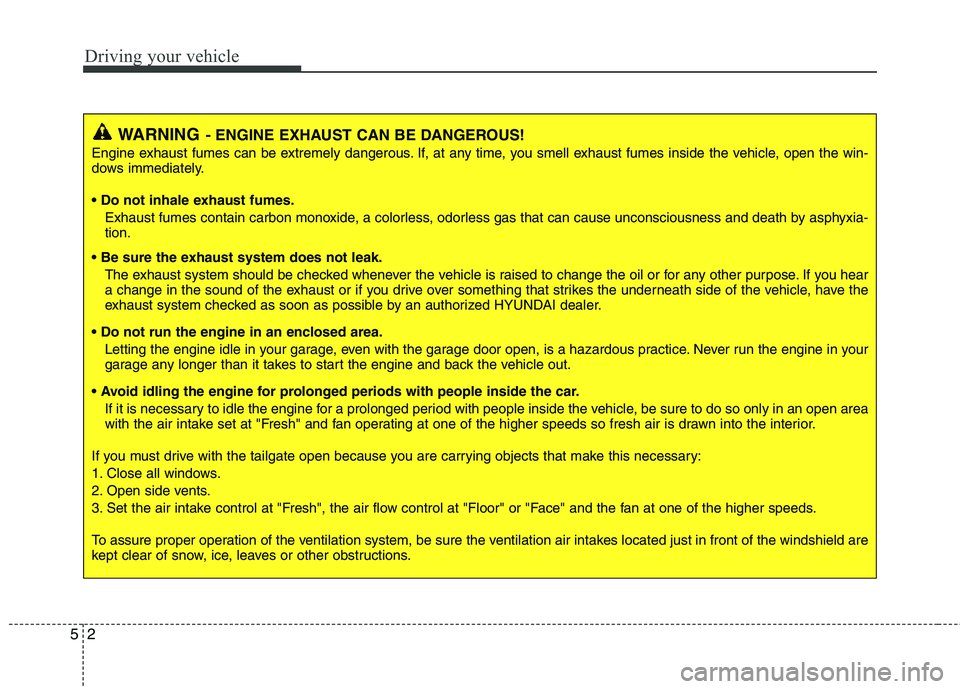
WARNING- ENGINE EXHAUST CAN BE DANGEROUS!
Engine exhaust fumes can be extremely dangerous. If, at any time, you smell exhaust fumes inside the vehicle, open the win-
dows immediately.
• Do not inhale exhaust fumes.
Exhaust fumes contain carbon monoxide, a colorless, odorless gas that can cause unconsciousness and death by asphyxia- tion.
The exhaust system should be checked whenever the vehicle is raised to change the oil or for any other purpose. If you hear
a change in the sound of the exhaust or if you drive over something that strikes the underneath side of the vehicle, have the
exhaust system checked as soon as possible by an authorized HYUNDAI dealer.
Letting the engine idle in your garage, even with the garage door open, is a hazardous practice. Never run the engine in your
garage any longer than it takes to start the engine and back the vehicle out.
If it is necessary to idle the engine for a prolonged period with people inside the vehicle, be sure to do so only in an open a rea
with the air intake set at "Fresh" and fan operating at one of the higher speeds so fresh air is drawn into the interior.
If you must drive with the tailgate open because you are carrying objects that make this necessary:
1. Close all windows.
2. Open side vents.
3. Set the air intake control at "Fresh", the air flow control at "Floor" or "Face" and the fan at one of the higher speeds.
To assure proper operation of the ventilation system, be sure the ventilation air intakes located just in front of the windshie ld are
kept clear of snow, ice, leaves or other obstructions.
Page 210 of 382
59
Driving your vehicle
Downshifting
When you must slow down in heavy traf-
fic or while driving up steep hills, down-
shift before the engine starts to labor.
Downshifting reduces the chance of
stalling and gives better acceleration
when you again need to increase your
speed. When the vehicle is traveling
down steep hills, downshifting helps
maintain safe speed and prolongs brake
life.
This vehicle is geared for improved fuel
economy and may need to be driven in a
lower gear when driving up hills or into
high winds. Using top gear is best for fuel
economy, but you should use the best
gear for the road conditions.
Good driving practices
Never take the vehicle out of gear andcoast down a hill. This is extremely
hazardous. Always leave the vehicle in
gear.
Don't "ride" the brakes. This can cause them to overheat and malfunction.
Instead, when you are driving down a
long hill, slow down and shift to a lower
gear. When you do this, engine braking
will help slow down the vehicle.
Slow down before shifting to a lower gear. This will help avoid over-revving
the engine, which can cause damage.
Slow down when you encounter cross winds. This gives you much better con-
trol of your vehicle.
Be sure the vehicle is completely stopped before you attempt to shift into
reverse. The transaxle can be dam-
aged if you do not. To shift into reverse,
depress the clutch, move the shift lever
to neutral, then shift to the reverseposition.
Exercise extreme caution when driving on a slippery surface. Be especially
careful when braking, accelerating or
shifting gears. On a slippery surface,
an abrupt change in vehicle speed can
cause the drive wheels to lose traction
and the vehicle to go out of control.WARNING
Always buckle-up! In a collision, an unbelted occupant is signifi-
cantly more likely to be seriously
injured or killed than a properly belted occupant.
Avoid high speeds when corner- ing or turning.
Do not make quick steering wheel movements, such as sharp
lane changes or fast, sharp turns.
The risk of rollover is greatly increased if you lose control of
your vehicle at highway speeds.
Loss of control often occurs if two or more wheels drop off the
roadway and the driver over-
steers to reenter the roadway.
In the event your vehicle leaves the roadway, do not steer sharply.
Instead, slow down before pulling
back into the travel lanes.
Never exceed posted speed lim- its.
Page 214 of 382
513
Driving your vehicle
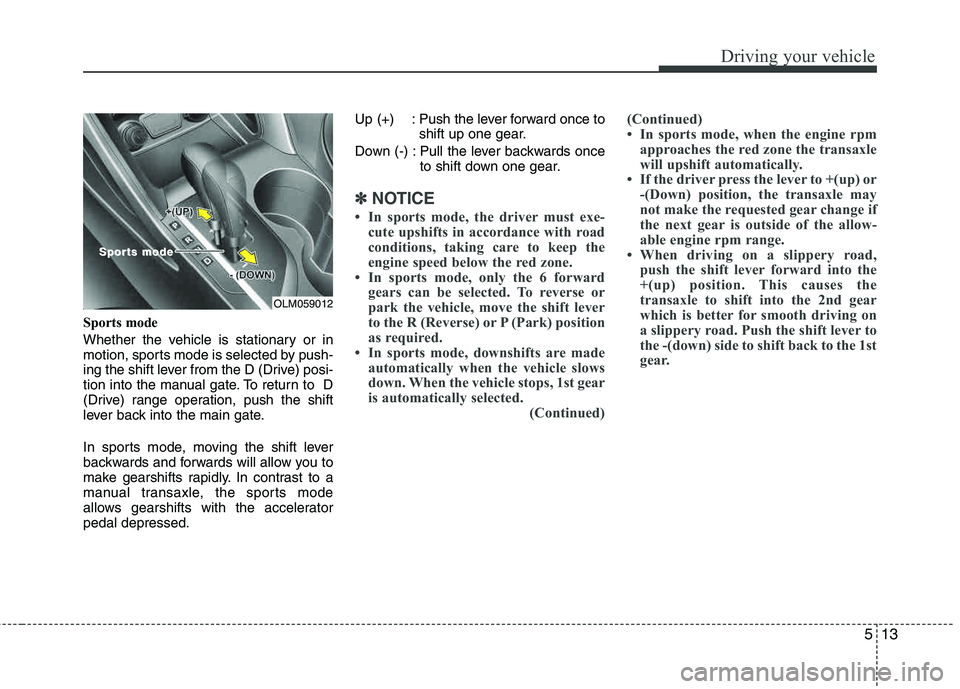
Sports mode
Whether the vehicle is stationary or in
motion, sports mode is selected by push-
ing the shift lever from the D (Drive) posi-
tion into the manual gate. To return to D
(Drive) range operation, push the shift
lever back into the main gate.
In sports mode, moving the shift lever
backwards and forwards will allow you to
make gearshifts rapidly. In contrast to a
manual transaxle, the sports mode
allows gearshifts with the accelerator pedal depressed.Up (+) : Push the lever forward once to
shift up one gear.
Down (-) : Pull the lever backwards once to shift down one gear.
✽✽NOTICE
In sports mode, the driver must exe- cute upshifts in accordance with road
conditions, taking care to keep the
engine speed below the red zone.
In sports mode, only the 6 forward gears can be selected. To reverse or
park the vehicle, move the shift lever
to the R (Reverse) or P (Park) position
as required.
In sports mode, downshifts are made automatically when the vehicle slows
down. When the vehicle stops, 1st gear
is automatically selected.
(Continued)(Continued)
In sports mode, when the engine rpm
approaches the red zone the transaxle
will upshift automatically.
If the driver press the lever to +(up) or -(Down) position, the transaxle may
not make the requested gear change if
the next gear is outside of the allow-
able engine rpm range.
When driving on a slippery road, push the shift lever forward into the
+(up) position. This causes the
transaxle to shift into the 2nd gear
which is better for smooth driving on
a slippery road. Push the shift lever to
the -(down) side to shift back to the 1st
gear.
OLM059012
SporSports modets mode
Page 216 of 382
515
Driving your vehicle
Good driving practices
Never move the gear shift lever from P(Park) or N (Neutral) to any other posi-
tion with the accelerator pedaldepressed.
Never move the gear shift lever into P (Park) when the vehicle is in motion.
Be sure the vehicle is completely stopped before you attempt to shift into
R (Reverse) or D (Drive).
Never take the vehicle out of gear and coast down a hill. This may be
extremely hazardous. Always leave the
car in gear when moving.
Do not "ride" the brakes. This can cause them to overheat and malfunc-
tion. Instead, when you are driving
down a long hill, slow down and shift to
a lower gear. When you do this, engine
braking will help slow down the vehicle.
Slow down before shifting to a lower gear. Otherwise, the lower gear may not be engaged. Always use the parking brake. Do not
depend on placing the transaxle in P
(Park) to keep the vehicle from moving.
Exercise extreme caution when driving on a slippery surface. Be especially
careful when braking, accelerating or
shifting gears. On a slippery surface,
an abrupt change in vehicle speed can
cause the drive wheels to lose traction
and the vehicle to go out of control.
Optimum vehicle performance and economy is obtained by smoothly
depressing and releasing the accelera-tor pedal.WARNING
Always buckle-up! In a collision, an unbelted occupant is signifi-
cantly more likely to be seriously
injured or killed than a properly belted occupant.
Avoid high speeds when corner- ing or turning.
Do not make quick steering wheel movements, such as sharp
lane changes or fast, sharp turns.
The risk of rollover is greatly increased if you lose control of
your vehicle at highway speeds.
Loss of control often occurs if two or more wheels drop off the
roadway and the driver over-
steers to reenter the roadway.
In the event your vehicle leaves the roadway, do not steer sharply.
Instead, slow down before pulling
back into the travel lanes.
Never exceed posted speed lim- its.
Page 220 of 382
519
Driving your vehicle
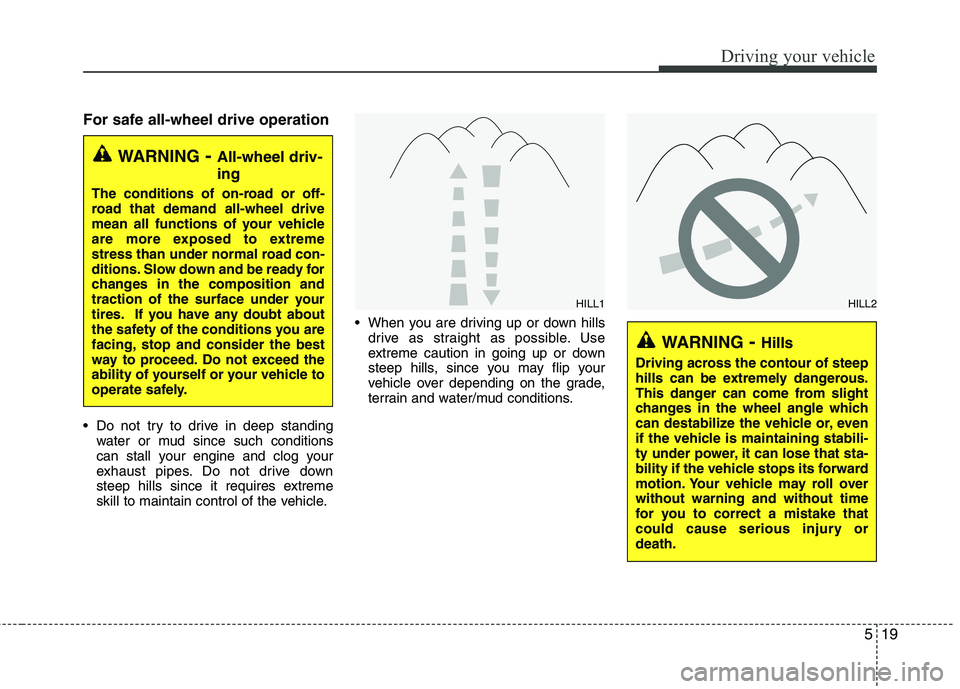
For safe all-wheel drive operation
Do not try to drive in deep standingwater or mud since such conditions
can stall your engine and clog your
exhaust pipes. Do not drive down
steep hills since it requires extreme
skill to maintain control of the vehicle. When you are driving up or down hills
drive as straight as possible. Use
extreme caution in going up or down
steep hills, since you may flip your
vehicle over depending on the grade,
terrain and water/mud conditions.
WARNING - All-wheel driv- ing
The conditions of on-road or off-
road that demand all-wheel drive
mean all functions of your vehicle
are more exposed to extreme
stress than under normal road con-
ditions. Slow down and be ready for
changes in the composition and
traction of the surface under your
tires. If you have any doubt about
the safety of the conditions you are
facing, stop and consider the best
way to proceed. Do not exceed the
ability of yourself or your vehicle to
operate safely.
WARNING- Hills
Driving across the contour of steep
hills can be extremely dangerous.
This danger can come from slight
changes in the wheel angle which
can destabilize the vehicle or, even
if the vehicle is maintaining stabili-
ty under power, it can lose that sta-
bility if the vehicle stops its forward
motion. Your vehicle may roll overwithout warning and without time
for you to correct a mistake that
could cause serious injury ordeath.
HILL1HILL2