sensor HYUNDAI TUCSON 2014 User Guide
[x] Cancel search | Manufacturer: HYUNDAI, Model Year: 2014, Model line: TUCSON, Model: HYUNDAI TUCSON 2014Pages: 542, PDF Size: 7.59 MB
Page 83 of 542
2-66
Safety system of your vehicle
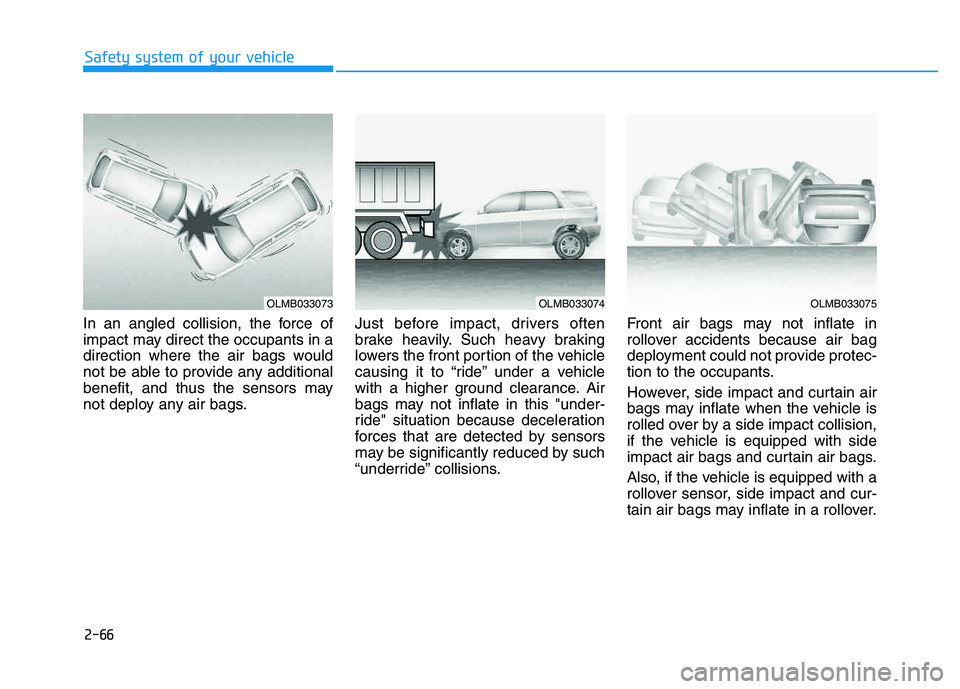
In an angled collision, the force of
impact may direct the occupants in a
direction where the air bags would
not be able to provide any additional
benefit, and thus the sensors may
not deploy any air bags.Just before impact, drivers often
brake heavily. Such heavy braking
lowers the front portion of the vehicle
causing it to “ride” under a vehicle
with a higher ground clearance. Air
bags may not inflate in this "under-
ride" situation because deceleration
forces that are detected by sensors
may be significantly reduced by such
“underride” collisions. Front air bags may not inflate in
rollover accidents because air bag
deployment could not provide protec-
tion to the occupants.
However, side impact and curtain air
bags may inflate when the vehicle is
rolled over by a side impact collision,
if the vehicle is equipped with side
impact air bags and curtain air bags.
Also, if the vehicle is equipped with a
rollover sensor, side impact and cur-
tain air bags may inflate in a rollover.
OLMB033073OLMB033074OLMB033075
Page 131 of 542
3-45
Convenient features of your vehicle
3
Electric chromic mirror (ECM) (if equipped)
The electric rearview mirror automati- cally controls the glare from the head-
lights of the car behind you in night-
time or low light driving conditions.
When the engine is running, the
glare is automatically controlled by
the sensor mounted in the rearview
mirror. The sensor detects the light
level around the vehicle, and auto-matically adjusts to control the head-
light glare from vehicles behind you.
Whenever the shift lever is placed in
R (Reverse), the mirror will automat-
ically go to the brightest setting to
improve the driver’s view behind the
vehicle.
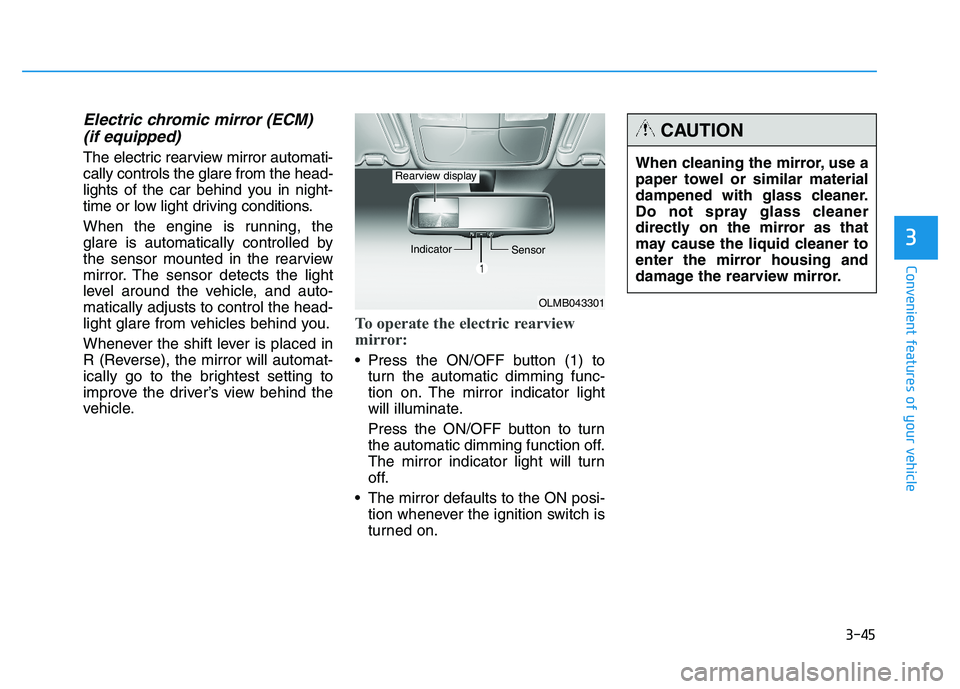
To operate the electric rearview
mirror:
Press the ON/OFF button (1) to turn the automatic dimming func-
tion on. The mirror indicator light
will illuminate.
Press the ON/OFF button to turn
the automatic dimming function off.
The mirror indicator light will turn
off.
The mirror defaults to the ON posi- tion whenever the ignition switch is
turned on.
OLMB043301
Indicator
Sensor
Rearview displayWhen cleaning the mirror, use a
paper towel or similar material
dampened with glass cleaner.
Do not spray glass cleaner
directly on the mirror as that
may cause the liquid cleaner to
enter the mirror housing and
damage the rearview mirror.
CAUTION
Page 132 of 542
3-46
Convenient features of your vehicle
Blue Link®
center (if equipped)
For details, refer to the Blue Link ®
Owner’s Guide, Navigation Manual
or Audio Manual. The Audio Manualis in the chapter 4.
Electric chromic mirror (ECM) with compass and HomeLink ®
system (if equipped)
Your vehicle may be equipped with a
Gentex Automatic-Dimming Mirror
with a Z-Nav™ Electronic Compass
Display and an Integrated HomeLink ®
Wireless Control System.
During nighttime driving, this feature will automatically detect and reduce
rearview mirror glare while the com-
pass indicates the direction the vehi-
cle is pointed. The HomeLink ®
Universal Transceiver allows you to
activate your garage door(s), electric
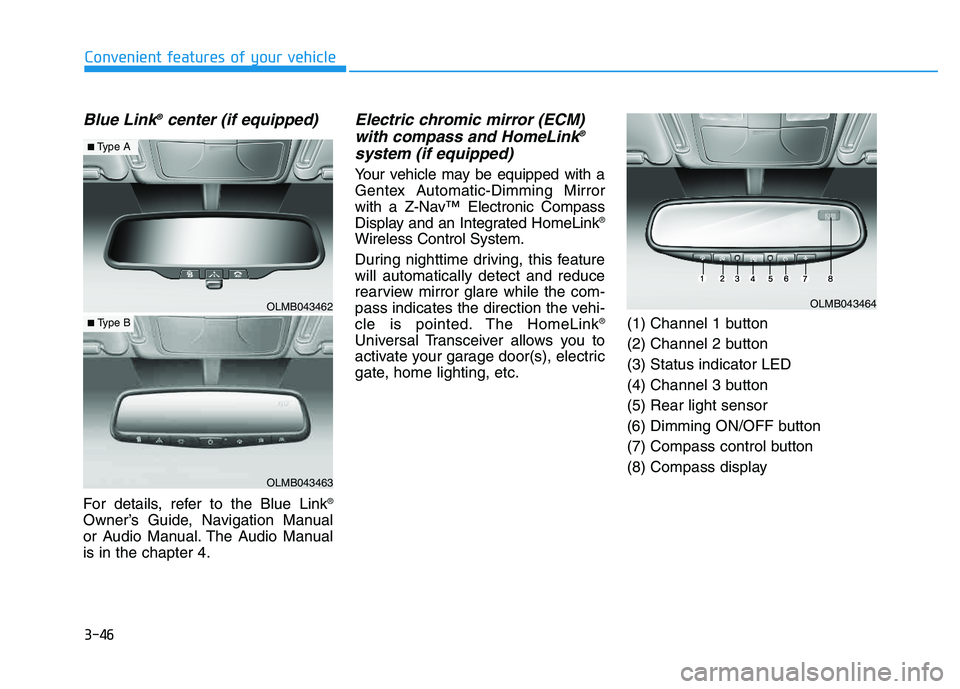
gate, home lighting, etc. (1) Channel 1 button
(2) Channel 2 button(3) Status indicator LED
(4) Channel 3 button(5) Rear light sensor
(6) Dimming ON/OFF button
(7) Compass control button
(8) Compass display
OLMB043462
OLMB043463
■
Type A
■ Type B
OLMB043464
Page 140 of 542
3-54
Convenient features of your vehicle
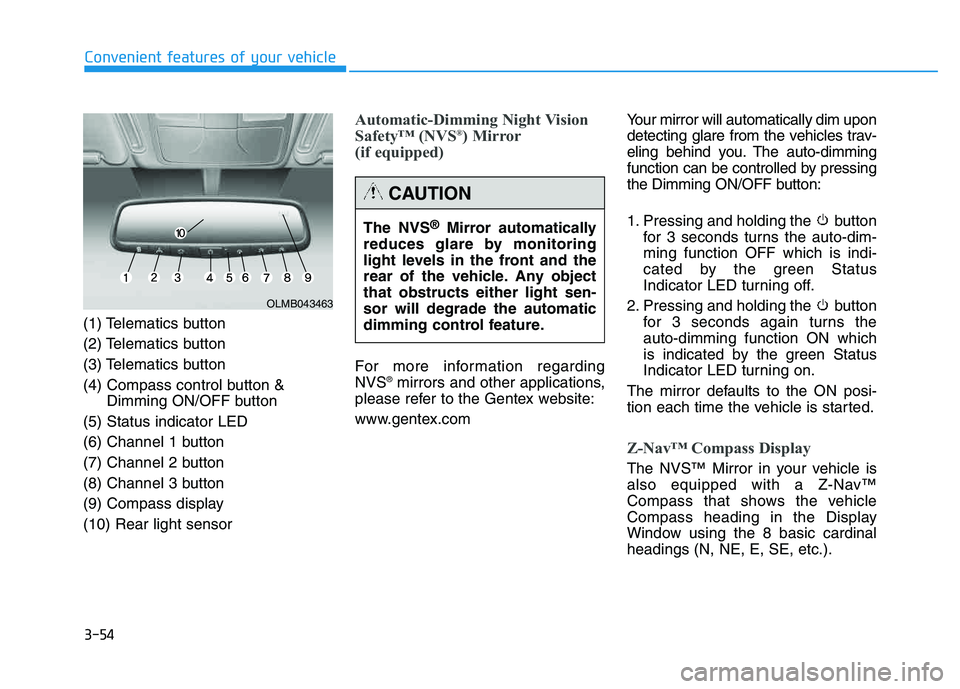
(1) Telematics button
(2) Telematics button
(3) Telematics button
(4) Compass control button &Dimming ON/OFF button
(5) Status indicator LED
(6) Channel 1 button
(7) Channel 2 button
(8) Channel 3 button
(9) Compass display(10) Rear light sensor
Automatic-Dimming Night Vision
Safety™ (NVS ®
) Mirror
(if equipped)
For more information regarding NVS ®
mirrors and other applications,
please refer to the Gentex website:
www.gentex.com Your mirror will automatically dim upon
detecting glare from the vehicles trav-
eling behind you. The auto-dimming
function can be controlled by pressing
the Dimming ON/OFF button:
1. Pressing and holding the button
for 3 seconds turns the auto-dim- ming function OFF which is indi-
cated by the green Status
Indicator LED turning off.
2. Pressing and holding the button for 3 seconds again turns theauto-dimming function ON which
is indicated by the green Status
Indicator LED turning on.
The mirror defaults to the ON posi-
tion each time the vehicle is started.
Z-Nav™ Compass Display
The NVS™ Mirror in your vehicle is
also equipped with a Z-Nav™
Compass that shows the vehicle
Compass heading in the Display
Window using the 8 basic cardinalheadings (N, NE, E, SE, etc.).
OLMB043463
The NVS ®
Mirror automatically
reduces glare by monitoring
light levels in the front and the
rear of the vehicle. Any objectthat obstructs either light sen-sor will degrade the automatic
dimming control feature.
CAUTION
Page 166 of 542
3-80
Convenient features of your vehicle
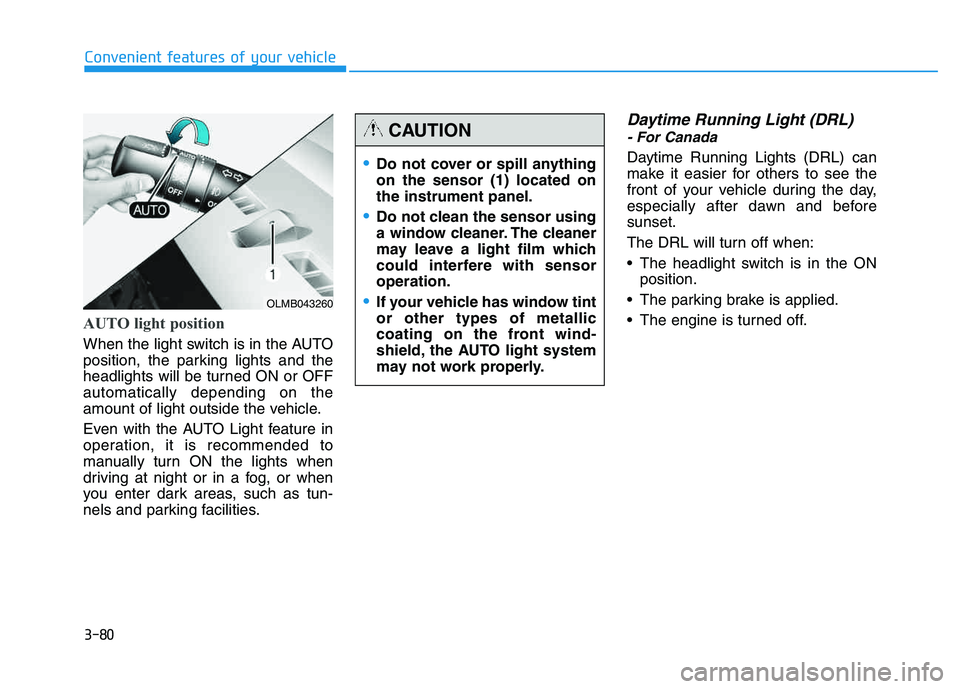
AUTO light position
When the light switch is in the AUTO
position, the parking lights and the
headlights will be turned ON or OFFautomatically depending on the
amount of light outside the vehicle.
Even with the AUTO Light feature in
operation, it is recommended to
manually turn ON the lights when
driving at night or in a fog, or when
you enter dark areas, such as tun-
nels and parking facilities.
Daytime Running Light (DRL)
- For Canada
Daytime Running Lights (DRL) can
make it easier for others to see the
front of your vehicle during the day,
especially after dawn and beforesunset.
The DRL will turn off when:
The headlight switch is in the ONposition.
The parking brake is applied.
The engine is turned off.
OLMB043260
Do not cover or spill anything on the sensor (1) located onthe instrument panel.
Do not clean the sensor using
a window cleaner. The cleaner
may leave a light film which
could interfere with sensoroperation.
If your vehicle has window tint or other types of metallic
coating on the front wind-
shield, the AUTO light system
may not work properly.
CAUTION
Page 173 of 542
3-87
Convenient features of your vehicle
3
WWIIPP EERR SS AA NN DD WW AASSHH EERR SS
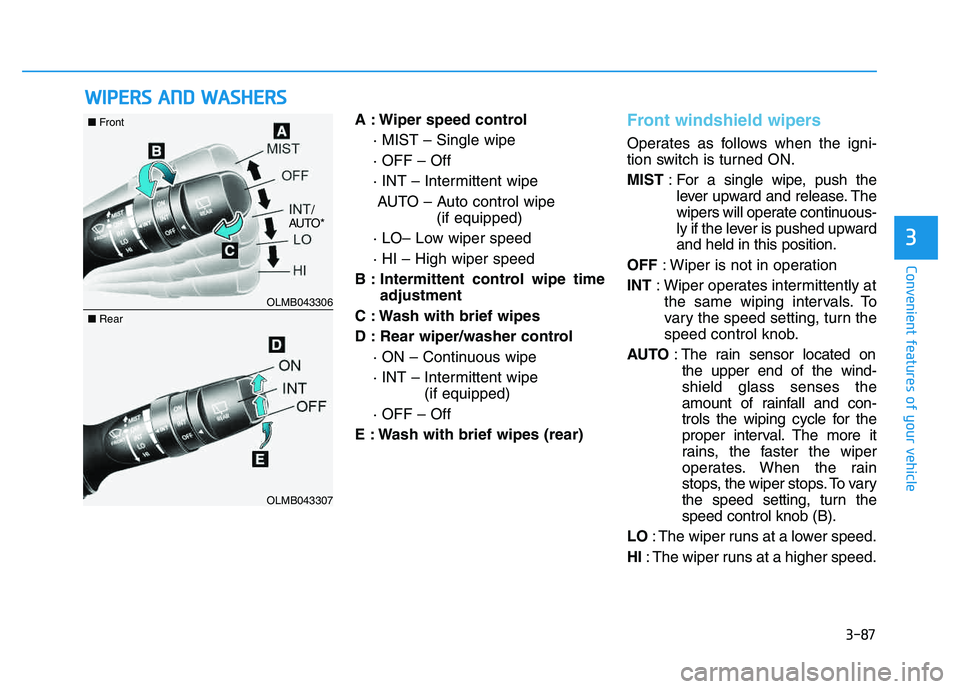
A : Wiper speed control
· MIST – Single wipe · OFF – Off
· INT – Intermittent wipeAUTO – Auto control wipe (if equipped)
· LO– Low wiper speed· HI – High wiper speed
B : Intermittent control wipe time adjustment
C : Wash with brief wipes
D : Rear wiper/washer control · ON – Continuous wipe
· INT – Intermittent wipe (if equipped)
· OFF – Off
E : Wash with brief wipes (rear)Front windshield wipers
Operates as follows when the igni-
tion switch is turned ON. MIST : For a single wipe, push the
lever upward and release. The
wipers will operate continuous-
ly if the lever is pushed upwardand held in this position.
OFF : Wiper is not in operation
INT : Wiper operates intermittently at
the same wiping intervals. To
vary the speed setting, turn the
speed control knob.
AUTO : The rain sensor located on
the upper end of the wind-shield glass senses the
amount of rainfall and con-
trols the wiping cycle for the
proper interval. The more it
rains, the faster the wiper
operates. When the rain
stops, the wiper stops. To vary
the speed setting, turn thespeed control knob (B).
LO : The wiper runs at a lower speed.
HI : The wiper runs at a higher speed.
OLMB043306
OLMB043307
■Front
■Rear
/
AUTO*
Page 174 of 542
3-88
Convenient features of your vehicle
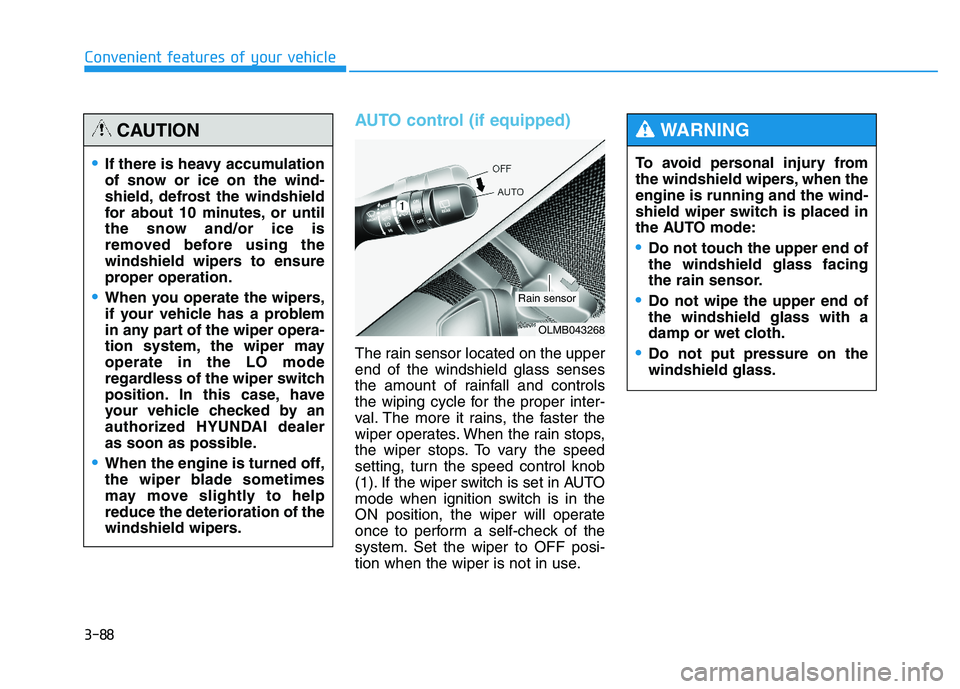
AUTO control (if equipped)
The rain sensor located on the upper end of the windshield glass senses
the amount of rainfall and controls
the wiping cycle for the proper inter-
val. The more it rains, the faster the
wiper operates. When the rain stops,
the wiper stops. To vary the speed
setting, turn the speed control knob
(1). If the wiper switch is set in AUTO
mode when ignition switch is in the
ON position, the wiper will operate
once to perform a self-check of the
system. Set the wiper to OFF posi-
tion when the wiper is not in use.To avoid personal injury from
the windshield wipers, when theengine is running and the wind-
shield wiper switch is placed in
the AUTO mode:
Do not touch the upper end of the windshield glass facing
the rain sensor.
Do not wipe the upper end of the windshield glass with a
damp or wet cloth.
Do not put pressure on the windshield glass.
WARNING
If there is heavy accumulation
of snow or ice on the wind-
shield, defrost the windshield
for about 10 minutes, or until
the snow and/or ice is
removed before using the
windshield wipers to ensure
proper operation.
When you operate the wipers,
if your vehicle has a problem
in any part of the wiper opera-
tion system, the wiper mayoperate in the LO mode
regardless of the wiper switch
position. In this case, have
your vehicle checked by an
authorized HYUNDAI dealer
as soon as possible.
When the engine is turned off,
the wiper blade sometimes
may move slightly to helpreduce the deterioration of the
windshield wipers.
CAUTION
OLMB043268
Rain sensor
Page 175 of 542
3-89
Convenient features of your vehicle
3
Front windshield washers
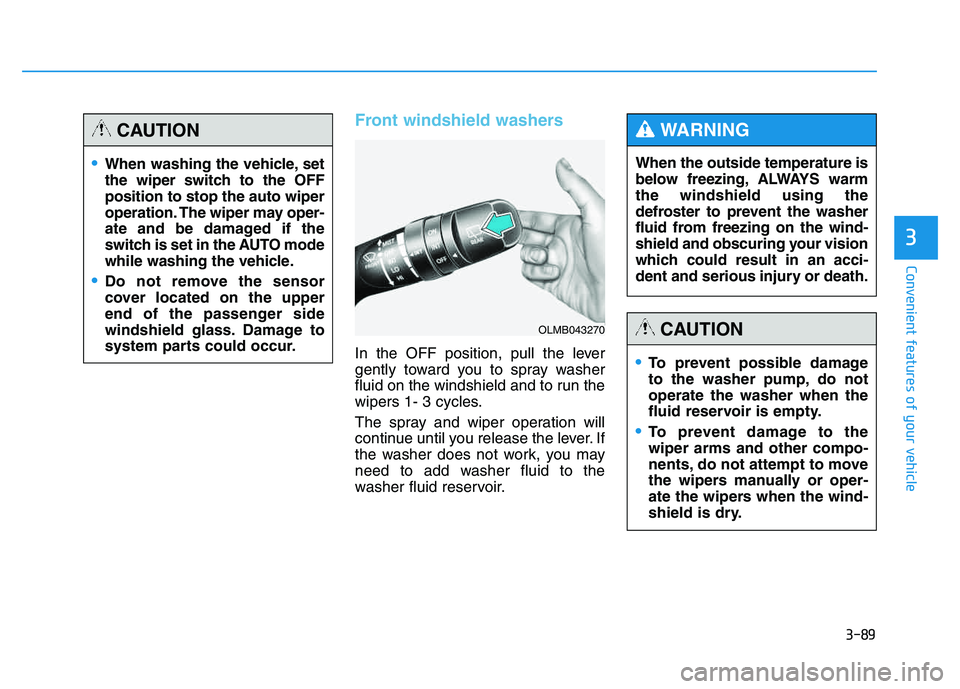
In the OFF position, pull the lever
gently toward you to spray washer
fluid on the windshield and to run the
wipers 1- 3 cycles.
The spray and wiper operation will
continue until you release the lever. If
the washer does not work, you may
need to add washer fluid to the
washer fluid reservoir.When the outside temperature is
below freezing, ALWAYS warmthe windshield using the
defroster to prevent the washer
fluid from freezing on the wind-
shield and obscuring your vision
which could result in an acci-
dent and serious injury or death.
WARNING
To prevent possible damage
to the washer pump, do notoperate the washer when the
fluid reservoir is empty.
To prevent damage to the wiper arms and other compo-
nents, do not attempt to move
the wipers manually or oper-
ate the wipers when the wind-
shield is dry.
CAUTION
When washing the vehicle, set
the wiper switch to the OFFposition to stop the auto wiper
operation. The wiper may oper-
ate and be damaged if the
switch is set in the AUTO mode
while washing the vehicle.
Do not remove the sensor
cover located on the upper
end of the passenger side
windshield glass. Damage to
system parts could occur.
CAUTION
OLMB043270
Page 190 of 542
3-104
Convenient features of your vehicle
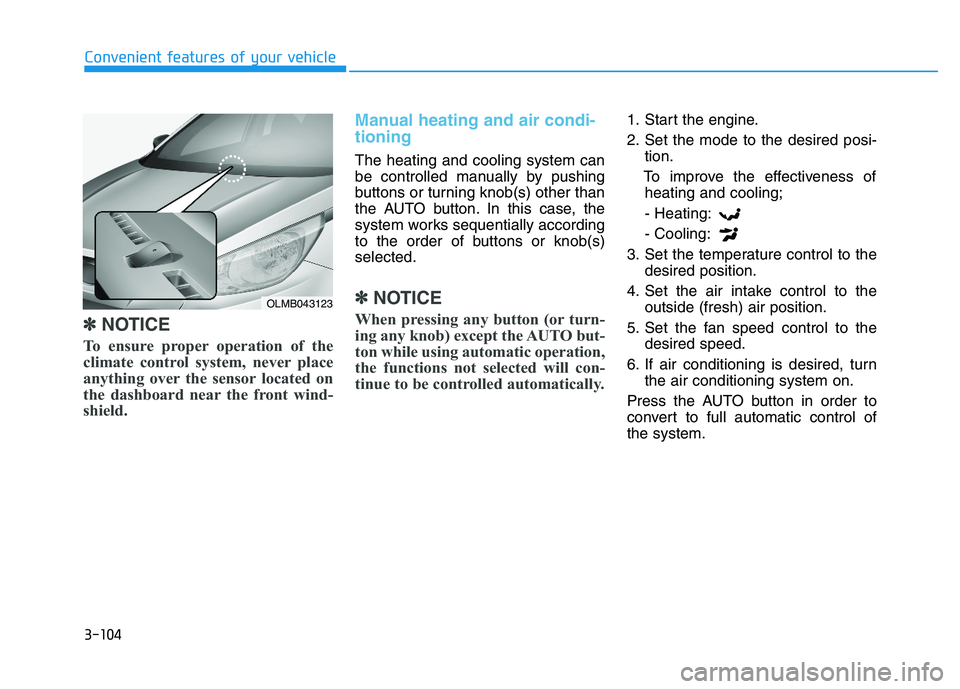
✽✽NOTICE
To ensure proper operation of the
climate control system, never place
anything over the sensor located on
the dashboard near the front wind-
shield.
Manual heating and air condi- tioning
The heating and cooling system can
be controlled manually by pushing
buttons or turning knob(s) other than
the AUTO button. In this case, the
system works sequentially according
to the order of buttons or knob(s)selected.
✽✽ NOTICE
When pressing any button (or turn-
ing any knob) except the AUTO but-
ton while using automatic operation,
the functions not selected will con-
tinue to be controlled automatically.
1. Start the engine.
2. Set the mode to the desired posi- tion.
To improve the effectiveness of heating and cooling;
- Heating:- Cooling:
3. Set the temperature control to the desired position.
4. Set the air intake control to the outside (fresh) air position.
5. Set the fan speed control to the desired speed.
6. If air conditioning is desired, turn the air conditioning system on.
Press the AUTO button in order to
convert to full automatic control ofthe system.
OLMB043123
Page 417 of 542
6-11
What to do in an emergency
TPMS malfunctions may occur for a
variety of reasons, including theinstallation of replacement or alter-
nate tires or wheels on the vehicle
that prevent the TPMS from function-
ing properly. Always check the TPMSmalfunction telltale after replacing
one or more tires or wheels on your
vehicle to ensure that the replace-
ment or alternate tires and wheels
allow the TPMS to continue to func-
tion properly.
✽✽NOTICE
If the TPMS Low Tire Pressure
Telltale does not illuminate for three
seconds when the ignition switch is
in the ON position or when the
engine starts, or if it remains illumi-
nated after coming on for approxi-
mately three seconds, take your
vehicle to your nearest authorized
HYUNDAI dealer and have the sys-
tem checked.
Low Tire Pressure
Telltale
The TPMS is not a substitute for
manually checking tire pressure with
a tire pressure gauge. Changes in
temperature affect tire pressure. See
“Tires and Wheels” in chapter 7 forproper tire inflating and tire pressure
measurement procedures.
Immediately reduce your speed,
avoid hard cornering and anticipate
increased stopping distances. You
should stop and check your tires as
soon as possible. Inflate the tires tothe proper pressure as indicated on
the vehicle’s placard or tire inflation
pressure label located on the driver’s
side door jamb. If you cannot reach a
service station or if the tire cannot
hold the newly added air, replace the
low pressure tire with the compact
spare tire. The Low Tire Pressure Telltale will
remain on and the TPMS Malfunction
Indicator may blink for one minuteand then remain illuminated if the
vehicle is driven approximately 20
minutes at speed above 15.5 mph(25 km/h).
✽✽
NOTICE
The compact spare tire is not
equipped with a tire pressure sensor.
6