warning light HYUNDAI TUCSON 2014 User Guide
[x] Cancel search | Manufacturer: HYUNDAI, Model Year: 2014, Model line: TUCSON, Model: HYUNDAI TUCSON 2014Pages: 542, PDF Size: 7.59 MB
Page 76 of 542
2-59
Safety system of your vehicle
2
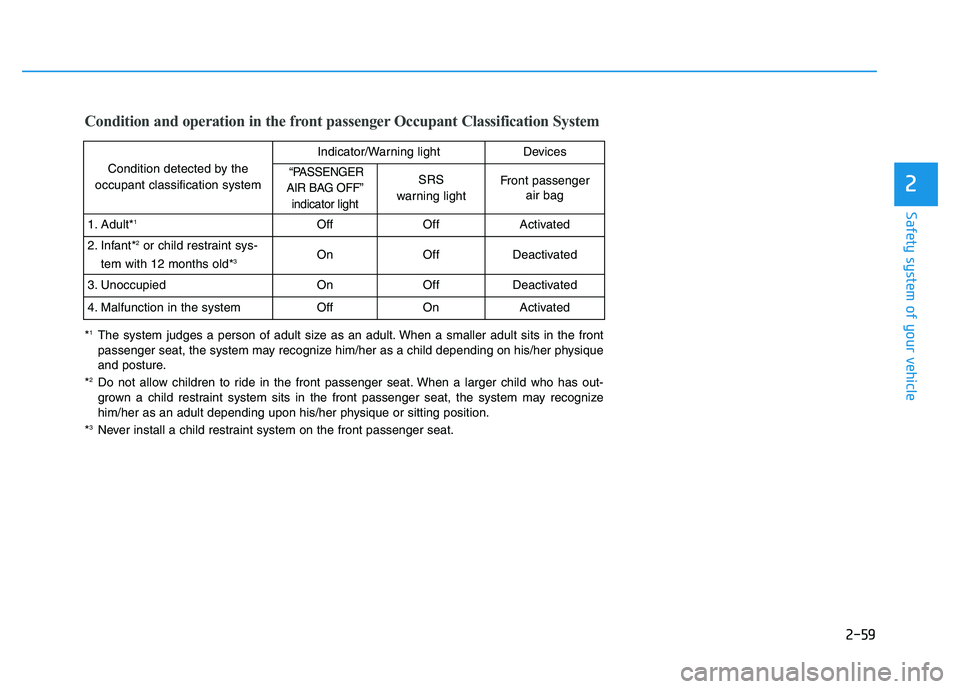
Condition and operation in the front passenger Occupant Classification System
Condition detected by the
occupant classification system
Indicator/Warning lightDevices
“PASSENGER
AIR BAG OFF” indicator lightSRS
warning lightFront passenger air bag
1. Adult* 1OffOffActivated
2. Infant* 2
or child restraint sys-
tem with 12 months old* 3OnOffDeactivated
3. Unoccupied OnOffDeactivated
4. Malfunction in the systemOffOnActivated
*1
The system judges a person of adult size as an adult. When a smaller adult sits in the front
passenger seat, the system may recognize him/her as a child depending on his/her physique
and posture.
* 2
Do not allow children to ride in the front passenger seat. When a larger child who has out-
grown a child restraint system sits in the front passenger seat, the system may recognize
him/her as an adult depending upon his/her physique or sitting position.
* 3
Never install a child restraint system on the front passenger seat.
Page 84 of 542
2-67
Safety system of your vehicle
2
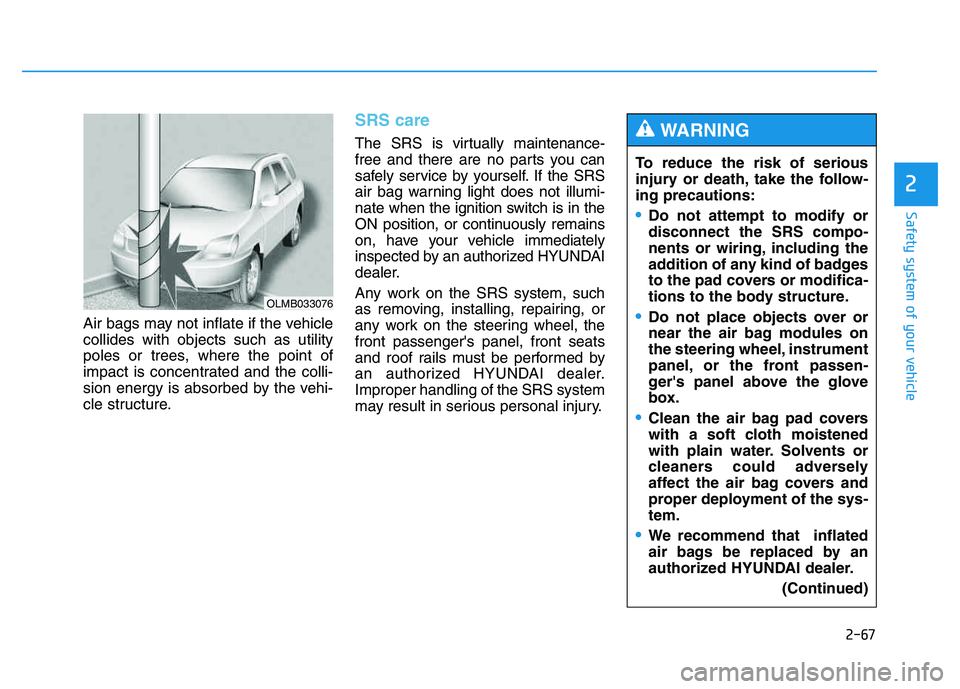
Air bags may not inflate if the vehicle collides with objects such as utility
poles or trees, where the point of
impact is concentrated and the colli-
sion energy is absorbed by the vehi-
cle structure.
SRS care
The SRS is virtually maintenance-
free and there are no parts you can
safely service by yourself. If the SRS
air bag warning light does not illumi-
nate when the ignition switch is in the
ON position, or continuously remains
on, have your vehicle immediately
inspected by an authorized HYUNDAI
dealer.
Any work on the SRS system, such
as removing, installing, repairing, or
any work on the steering wheel, thefront passenger's panel, front seats
and roof rails must be performed by
an authorized HYUNDAI dealer.Improper handling of the SRS system
may result in serious personal injury.
OLMB033076
To reduce the risk of serious
injury or death, take the follow-ing precautions:
Do not attempt to modify or disconnect the SRS compo-
nents or wiring, including the
addition of any kind of badges
to the pad covers or modifica-
tions to the body structure.
Do not place objects over or
near the air bag modules on
the steering wheel, instrument
panel, or the front passen-
ger's panel above the glove
box.
Clean the air bag pad covers
with a soft cloth moistened
with plain water. Solvents or
cleaners could adversely
affect the air bag covers and
proper deployment of the sys-tem.
We recommend that inflated
air bags be replaced by an
authorized HYUNDAI dealer.(Continued)
WARNING
Page 87 of 542
Convenient features of your vehicle
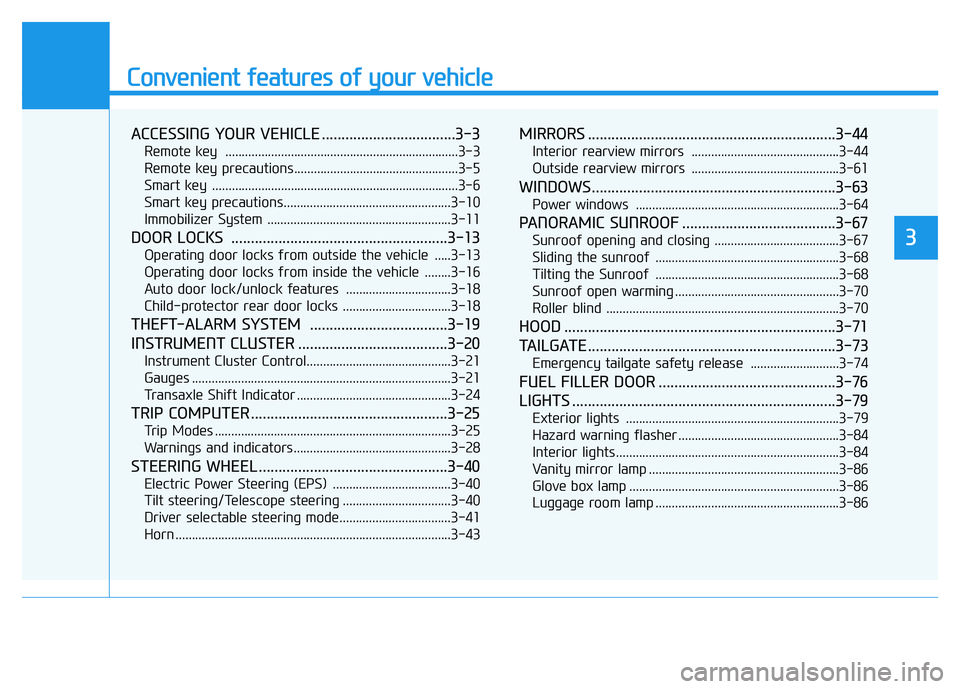
ACCESSING YOUR VEHICLE ..................................3-3
Remote key .......................................................................3-3
Remote key precautions..................................................3-5
Smart key ...........................................................................3-6
Smart key precautions...................................................3-10 Immobilizer System ........................................................3-11
DOOR LOCKS .......................................................3-13
Operating door locks from outside the vehicle .....3-13
Operating door locks from inside the vehicle ........3-16
Auto door lock/unlock features ................................3-18
Child-protector rear door locks .................................3-18
THEFT-ALARM SYSTEM ...................................3-19
INSTRUMENT CLUSTER ......................................3-20
Instrument Cluster Control............................................3-21
Gauges ...............................................................................3-21
Transaxle Shift Indicator ...............................................3-24
TRIP COMPUTER ..................................................3-25
Trip Modes ........................................................................3-25
Warnings and indicators................................................3-28
STEERING WHEEL ................................................3-40
Electric Power Steering (EPS) ....................................3-40
Tilt steering/Telescope steering .................................3-40
Driver selectable steering mode..................................3-41
Horn ....................................................................................3-43
MIRRORS ...............................................................3-44
Interior rearview mirrors .............................................3-44
Outside rearview mirrors .............................................3-61
WINDOWS..............................................................3-63
Power windows ..............................................................3-64
PANORAMIC SUNROOF .......................................3-67
Sunroof opening and closing ......................................3-67
Sliding the sunroof ........................................................3-68
Tilting the Sunroof ........................................................3-68
Sunroof open warming ..................................................3-70
Roller blind .......................................................................3-70
HOOD .....................................................................3-71
TAILGATE ...............................................................3-73
Emergency tailgate safety release ...........................3-74
FUEL FILLER DOOR .............................................3-76
LIGHTS ...................................................................3-79
Exterior lights .................................................................3-79
Hazard warning flasher .................................................3-84
Interior lights ....................................................................3-84
Vanity mirror lamp ..........................................................3-86
Glove box lamp ................................................................3-86
Luggage room lamp ........................................................3-86
3
Page 89 of 542
3-3
Convenient features of your vehicle
3
Remote key
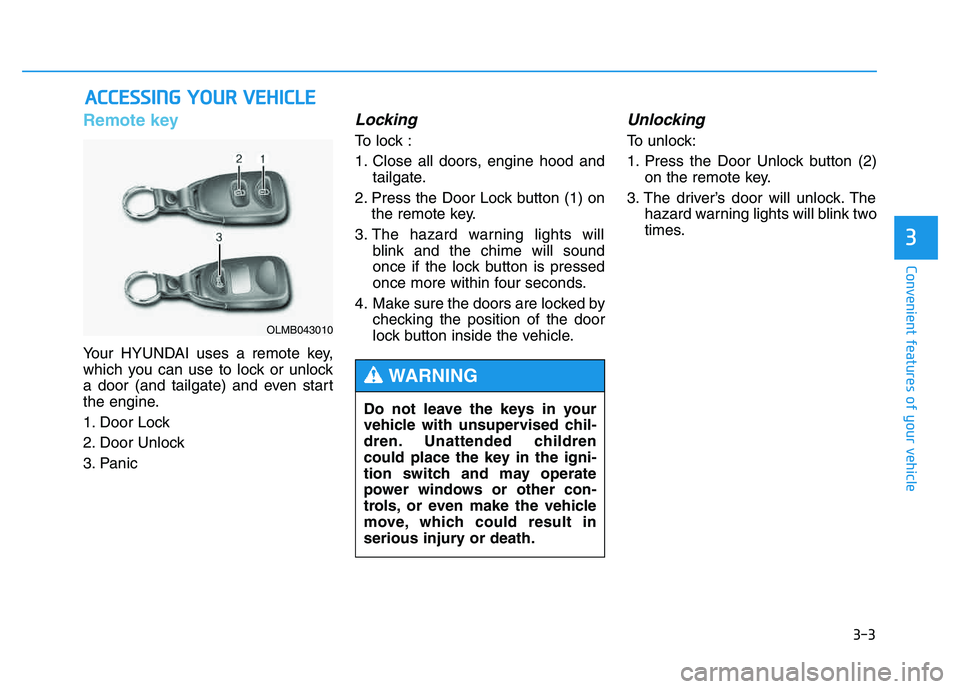
Your HYUNDAI uses a remote key,
which you can use to lock or unlock
a door (and tailgate) and even start
the engine.
1. Door Lock
2. Door Unlock
3. Panic
Locking
To lock :
1. Close all doors, engine hood andtailgate.
2. Press the Door Lock button (1) on the remote key.
3. The hazard warning lights will blink and the chime will sound
once if the lock button is pressed
once more within four seconds.
4. Make sure the doors are locked by checking the position of the door
lock button inside the vehicle.
Unlocking
To unlock:
1. Press the Door Unlock button (2)on the remote key.
3. The driver’s door will unlock. The hazard warning lights will blink two
times.
AACCCCEE SSSSIINN GG YY OO UURR VV EEHH IICC LLEE
Do not leave the keys in your
vehicle with unsupervised chil-
dren. Unattended children
could place the key in the igni-
tion switch and may operate
power windows or other con-
trols, or even make the vehicle
move, which could result in
serious injury or death.
WARNING
OLMB043010
Page 90 of 542
3-4
Convenient features of your vehicle
✽✽NOTICE
If you press the Door Unlock but- ton again within four seconds,
then all the doors will unlock.
After unlocking the doors, the doors will lock automatically after
30 seconds unless a door is opened.
You can change the system to the central door unlock mode (unlock
all the doors when you press the
unlock button one time). If you want
this feature, perform the following:
Unlock mode conversion (two
stage unlock mode ↔
↔
central door
unlock mode)
The unlock mode changes alter-
nately by pressing the lock button
and unlock button on the remote
key at the same time for 4 seconds
or more. The hazard warning
lights will blink four times to indi-
cate that the mode conversion is
completed.
Panic button
Press the Panic button (4) for more
than one second. The horn sounds
and hazard warning lights flash for
about 30 seconds.
To cancel the panic mode, press any
button on the remote key.
Start-up
For detailed information refer to the
“Key Ignition Switch” in chapter 5.
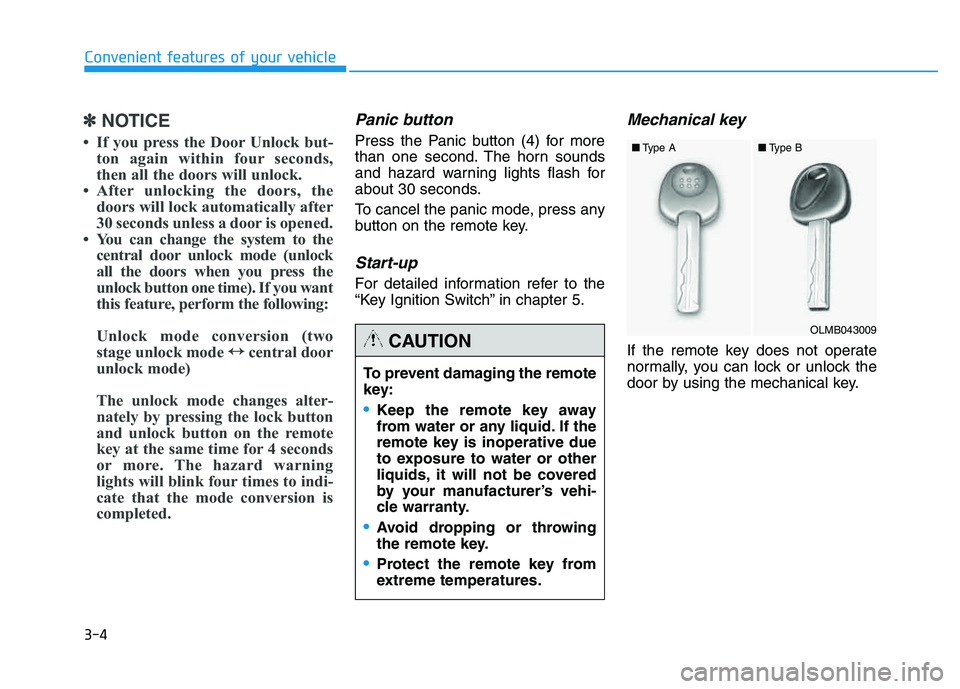
Mechanical key
If the remote key does not operate
normally, you can lock or unlock the
door by using the mechanical key.
To prevent damaging the remote
key:
•Keep the remote key away
from water or any liquid. If the
remote key is inoperative due
to exposure to water or other
liquids, it will not be covered
by your manufacturer’s vehi-
cle warranty.
Avoid dropping or throwing
the remote key.
Protect the remote key from
extreme temperatures.
CAUTIONOLMB043009
■
Type A ■Type B
Page 93 of 542
3-7
Convenient features of your vehicle
3
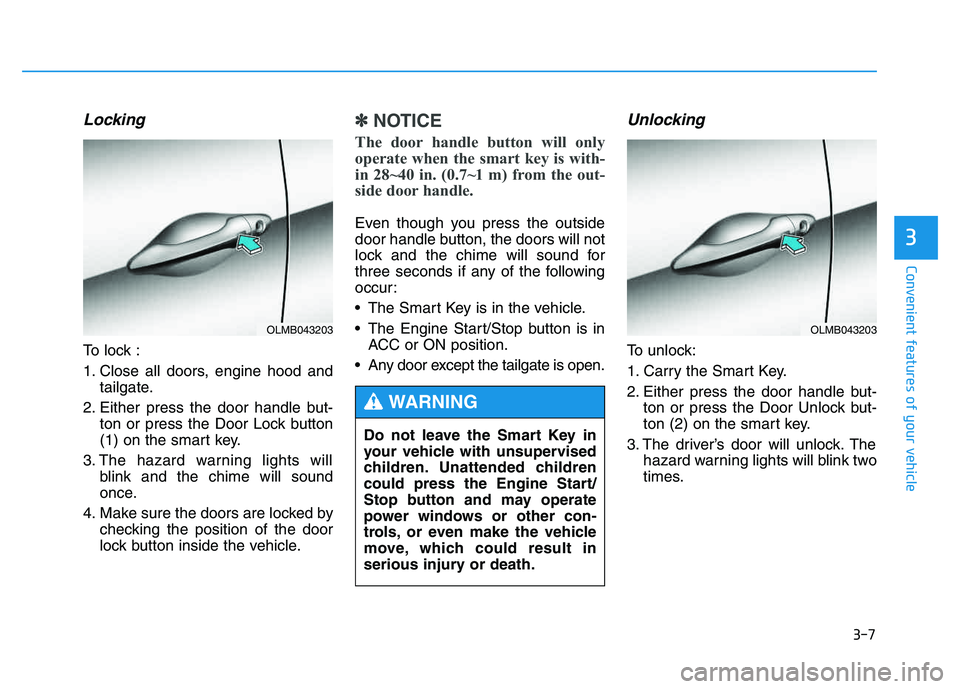
Locking
To lock :
1. Close all doors, engine hood andtailgate.
2. Either press the door handle but- ton or press the Door Lock button
(1) on the smart key.
3. The hazard warning lights will blink and the chime will sound
once.
4. Make sure the doors are locked by checking the position of the door
lock button inside the vehicle.
✽✽ NOTICE
The door handle button will only
operate when the smart key is with-
in 28~40 in. (0.7~1 m) from the out-
side door handle.
Even though you press the outside
door handle button, the doors will not
lock and the chime will sound for
three seconds if any of the following
occur:
The Smart Key is in the vehicle.
The Engine Start/Stop button is in ACC or ON position.
Any door except the tailgate is open.
Unlocking
To unlock:
1. Carry the Smart Key.
2. Either press the door handle but- ton or press the Door Unlock but-
ton (2) on the smart key.
3. The driver’s door will unlock. The hazard warning lights will blink two
times.
OLMB043203
Do not leave the Smart Key in
your vehicle with unsupervised
children. Unattended children
could press the Engine Start/
Stop button and may operate
power windows or other con-
trols, or even make the vehicle
move, which could result in
serious injury or death.
WARNING
OLMB043203
Page 94 of 542
3-8
Convenient features of your vehicle
✽✽NOTICE
The door handle button will only operate when the smart key is
within 28~40 in. (0.7~1 m) from the
outside door handle. Other people
can also open the doors without the
smart key in possession.
If you press the Door Unlock but- ton again within four seconds,
then all the doors will unlock.
After unlocking the doors, the doors will lock automatically after
30 seconds unless a door is opened.
You can change the system to the central door unlock mode (unlock
all the doors when you press the
unlock button one time). If you want
this feature, perform the following:
Unlock mode conversion (two
stage unlock mode ↔
↔
central door
unlock mode)
The unlock mode changes alter-
nately by pressing the lock button
and unlock button on the smart key
at the same time for 4 seconds or
more. The hazard warning lights
will blink four times to indicate that
the mode conversion is completed.
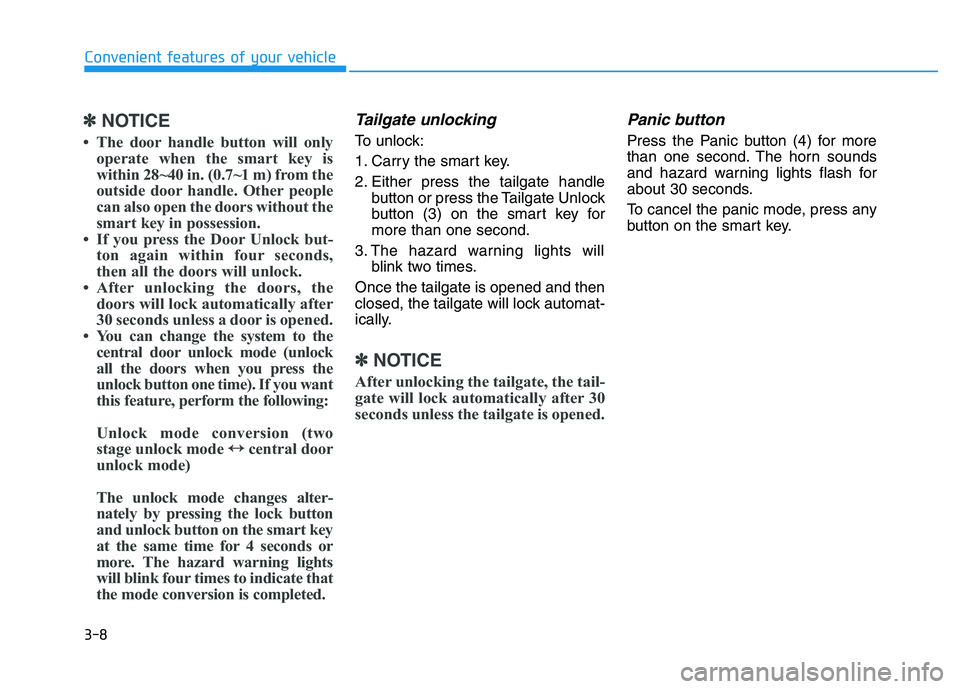
Tailgate unlocking
To unlock:
1. Carry the smart key.
2. Either press the tailgate handle button or press the Tailgate Unlock
button (3) on the smart key formore than one second.
3. The hazard warning lights will blink two times.
Once the tailgate is opened and then
closed, the tailgate will lock automat-
ically.
✽✽ NOTICE
After unlocking the tailgate, the tail-
gate will lock automatically after 30
seconds unless the tailgate is opened.
Panic button
Press the Panic button (4) for more
than one second. The horn sounds
and hazard warning lights flash for
about 30 seconds.
To cancel the panic mode, press any
button on the smart key.
Page 100 of 542
3-14
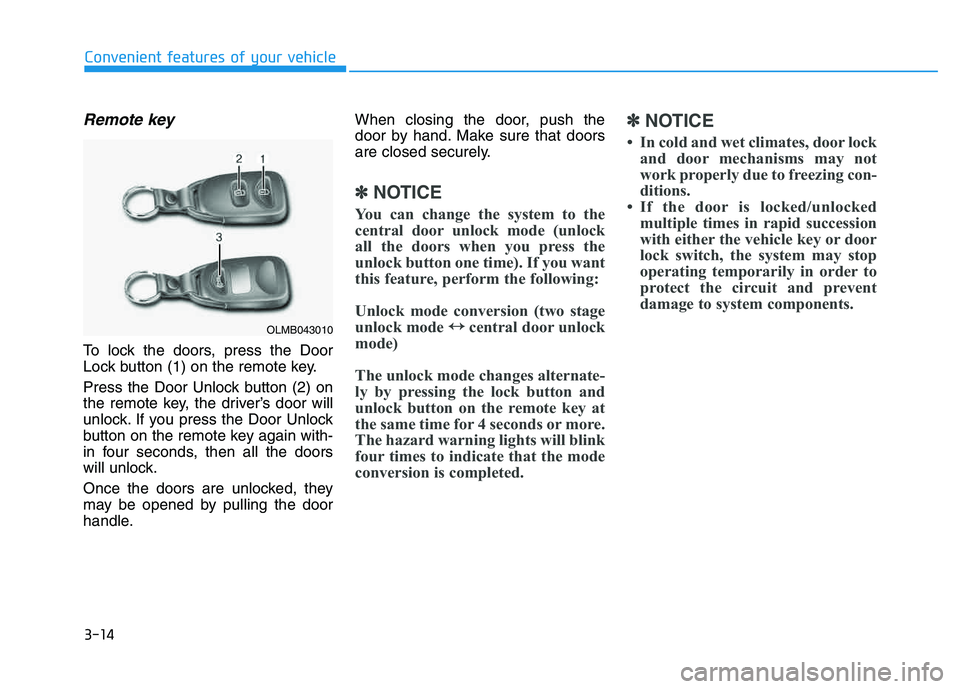
Remote key
To lock the doors, press the Door
Lock button (1) on the remote key.
Press the Door Unlock button (2) on
the remote key, the driver’s door will
unlock. If you press the Door Unlock
button on the remote key again with-
in four seconds, then all the doors
will unlock.
Once the doors are unlocked, they
may be opened by pulling the door
handle.When closing the door, push the
door by hand. Make sure that doors
are closed securely.
✽✽
NOTICE
You can change the system to the
central door unlock mode (unlock
all the doors when you press the
unlock button one time). If you want
this feature, perform the following:
Unlock mode conversion (two stage
unlock mode ↔
↔
central door unlock
mode)
The unlock mode changes alternate-
ly by pressing the lock button and
unlock button on the remote key at
the same time for 4 seconds or more.
The hazard warning lights will blink
four times to indicate that the mode
conversion is completed. ✽
✽
NOTICE
In cold and wet climates, door lock and door mechanisms may not
work properly due to freezing con-
ditions.
If the door is locked/unlocked multiple times in rapid succession
with either the vehicle key or door
lock switch, the system may stop
operating temporarily in order to
protect the circuit and prevent
damage to system components.
Convenient features of your vehicle
OLMB043010
Page 101 of 542
3-15
Convenient features of your vehicle
3
Smart key
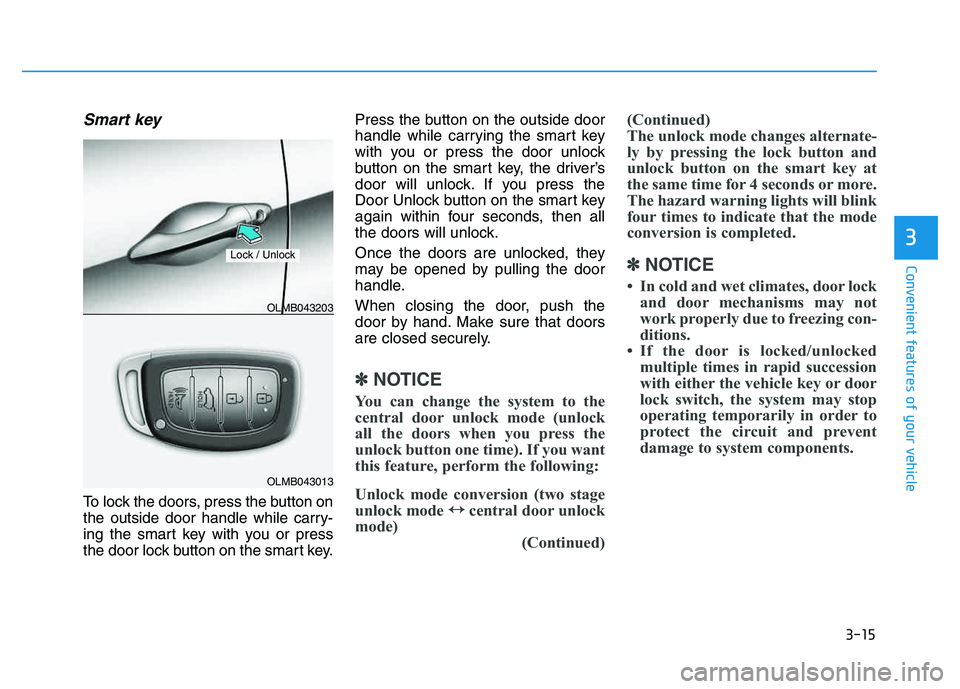
To lock the doors, press the button on
the outside door handle while carry-
ing the smart key with you or press
the door lock button on the smart key.Press the button on the outside door
handle while carrying the smart key
with you or press the door unlock
button on the smart key, the driver’s
door will unlock. If you press the
Door Unlock button on the smart key
again within four seconds, then all
the doors will unlock.
Once the doors are unlocked, they
may be opened by pulling the door
handle.
When closing the door, push the
door by hand. Make sure that doors
are closed securely.
✽✽
NOTICE
You can change the system to the
central door unlock mode (unlock
all the doors when you press the
unlock button one time). If you want
this feature, perform the following:
Unlock mode conversion (two stage
unlock mode ↔
↔
central door unlock
mode) (Continued)(Continued)
The unlock mode changes alternate-
ly by pressing the lock button and
unlock button on the smart key at
the same time for 4 seconds or more.
The hazard warning lights will blink
four times to indicate that the mode
conversion is completed.
✽
✽ NOTICE
In cold and wet climates, door lock and door mechanisms may not
work properly due to freezing con-
ditions.
If the door is locked/unlocked multiple times in rapid succession
with either the vehicle key or door
lock switch, the system may stop
operating temporarily in order to
protect the circuit and prevent
damage to system components.
OLMB043013
OLMB043203
Lock / Unlock
Page 105 of 542
3-19
Convenient features of your vehicle
3
This system helps to protect your
vehicle and valuables. The horn will
sound and the hazard warning lights
will blink continuously if any of the
following occurs:
- A door is opened without using theremote key or smart key.
- The tailgate is opened without using the remote key or smart key.
- The engine hood is opened.
The alarm continues for 30 seconds
and the alarm will repeat once more,
then the system resets. To turn off
the alarm, unlock the doors with the
remote key or smart key. The Theft Alarm System automatical-
ly sets 30 seconds after you lock the
doors and the tailgate. For the system
to activate, you must lock the doors
and the tailgate from outside the vehi-
cle with the remote key or smart key
or by pressing the button on the out-side of the door handles with the
smart key in your possession.
The hazard warning lights will blink and the chime will sound once to
indicate the system is armed.
Once the security system is set,
opening any door, the tailgate, or the
hood without using the remote key or
smart key will cause the alarm to
activate.
The Theft Alarm System will not set if
the hood, the tailgate, or any door is
not fully closed. If the system will not
set, check the hood, the tailgate, orthe doors are fully closed. Do not attempt to alter this system or
add other devices to it.✽✽
NOTICE
Do not lock the doors until all pas- sengers have left the vehicle. If the
remaining passenger leaves the
vehicle when the system is armed,
the alarm will be activated.
If the vehicle is not disarmed with the remote key or smart key, open
the doors by using the mechanical
key and place the ignition switch
in the ON position (for remote
key) or start the engine (for smart
key) and wait for 30 seconds.
TTHH EEFFTT --AA LLAA RRMM SS YY SSTT EEMM