warning light HYUNDAI TUCSON 2014 Owner's Guide
[x] Cancel search | Manufacturer: HYUNDAI, Model Year: 2014, Model line: TUCSON, Model: HYUNDAI TUCSON 2014Pages: 542, PDF Size: 7.59 MB
Page 124 of 542
3-38
Convenient features of your vehicle
Engine coolanttemperature warning light (if equipped)
The warning light illuminates if the
temperature of the engine coolant is
above 248±5.4°F (120±3°C).
Do not continue driving with an over-
heated engine. If your vehicle over-
heats, refer to “Overheating” in chap-ter 6.
✽✽ NOTICE
If the engine coolant temperature
warning light illuminates, it indi-
cates overheating that may damage
the engine.
Electric power steer- ing (EPS) systemwarning light
This indicator light comes on after
the ignition key is turned to the ONposition and then it will go out after
the engine is started. This light also comes on when the
EPS is not functioning properly. If it
comes on while driving, have your
vehicle inspected by an authorized
HYUNDAI dealer.
Cruise indicator
(if equipped)
The indicator light illuminates when
the cruise control system is enabled.
The cruise indicator light in the
instrument cluster is illuminated
when the cruise control ON-OFF but-
ton on the steering wheel is pushed.
The indicator light turns off when the
cruise control ON-OFF button is
pushed again. For more information
about the use of cruise control, refer to
“Cruise control system” in chapter 5.
CRUISE
Page 125 of 542
3-39
Convenient features of your vehicle
3
Cruise SET indicator (if equipped)
The indicator light illuminates when
the cruise function switch (SET- orRES+) is ON.
The cruise SET indicator light in the
instrument cluster is illuminated
when the cruise control switch (SET-
or RES+) is pushed. The cruise SETindicator light does not illuminate
when the cruise control switch (CAN-CEL) is pushed or the system is dis-engaged.
KEY OUT indicator (if equipped)
When the Engine Start/Stop button
is in the ACC or ON position, if any
door is open, the system checks for
the smart key. If the smart key is not
in the vehicle, the indicator will blink,and if all doors are closed, the chime
will also sound for about 5 seconds.The indicator will go off while the
vehicle is moving. Keep the smart
key in the vehicle.
Key reminder warning chime
If the driver’s door is opened while
the ignition key is left in the ignition
switch (ACC or LOCK position), the
key reminder warning chime will
sound. This is to prevent you from
locking your keys in the vehicle. The
chime sounds until the key is
removed from the ignition switch or
the driver’s door is closed.SETKEY
OUT
Page 126 of 542
3-40
Convenient features of your vehicle
SSTT EEEERR IINN GG WW HHEEEELL
Electric Power Steering (EPS)
This system assists you with steering
the vehicle.
If the engine is turned off or if the
EPS becomes inoperative, you may
still steer the vehicle, but it will
require increased steering effort.
Should you notice any change in the
effort required to steer during normal
vehicle operation, have the EPS
checked by an authorized HYUNDAI
dealer.
✽✽
NOTICE
The steering effort may be high immediately after placing the igni-
tion switch in the ON position.
This happens as the system per-
forms the EPS system diagnostics.
When the diagnostics is complet-
ed, the steering wheel will return
to its normal condition.
A click noise may be heard from the EPS relay after the ignition
switch is placed in the ON or
LOCK/OFF position.
A motor noise may be heard when the vehicle is at a stop or at a low
driving speed.
When you operate the steering wheel in low temperature, abnor-
mal noise may occur. If tempera-
ture rises, the noise will disappear.
This is a normal condition.Tilt steering/Telescope steering
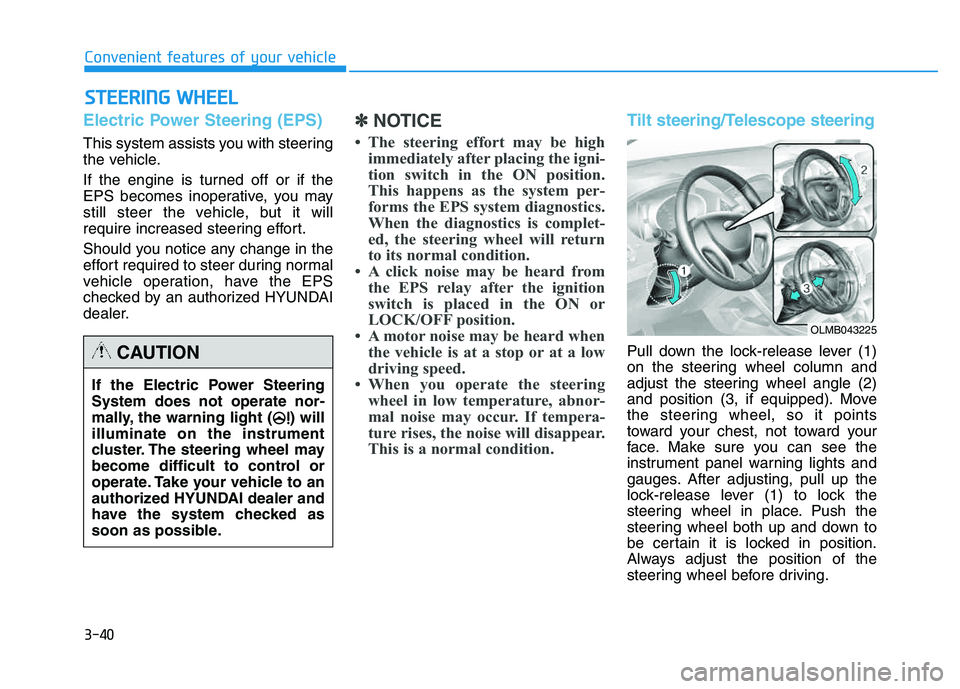
Pull down the lock-release lever (1)
on the steering wheel column and
adjust the steering wheel angle (2)
and position (3, if equipped). Move
the steering wheel, so it points
toward your chest, not toward your
face. Make sure you can see the
instrument panel warning lights and
gauges. After adjusting, pull up the
lock-release lever (1) to lock the
steering wheel in place. Push the
steering wheel both up and down to
be certain it is locked in position.
Always adjust the position of the
steering wheel before driving.
If the Electric Power Steering System does not operate nor-
mally, the warning light ( ) willilluminate on the instrument
cluster. The steering wheel may
become difficult to control or
operate. Take your vehicle to an
authorized HYUNDAI dealer and
have the system checked as
soon as possible.CAUTION
OLMB043225
Page 130 of 542
3-44
Convenient features of your vehicle
Interior rearview mirrors
Before you start driving, adjust the
rearview mirror to the center on the
view through the rear window.
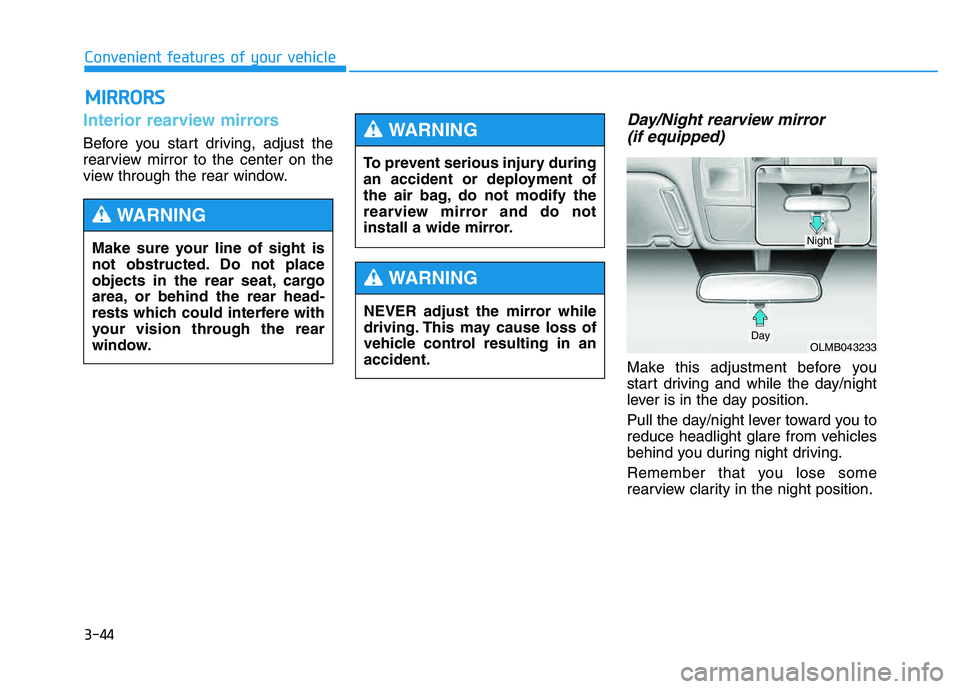
Day/Night rearview mirror (if equipped)
Make this adjustment before you
start driving and while the day/night
lever is in the day position.
Pull the day/night lever toward you to
reduce headlight glare from vehicles
behind you during night driving.
Remember that you lose some
rearview clarity in the night position.
MM IIRR RROO RRSS
Make sure your line of sight is
not obstructed. Do not place
objects in the rear seat, cargo
area, or behind the rear head-
rests which could interfere with
your vision through the rear
window.
WARNING
To prevent serious injury during
an accident or deployment of
the air bag, do not modify the
rearview mirror and do not
install a wide mirror.
WARNING
NEVER adjust the mirror while
driving. This may cause loss of
vehicle control resulting in anaccident.
WARNING
OLMB043233Day
Night
Page 136 of 542
3-50
Convenient features of your vehicle
Programming HomeLink®
Please note the following:
When programming a garage door
opener, it is advised to park the
vehicle outside of the garage.
It is recommended that a new bat- tery be placed in the hand-held
transmitter of the device being pro-
grammed to HomeLink ®
for quicker
training and accurate transmission
of the radio-frequency signal.
Some vehicles may require the ignition switch to be placed in the
ACC (or "Accessories") position for
programming and/or operation ofHomeLink ®
.
In the event that there are still pro- gramming difficulties or questions
after following the programming
steps listed below, contactHomeLink ®
at: www.homelink.com
or by calling 1-800-355-3515.
Rolling code programming
Rolling code devices which are
"code-protected" and manufactured
after 1996 may be determined by the
following:
Reference the device owner's manual for verification.
The handheld transmitter appears to program the HomeLink ®
Universal Transceiver but does not
activate the device.
Press and hold the trained HomeLink button. The device has
the rolling code feature if the indi-
cator light flashes rapidly and then
turns solid after 2 seconds.
Before programming HomeLink
®
to a garage door opener or gate
operator, make sure people and
objects are out of the way of the
device to prevent potential harm
or damage. Do not use theHomeLink ®
with any garage door
opener that lacks the safety stop
and reverse features required by
U.S. federal safety standards
(this includes any garage door
opener model manufactured
before April 1, 1982). A garagedoor that cannot detect an object- signaling the door to stop and
reverse - does not meet current
U.S. federal safety standards.
Using a garage door opener
without these features increases
the risk of serious injury ordeath.WARNING
Page 139 of 542
3-53
Convenient features of your vehicle
3
Erasing HomeLink®
buttons
Individual buttons cannot be erased.
However, to erase all three pro-
grammed buttons:
1. Press and hold the two outer
HomeLink ®
buttons until the indi-
cator light begins to flash-after 20
seconds.
2. Release both buttons. Do not hold for longer than 30 seconds.
The Integrated HomeLink ®
Wireless
Control System is now in the training
(learn) mode and can be pro-
grammed at any time following the
appropriate steps in the Programming
chapters above. NVS ®
is a registered trademark and
Z-Nav™ is a trademark of the Gentex
Corporation, Zeeland, Michigan.HomeLink ®
is a registered trademark
owned by Johnson Controls,
Incorporated, Milwaukee, Wisconsin.
FCC ID: NZLZTVHL3
IC: 4112A-ZTVHL3 This device complies with Part 15 of the FCC Rules.
Operation is subject to the following
two conditions:
1. This device may not cause harm-
ful interference, and
2. This device must accept any inter- ference received, including inter-
ference that may cause undesired
operation.
Electric chromic mirror (ECM)
with HomeLink ®
system,
compass and Blue Link ®
(if equipped)
Your vehicle may be equipped with a
Gentex Automatic-Dimming Mirror
with a Z-Nav™ Electronic Compass
Display and an Integrated HomeLink ®
Wireless Control System. During
nighttime driving, this feature willautomatically detect and reduce
rearview mirror glare while the com-
pass indicates the direction the vehi-
cle is pointed. The HomeLink ®
Universal Transceiver allows you to
activate your garage door(s), electric
gate, home lighting, etc.
The transceiver has been testedand complies with FCC and
Industry Canada rules. Changes
or modifications not expressly
approved by the party responsi-
ble for compliance could voidthe user's authority to operate
the device.
WARNING
Page 155 of 542
3-69
Convenient features of your vehicle
3
✽✽NOTICE
After washing the vehicle or after a
rain, be sure to wipe off the water on
the sunroof before operating the
sunroof.
To reset the sunroof
If the battery has been discharged or disconnected, or if the related fusehas been replaced or disconnected,
reset the Sunroof as follows:
1. The ignition switch must be in the ON position.
2. Open the roller blind.
3. Close the sunroof completely.
4. Release the control lever.
5. Push the control lever forward until the sunroof tilts and slightly moves
up and down. Then, release the
lever.
6. Push the control lever forward until the sunroof is operated as follows:
TILT OPEN SLIDE OPEN
SLIDE CLOSE
Then, release the control lever.
If the sunroof does not operate prop-
erly after resetting, have the system
checked by an authorized HYUNDAI
dealer.
Periodically remove any dirt
that may accumulate on the
sunroof guide rail or between
the sunroof and roof panel,
which can make a noise.
Do not try to open the sunroof when the temperature is
below freezing or when the
sunroof is covered with snow
or ice, the motor could be
damaged. In cold and wet cli-
mates, the sunroof may not
work properly.
To prevent damage to the sun-
roof and the motor, do not
continue to press the sunroof
control lever after the sunroof
is in the fully open, closed ortilt position(s).
CAUTION
Make sure heads, other body
parts or other objects are
safely out of the way before
closing the sunroof to avoid
injuries or vehicle damage.
Never adjust the sunroof or
roller blind while driving. This
may cause loss of vehicle con-
trol resulting in an accident.
To avoid serious injury or
death, do not extend your
head, arms or body outside
the sunroof while driving.
WARNING
Page 156 of 542
3-70
Convenient features of your vehicle
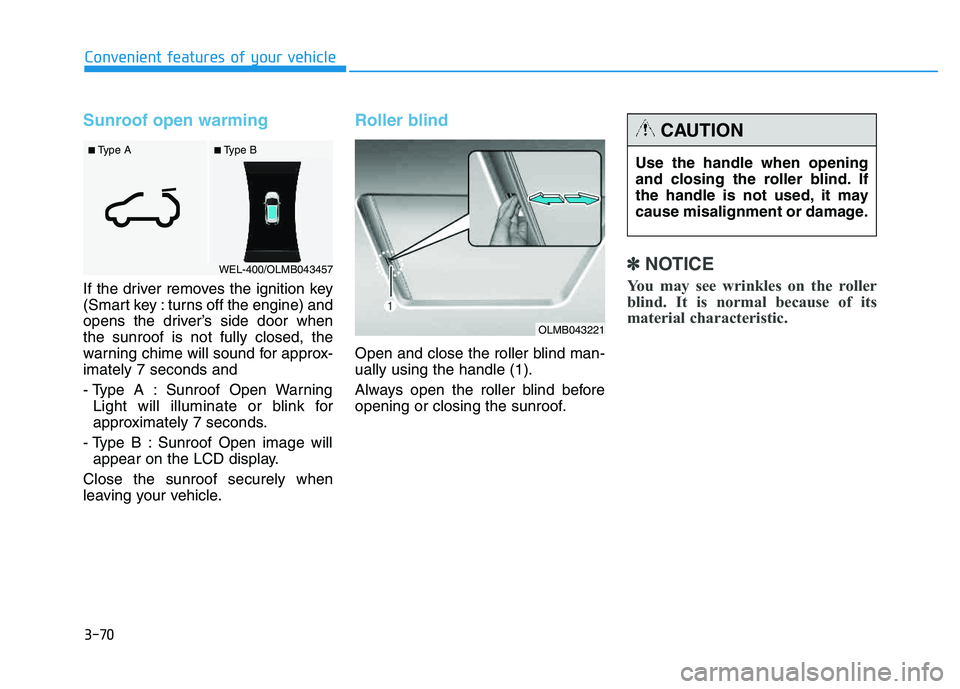
Sunroof open warming
If the driver removes the ignition key
(Smart key : turns off the engine) and
opens the driver’s side door whenthe sunroof is not fully closed, the
warning chime will sound for approx-imately 7 seconds and
- Type A : Sunroof Open WarningLight will illuminate or blink for
approximately 7 seconds.
- Type B : Sunroof Open image will appear on the LCD display.
Close the sunroof securely when
leaving your vehicle.
Roller blind
Open and close the roller blind man- ually using the handle (1).
Always open the roller blind before
opening or closing the sunroof.
✽✽ NOTICE
You may see wrinkles on the roller
blind. It is normal because of its
material characteristic.
■ Type B
■ Type A
WEL-400/OLMB043457
Use the handle when opening
and closing the roller blind. If
the handle is not used, it may
cause misalignment or damage.
CAUTION
OLMB043221
Page 157 of 542
3-71
Convenient features of your vehicle
3
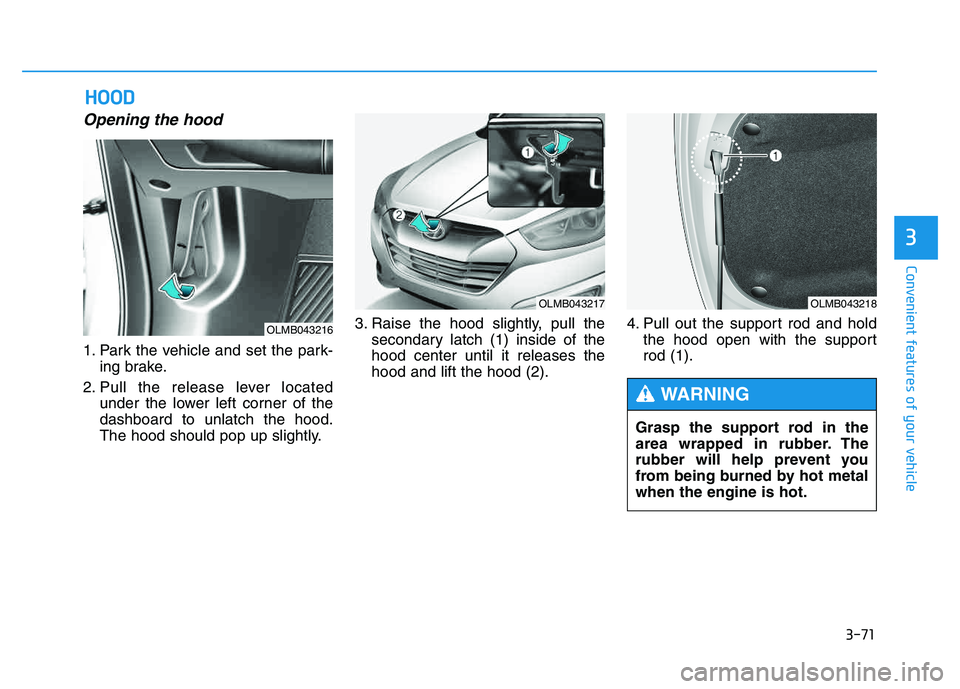
Opening the hood
1. Park the vehicle and set the park-ing brake.
2. Pull the release lever located under the lower left corner of the dashboard to unlatch the hood.
The hood should pop up slightly. 3. Raise the hood slightly, pull the
secondary latch (1) inside of thehood center until it releases thehood and lift the hood (2). 4. Pull out the support rod and hold
the hood open with the supportrod (1).
HHOO OODD
OLMB043216
OLMB043217OLMB043218
Grasp the support rod in the
area wrapped in rubber. The
rubber will help prevent you
from being burned by hot metalwhen the engine is hot.
WARNING
Page 163 of 542
3-77
Convenient features of your vehicle
3
Closing the fuel filler door
1. To install the fuel tank cap, turn itclockwise until it clicks one time.
2. Close the fuel filler door until it is latched securely.
If the Malfunction Indicator Light ( )
comes ON, turn the engine off and
check or retighten the fuel filler cap
until it clicks once. If the Malfunction
Indicator Light ( ) does not go off,
have your vehicle checked by your
HYUNDAI dealer.
Gasoline is highly flammable
and explosive. Failure to follow
these guidelines may result in
SERIOUS INJURY or DEATH:
Read and follow all warnings posted at the gas station.
Before refueling, note the
location of the Emergency
Gasoline Shut-Off, if available,at the gas station.
Before touching the fuel noz-
zle, you should eliminate the
potential build-up of static
electricity by touching a metal
part of the vehicle, a safe dis-
tance away from the fuel filler
neck, nozzle, or other gas
source, with your bare hand.
Do not use cellular phones
while refueling. Electric cur-
rent and/or electronic interfer-
ence from cellular phones can
potentially ignite fuel vapors
and cause a fire. (Continued)
WARNING (Continued)
Do not get back into a vehicle
once you have begun refuel-
ing. You can generate a build-
up of static electricity by
touching, rubbing or sliding
against any item or fabric
capable of producing static
electricity. Static electricity
discharge can ignite fuel
vapors causing a fire. If you
must re-enter the vehicle, you
should once again eliminate
potentially dangerous static
electricity discharge by touch-
ing a metal part of the vehicle,
away from the fuel filler neck,
nozzle or other gasoline source,
with your bare hand.(Continued)